
1.GATEWAY
2.FIREWALL
3.BRIDGE AND ACCESS-
POINT
Presented by
MScIT/16/010 Vinay
Vaghamshi
Gateway
 A gateway is a network node connecting two
networks that use different protocols.
 A node on a network that serves as an entrance
to another network.
 In enterprises, The gateway is the computer that
routes the traffic from a workstation to the
outside network that is serving the Web pages.
 In homes, the gateway is the ISP that connects
the user to the internet.
What is gateway?
 Gateway are also known as Protocol Converters and
can operate any network level. The activates of
gateway are more complex than routers or switch as it
works on different protocols.
 Router is also gateway, Since it interprets data from
one network protocols to another
 Combination of networking hardware and software
that connects two similar kinds of networks.
 Popular type of gateways includes:
 E-Mail Gateway
 IBM Host Gateway
 Internet Gateway
 LAN Gateway
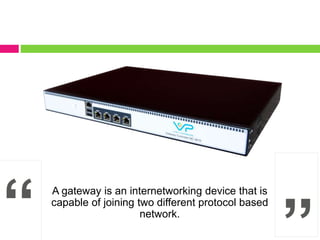
A gateway is an internetworking device that is
capable of joining two different protocol based
network.
Functions of gateway
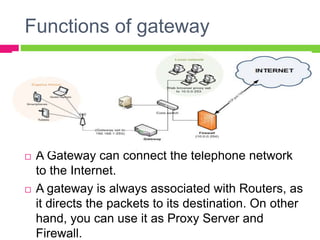
 A Gateway can connect the telephone network
to the Internet.
 A gateway is always associated with Routers, as
it directs the packets to its destination. On other
hand, you can use it as Proxy Server and
Firewall.
Functions of gateway
 Web application firewalls filter traffic to and from
a web server and look at application-layer data
 Cloud storage gateways translate storage
requests with various cloud storage service API
calls
 Cloud bridges connect networks and services
inside a data center to a virtual data center in an
infrastructure as a service environment, or
between IaaS environments
 API, SOA or XML gateways manage traffic flowing
into and out of a service, microservices-oriented
architecture or an XML-based web service.
Definition of firewall
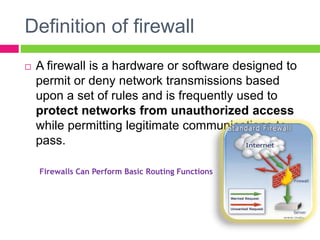
 A firewall is a hardware or software designed to
permit or deny network transmissions based
upon a set of rules and is frequently used to
protect networks from unauthorized access
while permitting legitimate communications to
pass.
Firewalls Can Perform Basic Routing Functions
How does a software firewall
work?
 Inspects each individual “packet” of data as it arrives at
either side of the firewall
 Determines whether it should be allowed to pass
through or if it should be blocked
 Focus for security decisions
 Stop hackers from accessing your computer
 Can enforce security policy
 Protects your personal information
 Limits your exposure
 Blocks “pop up” ads and certain cookies
 Can log Internet activity efficiently
 Determines which programs can access the Internet
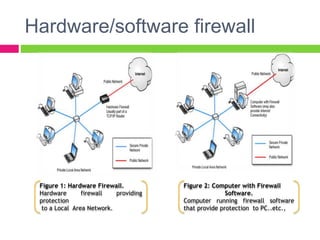
Hardware/software firewall
Figure 1: Hardware Firewall.
Hardware firewall providing
protection
to a Local Area Network.
Figure 2: Computer with Firewall
Software.
Computer running firewall software
that provide protection to PC..etc.,
Firewall Rules
 Allow – traffic that flows automatically
because it has been deemed
 Block – traffic that is blocked because it has
been deemed dangerous to your computer
 Ask – asks the user whether or not the traffic
is allowed to pass through
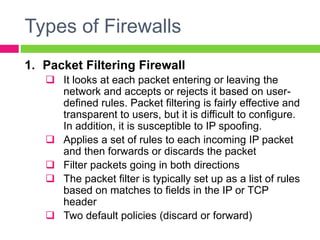
Types of Firewalls
1. Packet Filtering Firewall
 It looks at each packet entering or leaving the
network and accepts or rejects it based on user-
defined rules. Packet filtering is fairly effective and
transparent to users, but it is difficult to configure.
In addition, it is susceptible to IP spoofing.
 Applies a set of rules to each incoming IP packet
and then forwards or discards the packet
 Filter packets going in both directions
 The packet filter is typically set up as a list of rules
based on matches to fields in the IP or TCP
header
 Two default policies (discard or forward)
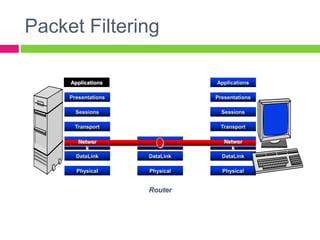
Packet Filtering
Applications
Presentations
Sessions
Transport
DataLink
Physical
DataLink
Physical
Router
Applications
Presentations
Sessions
Transport
DataLink
Physical
Networ
k
Networ
k
Types of Firewalls
2. Application gateway/ proxy server/ proxy
application gateway
 In such type of firewall remote host or network can
interact only with proxy server, proxy server is
responsible for hiding the details of the internal
network
 i.e. intranet.
 User uses TCP/IP applications, such as FTP and
Telnet servers.
 This is very effective, but can impose a performance
degradation.
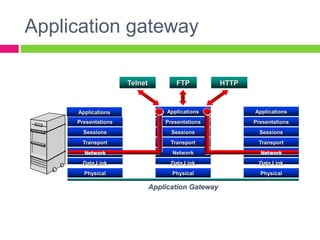
Application gateway
Applications
Presentations
Sessions
Transport
Data Link
Physical
Network
Data Link
Physical
Applications
Presentations
Sessions
Transport
Data Link
Physical
Application Gateway
Applications
Presentations
Sessions
Transport
Network Network
Telnet HTTPFTP
Types of Firewalls
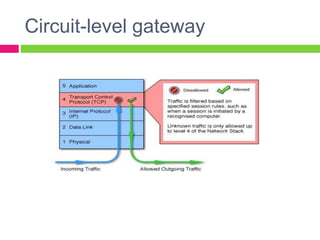
3. Circuit level gateway
 It is a stand alone system or application.
 It does not permit end-to-end TCP connection. It sets
up 2 TCP connections:
 B/w itself and a TCP user on an inner host.
 B/w itself and a TCP user on an outer host.
 Specialized function performed by an Application-level
Gateway
 The gateway typically relays TCP segments from one
connection to the other without examining the
contents
Circuit-level gateway
Definition of a Bridge
 A bridge is a connecting device which has it’s own
processor, memory and two NIC cards, to connect
two portions of a network
 Facilitates host to host communication
 Operates at the physical as well as data link layer
 Bridge is to divide a big network in to smaller sub-
networks
How Bridges Work?
 Bridges work at the Media Access Control
Sub-layer of the OSI model
 .
• Routing table is built to record the segment
no. of
address
 .
• If destination address is in the same segment
as the source address, stop transmit
 .
• Otherwise, forward to the other segment
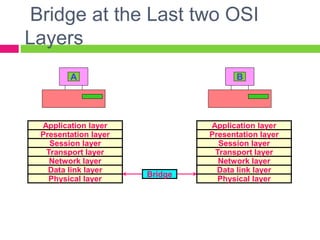
Bridge at the Last two OSI
Layers
Application layer
Presentation layer
Session layer
Transport layer
Network layer
Data link layer
Physical layer
Bridge
A
Physical layer
Data link layer
Network layer
Transport layer
Session layer
Presentation layer
Application layer
B
Function of a Bridge
 As a physical layer device it generates the signal it
receives
 As a data link layer device it checks the source and
destination addresses in the frame
 It send data frames only to the concerned destination
 It minimizes unwanted traffic
 It minimizes network congestion
 Error links can be identified and then isolated
 Security features or access control can be added
 It acts as a filter
 It maintains a table that maps addresses to ports
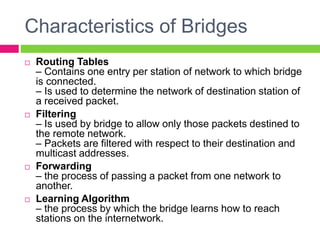
Characteristics of Bridges
 Routing Tables
– Contains one entry per station of network to which bridge
is connected.
– Is used to determine the network of destination station of
a received packet.
 Filtering
– Is used by bridge to allow only those packets destined to
the remote network.
– Packets are filtered with respect to their destination and
multicast addresses.
 Forwarding
– the process of passing a packet from one network to
another.
 Learning Algorithm
– the process by which the bridge learns how to reach
stations on the internetwork.
Types of Bridges
 Transparent Bridge
– Also called learning bridges
– Build a table of MAC addresses as frames arrive
– Ethernet networks use transparent bridge
– Duties of transparent bridge are : Filtering frames,
forwarding and blocking
 Source Routing Bridge
– Used in Token Ring networks
– Each station should determine the route to the
destination when it wants to send a frame and therefore
include the route information in the header of frame.
– Addresses of these bridges are included in the frame.
– Frame contains not only the source and destination
address but also the bridge addresses.
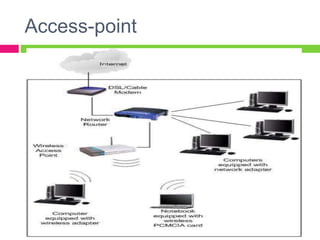
Access-point
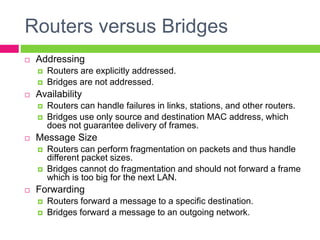
Routers versus Bridges
 Addressing
 Routers are explicitly addressed.
 Bridges are not addressed.
 Availability
 Routers can handle failures in links, stations, and other routers.
 Bridges use only source and destination MAC address, which
does not guarantee delivery of frames.
 Message Size
 Routers can perform fragmentation on packets and thus handle
different packet sizes.
 Bridges cannot do fragmentation and should not forward a frame
which is too big for the next LAN.
 Forwarding
 Routers forward a message to a specific destination.
 Bridges forward a message to an outgoing network.
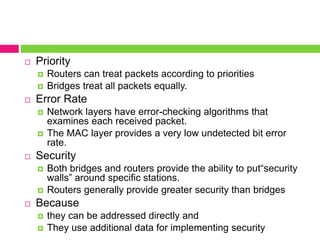
 Priority
 Routers can treat packets according to priorities
 Bridges treat all packets equally.
 Error Rate
 Network layers have error-checking algorithms that
examines each received packet.
 The MAC layer provides a very low undetected bit error
rate.
 Security
 Both bridges and routers provide the ability to put“security
walls” around specific stations.
 Routers generally provide greater security than bridges
 Because
 they can be addressed directly and
 They use additional data for implementing security
Thank
you

Gateway and firewall

  • 1.
  • 2.
    Gateway  A gatewayis a network node connecting two networks that use different protocols.  A node on a network that serves as an entrance to another network.  In enterprises, The gateway is the computer that routes the traffic from a workstation to the outside network that is serving the Web pages.  In homes, the gateway is the ISP that connects the user to the internet.
  • 3.
    What is gateway? Gateway are also known as Protocol Converters and can operate any network level. The activates of gateway are more complex than routers or switch as it works on different protocols.  Router is also gateway, Since it interprets data from one network protocols to another  Combination of networking hardware and software that connects two similar kinds of networks.  Popular type of gateways includes:  E-Mail Gateway  IBM Host Gateway  Internet Gateway  LAN Gateway
  • 4.
    A gateway isan internetworking device that is capable of joining two different protocol based network.
  • 5.
    Functions of gateway A Gateway can connect the telephone network to the Internet.  A gateway is always associated with Routers, as it directs the packets to its destination. On other hand, you can use it as Proxy Server and Firewall.
  • 6.
    Functions of gateway Web application firewalls filter traffic to and from a web server and look at application-layer data  Cloud storage gateways translate storage requests with various cloud storage service API calls  Cloud bridges connect networks and services inside a data center to a virtual data center in an infrastructure as a service environment, or between IaaS environments  API, SOA or XML gateways manage traffic flowing into and out of a service, microservices-oriented architecture or an XML-based web service.
  • 7.
    Definition of firewall A firewall is a hardware or software designed to permit or deny network transmissions based upon a set of rules and is frequently used to protect networks from unauthorized access while permitting legitimate communications to pass. Firewalls Can Perform Basic Routing Functions
  • 8.
    How does asoftware firewall work?  Inspects each individual “packet” of data as it arrives at either side of the firewall  Determines whether it should be allowed to pass through or if it should be blocked  Focus for security decisions  Stop hackers from accessing your computer  Can enforce security policy  Protects your personal information  Limits your exposure  Blocks “pop up” ads and certain cookies  Can log Internet activity efficiently  Determines which programs can access the Internet
  • 9.
    Hardware/software firewall Figure 1:Hardware Firewall. Hardware firewall providing protection to a Local Area Network. Figure 2: Computer with Firewall Software. Computer running firewall software that provide protection to PC..etc.,
  • 10.
    Firewall Rules  Allow– traffic that flows automatically because it has been deemed  Block – traffic that is blocked because it has been deemed dangerous to your computer  Ask – asks the user whether or not the traffic is allowed to pass through
  • 11.
    Types of Firewalls 1.Packet Filtering Firewall  It looks at each packet entering or leaving the network and accepts or rejects it based on user- defined rules. Packet filtering is fairly effective and transparent to users, but it is difficult to configure. In addition, it is susceptible to IP spoofing.  Applies a set of rules to each incoming IP packet and then forwards or discards the packet  Filter packets going in both directions  The packet filter is typically set up as a list of rules based on matches to fields in the IP or TCP header  Two default policies (discard or forward)
  • 12.
  • 13.
    Types of Firewalls 2.Application gateway/ proxy server/ proxy application gateway  In such type of firewall remote host or network can interact only with proxy server, proxy server is responsible for hiding the details of the internal network  i.e. intranet.  User uses TCP/IP applications, such as FTP and Telnet servers.  This is very effective, but can impose a performance degradation.
  • 14.
    Application gateway Applications Presentations Sessions Transport Data Link Physical Network DataLink Physical Applications Presentations Sessions Transport Data Link Physical Application Gateway Applications Presentations Sessions Transport Network Network Telnet HTTPFTP
  • 15.
    Types of Firewalls 3.Circuit level gateway  It is a stand alone system or application.  It does not permit end-to-end TCP connection. It sets up 2 TCP connections:  B/w itself and a TCP user on an inner host.  B/w itself and a TCP user on an outer host.  Specialized function performed by an Application-level Gateway  The gateway typically relays TCP segments from one connection to the other without examining the contents
  • 16.
  • 17.
    Definition of aBridge  A bridge is a connecting device which has it’s own processor, memory and two NIC cards, to connect two portions of a network  Facilitates host to host communication  Operates at the physical as well as data link layer  Bridge is to divide a big network in to smaller sub- networks
  • 18.
    How Bridges Work? Bridges work at the Media Access Control Sub-layer of the OSI model  . • Routing table is built to record the segment no. of address  . • If destination address is in the same segment as the source address, stop transmit  . • Otherwise, forward to the other segment
  • 19.
    Bridge at theLast two OSI Layers Application layer Presentation layer Session layer Transport layer Network layer Data link layer Physical layer Bridge A Physical layer Data link layer Network layer Transport layer Session layer Presentation layer Application layer B
  • 20.
    Function of aBridge  As a physical layer device it generates the signal it receives  As a data link layer device it checks the source and destination addresses in the frame  It send data frames only to the concerned destination  It minimizes unwanted traffic  It minimizes network congestion  Error links can be identified and then isolated  Security features or access control can be added  It acts as a filter  It maintains a table that maps addresses to ports
  • 21.
    Characteristics of Bridges Routing Tables – Contains one entry per station of network to which bridge is connected. – Is used to determine the network of destination station of a received packet.  Filtering – Is used by bridge to allow only those packets destined to the remote network. – Packets are filtered with respect to their destination and multicast addresses.  Forwarding – the process of passing a packet from one network to another.  Learning Algorithm – the process by which the bridge learns how to reach stations on the internetwork.
  • 22.
    Types of Bridges Transparent Bridge – Also called learning bridges – Build a table of MAC addresses as frames arrive – Ethernet networks use transparent bridge – Duties of transparent bridge are : Filtering frames, forwarding and blocking  Source Routing Bridge – Used in Token Ring networks – Each station should determine the route to the destination when it wants to send a frame and therefore include the route information in the header of frame. – Addresses of these bridges are included in the frame. – Frame contains not only the source and destination address but also the bridge addresses.
  • 23.
  • 24.
    Routers versus Bridges Addressing  Routers are explicitly addressed.  Bridges are not addressed.  Availability  Routers can handle failures in links, stations, and other routers.  Bridges use only source and destination MAC address, which does not guarantee delivery of frames.  Message Size  Routers can perform fragmentation on packets and thus handle different packet sizes.  Bridges cannot do fragmentation and should not forward a frame which is too big for the next LAN.  Forwarding  Routers forward a message to a specific destination.  Bridges forward a message to an outgoing network.
  • 25.
     Priority  Routerscan treat packets according to priorities  Bridges treat all packets equally.  Error Rate  Network layers have error-checking algorithms that examines each received packet.  The MAC layer provides a very low undetected bit error rate.  Security  Both bridges and routers provide the ability to put“security walls” around specific stations.  Routers generally provide greater security than bridges  Because  they can be addressed directly and  They use additional data for implementing security
  • 26.