Your 1,2,3 to getting setup for today’s session
1. Sign in on the sign sheet
provided.
2. Create an account on
Wikipedia if you have not
already done so (this takes 2
minutes and asks you to
create a username &
password.
3. Log in to Wikipedia. Sit back
and relax.
Let the games begin!
TODAY’S SCHEDULE – 2:50pm-3:50pm
Seminar Room 2
2.50-3.00 Housekeeping and Welcome – What do we mean by gamification?
3.00-3.05 Wiki Wars clip
3.05-3.25 Activity 1: Wiki Race
3.25-3.45 Activity 2: Wiki Shootme
3.45-3.50 Citation Hunt / Q&A
World ofWikimedia
Creating a web of knowledge
What do we mean by ‘Gamifying Wikimedia’?
• “Gamification is a powerful tool due to its ability to capture
people’s attention, to engage them in a target activity, and even
to influence their behavior.” (Kim, 2015)
• “Gamification is the use of game design elements and game
mechanics in non-game contexts. This idea has been used
successfully in many web based businesses to increase user
engagement. Some researchers suggest that it could also be used
in web based education as a tool to increase student motivation
and engagement.”(Dominguez et al, 2013)
Wiki Race
https://en.wikipedia.org/wiki/Wikipedia:Wikirace
• Use only the body of the text
• You can use Back and Ctrl + F
Wiki War example on
Youtube:
https://www.youtube.co
m/watch?v=FdJN2iK0BSo
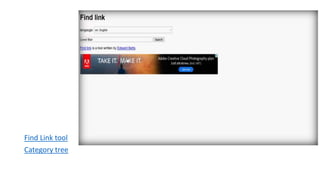
Find Link tool
Category tree
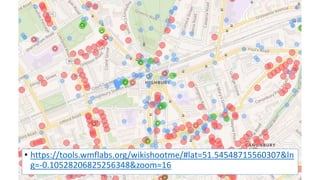
WikiShootMe
• https://tools.wmflabs.org/wikishootme/#lat=51.54548715560307&ln
g=-0.10528206825256348&zoom=16
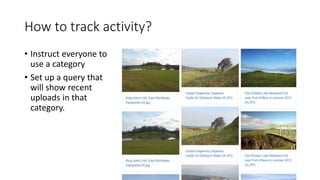
How to track activity?
• Instruct everyone to
use a category
• Set up a query that
will show recent
uploads in that
category.
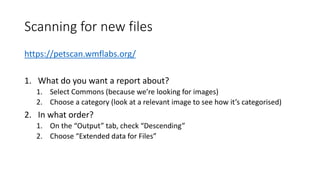
Scanning for new files
https://petscan.wmflabs.org/
1. What do you want a report about?
1. Select Commons (because we’re looking for images)
2. Choose a category (look at a relevant image to see how it’s categorised)
2. In what order?
1. On the “Output” tab, check “Descending”
2. Choose “Extended data for Files”
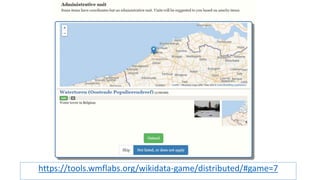
Administrative unit game
https://tools.wmflabs.org/wikidata-game/distributed/#game=7
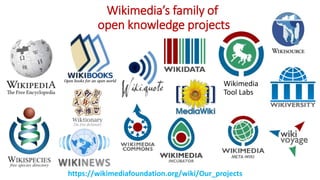
Wikimedia’s family of
open knowledge projects
https://wikimediafoundation.org/wiki/Our_projects
Wikimedia
Tool Labs
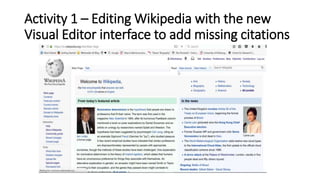
Activity 1 – Editing Wikipedia with the new
Visual Editor interface to add missing citations
Citation Hunt
Activity 1 – Adding missing citations to Wikipedia
using the new Citation Hunt tool.
5 min video tutorial
explaining Citation Hunt
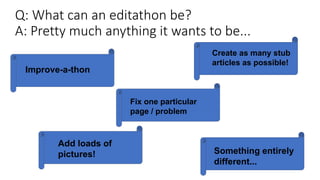
Q: What can an editathon be?
A: Pretty much anything it wants to be...
Improve-a-thon
Create as many stub
articles as possible!
Fix one particular
page / problem
Add loads of
pictures! Something entirely
different...
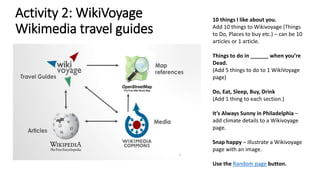
Activity 2: WikiVoyage
Wikimedia travel guides
10 things I like about you.
Add 10 things to Wikivoyage (Things
to Do, Places to buy etc.) – can be 10
articles or 1 article.
Things to do in ______ when you’re
Dead.
(Add 5 things to do to 1 WikiVoyage
page)
Do, Eat, Sleep, Buy, Drink
(Add 1 thing to each section.)
It’s Always Sunny in Philadelphia –
add climate details to a Wikivoyage
page.
Snap happy – illustrate a Wikivoyage
page with an image.
Use the Random page button.
Activity 2
•Go to WikiVoyage.
• Look up your hometown on WikiVoyage or somewhere you know reasonably well.
•Log in and make a comment to one of the sections. NB: Consult the Manual of Style to keep
yourself right and have a look at a Star Quality article like Berneray to see how information is laid
out on WikiVoyage.
NB: Writing should describe the destination or attraction in a lively and concise manner. Avoid
exaggerations, superlatives and vague, flowery language. Be fair in your descriptions and include
what you learned, not what you did.
• University of Portsmouth run an ‘Applied Human Geography’ assignment where students
research and write Wikipedia articles about villages in England andWales.
ACTIVITY 3 – Adding images to Wikimedia Commons
• Wikimedia Commons is Wikipedia’s sister project, with 36 million+
openly-licensed media files (photos, video clips, sound files, diagrams,
illustrations etc.)
• You can upload up to 50 images to Wiki Commons at a time via its upload
tool as long as they are uploaded using Creative Commons licenses.
• Further guidance can be found in this brochure.
• You can also use the Flickr2Commons tool to import images direct from
Flickr as long as the image(s) are clearly openly-licensed.
• WikiShootMe is a tool which identifies locations with/without images in
terms of Wikipedia pages, Wikimedia Commons and Wikidataitems.
• CC Search is a search aggregator which helps with finding open images.
• FIST – is the Free Image Search Tool.
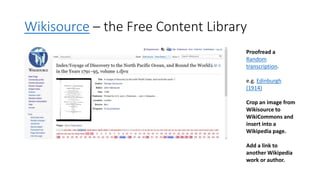
Wikisource – the Free Content Library
Proofread a
Random
transcription.
e.g. Edinburgh
(1914)
Crop an image from
Wikisource to
WikiCommons and
insert into a
Wikipedia page.
Add a link to
another Wikipedia
work or author.
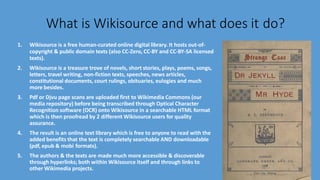
What is Wikisource and what does it do?
1. Wikisource is a free human-curated online digital library. It hosts out-of-
copyright & public domain texts (also CC-Zero, CC-BY and CC-BY-SA licensed
texts).
2. Wikisource is a treasure trove of novels, short stories, plays, poems, songs,
letters, travel writing, non-fiction texts, speeches, news articles,
constitutional documents, court rulings, obituaries, eulogies and much
more besides.
3. Pdf or Djvu page scans are uploaded first to Wikimedia Commons (our
media repository) before being transcribed through Optical Character
Recognition software (OCR) onto Wikisource in a searchable HTML format
which is then proofread by 2 different Wikisource users for quality
assurance.
4. The result is an online text library which is free to anyone to read with the
added benefits that the text is completely searchable AND downloadable
(pdf, epub & mobi formats).
5. The authors & the texts are made much more accessible & discoverable
through hyperlinks; both within Wikisource itself and through links to
other Wikimedia projects.
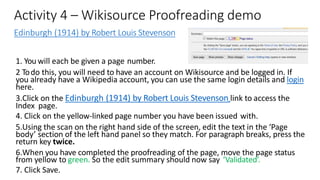
Activity 4 – Wikisource Proofreading demo
Edinburgh (1914) by Robert Louis Stevenson
1. You will each be given a page number.
2 Todo this, you will need to have an account on Wikisource and be logged in. If
you already have a Wikipedia account, you can use the same login details and login
here.
3.Click on the Edinburgh (1914) by Robert Louis Stevenson link to access the
Index page.
4. Click on the yellow-linked page number you have been issued with.
5.Using the scan on the right hand side of the screen, edit the text in the ‘Page
body’ section of the left hand panel so they match. For paragraph breaks, press the
return key twice.
6.When you have completed the proofreading of the page, move the page status
from yellow to green. So the edit summary should now say ‘Validated’.
7. Click Save.
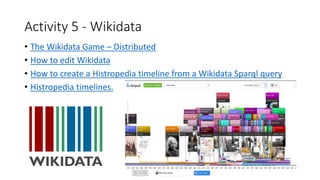
Activity 5 - Wikidata
• The Wikidata Game – Distributed
• How to edit Wikidata
• How to create a Histropedia timeline from a Wikidata Sparql query
• Histropedia timelines.
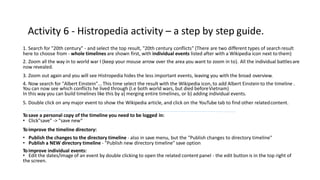
Activity 6 - Histropedia activity – a step by step guide.
1. Search for "20th century" - and select the top result, "20th century conflicts" (There are two different types of search result
here to choose from - whole timelines are shown first, with individual events listed after with a Wikipedia icon next to them)
2. Zoom all the way in to world war I (keep your mouse arrow over the area you want to zoom in to). All the individual battlesare
now revealed.
3. Zoom out again and you will see Histropedia hides the less important events, leaving you with the broad overview.
4. Now search for "Albert Einstein"... This time select the result with the Wikipedia icon, to add Albert Einstein to the timeline .
You can now see which conflicts he lived through (I.e both world wars, but died beforeVietnam)
In this way you can build timelines like this by a) merging entire timelines, or b) adding individual events.
5. Double click on any major event to show the Wikipedia article, and click on the YouTube tab to find other relatedcontent.
Tosave a personal copy of the timeline you need to be logged in:
• Click"save" -> "save new“
Toimprove the timeline directory:
• Publish the changes to the directory timeline - also in save menu, but the "Publish changes to directory timeline"
• Publish a NEW directory timeline - "Publish new directory timeline" save option
Toimprove individual events:
• Edit the dates/image of an event by double clicking to open the related content panel - the edit button is in the top right of
the screen.
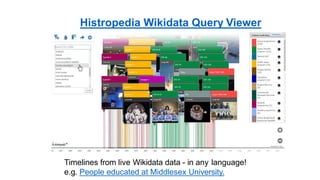
Histropedia Wikidata Query Viewer
Timelines from live Wikidata data - in any language!
e.g. People educated at Middlesex University.
Wiki Translation – Choosing an article
• Please aim to select a high quality article to translate such as from the
Featured Articles quality criteria (the highest quality standard on
Wikipedia) or the Good Article quality criteria (the 2nd highest).
• If you click on the Featured article link, there are links on the left hand
side of pages to the ‘Featured Articles’ page in each of the other
language Wikipedias. You will find the same if you click on the ‘Good
Article’ links.
• You can view Pages needing translation into English and do category
searches for articles in a subject you are interested in e.g.
Category:Articles needing translation from foreign-language Wikipedias.
You can also view the Portal directory to search portals in the same way.
Wiki Translation – Choosing an article
• Tool: Gapfinder - This tool has been developed to help editors find missing content in any
language for which there is a Wikipedia edition. GapFinder helps you discover articles
that exist in one language but are missing in another. Start by selecting a source language
and a target language. GapFinder will find trending articles in the source that are missing
in the target. If you are interested in a particular topic area, provide a seed article in the
source language, and GapFinder will find related articles missing in the target. Click on a
card to take a closer look at a missing article to see if you would like to create it from
scratch or translate it.
• Tool: "Not in the other language" - This tool looks for Wikidata items that have a page in
one language but not in the other (using Wikipedia categories to filter the results).
• Check the word count of the source article. You can use this tool Search tool to look up
the article & its word count Hence you should copy the article's main text (not including
notes, references, bibliographies etc.) into a Word document so you can get a more
accurate indication of the main body of the article's wordcount.
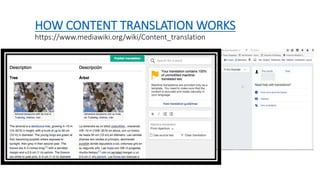
HOW CONTENT TRANSLATION WORKS
https://www.mediawiki.org/wiki/Content_translation
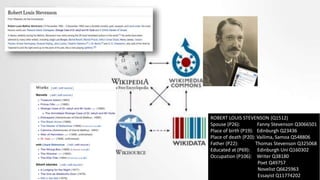
ROBERT LOUIS STEVENSON (Q1512)
Spouse (P26): Fanny Stevenson Q3066501
Place of birth (P19): Edinburgh Q23436
Place of death (P20): Vailima, Samoa Q548806
Father (P22): Thomas Stevenson Q325068
Educated at (P69): Edinburgh Uni Q160302
Occupation (P106): Writer Q38180
Poet Q49757
Novelist Q6625963
Essayist Q11774202
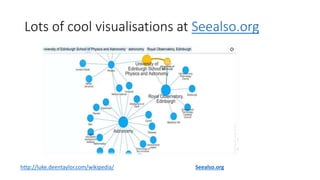
Lots of cool visualisations at Seealso.org
http://luke.deentaylor.com/wikipedia/ Seealso.org
Creating ‘worklists’ using the Listeria
tool to search Wikidata.
Listeria subpages – Creating Wikidata ‘worklists’ on Wikipedia.
To create a subpage from your userpage:
Type
User:YOURUSERNAME/WikidataList1
In the search bar.
Click on the red link newly created when Wikipedia cannot find a page with the name of Wikidata List 1
Add at least 1 character of text within the body of the page in order to save the page e.g. “This is Wikidata list subpage
1.”
Click Save to create the page.
Now we’ll open the Listeria code in a new tab.
Click on this link to open up the Listeria pages I have already generated.
Check the code in the Wikidata Query Service
https://query.wikidata.org/
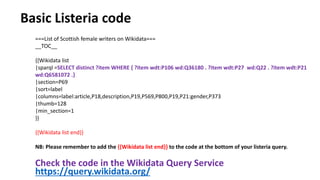
===List of Scottish female writers on Wikidata===
__TOC__
{{Wikidata list
|sparql =SELECT distinct ?item WHERE { ?item wdt:P106 wd:Q36180 . ?item wdt:P27 wd:Q22 . ?item wdt:P21
wd:Q6581072 .}
|section=P69
|sort=label
|columns=label:article,P18,description,P19,P569,P800,P19,P21:gender,P373
|thumb=128
|min_section=1
}}
{{Wikidata list end}}
NB: Please remember to add the {{Wikidata list end}} to the code at the bottom of your listeria query.
Basic Listeria code
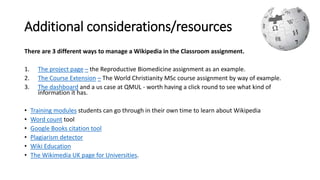
Additional considerations/resources
There are 3 different ways to manage a Wikipedia in the Classroom assignment.
1. The project page – the Reproductive Biomedicine assignment as an example.
2. The Course Extension – The World Christianity MSc course assignment by way of example.
3. The dashboard and a us case at QMUL - worth having a click round to see what kind of
information it has.
• Training modules students can go through in their own time to learn about Wikipedia
• Word count tool
• Google Books citation tool
• Plagiarism detector
• Wiki Education
• The Wikimedia UK page for Universities.
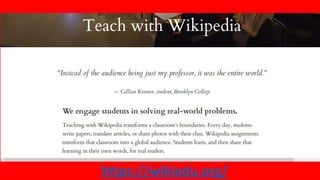
https://wikiedu.org/
Ewan McAndrew
Wikimedian in Residence
Tel: +44 (0) 7719 330076
Twitter: @emcandre
Email:
ewan.mcandrew@ed.ac.uk
Our Mission
The creation, dissemination and
curation of knowledge
www.ed.ac.uk/is
Information Services
The University of Edinburgh
Argyle House
3 Lady Lawson Street
Edinburgh EH3 9SH
United Kingdom

Gamifying Wikimedia

  • 2.
    Your 1,2,3 togetting setup for today’s session 1. Sign in on the sign sheet provided. 2. Create an account on Wikipedia if you have not already done so (this takes 2 minutes and asks you to create a username & password. 3. Log in to Wikipedia. Sit back and relax. Let the games begin!
  • 3.
    TODAY’S SCHEDULE –2:50pm-3:50pm Seminar Room 2 2.50-3.00 Housekeeping and Welcome – What do we mean by gamification? 3.00-3.05 Wiki Wars clip 3.05-3.25 Activity 1: Wiki Race 3.25-3.45 Activity 2: Wiki Shootme 3.45-3.50 Citation Hunt / Q&A
  • 4.
  • 5.
    What do wemean by ‘Gamifying Wikimedia’? • “Gamification is a powerful tool due to its ability to capture people’s attention, to engage them in a target activity, and even to influence their behavior.” (Kim, 2015) • “Gamification is the use of game design elements and game mechanics in non-game contexts. This idea has been used successfully in many web based businesses to increase user engagement. Some researchers suggest that it could also be used in web based education as a tool to increase student motivation and engagement.”(Dominguez et al, 2013)
  • 6.
    Wiki Race https://en.wikipedia.org/wiki/Wikipedia:Wikirace • Useonly the body of the text • You can use Back and Ctrl + F Wiki War example on Youtube: https://www.youtube.co m/watch?v=FdJN2iK0BSo
  • 7.
  • 8.
  • 9.
  • 10.
    How to trackactivity? • Instruct everyone to use a category • Set up a query that will show recent uploads in that category.
  • 11.
    Scanning for newfiles https://petscan.wmflabs.org/ 1. What do you want a report about? 1. Select Commons (because we’re looking for images) 2. Choose a category (look at a relevant image to see how it’s categorised) 2. In what order? 1. On the “Output” tab, check “Descending” 2. Choose “Extended data for Files”
  • 12.
  • 13.
  • 14.
    Wikimedia’s family of openknowledge projects https://wikimediafoundation.org/wiki/Our_projects Wikimedia Tool Labs
  • 15.
    Activity 1 –Editing Wikipedia with the new Visual Editor interface to add missing citations
  • 16.
    Citation Hunt Activity 1– Adding missing citations to Wikipedia using the new Citation Hunt tool. 5 min video tutorial explaining Citation Hunt
  • 17.
    Q: What canan editathon be? A: Pretty much anything it wants to be... Improve-a-thon Create as many stub articles as possible! Fix one particular page / problem Add loads of pictures! Something entirely different...
  • 18.
    Activity 2: WikiVoyage Wikimediatravel guides 10 things I like about you. Add 10 things to Wikivoyage (Things to Do, Places to buy etc.) – can be 10 articles or 1 article. Things to do in ______ when you’re Dead. (Add 5 things to do to 1 WikiVoyage page) Do, Eat, Sleep, Buy, Drink (Add 1 thing to each section.) It’s Always Sunny in Philadelphia – add climate details to a Wikivoyage page. Snap happy – illustrate a Wikivoyage page with an image. Use the Random page button.
  • 19.
    Activity 2 •Go toWikiVoyage. • Look up your hometown on WikiVoyage or somewhere you know reasonably well. •Log in and make a comment to one of the sections. NB: Consult the Manual of Style to keep yourself right and have a look at a Star Quality article like Berneray to see how information is laid out on WikiVoyage. NB: Writing should describe the destination or attraction in a lively and concise manner. Avoid exaggerations, superlatives and vague, flowery language. Be fair in your descriptions and include what you learned, not what you did. • University of Portsmouth run an ‘Applied Human Geography’ assignment where students research and write Wikipedia articles about villages in England andWales.
  • 20.
    ACTIVITY 3 –Adding images to Wikimedia Commons • Wikimedia Commons is Wikipedia’s sister project, with 36 million+ openly-licensed media files (photos, video clips, sound files, diagrams, illustrations etc.) • You can upload up to 50 images to Wiki Commons at a time via its upload tool as long as they are uploaded using Creative Commons licenses. • Further guidance can be found in this brochure. • You can also use the Flickr2Commons tool to import images direct from Flickr as long as the image(s) are clearly openly-licensed. • WikiShootMe is a tool which identifies locations with/without images in terms of Wikipedia pages, Wikimedia Commons and Wikidataitems. • CC Search is a search aggregator which helps with finding open images. • FIST – is the Free Image Search Tool.
  • 21.
    Wikisource – theFree Content Library Proofread a Random transcription. e.g. Edinburgh (1914) Crop an image from Wikisource to WikiCommons and insert into a Wikipedia page. Add a link to another Wikipedia work or author.
  • 22.
    What is Wikisourceand what does it do? 1. Wikisource is a free human-curated online digital library. It hosts out-of- copyright & public domain texts (also CC-Zero, CC-BY and CC-BY-SA licensed texts). 2. Wikisource is a treasure trove of novels, short stories, plays, poems, songs, letters, travel writing, non-fiction texts, speeches, news articles, constitutional documents, court rulings, obituaries, eulogies and much more besides. 3. Pdf or Djvu page scans are uploaded first to Wikimedia Commons (our media repository) before being transcribed through Optical Character Recognition software (OCR) onto Wikisource in a searchable HTML format which is then proofread by 2 different Wikisource users for quality assurance. 4. The result is an online text library which is free to anyone to read with the added benefits that the text is completely searchable AND downloadable (pdf, epub & mobi formats). 5. The authors & the texts are made much more accessible & discoverable through hyperlinks; both within Wikisource itself and through links to other Wikimedia projects.
  • 23.
    Activity 4 –Wikisource Proofreading demo Edinburgh (1914) by Robert Louis Stevenson 1. You will each be given a page number. 2 Todo this, you will need to have an account on Wikisource and be logged in. If you already have a Wikipedia account, you can use the same login details and login here. 3.Click on the Edinburgh (1914) by Robert Louis Stevenson link to access the Index page. 4. Click on the yellow-linked page number you have been issued with. 5.Using the scan on the right hand side of the screen, edit the text in the ‘Page body’ section of the left hand panel so they match. For paragraph breaks, press the return key twice. 6.When you have completed the proofreading of the page, move the page status from yellow to green. So the edit summary should now say ‘Validated’. 7. Click Save.
  • 24.
    Activity 5 -Wikidata • The Wikidata Game – Distributed • How to edit Wikidata • How to create a Histropedia timeline from a Wikidata Sparql query • Histropedia timelines.
  • 25.
    Activity 6 -Histropedia activity – a step by step guide. 1. Search for "20th century" - and select the top result, "20th century conflicts" (There are two different types of search result here to choose from - whole timelines are shown first, with individual events listed after with a Wikipedia icon next to them) 2. Zoom all the way in to world war I (keep your mouse arrow over the area you want to zoom in to). All the individual battlesare now revealed. 3. Zoom out again and you will see Histropedia hides the less important events, leaving you with the broad overview. 4. Now search for "Albert Einstein"... This time select the result with the Wikipedia icon, to add Albert Einstein to the timeline . You can now see which conflicts he lived through (I.e both world wars, but died beforeVietnam) In this way you can build timelines like this by a) merging entire timelines, or b) adding individual events. 5. Double click on any major event to show the Wikipedia article, and click on the YouTube tab to find other relatedcontent. Tosave a personal copy of the timeline you need to be logged in: • Click"save" -> "save new“ Toimprove the timeline directory: • Publish the changes to the directory timeline - also in save menu, but the "Publish changes to directory timeline" • Publish a NEW directory timeline - "Publish new directory timeline" save option Toimprove individual events: • Edit the dates/image of an event by double clicking to open the related content panel - the edit button is in the top right of the screen.
  • 26.
    Histropedia Wikidata QueryViewer Timelines from live Wikidata data - in any language! e.g. People educated at Middlesex University.
  • 27.
    Wiki Translation –Choosing an article • Please aim to select a high quality article to translate such as from the Featured Articles quality criteria (the highest quality standard on Wikipedia) or the Good Article quality criteria (the 2nd highest). • If you click on the Featured article link, there are links on the left hand side of pages to the ‘Featured Articles’ page in each of the other language Wikipedias. You will find the same if you click on the ‘Good Article’ links. • You can view Pages needing translation into English and do category searches for articles in a subject you are interested in e.g. Category:Articles needing translation from foreign-language Wikipedias. You can also view the Portal directory to search portals in the same way.
  • 28.
    Wiki Translation –Choosing an article • Tool: Gapfinder - This tool has been developed to help editors find missing content in any language for which there is a Wikipedia edition. GapFinder helps you discover articles that exist in one language but are missing in another. Start by selecting a source language and a target language. GapFinder will find trending articles in the source that are missing in the target. If you are interested in a particular topic area, provide a seed article in the source language, and GapFinder will find related articles missing in the target. Click on a card to take a closer look at a missing article to see if you would like to create it from scratch or translate it. • Tool: "Not in the other language" - This tool looks for Wikidata items that have a page in one language but not in the other (using Wikipedia categories to filter the results). • Check the word count of the source article. You can use this tool Search tool to look up the article & its word count Hence you should copy the article's main text (not including notes, references, bibliographies etc.) into a Word document so you can get a more accurate indication of the main body of the article's wordcount.
  • 29.
    HOW CONTENT TRANSLATIONWORKS https://www.mediawiki.org/wiki/Content_translation
  • 30.
    ROBERT LOUIS STEVENSON(Q1512) Spouse (P26): Fanny Stevenson Q3066501 Place of birth (P19): Edinburgh Q23436 Place of death (P20): Vailima, Samoa Q548806 Father (P22): Thomas Stevenson Q325068 Educated at (P69): Edinburgh Uni Q160302 Occupation (P106): Writer Q38180 Poet Q49757 Novelist Q6625963 Essayist Q11774202
  • 31.
    Lots of coolvisualisations at Seealso.org http://luke.deentaylor.com/wikipedia/ Seealso.org
  • 32.
    Creating ‘worklists’ usingthe Listeria tool to search Wikidata. Listeria subpages – Creating Wikidata ‘worklists’ on Wikipedia.
  • 33.
    To create asubpage from your userpage: Type User:YOURUSERNAME/WikidataList1 In the search bar. Click on the red link newly created when Wikipedia cannot find a page with the name of Wikidata List 1 Add at least 1 character of text within the body of the page in order to save the page e.g. “This is Wikidata list subpage 1.” Click Save to create the page. Now we’ll open the Listeria code in a new tab. Click on this link to open up the Listeria pages I have already generated.
  • 34.
    Check the codein the Wikidata Query Service https://query.wikidata.org/ ===List of Scottish female writers on Wikidata=== __TOC__ {{Wikidata list |sparql =SELECT distinct ?item WHERE { ?item wdt:P106 wd:Q36180 . ?item wdt:P27 wd:Q22 . ?item wdt:P21 wd:Q6581072 .} |section=P69 |sort=label |columns=label:article,P18,description,P19,P569,P800,P19,P21:gender,P373 |thumb=128 |min_section=1 }} {{Wikidata list end}} NB: Please remember to add the {{Wikidata list end}} to the code at the bottom of your listeria query. Basic Listeria code
  • 35.
    Additional considerations/resources There are3 different ways to manage a Wikipedia in the Classroom assignment. 1. The project page – the Reproductive Biomedicine assignment as an example. 2. The Course Extension – The World Christianity MSc course assignment by way of example. 3. The dashboard and a us case at QMUL - worth having a click round to see what kind of information it has. • Training modules students can go through in their own time to learn about Wikipedia • Word count tool • Google Books citation tool • Plagiarism detector • Wiki Education • The Wikimedia UK page for Universities.
  • 36.
  • 37.
    Ewan McAndrew Wikimedian inResidence Tel: +44 (0) 7719 330076 Twitter: @emcandre Email: ewan.mcandrew@ed.ac.uk Our Mission The creation, dissemination and curation of knowledge www.ed.ac.uk/is Information Services The University of Edinburgh Argyle House 3 Lady Lawson Street Edinburgh EH3 9SH United Kingdom

Editor's Notes

  • #2 Pic by Matthew Rutledge (CC-BY) via Flickr. https://www.flickr.com/photos/rutlo/3968025746/in/photolist-doPiJb-osdrpz-73DaP1-6AhXfg-4ACa2o-4AxSWV-4AxSYe
  • #4 By Wikimedia Foundation (edited by Lambda at Uncyclopedia) [GFDL (http://www.gnu.org/copyleft/fdl.html) or CC BY-SA 3.0 (http://creativecommons.org/licenses/by-sa/3.0)], via Wikimedia Commons Headcount of male/female editors in the room.
  • #7 Screengrab from Wiki Wars - https://www.youtube.com/watch?v=FdJN2iK0BSo
  • #15 Wikimedia UK is a charitable foundation
  • #23 File:Stevenson - Strange case of Dr. Jekyll and Mr. Hyde (1886).djvu Public domain via Wikimedia Commons. https://commons.wikimedia.org/wiki/File:Stevenson_-_Strange_case_of_Dr._Jekyll_and_Mr._Hyde_(1886).djvu
  • #30 https://www.mediawiki.org/wiki/Content_translation
  • #31 Public domain pic of Robert Louis Stevenson via Wikimedia Commons
  • #38 Contact details once more.