Welcome to Wikipedia:
New Editor Orientation
Africa Collection
Edit-a-thon
Library of Congress
April 11, 2014
Wikipedia: The Free Encyclopedia
• Free as in beer & free as in speech
• Content created entirely by volunteers, anyone
can edit!
• Non-profit educational project supported by
the Wikimedia Foundation
• All changes/versions recorded indefinitely
• 4,489,877+ articles in English Wikipedia alone;
encyclopedias in 287 languages (see size of Wikipedia)
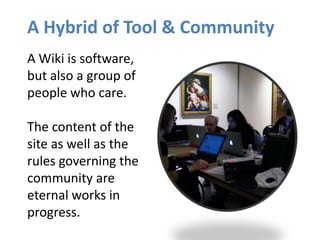
A Hybrid of Tool & Community
A Wiki is software,
but also a group of
people who care.
The content of the
site as well as the
rules governing the
community are
eternal works in
progress.
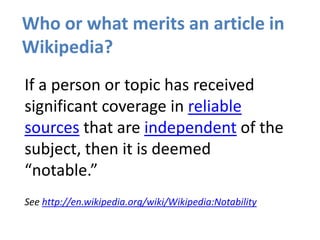
Who or what merits an article in
Wikipedia?
If a person or topic has received
significant coverage in reliable
sources that are independent of the
subject, then it is deemed
“notable.”
See http://en.wikipedia.org/wiki/Wikipedia:Notability
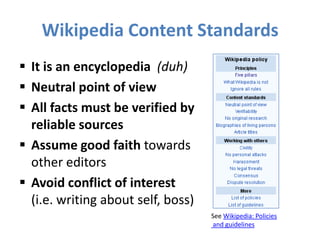
Wikipedia Content Standards
 It is an encyclopedia (duh)
 Neutral point of view
 All facts must be verified by
reliable sources
 Assume good faith towards
other editors
 Avoid conflict of interest
(i.e. writing about self, boss)
See Wikipedia: Policies
and guidelines
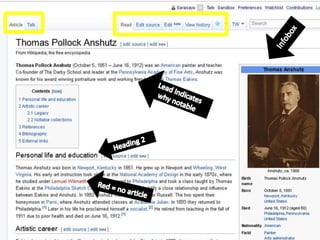
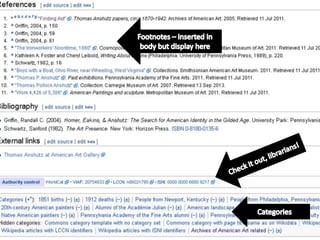
ANATOMY OF A WIKIPEDIA ARTICLE
THE MECHANICS OF CONTRIBUTING
Step 1 - Register a user account
Advantages of registering an account:
– A record of your work builds credibility
– More privacy, since anonymous contributors’ IP address is recorded
– Ability to create/rename articles, upload images, edit preferences
– Signals membership in the community
1. Go to en.wikipedia.org, click “Create Account”
2. Choose a username and password
There should be a 1:1 ratio between editors and accounts on Wikipedia.
Sharing an account is not allowed, so you should not create an
account in the name of your organization.
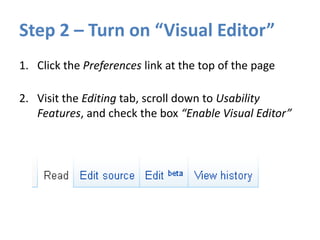
Step 2 – Turn on “Visual Editor”
1. Click the Preferences link at the top of the page
2. Visit the Editing tab, scroll down to Usability
Features, and check the box “Enable Visual Editor”
Step 3 - Create a user page
1. Click the link at the top with your username on it.
2. Write something (i.e. “Hello world”) and click Show
Preview.
3. Leave a comment under Edit Summary explaining
what you did. Now you have a user page!
This user page can be personalized—or not—as you
want. You may wish to post a conflict of interest
statement if close to subject:
en.wikipedia.org/wiki/User:Sarasays/COI
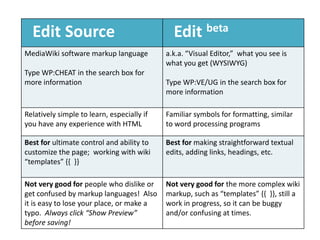
Edit Source Edit beta
MediaWiki software markup language
Type WP:CHEAT in the search box for
more information
a.k.a. “Visual Editor,” what you see is
what you get (WYSIWYG)
Type WP:VE/UG in the search box for
more information
Relatively simple to learn, especially if
you have any experience with HTML
Familiar symbols for formatting, similar
to word processing programs
Best for ultimate control and ability to
customize the page; working with wiki
“templates” {{ }}
Best for making straightforward textual
edits, adding links, headings, etc.
Not very good for people who dislike or
get confused by markup languages! Also
it is easy to lose your place, or make a
typo. Always click “Show Preview”
before saving!
Not very good for the more complex wiki
markup, such as “templates” {{ }}, still a
work in progress, so it can be buggy
and/or confusing at times.
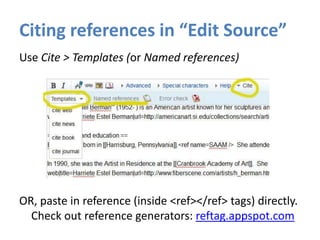
Citing references in “Edit Source”
Use Cite > Templates (or Named references)
OR, paste in reference (inside <ref></ref> tags) directly.
Check out reference generators: reftag.appspot.com
Creating a new article
1. Do some searching around to confirm the article
doesn’t exist under a different name.
2. Draft the article stub in your user Sandbox.
3. Search (unsuccessfully) for the exact name of the
article you want to create.
4. Click on the resulting redlink to create the page,
paste in code from your Sandbox, Save.
NOTE: “Submit for review” is not required for
registered editors. Be bold!
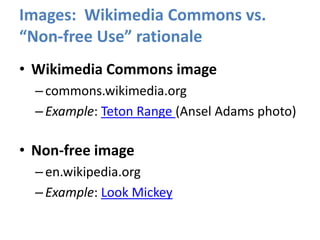
Images: Wikimedia Commons vs.
“Non-free Use” rationale
• Wikimedia Commons image
–commons.wikimedia.org
–Example: Teton Range (Ansel Adams photo)
• Non-free image
–en.wikipedia.org
–Example: Look Mickey
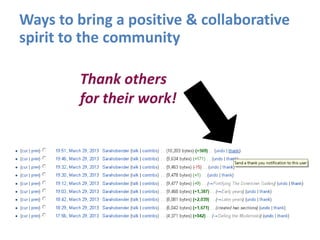
Thank others
for their work!
Ways to bring a positive & collaborative
spirit to the community
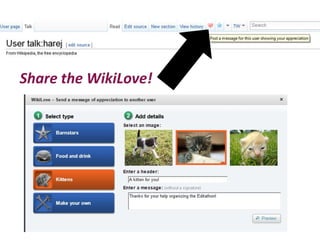
Share the WikiLove!
Keep in touch!
• Twitter: follow #GLAMwiki
• Email lists: lists.wikimedia.org
• Come out for more events!
In Washington, D.C., wikimediadc.org

Getting started-wikipedia-april2014

  • 1.
    Welcome to Wikipedia: NewEditor Orientation Africa Collection Edit-a-thon Library of Congress April 11, 2014
  • 2.
    Wikipedia: The FreeEncyclopedia • Free as in beer & free as in speech • Content created entirely by volunteers, anyone can edit! • Non-profit educational project supported by the Wikimedia Foundation • All changes/versions recorded indefinitely • 4,489,877+ articles in English Wikipedia alone; encyclopedias in 287 languages (see size of Wikipedia)
  • 3.
    A Hybrid ofTool & Community A Wiki is software, but also a group of people who care. The content of the site as well as the rules governing the community are eternal works in progress.
  • 4.
    Who or whatmerits an article in Wikipedia? If a person or topic has received significant coverage in reliable sources that are independent of the subject, then it is deemed “notable.” See http://en.wikipedia.org/wiki/Wikipedia:Notability
  • 5.
    Wikipedia Content Standards It is an encyclopedia (duh)  Neutral point of view  All facts must be verified by reliable sources  Assume good faith towards other editors  Avoid conflict of interest (i.e. writing about self, boss) See Wikipedia: Policies and guidelines
  • 6.
    ANATOMY OF AWIKIPEDIA ARTICLE
  • 9.
    THE MECHANICS OFCONTRIBUTING
  • 10.
    Step 1 -Register a user account Advantages of registering an account: – A record of your work builds credibility – More privacy, since anonymous contributors’ IP address is recorded – Ability to create/rename articles, upload images, edit preferences – Signals membership in the community 1. Go to en.wikipedia.org, click “Create Account” 2. Choose a username and password There should be a 1:1 ratio between editors and accounts on Wikipedia. Sharing an account is not allowed, so you should not create an account in the name of your organization.
  • 11.
    Step 2 –Turn on “Visual Editor” 1. Click the Preferences link at the top of the page 2. Visit the Editing tab, scroll down to Usability Features, and check the box “Enable Visual Editor”
  • 12.
    Step 3 -Create a user page 1. Click the link at the top with your username on it. 2. Write something (i.e. “Hello world”) and click Show Preview. 3. Leave a comment under Edit Summary explaining what you did. Now you have a user page! This user page can be personalized—or not—as you want. You may wish to post a conflict of interest statement if close to subject: en.wikipedia.org/wiki/User:Sarasays/COI
  • 13.
    Edit Source Editbeta MediaWiki software markup language Type WP:CHEAT in the search box for more information a.k.a. “Visual Editor,” what you see is what you get (WYSIWYG) Type WP:VE/UG in the search box for more information Relatively simple to learn, especially if you have any experience with HTML Familiar symbols for formatting, similar to word processing programs Best for ultimate control and ability to customize the page; working with wiki “templates” {{ }} Best for making straightforward textual edits, adding links, headings, etc. Not very good for people who dislike or get confused by markup languages! Also it is easy to lose your place, or make a typo. Always click “Show Preview” before saving! Not very good for the more complex wiki markup, such as “templates” {{ }}, still a work in progress, so it can be buggy and/or confusing at times.
  • 14.
    Citing references in“Edit Source” Use Cite > Templates (or Named references) OR, paste in reference (inside <ref></ref> tags) directly. Check out reference generators: reftag.appspot.com
  • 15.
    Creating a newarticle 1. Do some searching around to confirm the article doesn’t exist under a different name. 2. Draft the article stub in your user Sandbox. 3. Search (unsuccessfully) for the exact name of the article you want to create. 4. Click on the resulting redlink to create the page, paste in code from your Sandbox, Save. NOTE: “Submit for review” is not required for registered editors. Be bold!
  • 16.
    Images: Wikimedia Commonsvs. “Non-free Use” rationale • Wikimedia Commons image –commons.wikimedia.org –Example: Teton Range (Ansel Adams photo) • Non-free image –en.wikipedia.org –Example: Look Mickey
  • 17.
    Thank others for theirwork! Ways to bring a positive & collaborative spirit to the community
  • 18.
  • 19.
    Keep in touch! •Twitter: follow #GLAMwiki • Email lists: lists.wikimedia.org • Come out for more events! In Washington, D.C., wikimediadc.org