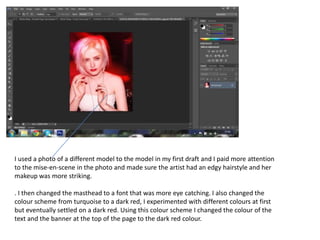
I used a photo of a different model to the model in my first draft and I paid more attention
to the mise-en-scene in the photo and made sure the artist had an edgy hairstyle and her
makeup was more striking.

. I then changed the masthead to a font that was more eye catching. I also changed the
colour scheme from turquoise to a dark red, I experimented with different colours at first
but eventually settled on a dark red. Using this colour scheme I changed the colour of the
text and the banner at the top of the page to the dark red colour.
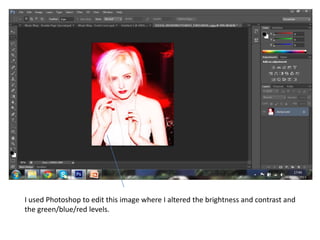
I used Photoshop to edit this image where I altered the brightness and contrast and
the green/blue/red levels.
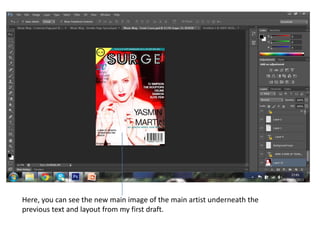
Here, you can see the new main image of the main artist underneath the
previous text and layout from my first draft.
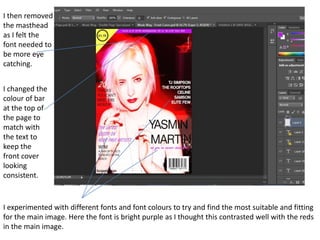
I then removed
the masthead
as I felt the
font needed to
be more eye
catching.


I changed the
colour of bar
at the top of
the page to
match with
the text to
keep the
front cover
looking
consistent.


I experimented with different fonts and font colours to try and find the most suitable and fitting
for the main image. Here the font is bright purple as I thought this contrasted well with the reds
in the main image.
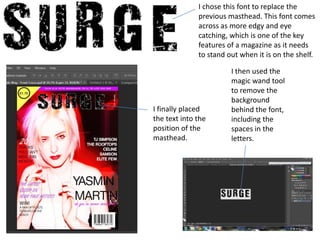
I chose this font to replace the
              previous masthead. This font comes
              across as more edgy and eye
              catching, which is one of the key
              features of a magazine as it needs
              to stand out when it is on the shelf.

                        I then used the
                        magic wand tool
                        to remove the
                        background
I finally placed        behind the font,
the text into the       including the
position of the         spaces in the
masthead.               letters.
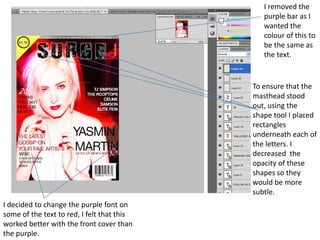
I removed the
                                               purple bar as I
                                               wanted the
                                               colour of this to
                                               be the same as
                                               the text.


                                            To ensure that the
                                            masthead stood
                                            out, using the
                                            shape tool I placed
                                            rectangles
                                            underneath each of
                                            the letters. I
                                            decreased the
                                            opacity of these
                                            shapes so they
                                            would be more
                                            subtle.
I decided to change the purple font on
some of the text to red, I felt that this
worked better with the front cover than
the purple.
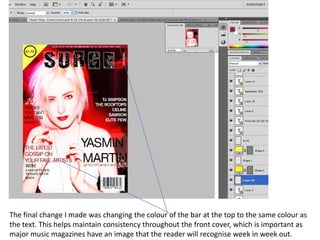
The final change I made was changing the colour of the bar at the top to the same colour as
the text. This helps maintain consistency throughout the front cover, which is important as
major music magazines have an image that the reader will recognise week in week out.

Front Cover Final Draft Breakdown

  • 2.
    I used aphoto of a different model to the model in my first draft and I paid more attention to the mise-en-scene in the photo and made sure the artist had an edgy hairstyle and her makeup was more striking. . I then changed the masthead to a font that was more eye catching. I also changed the colour scheme from turquoise to a dark red, I experimented with different colours at first but eventually settled on a dark red. Using this colour scheme I changed the colour of the text and the banner at the top of the page to the dark red colour.
  • 3.
    I used Photoshopto edit this image where I altered the brightness and contrast and the green/blue/red levels.
  • 4.
    Here, you cansee the new main image of the main artist underneath the previous text and layout from my first draft.
  • 5.
    I then removed themasthead as I felt the font needed to be more eye catching. I changed the colour of bar at the top of the page to match with the text to keep the front cover looking consistent. I experimented with different fonts and font colours to try and find the most suitable and fitting for the main image. Here the font is bright purple as I thought this contrasted well with the reds in the main image.
  • 6.
    I chose thisfont to replace the previous masthead. This font comes across as more edgy and eye catching, which is one of the key features of a magazine as it needs to stand out when it is on the shelf. I then used the magic wand tool to remove the background I finally placed behind the font, the text into the including the position of the spaces in the masthead. letters.
  • 7.
    I removed the purple bar as I wanted the colour of this to be the same as the text. To ensure that the masthead stood out, using the shape tool I placed rectangles underneath each of the letters. I decreased the opacity of these shapes so they would be more subtle. I decided to change the purple font on some of the text to red, I felt that this worked better with the front cover than the purple.
  • 8.
    The final changeI made was changing the colour of the bar at the top to the same colour as the text. This helps maintain consistency throughout the front cover, which is important as major music magazines have an image that the reader will recognise week in week out.