F2037 - PROGRAMMING
FUNDAMENTAL WITH C++
Unit 4.1 - Understand the use of array
INDEX
 Objective
 Introduction to Array

 One dimensional array

 Two dimensional array
OBJECTIVES
   At the end of this module, students should be
    able to:
     Declare and use an array
     Use the array statement in C++ program
     Accessing element in an array
ARRAY DEFINITION
   Array is a collection of data elements of the
    same type that are referenced by a common
    name.

   Used to process a collection of data all of which is
    of the same type, such as list of name, list of
    temperature.
ARRAY DEFINITION
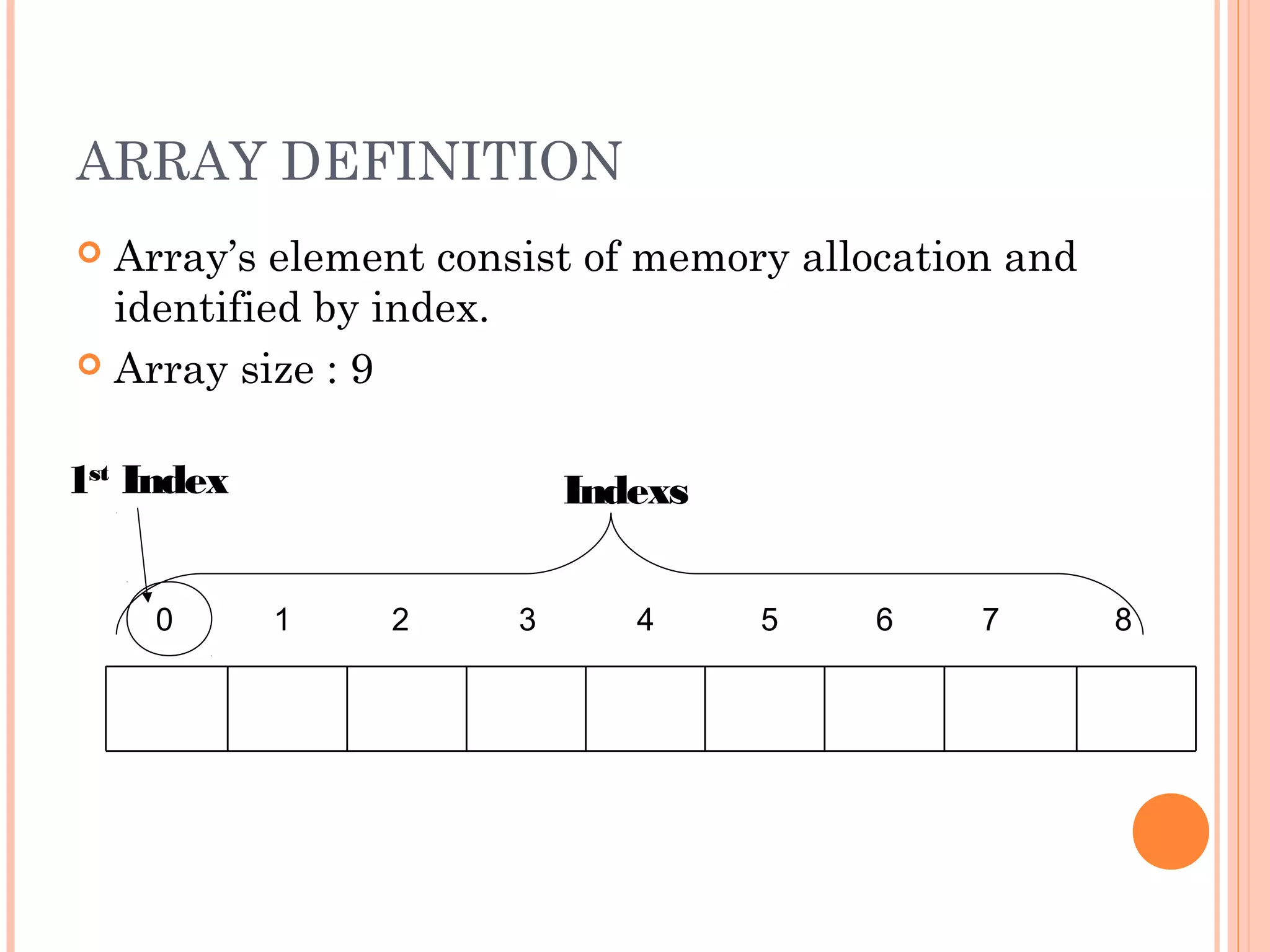
 Array’s element consist of memory allocation and
  identified by index.
 Array size : 9


1st Index                 Indexs


    0       1   2     3      4     5   6     7       8
   Two types of arrays
       One-dimensional array
       Two-dimensional array
DECLARING ONE DIMENSIONAL
ARRAY
   Will have a single row and can have any number
    of columns.
 Will have only one subscript. Subscript refers to
  the dimension of the array.
 Array declaration of 10 alphabet
     type array_name[size]
     Eg : char huruf[10];
INITIALIZING ONE DIMENSIONAL
ARRAY
 Initialization is the process of assigning values to
  the array you have created.
 To assign initial values to each one of array’s
  elements we must enclose the values in curly
  braces ({ }) and separate them with comma (,). 
     Eg   : char huruf[5] = {‘a’, ‘b’, ‘c’, ‘d’, ‘e’};
INITIALIZING ONE DIMENSIONAL
ARRAY
  Eg: int nombor[3] = {3, 24, 31};


         first index   0        1     2


            nombor         3    24   31


 nombor[0];//3
 nombor[1];//24
 nombor[2];//31
 nombor[0+1];//nombor[1];//24
 nombor[3];
ACCESSING ELEMENT OF ONE
DIMENSIONAL ARRAY
   Element is accessed by its index
   Array index refers to the location of the values in an
    array.
   The first element will always have the array index as
    0.

Syntax :
<Variable name>[Array index] = Value;

For example:
  marks[0]=95;
  marks[1]=85;
  marks[2]=75;
ACCESSING ELEMENT OF ONE
DIMENSIONAL ARRAY
   Eg:
      int my_array[5] =    {11, 22, 33, 44, 55};

   to store the value 75 in the third element
    of my_array, we could write the following
    statement:
      my_array[2] = 75;

   to pass the value in 4th element of my_array and
    store the value into temporary variable,
    temp_value:
      int temp_value = my_array[3]; // also
      equals to 44
ACCESSING ELEMENT OF ONE
DIMENSIONAL ARRAY
   if the name of an array is name, then name[0] is
    the name of the element that is in position 0,
    name[1] is the name of the element that is in
    position 1, etc.
   in general, the nth element is in position n-1. So
    if the array has n elements, their names are
    name[0], name[1], name[2], …, name[n-
    1].
   it is important to be able to clearly distinguish
    between the two uses that brackets [ ] have
    related to arrays:
      int name[5]; // declaration of a new array
      name[2] = 75; // access to an element of the
      array.
EXAMPLE
   Program Student_Marks.cpp will illustrate how
    to declare an array, initialize and access its
    elements.
#include<iostream>
using namespace std;
void main()
{                                    marks[0]   : 95
  int marks[]={95,85,75,80,65};      marks[1]   : 85
  cout<<"marks[0] : "<<marks[0];     marks[2]   : 75
                                     marks[3]   : 80
  cout<<"nmarks[1] : "<<marks[1];
                                     marks[4]   : 65
  cout<<"nmarks[2] : "<<marks[2];
  cout<<"nmarks[3] : "<<marks[3];
  cout<<"nmarks[4] : "<<marks[4];
}
EXAMPLE
   Program Onedim_Int_Array.cpp illustrates how
    to initialize integer array and display its
    contents.
#include<iostream>
using namespace std;
void main()
{
  int y[4]={8,7,6,4};
  for(int i=0;i<4;i++)
  {
       cout<<y[i]<<"n";
  }
}
EXAMPLE
   Program Onedim_Char_Array_Name.cpp
    illustrates how to initialize a character array and
    display its contents.
#include<iostream>
using namespace std;
void main()
{
  char stud_name[]={‘M',‘A',‘F','I','A'};
  for(int i=0;i<=4;i++)
  {
       cout<<stud_name[i];
  }
}
ENTERING DATA INTO AN ARRAY
    When more number of values are to be stored
     in an array, a for loop can be used.
    The sample code shows how to use a for loop
     in an array.


      for(int i=0;i<5;i++)
      {
        cout<<“Enter the marks: ";
        cin>>marks[i];
      }
READING DATA FROM AN ARRAY
   You can use a for loop with a single cout
    statement to print the values from an array.


    for (int i=0;i<5;i++)
    {
        cout<<"Marks : "+marks[i]);
    }
EXAMPLE
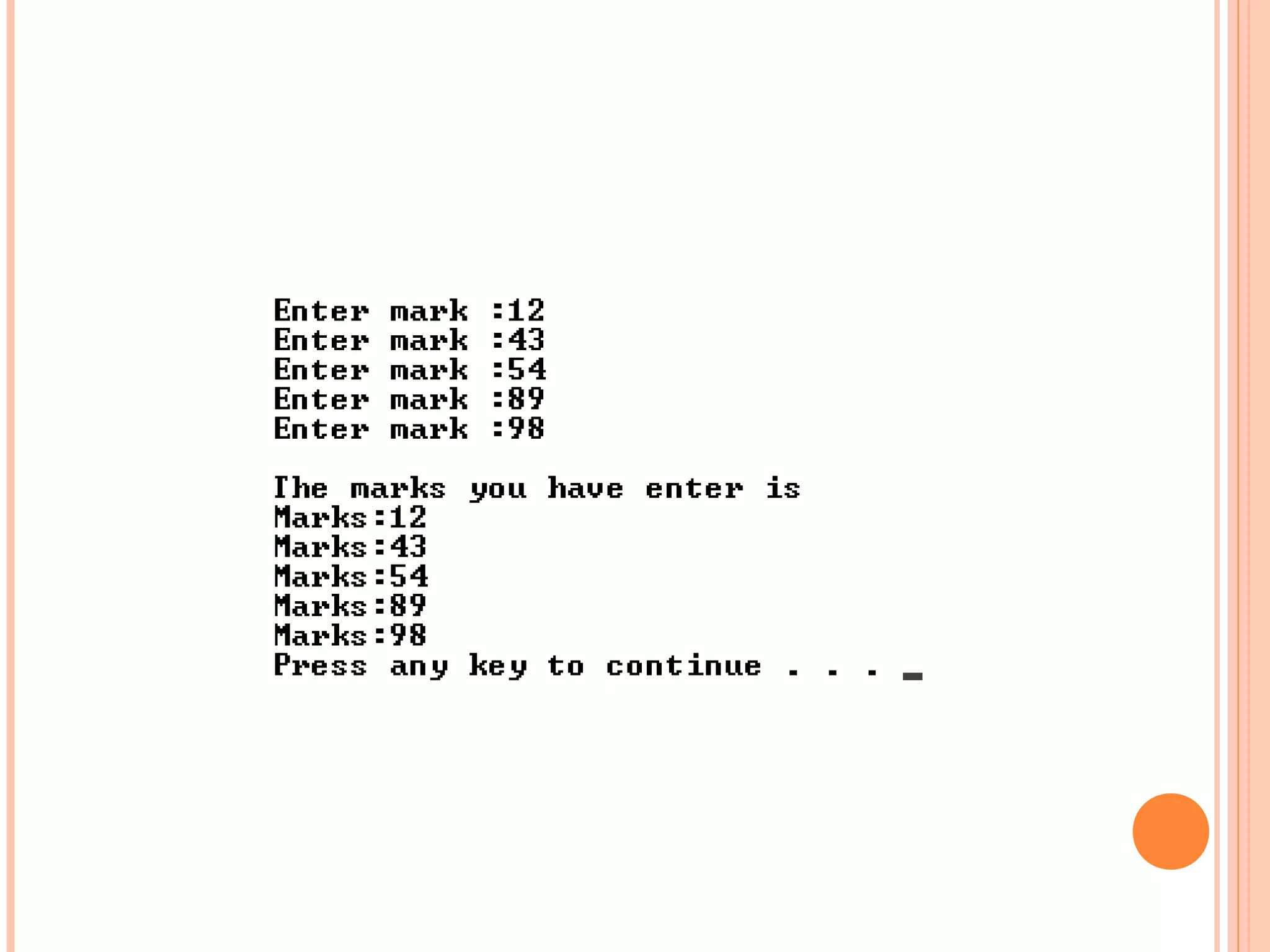
   Program One_Int_Array.cpp illustrates how to
    accept five marks from the user and prints the
    values on the screen.
#include <iostream>
using namespace std;
void main()
{
       int marks[5];
       //Accepting the marks
       for(int i=0;i<5;i++){
          cout<<"Enter mark :";
          cin>>marks[i];
       }
       cout<<"nThe marks you have enter is"<<endl;
       //Displaying the array
       for(int i=0;i<5;i++){
           cout<<"Marks:"<<marks[i]<<endl;
       }
}
IN CLASS EXERCISE 4.1
 Declare an array alpha of 15 elements of type
  int.
 Access the value of tenth element of array alpha.

 Set the value of fifth element of array alpha to
  35.
 Set the value of ninth element of array alpha to
  the sum of fifth and sixth element of array
  alpha.
   Declare an array alpha of 15 elements of type
    int.
    int alpha [15];

   Access the value of tenth element of array alpha.
    alpha [9];

   Set the value of fifth element of array alpha to
    35.
    alpha [4] = 35;
   Set the value of ninth element of array alpha to
    the sum of fifth and sixth element of array
    alpha.
    alpha [8] = alpha [4] + alpha [5]
   What is the output

#include<iostream>
using namespace std;
void main()
{
  double num []= {2.0, 4.0, 6.5, 8.7};
  cout<<num[1+2];
}
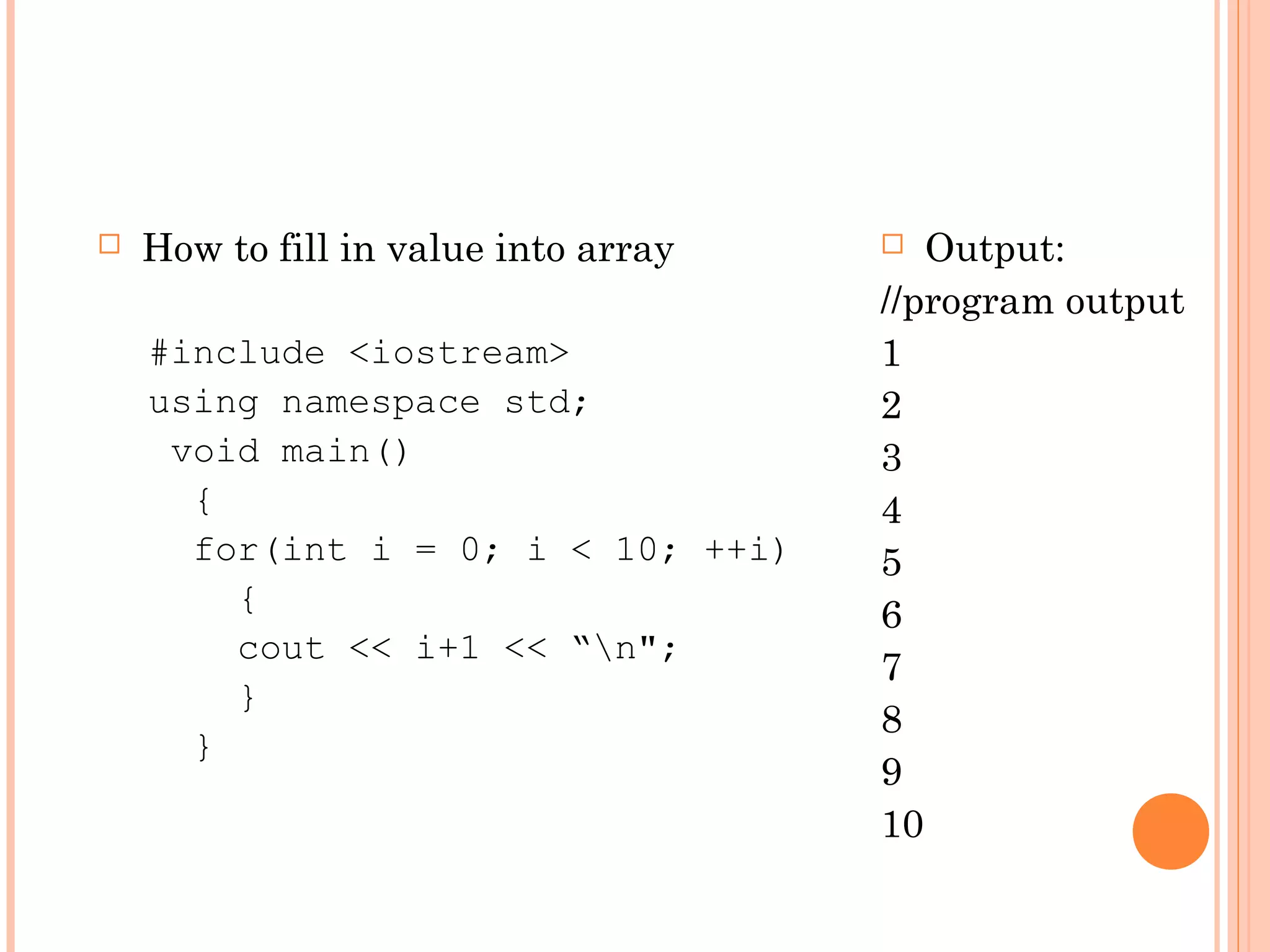
   How to fill in value into array     Output:
                                      //program output
    #include <iostream>               1
    using namespace std;              2
     void main()                      3
      {                               4
      for(int i = 0; i < 10; ++i)     5
        {                             6
        cout << i+1 << “n";
                                      7
        }
                                      8
      }
                                      9
                                      10
#include <iostream>
using namespace std;
void main()
{
  int num[]={1,2,3,4,5,6,7,8,9,10};
  for(int i = 0; i < 10; ++i)
   {
       cout << num[i]<< "n";
   }
}
TWO-DIMENSIONAL ARRAY
 Two-dimensional arrays can be described as
  "arrays of arrays".
 For example, a two-dimensional array can be
  imagined as a two-dimensional table made of
  elements of a same uniform data type.
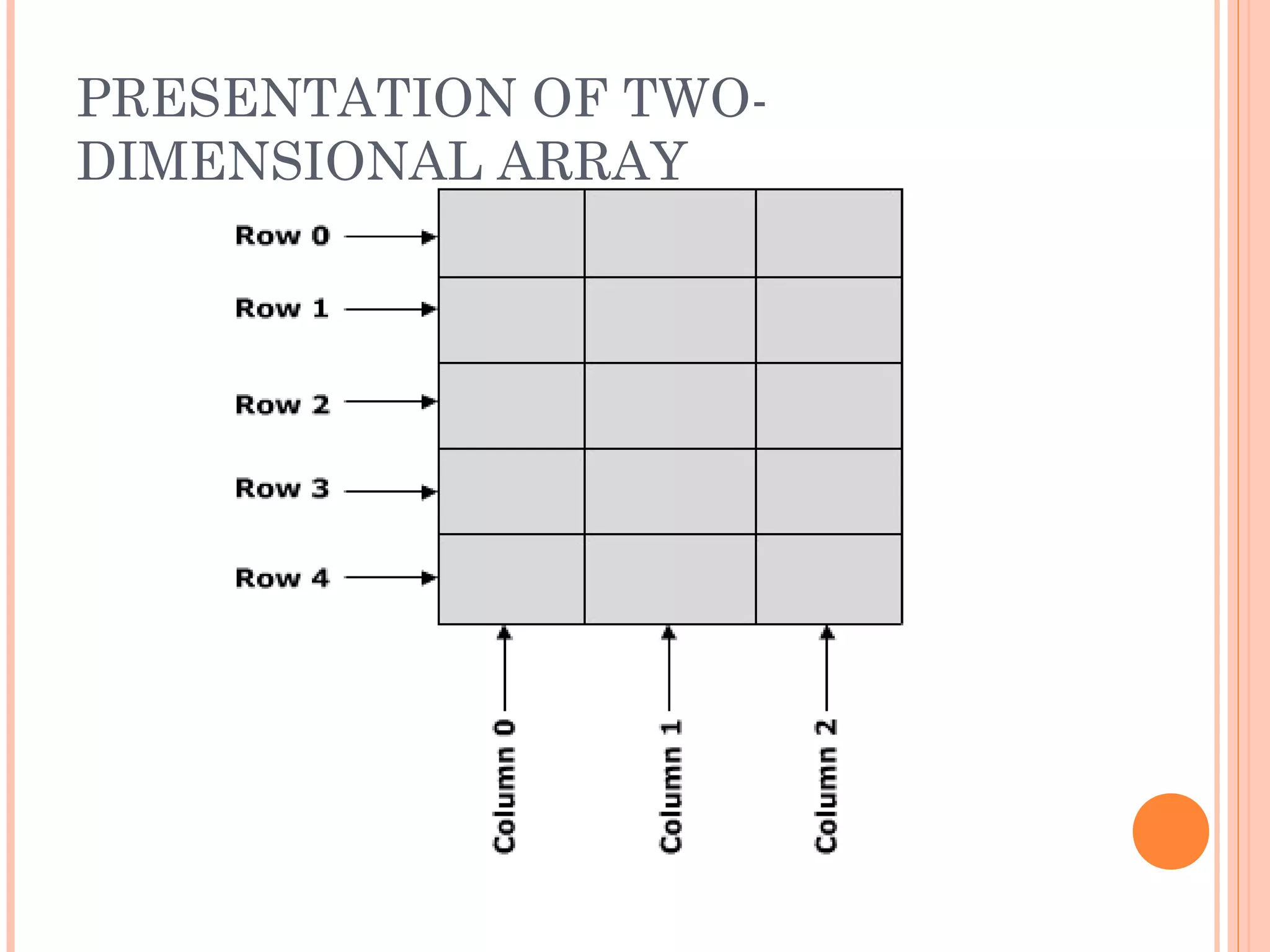
PRESENTATION OF TWO-
DIMENSIONAL ARRAY
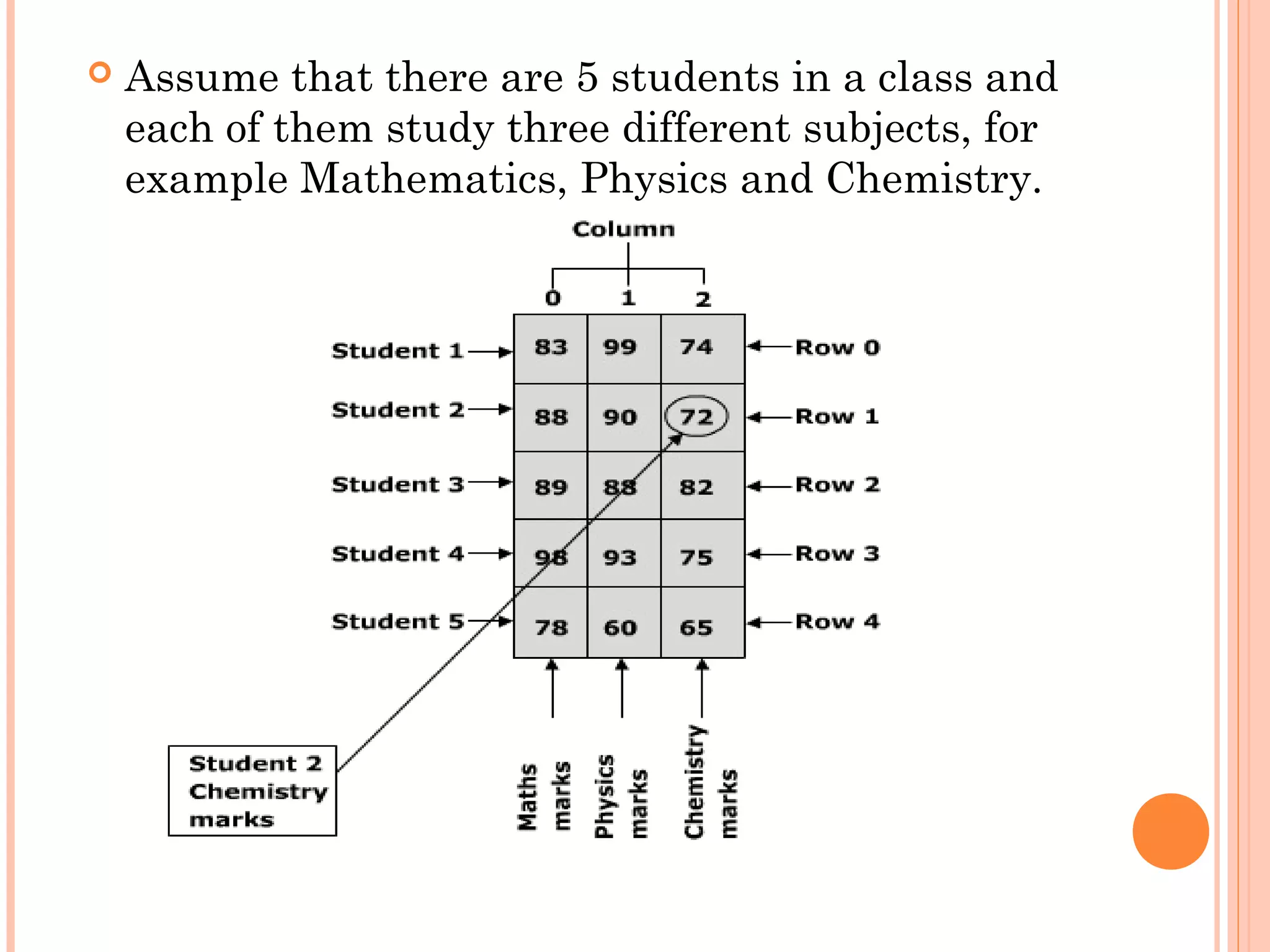
   Assume that there are 5 students in a class and
    each of them study three different subjects, for
    example Mathematics, Physics and Chemistry.
Example
        int marks_table [5][3];
 
Syntax
    <Data type> <Variable name> [Row][Column];
TWO-DIMENSIONAL ARRAY
   Table jimmy represents a bidimensional array of
    3 by 5 elements of type int.


   The way to declare this array in C++ would be:
    int jimmy [3][5];
                                   column
                         row
INITIALIZING TWO-DIMENSIONAL
ARRAY
   Eg:
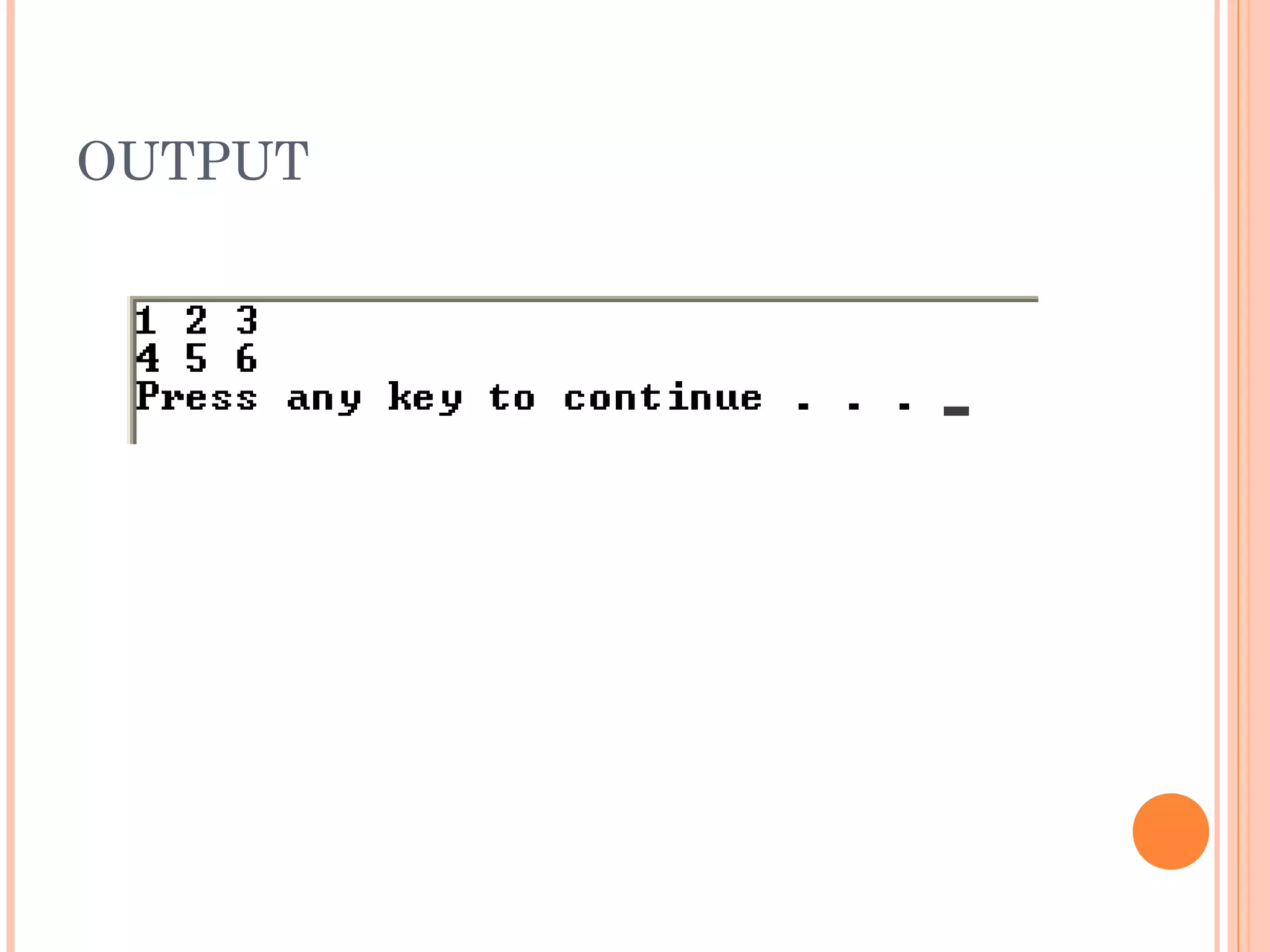
     int array1[ 2 ][ 3 ] = { { 1, 2, 3 }, { 4, 5, 6 } };
        Output:

          123
          456
     int array2[ 2 ][ 3 ] = { 1, 2, 3, 4, 5 };
        Output:

         123
         450
       int array3[ 2 ][ 3 ] = { { 1, 2 }, { 4 } };
          Output:

           120
           400
ACCESSING ELEMENT IN TWO-
DIMENSIONAL ARRAY
 Element is accessed by the index of its row and
  column.
 Eg:
     Toaccess the element in the 2nd row and at the 4th
     column of this two-dimentional array, we can used
     the following code:
       jimmy[1][3];
#include<iostream>
using namespace std;
void main()
{
  int array2[ 2 ][ 3 ] = {{ 1, 2, 3} ,{4, 5,6 }};

    for(int index1=0;index1<2;index1++)
    {
         for(int index2=0;index2<3;index2++)
                cout<<array2[index1][index2] << " ";
         cout<<endl;
    }
}
OUTPUT
WHAT IS OUTPUT?
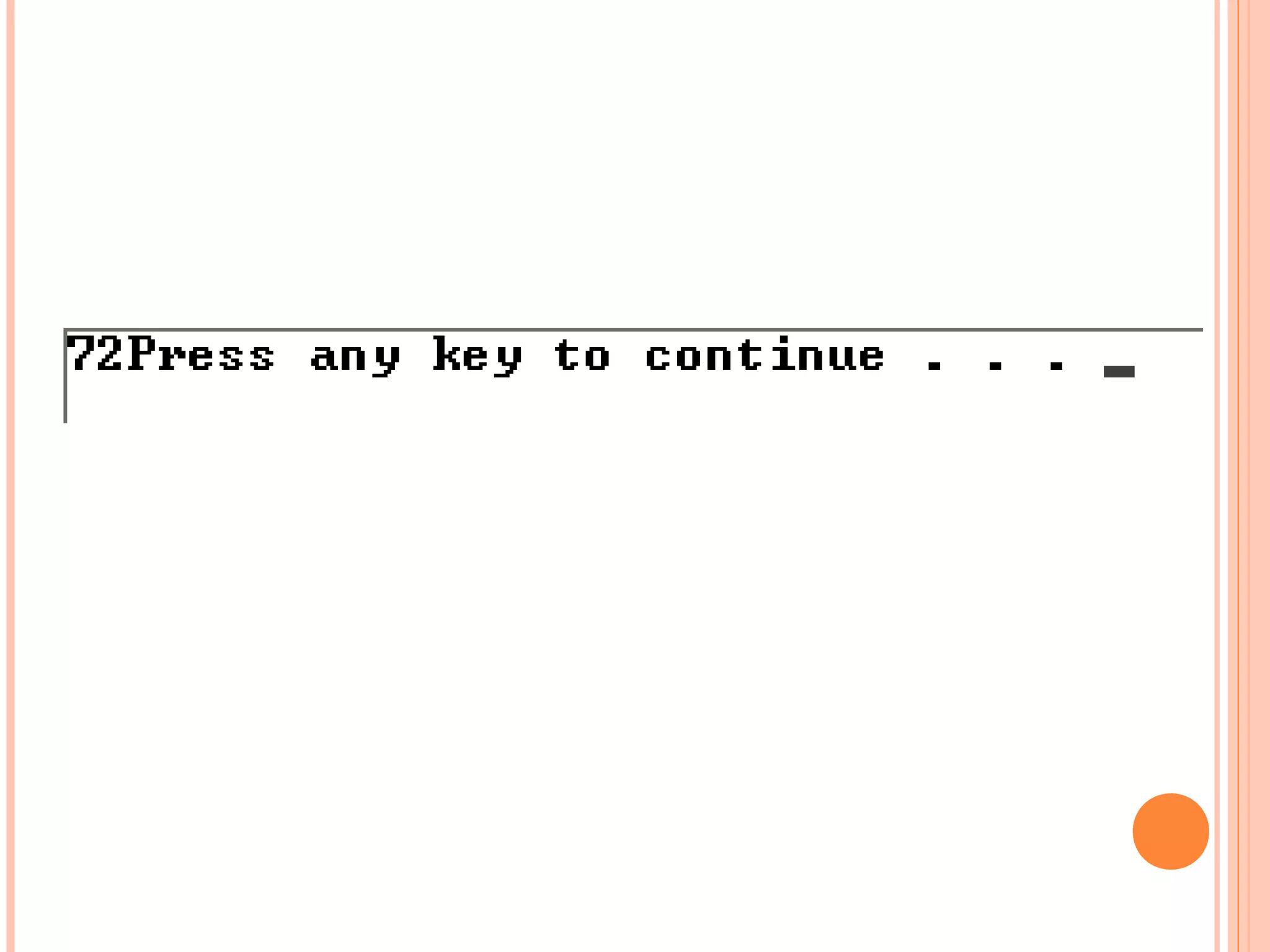
#include<iostream>
using namespace std;
void main()
{
   int marks_table[5][3] = {{83,99,74},
                           {88,90,72},{89,88,82},
                           {98,93,75},{78,60,65}};
   cout<<marks_table[1][2];
 }
#include<iostream>
#include<string>
using namespace std;
void main()
{
string Data [2][3];
//For first fow
Data[0][0] = "Lisa"; //lastname
Data[0][1] = "Sulaiman"; //firstname
Data[0][2] = "Kedah"; //location
    //Second row
    Data[1][0] = "Ali"; //lastname
    Data[1][1] = "Muhammad"; //firstname
    Data[1][2] = "Johor"; //location
    cout<<"LastnametFirstnametLocationn";
for(int i=0;i<2;i++){
      for(int j=0;j<3;j++){
      cout<<Data[i][j]<<"tt";
      }
      cout<<"n";//move to new line
      }
}
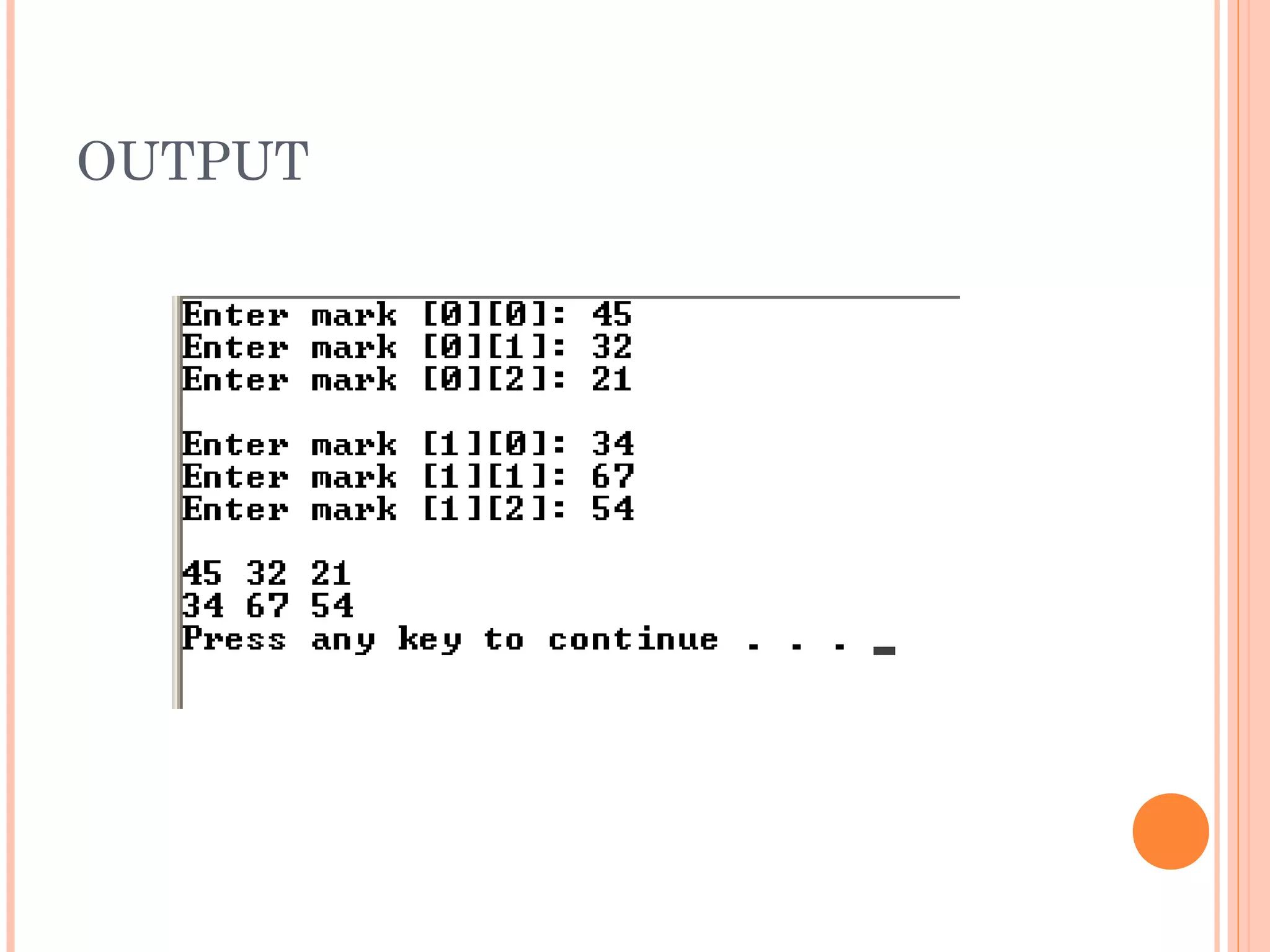
#include <iostream>
using namespace std;
void main()
{
           int array2[ 23 ][ 4 ];
           //Accepting the marks
           for (int row=0; row<2; row++) {
                        for(int col=0; col<3; col++){
                                    cout<<"Enter mark ["<<(row)<<"][" <<col <<"]: ";
                                    cin>>array2[row][col];
                        }
                                    cout<<endl;
                      }
           //display
           for(int row=0; row<2; row++){
                        for(int col=0; col<3; col++)
                        cout<<array2[row][col] << " ";
                        cout<<endl;
           }
}
OUTPUT
IN CLASS EXERCISE 4.2
 Declare an array beta of 10 rows and 20 columns
  of type int.
 Examine the following:

    double values[ ] [ ] = {
                       {1.2, 9.0, 3.2},
                       {9.2, 0.5, 1.5},
                       {7.3, 7.9, 4.8} } ;
    What is the value of values[2][1]?
   Which of the following statements constructs
    an array with 5 rows of 7 columns?
      long stuff[5][7];
      long[5][7];
      long stuff[7][5];
      long [7][5];
   Declare an array beta of 10 rows and 20 columns
    of type int.
    int beta [10][20]

o   Value of values[2][1]? 7.9

o   long stuff[5][7];
SUMMARY
 An array is a structured data type with a fixed
  number of elements.
 Every element of an array is of the same type
  and can be accessed by their index.
 Array index started with 0.

 Array can be initialized during declaration.

 A one-dimensional array has one subscript.

 In two-dimensional array, elements are arranged
  in table form.
 To access element from two-dimensional array,
  pair of indices is needed (index for row and index
  for column).

Fp201 unit4

  • 1.
    F2037 - PROGRAMMING FUNDAMENTALWITH C++ Unit 4.1 - Understand the use of array
  • 2.
    INDEX  Objective  Introductionto Array  One dimensional array  Two dimensional array
  • 3.
    OBJECTIVES  At the end of this module, students should be able to:  Declare and use an array  Use the array statement in C++ program  Accessing element in an array
  • 4.
    ARRAY DEFINITION  Array is a collection of data elements of the same type that are referenced by a common name.  Used to process a collection of data all of which is of the same type, such as list of name, list of temperature.
  • 5.
    ARRAY DEFINITION  Array’selement consist of memory allocation and identified by index.  Array size : 9 1st Index Indexs 0 1 2 3 4 5 6 7 8
  • 6.
    Two types of arrays  One-dimensional array  Two-dimensional array
  • 7.
    DECLARING ONE DIMENSIONAL ARRAY  Will have a single row and can have any number of columns.  Will have only one subscript. Subscript refers to the dimension of the array.  Array declaration of 10 alphabet  type array_name[size]  Eg : char huruf[10];
  • 8.
    INITIALIZING ONE DIMENSIONAL ARRAY Initialization is the process of assigning values to the array you have created.  To assign initial values to each one of array’s elements we must enclose the values in curly braces ({ }) and separate them with comma (,).   Eg : char huruf[5] = {‘a’, ‘b’, ‘c’, ‘d’, ‘e’};
  • 9.
    INITIALIZING ONE DIMENSIONAL ARRAY  Eg: int nombor[3] = {3, 24, 31}; first index 0 1 2 nombor 3 24 31 nombor[0];//3 nombor[1];//24 nombor[2];//31 nombor[0+1];//nombor[1];//24 nombor[3];
  • 10.
    ACCESSING ELEMENT OFONE DIMENSIONAL ARRAY  Element is accessed by its index  Array index refers to the location of the values in an array.  The first element will always have the array index as 0. Syntax : <Variable name>[Array index] = Value; For example: marks[0]=95; marks[1]=85; marks[2]=75;
  • 11.
    ACCESSING ELEMENT OFONE DIMENSIONAL ARRAY  Eg: int my_array[5] = {11, 22, 33, 44, 55};  to store the value 75 in the third element of my_array, we could write the following statement: my_array[2] = 75;  to pass the value in 4th element of my_array and store the value into temporary variable, temp_value: int temp_value = my_array[3]; // also equals to 44
  • 12.
    ACCESSING ELEMENT OFONE DIMENSIONAL ARRAY  if the name of an array is name, then name[0] is the name of the element that is in position 0, name[1] is the name of the element that is in position 1, etc.  in general, the nth element is in position n-1. So if the array has n elements, their names are name[0], name[1], name[2], …, name[n- 1].  it is important to be able to clearly distinguish between the two uses that brackets [ ] have related to arrays: int name[5]; // declaration of a new array name[2] = 75; // access to an element of the array.
  • 13.
    EXAMPLE  Program Student_Marks.cpp will illustrate how to declare an array, initialize and access its elements.
  • 14.
    #include<iostream> using namespace std; voidmain() { marks[0] : 95 int marks[]={95,85,75,80,65}; marks[1] : 85 cout<<"marks[0] : "<<marks[0]; marks[2] : 75 marks[3] : 80 cout<<"nmarks[1] : "<<marks[1]; marks[4] : 65 cout<<"nmarks[2] : "<<marks[2]; cout<<"nmarks[3] : "<<marks[3]; cout<<"nmarks[4] : "<<marks[4]; }
  • 15.
    EXAMPLE  Program Onedim_Int_Array.cpp illustrates how to initialize integer array and display its contents.
  • 16.
    #include<iostream> using namespace std; voidmain() { int y[4]={8,7,6,4}; for(int i=0;i<4;i++) { cout<<y[i]<<"n"; } }
  • 17.
    EXAMPLE  Program Onedim_Char_Array_Name.cpp illustrates how to initialize a character array and display its contents.
  • 18.
    #include<iostream> using namespace std; voidmain() { char stud_name[]={‘M',‘A',‘F','I','A'}; for(int i=0;i<=4;i++) { cout<<stud_name[i]; } }
  • 19.
    ENTERING DATA INTOAN ARRAY  When more number of values are to be stored in an array, a for loop can be used.  The sample code shows how to use a for loop in an array. for(int i=0;i<5;i++) { cout<<“Enter the marks: "; cin>>marks[i]; }
  • 20.
    READING DATA FROMAN ARRAY  You can use a for loop with a single cout statement to print the values from an array. for (int i=0;i<5;i++) { cout<<"Marks : "+marks[i]); }
  • 21.
    EXAMPLE  Program One_Int_Array.cpp illustrates how to accept five marks from the user and prints the values on the screen.
  • 22.
    #include <iostream> using namespacestd; void main() { int marks[5]; //Accepting the marks for(int i=0;i<5;i++){ cout<<"Enter mark :"; cin>>marks[i]; } cout<<"nThe marks you have enter is"<<endl; //Displaying the array for(int i=0;i<5;i++){ cout<<"Marks:"<<marks[i]<<endl; } }
  • 24.
    IN CLASS EXERCISE4.1  Declare an array alpha of 15 elements of type int.  Access the value of tenth element of array alpha.  Set the value of fifth element of array alpha to 35.  Set the value of ninth element of array alpha to the sum of fifth and sixth element of array alpha.
  • 25.
    Declare an array alpha of 15 elements of type int. int alpha [15];  Access the value of tenth element of array alpha. alpha [9];  Set the value of fifth element of array alpha to 35. alpha [4] = 35;
  • 26.
    Set the value of ninth element of array alpha to the sum of fifth and sixth element of array alpha. alpha [8] = alpha [4] + alpha [5]
  • 27.
    What is the output #include<iostream> using namespace std; void main() { double num []= {2.0, 4.0, 6.5, 8.7}; cout<<num[1+2]; }
  • 28.
    How to fill in value into array  Output: //program output #include <iostream> 1 using namespace std; 2 void main() 3 { 4 for(int i = 0; i < 10; ++i) 5 { 6 cout << i+1 << “n"; 7 } 8 } 9 10
  • 29.
    #include <iostream> using namespacestd; void main() { int num[]={1,2,3,4,5,6,7,8,9,10}; for(int i = 0; i < 10; ++i) { cout << num[i]<< "n"; } }
  • 30.
    TWO-DIMENSIONAL ARRAY  Two-dimensionalarrays can be described as "arrays of arrays".  For example, a two-dimensional array can be imagined as a two-dimensional table made of elements of a same uniform data type.
  • 31.
  • 32.
    Assume that there are 5 students in a class and each of them study three different subjects, for example Mathematics, Physics and Chemistry.
  • 33.
    Example int marks_table [5][3];   Syntax <Data type> <Variable name> [Row][Column];
  • 34.
    TWO-DIMENSIONAL ARRAY  Table jimmy represents a bidimensional array of 3 by 5 elements of type int.  The way to declare this array in C++ would be: int jimmy [3][5]; column row
  • 35.
    INITIALIZING TWO-DIMENSIONAL ARRAY  Eg:  int array1[ 2 ][ 3 ] = { { 1, 2, 3 }, { 4, 5, 6 } };  Output: 123 456  int array2[ 2 ][ 3 ] = { 1, 2, 3, 4, 5 };  Output: 123 450  int array3[ 2 ][ 3 ] = { { 1, 2 }, { 4 } };  Output: 120 400
  • 36.
    ACCESSING ELEMENT INTWO- DIMENSIONAL ARRAY  Element is accessed by the index of its row and column.  Eg:  Toaccess the element in the 2nd row and at the 4th column of this two-dimentional array, we can used the following code: jimmy[1][3];
  • 37.
    #include<iostream> using namespace std; voidmain() { int array2[ 2 ][ 3 ] = {{ 1, 2, 3} ,{4, 5,6 }}; for(int index1=0;index1<2;index1++) { for(int index2=0;index2<3;index2++) cout<<array2[index1][index2] << " "; cout<<endl; } }
  • 38.
  • 39.
    WHAT IS OUTPUT? #include<iostream> usingnamespace std; void main() { int marks_table[5][3] = {{83,99,74}, {88,90,72},{89,88,82}, {98,93,75},{78,60,65}}; cout<<marks_table[1][2]; }
  • 41.
    #include<iostream> #include<string> using namespace std; voidmain() { string Data [2][3]; //For first fow Data[0][0] = "Lisa"; //lastname Data[0][1] = "Sulaiman"; //firstname Data[0][2] = "Kedah"; //location //Second row Data[1][0] = "Ali"; //lastname Data[1][1] = "Muhammad"; //firstname Data[1][2] = "Johor"; //location cout<<"LastnametFirstnametLocationn"; for(int i=0;i<2;i++){ for(int j=0;j<3;j++){ cout<<Data[i][j]<<"tt"; } cout<<"n";//move to new line } }
  • 42.
    #include <iostream> using namespacestd; void main() { int array2[ 23 ][ 4 ]; //Accepting the marks for (int row=0; row<2; row++) { for(int col=0; col<3; col++){ cout<<"Enter mark ["<<(row)<<"][" <<col <<"]: "; cin>>array2[row][col]; } cout<<endl; } //display for(int row=0; row<2; row++){ for(int col=0; col<3; col++) cout<<array2[row][col] << " "; cout<<endl; } }
  • 43.
  • 44.
    IN CLASS EXERCISE4.2  Declare an array beta of 10 rows and 20 columns of type int.  Examine the following: double values[ ] [ ] = { {1.2, 9.0, 3.2}, {9.2, 0.5, 1.5}, {7.3, 7.9, 4.8} } ; What is the value of values[2][1]?
  • 45.
    Which of the following statements constructs an array with 5 rows of 7 columns? long stuff[5][7]; long[5][7]; long stuff[7][5]; long [7][5];
  • 46.
    Declare an array beta of 10 rows and 20 columns of type int. int beta [10][20] o Value of values[2][1]? 7.9 o long stuff[5][7];
  • 47.
    SUMMARY  An arrayis a structured data type with a fixed number of elements.  Every element of an array is of the same type and can be accessed by their index.  Array index started with 0.  Array can be initialized during declaration.  A one-dimensional array has one subscript.  In two-dimensional array, elements are arranged in table form.  To access element from two-dimensional array, pair of indices is needed (index for row and index for column).