Arrays
Michael Heron
Introduction
• Variables are useful.
• If you like that sort of thing.
• But they have a serious limitation.
• They only store one piece of information.
• This represents a considerable barrier to building expandable
programs.
• We’ll SMASH that barrier today!
• Aw Jeah!
The Problem of Single
Variables
• Imagine a program that will store the GPA of five students.
• It’s simple, we can do that already.
• We saw the problem with this a little when we talked about
for loops.
• It’s a lot of repetition.
• We got around it with our average example by not storing the
individual numbers.
• Just the totals.
The Problem of Single
Variables
• In this program, we need to store the GPAs.
• How can we do that?
• We need a separate variable for each GPA.
• This means we can’t even use a loop.
• Because we can’t have variable variable names.
• At the moment, we have no alternative except for copy and
paste.
• And our programs has all the usual problems that comes with
that.
The Program
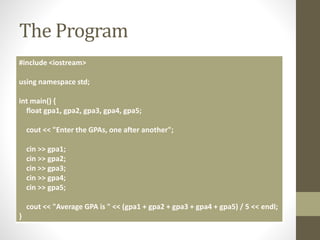
#include <iostream>
using namespace std;
int main() {
float gpa1, gpa2, gpa3, gpa4, gpa5;
cout << "Enter the GPAs, one after another";
cin >> gpa1;
cin >> gpa2;
cin >> gpa3;
cin >> gpa4;
cin >> gpa5;
cout << "Average GPA is " << (gpa1 + gpa2 + gpa3 + gpa4 + gpa5) / 5 << endl;
}
The Array
• We resolve this by making use of a data structure called an
array.
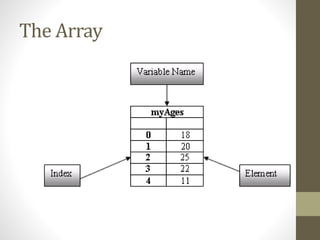
• It’s one variable, but contains multiple compartments.
• These compartments are called elements.
• We tell the compiler how many elements the array should
have.
• We then set the value of individual elements.
• And query the value of compartments similarly.
• Each element has a unique numerical index.
• We use that to reference the specific compartment.
Declaring an Array
• Arrays have special syntax that go with them.
• We indicate their size with square brackets.
• We need to give the type, name, and size of the array.
• float my_ages[5];
• Creates an array of five floats.
• Arrays start indexing from 0.
• There’s a reason for this, but you don’t need to worry about it.
The Array
Halfway Fixed Program
#include <iostream>
using namespace std;
int main() {
float my_gpas[5];
cout << "Enter the GPAs, one after another”;
cin >> my_gpas[0];
cin >> my_gpas[1];
cin >> my_gpas[2];
cin >> my_gpas[3];
cin >> my_gpas[4];
cout << "Average GPA is " << (my_gpas[0] + my_gpas[1] + my_gpas[2] +
my_gpas[3] + my_gpas[4]) / 5 << endl;
}
The Next Step
• So far, so simple.
• But why?
• The real power of arrays comes with how easily they marry
themselves to other programming structures.
• For example, the for loop.
• All we need to manipulate is the index value.
• So we can use a for loop to do all the heavy lifting.
Fixed Program
#include <iostream>
using namespace std;
int main() {
float my_gpas[5];
float average = 0;
cout << "Enter the GPAs, one after another";
for (int i = 0; i < 5; i++) {
cin >> my_gpas[i];
}
for (int i = 0; i < 5; i++) {
average = average + my_gpas[i];
}
average = average / 5;
cout << "Average GPA is " << average << endl;
}
Notes About Arrays
• Arrays are homogeneous
• They contain only one type of variable.
• Arrays are a single variable.
• Just with multiple compartments.
• Arrays cannot be resized
• You’re stuck with the size you originally get them.
• You can’t make one array equal another.
• You need to handle that yourself.
• C++ won’t stop you accessing elements greater than the size
of the array.
• Weird stuff happens when you do.
The Power of Arrays
• Arrays open up new kinds of programming that we could not
previously reasonably achieve.
• It represents a major plateau in your programming
knowledge.
• Things that were not previously possible have become so.
• Let’s look at some tasks that have become trivial with the use
of arrays.
Example Program
• Find the highest number in a list of numbers.
#include <iostream>
using namespace std;
int main() {
int numbers[] = {10,20,30,25,15,55,65,85,15,5};
int highest = -1;
for (int i = 0; i < 10; i++) {
if (numbers[i] > highest) {
highest = numbers[i];
}
}
cout << "Highest Number is " << highest << endl;
}
2D Arrays
• If the arrays we have seen so far are a table of data, we can
also create a grid.
• Using two dimensional arrays.
• The principle is identical
• We just provide two sets of square brackets to indicate
dimensionality.
• Grids are immensely useful for certain kinds of programming
tasks.
2D Arrays
• Accessing compartments is done with a pair of indexes.
• Think of it as row and column.
• cout << my_array[0][2];
• my_array[0][2] = 1;
Declaring Arrays
• We saw a shorthand array declaration syntax earlier:
• int numbers[3] = {1,2,3}
• A similar shorthand works for 2D arrays
int grid[10][10] =
{
{0,0,0,0,0,0,0,0,0,0},
{0,1,1,1,0,0,1,1,1,0},
{0,1,0,1,0,0,1,0,1,0},
{0,1,1,1,0,0,1,1,1,0},
{0,0,0,0,0,0,0,0,0,0},
{0,1,0,0,0,0,0,0,1,0},
{0,0,1,0,0,0,0,1,0,0},
{0,0,0,1,1,1,1,0,0,0},
{0,0,0,0,0,0,0,0,0,0},
};
2D Arrays
• When declaring 2D arrays in this way, it is perhaps easier to
think of them as an array of arrays.
• Or perhaps not!
• There are many powerful tools that come to bear when we
have 2D arrays available to us.
• We’ll talk about one of these in a later tutorial exercise.
One Final Note About Arrays
• At the moment we are hard-coding magic numbers into our
for loops.
• This isn’t good.
• Instead, we should set a value somewhere and make use of
that everywhere.
• We can use the preprocessor to do this.
• Remember that from the first lecture?
• In addition to the #include we have already seen, we can use
#define
The Preprocessor
• The preprocessor is really just a fancy search and replace.
• It runs over your code before the compiler gets to it.
• We set a define like so:
• #define SIZE 5
• When you set a define, the preprocessor will replace any
instance of term 1 (SIZE) with term 2 (5)
Defines
#include <iostream>
#define SIZE 5
using namespace std;
int main() {
float my_gpas[SIZE];
float average = 0;
cout << "Enter the GPAs, one after another";
for (int i = 0; i < SIZE; i++) {
cin >> my_gpas[i];
}
for (int i = 0; i < SIZE; i++) {
average = average + my_gpas[i];
}
average = average / SIZE;
cout << "Average GPA is " << average << endl;
}
Defines
• To change the size of an array we work with, we just change
the define.
• We can later put the define in a header file if we need to
• Making it available to other programs.
• It’s clear from reading the code when a define has been used.
• By convention (although not enforced by the compiler), a define
is in all caps.
Summary
• Arrays represent the next plateau of programming ability.
• You can do things you weren’t able to do before now.
• They come in various levels of dimensionality.
• 1 and 2 dimensions are most common.
• Making use of the preprocessor can aid in maintainability of
your program.
• Change a define, update the entire program.

CPP05 - Arrays

  • 1.
  • 2.
    Introduction • Variables areuseful. • If you like that sort of thing. • But they have a serious limitation. • They only store one piece of information. • This represents a considerable barrier to building expandable programs. • We’ll SMASH that barrier today! • Aw Jeah!
  • 3.
    The Problem ofSingle Variables • Imagine a program that will store the GPA of five students. • It’s simple, we can do that already. • We saw the problem with this a little when we talked about for loops. • It’s a lot of repetition. • We got around it with our average example by not storing the individual numbers. • Just the totals.
  • 4.
    The Problem ofSingle Variables • In this program, we need to store the GPAs. • How can we do that? • We need a separate variable for each GPA. • This means we can’t even use a loop. • Because we can’t have variable variable names. • At the moment, we have no alternative except for copy and paste. • And our programs has all the usual problems that comes with that.
  • 5.
    The Program #include <iostream> usingnamespace std; int main() { float gpa1, gpa2, gpa3, gpa4, gpa5; cout << "Enter the GPAs, one after another"; cin >> gpa1; cin >> gpa2; cin >> gpa3; cin >> gpa4; cin >> gpa5; cout << "Average GPA is " << (gpa1 + gpa2 + gpa3 + gpa4 + gpa5) / 5 << endl; }
  • 6.
    The Array • Weresolve this by making use of a data structure called an array. • It’s one variable, but contains multiple compartments. • These compartments are called elements. • We tell the compiler how many elements the array should have. • We then set the value of individual elements. • And query the value of compartments similarly. • Each element has a unique numerical index. • We use that to reference the specific compartment.
  • 7.
    Declaring an Array •Arrays have special syntax that go with them. • We indicate their size with square brackets. • We need to give the type, name, and size of the array. • float my_ages[5]; • Creates an array of five floats. • Arrays start indexing from 0. • There’s a reason for this, but you don’t need to worry about it.
  • 8.
  • 9.
    Halfway Fixed Program #include<iostream> using namespace std; int main() { float my_gpas[5]; cout << "Enter the GPAs, one after another”; cin >> my_gpas[0]; cin >> my_gpas[1]; cin >> my_gpas[2]; cin >> my_gpas[3]; cin >> my_gpas[4]; cout << "Average GPA is " << (my_gpas[0] + my_gpas[1] + my_gpas[2] + my_gpas[3] + my_gpas[4]) / 5 << endl; }
  • 10.
    The Next Step •So far, so simple. • But why? • The real power of arrays comes with how easily they marry themselves to other programming structures. • For example, the for loop. • All we need to manipulate is the index value. • So we can use a for loop to do all the heavy lifting.
  • 11.
    Fixed Program #include <iostream> usingnamespace std; int main() { float my_gpas[5]; float average = 0; cout << "Enter the GPAs, one after another"; for (int i = 0; i < 5; i++) { cin >> my_gpas[i]; } for (int i = 0; i < 5; i++) { average = average + my_gpas[i]; } average = average / 5; cout << "Average GPA is " << average << endl; }
  • 12.
    Notes About Arrays •Arrays are homogeneous • They contain only one type of variable. • Arrays are a single variable. • Just with multiple compartments. • Arrays cannot be resized • You’re stuck with the size you originally get them. • You can’t make one array equal another. • You need to handle that yourself. • C++ won’t stop you accessing elements greater than the size of the array. • Weird stuff happens when you do.
  • 13.
    The Power ofArrays • Arrays open up new kinds of programming that we could not previously reasonably achieve. • It represents a major plateau in your programming knowledge. • Things that were not previously possible have become so. • Let’s look at some tasks that have become trivial with the use of arrays.
  • 14.
    Example Program • Findthe highest number in a list of numbers. #include <iostream> using namespace std; int main() { int numbers[] = {10,20,30,25,15,55,65,85,15,5}; int highest = -1; for (int i = 0; i < 10; i++) { if (numbers[i] > highest) { highest = numbers[i]; } } cout << "Highest Number is " << highest << endl; }
  • 15.
    2D Arrays • Ifthe arrays we have seen so far are a table of data, we can also create a grid. • Using two dimensional arrays. • The principle is identical • We just provide two sets of square brackets to indicate dimensionality. • Grids are immensely useful for certain kinds of programming tasks.
  • 16.
    2D Arrays • Accessingcompartments is done with a pair of indexes. • Think of it as row and column. • cout << my_array[0][2]; • my_array[0][2] = 1;
  • 17.
    Declaring Arrays • Wesaw a shorthand array declaration syntax earlier: • int numbers[3] = {1,2,3} • A similar shorthand works for 2D arrays int grid[10][10] = { {0,0,0,0,0,0,0,0,0,0}, {0,1,1,1,0,0,1,1,1,0}, {0,1,0,1,0,0,1,0,1,0}, {0,1,1,1,0,0,1,1,1,0}, {0,0,0,0,0,0,0,0,0,0}, {0,1,0,0,0,0,0,0,1,0}, {0,0,1,0,0,0,0,1,0,0}, {0,0,0,1,1,1,1,0,0,0}, {0,0,0,0,0,0,0,0,0,0}, };
  • 18.
    2D Arrays • Whendeclaring 2D arrays in this way, it is perhaps easier to think of them as an array of arrays. • Or perhaps not! • There are many powerful tools that come to bear when we have 2D arrays available to us. • We’ll talk about one of these in a later tutorial exercise.
  • 19.
    One Final NoteAbout Arrays • At the moment we are hard-coding magic numbers into our for loops. • This isn’t good. • Instead, we should set a value somewhere and make use of that everywhere. • We can use the preprocessor to do this. • Remember that from the first lecture? • In addition to the #include we have already seen, we can use #define
  • 20.
    The Preprocessor • Thepreprocessor is really just a fancy search and replace. • It runs over your code before the compiler gets to it. • We set a define like so: • #define SIZE 5 • When you set a define, the preprocessor will replace any instance of term 1 (SIZE) with term 2 (5)
  • 21.
    Defines #include <iostream> #define SIZE5 using namespace std; int main() { float my_gpas[SIZE]; float average = 0; cout << "Enter the GPAs, one after another"; for (int i = 0; i < SIZE; i++) { cin >> my_gpas[i]; } for (int i = 0; i < SIZE; i++) { average = average + my_gpas[i]; } average = average / SIZE; cout << "Average GPA is " << average << endl; }
  • 22.
    Defines • To changethe size of an array we work with, we just change the define. • We can later put the define in a header file if we need to • Making it available to other programs. • It’s clear from reading the code when a define has been used. • By convention (although not enforced by the compiler), a define is in all caps.
  • 23.
    Summary • Arrays representthe next plateau of programming ability. • You can do things you weren’t able to do before now. • They come in various levels of dimensionality. • 1 and 2 dimensions are most common. • Making use of the preprocessor can aid in maintainability of your program. • Change a define, update the entire program.