Chapter 2
Memory and process
  Management

 PART 2: PROCESS
MANAGEMENT IN OS

 DEPARTMENT OF IT & COMMUNICATION
 POLITEKNIK TUANKU SYED SIRAJUDDIN
Learning Outcome

 By the end of this chapter, student will be able to:
1) Explain role of control blocks and interrupt in the
   dispatching process
2) Describe various types of scheduling processes
3) Explain different types of scheduling algorithms
4) Explain how queuing and the scheduler work together
5) Differences between multiprogramming and time
   sharing
6) Explain how to handle deadlock
Process

Process – a program in execution.
A process – need resources (CPU time, files, I/O
 devices) to accomplish task.
process execution must progress in sequential
 fashion
Process include:
1)Program counter
2)Process Stack – containing temp data (subroutine
parameters, return addresses, temp variables)
3)Data section – containing global variables.
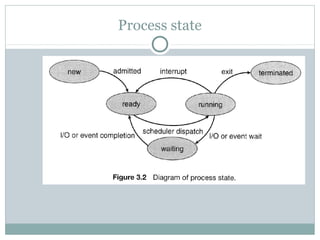
Process state
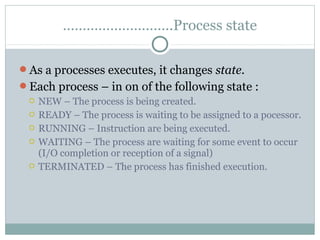
……………………….Process state

As a processes executes, it changes state.
Each process – in on of the following state :
  NEW – The process is being created.
  READY – The process is waiting to be assigned to a pocessor.
  RUNNING – Instruction are being executed.
  WAITING – The process are waiting for some event to occur
   (I/O completion or reception of a signal)
  TERMINATED – The process has finished execution.
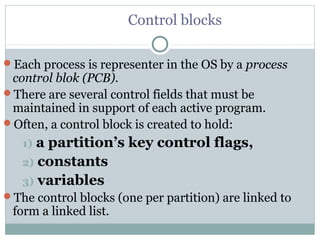
Control blocks

Each process is representer in the OS by a process
 control blok (PCB).
There are several control fields that must be
 maintained in support of each active program.
Often, a control block is created to hold:
   1) a partition’s key control flags,
   2) constants
   3) variables
The control blocks (one per partition) are linked to
 form a linked list.
………………………..Control blocks

The dispatcher typically determines which program is
 to start by following the chain of pointers from control
 block to control block.
A given control block’s relative position in the linked
 list might be determined by its priority or computed
 dynamically, perhaps taking into account such factors
 as:
     1) program  size,
     2) time in memory,
     3) peripheral device requirements
     4) andother measures of the program’s impact on
       system resources.
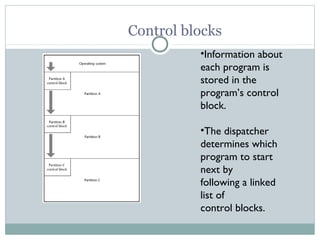
Control blocks
          •Information about
          each program is
          stored in the
          program’s control
          block.
          •The dispatcher
          determines which
          program to start
          next by
          following a linked
          list of
          control blocks.
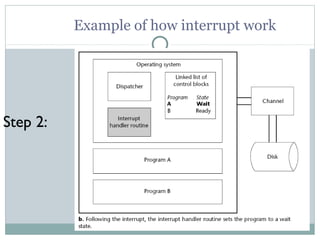
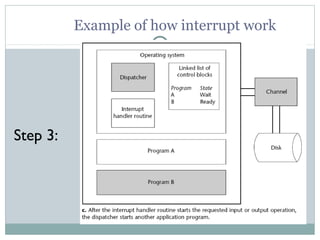
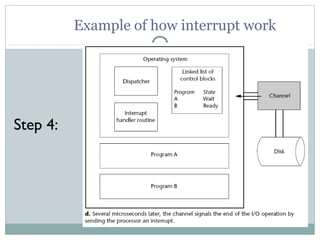
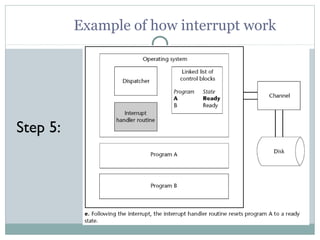
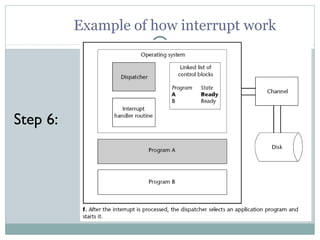
Interrupts

An interrupt is an electronic signal.
 Hardware senses the signal, saves key control
 information for the currently executing program, and
 starts the operating system’s interrupt handler
 routine. At that instant, the interrupt ends.
The operating system then handles the interrupt.
Subsequently, after the interrupt is processed, the
 dispatcher starts an application program.
Eventually, the program that was executing at the time
 of the interrupt resumes processing.
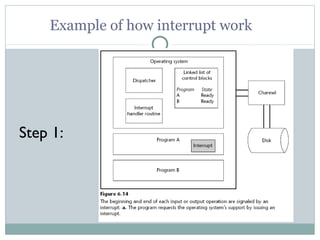
Example of how interrupt work


Step 1:
Example of how interrupt work


Step 2:
Example of how interrupt work


Step 3:
Example of how interrupt work


Step 4:
Example of how interrupt work


Step 5:
Example of how interrupt work


Step 6:
CPU SCHEDULING

Basic Conceptts :
Objective of multiprogramming  to have some
process running at all time, to maximize CPU
utilization.
When one process in wait state  OS will take the
CPU away from that process and gives the CPU to
another one. This pattern continues…
Uniprecess ???  Only ONE running process. If
more than one ???
……………………………….CPU Scheduler
CPU scheduling decisions may take place when
a process:
1. Switches from running to waiting state
2. Switches from running to ready state
3. Switches from waiting to ready
4. Terminates
 Scheduling under 1 and 4 is nonpreemptive
All other scheduling is preemptive
………………………………...CPU Scheduler
 Preemptive scheduling policy interrupts processing of a
   job and transfers the CPU to another job.
- The process may be pre-empted by the operating system
   when:
1) a new process arrives (perhaps at a higher priority), or
2) an interrupt or signal occurs, or
3) a (frequent) clock interrupt occurs.

 Non-preemptive scheduling policy functions without
   external interrupts.
- once a process is executing, it will continue to execute until
 it terminates, or by switching o the waiting state.
…………………………………………CPU Scheduling

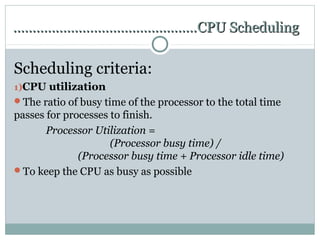
Scheduling criteria:
1)CPU utilization
The ratio of busy time of the processor to the total time
passes for processes to finish.
       Processor Utilization =
                     (Processor busy time) /
              (Processor busy time + Processor idle time)
To keep the CPU as busy as possible
…………………………………………CPU Scheduling

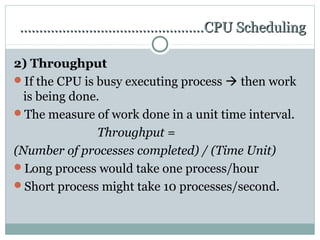
2) Throughput
If the CPU is busy executing process  then work
  is being done.
The measure of work done in a unit time interval.
               Throughput =
(Number of processes completed) / (Time Unit)
Long process would take one process/hour
Short process might take 10 processes/second.
…………………………………………….CPU Scheduling
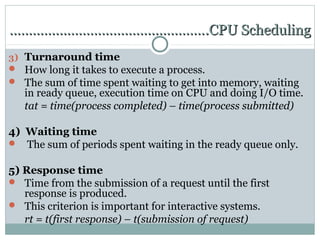
3) Turnaround time
 How long it takes to execute a process.
 The sum of time spent waiting to get into memory, waiting
   in ready queue, execution time on CPU and doing I/O time.
   tat = time(process completed) – time(process submitted)

4) Waiting time
 The sum of periods spent waiting in the ready queue only.


5) Response time
 Time from the submission of a request until the first
   response is produced.
 This criterion is important for interactive systems.
   rt = t(first response) – t(submission of request)
………………………………………….CPU Scheduling

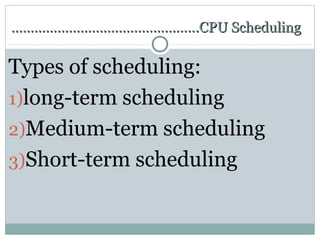
Types of scheduling:
1)long-term scheduling
2)Medium-term scheduling
3)Short-term scheduling
Long-term scheduling
Determine which programs admitted to system for
 processing - controls degree of multiprogramming
 Once admitted, program becomes a process, either:
   – added to queue for short-term scheduler
   – swapped out (to disk), so added to queue for medium-term
    scheduler
Medium –term scheduling

Part of swapping function between main
 memory and disk
   - based on how many processes the OS wants available at
     any one time
   - must consider memory management if no virtual memory
     (VM), so look at memory requirements of swapped out
     processes
Short –term scheduling (dispatcher)

Executes most frequently, to decide which
 process to execute next
   – Invoked whenever event occurs that interrupts current
    process or provides an opportunity to preempt current
    one in favor of another
   – Events: clock interrupt, I/O interrupt, OS call, signal
Scheduling Algorithm

CPU scheduling deals with the
 problem of deciding which of
   the processes in the ready
  queue is to be allocated the
             CPU.
…………………………………….Scheduling Algorithm

Types of scheduling algorithm:
Basic strategies
1)First In First Out (FIFO) / First –Come, First-Served.
2)Shortest Job First (SJF)
3)Shortest Remaining Time First (SRTF)
4)Round Robin (RR)
5)Priority


Combined strategies
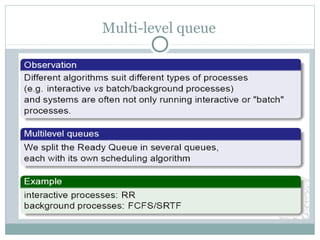
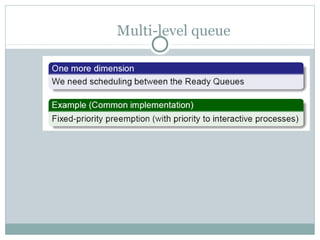
1)Multi-level queue
2)Multi-level feedback queue
First Come First Serve (FIFO)
 Non-preemptive.
 Handles jobs according to their arrival time -- the earlier they
  arrive, the sooner they’re served.
 The process the request the CPU first is allocated the CPU
  first.
 Simplest algorithm to implement -- uses a FIFO queue.
 Good for batch systems; not so good for interactive ones.
 Turnaround time is unpredictable.
Shortest Job First (SJF)

 Non-preemptive.
 Handles jobs based on length of their CPU cycle time.
   Use lengths to schedule process with shortest time.
 Optimal – gives minimum average waiting time for a given
  set of processes.
   optimal only when all of jobs are available at same time and
    the CPU estimates are available and accurate.
 Doesn’t work in interactive systems because users don’t
  estimate in advance CPU time required to run their jobs.
Shortest Remaining Time First (SRTF)

 Preemptive version of the SJF algorithm.
 Processor allocated to job closest to completion.
   This job can be preempted if a newer job in READY queue
    has a “time to completion” that's shorter.
 Can’t be implemented in interactive system -- requires
  advance knowledge of CPU time required to finish each job.
 SRT involves more overhead than SJN.
   OS monitors CPU time for all jobs in READY queue and
    performs “context switching”.
Round Robin (RR)
 FCFS with Preemption.
 Used extensively in interactive systems because it’s easy to
  implement.
 Isn’t based on job characteristics but on a predetermined slice
  of time that’s given to each job.
   Ensures CPU is equally shared among all active processes
    and isn’t monopolized by any one job.
 Time slice is called a time quantum
   size crucial to system performance (100 ms to 1-2 secs)
Priority scheduling
 Non-preemptive.
 Gives preferential treatment to important jobs.
    Programs with highest priority are processed first.
   Aren’t interrupted until CPU cycles are completed or a
     natural wait occurs.
 If 2+ jobs with equal priority are in READY queue, processor
  is allocated to one that arrived first (first come first served
  within priority).
 Many different methods of assigning priorities by system
  administrator or by Processor Manager.
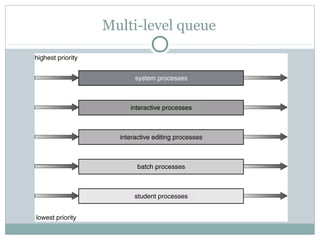
Multi-level queue
Multi-level queue
Multi-level queue
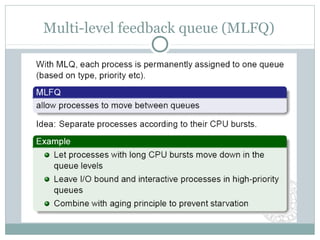
Multi-level feedback queue (MLFQ)
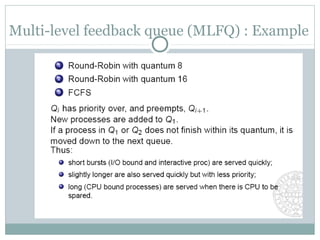
Multi-level feedback queue (MLFQ) : Example
Queuing and scheduler

As one program finishes processing and space
 becomes available, which program is loaded
 into memory next?
This decision typically involves two separate
 modules, a queuing routine and a
 scheduler
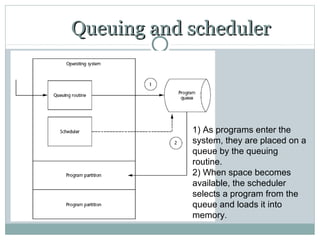
Queuing and scheduler


            1) As programs enter the
            system, they are placed on a
            queue by the queuing
            routine.
            2) When space becomes
            available, the scheduler
            selects a program from the
            queue and loads it into
            memory.
Multiprogramming and time sharing

 A timesharing system allows multiple users to interact with a
  computer at the same time
 Multiprogramming allowed multiple processes to be active at
  once, which gave rise to the ability for programmers to
  interact with the computer system directly, while still sharing
  its resources
 In a timesharing system, each user has his or her own virtual
  machine, in which all system resources are (in effect)
  available for use

Chapter 2 (Part 2)

  • 1.
    Chapter 2 Memory andprocess Management PART 2: PROCESS MANAGEMENT IN OS DEPARTMENT OF IT & COMMUNICATION POLITEKNIK TUANKU SYED SIRAJUDDIN
  • 2.
    Learning Outcome  Bythe end of this chapter, student will be able to: 1) Explain role of control blocks and interrupt in the dispatching process 2) Describe various types of scheduling processes 3) Explain different types of scheduling algorithms 4) Explain how queuing and the scheduler work together 5) Differences between multiprogramming and time sharing 6) Explain how to handle deadlock
  • 3.
    Process Process – aprogram in execution. A process – need resources (CPU time, files, I/O devices) to accomplish task. process execution must progress in sequential fashion
  • 4.
    Process include: 1)Program counter 2)ProcessStack – containing temp data (subroutine parameters, return addresses, temp variables) 3)Data section – containing global variables.
  • 5.
  • 6.
    ……………………….Process state As aprocesses executes, it changes state. Each process – in on of the following state :  NEW – The process is being created.  READY – The process is waiting to be assigned to a pocessor.  RUNNING – Instruction are being executed.  WAITING – The process are waiting for some event to occur (I/O completion or reception of a signal)  TERMINATED – The process has finished execution.
  • 7.
    Control blocks Each processis representer in the OS by a process control blok (PCB). There are several control fields that must be maintained in support of each active program. Often, a control block is created to hold: 1) a partition’s key control flags, 2) constants 3) variables The control blocks (one per partition) are linked to form a linked list.
  • 8.
    ………………………..Control blocks The dispatchertypically determines which program is to start by following the chain of pointers from control block to control block. A given control block’s relative position in the linked list might be determined by its priority or computed dynamically, perhaps taking into account such factors as: 1) program size, 2) time in memory, 3) peripheral device requirements 4) andother measures of the program’s impact on system resources.
  • 9.
    Control blocks •Information about each program is stored in the program’s control block. •The dispatcher determines which program to start next by following a linked list of control blocks.
  • 10.
    Interrupts An interrupt isan electronic signal.  Hardware senses the signal, saves key control information for the currently executing program, and starts the operating system’s interrupt handler routine. At that instant, the interrupt ends. The operating system then handles the interrupt. Subsequently, after the interrupt is processed, the dispatcher starts an application program. Eventually, the program that was executing at the time of the interrupt resumes processing.
  • 11.
    Example of howinterrupt work Step 1:
  • 12.
    Example of howinterrupt work Step 2:
  • 13.
    Example of howinterrupt work Step 3:
  • 14.
    Example of howinterrupt work Step 4:
  • 15.
    Example of howinterrupt work Step 5:
  • 16.
    Example of howinterrupt work Step 6:
  • 17.
    CPU SCHEDULING Basic Conceptts: Objective of multiprogramming  to have some process running at all time, to maximize CPU utilization. When one process in wait state  OS will take the CPU away from that process and gives the CPU to another one. This pattern continues… Uniprecess ???  Only ONE running process. If more than one ???
  • 18.
    ……………………………….CPU Scheduler CPU schedulingdecisions may take place when a process: 1. Switches from running to waiting state 2. Switches from running to ready state 3. Switches from waiting to ready 4. Terminates  Scheduling under 1 and 4 is nonpreemptive All other scheduling is preemptive
  • 19.
    ………………………………...CPU Scheduler  Preemptivescheduling policy interrupts processing of a job and transfers the CPU to another job. - The process may be pre-empted by the operating system when: 1) a new process arrives (perhaps at a higher priority), or 2) an interrupt or signal occurs, or 3) a (frequent) clock interrupt occurs.  Non-preemptive scheduling policy functions without external interrupts. - once a process is executing, it will continue to execute until it terminates, or by switching o the waiting state.
  • 20.
    …………………………………………CPU Scheduling Scheduling criteria: 1)CPUutilization The ratio of busy time of the processor to the total time passes for processes to finish. Processor Utilization = (Processor busy time) / (Processor busy time + Processor idle time) To keep the CPU as busy as possible
  • 21.
    …………………………………………CPU Scheduling 2) Throughput Ifthe CPU is busy executing process  then work is being done. The measure of work done in a unit time interval. Throughput = (Number of processes completed) / (Time Unit) Long process would take one process/hour Short process might take 10 processes/second.
  • 22.
    …………………………………………….CPU Scheduling 3) Turnaroundtime  How long it takes to execute a process.  The sum of time spent waiting to get into memory, waiting in ready queue, execution time on CPU and doing I/O time. tat = time(process completed) – time(process submitted) 4) Waiting time  The sum of periods spent waiting in the ready queue only. 5) Response time  Time from the submission of a request until the first response is produced.  This criterion is important for interactive systems. rt = t(first response) – t(submission of request)
  • 23.
    ………………………………………….CPU Scheduling Types ofscheduling: 1)long-term scheduling 2)Medium-term scheduling 3)Short-term scheduling
  • 24.
    Long-term scheduling Determine whichprograms admitted to system for processing - controls degree of multiprogramming  Once admitted, program becomes a process, either: – added to queue for short-term scheduler – swapped out (to disk), so added to queue for medium-term scheduler
  • 25.
    Medium –term scheduling Partof swapping function between main memory and disk - based on how many processes the OS wants available at any one time - must consider memory management if no virtual memory (VM), so look at memory requirements of swapped out processes
  • 26.
    Short –term scheduling(dispatcher) Executes most frequently, to decide which process to execute next – Invoked whenever event occurs that interrupts current process or provides an opportunity to preempt current one in favor of another – Events: clock interrupt, I/O interrupt, OS call, signal
  • 27.
    Scheduling Algorithm CPU schedulingdeals with the problem of deciding which of the processes in the ready queue is to be allocated the CPU.
  • 28.
    …………………………………….Scheduling Algorithm Types ofscheduling algorithm: Basic strategies 1)First In First Out (FIFO) / First –Come, First-Served. 2)Shortest Job First (SJF) 3)Shortest Remaining Time First (SRTF) 4)Round Robin (RR) 5)Priority Combined strategies 1)Multi-level queue 2)Multi-level feedback queue
  • 29.
    First Come FirstServe (FIFO)  Non-preemptive.  Handles jobs according to their arrival time -- the earlier they arrive, the sooner they’re served.  The process the request the CPU first is allocated the CPU first.  Simplest algorithm to implement -- uses a FIFO queue.  Good for batch systems; not so good for interactive ones.  Turnaround time is unpredictable.
  • 30.
    Shortest Job First(SJF)  Non-preemptive.  Handles jobs based on length of their CPU cycle time.  Use lengths to schedule process with shortest time.  Optimal – gives minimum average waiting time for a given set of processes.  optimal only when all of jobs are available at same time and the CPU estimates are available and accurate.  Doesn’t work in interactive systems because users don’t estimate in advance CPU time required to run their jobs.
  • 31.
    Shortest Remaining TimeFirst (SRTF)  Preemptive version of the SJF algorithm.  Processor allocated to job closest to completion.  This job can be preempted if a newer job in READY queue has a “time to completion” that's shorter.  Can’t be implemented in interactive system -- requires advance knowledge of CPU time required to finish each job.  SRT involves more overhead than SJN.  OS monitors CPU time for all jobs in READY queue and performs “context switching”.
  • 32.
    Round Robin (RR) FCFS with Preemption.  Used extensively in interactive systems because it’s easy to implement.  Isn’t based on job characteristics but on a predetermined slice of time that’s given to each job.  Ensures CPU is equally shared among all active processes and isn’t monopolized by any one job.  Time slice is called a time quantum  size crucial to system performance (100 ms to 1-2 secs)
  • 33.
    Priority scheduling  Non-preemptive. Gives preferential treatment to important jobs.  Programs with highest priority are processed first.  Aren’t interrupted until CPU cycles are completed or a natural wait occurs.  If 2+ jobs with equal priority are in READY queue, processor is allocated to one that arrived first (first come first served within priority).  Many different methods of assigning priorities by system administrator or by Processor Manager.
  • 34.
  • 35.
  • 36.
  • 37.
  • 38.
  • 39.
    Queuing and scheduler Asone program finishes processing and space becomes available, which program is loaded into memory next? This decision typically involves two separate modules, a queuing routine and a scheduler
  • 40.
    Queuing and scheduler 1) As programs enter the system, they are placed on a queue by the queuing routine. 2) When space becomes available, the scheduler selects a program from the queue and loads it into memory.
  • 41.
    Multiprogramming and timesharing  A timesharing system allows multiple users to interact with a computer at the same time  Multiprogramming allowed multiple processes to be active at once, which gave rise to the ability for programmers to interact with the computer system directly, while still sharing its resources  In a timesharing system, each user has his or her own virtual machine, in which all system resources are (in effect) available for use