F2037 PROGRAMMING FUNDAMENTAL WITH C++


    LAB 3: INPUT/OUTPUT

Objectives

By the end of this lab, students should be able to :
• Describe the structure of input-output statement
• Write a program that use the input and output
    statements

Theory/ Topics

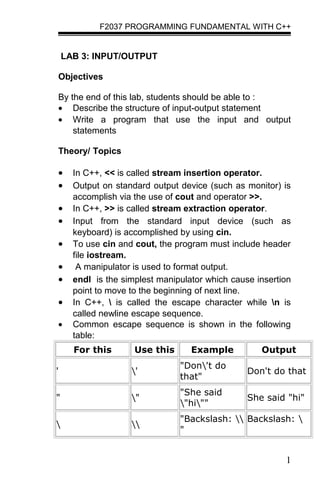
•     In C++, << is called stream insertion operator.
•     Output on standard output device (such as monitor) is
      accomplish via the use of cout and operator >>.
•     In C++, >> is called stream extraction operator.
•     Input from the standard input device (such as
      keyboard) is accomplished by using cin.
•     To use cin and cout, the program must include header
      file iostream.
•      A manipulator is used to format output.
•     endl is the simplest manipulator which cause insertion
      point to move to the beginning of next line.
•     In C++,  is called the escape character while n is
      called newline escape sequence.
•     Common escape sequence is shown in the following
      table:
      For this       Use this      Example          Output
                                "Don't do
'                   '                           Don't do that
                                that"
                                "She said
"                   "                           She said "hi"
                                "hi""
                                "Backslash:  Backslash: 
                   
                                "


                                                          1
F2037 PROGRAMMING FUNDAMENTAL WITH C++


                                                1
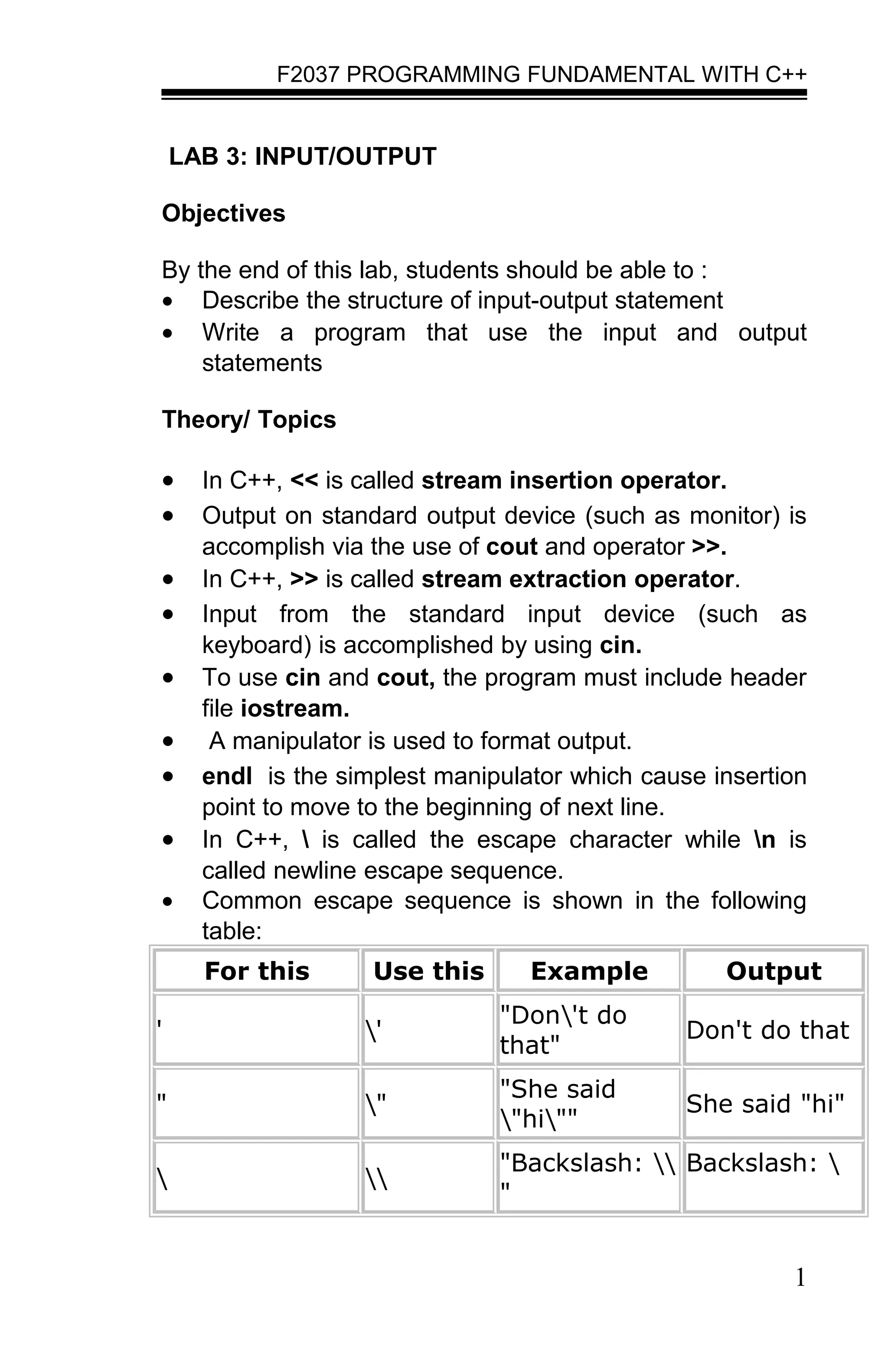
[newline]          n          "1n2"
                                                2
[horizontal tab] t            "1t2"           12

    •   Manipulators allowed us to format the output in a
        desired way.
    •   To use manipulator we need to include header file
        iomanip.
    •   The following table is showing manipulators that is
        commonly used:
          Syntax                         Purpose
setprecision(n)            Set decimal precision
setfill(c)                 Setfill character
setw(n)                    Set field width


Activity 3A

Procedure :

Step 1: Type the programs given below
Step 2: Compile and run the program. Write the output.
Step 3: Save the program as lab3A.cpp.

The following program illustrate input name from user and
the usage of usage of header file string.h

#include <iostream>
#include <string >

using namespace std;

void main()
   {

                                                         2
F2037 PROGRAMMING FUNDAMENTAL WITH C++


   string name;
   cout << "Please enter your name : ";
   cin >> name;
   cout << "Your name have " <<
   name.size() << "
   characters.n";
   }

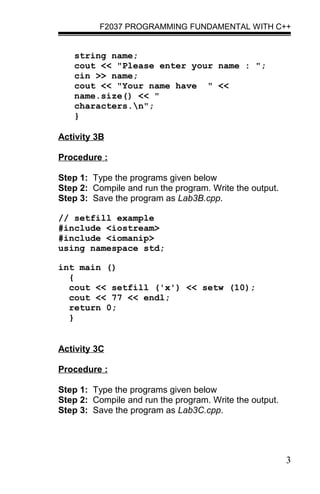
Activity 3B

Procedure :

Step 1: Type the programs given below
Step 2: Compile and run the program. Write the output.
Step 3: Save the program as Lab3B.cpp.

// setfill example
#include <iostream>
#include <iomanip>
using namespace std;

int main ()
  {
  cout << setfill ('x') << setw (10);
  cout << 77 << endl;
  return 0;
  }


Activity 3C

Procedure :

Step 1: Type the programs given below
Step 2: Compile and run the program. Write the output.
Step 3: Save the program as Lab3C.cpp.


                                                         3
F2037 PROGRAMMING FUNDAMENTAL WITH C++


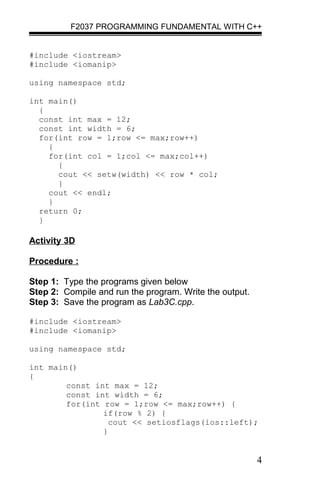
#include <iostream>
#include <iomanip>

using namespace std;

int main()
  {
  const int max = 12;
  const int width = 6;
  for(int row = 1;row <= max;row++)
    {
    for(int col = 1;col <= max;col++)
      {
      cout << setw(width) << row * col;
      }
    cout << endl;
    }
  return 0;
  }

Activity 3D

Procedure :

Step 1: Type the programs given below
Step 2: Compile and run the program. Write the output.
Step 3: Save the program as Lab3C.cpp.

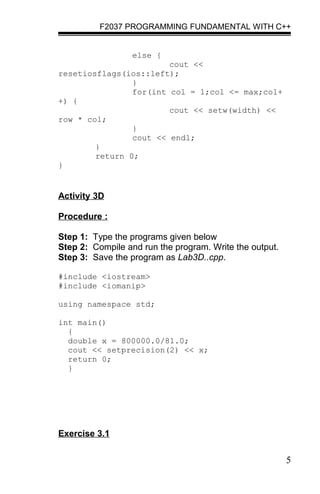
#include <iostream>
#include <iomanip>

using namespace std;

int main()
{
        const int max = 12;
        const int width = 6;
        for(int row = 1;row <= max;row++) {
                if(row % 2) {
                  cout << setiosflags(ios::left);
                }


                                                         4
F2037 PROGRAMMING FUNDAMENTAL WITH C++


                  else {
                        cout <<
resetiosflags(ios::left);
                }
                for(int col = 1;col <= max;col+
+) {
                        cout << setw(width) <<
row * col;
                }
                cout << endl;
        }
        return 0;
}


Activity 3D

Procedure :

Step 1: Type the programs given below
Step 2: Compile and run the program. Write the output.
Step 3: Save the program as Lab3D..cpp.

#include <iostream>
#include <iomanip>

using namespace std;

int main()
  {
  double x = 800000.0/81.0;
  cout << setprecision(2) << x;
  return 0;
  }


Exercise 3.1


                                                         5
F2037 PROGRAMMING FUNDAMENTAL WITH C++


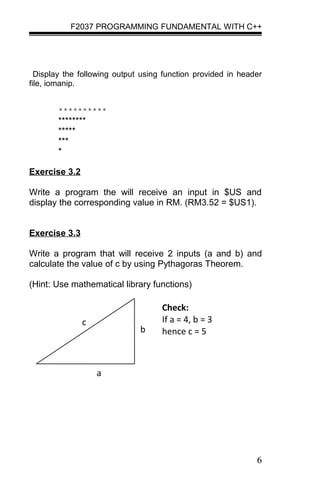
  Display the following output using function provided in header
file, iomanip.


        **********
        ********
        *****
        ***
        *

Exercise 3.2

Write a program the will receive an input in $US and
display the corresponding value in RM. (RM3.52 = $US1).


Exercise 3.3

Write a program that will receive 2 inputs (a and b) and
calculate the value of c by using Pythagoras Theorem.

(Hint: Use mathematical library functions)

                                    Check:
               c                    If a = 4, b = 3
                              b     hence c = 5


                   a


                                                              6

Labsheet_3

  • 1.
    F2037 PROGRAMMING FUNDAMENTALWITH C++ LAB 3: INPUT/OUTPUT Objectives By the end of this lab, students should be able to : • Describe the structure of input-output statement • Write a program that use the input and output statements Theory/ Topics • In C++, << is called stream insertion operator. • Output on standard output device (such as monitor) is accomplish via the use of cout and operator >>. • In C++, >> is called stream extraction operator. • Input from the standard input device (such as keyboard) is accomplished by using cin. • To use cin and cout, the program must include header file iostream. • A manipulator is used to format output. • endl is the simplest manipulator which cause insertion point to move to the beginning of next line. • In C++, is called the escape character while n is called newline escape sequence. • Common escape sequence is shown in the following table: For this Use this Example Output "Don't do ' ' Don't do that that" "She said " " She said "hi" "hi"" "Backslash: Backslash: " 1
  • 2.
    F2037 PROGRAMMING FUNDAMENTALWITH C++ 1 [newline] n "1n2" 2 [horizontal tab] t "1t2" 12 • Manipulators allowed us to format the output in a desired way. • To use manipulator we need to include header file iomanip. • The following table is showing manipulators that is commonly used: Syntax Purpose setprecision(n) Set decimal precision setfill(c) Setfill character setw(n) Set field width Activity 3A Procedure : Step 1: Type the programs given below Step 2: Compile and run the program. Write the output. Step 3: Save the program as lab3A.cpp. The following program illustrate input name from user and the usage of usage of header file string.h #include <iostream> #include <string > using namespace std; void main() { 2
  • 3.
    F2037 PROGRAMMING FUNDAMENTALWITH C++ string name; cout << "Please enter your name : "; cin >> name; cout << "Your name have " << name.size() << " characters.n"; } Activity 3B Procedure : Step 1: Type the programs given below Step 2: Compile and run the program. Write the output. Step 3: Save the program as Lab3B.cpp. // setfill example #include <iostream> #include <iomanip> using namespace std; int main () { cout << setfill ('x') << setw (10); cout << 77 << endl; return 0; } Activity 3C Procedure : Step 1: Type the programs given below Step 2: Compile and run the program. Write the output. Step 3: Save the program as Lab3C.cpp. 3
  • 4.
    F2037 PROGRAMMING FUNDAMENTALWITH C++ #include <iostream> #include <iomanip> using namespace std; int main() { const int max = 12; const int width = 6; for(int row = 1;row <= max;row++) { for(int col = 1;col <= max;col++) { cout << setw(width) << row * col; } cout << endl; } return 0; } Activity 3D Procedure : Step 1: Type the programs given below Step 2: Compile and run the program. Write the output. Step 3: Save the program as Lab3C.cpp. #include <iostream> #include <iomanip> using namespace std; int main() { const int max = 12; const int width = 6; for(int row = 1;row <= max;row++) { if(row % 2) { cout << setiosflags(ios::left); } 4
  • 5.
    F2037 PROGRAMMING FUNDAMENTALWITH C++ else { cout << resetiosflags(ios::left); } for(int col = 1;col <= max;col+ +) { cout << setw(width) << row * col; } cout << endl; } return 0; } Activity 3D Procedure : Step 1: Type the programs given below Step 2: Compile and run the program. Write the output. Step 3: Save the program as Lab3D..cpp. #include <iostream> #include <iomanip> using namespace std; int main() { double x = 800000.0/81.0; cout << setprecision(2) << x; return 0; } Exercise 3.1 5
  • 6.
    F2037 PROGRAMMING FUNDAMENTALWITH C++ Display the following output using function provided in header file, iomanip. ********** ******** ***** *** * Exercise 3.2 Write a program the will receive an input in $US and display the corresponding value in RM. (RM3.52 = $US1). Exercise 3.3 Write a program that will receive 2 inputs (a and b) and calculate the value of c by using Pythagoras Theorem. (Hint: Use mathematical library functions) Check: c If a = 4, b = 3 b hence c = 5 a 6