Jayesh Joy Meher Anand
The Hardware Programming – Making hardware perform an action in a desired way Digital circuits are binary, they can understand only 0 and 1 Modern day processors are made from transistors, millions of them Work in time of the order of 10 -9  seconds
Evolution of Programming Languages Machine language – consists of 0s and 1s only Very hard to read and debug Time consuming Low level language Platform dependent
Evolution (contd...) Assembly language – consists of mnemonics and opcodes Ex:- MOV A,B Better readability but not sufficient Hard to debug but better than machine code Low level language Platform dependent
Evolution (contd...) High level languages – English-like constructs, definitions, declarations. Easier to read, debug and maintain Ex- C, C++, C#, Java etc. Platform independent
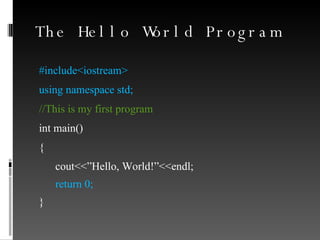
The Hello World Program #include<iostream> using namespace std; //This is my first program int main()‏ { cout<<”Hello, World!”<<endl; return 0; }
Explanation Program execution starts from main(), also known as PROGRAM ENTRY POINT cout<<  prints the text following it on to the screen endl is equivalent to the Enter key on the keyboard. Starts off at the next line, the next time. Blindly include the  blue  parts in the code for now
Data Programs can take in data, operate on it and give an output Data is stored in variables. Each variable is of a certain “Data Type” Primitive (or standard) data types –  Integers (int)‏ floating point (real) numbers (float)‏ Characters (char)‏
Declarations Tell the machine that you want to create a variable of a particular data type Assign a name to a particular variable Assign a value to it and start using it Example declaration – Declare an integer variable with the name 'apples' and assign a value 40 to it int  no_of_apples; no_of_apples=40;
Input Take in data from the user (keyboard) while the program is running cin>>  operator instructs machine to take in input from user
Example program Example 1
Operators Basic Arithmetic: +, -, /, *, % Can be used for operations on int & float values. Bitwise: &  (and) , |  (or) , ^ (xor)‏ Relational and Logical: <, >, <=, >=, ==, !=, &&  (and) , ||  (or) , !  (not)‏ Sign: -, + Increment and Decrement: ++, --
Hierarchy of Operators () [] ! ~ ++ -- + - (all are unary operators)‏ * / % + - << >> < <= > >= == !=
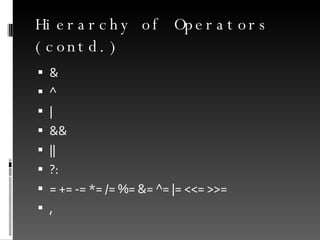
Hierarchy of Operators (contd.) & ^ | && || ?: = += -= *= /= %= &= ^= |= <<= >>= ,
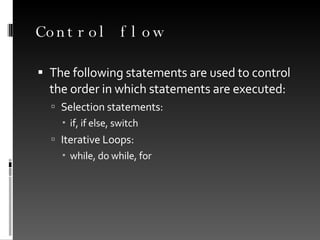
Control flow The following statements are used to control the order in which statements are executed: Selection statements: if, if else, switch Iterative Loops: while, do while, for
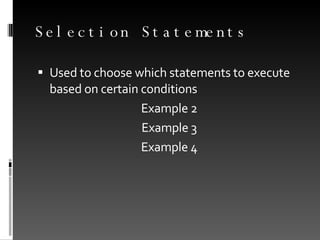
Selection Statements Used to choose which statements to execute based on certain conditions Example 2 Example 3 Example 4
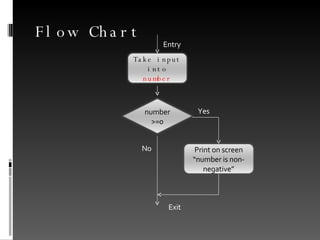
Flow Chart Yes No Entry  Exit  number>=0 Take input into  number Print on screen “number is non-negative”
Iterative Loops Perform repetitive tasks If we want to perform certain tasks for a certain number of times  or until a certain  condition is met. Three types of loops are used: while  (example 5) do while (example 6) for (example 7)
Nested Loops Example 8

Foundations of Programming Part I

  • 1.
  • 2.
    The Hardware Programming– Making hardware perform an action in a desired way Digital circuits are binary, they can understand only 0 and 1 Modern day processors are made from transistors, millions of them Work in time of the order of 10 -9 seconds
  • 3.
    Evolution of ProgrammingLanguages Machine language – consists of 0s and 1s only Very hard to read and debug Time consuming Low level language Platform dependent
  • 4.
    Evolution (contd...) Assemblylanguage – consists of mnemonics and opcodes Ex:- MOV A,B Better readability but not sufficient Hard to debug but better than machine code Low level language Platform dependent
  • 5.
    Evolution (contd...) Highlevel languages – English-like constructs, definitions, declarations. Easier to read, debug and maintain Ex- C, C++, C#, Java etc. Platform independent
  • 6.
    The Hello WorldProgram #include<iostream> using namespace std; //This is my first program int main()‏ { cout<<”Hello, World!”<<endl; return 0; }
  • 7.
    Explanation Program executionstarts from main(), also known as PROGRAM ENTRY POINT cout<< prints the text following it on to the screen endl is equivalent to the Enter key on the keyboard. Starts off at the next line, the next time. Blindly include the blue parts in the code for now
  • 8.
    Data Programs cantake in data, operate on it and give an output Data is stored in variables. Each variable is of a certain “Data Type” Primitive (or standard) data types – Integers (int)‏ floating point (real) numbers (float)‏ Characters (char)‏
  • 9.
    Declarations Tell themachine that you want to create a variable of a particular data type Assign a name to a particular variable Assign a value to it and start using it Example declaration – Declare an integer variable with the name 'apples' and assign a value 40 to it int no_of_apples; no_of_apples=40;
  • 10.
    Input Take indata from the user (keyboard) while the program is running cin>> operator instructs machine to take in input from user
  • 11.
  • 12.
    Operators Basic Arithmetic:+, -, /, *, % Can be used for operations on int & float values. Bitwise: & (and) , | (or) , ^ (xor)‏ Relational and Logical: <, >, <=, >=, ==, !=, && (and) , || (or) , ! (not)‏ Sign: -, + Increment and Decrement: ++, --
  • 13.
    Hierarchy of Operators() [] ! ~ ++ -- + - (all are unary operators)‏ * / % + - << >> < <= > >= == !=
  • 14.
    Hierarchy of Operators(contd.) & ^ | && || ?: = += -= *= /= %= &= ^= |= <<= >>= ,
  • 15.
    Control flow Thefollowing statements are used to control the order in which statements are executed: Selection statements: if, if else, switch Iterative Loops: while, do while, for
  • 16.
    Selection Statements Usedto choose which statements to execute based on certain conditions Example 2 Example 3 Example 4
  • 17.
    Flow Chart YesNo Entry Exit number>=0 Take input into number Print on screen “number is non-negative”
  • 18.
    Iterative Loops Performrepetitive tasks If we want to perform certain tasks for a certain number of times or until a certain condition is met. Three types of loops are used: while (example 5) do while (example 6) for (example 7)
  • 19.