Introduction to Programming in C++
Eight Edition
Lesson 4.1:
Completing the Problem-Solving
Process
An Introduction to Programming with C++, Eight Edition
• Get numeric and character data from the keyboard
• Display information on the computer screen
• Write arithmetic expressions
• Type cast a value
• Write an assignment statement
• Code the algorithm into a program
• Desk-check a program
• Evaluate and modify a program
Objectives
2
An Introduction to Programming with C++, Eight Edition
• The fourth step in the problem-solving process is to
code algorithm into a program
• Begin by declaring a memory location for each input,
processing, and output value in IPO chart
• Optionally initialize each value (highly preferred)
• Next, you code the instructions for the algorithm
Finishing Step 4 in the Problem-
Solving Process
3
An Introduction to Programming with C++, Eight Edition
Getting Data from the Keyboard
4
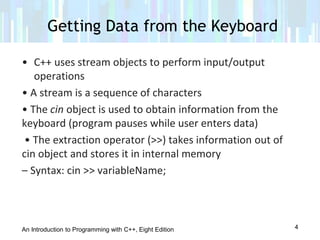
• C++ uses stream objects to perform input/output
operations
• A stream is a sequence of characters
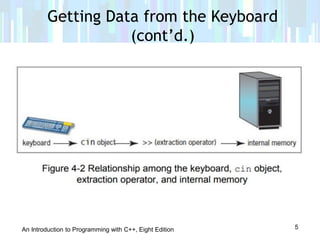
• The cin object is used to obtain information from the
keyboard (program pauses while user enters data)
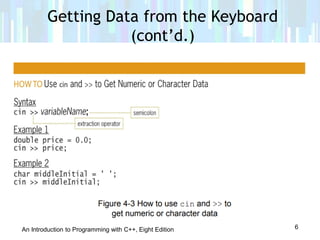
• The extraction operator (>>) takes information out of
cin object and stores it in internal memory
– Syntax: cin >> variableName;
An Introduction to Programming with C++, Eight Edition
Getting Data from the Keyboard
(cont’d.)
5
An Introduction to Programming with C++, Eight Edition
Getting Data from the Keyboard
(cont’d.)
6
An Introduction to Programming with C++, Eight Edition
Displaying Messages on the Computer
Screen
7
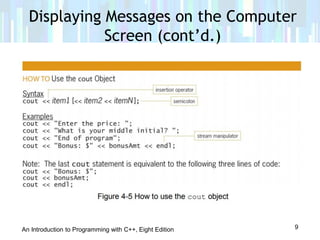
• You use a prompt (message) to let the user know what
data is to be entered
• The cout object is used with the insertion operator (<<)
To display information on the screen.
• Information can be any combination of literal constants,
named constants , and variables.
• Multiple items can be printed in the same statement
- Systax : cout << item1 [<<item2 << itemN];
- Part in brackets is optional
An Introduction to Programming with C++, Eight Edition
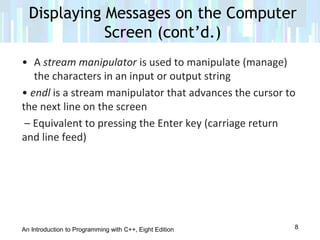
• A stream manipulator is used to manipulate (manage)
the characters in an input or output string
• endl is a stream manipulator that advances the cursor to
the next line on the screen
– Equivalent to pressing the Enter key (carriage return
and line feed)
Displaying Messages on the Computer
Screen (cont’d.)
8
An Introduction to Programming with C++, Eight Edition
Displaying Messages on the Computer
Screen (cont’d.)
9
An Introduction to Programming with C++, Eight Edition
• You can evaluate arithmetic expressions in C++ using
arithmetic operators
• Operators are negation (-), addition (+), subtraction (-),
multiplication (*), division (/), and modulus (%)
• Negation and subtraction use the same symbol, but
negation is a unary operator (one operand) and
subtraction is a binary operator (two operands)
• Modulus gives remainder when dividing two integers
Arithmetic Operators in C++
10
An Introduction to Programming with C++, Eight Edition
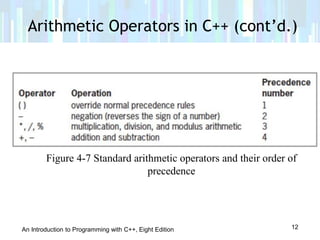
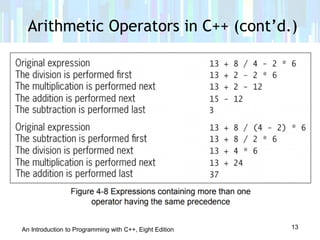
• Each operator has a precedence: determines in which
order operators in an expression are evaluated
• Operators with lower-precedence numbers are
evaluated before higher ones
• Parentheses have lowest-precedence number, so they
can be used to override precedence order
• Operators with the same precedence number are
evaluated from left to right
Arithmetic Operators in C++ (cont’d.)
11
An Introduction to Programming with C++, Eight Edition
Arithmetic Operators in C++ (cont’d.)
12
Figure 4-7 Standard arithmetic operators and their order of
precedence
An Introduction to Programming with C++, Eight Edition
Arithmetic Operators in C++ (cont’d.)
13
An Introduction to Programming with C++, Eight Edition
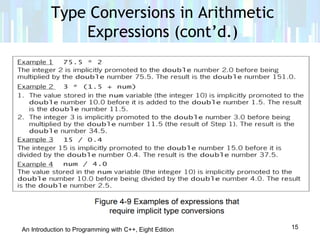
• Recall that the compiler will implicitly promote or
demote data types to match when possible
• Sometimes it is necessary to explicitly cast from one
data type into another
– Example: dividing two integers gives the result of
integer division (no remainder), but you would really like a
double result
– If one or both of the integers is a literal, you can
cast it to a double by adding .0 to the end of it
– If both are variables, you must use the static_cast
operator
Type Conversions in Arithmetic
Expressions
14
An Introduction to Programming with C++, Eight Edition
Type Conversions in Arithmetic
Expressions (cont’d.)
15
An Introduction to Programming with C++, Eight Edition
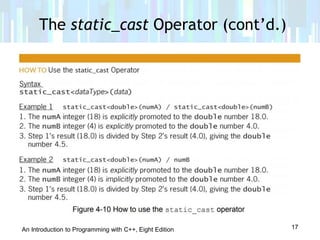
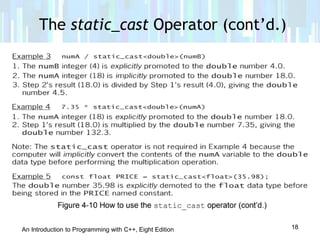
• Used to explicitly convert data from one data type to
another
• Called an explicit type conversion or type cast
• Syntax: static_cast(data)
– data can be a literal constant, named constant, or
variable
– dataType is the data type to which you want the
data converted
The static_cast Operator
16
An Introduction to Programming with C++, Eight Edition
The static_cast Operator (cont’d.)
17
An Introduction to Programming with C++, Eight Edition
The static_cast Operator (cont’d.)
18
An Introduction to Programming with C++, Eight Edition
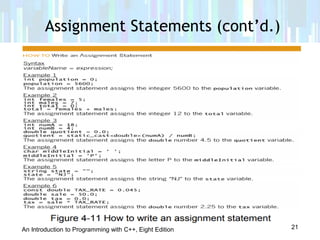
• You use an assignment statement to assign a value to a
variable while a program is running
• Syntax: variableName = expression
– The = symbol is the assignment operator
• Tells computer to evaluate expression on right side of
assignment operator and store result in variable on left
side of the operator
– expression can include one or more literal
constants, named constants, variables, or arithmetic
operators
Assignment Statements
19
An Introduction to Programming with C++, Eight Edition
• Data type of expression in an assignment statement
must match data type of the variable
• If they don’t match, compiler will use implicit type
casting to get them to match
– Doesn’t always produce correct result
– Better to explicitly cast to correct data type
yourself
• Remember:
– Declaration statement creates a new variable
– Assignment statement assigns a new value to an
existing variable
Assignment Statements (cont’d.)
20
An Introduction to Programming with C++, Eight Edition
Assignment Statements (cont’d.)
21
An Introduction to Programming with C++, Eight Edition
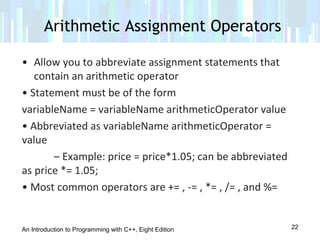
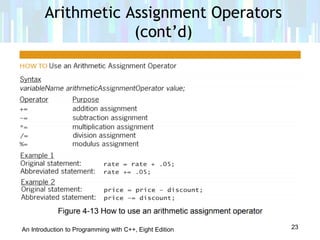
• Allow you to abbreviate assignment statements that
contain an arithmetic operator
• Statement must be of the form
variableName = variableName arithmeticOperator value
• Abbreviated as variableName arithmeticOperator =
value
– Example: price = price*1.05; can be abbreviated
as price *= 1.05;
• Most common operators are += , -= , *= , /= , and %=
Arithmetic Assignment Operators
22
An Introduction to Programming with C++, Eight Edition
Arithmetic Assignment Operators
(cont’d)
23
An Introduction to Programming with C++, Eight Edition
The End ♥ ♥ ♥
24

Lesson 4.1 completing the problem solving process

  • 1.
    Introduction to Programmingin C++ Eight Edition Lesson 4.1: Completing the Problem-Solving Process
  • 2.
    An Introduction toProgramming with C++, Eight Edition • Get numeric and character data from the keyboard • Display information on the computer screen • Write arithmetic expressions • Type cast a value • Write an assignment statement • Code the algorithm into a program • Desk-check a program • Evaluate and modify a program Objectives 2
  • 3.
    An Introduction toProgramming with C++, Eight Edition • The fourth step in the problem-solving process is to code algorithm into a program • Begin by declaring a memory location for each input, processing, and output value in IPO chart • Optionally initialize each value (highly preferred) • Next, you code the instructions for the algorithm Finishing Step 4 in the Problem- Solving Process 3
  • 4.
    An Introduction toProgramming with C++, Eight Edition Getting Data from the Keyboard 4 • C++ uses stream objects to perform input/output operations • A stream is a sequence of characters • The cin object is used to obtain information from the keyboard (program pauses while user enters data) • The extraction operator (>>) takes information out of cin object and stores it in internal memory – Syntax: cin >> variableName;
  • 5.
    An Introduction toProgramming with C++, Eight Edition Getting Data from the Keyboard (cont’d.) 5
  • 6.
    An Introduction toProgramming with C++, Eight Edition Getting Data from the Keyboard (cont’d.) 6
  • 7.
    An Introduction toProgramming with C++, Eight Edition Displaying Messages on the Computer Screen 7 • You use a prompt (message) to let the user know what data is to be entered • The cout object is used with the insertion operator (<<) To display information on the screen. • Information can be any combination of literal constants, named constants , and variables. • Multiple items can be printed in the same statement - Systax : cout << item1 [<<item2 << itemN]; - Part in brackets is optional
  • 8.
    An Introduction toProgramming with C++, Eight Edition • A stream manipulator is used to manipulate (manage) the characters in an input or output string • endl is a stream manipulator that advances the cursor to the next line on the screen – Equivalent to pressing the Enter key (carriage return and line feed) Displaying Messages on the Computer Screen (cont’d.) 8
  • 9.
    An Introduction toProgramming with C++, Eight Edition Displaying Messages on the Computer Screen (cont’d.) 9
  • 10.
    An Introduction toProgramming with C++, Eight Edition • You can evaluate arithmetic expressions in C++ using arithmetic operators • Operators are negation (-), addition (+), subtraction (-), multiplication (*), division (/), and modulus (%) • Negation and subtraction use the same symbol, but negation is a unary operator (one operand) and subtraction is a binary operator (two operands) • Modulus gives remainder when dividing two integers Arithmetic Operators in C++ 10
  • 11.
    An Introduction toProgramming with C++, Eight Edition • Each operator has a precedence: determines in which order operators in an expression are evaluated • Operators with lower-precedence numbers are evaluated before higher ones • Parentheses have lowest-precedence number, so they can be used to override precedence order • Operators with the same precedence number are evaluated from left to right Arithmetic Operators in C++ (cont’d.) 11
  • 12.
    An Introduction toProgramming with C++, Eight Edition Arithmetic Operators in C++ (cont’d.) 12 Figure 4-7 Standard arithmetic operators and their order of precedence
  • 13.
    An Introduction toProgramming with C++, Eight Edition Arithmetic Operators in C++ (cont’d.) 13
  • 14.
    An Introduction toProgramming with C++, Eight Edition • Recall that the compiler will implicitly promote or demote data types to match when possible • Sometimes it is necessary to explicitly cast from one data type into another – Example: dividing two integers gives the result of integer division (no remainder), but you would really like a double result – If one or both of the integers is a literal, you can cast it to a double by adding .0 to the end of it – If both are variables, you must use the static_cast operator Type Conversions in Arithmetic Expressions 14
  • 15.
    An Introduction toProgramming with C++, Eight Edition Type Conversions in Arithmetic Expressions (cont’d.) 15
  • 16.
    An Introduction toProgramming with C++, Eight Edition • Used to explicitly convert data from one data type to another • Called an explicit type conversion or type cast • Syntax: static_cast(data) – data can be a literal constant, named constant, or variable – dataType is the data type to which you want the data converted The static_cast Operator 16
  • 17.
    An Introduction toProgramming with C++, Eight Edition The static_cast Operator (cont’d.) 17
  • 18.
    An Introduction toProgramming with C++, Eight Edition The static_cast Operator (cont’d.) 18
  • 19.
    An Introduction toProgramming with C++, Eight Edition • You use an assignment statement to assign a value to a variable while a program is running • Syntax: variableName = expression – The = symbol is the assignment operator • Tells computer to evaluate expression on right side of assignment operator and store result in variable on left side of the operator – expression can include one or more literal constants, named constants, variables, or arithmetic operators Assignment Statements 19
  • 20.
    An Introduction toProgramming with C++, Eight Edition • Data type of expression in an assignment statement must match data type of the variable • If they don’t match, compiler will use implicit type casting to get them to match – Doesn’t always produce correct result – Better to explicitly cast to correct data type yourself • Remember: – Declaration statement creates a new variable – Assignment statement assigns a new value to an existing variable Assignment Statements (cont’d.) 20
  • 21.
    An Introduction toProgramming with C++, Eight Edition Assignment Statements (cont’d.) 21
  • 22.
    An Introduction toProgramming with C++, Eight Edition • Allow you to abbreviate assignment statements that contain an arithmetic operator • Statement must be of the form variableName = variableName arithmeticOperator value • Abbreviated as variableName arithmeticOperator = value – Example: price = price*1.05; can be abbreviated as price *= 1.05; • Most common operators are += , -= , *= , /= , and %= Arithmetic Assignment Operators 22
  • 23.
    An Introduction toProgramming with C++, Eight Edition Arithmetic Assignment Operators (cont’d) 23
  • 24.
    An Introduction toProgramming with C++, Eight Edition The End ♥ ♥ ♥ 24