



www.acropolis.in
Foundation of
Programming
By: Ajay Khatri & Narendra Pal Singh Rathore
Overview – Topics to be Covered
2 December 2020 www.ajaykhatri.in 3
Variable
Data Types
Comments
Input / Output
Operators
Control Statements
Variables
2 December 2020 www.ajaykhatri.in 4
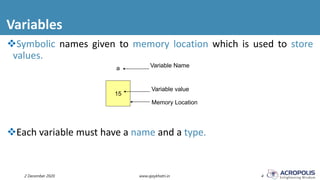
Symbolic names given to memory location which is used to store
values.
Each variable must have a name and a type.
15
a
Variable value
Variable Name
Memory Location
Rules to Construct Variables
2 December 2020 www.ajaykhatri.in 5
Should start with letter or underscore.
May contain alphabets, digits & a symbol underscore( _).
Should not contain any special symbol.
blank space not allowed.
Should not more than 8 characters (may be optional).
Keyword can not used as variable.
Data Types
2 December 2020 www.ajaykhatri.in 6
Determines the type and size of data associated with variables.
int myVar;
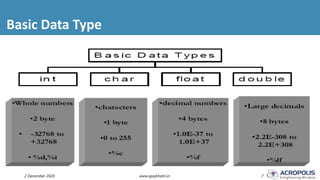
Basic Data Type
2 December 2020 www.ajaykhatri.in 7
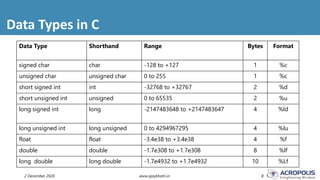
Data Types in C
2 December 2020 www.ajaykhatri.in 8
Data Type Shorthand Range Bytes Format
signed char char -128 to +127 1 %c
unsigned char unsigned char 0 to 255 1 %c
short signed int int -32768 to +32767 2 %d
short unsigned int unsigned 0 to 65535 2 %u
long signed int long -2147483648 to +2147483647 4 %ld
long unsigned int long unsigned 0 to 4294967295 4 %lu
float float -3.4e38 to +3.4e38 4 %f
double double -1.7e308 to +1.7e308 8 %lf
long double long double -1.7e4932 to +1.7e4932 10 %Lf
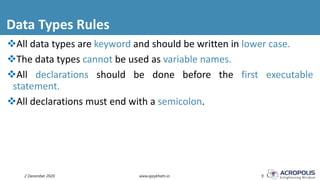
Data Types Rules
2 December 2020 www.ajaykhatri.in 9
All data types are keyword and should be written in lower case.
The data types cannot be used as variable names.
All declarations should be done before the first executable
statement.
All declarations must end with a semicolon.
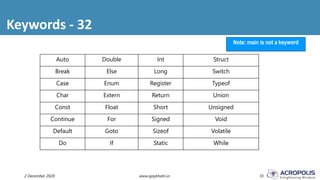
Keywords - 32
2 December 2020 www.ajaykhatri.in 10
Note: main is not a keyword
Auto Double Int Struct
Break Else Long Switch
Case Enum Register Typeof
Char Extern Return Union
Const Float Short Unsigned
Continue For Signed Void
Default Goto Sizeof Volatile
Do If Static While
The Output Function
2 December 2020 www.ajaykhatri.in 11
The printf()
Displays the message on the console.
The message has no effect on the program
It returns the number of characters that are printed. If there is some error
then it returns a negative value.
The Input Function
2 December 2020 www.ajaykhatri.in 12
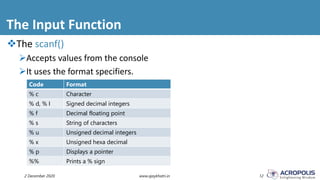
The scanf()
Accepts values from the console
It uses the format specifiers.
Code Format
% c Character
% d, % I Signed decimal integers
% f Decimal floating point
% s String of characters
% u Unsigned decimal integers
% x Unsigned hexa decimal
% p Displays a pointer
%% Prints a % sign
Comments
2 December 2020 www.ajaykhatri.in 13
Having comments is good programming practice.
Two types of comments
Single Line (indicated by //)
Multi Line (indicated by /* & */)
 Comments begin with /* and end with */ anything between the delimiters is ignored
Operators in C
2 December 2020 www.ajaykhatri.in 14
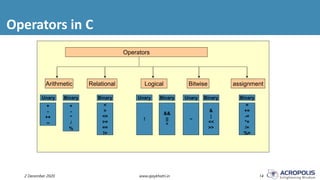
Operators
Arithmetic Relational Logical Bitwise
Unary BinaryUnaryBinaryUnaryBinaryBinary
assignment
+
-
++
--
+
-
*
/
%
<
>
<=
>=
==
!=
!
&&
||
^
~
&
|
<<
>>
Binary
=
+=
-=
*=
/=
%=
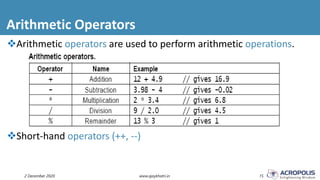
Arithmetic Operators
2 December 2020 www.ajaykhatri.in 15
Arithmetic operators are used to perform arithmetic operations.
Short-hand operators (++, --)
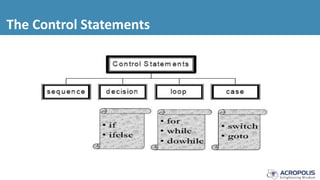
The Control Statements
Sequence Control Structure
It is an uncomplicated method
The statement are executed in a serial manner
The complier executes the first line initially and then moves on to the
next.
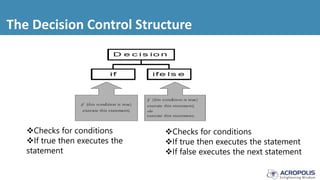
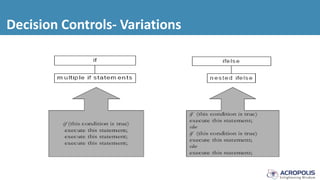
The Decision Control Structure
Checks for conditions
If true then executes the
statement
Checks for conditions
If true then executes the statement
If false executes the next statement
Decision Controls- Variations
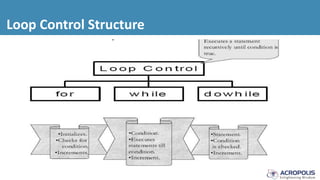
Loop Control Structure
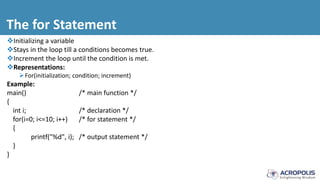
The for Statement
Initializing a variable
Stays in the loop till a conditions becomes true.
Increment the loop until the condition is met.
Representations:
For(initialization; condition; increment)
Example:
main() /* main function */
{
int i; /* declaration */
for(i=0; i<=10; i++) /* for statement */
{
printf("%d", i); /* output statement */
}
}
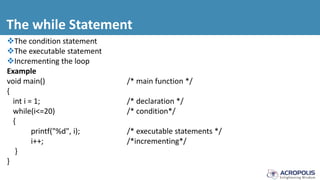
The while Statement
The condition statement
The executable statement
Incrementing the loop
Example
void main() /* main function */
{
int i = 1; /* declaration */
while(i<=20) /* condition*/
{
printf("%d", i); /* executable statements */
i++; /*incrementing*/
}
}
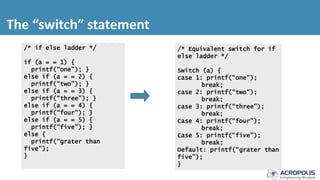
The “switch” statement
/* Equivalent switch for if
else ladder */
Switch (a) {
case 1: printf(“one”);
break;
case 2: printf(“two”);
break;
case 3: printf(“three”);
break;
Case 4: printf(“four”);
break;
Case 5: printf(“five”);
break;
Default: printf(“grater than
five”);
}
/* if else ladder */
if (a = = 1) {
printf(“one”); }
else if (a = = 2) {
printf(“two”); }
else if (a = = 3) {
printf(“three”); }
else if (a = = 4) {
printf(“four”); }
else if (a = = 5) {
printf(“five”); }
else {
printf(“grater than
five”);
}
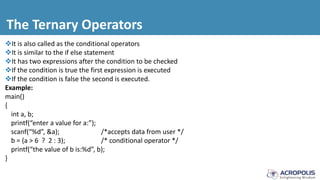
The Ternary Operators
It is also called as the conditional operators
It is similar to the if else statement
It has two expressions after the condition to be checked
If the condition is true the first expression is executed
If the condition is false the second is executed.
Example:
main()
{
int a, b;
printf(“enter a value for a:”);
scanf(“%d”, &a); /*accepts data from user */
b = (a > 6 ? 2 : 3); /* conditional operator */
printf(“the value of b is:%d”, b);
}
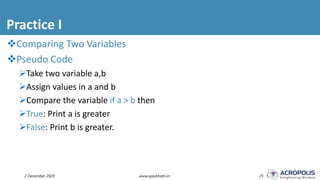
Practice I
2 December 2020 www.ajaykhatri.in 25
Comparing Two Variables
Pseudo Code
Take two variable a,b
Assign values in a and b
Compare the variable if a > b then
True: Print a is greater
False: Print b is greater.
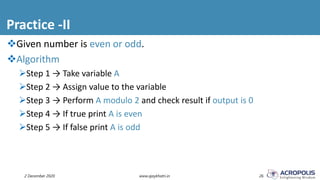
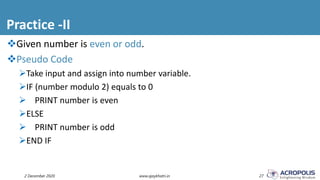
Practice -II
2 December 2020 www.ajaykhatri.in 26
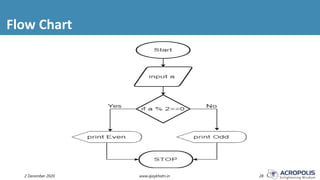
Given number is even or odd.
Algorithm
Step 1 → Take variable A
Step 2 → Assign value to the variable
Step 3 → Perform A modulo 2 and check result if output is 0
Step 4 → If true print A is even
Step 5 → If false print A is odd
Practice -II
2 December 2020 www.ajaykhatri.in 27
Given number is even or odd.
Pseudo Code
Take input and assign into number variable.
IF (number modulo 2) equals to 0
 PRINT number is even
ELSE
 PRINT number is odd
END IF
Flow Chart
2 December 2020 www.ajaykhatri.in 28
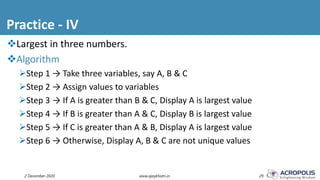
Practice - IV
2 December 2020 www.ajaykhatri.in 29
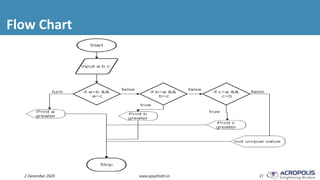
Largest in three numbers.
Algorithm
Step 1 → Take three variables, say A, B & C
Step 2 → Assign values to variables
Step 3 → If A is greater than B & C, Display A is largest value
Step 4 → If B is greater than A & C, Display B is largest value
Step 5 → If C is greater than A & B, Display A is largest value
Step 6 → Otherwise, Display A, B & C are not unique values
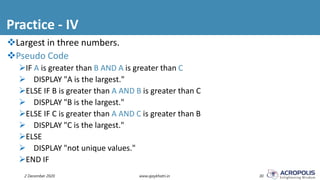
Practice - IV
2 December 2020 www.ajaykhatri.in 30
Largest in three numbers.
Pseudo Code
IF A is greater than B AND A is greater than C
 DISPLAY "A is the largest."
ELSE IF B is greater than A AND B is greater than C
 DISPLAY "B is the largest."
ELSE IF C is greater than A AND C is greater than B
 DISPLAY "C is the largest."
ELSE
 DISPLAY "not unique values."
END IF
Flow Chart
2 December 2020 www.ajaykhatri.in 31
Practice -V
2 December 2020 www.ajaykhatri.in 32
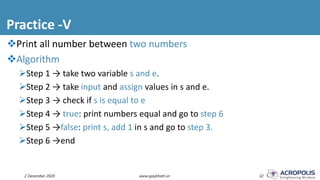
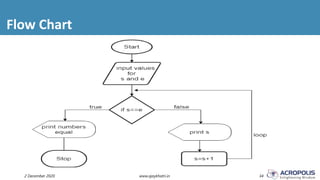
Print all number between two numbers
Algorithm
Step 1 → take two variable s and e.
Step 2 → take input and assign values in s and e.
Step 3 → check if s is equal to e
Step 4 → true: print numbers equal and go to step 6
Step 5 →false: print s, add 1 in s and go to step 3.
Step 6 →end
Practice -V
2 December 2020 www.ajaykhatri.in 33
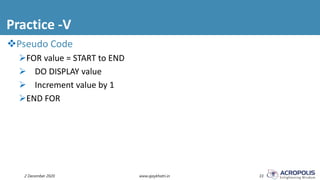
Pseudo Code
FOR value = START to END
 DO DISPLAY value
 Increment value by 1
END FOR
Flow Chart
2 December 2020 www.ajaykhatri.in 34
Important Link
2 December 2020 www.ajaykhatri.in 35
Android App to Learn C Programming
https://play.google.com/store/apps/details?id=in.ajaykhatri.ctutorial
Online IDE
https://ideone.com/
Download ppt
https://www2.slideshare.net/ajaykhatri
2 December 2020 36www.ajaykhatri.in
Acknowledgement
2 December 2020 www.ajaykhatri.in 37
This presentation has been prepared by summarizing the content
taken from different lecture notes, presentations, books and
websites available on the web. It is really hard to recall from where
these slides exactly come from. However, I don’t want to miss the
opportunity to thank individual contributors who created such a
good piece of work. Without their contribution, this presentation
even can’t be imagined.
This presentation is solely used for education purpose. Still, if you
have copyright on any material and want to get it removed from this
presentation, please let us know, we will remove it immediately.
2 December 2020 38www.ajaykhatri.in

Basics of C programming - day 2

  • 1.
  • 2.
    Foundation of Programming By: AjayKhatri & Narendra Pal Singh Rathore
  • 3.
    Overview – Topicsto be Covered 2 December 2020 www.ajaykhatri.in 3 Variable Data Types Comments Input / Output Operators Control Statements
  • 4.
    Variables 2 December 2020www.ajaykhatri.in 4 Symbolic names given to memory location which is used to store values. Each variable must have a name and a type. 15 a Variable value Variable Name Memory Location
  • 5.
    Rules to ConstructVariables 2 December 2020 www.ajaykhatri.in 5 Should start with letter or underscore. May contain alphabets, digits & a symbol underscore( _). Should not contain any special symbol. blank space not allowed. Should not more than 8 characters (may be optional). Keyword can not used as variable.
  • 6.
    Data Types 2 December2020 www.ajaykhatri.in 6 Determines the type and size of data associated with variables. int myVar;
  • 7.
    Basic Data Type 2December 2020 www.ajaykhatri.in 7
  • 8.
    Data Types inC 2 December 2020 www.ajaykhatri.in 8 Data Type Shorthand Range Bytes Format signed char char -128 to +127 1 %c unsigned char unsigned char 0 to 255 1 %c short signed int int -32768 to +32767 2 %d short unsigned int unsigned 0 to 65535 2 %u long signed int long -2147483648 to +2147483647 4 %ld long unsigned int long unsigned 0 to 4294967295 4 %lu float float -3.4e38 to +3.4e38 4 %f double double -1.7e308 to +1.7e308 8 %lf long double long double -1.7e4932 to +1.7e4932 10 %Lf
  • 9.
    Data Types Rules 2December 2020 www.ajaykhatri.in 9 All data types are keyword and should be written in lower case. The data types cannot be used as variable names. All declarations should be done before the first executable statement. All declarations must end with a semicolon.
  • 10.
    Keywords - 32 2December 2020 www.ajaykhatri.in 10 Note: main is not a keyword Auto Double Int Struct Break Else Long Switch Case Enum Register Typeof Char Extern Return Union Const Float Short Unsigned Continue For Signed Void Default Goto Sizeof Volatile Do If Static While
  • 11.
    The Output Function 2December 2020 www.ajaykhatri.in 11 The printf() Displays the message on the console. The message has no effect on the program It returns the number of characters that are printed. If there is some error then it returns a negative value.
  • 12.
    The Input Function 2December 2020 www.ajaykhatri.in 12 The scanf() Accepts values from the console It uses the format specifiers. Code Format % c Character % d, % I Signed decimal integers % f Decimal floating point % s String of characters % u Unsigned decimal integers % x Unsigned hexa decimal % p Displays a pointer %% Prints a % sign
  • 13.
    Comments 2 December 2020www.ajaykhatri.in 13 Having comments is good programming practice. Two types of comments Single Line (indicated by //) Multi Line (indicated by /* & */)  Comments begin with /* and end with */ anything between the delimiters is ignored
  • 14.
    Operators in C 2December 2020 www.ajaykhatri.in 14 Operators Arithmetic Relational Logical Bitwise Unary BinaryUnaryBinaryUnaryBinaryBinary assignment + - ++ -- + - * / % < > <= >= == != ! && || ^ ~ & | << >> Binary = += -= *= /= %=
  • 15.
    Arithmetic Operators 2 December2020 www.ajaykhatri.in 15 Arithmetic operators are used to perform arithmetic operations. Short-hand operators (++, --)
  • 16.
  • 17.
    Sequence Control Structure Itis an uncomplicated method The statement are executed in a serial manner The complier executes the first line initially and then moves on to the next.
  • 18.
    The Decision ControlStructure Checks for conditions If true then executes the statement Checks for conditions If true then executes the statement If false executes the next statement
  • 19.
  • 20.
  • 21.
    The for Statement Initializinga variable Stays in the loop till a conditions becomes true. Increment the loop until the condition is met. Representations: For(initialization; condition; increment) Example: main() /* main function */ { int i; /* declaration */ for(i=0; i<=10; i++) /* for statement */ { printf("%d", i); /* output statement */ } }
  • 22.
    The while Statement Thecondition statement The executable statement Incrementing the loop Example void main() /* main function */ { int i = 1; /* declaration */ while(i<=20) /* condition*/ { printf("%d", i); /* executable statements */ i++; /*incrementing*/ } }
  • 23.
    The “switch” statement /*Equivalent switch for if else ladder */ Switch (a) { case 1: printf(“one”); break; case 2: printf(“two”); break; case 3: printf(“three”); break; Case 4: printf(“four”); break; Case 5: printf(“five”); break; Default: printf(“grater than five”); } /* if else ladder */ if (a = = 1) { printf(“one”); } else if (a = = 2) { printf(“two”); } else if (a = = 3) { printf(“three”); } else if (a = = 4) { printf(“four”); } else if (a = = 5) { printf(“five”); } else { printf(“grater than five”); }
  • 24.
    The Ternary Operators Itis also called as the conditional operators It is similar to the if else statement It has two expressions after the condition to be checked If the condition is true the first expression is executed If the condition is false the second is executed. Example: main() { int a, b; printf(“enter a value for a:”); scanf(“%d”, &a); /*accepts data from user */ b = (a > 6 ? 2 : 3); /* conditional operator */ printf(“the value of b is:%d”, b); }
  • 25.
    Practice I 2 December2020 www.ajaykhatri.in 25 Comparing Two Variables Pseudo Code Take two variable a,b Assign values in a and b Compare the variable if a > b then True: Print a is greater False: Print b is greater.
  • 26.
    Practice -II 2 December2020 www.ajaykhatri.in 26 Given number is even or odd. Algorithm Step 1 → Take variable A Step 2 → Assign value to the variable Step 3 → Perform A modulo 2 and check result if output is 0 Step 4 → If true print A is even Step 5 → If false print A is odd
  • 27.
    Practice -II 2 December2020 www.ajaykhatri.in 27 Given number is even or odd. Pseudo Code Take input and assign into number variable. IF (number modulo 2) equals to 0  PRINT number is even ELSE  PRINT number is odd END IF
  • 28.
    Flow Chart 2 December2020 www.ajaykhatri.in 28
  • 29.
    Practice - IV 2December 2020 www.ajaykhatri.in 29 Largest in three numbers. Algorithm Step 1 → Take three variables, say A, B & C Step 2 → Assign values to variables Step 3 → If A is greater than B & C, Display A is largest value Step 4 → If B is greater than A & C, Display B is largest value Step 5 → If C is greater than A & B, Display A is largest value Step 6 → Otherwise, Display A, B & C are not unique values
  • 30.
    Practice - IV 2December 2020 www.ajaykhatri.in 30 Largest in three numbers. Pseudo Code IF A is greater than B AND A is greater than C  DISPLAY "A is the largest." ELSE IF B is greater than A AND B is greater than C  DISPLAY "B is the largest." ELSE IF C is greater than A AND C is greater than B  DISPLAY "C is the largest." ELSE  DISPLAY "not unique values." END IF
  • 31.
    Flow Chart 2 December2020 www.ajaykhatri.in 31
  • 32.
    Practice -V 2 December2020 www.ajaykhatri.in 32 Print all number between two numbers Algorithm Step 1 → take two variable s and e. Step 2 → take input and assign values in s and e. Step 3 → check if s is equal to e Step 4 → true: print numbers equal and go to step 6 Step 5 →false: print s, add 1 in s and go to step 3. Step 6 →end
  • 33.
    Practice -V 2 December2020 www.ajaykhatri.in 33 Pseudo Code FOR value = START to END  DO DISPLAY value  Increment value by 1 END FOR
  • 34.
    Flow Chart 2 December2020 www.ajaykhatri.in 34
  • 35.
    Important Link 2 December2020 www.ajaykhatri.in 35 Android App to Learn C Programming https://play.google.com/store/apps/details?id=in.ajaykhatri.ctutorial Online IDE https://ideone.com/ Download ppt https://www2.slideshare.net/ajaykhatri
  • 36.
    2 December 202036www.ajaykhatri.in
  • 37.
    Acknowledgement 2 December 2020www.ajaykhatri.in 37 This presentation has been prepared by summarizing the content taken from different lecture notes, presentations, books and websites available on the web. It is really hard to recall from where these slides exactly come from. However, I don’t want to miss the opportunity to thank individual contributors who created such a good piece of work. Without their contribution, this presentation even can’t be imagined. This presentation is solely used for education purpose. Still, if you have copyright on any material and want to get it removed from this presentation, please let us know, we will remove it immediately.
  • 38.
    2 December 202038www.ajaykhatri.in