www.simpletaxindia.net


                                  e-Tutorial

                         Download Form 16A


                           Copyright http://www.simpletaxindia.net/2013/03/tds-rate-chart-fy-2013-14-tcs-rate.html
                                     © 2012 Income Tax Department                                               1
www.simpletaxindia.net

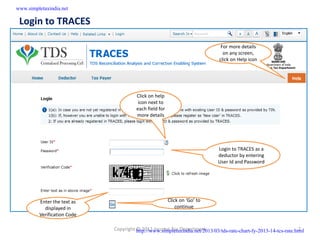
 Login to TRACES

                                                                              For more details
                                                                               on any screen,
                                                                             click on Help icon


                                       Click on help
                                        icon next to
                                       each field for
                                       more details


                                                                            Login to TRACES as a
                                                                            deductor by entering
                                                                            User Id and Password


         Enter the text as                              Click on ‘Go’ to
           displayed in                                     continue
         Verification Code

                             Copyright http://www.simpletaxindia.net/2013/03/tds-rate-chart-fy-2013-14-tcs-rate.html
                                       © 2012 Income Tax Department                                               2
www.simpletaxindia.net

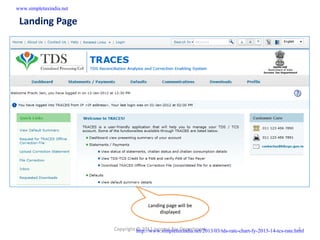
 Landing Page


                                        Landing page will be
                                             displayed


                         Copyright http://www.simpletaxindia.net/2013/03/tds-rate-chart-fy-2013-14-tcs-rate.html
                                   © 2012 Income Tax Department                                               3
www.simpletaxindia.net

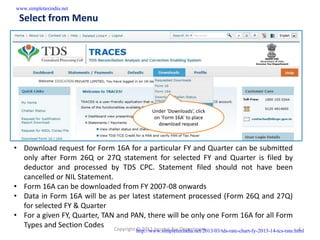
 Select from Menu


                                           Under ‘Downloads’, click
                                            on ‘Form 16A’ to place
                                              download request


• Download request for Form 16A for a particular FY and Quarter can be submitted
  only after Form 26Q or 27Q statement for selected FY and Quarter is filed by
  deductor and processed by TDS CPC. Statement filed should not have been
  cancelled or NIL Statement.
• Form 16A can be downloaded from FY 2007-08 onwards
• Data in Form 16A will be as per latest statement processed (Form 26Q and 27Q)
  for selected FY & Quarter
• For a given FY, Quarter, TAN and PAN, there will be only one Form 16A for all Form
  Types and Section Codes Copyright © 2012 Income Tax Department                                               4
                                    http://www.simpletaxindia.net/2013/03/tds-rate-chart-fy-2013-14-tcs-rate.html
www.simpletaxindia.net

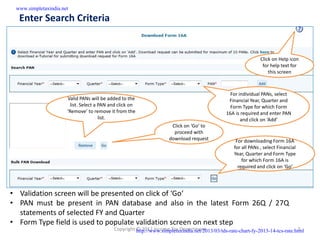
  Enter Search Criteria


                                                                                                               Click on Help icon
                                                                                                                for help text for
                                                                                                                   this screen


                                                                                                 For individual PANs, select
                      Valid PANs will be added to the                                           Financial Year, Quarter and
                        list. Select a PAN and click on                                          Form Type for which Form
                      ‘Remove’ to remove it from the                                           16A is required and enter PAN
                                       list.                                                          and click on ‘Add’
                                                                      Click on ‘Go’ to
                                                                       proceed with
                                                                     download request              For downloading Form 16A
                                                                                                  for all PANs , select Financial
                                                                                                  Year, Quarter and Form Type
                                                                                                      for which Form 16A is
                                                                                                    required and click on ‘Go’


• Validation screen will be presented on click of ‘Go‘
• PAN must be present in PAN database and also in the latest Form 26Q / 27Q
  statements of selected FY and Quarter
• Form Type field is used to populate validation screen on next step
                                            Copyright http://www.simpletaxindia.net/2013/03/tds-rate-chart-fy-2013-14-tcs-rate.html
                                                      © 2012 Income Tax Department                                               5
www.simpletaxindia.net

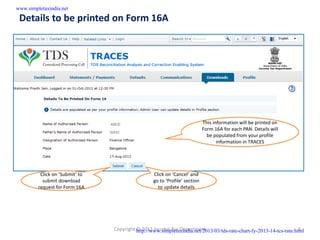
 Details to be printed on Form 16A


                                                                            This information will be printed on
                                                                            Form 16A for each PAN. Details will
                                                                              be populated from your profile
                                                                                   information in TRACES


          Click on ‘Submit’ to                    Click on ‘Cancel’ and
           submit download                        go to ‘Profile’ section
         request for Form 16A                       to update details


                                 Copyright http://www.simpletaxindia.net/2013/03/tds-rate-chart-fy-2013-14-tcs-rate.html
                                           © 2012 Income Tax Department                                               6
www.simpletaxindia.net

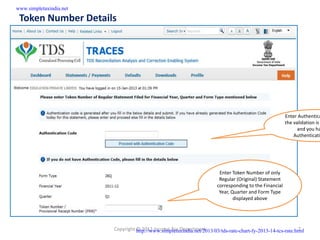
 Token Number Details


                                                                                                         Enter Authentica
                                                                                                         the validation is
                                                                                                               and you ha
                                                                                                             Authenticati


                                                                         Enter Token Number of only
                                                                         Regular (Original) Statement
                                                                        corresponding to the Financial
                                                                         Year, Quarter and Form Type
                                                                                displayed above


                         Copyright http://www.simpletaxindia.net/2013/03/tds-rate-chart-fy-2013-14-tcs-rate.html
                                   © 2012 Income Tax Department                                               7
www.simpletaxindia.net

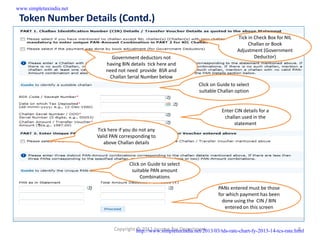
 Token Number Details (Contd.)
                                                                                        Tick in Check Box for NIL
                                                                                             Challan or Book
                                                                                        Adjustment (Government
                               Government deductors not                                         Deductor)
                             having BIN details tick here and
                             need not need provide BSR and
                              Challan Serial Number below
                                                                      Click on Guide to select
                                                                      suitable Challan option


                                                                                 Enter CIN details for a
                                                                                  challan used in the
                                                                                       statement
                         Tick here if you do not any
                         Valid PAN corresponding to
                            above Challan details


                                       Click on Guide to select
                                        suitable PAN amount
                                            Combinations

                                                                               PANs entered must be those
                                                                               for which payment has been
                                                                                 done using the CIN / BIN
                                                                                  entered on this screen


                                Copyright http://www.simpletaxindia.net/2013/03/tds-rate-chart-fy-2013-14-tcs-rate.html
                                          © 2012 Income Tax Department                                               8
www.simpletaxindia.net

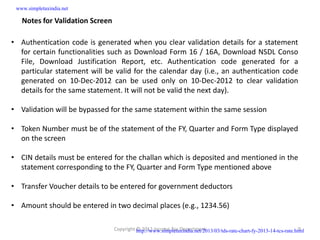
   Notes for Validation Screen

• Authentication code is generated when you clear validation details for a statement
  for certain functionalities such as Download Form 16 / 16A, Download NSDL Conso
  File, Download Justification Report, etc. Authentication code generated for a
  particular statement will be valid for the calendar day (i.e., an authentication code
  generated on 10-Dec-2012 can be used only on 10-Dec-2012 to clear validation
  details for the same statement. It will not be valid the next day).

• Validation will be bypassed for the same statement within the same session

• Token Number must be of the statement of the FY, Quarter and Form Type displayed
  on the screen

• CIN details must be entered for the challan which is deposited and mentioned in the
  statement corresponding to the FY, Quarter and Form Type mentioned above

• Transfer Voucher details to be entered for government deductors

• Amount should be entered in two decimal places (e.g., 1234.56)

                                 Copyright http://www.simpletaxindia.net/2013/03/tds-rate-chart-fy-2013-14-tcs-rate.html
                                           © 2012 Income Tax Department                                               9
www.simpletaxindia.net

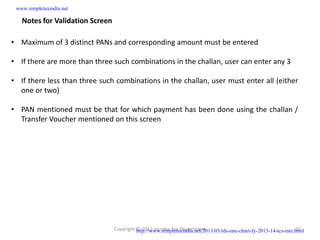
   Notes for Validation Screen

• Maximum of 3 distinct PANs and corresponding amount must be entered

• If there are more than three such combinations in the challan, user can enter any 3

• If there less than three such combinations in the challan, user must enter all (either
  one or two)

• PAN mentioned must be that for which payment has been done using the challan /
  Transfer Voucher mentioned on this screen


                                 Copyright http://www.simpletaxindia.net/2013/03/tds-rate-chart-fy-2013-14-tcs-rate.html
                                           © 2012 Income Tax Department                                             10
www.simpletaxindia.net

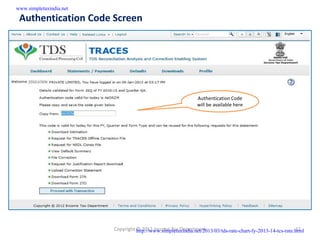
 Authentication Code Screen


                                                               Authentication Code
                                                               will be available here


                         Copyright http://www.simpletaxindia.net/2013/03/tds-rate-chart-fy-2013-14-tcs-rate.html
                                   © 2012 Income Tax Department                                             11
www.simpletaxindia.net

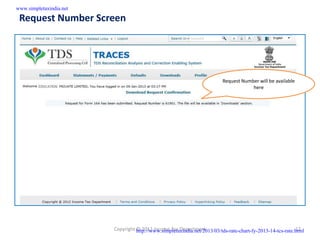
 Request Number Screen


                                                                          Request Number will be available
                                                                                      here


                         Copyright http://www.simpletaxindia.net/2013/03/tds-rate-chart-fy-2013-14-tcs-rate.html
                                   © 2012 Income Tax Department                                             12
www.simpletaxindia.net

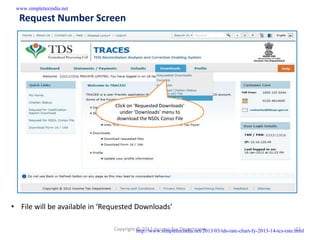
  Request Number Screen


                               Click on ‘Requested Downloads’
                                 under ‘Downloads’ menu to
                                download the NSDL Conso File


• File will be available in ‘Requested Downloads’

                               Copyright http://www.simpletaxindia.net/2013/03/tds-rate-chart-fy-2013-14-tcs-rate.html
                                         © 2012 Income Tax Department                                             13
www.simpletaxindia.net

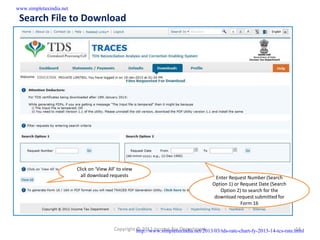
 Search File to Download


                         Click on ‘View All’ to view
                           all download requests                                          Enter Request Number (Search
                                                                                        Option 1) or Request Date (Search
                                                                                            Option 2) to search for the
                                                                                         download request submitted for
                                                                                                     Form 16


                                           Copyright http://www.simpletaxindia.net/2013/03/tds-rate-chart-fy-2013-14-tcs-rate.html
                                                     © 2012 Income Tax Department                                             14
www.simpletaxindia.net

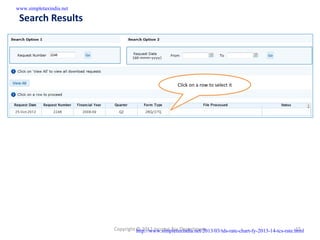
 Search Results


                                                      Click on a row to select it


                         Copyright http://www.simpletaxindia.net/2013/03/tds-rate-chart-fy-2013-14-tcs-rate.html
                                   © 2012 Income Tax Department                                             15
www.simpletaxindia.net

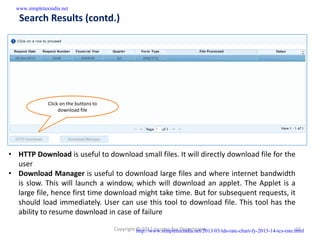
   Search Results (contd.)


               Click on the buttons to
                    download file


• HTTP Download is useful to download small files. It will directly download file for the
  user
• Download Manager is useful to download large files and where internet bandwidth
  is slow. This will launch a window, which will download an applet. The Applet is a
  large file, hence first time download might take time. But for subsequent requests, it
  should load immediately. User can use this tool to download file. This tool has the
  ability to resume download in case of failure

                                         Copyright http://www.simpletaxindia.net/2013/03/tds-rate-chart-fy-2013-14-tcs-rate.html
                                                   © 2012 Income Tax Department                                             16
www.simpletaxindia.net

 Convert .ZIP File into PDF

• .Zip file will contain Form 16A details for all requested PANs
• Download ‘TRACES PDF Generation Utility’ from the website and install it on your
  desktop
• Pass the ZIP file through the utility to convert it into individual PDF files for each PAN
• User can opt to digitally sign the Form 16As during conversion
• Deductor can also opt to manually sign the PDF files after printing


                                Copyright http://www.simpletaxindia.net/2013/03/tds-rate-chart-fy-2013-14-tcs-rate.html
                                          © 2012 Income Tax Department                                             17

Form16a

  • 1.
    www.simpletaxindia.net e-Tutorial Download Form 16A Copyright http://www.simpletaxindia.net/2013/03/tds-rate-chart-fy-2013-14-tcs-rate.html © 2012 Income Tax Department 1
  • 2.
    www.simpletaxindia.net Login toTRACES For more details on any screen, click on Help icon Click on help icon next to each field for more details Login to TRACES as a deductor by entering User Id and Password Enter the text as Click on ‘Go’ to displayed in continue Verification Code Copyright http://www.simpletaxindia.net/2013/03/tds-rate-chart-fy-2013-14-tcs-rate.html © 2012 Income Tax Department 2
  • 3.
    www.simpletaxindia.net Landing Page Landing page will be displayed Copyright http://www.simpletaxindia.net/2013/03/tds-rate-chart-fy-2013-14-tcs-rate.html © 2012 Income Tax Department 3
  • 4.
    www.simpletaxindia.net Select fromMenu Under ‘Downloads’, click on ‘Form 16A’ to place download request • Download request for Form 16A for a particular FY and Quarter can be submitted only after Form 26Q or 27Q statement for selected FY and Quarter is filed by deductor and processed by TDS CPC. Statement filed should not have been cancelled or NIL Statement. • Form 16A can be downloaded from FY 2007-08 onwards • Data in Form 16A will be as per latest statement processed (Form 26Q and 27Q) for selected FY & Quarter • For a given FY, Quarter, TAN and PAN, there will be only one Form 16A for all Form Types and Section Codes Copyright © 2012 Income Tax Department 4 http://www.simpletaxindia.net/2013/03/tds-rate-chart-fy-2013-14-tcs-rate.html
  • 5.
    www.simpletaxindia.net EnterSearch Criteria Click on Help icon for help text for this screen For individual PANs, select Valid PANs will be added to the Financial Year, Quarter and list. Select a PAN and click on Form Type for which Form ‘Remove’ to remove it from the 16A is required and enter PAN list. and click on ‘Add’ Click on ‘Go’ to proceed with download request For downloading Form 16A for all PANs , select Financial Year, Quarter and Form Type for which Form 16A is required and click on ‘Go’ • Validation screen will be presented on click of ‘Go‘ • PAN must be present in PAN database and also in the latest Form 26Q / 27Q statements of selected FY and Quarter • Form Type field is used to populate validation screen on next step Copyright http://www.simpletaxindia.net/2013/03/tds-rate-chart-fy-2013-14-tcs-rate.html © 2012 Income Tax Department 5
  • 6.
    www.simpletaxindia.net Details tobe printed on Form 16A This information will be printed on Form 16A for each PAN. Details will be populated from your profile information in TRACES Click on ‘Submit’ to Click on ‘Cancel’ and submit download go to ‘Profile’ section request for Form 16A to update details Copyright http://www.simpletaxindia.net/2013/03/tds-rate-chart-fy-2013-14-tcs-rate.html © 2012 Income Tax Department 6
  • 7.
    www.simpletaxindia.net Token NumberDetails Enter Authentica the validation is and you ha Authenticati Enter Token Number of only Regular (Original) Statement corresponding to the Financial Year, Quarter and Form Type displayed above Copyright http://www.simpletaxindia.net/2013/03/tds-rate-chart-fy-2013-14-tcs-rate.html © 2012 Income Tax Department 7
  • 8.
    www.simpletaxindia.net Token NumberDetails (Contd.) Tick in Check Box for NIL Challan or Book Adjustment (Government Government deductors not Deductor) having BIN details tick here and need not need provide BSR and Challan Serial Number below Click on Guide to select suitable Challan option Enter CIN details for a challan used in the statement Tick here if you do not any Valid PAN corresponding to above Challan details Click on Guide to select suitable PAN amount Combinations PANs entered must be those for which payment has been done using the CIN / BIN entered on this screen Copyright http://www.simpletaxindia.net/2013/03/tds-rate-chart-fy-2013-14-tcs-rate.html © 2012 Income Tax Department 8
  • 9.
    www.simpletaxindia.net Notes for Validation Screen • Authentication code is generated when you clear validation details for a statement for certain functionalities such as Download Form 16 / 16A, Download NSDL Conso File, Download Justification Report, etc. Authentication code generated for a particular statement will be valid for the calendar day (i.e., an authentication code generated on 10-Dec-2012 can be used only on 10-Dec-2012 to clear validation details for the same statement. It will not be valid the next day). • Validation will be bypassed for the same statement within the same session • Token Number must be of the statement of the FY, Quarter and Form Type displayed on the screen • CIN details must be entered for the challan which is deposited and mentioned in the statement corresponding to the FY, Quarter and Form Type mentioned above • Transfer Voucher details to be entered for government deductors • Amount should be entered in two decimal places (e.g., 1234.56) Copyright http://www.simpletaxindia.net/2013/03/tds-rate-chart-fy-2013-14-tcs-rate.html © 2012 Income Tax Department 9
  • 10.
    www.simpletaxindia.net Notes for Validation Screen • Maximum of 3 distinct PANs and corresponding amount must be entered • If there are more than three such combinations in the challan, user can enter any 3 • If there less than three such combinations in the challan, user must enter all (either one or two) • PAN mentioned must be that for which payment has been done using the challan / Transfer Voucher mentioned on this screen Copyright http://www.simpletaxindia.net/2013/03/tds-rate-chart-fy-2013-14-tcs-rate.html © 2012 Income Tax Department 10
  • 11.
    www.simpletaxindia.net Authentication CodeScreen Authentication Code will be available here Copyright http://www.simpletaxindia.net/2013/03/tds-rate-chart-fy-2013-14-tcs-rate.html © 2012 Income Tax Department 11
  • 12.
    www.simpletaxindia.net Request NumberScreen Request Number will be available here Copyright http://www.simpletaxindia.net/2013/03/tds-rate-chart-fy-2013-14-tcs-rate.html © 2012 Income Tax Department 12
  • 13.
    www.simpletaxindia.net RequestNumber Screen Click on ‘Requested Downloads’ under ‘Downloads’ menu to download the NSDL Conso File • File will be available in ‘Requested Downloads’ Copyright http://www.simpletaxindia.net/2013/03/tds-rate-chart-fy-2013-14-tcs-rate.html © 2012 Income Tax Department 13
  • 14.
    www.simpletaxindia.net Search Fileto Download Click on ‘View All’ to view all download requests Enter Request Number (Search Option 1) or Request Date (Search Option 2) to search for the download request submitted for Form 16 Copyright http://www.simpletaxindia.net/2013/03/tds-rate-chart-fy-2013-14-tcs-rate.html © 2012 Income Tax Department 14
  • 15.
    www.simpletaxindia.net Search Results Click on a row to select it Copyright http://www.simpletaxindia.net/2013/03/tds-rate-chart-fy-2013-14-tcs-rate.html © 2012 Income Tax Department 15
  • 16.
    www.simpletaxindia.net Search Results (contd.) Click on the buttons to download file • HTTP Download is useful to download small files. It will directly download file for the user • Download Manager is useful to download large files and where internet bandwidth is slow. This will launch a window, which will download an applet. The Applet is a large file, hence first time download might take time. But for subsequent requests, it should load immediately. User can use this tool to download file. This tool has the ability to resume download in case of failure Copyright http://www.simpletaxindia.net/2013/03/tds-rate-chart-fy-2013-14-tcs-rate.html © 2012 Income Tax Department 16
  • 17.
    www.simpletaxindia.net Convert .ZIPFile into PDF • .Zip file will contain Form 16A details for all requested PANs • Download ‘TRACES PDF Generation Utility’ from the website and install it on your desktop • Pass the ZIP file through the utility to convert it into individual PDF files for each PAN • User can opt to digitally sign the Form 16As during conversion • Deductor can also opt to manually sign the PDF files after printing Copyright http://www.simpletaxindia.net/2013/03/tds-rate-chart-fy-2013-14-tcs-rate.html © 2012 Income Tax Department 17