www.cbec.gov.in www.aces.gov.in
CENTRAL BOARD OF EXCISE & CUSTOMS
GST Migration: Workflow
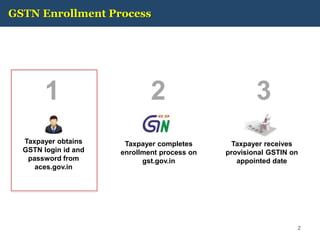
GSTN Enrollment Process
Taxpayer obtains
GSTN login id and
password from
aces.gov.in
1
Taxpayer completes
enrollment process on
gst.gov.in
2 3
Taxpayer receives
provisional GSTIN on
appointed date
2
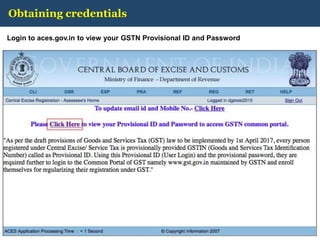
Obtaining credentials
Login to aces.gov.in to view your GSTN Provisional ID and Password
3
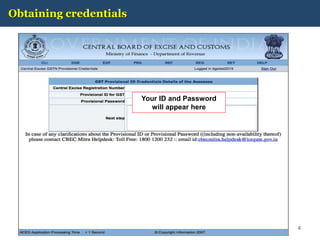
Obtaining credentials
4
Your ID and Password
will appear here
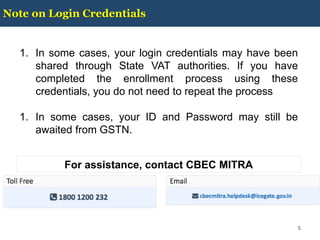
Note on Login Credentials
5
1. In some cases, your login credentials may have been
shared through State VAT authorities. If you have
completed the enrollment process using these
credentials, you do not need to repeat the process
1. In some cases, your ID and Password may still be
awaited from GSTN.
For assistance, contact CBEC MITRA
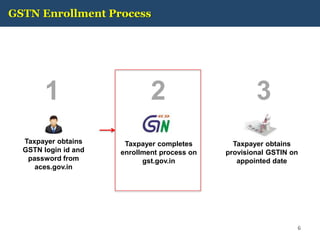
GSTN Enrollment Process
Taxpayer obtains
GSTN login id and
password from
aces.gov.in
1
Taxpayer completes
enrollment process on
gst.gov.in
2 3
Taxpayer obtains
provisional GSTIN on
appointed date
6
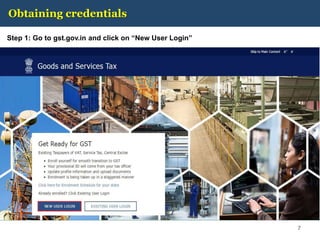
Obtaining credentials
Step 1: Go to gst.gov.in and click on “New User Login”
7
Obtaining credentials
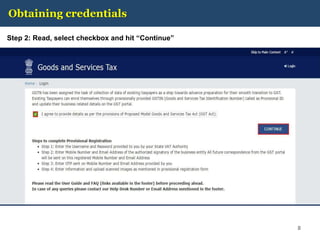
Step 2: Read, select checkbox and hit “Continue”
8
Obtaining credentials
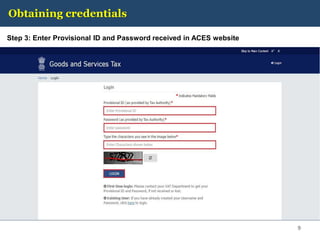
Step 3: Enter Provisional ID and Password received in ACES website
9
Obtaining credentials
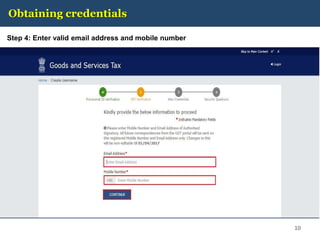
Step 4: Enter valid email address and mobile number
10
Obtaining credentials
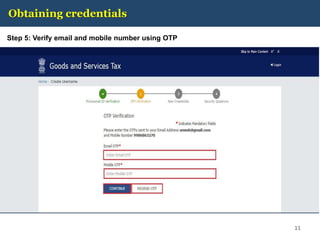
Step 5: Verify email and mobile number using OTP
11
Obtaining credentials
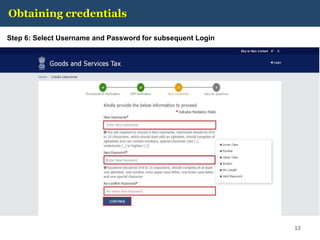
Step 6: Select Username and Password for subsequent Login
12
Obtaining credentials
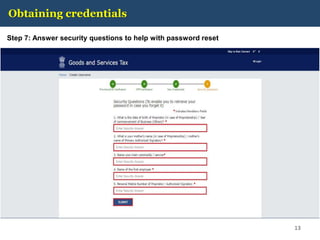
Step 7: Answer security questions to help with password reset
13
Obtaining credentials
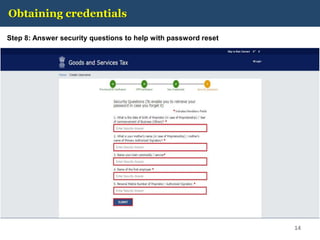
Step 8: Answer security questions to help with password reset
14
Obtaining credentials
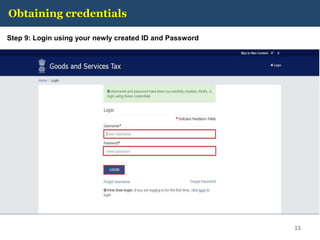
Step 9: Login using your newly created ID and Password
15
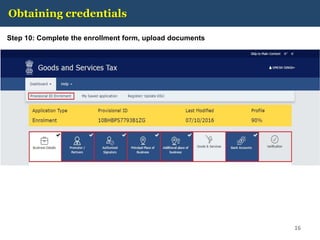
Obtaining credentials
Step 10: Complete the enrollment form, upload documents
16
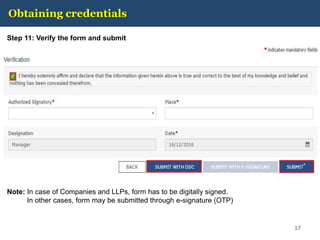
Obtaining credentials
Step 11: Verify the form and submit
17
Note: In case of Companies and LLPs, form has to be digitally signed.
In other cases, form may be submitted through e-signature (OTP)
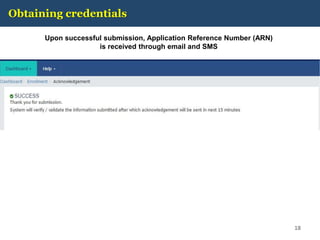
Obtaining credentials
Upon successful submission, Application Reference Number (ARN)
is received through email and SMS
18
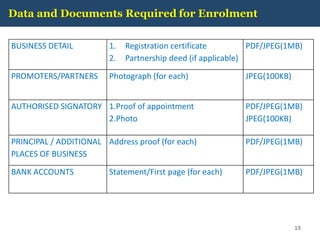
Data and Documents Required for Enrolment
19
BUSINESS DETAIL 1. Registration certificate
2. Partnership deed (if applicable)
PDF/JPEG(1MB)
PROMOTERS/PARTNERS Photograph (for each) JPEG(100KB)
AUTHORISED SIGNATORY 1.Proof of appointment
2.Photo
PDF/JPEG(1MB)
JPEG(100KB)
PRINCIPAL / ADDITIONAL
PLACES OF BUSINESS
Address proof (for each) PDF/JPEG(1MB)
BANK ACCOUNTS Statement/First page (for each) PDF/JPEG(1MB)
GSTN Portal Help
20
For any assistance with GSTN Common Portal, contact
GSTN helpdesk:
• 0124-4688999
• helpdesk@gst.gov.in
• http://tutorial.gst.gov.in
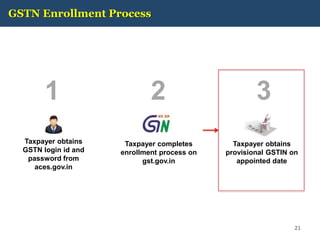
GSTN Enrollment Process
Taxpayer obtains
GSTN login id and
password from
aces.gov.in
1
Taxpayer completes
enrollment process on
gst.gov.in
2 3
Taxpayer obtains
provisional GSTIN on
appointed date
21
Relevant provision of Model GST Law
Sec 166. Migration of existing taxpayers to GST
(1) On the appointed day, every person registered under any of the earlier laws and having a valid PAN shall
be issued a certificate of registration on a provisional basis in such form and manner as may be prescribed.
(2) The certificate of registration issued under sub-section (1) shall be valid for a period of six months from
the date of its issue:
PROVIDED that the said validity period may be extended for such further period as the
Central/State Government may, on the recommendation of the Council, notify.
(3) Every person to whom a certificate of registration has been issued under subsection (1) shall, within the
period specified under sub-section (2), furnish such information as may be prescribed.
(4) On furnishing of such information, the certificate of registration issued under subsection (1) shall, subject
to the provisions of section 23, be granted on a final basis by the Central/State Government.
(5) The certificate of registration issued to a person under sub-section (1) may be cancelled if such person
fails to furnish, within the time specified under subsection (2), the information prescribed under sub-section
(3).
(6) The certificate of registration issued to a person under sub-section (1) shall be deemed to have not been
issued if the said registration is cancelled in pursuance of an application filed by such person that he was not
liable to registration under section 23.
(7) A person to whom a certificate of registration has been issued on a provisional basis and who is eligible
to pay tax under section 9, may opt to do so within such time and in such manner as may be prescribed:
PROVIDED that where the said person does not opt to pay tax under section 9 within the time prescribed in
this behalf, he shall be liable to pay tax under section 8. 22
Relevant provision of Draft Registration Rules
Rule 14. Migration of persons registered under Earlier Law
(1) Every person registered under an earlier law and having a Permanent Account Number issued under the
Income Tax Act, 1961 (Act 43 of 1961) shall be granted registration on a provisional basis and a certificate of
registration in FORM GST REG- 21, incorporating the Goods and Services Tax Identification Number
(GSTIN) therein, shall be made available on the Common Portal.
(2)(a) Every person who has been granted a provisional registration under subrule (1) shall submit an
application electronically in FORM GST REG–20, duly signed, along with the information and documents
specified in the said application, on the Common Portal either directly or through a Facilitation Centre,
notified by the Board or Commissioner.
(b) The information asked for in clause (a) shall be furnished within the period specified in section 142 or
within such further period as may be extended by the Board or Commissioner in this behalf.
(c) If the information and the particulars furnished in the application are found, by the proper officer, to be
correct and complete, a certificate of registration in FORM GST REG-06 shall be made available to the
registered taxable person electronically on the Common Portal.
(3) Where the particulars and/or information specified in sub-rule (2) have either not been furnished or not
found to be correct or complete, the proper officer shall cancel the provisional registration granted under sub-
rule (1) and issue an order in FORM GST REG- 22:
Provided that no provisional registration shall be cancelled as aforesaid without serving a notice to show
cause in FORM GST REG-23 and without affording the person concerned a reasonable opportunity of being
heard.
(4) Every person registered under any of the earlier laws, who is not liable to be registered under the Act
may, at his option, file electronically an application in FORM GST REG-24 at the Common Portal for
cancellation of the registration granted provisionally to him and the proper officer shall, after conducting such
enquiry as deemed fit, cancel the said provisional registration. 23

Cbec gst-migration-help

  • 1.
    www.cbec.gov.in www.aces.gov.in CENTRAL BOARDOF EXCISE & CUSTOMS GST Migration: Workflow
  • 2.
    GSTN Enrollment Process Taxpayerobtains GSTN login id and password from aces.gov.in 1 Taxpayer completes enrollment process on gst.gov.in 2 3 Taxpayer receives provisional GSTIN on appointed date 2
  • 3.
    Obtaining credentials Login toaces.gov.in to view your GSTN Provisional ID and Password 3
  • 4.
    Obtaining credentials 4 Your IDand Password will appear here
  • 5.
    Note on LoginCredentials 5 1. In some cases, your login credentials may have been shared through State VAT authorities. If you have completed the enrollment process using these credentials, you do not need to repeat the process 1. In some cases, your ID and Password may still be awaited from GSTN. For assistance, contact CBEC MITRA
  • 6.
    GSTN Enrollment Process Taxpayerobtains GSTN login id and password from aces.gov.in 1 Taxpayer completes enrollment process on gst.gov.in 2 3 Taxpayer obtains provisional GSTIN on appointed date 6
  • 7.
    Obtaining credentials Step 1:Go to gst.gov.in and click on “New User Login” 7
  • 8.
    Obtaining credentials Step 2:Read, select checkbox and hit “Continue” 8
  • 9.
    Obtaining credentials Step 3:Enter Provisional ID and Password received in ACES website 9
  • 10.
    Obtaining credentials Step 4:Enter valid email address and mobile number 10
  • 11.
    Obtaining credentials Step 5:Verify email and mobile number using OTP 11
  • 12.
    Obtaining credentials Step 6:Select Username and Password for subsequent Login 12
  • 13.
    Obtaining credentials Step 7:Answer security questions to help with password reset 13
  • 14.
    Obtaining credentials Step 8:Answer security questions to help with password reset 14
  • 15.
    Obtaining credentials Step 9:Login using your newly created ID and Password 15
  • 16.
    Obtaining credentials Step 10:Complete the enrollment form, upload documents 16
  • 17.
    Obtaining credentials Step 11:Verify the form and submit 17 Note: In case of Companies and LLPs, form has to be digitally signed. In other cases, form may be submitted through e-signature (OTP)
  • 18.
    Obtaining credentials Upon successfulsubmission, Application Reference Number (ARN) is received through email and SMS 18
  • 19.
    Data and DocumentsRequired for Enrolment 19 BUSINESS DETAIL 1. Registration certificate 2. Partnership deed (if applicable) PDF/JPEG(1MB) PROMOTERS/PARTNERS Photograph (for each) JPEG(100KB) AUTHORISED SIGNATORY 1.Proof of appointment 2.Photo PDF/JPEG(1MB) JPEG(100KB) PRINCIPAL / ADDITIONAL PLACES OF BUSINESS Address proof (for each) PDF/JPEG(1MB) BANK ACCOUNTS Statement/First page (for each) PDF/JPEG(1MB)
  • 20.
    GSTN Portal Help 20 Forany assistance with GSTN Common Portal, contact GSTN helpdesk: • 0124-4688999 • helpdesk@gst.gov.in • http://tutorial.gst.gov.in
  • 21.
    GSTN Enrollment Process Taxpayerobtains GSTN login id and password from aces.gov.in 1 Taxpayer completes enrollment process on gst.gov.in 2 3 Taxpayer obtains provisional GSTIN on appointed date 21
  • 22.
    Relevant provision ofModel GST Law Sec 166. Migration of existing taxpayers to GST (1) On the appointed day, every person registered under any of the earlier laws and having a valid PAN shall be issued a certificate of registration on a provisional basis in such form and manner as may be prescribed. (2) The certificate of registration issued under sub-section (1) shall be valid for a period of six months from the date of its issue: PROVIDED that the said validity period may be extended for such further period as the Central/State Government may, on the recommendation of the Council, notify. (3) Every person to whom a certificate of registration has been issued under subsection (1) shall, within the period specified under sub-section (2), furnish such information as may be prescribed. (4) On furnishing of such information, the certificate of registration issued under subsection (1) shall, subject to the provisions of section 23, be granted on a final basis by the Central/State Government. (5) The certificate of registration issued to a person under sub-section (1) may be cancelled if such person fails to furnish, within the time specified under subsection (2), the information prescribed under sub-section (3). (6) The certificate of registration issued to a person under sub-section (1) shall be deemed to have not been issued if the said registration is cancelled in pursuance of an application filed by such person that he was not liable to registration under section 23. (7) A person to whom a certificate of registration has been issued on a provisional basis and who is eligible to pay tax under section 9, may opt to do so within such time and in such manner as may be prescribed: PROVIDED that where the said person does not opt to pay tax under section 9 within the time prescribed in this behalf, he shall be liable to pay tax under section 8. 22
  • 23.
    Relevant provision ofDraft Registration Rules Rule 14. Migration of persons registered under Earlier Law (1) Every person registered under an earlier law and having a Permanent Account Number issued under the Income Tax Act, 1961 (Act 43 of 1961) shall be granted registration on a provisional basis and a certificate of registration in FORM GST REG- 21, incorporating the Goods and Services Tax Identification Number (GSTIN) therein, shall be made available on the Common Portal. (2)(a) Every person who has been granted a provisional registration under subrule (1) shall submit an application electronically in FORM GST REG–20, duly signed, along with the information and documents specified in the said application, on the Common Portal either directly or through a Facilitation Centre, notified by the Board or Commissioner. (b) The information asked for in clause (a) shall be furnished within the period specified in section 142 or within such further period as may be extended by the Board or Commissioner in this behalf. (c) If the information and the particulars furnished in the application are found, by the proper officer, to be correct and complete, a certificate of registration in FORM GST REG-06 shall be made available to the registered taxable person electronically on the Common Portal. (3) Where the particulars and/or information specified in sub-rule (2) have either not been furnished or not found to be correct or complete, the proper officer shall cancel the provisional registration granted under sub- rule (1) and issue an order in FORM GST REG- 22: Provided that no provisional registration shall be cancelled as aforesaid without serving a notice to show cause in FORM GST REG-23 and without affording the person concerned a reasonable opportunity of being heard. (4) Every person registered under any of the earlier laws, who is not liable to be registered under the Act may, at his option, file electronically an application in FORM GST REG-24 at the Common Portal for cancellation of the registration granted provisionally to him and the proper officer shall, after conducting such enquiry as deemed fit, cancel the said provisional registration. 23