FMP Production Reflection Part 3
•Sean cawood
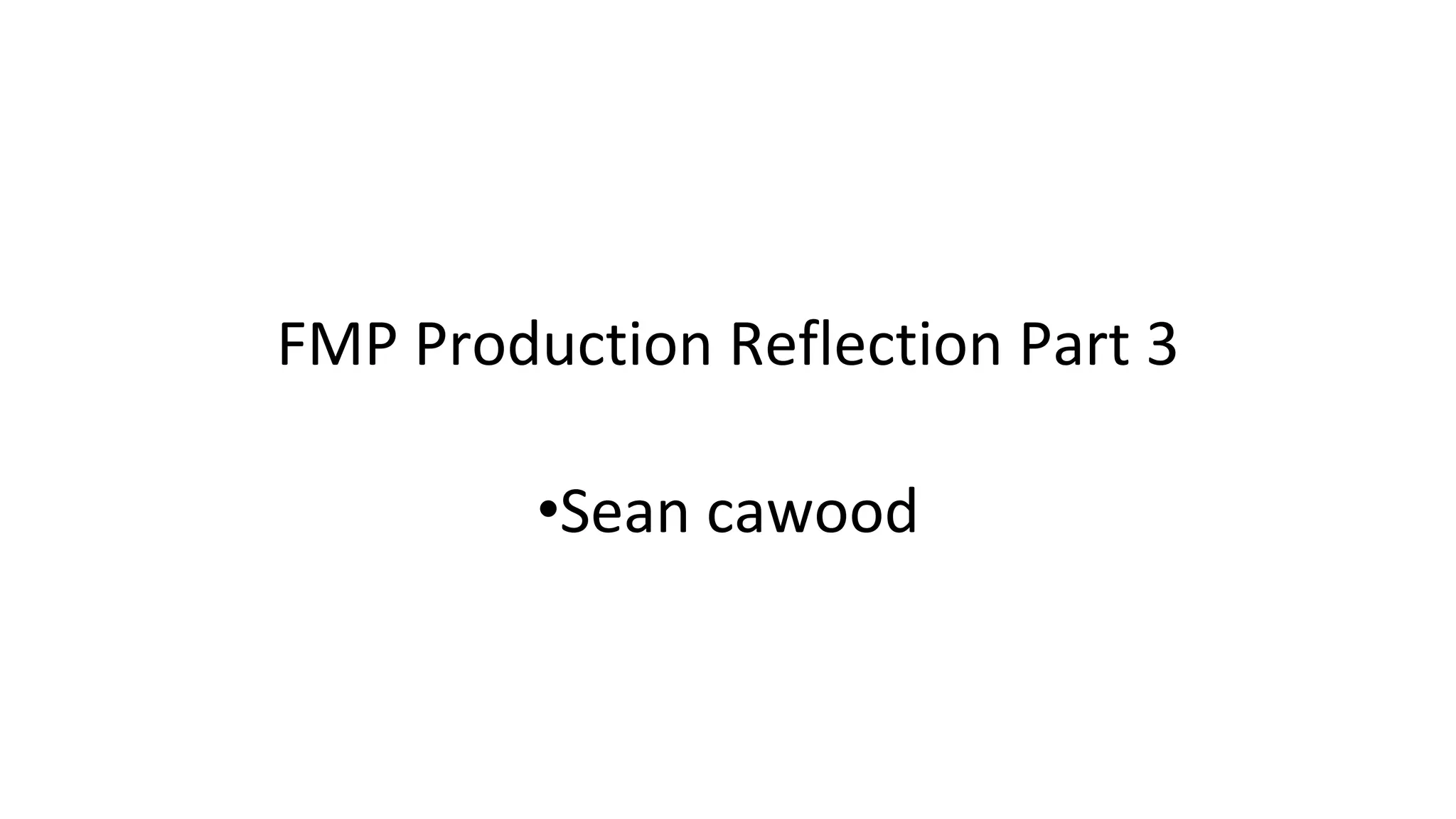
So i kinda didnt like using the logos already created for the companies and studios that i took from other trailer
so in the end i decided to try and build my own. First i created the EA logo taking heavy inspiration from how it
looks within the mass effect 3 trailer. First i had a singular optical flares lensflare and i customize it to make it
looks a lot more futuristic and more digital.
I then animated the brightness so this lensflare would appear from nowhere, become really bright and reveal
the EA logo as it dimmed back down.
I then had the EA logo and traced around it with the pen tool to create a mask
I then used a saber effect over the mask to then make it look like a hologram. I masked the glow which meant
the glow was only inside the mask that the saber was on and that meant the glow was only on the inside of
the mask. I also animated the lensflare to follow the line across the letters which i think was a good touch.
Then traced around the bioware logo too. I then animated the lensflare to get smaller and less bright again to
reveal the logo
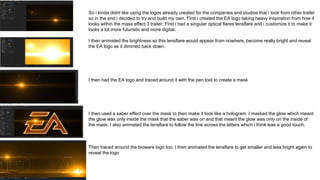
I then swapped around the logos around because i think It works better the other way around. I then added the saber
effect to bioware logo and i think it looked really good and i used the same options as before on both
I then used a track mat to add scan lines to the glow. But i also added the masks from the logo to make sure it didnt go
outside the lines and i was also able to feather them from the cores of the effect. I wanted the scan lines because it adds
more texture to it which i think looks good on it because it makes it look like some kind of hologram.
I then used the distance from end option from the saber plugin to make it so that the logo quickly disappeared. I think this
is a unique and better way of remove the logo than just plain Fades. I think it makes it more professional looking too.
I tinted the scan lines. To make the white look more orange I think this made it blend in better with the orange glow.
I then finished animating its way out and i made sure to turn down the glow amount as it disappeared.
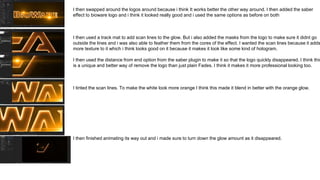
I then added a bit of lens texture for one of the Lensflare s and i then started adding a lot more lensflares along the
lines of the logos making sure there was plenty of room for them to move.
I then had a little more playing about with it before i was finished and i then rendered it when i was happy with it.
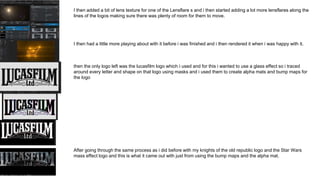
then the only logo left was the lucasfilm logo which i used and for this i wanted to use a glass effect so i traced
around every letter and shape on that logo using masks and i used them to create alpha mats and bump maps for
the logo
After going through the same process as i did before with my knights of the old republic logo and the Star Wars
mass effect logo and this is what it came out with just from using the bump maps and the alpha mat.
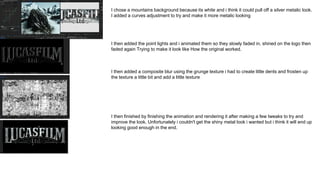
I chose a mountains background because its white and i think it could pull off a silver metalic look.
I added a curves adjustment to try and make it more metalic looking
I then added the point lights and i animated them so they slowly faded in, shined on the logo then
faded again Trying to make it look like How the original worked.
I then added a composite blur using the grunge texture i had to create little dents and frosten up
the texture a little bit and add a little texture
I then finished by finishing the animation and rendering it after making a few tweaks to try and
improve the look. Unfortunately i couldn't get the shiny metal look i wanted but i think it will end up
looking good enough in the end.
Cereal Process
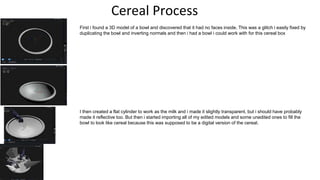
First i found a 3D model of a bowl and discovered that it had no faces inside. This was a glitch i easily fixed by
duplicating the bowl and inverting normals and then i had a bowl i could work with for this cereal box
I then created a flat cylinder to work as the milk and i made it slightly transparent, but i should have probably
made it reflective too. But then i started importing all of my edited models and some unedited ones to fill the
bowl to look like cereal because this was supposed to be a digital version of the cereal.
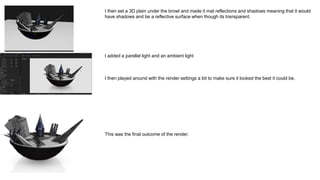
I then set a 3D plain under the browl and made it mat reflections and shadows meaning that it would
have shadows and be a reflective surface when though its transparent.
I added a parellel light and an ambient light
I then played around with the render settings a bit to make sure it looked the best it could be.
This was the final outcome of the render.
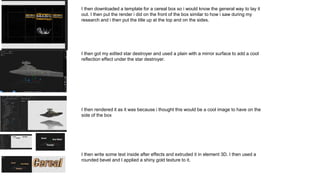
I then downloaded a template for a cereal box so i would know the general way to lay it
out. I then put the render i did on the front of the box similar to how i saw during my
research and i then put the title up at the top and on the sides.
I then got my edited star destroyer and used a plain with a mirror surface to add a cool
reflection effect under the star destroyer.
I then rendered it as it was because i thought this would be a cool image to have on the
side of the box
I then write some text inside after effects and extruded it in element 3D. I then used a
rounded bevel and I applied a shiny gold texture to it.
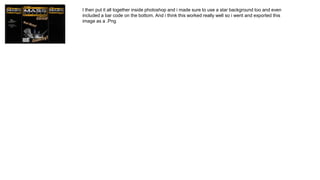
I then put it all together inside photoshop and i made sure to use a star background too and even
included a bar code on the bottom. And i think this worked really well so i went and exported this
image as a .Png
Shirt Process
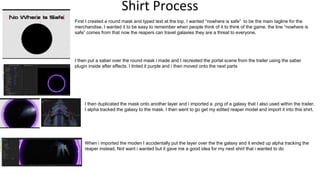
First I created a round mask and typed text at the top. I wanted “nowhere is safe” to be the main tagline for the
merchandise. I wanted it to be easy to remember when people think of it to think of the game. the line “nowhere is
safe” comes from that now the reapers can travel galaxies they are a threat to everyone.
I then put a saber over the round mask i made and I recreated the portal scene from the trailer using the saber
plugin inside after effects. I tinted it purple and i then moved onto the next parts
I then duplicated the mask onto another layer and i imported a .png of a galaxy that I also used within the trailer.
I alpha tracked the galaxy to the mask. I then went to go get my edited reaper model and import it into this shirt.
When i imported the moden I accidentally put the layer over the the galaxy and it ended up alpha tracking the
reaper instead. Not want i wanted but it gave me a good idea for my next shirt that i wanted to do
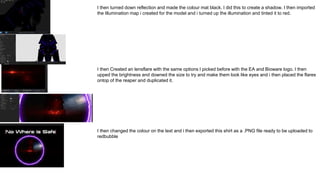
I then turned down reflection and made the colour mat black. I did this to create a shadow. I then imported
the Illumination map i created for the model and i turned up the illumination and tinted it to red.
I then Created an lensflare with the same options I picked before with the EA and Bioware logo. I then
upped the brightness and downed the size to try and make them look like eyes and i then placed the flares
ontop of the reaper and duplicated it.
I then changed the colour on the text and i then exported this shirt as a .PNG file ready to be uploaded to
redbubble
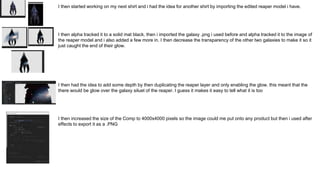
I then started working on my next shirt and i had the idea for another shirt by importing the edited reaper model i have.
I then alpha tracked it to a solid mat black, then i imported the galaxy .png i used before and alpha tracked it to the image of
the reaper model and i also added a few more in. I then decrease the transparency of the other two galaxies to make it so it
just caught the end of their glow.
I then had the idea to add some depth by then duplicating the reaper layer and only enabling the glow. this meant that the
there would be glow over the galaxy siluet of the reaper. I guess it makes it easy to tell what it is too
I then increased the size of the Comp to 4000x4000 pixels so the image could me put onto any product but then i used after
effects to export it as a .PNG
Game Case Process
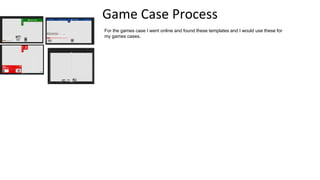
For the games case I went online and found these templates and I would use these for
my games cases.
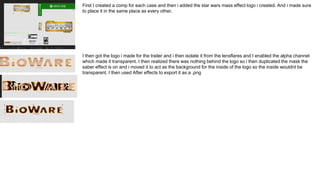
First I created a comp for each case and then i added the star wars mass effect logo i created. And i made sure
to place it in the same place as every other.
I then got the logo i made for the trailer and i then isolate it from the lensflares and I enabled the alpha channel
which made it transparent. I then realized there was nothing behind the logo so i then duplicated the mask the
saber effect is on and i moved it to act as the background for the inside of the logo so the inside wouldnt be
transparent. I then used After effects to export it as a .png
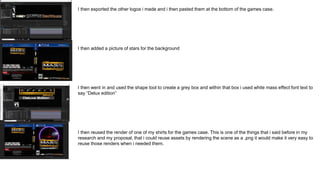
I then exported the other logos i made and i then pasted them at the bottom of the games case.
I then added a picture of stars for the background
I then went in and used the shape tool to create a grey box and within that box i used white mass effect font text to
say “Delux edition”
I then reused the render of one of my shirts for the games case. This is one of the things that i said before in my
research and my proposal, that i could reuse assets by rendering the scene as a .png it would make it very easy to
reuse those renders when i needed them.
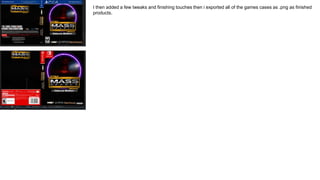
I then added a few tweaks and finishing touches then i exported all of the games cases as .png as finished
products.
Computer Background Process
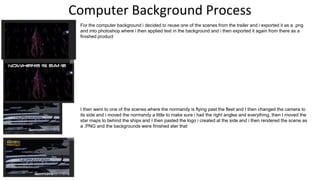
For the computer background i decided to reuse one of the scenes from the trailer and i exported it as a .png
and into photoshop where i then applied text in the background and i then exported it again from there as a
finished product
I then went to one of the scenes where the normandy is flying past the fleet and I then changed the camera to
its side and i moved the normandy a little to make sure i had the right angles and everything. then I moved the
star maps to behind the ships and I then pasted the logo i created at the side and i then rendered the scene as
a .PNG and the backgrounds were finished ater that
Poster Process
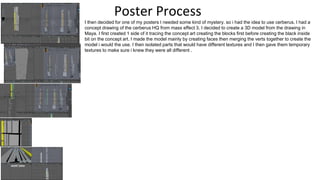
I then decided for one of my posters I needed some kind of mystery. so i had the idea to use cerberus. I had a
concept drawing of the cerberus HQ from mass effect 3. I decided to create a 3D model from the drawing in
Maya. I first created 1 side of it tracing the concept art creating the blocks first before creating the black inside
bit on the concept art. I made the model mainly by creating faces then merging the verts together to create the
model i would the use. I then isolated parts that would have different textures and I then gave them temporary
textures to make sure i knew they were all different .
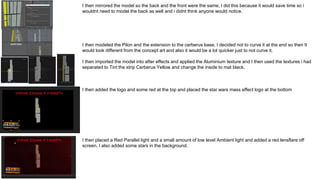
I then mirrored the model so the back and the front were the same, I did this because it would save time so i
wouldnt need to model the back as well and i didnt think anyone would notice.
I then modeled the Pilon and the extension to the cerberus base. I decided not to curve it at the end so then It
would look different from the concept art and also it would be a lot quicker just to not curve it.
I then imported the model into after effects and applied the Aluminium texture and I then used the textures i had
separated to Tint the strip Cerberus Yellow and change the inside to mat black.
I then added the logo and some red at the top and placed the star wars mass effect logo at the bottom
I then placed a Red Parallel light and a small amount of low level Ambient light and added a red lensflare off
screen. I also added some stars in the background.
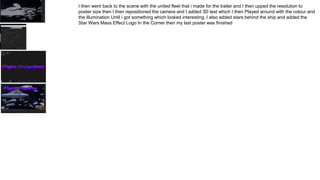
I then went back to the scene with the united fleet that i made for the trailer and I then upped the resolution to
poster size then I then repositioned the camera and I added 3D text which I then Played around with the colour and
the illumination Until i got something which looked interesting. I also added stars behind the ship and added the
Star Wars Mass Effect Logo In the Corner then my last poster was finished
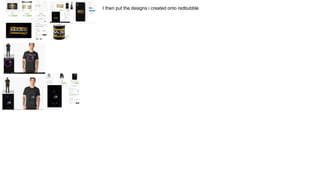
I then put the designs i created onto redbubble

Fmp production reflection part 3

  • 1.
    FMP Production ReflectionPart 3 •Sean cawood
  • 2.
    So i kindadidnt like using the logos already created for the companies and studios that i took from other trailer so in the end i decided to try and build my own. First i created the EA logo taking heavy inspiration from how it looks within the mass effect 3 trailer. First i had a singular optical flares lensflare and i customize it to make it looks a lot more futuristic and more digital. I then animated the brightness so this lensflare would appear from nowhere, become really bright and reveal the EA logo as it dimmed back down. I then had the EA logo and traced around it with the pen tool to create a mask I then used a saber effect over the mask to then make it look like a hologram. I masked the glow which meant the glow was only inside the mask that the saber was on and that meant the glow was only on the inside of the mask. I also animated the lensflare to follow the line across the letters which i think was a good touch. Then traced around the bioware logo too. I then animated the lensflare to get smaller and less bright again to reveal the logo
  • 3.
    I then swappedaround the logos around because i think It works better the other way around. I then added the saber effect to bioware logo and i think it looked really good and i used the same options as before on both I then used a track mat to add scan lines to the glow. But i also added the masks from the logo to make sure it didnt go outside the lines and i was also able to feather them from the cores of the effect. I wanted the scan lines because it adds more texture to it which i think looks good on it because it makes it look like some kind of hologram. I then used the distance from end option from the saber plugin to make it so that the logo quickly disappeared. I think this is a unique and better way of remove the logo than just plain Fades. I think it makes it more professional looking too. I tinted the scan lines. To make the white look more orange I think this made it blend in better with the orange glow. I then finished animating its way out and i made sure to turn down the glow amount as it disappeared.
  • 4.
    I then addeda bit of lens texture for one of the Lensflare s and i then started adding a lot more lensflares along the lines of the logos making sure there was plenty of room for them to move. I then had a little more playing about with it before i was finished and i then rendered it when i was happy with it. then the only logo left was the lucasfilm logo which i used and for this i wanted to use a glass effect so i traced around every letter and shape on that logo using masks and i used them to create alpha mats and bump maps for the logo After going through the same process as i did before with my knights of the old republic logo and the Star Wars mass effect logo and this is what it came out with just from using the bump maps and the alpha mat.
  • 5.
    I chose amountains background because its white and i think it could pull off a silver metalic look. I added a curves adjustment to try and make it more metalic looking I then added the point lights and i animated them so they slowly faded in, shined on the logo then faded again Trying to make it look like How the original worked. I then added a composite blur using the grunge texture i had to create little dents and frosten up the texture a little bit and add a little texture I then finished by finishing the animation and rendering it after making a few tweaks to try and improve the look. Unfortunately i couldn't get the shiny metal look i wanted but i think it will end up looking good enough in the end.
  • 6.
    Cereal Process First ifound a 3D model of a bowl and discovered that it had no faces inside. This was a glitch i easily fixed by duplicating the bowl and inverting normals and then i had a bowl i could work with for this cereal box I then created a flat cylinder to work as the milk and i made it slightly transparent, but i should have probably made it reflective too. But then i started importing all of my edited models and some unedited ones to fill the bowl to look like cereal because this was supposed to be a digital version of the cereal.
  • 7.
    I then seta 3D plain under the browl and made it mat reflections and shadows meaning that it would have shadows and be a reflective surface when though its transparent. I added a parellel light and an ambient light I then played around with the render settings a bit to make sure it looked the best it could be. This was the final outcome of the render.
  • 8.
    I then downloadeda template for a cereal box so i would know the general way to lay it out. I then put the render i did on the front of the box similar to how i saw during my research and i then put the title up at the top and on the sides. I then got my edited star destroyer and used a plain with a mirror surface to add a cool reflection effect under the star destroyer. I then rendered it as it was because i thought this would be a cool image to have on the side of the box I then write some text inside after effects and extruded it in element 3D. I then used a rounded bevel and I applied a shiny gold texture to it.
  • 9.
    I then putit all together inside photoshop and i made sure to use a star background too and even included a bar code on the bottom. And i think this worked really well so i went and exported this image as a .Png
  • 10.
    Shirt Process First Icreated a round mask and typed text at the top. I wanted “nowhere is safe” to be the main tagline for the merchandise. I wanted it to be easy to remember when people think of it to think of the game. the line “nowhere is safe” comes from that now the reapers can travel galaxies they are a threat to everyone. I then put a saber over the round mask i made and I recreated the portal scene from the trailer using the saber plugin inside after effects. I tinted it purple and i then moved onto the next parts I then duplicated the mask onto another layer and i imported a .png of a galaxy that I also used within the trailer. I alpha tracked the galaxy to the mask. I then went to go get my edited reaper model and import it into this shirt. When i imported the moden I accidentally put the layer over the the galaxy and it ended up alpha tracking the reaper instead. Not want i wanted but it gave me a good idea for my next shirt that i wanted to do
  • 11.
    I then turneddown reflection and made the colour mat black. I did this to create a shadow. I then imported the Illumination map i created for the model and i turned up the illumination and tinted it to red. I then Created an lensflare with the same options I picked before with the EA and Bioware logo. I then upped the brightness and downed the size to try and make them look like eyes and i then placed the flares ontop of the reaper and duplicated it. I then changed the colour on the text and i then exported this shirt as a .PNG file ready to be uploaded to redbubble
  • 12.
    I then startedworking on my next shirt and i had the idea for another shirt by importing the edited reaper model i have. I then alpha tracked it to a solid mat black, then i imported the galaxy .png i used before and alpha tracked it to the image of the reaper model and i also added a few more in. I then decrease the transparency of the other two galaxies to make it so it just caught the end of their glow. I then had the idea to add some depth by then duplicating the reaper layer and only enabling the glow. this meant that the there would be glow over the galaxy siluet of the reaper. I guess it makes it easy to tell what it is too I then increased the size of the Comp to 4000x4000 pixels so the image could me put onto any product but then i used after effects to export it as a .PNG
  • 13.
    Game Case Process Forthe games case I went online and found these templates and I would use these for my games cases.
  • 14.
    First I createda comp for each case and then i added the star wars mass effect logo i created. And i made sure to place it in the same place as every other. I then got the logo i made for the trailer and i then isolate it from the lensflares and I enabled the alpha channel which made it transparent. I then realized there was nothing behind the logo so i then duplicated the mask the saber effect is on and i moved it to act as the background for the inside of the logo so the inside wouldnt be transparent. I then used After effects to export it as a .png
  • 15.
    I then exportedthe other logos i made and i then pasted them at the bottom of the games case. I then added a picture of stars for the background I then went in and used the shape tool to create a grey box and within that box i used white mass effect font text to say “Delux edition” I then reused the render of one of my shirts for the games case. This is one of the things that i said before in my research and my proposal, that i could reuse assets by rendering the scene as a .png it would make it very easy to reuse those renders when i needed them.
  • 16.
    I then addeda few tweaks and finishing touches then i exported all of the games cases as .png as finished products.
  • 17.
    Computer Background Process Forthe computer background i decided to reuse one of the scenes from the trailer and i exported it as a .png and into photoshop where i then applied text in the background and i then exported it again from there as a finished product I then went to one of the scenes where the normandy is flying past the fleet and I then changed the camera to its side and i moved the normandy a little to make sure i had the right angles and everything. then I moved the star maps to behind the ships and I then pasted the logo i created at the side and i then rendered the scene as a .PNG and the backgrounds were finished ater that
  • 18.
    Poster Process I thendecided for one of my posters I needed some kind of mystery. so i had the idea to use cerberus. I had a concept drawing of the cerberus HQ from mass effect 3. I decided to create a 3D model from the drawing in Maya. I first created 1 side of it tracing the concept art creating the blocks first before creating the black inside bit on the concept art. I made the model mainly by creating faces then merging the verts together to create the model i would the use. I then isolated parts that would have different textures and I then gave them temporary textures to make sure i knew they were all different .
  • 19.
    I then mirroredthe model so the back and the front were the same, I did this because it would save time so i wouldnt need to model the back as well and i didnt think anyone would notice. I then modeled the Pilon and the extension to the cerberus base. I decided not to curve it at the end so then It would look different from the concept art and also it would be a lot quicker just to not curve it. I then imported the model into after effects and applied the Aluminium texture and I then used the textures i had separated to Tint the strip Cerberus Yellow and change the inside to mat black. I then added the logo and some red at the top and placed the star wars mass effect logo at the bottom I then placed a Red Parallel light and a small amount of low level Ambient light and added a red lensflare off screen. I also added some stars in the background.
  • 20.
    I then wentback to the scene with the united fleet that i made for the trailer and I then upped the resolution to poster size then I then repositioned the camera and I added 3D text which I then Played around with the colour and the illumination Until i got something which looked interesting. I also added stars behind the ship and added the Star Wars Mass Effect Logo In the Corner then my last poster was finished
  • 21.
    I then putthe designs i created onto redbubble