
© Modelon 2017 1
FMI Composer®
Collaborative simulation
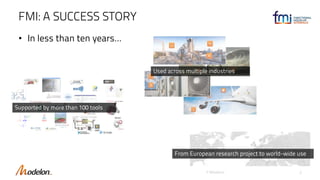
FMI: A SUCCESS STORY
• In less than ten years…
© Modelon 2
Supported by more than 100 tools
From European research project to world-wide use
Used across multiple industries
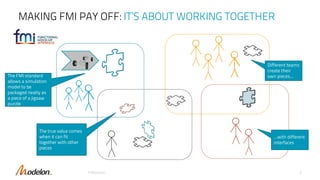
MAKING FMI PAY OFF: IT’S ABOUT WORKING TOGETHER
© Modelon 3
The true value comes
when it can fit
together with other
pieces
The FMI standard
allows a simulation
model to be
packaged neatly as
a piece of a jigsaw
puzzle
Different teams
create their
own pieces...
...with different
interfaces
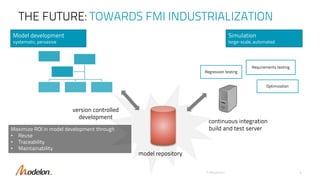
THE FUTURE: TOWARDS FMI INDUSTRIALIZATION
© Modelon 4
version controlled
development
model repository
continuous integration
build and test server
Model development
systematic, pervasive
Simulation
large-scale, automated
Regression testing
Requirements testing
Optimization
Maximize ROI in model development through
• Reuse
• Traceability
• Maintainability
FMI COMPOSER® ENABLE COLLABORATION
© Modelon 5
© Modelon 6
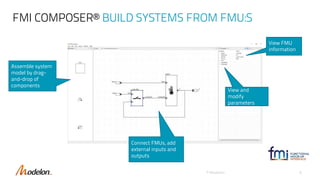
FMI COMPOSER® BUILD SYSTEMS FROM FMU:S
View FMU
information
Assemble system
model by drag-
and-drop of
components
Connect FMUs, add
external inputs and
outputs
View and
modify
parameters
© Modelon 7
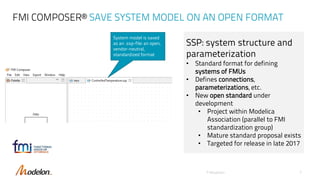
FMI COMPOSER® SAVE SYSTEM MODEL ON AN OPEN FORMAT
System model is saved
as an .ssp-file: an open,
vendor-neutral,
standardized format
SSP: system structure and
parameterization
• Standard format for defining
systems of FMUs
• Defines connections,
parameterizations, etc.
• New open standard under
development
• Project within Modelica
Association (parallel to FMI
standardization group)
• Mature standard proposal exists
• Targeted for release in late 2017
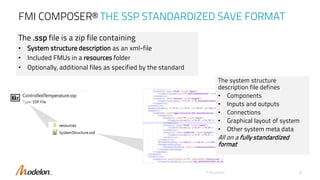
FMI COMPOSER® THE SSP STANDARDIZED SAVE FORMAT
© Modelon 8
The .ssp file is a zip file containing
• System structure description as an xml-file
• Included FMUs in a resources folder
• Optionally, additional files as specified by the standard
The system structure
description file defines
• Components
• Inputs and outputs
• Connections
• Graphical layout of system
• Other system meta data
All on a fully standardized
format
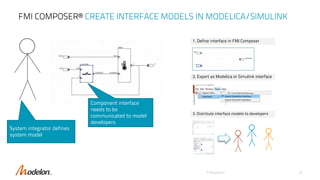
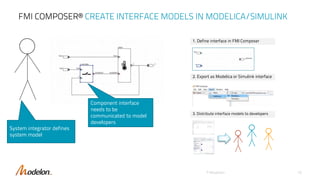
FMI COMPOSER® CREATE INTERFACE MODELS IN MODELICA/SIMULINK
© Modelon 9
Component interface
needs to be
communicated to model
developers
System integrator defines
system model
1. Define interface in FMI Composer
2. Export as Modelica or Simulink interface
3. Distribute interface models to developers
FMI COMPOSER® CREATE INTERFACE MODELS IN MODELICA/SIMULINK
© Modelon 10
Component interface
needs to be
communicated to model
developers
System integrator defines
system model
1. Define interface in FMI Composer
2. Export as Modelica or Simulink interface
3. Distribute interface models to developers
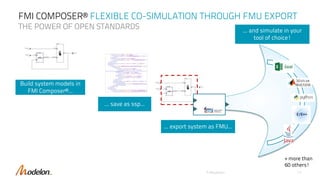
FMI COMPOSER® FLEXIBLE CO-SIMULATION THROUGH FMU EXPORT
THE POWER OF OPEN STANDARDS
© Modelon 11
Build system models in
FMI Composer®...
... and simulate in your
tool of choice!
... save as ssp...
... export system as FMU...
+ more than
60 others!
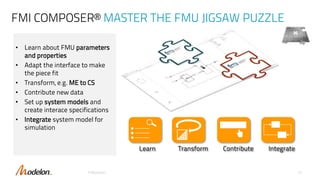
FMI COMPOSER® MASTER THE FMU JIGSAW PUZZLE
• Learn about FMU parameters
and properties
• Adapt the interface to make
the piece fit
• Transform, e.g. ME to CS
• Contribute new data
• Set up system models and
create interace specifications
• Integrate system model for
simulation
© Modelon 12
Learn Transform Contribute Integrate
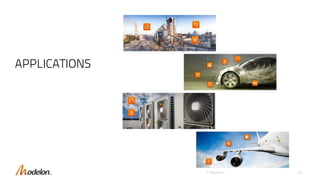
APPLICATIONS
© Modelon 1313
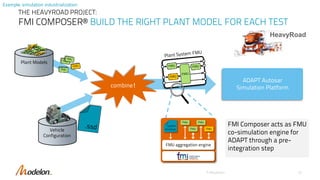
THE HEAVYROAD PROJECT:
FMI COMPOSER® BUILD THE RIGHT PLANT MODEL FOR EACH TEST
© Modelon 15
combine!
Plant Models
Vehicle
Configuration
FMUFMU
FMU FMU
system
structure
FMU aggregation engine
ADAPT Autosar
Simulation Platform
HeavyRoad
FMI Composer acts as FMU
co-simulation engine for
ADAPT through a pre-
integration step
Example: simulation industrialization
© Modelon 16
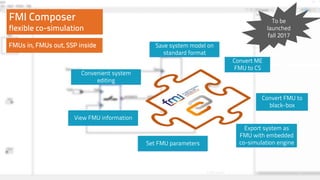
Convenient system
editing
Save system model on
standard format
View FMU information
Set FMU parameters
FMI Composer
flexible co-simulation
Convert FMU to
black-box
Convert ME
FMU to CS
FMUs in, FMUs out, SSP inside
Export system as
FMU with embedded
co-simulation engine
To be
launched
fall 2017
Convenient system
editing
Save system model on
standard format
View FMU information
Set FMU parameters
Convert FMU to
black-box
Convert ME
FMU to CS
Export system as
FMU with embedded
co-simulation engine

FMI Composer Overview

  • 1.
    © Modelon 20171 FMI Composer® Collaborative simulation
  • 2.
    FMI: A SUCCESSSTORY • In less than ten years… © Modelon 2 Supported by more than 100 tools From European research project to world-wide use Used across multiple industries
  • 3.
    MAKING FMI PAYOFF: IT’S ABOUT WORKING TOGETHER © Modelon 3 The true value comes when it can fit together with other pieces The FMI standard allows a simulation model to be packaged neatly as a piece of a jigsaw puzzle Different teams create their own pieces... ...with different interfaces
  • 4.
    THE FUTURE: TOWARDSFMI INDUSTRIALIZATION © Modelon 4 version controlled development model repository continuous integration build and test server Model development systematic, pervasive Simulation large-scale, automated Regression testing Requirements testing Optimization Maximize ROI in model development through • Reuse • Traceability • Maintainability
  • 5.
    FMI COMPOSER® ENABLECOLLABORATION © Modelon 5
  • 6.
    © Modelon 6 FMICOMPOSER® BUILD SYSTEMS FROM FMU:S View FMU information Assemble system model by drag- and-drop of components Connect FMUs, add external inputs and outputs View and modify parameters
  • 7.
    © Modelon 7 FMICOMPOSER® SAVE SYSTEM MODEL ON AN OPEN FORMAT System model is saved as an .ssp-file: an open, vendor-neutral, standardized format SSP: system structure and parameterization • Standard format for defining systems of FMUs • Defines connections, parameterizations, etc. • New open standard under development • Project within Modelica Association (parallel to FMI standardization group) • Mature standard proposal exists • Targeted for release in late 2017
  • 8.
    FMI COMPOSER® THESSP STANDARDIZED SAVE FORMAT © Modelon 8 The .ssp file is a zip file containing • System structure description as an xml-file • Included FMUs in a resources folder • Optionally, additional files as specified by the standard The system structure description file defines • Components • Inputs and outputs • Connections • Graphical layout of system • Other system meta data All on a fully standardized format
  • 9.
    FMI COMPOSER® CREATEINTERFACE MODELS IN MODELICA/SIMULINK © Modelon 9 Component interface needs to be communicated to model developers System integrator defines system model 1. Define interface in FMI Composer 2. Export as Modelica or Simulink interface 3. Distribute interface models to developers
  • 10.
    FMI COMPOSER® CREATEINTERFACE MODELS IN MODELICA/SIMULINK © Modelon 10 Component interface needs to be communicated to model developers System integrator defines system model 1. Define interface in FMI Composer 2. Export as Modelica or Simulink interface 3. Distribute interface models to developers
  • 11.
    FMI COMPOSER® FLEXIBLECO-SIMULATION THROUGH FMU EXPORT THE POWER OF OPEN STANDARDS © Modelon 11 Build system models in FMI Composer®... ... and simulate in your tool of choice! ... save as ssp... ... export system as FMU... + more than 60 others!
  • 12.
    FMI COMPOSER® MASTERTHE FMU JIGSAW PUZZLE • Learn about FMU parameters and properties • Adapt the interface to make the piece fit • Transform, e.g. ME to CS • Contribute new data • Set up system models and create interace specifications • Integrate system model for simulation © Modelon 12 Learn Transform Contribute Integrate
  • 13.
  • 14.
    THE HEAVYROAD PROJECT: FMICOMPOSER® BUILD THE RIGHT PLANT MODEL FOR EACH TEST © Modelon 15 combine! Plant Models Vehicle Configuration FMUFMU FMU FMU system structure FMU aggregation engine ADAPT Autosar Simulation Platform HeavyRoad FMI Composer acts as FMU co-simulation engine for ADAPT through a pre- integration step Example: simulation industrialization
  • 15.
    © Modelon 16 Convenientsystem editing Save system model on standard format View FMU information Set FMU parameters FMI Composer flexible co-simulation Convert FMU to black-box Convert ME FMU to CS FMUs in, FMUs out, SSP inside Export system as FMU with embedded co-simulation engine To be launched fall 2017 Convenient system editing Save system model on standard format View FMU information Set FMU parameters Convert FMU to black-box Convert ME FMU to CS Export system as FMU with embedded co-simulation engine