

© Modelon 2017 1
MODEL TESTING TOOLKIT
Regression Testing with Modelica & FMI
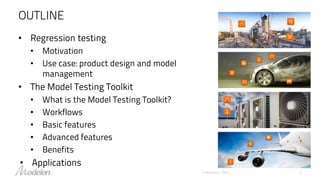
OUTLINE
• Regression testing
• Motivation
• Use case: product design and model
management
• The Model Testing Toolkit
• What is the Model Testing Toolkit?
• Workflows
• Basic features
• Advanced features
• Benefits
• Applications
© Modelon 2017 2
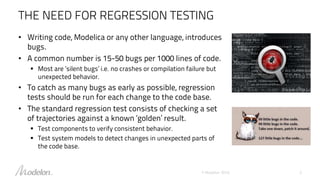
THE NEED FOR REGRESSION TESTING
• Writing code, Modelica or any other language, introduces
bugs.
• A common number is 15-50 bugs per 1000 lines of code.
 Most are ‘silent bugs’ i.e. no crashes or compilation failure but
unexpected behavior.
• To catch as many bugs as early as possible, regression
tests should be run for each change to the code base.
• The standard regression test consists of checking a set
of trajectories against a known ‘golden’ result.
 Test components to verify consistent behavior.
 Test system models to detect changes in unexpected parts of
the code base.
© Modelon 2016 3
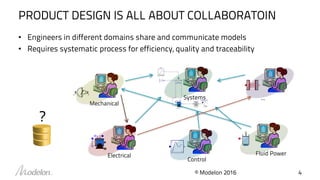
PRODUCT DESIGN IS ALL ABOUT COLLABORATOIN
• Engineers in different domains share and communicate models
• Requires systematic process for efficiency, quality and traceability
Electrical Fluid Power
Mechanical
Systems ...
Control
© Modelon 2016 4
?
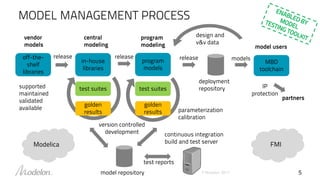
MODEL MANAGEMENT PROCESS
5
off-the-
shelf
libraries
in-house
libraries
program
models
vendor
models model users
program
modeling
test suites
golden
results
central
modeling
test suites
golden
results
release release release
design and
v&v data
version controlled
development
model repository
parameterization
calibration
IP
protection
supported
maintained
validated
available
deployment
repository
partners
continuous integration
build and test server
MBD
toolchain
models
test reports
Modelica FMI
© Modelon 2017
WHAT IS MODEL TESTING TOOLKIT?
• Regression testing tool for Modelica and FMI
• Framework to define individual tests, test suites, and execute them
either from a GUI or from Python scripts
 Uses OPTIMICA Compiler Toolikt compiler to facilitate test design and usage
• Tool-agnostic approach for test execution (currently supports Dymola,
OpenModelica and OPTIMICA Compiler Toolkit)
• Execution on local machines or via a server
• Full HTML report provides dashboard overview with links to individual
test results
© Modelon 2017 6
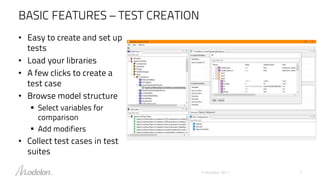
BASIC FEATURES – TEST CREATION
• Easy to create and set up
tests
• Load your libraries
• A few clicks to create a
test case
• Browse model structure
 Select variables for
comparison
 Add modifiers
• Collect test cases in test
suites
© Modelon 2017 7
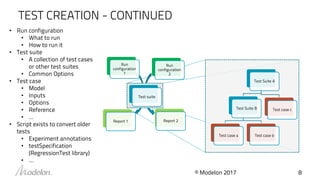
TEST CREATION - CONTINUED
© Modelon 2017 8
• Run configuration
• What to run
• How to run it
• Test suite
• A collection of test cases
or other test suites
• Common Options
• Test case
• Model
• Inputs
• Options
• Reference
• …
• Script exists to convert older
tests
• Experiment annotations
• testSpecification
(RegressionTest library)
• …
Run
configuration
1
Run
configuration
2
Test suite
Report 1 Report 2
Test Suite A
Test Suite B
Test case a Test case b
Test case c
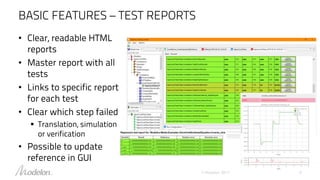
BASIC FEATURES – TEST REPORTS
© Modelon 2017 9
• Clear, readable HTML
reports
• Master report with all
tests
• Links to specific report
for each test
• Clear which step failed
 Translation, simulation
or verification
• Possible to update
reference in GUI
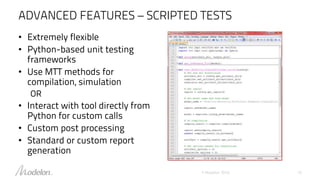
ADVANCED FEATURES – SCRIPTED TESTS
© Modelon 2016 10
• Extremely flexible
• Python-based unit testing
frameworks
• Use MTT methods for
compilation, simulation
OR
• Interact with tool directly from
Python for custom calls
• Custom post processing
• Standard or custom report
generation
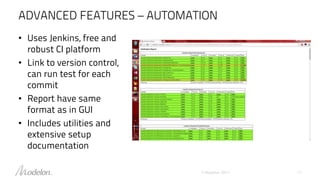
ADVANCED FEATURES – AUTOMATION
© Modelon 2017 11
• Uses Jenkins, free and
robust CI platform
• Link to version control,
can run test for each
commit
• Report have same
format as in GUI
• Includes utilities and
extensive setup
documentation
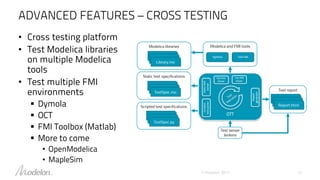
ADVANCED FEATURES – CROSS TESTING
© Modelon 2017 12
• Cross testing platform
• Test Modelica libraries
on multiple Modelica
tools
• Test multiple FMI
environments
 Dymola
 OCT
 FMI Toolbox (Matlab)
 More to come
• OpenModelica
• MapleSim
BENEFITS
• Easy to use through the graphical user interface for test creation and
local execution
• Connection to OPTIMICA Compiler Toolkit enables for convenient
extraction of parameters and variables from models for test creation
• Tests the models on multiple tools and FMI environments
• Interactive dashboard overview in HTML reports
• Ready for integration with continuous integration platforms in
general, and Jenkins in particular, to facilitate automation of test
execution
• Custom tests are enabled by Python-based scripted framework
© Modelon 2017 13
APPLICATIONS
Modelon libraries development
Validation via tests of the development of Modelon libraries.
Cross platform testing and validation
• Test multiple FMI environments
• Test FMI Tools in connection with Modelica Compilers and/or Libraries.
© Modelon 2017 14

Model Testing Toolkit - Overview

  • 1.
    © Modelon 20171 MODEL TESTING TOOLKIT Regression Testing with Modelica & FMI
  • 2.
    OUTLINE • Regression testing •Motivation • Use case: product design and model management • The Model Testing Toolkit • What is the Model Testing Toolkit? • Workflows • Basic features • Advanced features • Benefits • Applications © Modelon 2017 2
  • 3.
    THE NEED FORREGRESSION TESTING • Writing code, Modelica or any other language, introduces bugs. • A common number is 15-50 bugs per 1000 lines of code.  Most are ‘silent bugs’ i.e. no crashes or compilation failure but unexpected behavior. • To catch as many bugs as early as possible, regression tests should be run for each change to the code base. • The standard regression test consists of checking a set of trajectories against a known ‘golden’ result.  Test components to verify consistent behavior.  Test system models to detect changes in unexpected parts of the code base. © Modelon 2016 3
  • 4.
    PRODUCT DESIGN ISALL ABOUT COLLABORATOIN • Engineers in different domains share and communicate models • Requires systematic process for efficiency, quality and traceability Electrical Fluid Power Mechanical Systems ... Control © Modelon 2016 4 ?
  • 5.
    MODEL MANAGEMENT PROCESS 5 off-the- shelf libraries in-house libraries program models vendor modelsmodel users program modeling test suites golden results central modeling test suites golden results release release release design and v&v data version controlled development model repository parameterization calibration IP protection supported maintained validated available deployment repository partners continuous integration build and test server MBD toolchain models test reports Modelica FMI © Modelon 2017
  • 6.
    WHAT IS MODELTESTING TOOLKIT? • Regression testing tool for Modelica and FMI • Framework to define individual tests, test suites, and execute them either from a GUI or from Python scripts  Uses OPTIMICA Compiler Toolikt compiler to facilitate test design and usage • Tool-agnostic approach for test execution (currently supports Dymola, OpenModelica and OPTIMICA Compiler Toolkit) • Execution on local machines or via a server • Full HTML report provides dashboard overview with links to individual test results © Modelon 2017 6
  • 7.
    BASIC FEATURES –TEST CREATION • Easy to create and set up tests • Load your libraries • A few clicks to create a test case • Browse model structure  Select variables for comparison  Add modifiers • Collect test cases in test suites © Modelon 2017 7
  • 8.
    TEST CREATION -CONTINUED © Modelon 2017 8 • Run configuration • What to run • How to run it • Test suite • A collection of test cases or other test suites • Common Options • Test case • Model • Inputs • Options • Reference • … • Script exists to convert older tests • Experiment annotations • testSpecification (RegressionTest library) • … Run configuration 1 Run configuration 2 Test suite Report 1 Report 2 Test Suite A Test Suite B Test case a Test case b Test case c
  • 9.
    BASIC FEATURES –TEST REPORTS © Modelon 2017 9 • Clear, readable HTML reports • Master report with all tests • Links to specific report for each test • Clear which step failed  Translation, simulation or verification • Possible to update reference in GUI
  • 10.
    ADVANCED FEATURES –SCRIPTED TESTS © Modelon 2016 10 • Extremely flexible • Python-based unit testing frameworks • Use MTT methods for compilation, simulation OR • Interact with tool directly from Python for custom calls • Custom post processing • Standard or custom report generation
  • 11.
    ADVANCED FEATURES –AUTOMATION © Modelon 2017 11 • Uses Jenkins, free and robust CI platform • Link to version control, can run test for each commit • Report have same format as in GUI • Includes utilities and extensive setup documentation
  • 12.
    ADVANCED FEATURES –CROSS TESTING © Modelon 2017 12 • Cross testing platform • Test Modelica libraries on multiple Modelica tools • Test multiple FMI environments  Dymola  OCT  FMI Toolbox (Matlab)  More to come • OpenModelica • MapleSim
  • 13.
    BENEFITS • Easy touse through the graphical user interface for test creation and local execution • Connection to OPTIMICA Compiler Toolkit enables for convenient extraction of parameters and variables from models for test creation • Tests the models on multiple tools and FMI environments • Interactive dashboard overview in HTML reports • Ready for integration with continuous integration platforms in general, and Jenkins in particular, to facilitate automation of test execution • Custom tests are enabled by Python-based scripted framework © Modelon 2017 13
  • 14.
    APPLICATIONS Modelon libraries development Validationvia tests of the development of Modelon libraries. Cross platform testing and validation • Test multiple FMI environments • Test FMI Tools in connection with Modelica Compilers and/or Libraries. © Modelon 2017 14