High Performance
Odoo
Olivier Dony
 @odony

Odoo can handle large data
and transaction volumes out
of the box!
On Odoo Online, a typical
server hosts more than
3000 instances
100/200 new ones/day
Typical size of large deployments
 Multi-GB database (10-20GB)
 Multi-million records tables
o Stock moves
o Journal items
o Mails / Leads
 On a single Odoo server!
Performance issues
can be (easily) solved
 With the right tools
 And the right facts
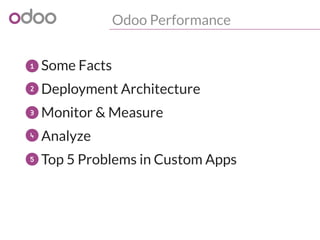
Odoo Performance
o Some Facts
Deployment Architecture
o Monitor & Measure
o Analyze
o Top 5 Problems in Custom Apps
1
2
3
4
5
Some Facts
PostgreSQL
o Is the real workhorse of your Odoo server
o Powers large cloud services
o Can handle terabytes of data efficiently
o Should be fine-tuned to use your hardware
o Cannot magically fix algorithmic/complexity
issues in [y]our code!
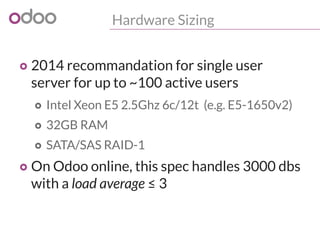
Hardware Sizing
o 2014 recommandation for single user
server for up to ~100 active users
o Intel Xeon E5 2.5Ghz 6c/12t (e.g. E5-1650v2)
o 32GB RAM
o SATA/SAS RAID-1
o On Odoo online, this spec handles 3000 dbs
with a load average ≤ 3
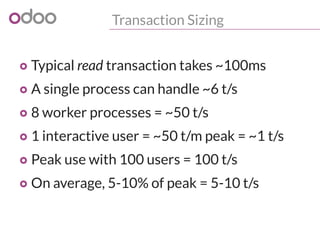
Transaction Sizing
o Typical read transaction takes ~100ms
o A single process can handle ~6 t/s
o 8 worker processes = ~50 t/s
o 1 interactive user = ~50 t/m peak = ~1 t/s
o Peak use with 100 users = 100 t/s
o On average, 5-10% of peak = 5-10 t/s
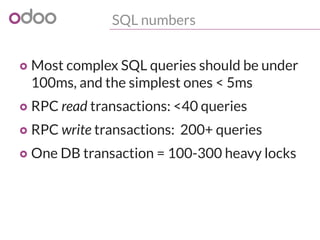
SQL numbers
o Most complex SQL queries should be under
100ms, and the simplest ones < 5ms
o RPC read transactions: <40 queries
o RPC write transactions: 200+ queries
o One DB transaction = 100-300 heavy locks
Sizing
For anything else, appropriate load testing
is a must before going live!
Then size accordingly...
Deployment
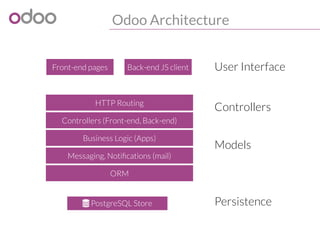
Odoo Architecture
Front-end pages Back-end JS client
 PostgreSQL Store
HTTP Routing
Business Logic (Apps)
Controllers (Front-end, Back-end)
Messaging, Notifications (mail)
ORM
User Interface
Controllers
Models
Persistence
Deployment Architecture
Single server, multi-process


PostgreSQL
Store
HTTP worker
HTTP worker
HTTP worker
Cron worker
gevent worker
Requests
Rule of thumb: --workers=$[1+$CORES*2]
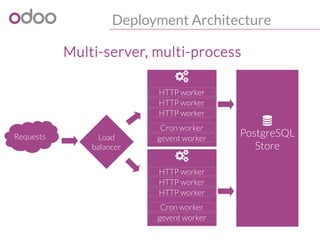
Deployment Architecture
Multi-server, multi-process

PostgreSQL
Store

HTTP worker
HTTP worker
HTTP worker
Cron worker
gevent workerRequests

HTTP worker
HTTP worker
HTTP worker
Cron worker
gevent worker
Load
balancer
PostgreSQL Deployment
o Use PostgreSQL 9.2/9.3 for performance
o Tune it: http://wiki.postgresql.org/wiki/Tuning_Your_PostgreSQL_Server
o Avoid deploying PostgreSQL on a VM
o If you must, optimize the VM for IOPS
o Check out vFabric vPostgres 9.2
o Use separate disks for SYSTEM/DATA/WAL
o shared_buffers: more than 55% VM RAM
o Enable guest memory ballooning driver
Monitor
& Measure
You cannot improve what
you cannot measure!


Monitor & Measure
o Get the pulse of your deployments
o System load
o Disk I/O
o Transactions per second
o Database size
o Recommended tool: munin
o --log-level=debug_rpc in Production!
2014-05-03 12:22:32,846 9663 DEBUG test openerp.netsvc.rpc.request:
object.execute_kw time:0.031s mem: 763716k -> 763716k (diff: 0k)('test',1,
'*','sale.order','read',(...),{...})
Monitor & Measure
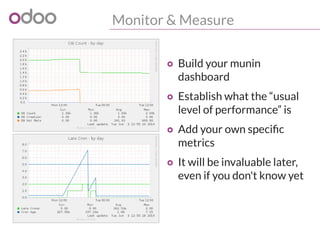
o Build your munin
dashboard
o Establish what the “usual
level of performance” is
o Add your own specific
metrics
o It will be invaluable later,
even if you don't know yet
Monitor & Measure
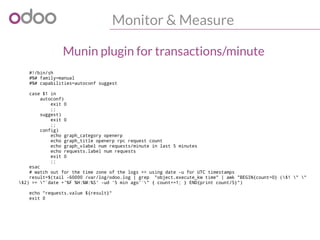
#!/bin/sh
#%# family=manual
#%# capabilities=autoconf suggest
case $1 in
autoconf)
exit 0
;;
suggest)
exit 0
;;
config)
echo graph_category openerp
echo graph_title openerp rpc request count
echo graph_vlabel num requests/minute in last 5 minutes
echo requests.label num requests
exit 0
;;
esac
# watch out for the time zone of the logs => using date -u for UTC timestamps
result=$(tail -60000 /var/log/odoo.log | grep "object.execute_kw time" | awk "BEGIN{count=0} ($1 " "
$2) >= "`date +'%F %H:%M:%S' -ud '5 min ago'`" { count+=1; } END{print count/5}")
echo "requests.value ${result}"
exit 0
Munin plugin for transactions/minute
Monitor & Measure
#!/bin/sh
#%# family=manual
#%# capabilities=autoconf suggest
case $1 in
config)
echo graph_category openerp
echo graph_title openerp rpc requests min/average response time
echo graph_vlabel seconds
echo graph_args --units-exponent -3
echo min.label min
echo min.warning 1
echo min.critical 5
echo avg.label average
echo avg.warning 1
echo avg.critical 5
exit 0
;;
esac
# watch out for the time zone of the logs => using date -u for UTC timestamps
result=$(tail -60000 /var/log/openerp.log | grep "object.execute_kw time" | awk "BEGIN{sum=0;count=0} (
$1 " " $2) >= "`date +'%F %H:%M:%S' -ud '5 min ago'`" {split($8,t,":");time=0+t[2];if (min=="")
{ min=time}; sum += time; count+=1; min=(time>min)?min:time } END{print min, sum/count}")
echo -n "min.value "
echo ${result} | cut -d" " -f1
echo -n "avg.value "
echo ${result} | cut -d" " -f2
exit 0
Munin plugin for response time
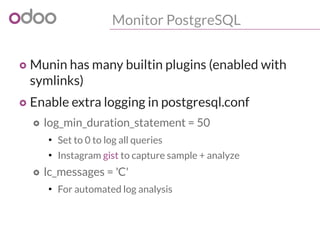
Monitor PostgreSQL
o Munin has many builtin plugins (enabled with
symlinks)
o Enable extra logging in postgresql.conf
o log_min_duration_statement = 50
●
Set to 0 to log all queries
●
Instagram gist to capture sample + analyze
o lc_messages = 'C'
●
For automated log analysis
Analyze
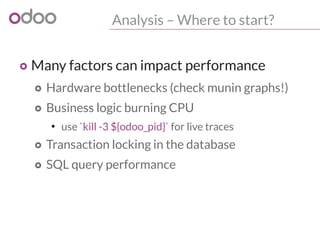
Analysis – Where to start?
o Many factors can impact performance
o Hardware bottlenecks (check munin graphs!)
o Business logic burning CPU
●
use `kill -3 ${odoo_pid}` for live traces
o Transaction locking in the database
o SQL query performance
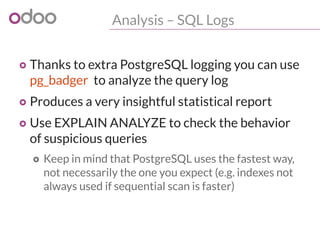
Analysis – SQL Logs
o Thanks to extra PostgreSQL logging you can use
pg_badger to analyze the query log
o Produces a very insightful statistical report
o Use EXPLAIN ANALYZE to check the behavior
of suspicious queries
o Keep in mind that PostgreSQL uses the fastest way,
not necessarily the one you expect (e.g. indexes not
always used if sequential scan is faster)
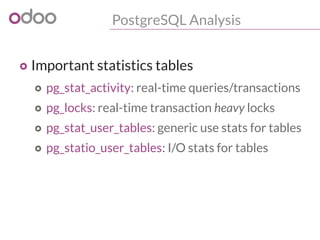
PostgreSQL Analysis
o Important statistics tables
o pg_stat_activity: real-time queries/transactions
o pg_locks: real-time transaction heavy locks
o pg_stat_user_tables: generic use stats for tables
o pg_statio_user_tables: I/O stats for tables
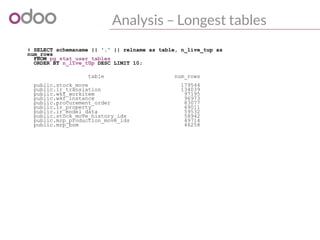
Analysis – Longest tables
# SELECT schemaname || '.' || relname as table, n_live_tup as
num_rows
FROM pg_stat_user_tables
ORDER BY n_live_tup DESC LIMIT 10;
table num_rows
public.stock_move 179544
public.ir_translation 134039
public.wkf_workitem 97195
public.wkf_instance 96973
public.procurement_order 83077
public.ir_property 69011
public.ir_model_data 59532
public.stock_move_history_ids 58942
public.mrp_production_move_ids 49714
public.mrp_bom 46258
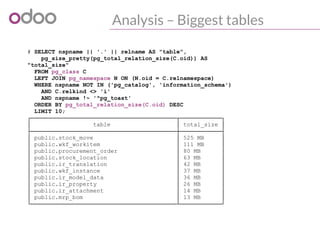
Analysis – Biggest tables
# SELECT nspname || '.' || relname AS "table",
pg_size_pretty(pg_total_relation_size(C.oid)) AS
"total_size"
FROM pg_class C
LEFT JOIN pg_namespace N ON (N.oid = C.relnamespace)
WHERE nspname NOT IN ('pg_catalog', 'information_schema')
AND C.relkind <> 'i'
AND nspname !~ '^pg_toast'
ORDER BY pg_total_relation_size(C.oid) DESC
LIMIT 10;
┌──────────────────────────────────────────┬────────────┐
│ table │ total_size │
├──────────────────────────────────────────┼────────────┤
│ public.stock_move │ 525 MB │
│ public.wkf_workitem │ 111 MB │
│ public.procurement_order │ 80 MB │
│ public.stock_location │ 63 MB │
│ public.ir_translation │ 42 MB │
│ public.wkf_instance │ 37 MB │
│ public.ir_model_data │ 36 MB │
│ public.ir_property │ 26 MB │
│ public.ir_attachment │ 14 MB │
│ public.mrp_bom │ 13 MB │
└──────────────────────────────────────────┴────────────┘
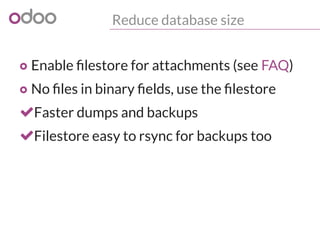
Reduce database size
o Enable filestore for attachments (see FAQ)
o No files in binary fields, use the filestore
Faster dumps and backups
Filestore easy to rsync for backups too
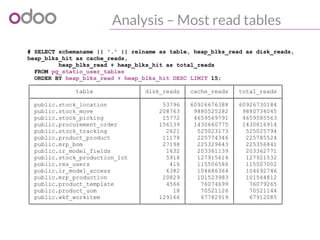
Analysis – Most read tables
# SELECT schemaname || '.' || relname as table, heap_blks_read as disk_reads,
heap_blks_hit as cache_reads,
heap_blks_read + heap_blks_hit as total_reads
FROM pg_statio_user_tables
ORDER BY heap_blks_read + heap_blks_hit DESC LIMIT 15;
┌───────────────────────────────┬────────────┬─────────────┬─────────────┐
│ table │ disk_reads │ cache_reads │ total_reads │
├───────────────────────────────┼────────────┼─────────────┼─────────────┤
│ public.stock_location │ 53796 │ 60926676388 │ 60926730184 │
│ public.stock_move │ 208763 │ 9880525282 │ 9880734045 │
│ public.stock_picking │ 15772 │ 4659569791 │ 4659585563 │
│ public.procurement_order │ 156139 │ 1430660775 │ 1430816914 │
│ public.stock_tracking │ 2621 │ 525023173 │ 525025794 │
│ public.product_product │ 11178 │ 225774346 │ 225785524 │
│ public.mrp_bom │ 27198 │ 225329643 │ 225356841 │
│ public.ir_model_fields │ 1632 │ 203361139 │ 203362771 │
│ public.stock_production_lot │ 5918 │ 127915614 │ 127921532 │
│ public.res_users │ 416 │ 115506586 │ 115507002 │
│ public.ir_model_access │ 6382 │ 104686364 │ 104692746 │
│ public.mrp_production │ 20829 │ 101523983 │ 101544812 │
│ public.product_template │ 4566 │ 76074699 │ 76079265 │
│ public.product_uom │ 18 │ 70521126 │ 70521144 │
│ public.wkf_workitem │ 129166 │ 67782919 │ 67912085 │
└───────────────────────────────┴────────────┴─────────────┴─────────────┘
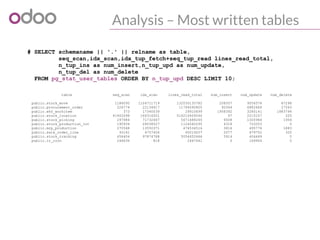
Analysis – Most written tables
# SELECT schemaname || '.' || relname as table,
seq_scan,idx_scan,idx_tup_fetch+seq_tup_read lines_read_total,
n_tup_ins as num_insert,n_tup_upd as num_update,
n_tup_del as num_delete
FROM pg_stat_user_tables ORDER BY n_tup_upd DESC LIMIT 10;
table seq_scan idx_scan lines_read_total num_insert num_update num_delete
public.stock_move 1188095 1104711719 132030135782 208507 9556574 67298
public.procurement_order 226774 22134417 11794090805 92064 6882666 27543
public.wkf_workitem 373 17340039 29910699 1958392 3280141 1883794
public.stock_location 41402098 166316501 516216409246 97 2215107 205
public.stock_picking 297984 71732467 5671488265 9008 1000966 1954
public.stock_production_lot 190934 28038527 1124560295 4318 722053 0
public.mrp_production 270568 13550371 476534514 3816 495776 1883
public.sale_order_line 30161 4757426 60019207 2077 479752 320
public.stock_tracking 656404 97874788 5054452666 5914 404469 0
public.ir_cron 246636 818 2467441 0 169904 0
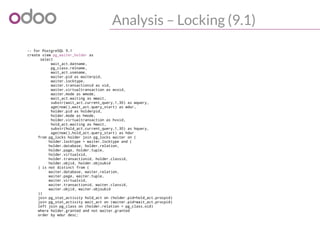
Analysis – Locking (9.1)
-- For PostgreSQL 9.1
create view pg_waiter_holder as
select
wait_act.datname,
pg_class.relname,
wait_act.usename,
waiter.pid as waiterpid,
waiter.locktype,
waiter.transactionid as xid,
waiter.virtualtransaction as wvxid,
waiter.mode as wmode,
wait_act.waiting as wwait,
substr(wait_act.current_query,1,30) as wquery,
age(now(),wait_act.query_start) as wdur,
holder.pid as holderpid,
holder.mode as hmode,
holder.virtualtransaction as hvxid,
hold_act.waiting as hwait,
substr(hold_act.current_query,1,30) as hquery,
age(now(),hold_act.query_start) as hdur
from pg_locks holder join pg_locks waiter on (
holder.locktype = waiter.locktype and (
holder.database, holder.relation,
holder.page, holder.tuple,
holder.virtualxid,
holder.transactionid, holder.classid,
holder.objid, holder.objsubid
) is not distinct from (
waiter.database, waiter.relation,
waiter.page, waiter.tuple,
waiter.virtualxid,
waiter.transactionid, waiter.classid,
waiter.objid, waiter.objsubid
))
join pg_stat_activity hold_act on (holder.pid=hold_act.procpid)
join pg_stat_activity wait_act on (waiter.pid=wait_act.procpid)
left join pg_class on (holder.relation = pg_class.oid)
where holder.granted and not waiter.granted
order by wdur desc;
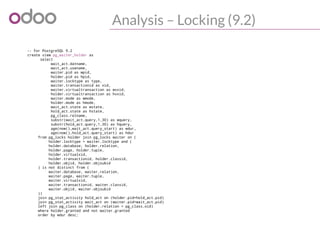
Analysis – Locking (9.2)
-- For PostgreSQL 9.2
create view pg_waiter_holder as
select
wait_act.datname,
wait_act.usename,
waiter.pid as wpid,
holder.pid as hpid,
waiter.locktype as type,
waiter.transactionid as xid,
waiter.virtualtransaction as wvxid,
holder.virtualtransaction as hvxid,
waiter.mode as wmode,
holder.mode as hmode,
wait_act.state as wstate,
hold_act.state as hstate,
pg_class.relname,
substr(wait_act.query,1,30) as wquery,
substr(hold_act.query,1,30) as hquery,
age(now(),wait_act.query_start) as wdur,
age(now(),hold_act.query_start) as hdur
from pg_locks holder join pg_locks waiter on (
holder.locktype = waiter.locktype and (
holder.database, holder.relation,
holder.page, holder.tuple,
holder.virtualxid,
holder.transactionid, holder.classid,
holder.objid, holder.objsubid
) is not distinct from (
waiter.database, waiter.relation,
waiter.page, waiter.tuple,
waiter.virtualxid,
waiter.transactionid, waiter.classid,
waiter.objid, waiter.objsubid
))
join pg_stat_activity hold_act on (holder.pid=hold_act.pid)
join pg_stat_activity wait_act on (waiter.pid=wait_act.pid)
left join pg_class on (holder.relation = pg_class.oid)
where holder.granted and not waiter.granted
order by wdur desc;
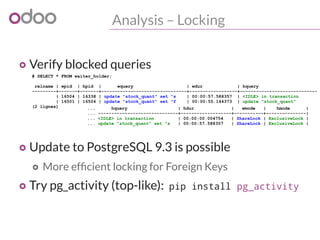
Analysis – Locking
o Verify blocked queries
o Update to PostgreSQL 9.3 is possible
o More efficient locking for Foreign Keys
o Try pg_activity (top-like): pip install pg_activity
# SELECT * FROM waiter_holder;
relname | wpid | hpid | wquery | wdur | hquery
---------+-------+-------+--------------------------------+------------------+-----------------------------
| 16504 | 16338 | update "stock_quant" set "s | 00:00:57.588357 | <IDLE> in transaction
| 16501 | 16504 | update "stock_quant" set "f | 00:00:55.144373 | update "stock_quant"
(2 lignes) ... hquery | hdur | wmode | hmode |
... ------------------------------+-------------------+-----------+---------------|
... <IDLE> in transaction | 00:00:00.004754 | ShareLock | ExclusiveLock |
... update "stock_quant" set "s | 00:00:57.588357 | ShareLock | ExclusiveLock |
Top 5
Problems
in Custom Apps
Top 5 Problems in Custom Apps
o 1. Wrong use of stored computed fields
o 2. Domain evaluation strategy
o 3. Business logic triggered too often
o 4. Misuse of the batch API
o 5. Custom locking
1. Stored computed fields
o Be vary careful when you add stored computed fields
(using the old API)
o Manually set the right trigger fields + func
store = {'trigger_model': (mapping_function,
[fields...],
priority) }
store = True is a shortcut for:
{self._name: (lambda s,c,u,ids,c: ids,
None,10)}
o  Do not add this on master data (products, locations,
users, companies, etc.)
2. Domain evaluation strategy
o Odoo cross-object domain expressions do not use
JOINs by default, to respect modularity and ACLs
o e.g. search([('picking_id.move_ids.partner_id', '!=', False)])
o Searches all moves without partner!
o Then uses “ id IN <found_move_ids>”!
o Imagine this in record rules (global security filter)
o Have a look at auto_join (v7.0+)
'move_ids': fields.one2many('stock.move', 'picking_id',
string='Moves', auto_join=True)
3. Busic logic triggered too often
o Think about it twice when you override
create() or write() to add your stuff
o How often will this be called? Should it be?
o Think again if you do it on a high-volume
object, such as o2m line records
(sale.order.line, stock.move, …)
o Again, make sure you don't alter master data
4. Misuse of batch API
o The API works with batches
o Computed fields work in batches
o Model.browse() pre-fetches in batches
o See @one in the new API
5. Custom Locking
o In general PostgreSQL and the ORM do all the DB and
Python locking we need
o Rare cases with manual DB locking
o Inter-process mutex in db (ir.cron)
o Sequence numbers
o Reservations in double-entry systems
o Python locking
o Caches and shared resources (db pool)
o You probably do not need more than this!
Thank You
 @odony
Odoo
sales@odoo.com
+32 (0) 2 290 34 90
www.odoo.com

Improving the performance of Odoo deployments

  • 1.
  • 2.
    Odoo can handlelarge data and transaction volumes out of the box!
  • 3.
    On Odoo Online,a typical server hosts more than 3000 instances 100/200 new ones/day
  • 4.
    Typical size oflarge deployments  Multi-GB database (10-20GB)  Multi-million records tables o Stock moves o Journal items o Mails / Leads  On a single Odoo server!
  • 5.
    Performance issues can be(easily) solved  With the right tools  And the right facts
  • 6.
    Odoo Performance o SomeFacts Deployment Architecture o Monitor & Measure o Analyze o Top 5 Problems in Custom Apps 1 2 3 4 5
  • 7.
  • 8.
    PostgreSQL o Is thereal workhorse of your Odoo server o Powers large cloud services o Can handle terabytes of data efficiently o Should be fine-tuned to use your hardware o Cannot magically fix algorithmic/complexity issues in [y]our code!
  • 9.
    Hardware Sizing o 2014recommandation for single user server for up to ~100 active users o Intel Xeon E5 2.5Ghz 6c/12t (e.g. E5-1650v2) o 32GB RAM o SATA/SAS RAID-1 o On Odoo online, this spec handles 3000 dbs with a load average ≤ 3
  • 10.
    Transaction Sizing o Typicalread transaction takes ~100ms o A single process can handle ~6 t/s o 8 worker processes = ~50 t/s o 1 interactive user = ~50 t/m peak = ~1 t/s o Peak use with 100 users = 100 t/s o On average, 5-10% of peak = 5-10 t/s
  • 11.
    SQL numbers o Mostcomplex SQL queries should be under 100ms, and the simplest ones < 5ms o RPC read transactions: <40 queries o RPC write transactions: 200+ queries o One DB transaction = 100-300 heavy locks
  • 12.
    Sizing For anything else,appropriate load testing is a must before going live! Then size accordingly...
  • 13.
  • 14.
    Odoo Architecture Front-end pagesBack-end JS client  PostgreSQL Store HTTP Routing Business Logic (Apps) Controllers (Front-end, Back-end) Messaging, Notifications (mail) ORM User Interface Controllers Models Persistence
  • 15.
    Deployment Architecture Single server,multi-process   PostgreSQL Store HTTP worker HTTP worker HTTP worker Cron worker gevent worker Requests Rule of thumb: --workers=$[1+$CORES*2]
  • 16.
    Deployment Architecture Multi-server, multi-process  PostgreSQL Store  HTTPworker HTTP worker HTTP worker Cron worker gevent workerRequests  HTTP worker HTTP worker HTTP worker Cron worker gevent worker Load balancer
  • 17.
    PostgreSQL Deployment o UsePostgreSQL 9.2/9.3 for performance o Tune it: http://wiki.postgresql.org/wiki/Tuning_Your_PostgreSQL_Server o Avoid deploying PostgreSQL on a VM o If you must, optimize the VM for IOPS o Check out vFabric vPostgres 9.2 o Use separate disks for SYSTEM/DATA/WAL o shared_buffers: more than 55% VM RAM o Enable guest memory ballooning driver
  • 18.
  • 19.
    You cannot improvewhat you cannot measure!  
  • 20.
    Monitor & Measure oGet the pulse of your deployments o System load o Disk I/O o Transactions per second o Database size o Recommended tool: munin o --log-level=debug_rpc in Production! 2014-05-03 12:22:32,846 9663 DEBUG test openerp.netsvc.rpc.request: object.execute_kw time:0.031s mem: 763716k -> 763716k (diff: 0k)('test',1, '*','sale.order','read',(...),{...})
  • 21.
    Monitor & Measure oBuild your munin dashboard o Establish what the “usual level of performance” is o Add your own specific metrics o It will be invaluable later, even if you don't know yet
  • 22.
    Monitor & Measure #!/bin/sh #%#family=manual #%# capabilities=autoconf suggest case $1 in autoconf) exit 0 ;; suggest) exit 0 ;; config) echo graph_category openerp echo graph_title openerp rpc request count echo graph_vlabel num requests/minute in last 5 minutes echo requests.label num requests exit 0 ;; esac # watch out for the time zone of the logs => using date -u for UTC timestamps result=$(tail -60000 /var/log/odoo.log | grep "object.execute_kw time" | awk "BEGIN{count=0} ($1 " " $2) >= "`date +'%F %H:%M:%S' -ud '5 min ago'`" { count+=1; } END{print count/5}") echo "requests.value ${result}" exit 0 Munin plugin for transactions/minute
  • 23.
    Monitor & Measure #!/bin/sh #%#family=manual #%# capabilities=autoconf suggest case $1 in config) echo graph_category openerp echo graph_title openerp rpc requests min/average response time echo graph_vlabel seconds echo graph_args --units-exponent -3 echo min.label min echo min.warning 1 echo min.critical 5 echo avg.label average echo avg.warning 1 echo avg.critical 5 exit 0 ;; esac # watch out for the time zone of the logs => using date -u for UTC timestamps result=$(tail -60000 /var/log/openerp.log | grep "object.execute_kw time" | awk "BEGIN{sum=0;count=0} ( $1 " " $2) >= "`date +'%F %H:%M:%S' -ud '5 min ago'`" {split($8,t,":");time=0+t[2];if (min=="") { min=time}; sum += time; count+=1; min=(time>min)?min:time } END{print min, sum/count}") echo -n "min.value " echo ${result} | cut -d" " -f1 echo -n "avg.value " echo ${result} | cut -d" " -f2 exit 0 Munin plugin for response time
  • 24.
    Monitor PostgreSQL o Muninhas many builtin plugins (enabled with symlinks) o Enable extra logging in postgresql.conf o log_min_duration_statement = 50 ● Set to 0 to log all queries ● Instagram gist to capture sample + analyze o lc_messages = 'C' ● For automated log analysis
  • 25.
  • 26.
    Analysis – Whereto start? o Many factors can impact performance o Hardware bottlenecks (check munin graphs!) o Business logic burning CPU ● use `kill -3 ${odoo_pid}` for live traces o Transaction locking in the database o SQL query performance
  • 27.
    Analysis – SQLLogs o Thanks to extra PostgreSQL logging you can use pg_badger to analyze the query log o Produces a very insightful statistical report o Use EXPLAIN ANALYZE to check the behavior of suspicious queries o Keep in mind that PostgreSQL uses the fastest way, not necessarily the one you expect (e.g. indexes not always used if sequential scan is faster)
  • 28.
    PostgreSQL Analysis o Importantstatistics tables o pg_stat_activity: real-time queries/transactions o pg_locks: real-time transaction heavy locks o pg_stat_user_tables: generic use stats for tables o pg_statio_user_tables: I/O stats for tables
  • 29.
    Analysis – Longesttables # SELECT schemaname || '.' || relname as table, n_live_tup as num_rows FROM pg_stat_user_tables ORDER BY n_live_tup DESC LIMIT 10; table num_rows public.stock_move 179544 public.ir_translation 134039 public.wkf_workitem 97195 public.wkf_instance 96973 public.procurement_order 83077 public.ir_property 69011 public.ir_model_data 59532 public.stock_move_history_ids 58942 public.mrp_production_move_ids 49714 public.mrp_bom 46258
  • 30.
    Analysis – Biggesttables # SELECT nspname || '.' || relname AS "table", pg_size_pretty(pg_total_relation_size(C.oid)) AS "total_size" FROM pg_class C LEFT JOIN pg_namespace N ON (N.oid = C.relnamespace) WHERE nspname NOT IN ('pg_catalog', 'information_schema') AND C.relkind <> 'i' AND nspname !~ '^pg_toast' ORDER BY pg_total_relation_size(C.oid) DESC LIMIT 10; ┌──────────────────────────────────────────┬────────────┐ │ table │ total_size │ ├──────────────────────────────────────────┼────────────┤ │ public.stock_move │ 525 MB │ │ public.wkf_workitem │ 111 MB │ │ public.procurement_order │ 80 MB │ │ public.stock_location │ 63 MB │ │ public.ir_translation │ 42 MB │ │ public.wkf_instance │ 37 MB │ │ public.ir_model_data │ 36 MB │ │ public.ir_property │ 26 MB │ │ public.ir_attachment │ 14 MB │ │ public.mrp_bom │ 13 MB │ └──────────────────────────────────────────┴────────────┘
  • 31.
    Reduce database size oEnable filestore for attachments (see FAQ) o No files in binary fields, use the filestore Faster dumps and backups Filestore easy to rsync for backups too
  • 32.
    Analysis – Mostread tables # SELECT schemaname || '.' || relname as table, heap_blks_read as disk_reads, heap_blks_hit as cache_reads, heap_blks_read + heap_blks_hit as total_reads FROM pg_statio_user_tables ORDER BY heap_blks_read + heap_blks_hit DESC LIMIT 15; ┌───────────────────────────────┬────────────┬─────────────┬─────────────┐ │ table │ disk_reads │ cache_reads │ total_reads │ ├───────────────────────────────┼────────────┼─────────────┼─────────────┤ │ public.stock_location │ 53796 │ 60926676388 │ 60926730184 │ │ public.stock_move │ 208763 │ 9880525282 │ 9880734045 │ │ public.stock_picking │ 15772 │ 4659569791 │ 4659585563 │ │ public.procurement_order │ 156139 │ 1430660775 │ 1430816914 │ │ public.stock_tracking │ 2621 │ 525023173 │ 525025794 │ │ public.product_product │ 11178 │ 225774346 │ 225785524 │ │ public.mrp_bom │ 27198 │ 225329643 │ 225356841 │ │ public.ir_model_fields │ 1632 │ 203361139 │ 203362771 │ │ public.stock_production_lot │ 5918 │ 127915614 │ 127921532 │ │ public.res_users │ 416 │ 115506586 │ 115507002 │ │ public.ir_model_access │ 6382 │ 104686364 │ 104692746 │ │ public.mrp_production │ 20829 │ 101523983 │ 101544812 │ │ public.product_template │ 4566 │ 76074699 │ 76079265 │ │ public.product_uom │ 18 │ 70521126 │ 70521144 │ │ public.wkf_workitem │ 129166 │ 67782919 │ 67912085 │ └───────────────────────────────┴────────────┴─────────────┴─────────────┘
  • 33.
    Analysis – Mostwritten tables # SELECT schemaname || '.' || relname as table, seq_scan,idx_scan,idx_tup_fetch+seq_tup_read lines_read_total, n_tup_ins as num_insert,n_tup_upd as num_update, n_tup_del as num_delete FROM pg_stat_user_tables ORDER BY n_tup_upd DESC LIMIT 10; table seq_scan idx_scan lines_read_total num_insert num_update num_delete public.stock_move 1188095 1104711719 132030135782 208507 9556574 67298 public.procurement_order 226774 22134417 11794090805 92064 6882666 27543 public.wkf_workitem 373 17340039 29910699 1958392 3280141 1883794 public.stock_location 41402098 166316501 516216409246 97 2215107 205 public.stock_picking 297984 71732467 5671488265 9008 1000966 1954 public.stock_production_lot 190934 28038527 1124560295 4318 722053 0 public.mrp_production 270568 13550371 476534514 3816 495776 1883 public.sale_order_line 30161 4757426 60019207 2077 479752 320 public.stock_tracking 656404 97874788 5054452666 5914 404469 0 public.ir_cron 246636 818 2467441 0 169904 0
  • 34.
    Analysis – Locking(9.1) -- For PostgreSQL 9.1 create view pg_waiter_holder as select wait_act.datname, pg_class.relname, wait_act.usename, waiter.pid as waiterpid, waiter.locktype, waiter.transactionid as xid, waiter.virtualtransaction as wvxid, waiter.mode as wmode, wait_act.waiting as wwait, substr(wait_act.current_query,1,30) as wquery, age(now(),wait_act.query_start) as wdur, holder.pid as holderpid, holder.mode as hmode, holder.virtualtransaction as hvxid, hold_act.waiting as hwait, substr(hold_act.current_query,1,30) as hquery, age(now(),hold_act.query_start) as hdur from pg_locks holder join pg_locks waiter on ( holder.locktype = waiter.locktype and ( holder.database, holder.relation, holder.page, holder.tuple, holder.virtualxid, holder.transactionid, holder.classid, holder.objid, holder.objsubid ) is not distinct from ( waiter.database, waiter.relation, waiter.page, waiter.tuple, waiter.virtualxid, waiter.transactionid, waiter.classid, waiter.objid, waiter.objsubid )) join pg_stat_activity hold_act on (holder.pid=hold_act.procpid) join pg_stat_activity wait_act on (waiter.pid=wait_act.procpid) left join pg_class on (holder.relation = pg_class.oid) where holder.granted and not waiter.granted order by wdur desc;
  • 35.
    Analysis – Locking(9.2) -- For PostgreSQL 9.2 create view pg_waiter_holder as select wait_act.datname, wait_act.usename, waiter.pid as wpid, holder.pid as hpid, waiter.locktype as type, waiter.transactionid as xid, waiter.virtualtransaction as wvxid, holder.virtualtransaction as hvxid, waiter.mode as wmode, holder.mode as hmode, wait_act.state as wstate, hold_act.state as hstate, pg_class.relname, substr(wait_act.query,1,30) as wquery, substr(hold_act.query,1,30) as hquery, age(now(),wait_act.query_start) as wdur, age(now(),hold_act.query_start) as hdur from pg_locks holder join pg_locks waiter on ( holder.locktype = waiter.locktype and ( holder.database, holder.relation, holder.page, holder.tuple, holder.virtualxid, holder.transactionid, holder.classid, holder.objid, holder.objsubid ) is not distinct from ( waiter.database, waiter.relation, waiter.page, waiter.tuple, waiter.virtualxid, waiter.transactionid, waiter.classid, waiter.objid, waiter.objsubid )) join pg_stat_activity hold_act on (holder.pid=hold_act.pid) join pg_stat_activity wait_act on (waiter.pid=wait_act.pid) left join pg_class on (holder.relation = pg_class.oid) where holder.granted and not waiter.granted order by wdur desc;
  • 36.
    Analysis – Locking oVerify blocked queries o Update to PostgreSQL 9.3 is possible o More efficient locking for Foreign Keys o Try pg_activity (top-like): pip install pg_activity # SELECT * FROM waiter_holder; relname | wpid | hpid | wquery | wdur | hquery ---------+-------+-------+--------------------------------+------------------+----------------------------- | 16504 | 16338 | update "stock_quant" set "s | 00:00:57.588357 | <IDLE> in transaction | 16501 | 16504 | update "stock_quant" set "f | 00:00:55.144373 | update "stock_quant" (2 lignes) ... hquery | hdur | wmode | hmode | ... ------------------------------+-------------------+-----------+---------------| ... <IDLE> in transaction | 00:00:00.004754 | ShareLock | ExclusiveLock | ... update "stock_quant" set "s | 00:00:57.588357 | ShareLock | ExclusiveLock |
  • 37.
  • 38.
    Top 5 Problemsin Custom Apps o 1. Wrong use of stored computed fields o 2. Domain evaluation strategy o 3. Business logic triggered too often o 4. Misuse of the batch API o 5. Custom locking
  • 39.
    1. Stored computedfields o Be vary careful when you add stored computed fields (using the old API) o Manually set the right trigger fields + func store = {'trigger_model': (mapping_function, [fields...], priority) } store = True is a shortcut for: {self._name: (lambda s,c,u,ids,c: ids, None,10)} o  Do not add this on master data (products, locations, users, companies, etc.)
  • 40.
    2. Domain evaluationstrategy o Odoo cross-object domain expressions do not use JOINs by default, to respect modularity and ACLs o e.g. search([('picking_id.move_ids.partner_id', '!=', False)]) o Searches all moves without partner! o Then uses “ id IN <found_move_ids>”! o Imagine this in record rules (global security filter) o Have a look at auto_join (v7.0+) 'move_ids': fields.one2many('stock.move', 'picking_id', string='Moves', auto_join=True)
  • 41.
    3. Busic logictriggered too often o Think about it twice when you override create() or write() to add your stuff o How often will this be called? Should it be? o Think again if you do it on a high-volume object, such as o2m line records (sale.order.line, stock.move, …) o Again, make sure you don't alter master data
  • 42.
    4. Misuse ofbatch API o The API works with batches o Computed fields work in batches o Model.browse() pre-fetches in batches o See @one in the new API
  • 43.
    5. Custom Locking oIn general PostgreSQL and the ORM do all the DB and Python locking we need o Rare cases with manual DB locking o Inter-process mutex in db (ir.cron) o Sequence numbers o Reservations in double-entry systems o Python locking o Caches and shared resources (db pool) o You probably do not need more than this!
  • 44.