1
FIRST PAGES OF HTML –ASP-ASP.NET
LAB WORK GUIDE
A Programme Under the compumitra Series
"This web design tutorial has taught me more than a College
Course."
-Pete Kessler
2
OUTLINE
First HTML Page (Using HTML)
First ASP Page (Using ASP)
First ASP.NET Page (Using VB)
First ASP.NET Page (Using C#)
3
My First html page
4
Go to Start button, Open
Start menu, select
Notepad From
accessories
If you are unable to find
the notepad program
here try the method
explained on the next
slide.
First HTML Page: Creation in Notepad
5
Go to start button.
Open run window.
Type Notepad
and click OK.
Open the notepad program
using the Run Method.
First HTML Page: Creation in Notepad Method 2
6
Type the code given here
In the notepad program and
save the file as hello.html in the
path
C:learner<student id>hello
The path given here is
for your guidance. With
the permission of
system administrator
You may choose other
path of your choice.
First HTML Page: Code Typing
7
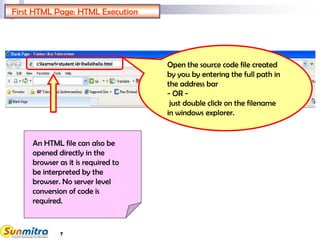
Open the source code file created
by you by entering the full path in
the address bar
- OR -
just double click on the filename
in windows explorer.
An HTML file can also be
opened directly in the
browser as it is required to
be interpreted by the
browser. No server level
conversion of code is
required.
First HTML Page: HTML Execution
8
Try changing the code by replacing <h1> with <h4>
and see the effect.
IS THE TEXT SIZE NOW DIFFERENT AS
COMPARED TO <h1> TAG.
Try writing the tags in Upper case such as <HTML>,
<H1> etc.
IS HTML CASE SENSITIVE.
Try creating a junk tag of yourself for e.g. add <h9>
somewhere in the body.
DOES HTML IGNORE JUNK TAGS.
First HTML Page: Modification Trials
9
My First ASP page
10
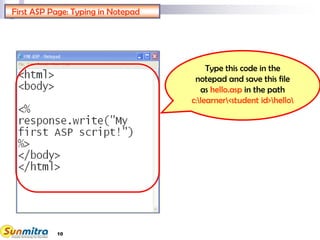
Type this code in the
notepad and save this file
as hello.asp in the path
c:learner<student id>hello
First ASP Page: Typing in Notepad
11
First ASP Page: Preparation to Publish-1
 An active page is required to be published before execution.
 The server converts the active page content to finally
prepare the HTML stream that is sent as response towards
the browser.
 The ideal webserver program to run an ASP page is IIS
(Internet information server) that usually comes along with
many releases of Windows XP and other variations.
12
Right click on the
<student id> folder
and the click on web
sharing.
First ASP Page: Publish As Webshare - 1
13
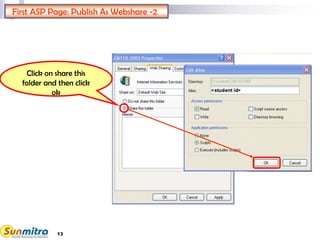
Click on share this
folder and then click
ok
First ASP Page: Publish As Webshare -2
14
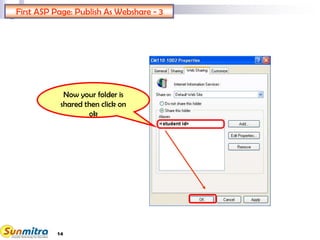
Now your folder is
shared then click on
ok
First ASP Page: Publish As Webshare - 3
15
Click on start button
Go to settings
And then click on
control panel
First ASP Page: Opening IIS for settings - 1
16
Click on
administrative
tools
First ASP Page: Opening IIS for settings -2
17
Now click internet
information
services (IIS)
NOTE: If you don’t find IIS here then ask your administrator to install
it on your machine.
First ASP Page: Opening IIS for settings -3
18
Right click on Default
Web Site and make it
a public website from
Permissions Wizard
from all task
First ASP Page: Opening IIS for settings -4
19
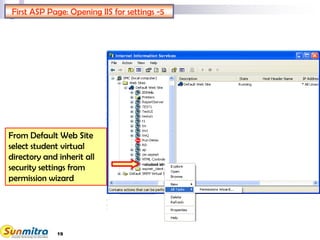
From Default Web Site
select student virtual
directory and inherit all
security settings from
permission wizard
First ASP Page: Opening IIS for settings -5
20
Open the source code file (student) by
entering the path localhost<student
id>hellohello.asp
in address bar and then click on go
First ASP Page: Execution
21
Try changing the code by adding <h1> </h1> around
the response.write text.
SEE IF HTML TAGS ARE INTERPRETED.
Try writing the function response.write in Upper case
such as RESPONSE.WRITE.
IS ASP CASE SENSITIVE.
Try changing code as follows.
A = “Hello”
response.write(A+“Great World”)
YOU JUST LEARNED VARIABLE FILLING AND
STRING CONCATENATION.
First ASP Page: Modification Trials
22
My First ASP.NET page
Using "VB"
23
Create an ASP. net file
Write this code on the
notepad and save this file
as hello.aspx in the path
c:learner<student id>hello
24
Run the source file
Open the source code file (student) by
entering the path localhost<student
id>hellohello.aspx
in address bar and then click on go
25
Try changing the code by adding <h1> </h1>
around the “Hello World!” text.
SEE IF HTML TAGS ARE INTERPRETED.
Try adding the following code as follows.
HelloWorld.ToolTip = "My Tool Tip"
YOU JUST LEARNED USING ADDITIONAL
PROPERTIES OF AN OBJECT BASED ON
AVAILABLE CLASSES.
First ASP.NET Page: Modification Trials
26
Change <%@ Page Language="VB" %> line to
<%@ Page Language="C#" %>
Watch the compiler error output as
BC30037:Character is not valid.
 Semicolon from Expression
Watch the error
CS1002: ; expected.
Try to correct it by putting the ';'.
First ASP.NET Page: Error Trials
27
My First ASP.NET page
Using "C#"
28
Create an ASP. net file
Write this code on the notepad
and save this file as
helloCS.aspx in the path
c:learner<student id>hello
<%@ Page Language="C#" %>
<%HelloWorld.Text= "Hello World!";%>
<html>
<head>
<title>ASP.NET Hello World</title>
</head>
<body bgcolor=cyan>
<p><asp:label id="HelloWorld"
runat="server"/></p>
</body>
</html>
Write 'C#' instead of 'VB'
Add ';' end of expression
29
Run the source file
Open the source code file (student) by
entering the path localhost<student
id>hellohelloCS.aspx
in address bar and then click on go
localhost<student id>hellohelloCS.aspx
30
Try changing the code by adding <h1> </h1>
around the “Hello World!” text.
SEE IF HTML TAGS ARE INTERPRETED.
Try adding the following code as follows.
HelloWorld.ToolTip = "My Tool Tip";
YOU JUST LEARNED USING ADDITIONAL
PROPERTIES OF AN OBJECT BASED ON
AVAILABLE CLASSES.
First ASP.NET Page: Modification Trials
31
Change <%@ Page Language="C#" %> line to
<%@ Page Language="VB" %>
Watch the compiler error output as
BC30037:Character is not valid.
Remove Semicolon from Expression
Watch the error
CS1002: ; expected.
Try to correct it by putting the ';'.
First ASP.NET Page: Error Trials
32
First Page of HTML, Asp.net : Learning Summary Review
Creation of HTML page on Notepad.
Use of different HTML Tags.
Creation of ASP Page on Notepad.
Publishing of web page.
Use of Asp Functions.
Creation of Asp.net file on Notepad.
33
First page of HTML, Asp.net: Bibliography
www.ncsu.edu/it/edu/html_trng/basic_comm
ands.html
www.w3schools.com/html/html_primary.asp
www.asp101.com
www.dotnetfunda.com
www.w3schools.com/ASPNET/default.asp
34
Ask and guide me at
sunmitraeducation@gmail.com
Share this information with as
many people as possible.
Keep visiting www.sunmitra.com
for programme updates.

First Pages HTML ASP-ASP.NET

  • 1.
    1 FIRST PAGES OFHTML –ASP-ASP.NET LAB WORK GUIDE A Programme Under the compumitra Series "This web design tutorial has taught me more than a College Course." -Pete Kessler
  • 2.
    2 OUTLINE First HTML Page(Using HTML) First ASP Page (Using ASP) First ASP.NET Page (Using VB) First ASP.NET Page (Using C#)
  • 3.
  • 4.
    4 Go to Startbutton, Open Start menu, select Notepad From accessories If you are unable to find the notepad program here try the method explained on the next slide. First HTML Page: Creation in Notepad
  • 5.
    5 Go to startbutton. Open run window. Type Notepad and click OK. Open the notepad program using the Run Method. First HTML Page: Creation in Notepad Method 2
  • 6.
    6 Type the codegiven here In the notepad program and save the file as hello.html in the path C:learner<student id>hello The path given here is for your guidance. With the permission of system administrator You may choose other path of your choice. First HTML Page: Code Typing
  • 7.
    7 Open the sourcecode file created by you by entering the full path in the address bar - OR - just double click on the filename in windows explorer. An HTML file can also be opened directly in the browser as it is required to be interpreted by the browser. No server level conversion of code is required. First HTML Page: HTML Execution
  • 8.
    8 Try changing thecode by replacing <h1> with <h4> and see the effect. IS THE TEXT SIZE NOW DIFFERENT AS COMPARED TO <h1> TAG. Try writing the tags in Upper case such as <HTML>, <H1> etc. IS HTML CASE SENSITIVE. Try creating a junk tag of yourself for e.g. add <h9> somewhere in the body. DOES HTML IGNORE JUNK TAGS. First HTML Page: Modification Trials
  • 9.
  • 10.
    10 Type this codein the notepad and save this file as hello.asp in the path c:learner<student id>hello First ASP Page: Typing in Notepad
  • 11.
    11 First ASP Page:Preparation to Publish-1  An active page is required to be published before execution.  The server converts the active page content to finally prepare the HTML stream that is sent as response towards the browser.  The ideal webserver program to run an ASP page is IIS (Internet information server) that usually comes along with many releases of Windows XP and other variations.
  • 12.
    12 Right click onthe <student id> folder and the click on web sharing. First ASP Page: Publish As Webshare - 1
  • 13.
    13 Click on sharethis folder and then click ok First ASP Page: Publish As Webshare -2
  • 14.
    14 Now your folderis shared then click on ok First ASP Page: Publish As Webshare - 3
  • 15.
    15 Click on startbutton Go to settings And then click on control panel First ASP Page: Opening IIS for settings - 1
  • 16.
    16 Click on administrative tools First ASPPage: Opening IIS for settings -2
  • 17.
    17 Now click internet information services(IIS) NOTE: If you don’t find IIS here then ask your administrator to install it on your machine. First ASP Page: Opening IIS for settings -3
  • 18.
    18 Right click onDefault Web Site and make it a public website from Permissions Wizard from all task First ASP Page: Opening IIS for settings -4
  • 19.
    19 From Default WebSite select student virtual directory and inherit all security settings from permission wizard First ASP Page: Opening IIS for settings -5
  • 20.
    20 Open the sourcecode file (student) by entering the path localhost<student id>hellohello.asp in address bar and then click on go First ASP Page: Execution
  • 21.
    21 Try changing thecode by adding <h1> </h1> around the response.write text. SEE IF HTML TAGS ARE INTERPRETED. Try writing the function response.write in Upper case such as RESPONSE.WRITE. IS ASP CASE SENSITIVE. Try changing code as follows. A = “Hello” response.write(A+“Great World”) YOU JUST LEARNED VARIABLE FILLING AND STRING CONCATENATION. First ASP Page: Modification Trials
  • 22.
    22 My First ASP.NETpage Using "VB"
  • 23.
    23 Create an ASP.net file Write this code on the notepad and save this file as hello.aspx in the path c:learner<student id>hello
  • 24.
    24 Run the sourcefile Open the source code file (student) by entering the path localhost<student id>hellohello.aspx in address bar and then click on go
  • 25.
    25 Try changing thecode by adding <h1> </h1> around the “Hello World!” text. SEE IF HTML TAGS ARE INTERPRETED. Try adding the following code as follows. HelloWorld.ToolTip = "My Tool Tip" YOU JUST LEARNED USING ADDITIONAL PROPERTIES OF AN OBJECT BASED ON AVAILABLE CLASSES. First ASP.NET Page: Modification Trials
  • 26.
    26 Change <%@ PageLanguage="VB" %> line to <%@ Page Language="C#" %> Watch the compiler error output as BC30037:Character is not valid.  Semicolon from Expression Watch the error CS1002: ; expected. Try to correct it by putting the ';'. First ASP.NET Page: Error Trials
  • 27.
    27 My First ASP.NETpage Using "C#"
  • 28.
    28 Create an ASP.net file Write this code on the notepad and save this file as helloCS.aspx in the path c:learner<student id>hello <%@ Page Language="C#" %> <%HelloWorld.Text= "Hello World!";%> <html> <head> <title>ASP.NET Hello World</title> </head> <body bgcolor=cyan> <p><asp:label id="HelloWorld" runat="server"/></p> </body> </html> Write 'C#' instead of 'VB' Add ';' end of expression
  • 29.
    29 Run the sourcefile Open the source code file (student) by entering the path localhost<student id>hellohelloCS.aspx in address bar and then click on go localhost<student id>hellohelloCS.aspx
  • 30.
    30 Try changing thecode by adding <h1> </h1> around the “Hello World!” text. SEE IF HTML TAGS ARE INTERPRETED. Try adding the following code as follows. HelloWorld.ToolTip = "My Tool Tip"; YOU JUST LEARNED USING ADDITIONAL PROPERTIES OF AN OBJECT BASED ON AVAILABLE CLASSES. First ASP.NET Page: Modification Trials
  • 31.
    31 Change <%@ PageLanguage="C#" %> line to <%@ Page Language="VB" %> Watch the compiler error output as BC30037:Character is not valid. Remove Semicolon from Expression Watch the error CS1002: ; expected. Try to correct it by putting the ';'. First ASP.NET Page: Error Trials
  • 32.
    32 First Page ofHTML, Asp.net : Learning Summary Review Creation of HTML page on Notepad. Use of different HTML Tags. Creation of ASP Page on Notepad. Publishing of web page. Use of Asp Functions. Creation of Asp.net file on Notepad.
  • 33.
    33 First page ofHTML, Asp.net: Bibliography www.ncsu.edu/it/edu/html_trng/basic_comm ands.html www.w3schools.com/html/html_primary.asp www.asp101.com www.dotnetfunda.com www.w3schools.com/ASPNET/default.asp
  • 34.
    34 Ask and guideme at sunmitraeducation@gmail.com Share this information with as many people as possible. Keep visiting www.sunmitra.com for programme updates.