Website design for the rest of us…… Debra D’Andrea School Library Media and Technology Specialist [email_address] If you want me to call you,  send an email with your number www.dandreamedia.com www.dandreamedia.wordpress.com Grant Wood
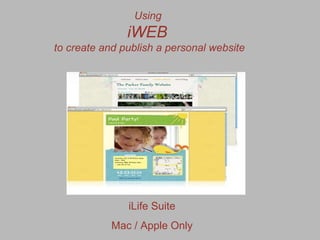
Using  iWEB  to create and publish a personal website iLife Suite Mac / Apple Only
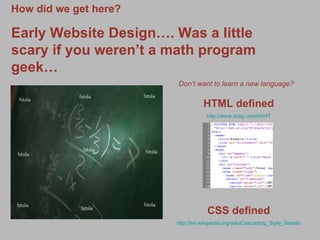
How did we get here? Early Website Design…. Was a little scary if you weren’t a math program geek… Don’t want to learn a new language?   HTML defined http://www.tizag.com/htmlT CSS defined http://en.wikipedia.org/wiki/Cascading_Style_Sheets
Why  WYSIWYG? WYSIWYG (play / ˈ w ɪ ziw ɪɡ / wiz-ee-wig) is an acronym for What You See Is What You Get. The term is used in computing to describe a system in which content displayed during editing appears very similar to the final output,[2] which might be a printed document, web page, or slide presentation. Source: Wikipedia
Variety of Programs Available to Do the Job Common Applications You’ve Heard Of Best of the Web 2011 http://webdesign.about.com/od/windowshtmleditors/tp/windows-wysiwyg-editors.htm Adobe Dreamweaver   Industry Standard / Difficult to learn MicroSoft Front Page   No longer supported by Microsoft www.bloomfield.k12.nj.us 1. It causes massive errors on other browsers 2. It's not valid code 3. The interface is ugly 4. It's only compatible with Internet Explorer 5. Created weird errors that made problems for visitors, esp. w/o IE 6. Created errors that were not fixable by even the experts here  7. The server that you want to host the site on has to have FrontPage Extensions  enabled and updated regularly in order for FrontP ageto work properly Microsoft Expressions Examples:  http://webdesigneraid.com/15-brilliant-examples-of-websites-using-expression-engine/ Information:  http://www.brighthub.com/computing/windows-platform/articles/2949.aspx
Consumer Suggestions Coffee Cup User Friendly http://www.coffeecup.com Wordpress blog in place of a website www.wordpress.com
eBlogger/blogspot Google Sites G o o g l e
The Basic Components Before iWEB   Domain Name Noun: A series of alphanumeric strings separated by periods, such as www.oup-usa.org, serving as an address for a computer network connection and identifying the owner of the address Ie .com .edu .gov Domain Registration/Hosting A variety of hosting options. Do your research, price conscience if necessary, review support. I use GoDaddy. Great phone support all the time. http://www.hosting-review.com/?gclid=CIav88Gg0akCFYLc4AodqDaYMQ
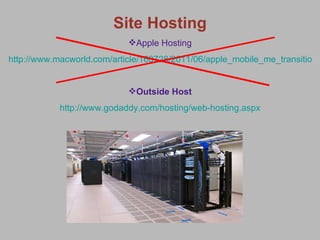
Site Hosting Apple Hosting http://www.macworld.com/article/160728/2011/06/apple_mobile_me_transition_faq.html Outside Host http://www.godaddy.com/hosting/web-hosting.aspx
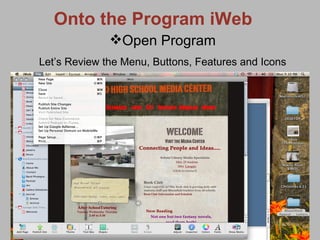
Onto the Program iWeb Open Program Let’s Review the Menu, Buttons, Features and Icons
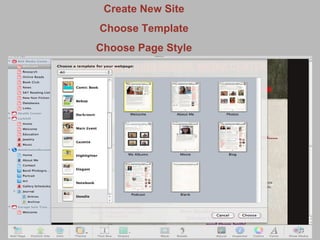
Create New Site Choose Template Choose Page Style
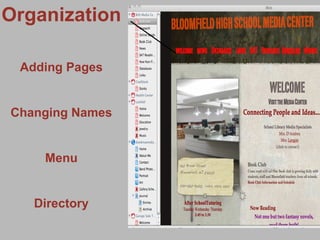
Organization Adding Pages Changing Names Menu Directory
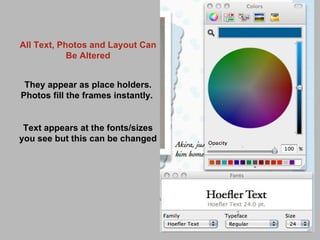
All Text, Photos and Layout Can Be Altered They appear as place holders. Photos fill the frames instantly.  Text appears at the fonts/sizes you see but this can be changed
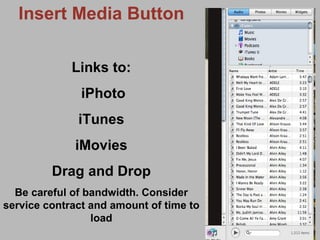
Insert Media Button Links to: iPhoto iTunes iMovies Drag and Drop Be careful of bandwidth. Consider service contract and amount of time to load
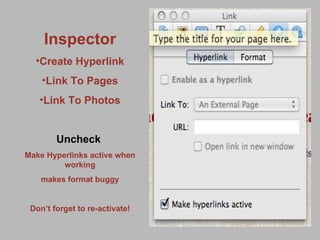
Inspector Create Hyperlink Link To Pages Link To Photos Uncheck   Make Hyperlinks active when working makes format buggy Don’t forget to re-activate!
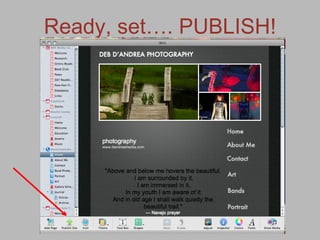
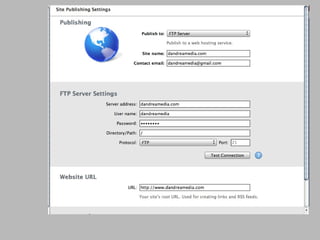
Ready, set…. PUBLISH!
 
Debra D’Andrea [email_address] 973-632-4320 www.dandreamedia.wordpress.com Site Samples Photography Site www.dandreamedia.com Musician Site www.larissadandrea.com Media Center Site http://www.ehow.com/videos-on_21_design-website-using-iweb.html Video Tutorials eHOW http://www.ehow.com/videos-on_21_design-website-using-iweb.html LYNDA.Com www.lynda.com Resources Templates http://www.iwebtemplate.com/ Winning iWeb WEBSITES http://iwebusersites.com/Home.html RESOURCE PAGE

iWeb NJECC June 28, 2011 DAndrea

  • 1.
    Website design forthe rest of us…… Debra D’Andrea School Library Media and Technology Specialist [email_address] If you want me to call you, send an email with your number www.dandreamedia.com www.dandreamedia.wordpress.com Grant Wood
  • 2.
    Using iWEB to create and publish a personal website iLife Suite Mac / Apple Only
  • 3.
    How did weget here? Early Website Design…. Was a little scary if you weren’t a math program geek… Don’t want to learn a new language? HTML defined http://www.tizag.com/htmlT CSS defined http://en.wikipedia.org/wiki/Cascading_Style_Sheets
  • 4.
    Why WYSIWYG?WYSIWYG (play / ˈ w ɪ ziw ɪɡ / wiz-ee-wig) is an acronym for What You See Is What You Get. The term is used in computing to describe a system in which content displayed during editing appears very similar to the final output,[2] which might be a printed document, web page, or slide presentation. Source: Wikipedia
  • 5.
    Variety of ProgramsAvailable to Do the Job Common Applications You’ve Heard Of Best of the Web 2011 http://webdesign.about.com/od/windowshtmleditors/tp/windows-wysiwyg-editors.htm Adobe Dreamweaver Industry Standard / Difficult to learn MicroSoft Front Page No longer supported by Microsoft www.bloomfield.k12.nj.us 1. It causes massive errors on other browsers 2. It's not valid code 3. The interface is ugly 4. It's only compatible with Internet Explorer 5. Created weird errors that made problems for visitors, esp. w/o IE 6. Created errors that were not fixable by even the experts here 7. The server that you want to host the site on has to have FrontPage Extensions enabled and updated regularly in order for FrontP ageto work properly Microsoft Expressions Examples: http://webdesigneraid.com/15-brilliant-examples-of-websites-using-expression-engine/ Information: http://www.brighthub.com/computing/windows-platform/articles/2949.aspx
  • 6.
    Consumer Suggestions CoffeeCup User Friendly http://www.coffeecup.com Wordpress blog in place of a website www.wordpress.com
  • 7.
  • 8.
    The Basic ComponentsBefore iWEB Domain Name Noun: A series of alphanumeric strings separated by periods, such as www.oup-usa.org, serving as an address for a computer network connection and identifying the owner of the address Ie .com .edu .gov Domain Registration/Hosting A variety of hosting options. Do your research, price conscience if necessary, review support. I use GoDaddy. Great phone support all the time. http://www.hosting-review.com/?gclid=CIav88Gg0akCFYLc4AodqDaYMQ
  • 9.
    Site Hosting AppleHosting http://www.macworld.com/article/160728/2011/06/apple_mobile_me_transition_faq.html Outside Host http://www.godaddy.com/hosting/web-hosting.aspx
  • 10.
    Onto the ProgramiWeb Open Program Let’s Review the Menu, Buttons, Features and Icons
  • 11.
    Create New SiteChoose Template Choose Page Style
  • 12.
    Organization Adding PagesChanging Names Menu Directory
  • 13.
    All Text, Photosand Layout Can Be Altered They appear as place holders. Photos fill the frames instantly. Text appears at the fonts/sizes you see but this can be changed
  • 14.
    Insert Media ButtonLinks to: iPhoto iTunes iMovies Drag and Drop Be careful of bandwidth. Consider service contract and amount of time to load
  • 15.
    Inspector Create HyperlinkLink To Pages Link To Photos Uncheck Make Hyperlinks active when working makes format buggy Don’t forget to re-activate!
  • 16.
  • 17.
  • 18.
    Debra D’Andrea [email_address]973-632-4320 www.dandreamedia.wordpress.com Site Samples Photography Site www.dandreamedia.com Musician Site www.larissadandrea.com Media Center Site http://www.ehow.com/videos-on_21_design-website-using-iweb.html Video Tutorials eHOW http://www.ehow.com/videos-on_21_design-website-using-iweb.html LYNDA.Com www.lynda.com Resources Templates http://www.iwebtemplate.com/ Winning iWeb WEBSITES http://iwebusersites.com/Home.html RESOURCE PAGE