





Finding Great Tech for
Teaching
15 March 2013
Presenter:
Meagen Farrell
Farrell Ink LLC
Thank You & Disclaimers
 This workshop was developed with the
  support of The Literacy Cooperative of
  Greater Cleveland.
 All other logos, images, and quotes are
  fair use for non-profit, educational
  purposes. They are the property of their
  respective copyright/trademark owners.
  Use does not imply sponsorship,
  endorsement or affiliation of any kind.
 Warning: I like pop culture references.
  It’s okay if you don’t get all the
  references as long as you get the main
  point.
Today’s workshop will:
 1.   Whet your appetite for using
      technology and media in your literacy
      program.
 2.   Ask you to select at least one
      awesome tech learning object.
 3.   Provide time and a template to
      create a integration plan to use your
      chosen tech learning object right
      away.
How will we do it? Agenda:
9:00 Intro & Greeting
9:20 Motivation: Good News & Bad
  News
9:35 Sign in to Google Sites
9:50 What does it all mean?
10:10 Creating Your Plan
11:30 Teach Back
12:00 Go have lunch!
Our activities connect with the
following NETS-T Standards:
   1.d Model collaborative knowledge
    construction by engaging in learning with
    students, colleagues, and others in face-
    to-face and virtual environments.
   3.d Model and facilitate effective use of
    current and emerging digital tools to
    locate, analyze, evaluate, and use
    information resources to support
    research and learning.
   5.a Participate in local and global
    learning communities to explore
    applications of technology to improve
Source: http://www.iste.org/standards
Let’s Get Motivated! Which
first?
Good News!     Or Bad News…
GOOD NEWS!
People of all ages & income levels
have increased access and use of
technology to communicate!
“OMG! My Grandparents R MY
BFF!”


 Source: Baker, M. Wall Street Journal, 5/30/2012
80% of people on the internet


Source: Zickuhr, K. & Smith, A. Digital differences. Pew Research
LET’S SEE IT IN THE
    CLASSROOM…


Source: Edutopia.org, Singapore’s 21st Century Teaching Strategies,
BAD NEWS… our jobs and
Technology is taking
is now required to access
housing, government aid &
employment.
You need computers to apply for a
job…


 Source: “The Target is Open!” 3/5/2008 http://dcist.com/2008/03/05/the_target_is_o.php
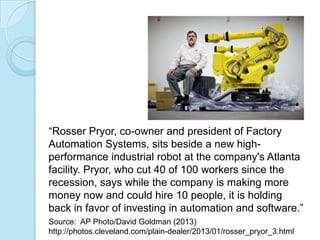
“Rosser Pryor, co-owner and president of Factory
Automation Systems, sits beside a new high-
performance industrial robot at the company's Atlanta
facility. Pryor, who cut 40 of 100 workers since the
recession, says while the company is making more
money now and could hire 10 people, it is holding
back in favor of investing in automation and software.”
Source: AP Photo/David Goldman (2013)
http://photos.cleveland.com/plain-dealer/2013/01/rosser_pryor_3.html
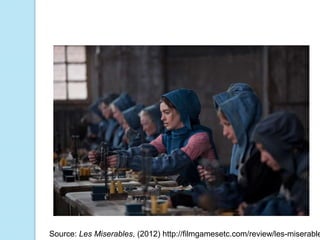
Source: Les Miserables, (2012) http://filmgamesetc.com/review/les-miserable
Source: http://employment.cuyahogacounty.us/en-US/Online-
Benefit-Application.aspx
And to get your money.
TECHNOLOGY SKILLS
are now a big part of determining who
 wins & loses in the economics game.
Reflect & take notes.

A FEW RESPONSES?
Everyone on board?
   Okay, time to buckle your seat belts!
WHAT DOES IT MEAN TO
BE AN EDUCATOR IN
THE DIGITAL AGE?
Imagine: Use Google Glasses at
the Lincoln Memorial to listen to
MLK!


 Source: http://thesoundsofhistory.com/martinlutherking.html
AND THIS IS WHAT WE’RE
       DOING WITH OUR NEW
       FOUND POWER:

Source: Parry Gripp (2008) http://www.youtube.com/watch?v=HN1ru6_u
Let’s read that quote again:
“In the early 1990s, the teachers really are the
monopoly of knowledge and they are the ones
that comes to class to deliver that knowledge so
that students can acquire them. But today,
knowledge is no more a monopoly among the
teachers because students can get knowledge
from a myriad of sources. Hence the role of the
teacher today is facilitation. You know, that
means facilitate students where they could get
the right knowledge, how they could synthesize
things, how they could discern the information
that they get.”
-Professor Lee Sing Kong, Director, Singapore
National Institute of Education.
How do you envision your role as
an educator in the digital era?
Reflect & take notes.
Safety Practice!
   Everyone sign out of everything you
    are logged into right now.
CREATE YOUR
TECHNOLOGY
INTEGRATION PLAN
The Indiana Jones Plan

                 “I’m going after
                    that truck.”
                 “How?”
                 “I don’t know.
                    I’m making
                    this up as I
                    go.”
The Mission Impossible Plan


 “You really think we can do this?”
 “We’re going to do it.”
Our 5 Steps
1.   Identify instructional need (or
     standard)
2.   Find the right tech learning object
3.   Where in the instructional cycle
4.   Instructional strategies
5.   Logistics
5 Minutes: What is your
instructional need?
   Reflect and post to the discussion
    forum:
    ◦ What is one skill or piece of knowledge
      that you can use technology to teach?
    ◦ Be specific! Choose ONE video,
      worksheet or practice problem.

    ◦ Optional: Link that to an educational
      standard.
10 minutes: Select Your Tech
   Get in pairs at your station. Discuss &
    explore together:
    ◦ What technology-based learning object
      could meet your instructional need?
      Video, docs, wikis, practice problems, etc?
      Suggestions for places to search are in the
       discussion forum.


   Pick ONE for your implementation
    plan & post the link to the discussion
    forum.
Instructional Cycle
Let’s look at today’s training to see
  where tech fit in to the following
  places:
 Opening Motivational Activity
 Central Focus of Lesson Plan
 Research Tool for Students
 Closure Activity
 Assessment Tool
 Remediation Tool
 Enrichment Tool
Instructional Strategies


    Source: Saskatoon Public Schools (2004)
    http://olc.spsd.sk.ca/DE/PD/instr/index.html
Logistics Questions
   What tools (smart board, website) do you
    currently have available that you want/need
    to use with your students? Can I test them
    advance?

   How will you manage the classroom with
    rules, procedures, and directions?

   What other software, hardware &
    connectivity do you need to consider?
Logistics: Potential Room Set Up


   Source: Verizon Foundation (2010)
11:30am One Minute Report
Back
 Your name,
 Your organization name,
 The tech learning object you selected
  &
 How you will use it.
Did our activities connect with
the NETS-T Standards?
   1.d Model collaborative knowledge
    construction by engaging in learning with
    students, colleagues, and others in face-
    to-face and virtual environments.
   3.d Model and facilitate effective use of
    current and emerging digital tools to
    locate, analyze, evaluate, and use
    information resources to support
    research and learning.
   5.a Participate in local and global
    learning communities to explore
    applications of technology to improve
Source: http://www.iste.org/standards
Thank You for Coming!
 Please complete an evaluation & turn
  it in.
 Did you remember to SIGN OUT of
  everything?

Finding Great Tech For Teaching

  • 1.
    Finding Great Techfor Teaching 15 March 2013
  • 2.
  • 3.
    Thank You &Disclaimers  This workshop was developed with the support of The Literacy Cooperative of Greater Cleveland.  All other logos, images, and quotes are fair use for non-profit, educational purposes. They are the property of their respective copyright/trademark owners. Use does not imply sponsorship, endorsement or affiliation of any kind.  Warning: I like pop culture references. It’s okay if you don’t get all the references as long as you get the main point.
  • 4.
    Today’s workshop will: 1. Whet your appetite for using technology and media in your literacy program. 2. Ask you to select at least one awesome tech learning object. 3. Provide time and a template to create a integration plan to use your chosen tech learning object right away.
  • 5.
    How will wedo it? Agenda: 9:00 Intro & Greeting 9:20 Motivation: Good News & Bad News 9:35 Sign in to Google Sites 9:50 What does it all mean? 10:10 Creating Your Plan 11:30 Teach Back 12:00 Go have lunch!
  • 6.
    Our activities connectwith the following NETS-T Standards:  1.d Model collaborative knowledge construction by engaging in learning with students, colleagues, and others in face- to-face and virtual environments.  3.d Model and facilitate effective use of current and emerging digital tools to locate, analyze, evaluate, and use information resources to support research and learning.  5.a Participate in local and global learning communities to explore applications of technology to improve Source: http://www.iste.org/standards
  • 7.
    Let’s Get Motivated!Which first? Good News! Or Bad News…
  • 8.
    GOOD NEWS! People ofall ages & income levels have increased access and use of technology to communicate!
  • 9.
    “OMG! My GrandparentsR MY BFF!” Source: Baker, M. Wall Street Journal, 5/30/2012
  • 10.
    80% of peopleon the internet Source: Zickuhr, K. & Smith, A. Digital differences. Pew Research
  • 11.
    LET’S SEE ITIN THE CLASSROOM… Source: Edutopia.org, Singapore’s 21st Century Teaching Strategies,
  • 12.
    BAD NEWS… ourjobs and Technology is taking is now required to access housing, government aid & employment.
  • 13.
    You need computersto apply for a job… Source: “The Target is Open!” 3/5/2008 http://dcist.com/2008/03/05/the_target_is_o.php
  • 14.
    “Rosser Pryor, co-ownerand president of Factory Automation Systems, sits beside a new high- performance industrial robot at the company's Atlanta facility. Pryor, who cut 40 of 100 workers since the recession, says while the company is making more money now and could hire 10 people, it is holding back in favor of investing in automation and software.” Source: AP Photo/David Goldman (2013) http://photos.cleveland.com/plain-dealer/2013/01/rosser_pryor_3.html
  • 15.
    Source: Les Miserables,(2012) http://filmgamesetc.com/review/les-miserable
  • 16.
  • 17.
    And to getyour money.
  • 18.
    TECHNOLOGY SKILLS are nowa big part of determining who wins & loses in the economics game.
  • 19.
    Reflect & takenotes. A FEW RESPONSES?
  • 20.
    Everyone on board?  Okay, time to buckle your seat belts!
  • 21.
    WHAT DOES ITMEAN TO BE AN EDUCATOR IN THE DIGITAL AGE?
  • 23.
    Imagine: Use GoogleGlasses at the Lincoln Memorial to listen to MLK! Source: http://thesoundsofhistory.com/martinlutherking.html
  • 24.
    AND THIS ISWHAT WE’RE DOING WITH OUR NEW FOUND POWER: Source: Parry Gripp (2008) http://www.youtube.com/watch?v=HN1ru6_u
  • 25.
    Let’s read thatquote again: “In the early 1990s, the teachers really are the monopoly of knowledge and they are the ones that comes to class to deliver that knowledge so that students can acquire them. But today, knowledge is no more a monopoly among the teachers because students can get knowledge from a myriad of sources. Hence the role of the teacher today is facilitation. You know, that means facilitate students where they could get the right knowledge, how they could synthesize things, how they could discern the information that they get.” -Professor Lee Sing Kong, Director, Singapore National Institute of Education.
  • 26.
    How do youenvision your role as an educator in the digital era? Reflect & take notes.
  • 27.
    Safety Practice!  Everyone sign out of everything you are logged into right now.
  • 28.
  • 29.
    The Indiana JonesPlan “I’m going after that truck.” “How?” “I don’t know. I’m making this up as I go.”
  • 30.
    The Mission ImpossiblePlan “You really think we can do this?” “We’re going to do it.”
  • 31.
    Our 5 Steps 1. Identify instructional need (or standard) 2. Find the right tech learning object 3. Where in the instructional cycle 4. Instructional strategies 5. Logistics
  • 32.
    5 Minutes: Whatis your instructional need?  Reflect and post to the discussion forum: ◦ What is one skill or piece of knowledge that you can use technology to teach? ◦ Be specific! Choose ONE video, worksheet or practice problem. ◦ Optional: Link that to an educational standard.
  • 33.
    10 minutes: SelectYour Tech  Get in pairs at your station. Discuss & explore together: ◦ What technology-based learning object could meet your instructional need?  Video, docs, wikis, practice problems, etc?  Suggestions for places to search are in the discussion forum.  Pick ONE for your implementation plan & post the link to the discussion forum.
  • 34.
    Instructional Cycle Let’s lookat today’s training to see where tech fit in to the following places:  Opening Motivational Activity  Central Focus of Lesson Plan  Research Tool for Students  Closure Activity  Assessment Tool  Remediation Tool  Enrichment Tool
  • 35.
    Instructional Strategies Source: Saskatoon Public Schools (2004) http://olc.spsd.sk.ca/DE/PD/instr/index.html
  • 36.
    Logistics Questions  What tools (smart board, website) do you currently have available that you want/need to use with your students? Can I test them advance?  How will you manage the classroom with rules, procedures, and directions?  What other software, hardware & connectivity do you need to consider?
  • 37.
    Logistics: Potential RoomSet Up Source: Verizon Foundation (2010)
  • 38.
    11:30am One MinuteReport Back  Your name,  Your organization name,  The tech learning object you selected &  How you will use it.
  • 39.
    Did our activitiesconnect with the NETS-T Standards?  1.d Model collaborative knowledge construction by engaging in learning with students, colleagues, and others in face- to-face and virtual environments.  3.d Model and facilitate effective use of current and emerging digital tools to locate, analyze, evaluate, and use information resources to support research and learning.  5.a Participate in local and global learning communities to explore applications of technology to improve Source: http://www.iste.org/standards
  • 40.
    Thank You forComing!  Please complete an evaluation & turn it in.  Did you remember to SIGN OUT of everything?