Ā 
Please can you attribute this booklet and all its content to Matt Britland, Director of Realise Learning. ShareĀ  Ā  Ā  Ā  Ā  Ā  Ā  Ā  Ā  Ā  Ā  Ā  Ā  Ā  Ā  Ā  Ā  Ā 
changesĀ withĀ theĀ communityĀ byĀ sharingĀ theĀ GoogleĀ DocumentĀ withĀ ictcomputingsubmit@gmail.com.Ā 
Ā 
Ā 
Information
Ā 
Author
Ā 
Matt Britland
www.mattbritland.com
matt@realiselearning.comĀ 
Ā @mattbritlandĀ 
Ā 
DirectorĀ Ā­Ā RealiseĀ LearningĀ 
DirectorĀ ofĀ ICTĀ atĀ TheĀ LadyĀ EleanorĀ HollesĀ SchoolĀ 
BloggerĀ andĀ EducationĀ AdvisorĀ forĀ TheĀ GuardianĀ TeacherĀ NetworkĀ 
Copyright
Ā 
ThisĀ bookĀ isĀ releasedĀ underĀ aĀ CreativeĀ CommonsĀ BYĀ­NCĀ­SAĀ 3.0Ā licenceĀ Ā 
(http://creativecommons.org/licenses/byĀ­ncĀ­sa/3.0/)Ā 
Ā 
YouĀ areĀ free:Ā 
toĀ Share — toĀ copy,Ā distributeĀ andĀ transmitĀ theĀ workĀ 
toĀ Remix — toĀ adaptĀ theĀ workĀ 
Ā 
Please can you attribute this booklet and all its content to Matt Britland, Director of RealiseĀ  Ā  Ā  Ā  Ā  Ā  Ā  Ā  Ā  Ā  Ā  Ā  Ā  Ā  Ā  Ā 
Learning. If you make changes, share them with the community by sharing the GoogleĀ  Ā  Ā  Ā  Ā  Ā  Ā  Ā  Ā  Ā  Ā  Ā  Ā  Ā 
DocumentĀ withĀ ictcomputingsubmit@gmail.comĀ 
Please can you attribute this booklet and all its content to Matt Britland, Director of Realise Learning. ShareĀ  Ā  Ā  Ā  Ā  Ā  Ā  Ā  Ā  Ā  Ā  Ā  Ā  Ā  Ā  Ā  Ā  Ā 
changesĀ withĀ theĀ communityĀ byĀ sharingĀ theĀ GoogleĀ DocumentĀ withĀ ictcomputingsubmit@gmail.com.Ā 
Ā 
Ā 
Remix Introduction
Ā 
RemixedĀ By: Ā 
Ā 
RemixĀ Summary:Ā Ā 
Ā 
Give a short summary of what you have changed from the original document. This will make itĀ  Ā  Ā  Ā  Ā  Ā  Ā  Ā  Ā  Ā  Ā  Ā  Ā  Ā  Ā  Ā  Ā 
easyĀ forĀ peopleĀ toĀ identifyĀ ifĀ theyĀ wouldĀ likeĀ toĀ useĀ yourĀ versionĀ inĀ anyĀ way.Ā 
Ā 
Ā 
Ā 
Ā 
Ā 
Ā 
Ā 
Ā 
Ā 
Ā 
Ā 
Ā 
Ā 
Ā 
Ā 
Ā 
Please can you attribute this booklet and all its content to Matt Britland, Director of Realise Learning. ShareĀ  Ā  Ā  Ā  Ā  Ā  Ā  Ā  Ā  Ā  Ā  Ā  Ā  Ā  Ā  Ā  Ā  Ā 
changesĀ withĀ theĀ communityĀ byĀ sharingĀ theĀ GoogleĀ DocumentĀ withĀ ictcomputingsubmit@gmail.com.Ā 
Ā 
Ā 
Contents
StrandsĀ Ā­Ā KS3Ā 
AimsĀ 
HowĀ toĀ useĀ thisĀ bookletĀ 
SoftwareĀ andĀ WebsitesĀ UsedĀ 
Ā 
YearĀ 7Ā 
Ā 
[1]Ā LearningĀ BlogĀ 
[2]Ā OfficeĀ documentsĀ andĀ theĀ CloudĀ 
[3]Ā StayĀ SafeĀ OnlineĀ 
[4]Ā VisualĀ Programming:Ā KoduĀ 
[5]Ā HowĀ aĀ ComputerĀ Works/ComputingĀ HistoryĀ 
[6]Ā MyĀ AppĀ 
Ā 
YearĀ 8Ā 
Ā 
[1]Ā HowĀ doesĀ theĀ internetĀ work?Ā 
[2]Ā GraphicĀ Design:Ā MagazineĀ CoversĀ 
[3]Ā VisualĀ Programming:Ā KoduĀ ProjectĀ 
[4]Ā TheĀ Web:Ā HTML5Ā andĀ CSS3Ā 
Ā 
YearĀ 9Ā 
Ā 
[1]Ā YourĀ DigitalĀ WorldĀ 
[2]Ā GraphicĀ Design:Ā AlbumĀ CoversĀ 
[3]Ā OfficeĀ documentsĀ andĀ theĀ CloudĀ 
[4]Ā AlgorithmsĀ andĀ GoogleĀ 
[5]Ā Programming:Ā RaspberryĀ PiĀ andĀ PythonĀ 
Ā 
ResourcesĀ 
Ā 
YearĀ 7/1stĀ YearĀ 
YearĀ 8/2ndĀ YearĀ 
YearĀ 9/3rdĀ YearĀ 
YouTubeĀ ChannelĀ 
Ā  Ā 
Please can you attribute this booklet and all its content to Matt Britland, Director of Realise Learning. ShareĀ  Ā  Ā  Ā  Ā  Ā  Ā  Ā  Ā  Ā  Ā  Ā  Ā  Ā  Ā  Ā  Ā  Ā 
changesĀ withĀ theĀ communityĀ byĀ sharingĀ theĀ GoogleĀ DocumentĀ withĀ ictcomputingsubmit@gmail.com.Ā 
Ā 
Ā 
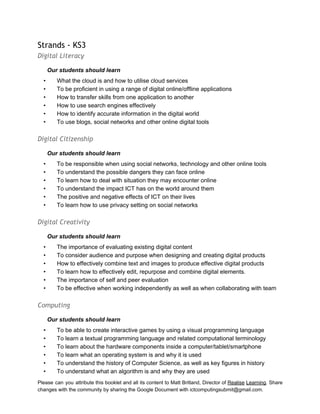
Strands - KS3
Digital Literacy
OurĀ studentsĀ shouldĀ learnĀ 
• WhatĀ theĀ cloudĀ isĀ andĀ howĀ toĀ utiliseĀ cloudĀ servicesĀ 
• ToĀ beĀ proficientĀ inĀ usingĀ aĀ rangeĀ ofĀ digitalĀ online/offlineĀ applicationsĀ 
• HowĀ toĀ transferĀ skillsĀ fromĀ oneĀ applicationĀ toĀ anotherĀ 
• HowĀ toĀ useĀ searchĀ enginesĀ effectivelyĀ 
• HowĀ toĀ identifyĀ accurateĀ informationĀ inĀ theĀ digitalĀ worldĀ 
• ToĀ useĀ blogs,Ā socialĀ networksĀ andĀ otherĀ onlineĀ digitalĀ toolsĀ 
Ā 
Digital Citizenship
OurĀ studentsĀ shouldĀ learnĀ 
• ToĀ beĀ responsibleĀ whenĀ usingĀ socialĀ networks,Ā technologyĀ andĀ otherĀ onlineĀ toolsĀ Ā 
• ToĀ understandĀ theĀ possibleĀ dangersĀ theyĀ canĀ faceĀ onlineĀ 
• ToĀ learnĀ howĀ toĀ dealĀ withĀ situationĀ theyĀ mayĀ encounterĀ onlineĀ 
• ToĀ understandĀ theĀ impactĀ ICTĀ hasĀ onĀ theĀ worldĀ aroundĀ themĀ 
• TheĀ positiveĀ andĀ negativeĀ effectsĀ ofĀ ICTĀ onĀ theirĀ livesĀ 
• ToĀ learnĀ howĀ toĀ useĀ privacyĀ settingĀ onĀ socialĀ networksĀ 
Ā 
Digital Creativity
OurĀ studentsĀ shouldĀ learnĀ 
• TheĀ importanceĀ ofĀ evaluatingĀ existingĀ digitalĀ contentĀ 
• ToĀ considerĀ audienceĀ andĀ purposeĀ whenĀ designingĀ andĀ creatingĀ digitalĀ productsĀ 
• HowĀ toĀ effectivelyĀ combineĀ textĀ andĀ imagesĀ toĀ produceĀ effectiveĀ digitalĀ productsĀ 
• ToĀ learnĀ howĀ toĀ effectivelyĀ edit,Ā repurposeĀ andĀ combineĀ digitalĀ elements.Ā 
• TheĀ importanceĀ ofĀ selfĀ andĀ peerĀ evaluationĀ 
• ToĀ beĀ effectiveĀ whenĀ workingĀ independentlyĀ asĀ wellĀ asĀ whenĀ collaboratingĀ withĀ teamĀ 
Ā 
Computing
OurĀ studentsĀ shouldĀ learnĀ 
• ToĀ beĀ ableĀ toĀ createĀ interactiveĀ gamesĀ byĀ usingĀ aĀ visualĀ programmingĀ languageĀ 
• ToĀ learnĀ aĀ textualĀ programmingĀ languageĀ andĀ relatedĀ computationalĀ terminologyĀ Ā 
• ToĀ learnĀ aboutĀ theĀ hardwareĀ componentsĀ insideĀ aĀ computer/tablet/smartphoneĀ 
• ToĀ learnĀ whatĀ anĀ operatingĀ systemĀ isĀ andĀ whyĀ itĀ isĀ usedĀ 
• ToĀ understandĀ theĀ historyĀ ofĀ ComputerĀ Science,Ā asĀ wellĀ asĀ keyĀ figuresĀ inĀ historyĀ 
• ToĀ understandĀ whatĀ anĀ algorithmĀ isĀ andĀ whyĀ theyĀ areĀ usedĀ 
Please can you attribute this booklet and all its content to Matt Britland, Director of Realise Learning. ShareĀ  Ā  Ā  Ā  Ā  Ā  Ā  Ā  Ā  Ā  Ā  Ā  Ā  Ā  Ā  Ā  Ā  Ā 
changesĀ withĀ theĀ communityĀ byĀ sharingĀ theĀ GoogleĀ DocumentĀ withĀ ictcomputingsubmit@gmail.com.Ā 
Ā 
Ā 
• ToĀ haveĀ aĀ basicĀ understandingĀ howĀ searchĀ enginesĀ workĀ 
• ToĀ learnĀ whatĀ localĀ areaĀ networksĀ areĀ 
• ToĀ haveĀ aĀ basicĀ understandingĀ ofĀ howĀ theĀ internetĀ worksĀ  Ā 
Please can you attribute this booklet and all its content to Matt Britland, Director of Realise Learning. ShareĀ  Ā  Ā  Ā  Ā  Ā  Ā  Ā  Ā  Ā  Ā  Ā  Ā  Ā  Ā  Ā  Ā  Ā 
changesĀ withĀ theĀ communityĀ byĀ sharingĀ theĀ GoogleĀ DocumentĀ withĀ ictcomputingsubmit@gmail.com.Ā 
Ā 
Ā 
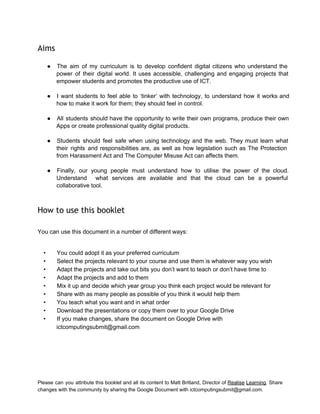
Aims
Ā 
ā— The aim of my curriculum is to develop confident digital citizens who understand theĀ  Ā  Ā  Ā  Ā  Ā  Ā  Ā  Ā  Ā  Ā  Ā  Ā  Ā 
power of their digital world. It uses accessible, challenging and engaging projects thatĀ  Ā  Ā  Ā  Ā  Ā  Ā  Ā  Ā  Ā  Ā  Ā  Ā 
empowerĀ studentsĀ andĀ promotesĀ theĀ productiveĀ useĀ ofĀ ICT.Ā 
Ā 
ā— I want students to feel able to ā€˜tinker’ with technology, to understand how it works andĀ  Ā  Ā  Ā  Ā  Ā  Ā  Ā  Ā  Ā  Ā  Ā  Ā  Ā  Ā  Ā 
how to make it work for them; they should feel in control. 
Ā 
ā— All students should have the opportunity to write their own programs, produce their ownĀ  Ā  Ā  Ā  Ā  Ā  Ā  Ā  Ā  Ā  Ā  Ā  Ā  Ā 
AppsĀ orĀ createĀ professionalĀ qualityĀ digitalĀ products.Ā 
Ā 
ā— Students should feel safe when using technology and the web. They must learn whatĀ  Ā  Ā  Ā  Ā  Ā  Ā  Ā  Ā  Ā  Ā  Ā  Ā  Ā 
their rights and responsibilities are, as well as how legislation such as The ProtectionĀ  Ā  Ā  Ā  Ā  Ā  Ā  Ā  Ā  Ā  Ā  Ā  Ā  Ā 
fromĀ HarassmentĀ ActĀ andĀ TheĀ ComputerĀ MisuseĀ ActĀ canĀ affectsĀ them.Ā 
Ā 
ā— Finally, our young people must understand how to utilise the power of the cloud.Ā  Ā  Ā  Ā  Ā  Ā  Ā  Ā  Ā  Ā  Ā  Ā  Ā  Ā 
Understand what services are available and that the cloud can be a powerfulĀ  Ā  Ā  Ā  Ā  Ā  Ā  Ā  Ā  Ā  Ā  Ā  Ā 
collaborativeĀ tool.Ā 
Ā 
How to use this booklet
Ā 
YouĀ canĀ useĀ thisĀ documentĀ inĀ aĀ numberĀ ofĀ differentĀ ways:Ā 
Ā 
• YouĀ couldĀ adoptĀ itĀ asĀ yourĀ preferredĀ curriculumĀ 
• SelectĀ theĀ projectsĀ relevantĀ toĀ yourĀ courseĀ andĀ useĀ themĀ isĀ whateverĀ wayĀ youĀ wishĀ 
• AdaptĀ theĀ projectsĀ andĀ takeĀ outĀ bitsĀ youĀ don’tĀ wantĀ toĀ teachĀ orĀ don’tĀ haveĀ timeĀ toĀ 
• AdaptĀ theĀ projectsĀ andĀ addĀ toĀ themĀ 
• MixĀ itĀ upĀ andĀ decideĀ whichĀ yearĀ groupĀ youĀ thinkĀ eachĀ projectĀ wouldĀ beĀ relevantĀ forĀ 
• ShareĀ withĀ asĀ manyĀ peopleĀ asĀ possibleĀ ofĀ youĀ thinkĀ itĀ wouldĀ helpĀ themĀ 
• YouĀ teachĀ whatĀ youĀ wantĀ andĀ inĀ whatĀ orderĀ 
• DownloadĀ theĀ presentationsĀ orĀ copyĀ themĀ overĀ toĀ yourĀ GoogleĀ DriveĀ 
• IfĀ youĀ makeĀ changes,Ā shareĀ theĀ documentĀ onĀ GoogleĀ DriveĀ withĀ 
ictcomputingsubmit@gmail.comĀ  Ā 
Please can you attribute this booklet and all its content to Matt Britland, Director of Realise Learning. ShareĀ  Ā  Ā  Ā  Ā  Ā  Ā  Ā  Ā  Ā  Ā  Ā  Ā  Ā  Ā  Ā  Ā  Ā 
changesĀ withĀ theĀ communityĀ byĀ sharingĀ theĀ GoogleĀ DocumentĀ withĀ ictcomputingsubmit@gmail.com.Ā 
Ā 
Ā 
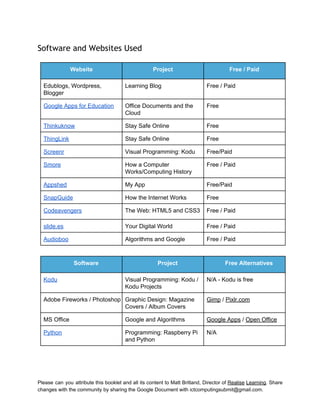
Software and Websites Used
Ā 
WebsiteĀ  ProjectĀ  FreeĀ /Ā PaidĀ 
Edublogs,Ā Wordpress,Ā 
BloggerĀ 
LearningĀ BlogĀ  FreeĀ /Ā PaidĀ 
GoogleĀ AppsĀ forĀ EducationĀ  OfficeĀ DocumentsĀ andĀ theĀ 
CloudĀ 
FreeĀ 
ThinkuknowĀ  StayĀ SafeĀ OnlineĀ Ā  FreeĀ 
ThingLinkĀ  StayĀ SafeĀ OnlineĀ Ā  FreeĀ 
ScreenrĀ  VisualĀ Programming:Ā KoduĀ  Free/PaidĀ 
SmoreĀ  HowĀ aĀ ComputerĀ 
Works/ComputingĀ HistoryĀ 
FreeĀ /Ā PaidĀ 
AppshedĀ  MyĀ AppĀ  Free/PaidĀ 
SnapGuideĀ  HowĀ theĀ InternetĀ WorksĀ  FreeĀ 
CodeavengersĀ  TheĀ Web:Ā HTML5Ā andĀ CSS3Ā  FreeĀ /Ā PaidĀ 
slide.esĀ  YourĀ DigitalĀ WorldĀ  FreeĀ /Ā PaidĀ 
AudiobooĀ  AlgorithmsĀ andĀ GoogleĀ  FreeĀ /Ā PaidĀ 
Ā 
SoftwareĀ  ProjectĀ  FreeĀ AlternativesĀ 
KoduĀ  VisualĀ Programming:Ā KoduĀ /Ā 
KoduĀ ProjectsĀ 
N/AĀ Ā­Ā KoduĀ isĀ freeĀ 
AdobeĀ FireworksĀ /Ā PhotoshopĀ  GraphicĀ Design:Ā MagazineĀ 
CoversĀ /Ā AlbumĀ CoversĀ 
GimpĀ /Ā Pixlr.comĀ 
MSĀ OfficeĀ  GoogleĀ andĀ AlgorithmsĀ  GoogleĀ AppsĀ /Ā OpenĀ OfficeĀ 
PythonĀ  Programming:Ā RaspberryĀ PiĀ 
andĀ PythonĀ 
N/AĀ 
Please can you attribute this booklet and all its content to Matt Britland, Director of Realise Learning. ShareĀ  Ā  Ā  Ā  Ā  Ā  Ā  Ā  Ā  Ā  Ā  Ā  Ā  Ā  Ā  Ā  Ā  Ā 
changesĀ withĀ theĀ communityĀ byĀ sharingĀ theĀ GoogleĀ DocumentĀ withĀ ictcomputingsubmit@gmail.com.Ā 
Ā 
Ā 
Year 7
[1] Learning Blog
Ā 
Learning Objectives:
Ā 
• ToĀ understandĀ whatĀ aĀ BlogĀ isĀ 
• ToĀ learnĀ howĀ toĀ setĀ upĀ aĀ blogĀ 
• ToĀ learnĀ howĀ createĀ postsĀ andĀ manageĀ yourĀ blogĀ 
• ToĀ understandĀ theĀ importanceĀ ofĀ selfĀ evaluationĀ 
Ā 
Learning Outcomes:
Ā 
• YourĀ ownĀ personalisedĀ blogĀ withĀ regularĀ updatesĀ 
Ā 
Tasks:
Ā 
1. LogĀ onĀ toĀ yourĀ chosenĀ blogĀ hostingĀ siteĀ (Edublogs,Ā Wordpress,Ā Blogger,Ā etc)Ā 
2. CreateĀ aĀ studentĀ accountĀ 
3. UsingĀ whatĀ youĀ haveĀ learntĀ inĀ classĀ 
a. SetĀ upĀ yourĀ blogĀ 
b. ChooseĀ aĀ themeĀ 
c. CreateĀ yourĀ firstĀ postĀ 
4. EveryĀ weekĀ youĀ mustĀ addĀ atĀ leastĀ oneĀ newĀ entry.Ā YouĀ canĀ useĀ theĀ followingĀ promptsĀ 
a. WhatĀ workĀ haveĀ youĀ done?Ā YouĀ couldĀ postĀ some.Ā 
b. WhatĀ haveĀ youĀ doneĀ thisĀ week?Ā 
c. WhatĀ didĀ youĀ findĀ easyĀ orĀ hard?Ā 
d. WhatĀ haveĀ youĀ learnt?Ā 
e. HowĀ couldĀ youĀ improve?Ā 
f. WhatĀ willĀ youĀ doĀ nextĀ week.Ā 
5. FeelĀ freeĀ toĀ shareĀ yourĀ blogĀ withĀ yourĀ friendsĀ 
a. AskĀ yourĀ peersĀ toĀ leaveĀ commentsĀ onĀ yourĀ postsĀ 
b. TheyĀ couldĀ helpĀ youĀ evaluateĀ yourĀ workĀ toĀ helpĀ youĀ improveĀ 
Ā 
Presentation
Ā 
ClickĀ belowĀ forĀ theĀ presentationĀ andĀ resourcesĀ usedĀ inĀ class:Ā 
LearningĀ BlogĀ 
Please can you attribute this booklet and all its content to Matt Britland, Director of Realise Learning. ShareĀ  Ā  Ā  Ā  Ā  Ā  Ā  Ā  Ā  Ā  Ā  Ā  Ā  Ā  Ā  Ā  Ā  Ā 
changesĀ withĀ theĀ communityĀ byĀ sharingĀ theĀ GoogleĀ DocumentĀ withĀ ictcomputingsubmit@gmail.com.Ā 
Ā 
Ā 
[2] Office documents and the Cloud
Ā 
(ToĀ useĀ GoogleĀ DocsĀ youĀ mustĀ beĀ 13Ā orĀ over.Ā ThisĀ projectĀ isĀ onlyĀ suitableĀ forĀ schoolsĀ 
usingĀ GoogleĀ AppsĀ forĀ Education.Ā IfĀ youĀ wouldĀ likeĀ toĀ useĀ thisĀ projectĀ youĀ couldĀ runĀ itĀ inĀ 
YearĀ 9/3rdĀ Year)Ā 
Ā 
Learning Objectives:
Ā 
• ToĀ understandĀ whatĀ isĀ meantĀ byĀ theĀ ā€˜cloud’ 
• ToĀ learnĀ theĀ differenceĀ betweenĀ cloudĀ andĀ localĀ documentsĀ 
• ToĀ learnĀ howĀ toĀ create,Ā editĀ andĀ manageĀ documentsĀ inĀ GoogleĀ DocsĀ 
• ToĀ learnĀ howĀ toĀ collaborateĀ usingĀ GoogleĀ DocsĀ 
• ToĀ learnĀ howĀ toĀ shareĀ documentsĀ 
• ToĀ learnĀ aboutĀ otherĀ CloudĀ ServicesĀ 
Ā 
Learning Outcomes:
Ā 
• AĀ PDFĀ userĀ guideĀ toĀ usingĀ GoogleĀ DocsĀ 
• AĀ documentĀ evaluatingĀ theĀ prosĀ andĀ consĀ ofĀ bothĀ localĀ andĀ cloudĀ officeĀ applicationsĀ 
Ā 
Tasks:
Ā 
1. CreateĀ aĀ GoogleĀ accountĀ ifĀ youĀ doĀ notĀ alreadyĀ haveĀ oneĀ (YouĀ shouldĀ haveĀ oneĀ fromĀ whenĀ 
youĀ setĀ upĀ yourĀ blog)Ā 
2. DuringĀ lessonsĀ youĀ willĀ beĀ taughtĀ howĀ toĀ useĀ andĀ manageĀ GoogleĀ DocsĀ inĀ detail.Ā UsingĀ thisĀ 
informationĀ createĀ aĀ userĀ guideĀ inĀ anĀ applicationĀ ofĀ yourĀ choice.Ā ItĀ couldĀ beĀ aĀ cloudĀ orĀ localĀ 
application.Ā Ā 
3. YourĀ userĀ guideĀ shouldĀ useĀ screenshotsĀ toĀ showĀ howĀ toĀ doĀ theĀ following:Ā 
a. CreateĀ foldersĀ 
b. CreateĀ documentsĀ 
c. CollaborateĀ usingĀ theĀ toolsĀ inĀ GoogleĀ DocsĀ 
d. ShareĀ documentsĀ 
e. ManageĀ documentsĀ andĀ foldersĀ 
4. OnceĀ youĀ haveĀ finishedĀ yourĀ guide,Ā PDFĀ itĀ readyĀ forĀ distributionĀ Ā 
a. ThisĀ couldĀ beĀ usedĀ laterĀ ifĀ youĀ forgetĀ somethingĀ 
b. YouĀ couldĀ sendĀ itĀ toĀ someoneĀ whoĀ doesĀ notĀ knowĀ howĀ toĀ useĀ GoogleĀ DocsĀ 
5. EvaluationĀ 
a. WhatĀ areĀ theĀ prosĀ andĀ consĀ ofĀ usingĀ GoogleĀ Docs?Ā 
b. WhatĀ areĀ theĀ prosĀ andĀ consĀ ofĀ usingĀ localĀ officeĀ application?Ā 
Please can you attribute this booklet and all its content to Matt Britland, Director of Realise Learning. ShareĀ  Ā  Ā  Ā  Ā  Ā  Ā  Ā  Ā  Ā  Ā  Ā  Ā  Ā  Ā  Ā  Ā  Ā 
changesĀ withĀ theĀ communityĀ byĀ sharingĀ theĀ GoogleĀ DocumentĀ withĀ ictcomputingsubmit@gmail.com.Ā 
Ā 
Ā 
c. WhichĀ doĀ youĀ preferĀ andĀ why?Ā 
Ā 
Presentation
Ā 
ClickĀ belowĀ forĀ theĀ presentationĀ andĀ resourcesĀ usedĀ inĀ class:Ā 
Ā 
OfficeĀ DocumentsĀ andĀ theĀ CloudĀ 
Please can you attribute this booklet and all its content to Matt Britland, Director of Realise Learning. ShareĀ  Ā  Ā  Ā  Ā  Ā  Ā  Ā  Ā  Ā  Ā  Ā  Ā  Ā  Ā  Ā  Ā  Ā 
changesĀ withĀ theĀ communityĀ byĀ sharingĀ theĀ GoogleĀ DocumentĀ withĀ ictcomputingsubmit@gmail.com.Ā 
Ā 
Ā 
[3] Stay Safe Online
Ā 
Learning Objectives:
Ā 
• ToĀ understandĀ theĀ importanceĀ ofĀ actingĀ appropriatelyĀ onlineĀ 
• ToĀ learnĀ howĀ toĀ protectĀ yourselfĀ onlineĀ 
• ToĀ learnĀ theĀ ageĀ ofĀ criminalĀ responsibilityĀ 
• ToĀ learnĀ howĀ toĀ createĀ interactiveĀ imagesĀ 
Learning Outcomes:
Ā 
• SeveralĀ onlineĀ interactiveĀ imagesĀ usingĀ ThingLinkĀ 
• AnĀ evaluationĀ usingĀ feedbackĀ fromĀ yourĀ peersĀ 
Ā 
Tasks:
Ā 
1. UseĀ www.thinkuknow.co.ukĀ toĀ doĀ someĀ research:Ā 
a. AccessĀ theĀ whatĀ canĀ goĀ wrongĀ sectionĀ inĀ theĀ 11Ā­16Ā partĀ ofĀ theĀ siteĀ 
b. MakeĀ notesĀ onĀ SocialĀ NetworkingĀ andĀ CyberbullyingĀ Ā 
c. ChooseĀ twoĀ otherĀ sectionsĀ toĀ researchĀ 
2. ResearchĀ shouldĀ beĀ detailedĀ andĀ containĀ adviceĀ onĀ howĀ youngĀ peopleĀ canĀ protectĀ 
themselvesĀ onlineĀ 
3. CreateĀ severalĀ onlineĀ interactiveĀ imagesĀ usingĀ ThingLinkĀ aboutĀ stayingĀ safeĀ online.Ā UseĀ theĀ 
promptsĀ below:Ā 
a. ItĀ isĀ aimedĀ atĀ 11Ā­13Ā yearĀ oldsĀ 
b. ItĀ canĀ haveĀ tagsĀ thatĀ includeĀ text,Ā otherĀ images,Ā videosĀ andĀ linksĀ 
c. WillĀ offerĀ youngĀ peopleĀ adviceĀ onĀ stayingĀ safeĀ online,Ā 
d. IncludeĀ detailsĀ ofĀ whoĀ youngĀ peopleĀ canĀ getĀ inĀ touchĀ withĀ ifĀ theyĀ needĀ confidentialĀ adviceĀ 
4. EvaluateĀ yourĀ workĀ 
a. AskĀ yourĀ friendsĀ whatĀ theyĀ thinkĀ ofĀ yourĀ kioskĀ 
b. FullyĀ evaluateĀ yourĀ workĀ usingĀ yourĀ ownĀ opinionĀ andĀ feedbackĀ 
i. WhatĀ doĀ yourĀ friendsĀ think?Ā 
ii. WhatĀ doĀ youĀ likeĀ aboutĀ yourĀ interactiveĀ images?Ā 
iii. WhatĀ don’tĀ youĀ likeĀ aboutĀ it?Ā 
iv. WhatĀ wouldĀ youĀ doĀ toĀ improve?Ā 
Ā 
Presentation
Ā 
Please can you attribute this booklet and all its content to Matt Britland, Director of Realise Learning. ShareĀ  Ā  Ā  Ā  Ā  Ā  Ā  Ā  Ā  Ā  Ā  Ā  Ā  Ā  Ā  Ā  Ā  Ā 
changesĀ withĀ theĀ communityĀ byĀ sharingĀ theĀ GoogleĀ DocumentĀ withĀ ictcomputingsubmit@gmail.com.Ā 
Ā 
Ā 
ClickĀ belowĀ forĀ theĀ presentationĀ andĀ resourcesĀ usedĀ inĀ class:Ā 
Ā 
StayingĀ SafeĀ OnlineĀ 
Please can you attribute this booklet and all its content to Matt Britland, Director of Realise Learning. ShareĀ  Ā  Ā  Ā  Ā  Ā  Ā  Ā  Ā  Ā  Ā  Ā  Ā  Ā  Ā  Ā  Ā  Ā 
changesĀ withĀ theĀ communityĀ byĀ sharingĀ theĀ GoogleĀ DocumentĀ withĀ ictcomputingsubmit@gmail.com.Ā 
Ā 
Ā 
[4] Visual Programming: Kodu
Ā 
Learning Objectives:
Ā 
• ToĀ understandĀ whatĀ visualĀ programmingĀ isĀ 
• ToĀ learnĀ howĀ toĀ useĀ theĀ KoduĀ programmingĀ languageĀ 
• ToĀ developĀ problemĀ solvingĀ skills.Ā 
Ā 
Learning Outcomes:
Ā 
• YouĀ willĀ produceĀ aĀ gameĀ inĀ KoduĀ 
• ComputerĀ gameĀ screencastĀ orĀ documentationĀ (dependentĀ onĀ availableĀ technology)Ā 
• AnĀ evaluationĀ usingĀ feedbackĀ fromĀ yourĀ peersĀ 
Ā 
Tasks:
Ā 
1. UsingĀ theĀ videoĀ tutorialsĀ andĀ whatĀ youĀ haveĀ beenĀ taughtĀ inĀ class,Ā createĀ aĀ worldĀ thatĀ containsĀ 
(minimum):Ā 
a. BasicĀ terrainĀ 
b. Hills/mountainsĀ 
c. WaterĀ 
d. TreesĀ 
2. CreateĀ aĀ gameĀ thatĀ (minimum):Ā 
a. AllowsĀ aĀ userĀ toĀ controlĀ aĀ characterĀ Ā 
b. CreateĀ charactersĀ thatĀ followĀ aĀ pathĀ 
c. CreateĀ aĀ gameĀ thatĀ allowsĀ theĀ userĀ toĀ scoreĀ pointsĀ 
d. AllowsĀ theĀ userĀ toĀ collectĀ itemsĀ 
3. OnceĀ youĀ haveĀ metĀ theĀ minimumĀ requirementsĀ aboveĀ tryĀ toĀ makeĀ yourĀ gameĀ moreĀ 
complicated.Ā TryĀ toĀ turnĀ itĀ intoĀ aĀ racingĀ game,Ā adventureĀ gameĀ orĀ shooter.Ā 
4. ProduceĀ aĀ screencastĀ documentationĀ orĀ thatĀ includes:Ā 
a. WellĀ presentedĀ evidenceĀ ofĀ yourĀ gameĀ 
b. AnnotatedĀ screenshotĀ explainingĀ yourĀ codeĀ orĀ narratedĀ screencastĀ 
5. EvaluateĀ yourĀ workĀ 
a. AskĀ yourĀ friendsĀ whatĀ theyĀ thinkĀ ofĀ yourĀ gameĀ 
b. FullyĀ evaluateĀ yourĀ workĀ usingĀ yourĀ ownĀ opinionĀ andĀ feedbackĀ 
i. WhatĀ doĀ yourĀ friendsĀ think?Ā 
ii. WhatĀ doĀ youĀ likeĀ aboutĀ yourĀ game?Ā 
iii. WhatĀ don’tĀ youĀ likeĀ aboutĀ it?Ā 
iv. WhatĀ wouldĀ youĀ doĀ toĀ improve?Ā 
Please can you attribute this booklet and all its content to Matt Britland, Director of Realise Learning. ShareĀ  Ā  Ā  Ā  Ā  Ā  Ā  Ā  Ā  Ā  Ā  Ā  Ā  Ā  Ā  Ā  Ā  Ā 
changesĀ withĀ theĀ communityĀ byĀ sharingĀ theĀ GoogleĀ DocumentĀ withĀ ictcomputingsubmit@gmail.com.Ā 
Ā 
Ā 
Ā 
Presentation
Ā 
ClickĀ belowĀ forĀ theĀ presentationĀ andĀ resourcesĀ usedĀ inĀ class:Ā 
Ā 
VisualĀ Programming:Ā KoduĀ 
Ā 
ExampleĀ ScreenshotsĀ 
Ā 
Ā 
Ā 
Ā 
Ā 
Ā 
Ā 
Ā 
Ā 
Ā 
Ā 
Ā 
Ā 
Ā 
Ā 
Ā 
Ā 
Ā 
Ā 
Ā 
Ā 
Ā 
Ā 
Ā 
Ā 
Ā 
Ā 
Ā 
Ā 
Ā 
Ā 
Ā  Ā 
Please can you attribute this booklet and all its content to Matt Britland, Director of Realise Learning. ShareĀ  Ā  Ā  Ā  Ā  Ā  Ā  Ā  Ā  Ā  Ā  Ā  Ā  Ā  Ā  Ā  Ā  Ā 
changesĀ withĀ theĀ communityĀ byĀ sharingĀ theĀ GoogleĀ DocumentĀ withĀ ictcomputingsubmit@gmail.com.Ā 
Ā 
Ā 
[5] How a Computer Works/Computing History
Ā 
Learning Objectives:
Ā 
• ToĀ learnĀ aboutĀ theĀ componentsĀ insideĀ aĀ computerĀ 
• ToĀ learnĀ aboutĀ theĀ softwareĀ usedĀ inĀ computersĀ 
• ToĀ understandĀ theĀ differenceĀ betweenĀ inputĀ andĀ outputĀ devicesĀ 
• ToĀ learnĀ aboutĀ theĀ impactĀ ofĀ AlanĀ TuringĀ onĀ modernĀ computingĀ 
• ToĀ learnĀ aboutĀ TimĀ BernersĀ­LeeĀ andĀ theĀ birthĀ ofĀ theĀ worldĀ wideĀ webĀ 
• ToĀ learnĀ whatĀ theĀ fourĀ generationsĀ ofĀ computersĀ areĀ 
Ā 
Learning Outcomes:
Ā 
• AĀ collectionĀ ofĀ informativeĀ digitalĀ publicationsĀ 
• AĀ multipleĀ choiceĀ quizĀ 
• AnĀ evaluationĀ usingĀ feedbackĀ fromĀ yourĀ peersĀ 
Ā 
Tasks:
Ā 
1. UsingĀ whatĀ youĀ haveĀ learntĀ inĀ lessonsĀ andĀ researchĀ fromĀ internet,Ā createĀ severalĀ 
publicationsĀ onĀ www.smore.com.Ā YouĀ shouldĀ tryĀ andĀ coverĀ theĀ following:Ā 
a. DrivesĀ 
b. MonitorĀ 
c. CPUĀ 
d. RAM/ROMĀ 
e. MotherboardsĀ 
f. Inputs/outputsĀ 
g. TouchĀ ScreensĀ 
h. OperatingĀ systemsĀ 
i. OtherĀ softwareĀ 
j. AlanĀ TuringĀ 
k. AdaĀ LovelaceĀ 
l. TimĀ BernersĀ­LeeĀ 
m. TheĀ fourĀ generationĀ ofĀ computersĀ 
2. EvaluateĀ yourĀ workĀ 
a. AskĀ yourĀ friendsĀ whatĀ theyĀ thinkĀ ofĀ yourĀ publicationsĀ 
b. FullyĀ evaluateĀ yourĀ workĀ usingĀ yourĀ ownĀ opinionĀ andĀ feedbackĀ 
i. WhatĀ doĀ yourĀ friendsĀ think?Ā 
ii. WhatĀ doĀ youĀ likeĀ aboutĀ yourĀ publications?Ā 
Please can you attribute this booklet and all its content to Matt Britland, Director of Realise Learning. ShareĀ  Ā  Ā  Ā  Ā  Ā  Ā  Ā  Ā  Ā  Ā  Ā  Ā  Ā  Ā  Ā  Ā  Ā 
changesĀ withĀ theĀ communityĀ byĀ sharingĀ theĀ GoogleĀ DocumentĀ withĀ ictcomputingsubmit@gmail.com.Ā 
Ā 
Ā 
iii. WhatĀ don’tĀ youĀ likeĀ aboutĀ it?Ā 
iv. WhatĀ wouldĀ youĀ doĀ toĀ improve?Ā 
Ā 
Presentation
Ā 
ClickĀ belowĀ forĀ theĀ presentationĀ andĀ resourcesĀ usedĀ inĀ class:Ā 
Ā 
HowĀ ComputersĀ Work/ComputingĀ HistoryĀ 
Ā 
Ā  Ā 
Please can you attribute this booklet and all its content to Matt Britland, Director of Realise Learning. ShareĀ  Ā  Ā  Ā  Ā  Ā  Ā  Ā  Ā  Ā  Ā  Ā  Ā  Ā  Ā  Ā  Ā  Ā 
changesĀ withĀ theĀ communityĀ byĀ sharingĀ theĀ GoogleĀ DocumentĀ withĀ ictcomputingsubmit@gmail.com.Ā 
Ā 
Ā 
[6] My App
Ā 
Learning Objectives:
Ā 
• ToĀ understandĀ whatĀ isĀ meantĀ byĀ anĀ AppĀ 
• ToĀ learnĀ aboutĀ theĀ technologyĀ usedĀ byĀ AppsĀ 
• ToĀ learnĀ aboutĀ differentĀ mobileĀ technologiesĀ Ā 
• ToĀ developĀ teamworkĀ andĀ collaborationĀ skillsĀ Ā 
• ToĀ learnĀ howĀ toĀ useĀ basicĀ toolsĀ inĀ AdobeĀ FireworksĀ 
• ToĀ learnĀ howĀ toĀ useĀ AppShedĀ toĀ createĀ webĀ AppsĀ 
Ā 
Learning Outcomes:
Ā 
• AĀ documentĀ outliningĀ technologyĀ foundĀ inĀ smartphones,Ā tabletsĀ andĀ AppsĀ 
• AĀ completedĀ AppĀ thatĀ worksĀ onĀ aĀ tabletĀ orĀ smartphoneĀ 
• AnĀ evaluationĀ 
Ā 
Tasks:
Ā 
1. GetĀ intoĀ aĀ groupĀ ofĀ 2Ā­4Ā peopleĀ 
2. InĀ yourĀ groupĀ createĀ aĀ documentĀ explainingĀ theĀ followingĀ technologyĀ andĀ howĀ itĀ isĀ usedĀ inĀ 
smartphoneĀ andĀ tabletĀ AppsĀ 
a. ARĀ 
b. CameraĀ 
c. LocationĀ technologyĀ 
d. MicrophoneĀ 
e. AccessoriesĀ 
3. InĀ yourĀ groupĀ whichĀ sortĀ ofĀ AppĀ youĀ wouldĀ likeĀ fromĀ theĀ list:Ā 
a. MovieĀ AppĀ 
b. TouristĀ AppĀ 
c. MusicĀ AppĀ 
d. CookeryĀ AppĀ 
e. FashionĀ AppĀ 
f. VideoĀ gamesĀ AppĀ 
4. AllocateĀ rolesĀ inĀ yourĀ groupĀ andĀ createĀ yourĀ AppĀ onĀ AppShed.Ā YouĀ willĀ needĀ peopleĀ toĀ doĀ theĀ 
following:Ā 
a. CreateĀ graphicsĀ andĀ iconsĀ 
b. PuttingĀ theĀ AppĀ togetherĀ 
c. Creating/findingĀ contentĀ 
Please can you attribute this booklet and all its content to Matt Britland, Director of Realise Learning. ShareĀ  Ā  Ā  Ā  Ā  Ā  Ā  Ā  Ā  Ā  Ā  Ā  Ā  Ā  Ā  Ā  Ā  Ā 
changesĀ withĀ theĀ communityĀ byĀ sharingĀ theĀ GoogleĀ DocumentĀ withĀ ictcomputingsubmit@gmail.com.Ā 
Ā 
Ā 
d. TestingĀ 
5. CreateĀ yourĀ AppĀ 
6. GroupĀ EvaluationĀ 
a. UsingĀ feedbackĀ fromĀ yourĀ peersĀ andĀ yourĀ ownĀ opinionĀ sayĀ whatĀ youĀ likedĀ andĀ didĀ notĀ likeĀ 
aboutĀ yourĀ presentation.Ā 
b. HowĀ wellĀ didĀ youĀ workĀ asĀ aĀ group?Ā 
i. GoodĀ pointsĀ 
ii. BadĀ pointsĀ 
iii. HowĀ couldĀ youĀ haveĀ workedĀ better?Ā 
Ā 
Presentation
Ā 
ClickĀ belowĀ forĀ theĀ presentationĀ andĀ resourcesĀ usedĀ inĀ class:Ā 
Ā 
MyĀ AppĀ 
Ā 
Ā  Ā 
Please can you attribute this booklet and all its content to Matt Britland, Director of Realise Learning. ShareĀ  Ā  Ā  Ā  Ā  Ā  Ā  Ā  Ā  Ā  Ā  Ā  Ā  Ā  Ā  Ā  Ā  Ā 
changesĀ withĀ theĀ communityĀ byĀ sharingĀ theĀ GoogleĀ DocumentĀ withĀ ictcomputingsubmit@gmail.com.Ā 
Ā 
Ā 
Year 8
[1] How does the internet work?
Ā 
Learning Objectives:
Ā 
• ToĀ understandĀ whatĀ theĀ internetĀ isĀ 
• ToĀ learnĀ theĀ basicsĀ ofĀ howĀ theĀ internetĀ worksĀ 
• ToĀ understandĀ theĀ differenceĀ betweenĀ theĀ internetĀ andĀ aĀ LANĀ 
Ā 
Learning Outcomes:
Ā 
• AĀ briefĀ documentĀ containingĀ notesĀ fromĀ someĀ researchĀ 
• AĀ setĀ ofĀ informativeĀ interactiveĀ guidesĀ usingĀ SnapGuideĀ orĀ anĀ online/localĀ presentationĀ 
• AnĀ evaluationĀ 
Ā 
Tasks:
Ā 
1. UsingĀ whatĀ youĀ haveĀ learntĀ inĀ classĀ andĀ theĀ resourcesĀ fromĀ theĀ presentation,Ā makeĀ someĀ 
briefĀ notesĀ onĀ theĀ basicsĀ ofĀ howĀ theĀ internetĀ worksĀ 
2. UsingĀ SnapGuide,Ā createĀ aĀ setĀ ofĀ onlineĀ guidesĀ explainingĀ howĀ theĀ internetĀ works,Ā basedĀ onĀ 
yourĀ notesĀ andĀ resourcesĀ fromĀ theĀ presentationĀ 
3. ORĀ InsteadĀ ofĀ SnapGuide,Ā youĀ couldĀ createĀ anĀ onlineĀ orĀ localĀ presentationĀ usingĀ aĀ 
service/softwareĀ ofĀ yourĀ choiceĀ 
4. AddĀ toĀ this,Ā yourĀ explanationĀ ofĀ whyĀ LANsĀ (localĀ areaĀ networks)Ā areĀ differentĀ toĀ theĀ internet.Ā 
TryĀ toĀ include:Ā 
a. WhatĀ isĀ aĀ LANĀ 
b. WhatĀ areĀ theĀ variousĀ topologiesĀ 
5. EvaluateĀ yourĀ workĀ 
a. WhatĀ didĀ youĀ learn?Ā 
b. DidĀ youĀ enjoyĀ theĀ project?Ā Why?Ā 
c. HowĀ wouldĀ youĀ changeĀ theĀ wayĀ youĀ worked?Ā 
d. AnythingĀ elseĀ youĀ wouldĀ likeĀ toĀ sayĀ aboutĀ thisĀ project?Ā 
Ā 
Presentation
Ā 
ClickĀ belowĀ forĀ theĀ presentationĀ andĀ resourcesĀ usedĀ inĀ class:Ā 
HowĀ doesĀ theĀ InternetĀ Work?Ā  Ā 
Please can you attribute this booklet and all its content to Matt Britland, Director of Realise Learning. ShareĀ  Ā  Ā  Ā  Ā  Ā  Ā  Ā  Ā  Ā  Ā  Ā  Ā  Ā  Ā  Ā  Ā  Ā 
changesĀ withĀ theĀ communityĀ byĀ sharingĀ theĀ GoogleĀ DocumentĀ withĀ ictcomputingsubmit@gmail.com.Ā 
Ā 
Ā 
[2] Graphic Design: Magazine Covers
Ā 
Learning Objectives:
Ā 
• ToĀ learnĀ aboutĀ theĀ importanceĀ ofĀ audienceĀ andĀ purposeĀ 
• ToĀ learnĀ howĀ toĀ manipulateĀ images,Ā shapesĀ andĀ textĀ inĀ graphicĀ designĀ applicationsĀ Ā 
• ToĀ understandĀ theĀ importanceĀ ofĀ arrangingĀ designĀ elementsĀ toĀ createĀ anĀ effectiveĀ 
publicationĀ 
• ToĀ understandĀ theĀ legalĀ implicationsĀ ofĀ usingĀ imagesĀ andĀ otherĀ contentĀ 
Ā 
Learning Outcomes:
Ā 
• AĀ documentĀ containingĀ yourĀ researchĀ onĀ existingĀ magazineĀ covers.Ā 
• AĀ completedĀ magazineĀ coverĀ 
• AnĀ evaluationĀ usingĀ feedbackĀ fromĀ yourĀ peersĀ 
Ā 
Tasks:
Ā 
1. UsingĀ aĀ searchĀ engineĀ ofĀ yourĀ choiceĀ doĀ someĀ researchĀ onĀ whatĀ existingĀ magazineĀ coversĀ 
lookĀ like.Ā 
a. CreateĀ aĀ documentĀ andĀ addĀ aĀ selectionĀ ofĀ magazineĀ coversĀ toĀ it.Ā Ā 
b. InvestigateĀ theĀ legalĀ implicationsĀ ofĀ usingĀ imagesĀ fromĀ theĀ internet.Ā SomeĀ adviceĀ here.Ā 
c. CreateĀ yourĀ ownĀ magazineĀ coverĀ inĀ AdobeĀ FireworksĀ orĀ PhotoshopĀ usingĀ theĀ skillsĀ 
taughtĀ inĀ class.Ā 
2. EvaluateĀ yourĀ workĀ 
a. AskĀ yourĀ friendsĀ whatĀ theyĀ thinkĀ ofĀ yourĀ magazineĀ coversĀ 
b. FullyĀ evaluateĀ yourĀ workĀ usingĀ yourĀ ownĀ opinionĀ andĀ feedbackĀ 
i. WhatĀ doĀ yourĀ friendsĀ think?Ā 
ii. WhatĀ doĀ youĀ likeĀ aboutĀ yourĀ cover?Ā 
iii. WhatĀ don’tĀ youĀ likeĀ aboutĀ it?Ā 
iv. WhatĀ wouldĀ youĀ doĀ toĀ improve?Ā 
Ā 
Presentation
Ā 
ClickĀ belowĀ forĀ theĀ presentationĀ andĀ resourcesĀ usedĀ inĀ class:Ā 
GraphicĀ Design:Ā MagazineĀ CoversĀ 
Ā 
Please can you attribute this booklet and all its content to Matt Britland, Director of Realise Learning. ShareĀ  Ā  Ā  Ā  Ā  Ā  Ā  Ā  Ā  Ā  Ā  Ā  Ā  Ā  Ā  Ā  Ā  Ā 
changesĀ withĀ theĀ communityĀ byĀ sharingĀ theĀ GoogleĀ DocumentĀ withĀ ictcomputingsubmit@gmail.com.Ā 
Ā 
Ā 
[3] Visual Programming: Kodu Project
Ā 
Learning Objectives:
Ā 
• ToĀ learnĀ howĀ toĀ programĀ advancedĀ gamesĀ inĀ KoduĀ 
• ToĀ understandĀ subroutinesĀ andĀ loopsĀ 
• ToĀ developĀ yourĀ understandingĀ ofĀ howĀ videoĀ gamesĀ areĀ createdĀ 
• ToĀ furtherĀ developĀ problemĀ solvingĀ skillsĀ andĀ logicalĀ thinkingĀ 
Ā 
Learning Outcomes:
Ā 
• ToĀ produceĀ aĀ briefĀ planĀ ofĀ yourĀ game.Ā (characters,Ā world,Ā plot,Ā codeĀ required)Ā 
• AĀ completedĀ game,Ā basedĀ onĀ yourĀ chosenĀ themeĀ 
• AnĀ evaluationĀ usingĀ feedbackĀ fromĀ yourĀ peersĀ 
Ā 
Tasks:
Ā 
1. ChooseĀ oneĀ ofĀ theĀ followingĀ themeĀ forĀ yourĀ game:Ā 
a. AnĀ airĀ combatĀ gameĀ 
b. AĀ racingĀ gameĀ 
c. AnĀ adventureĀ gameĀ 
d. AĀ puzzleĀ gameĀ 
2. CreateĀ aĀ briefĀ planĀ forĀ yourĀ game.Ā Ā 
a. WhatĀ isĀ yourĀ gameĀ called?Ā 
b. WhoĀ areĀ theĀ characters?Ā 
c. WhatĀ willĀ yourĀ worldĀ lookĀ like?Ā 
d. WhatĀ willĀ theĀ userĀ haveĀ toĀ do?Ā (purposeĀ ofĀ theĀ game)Ā 
3. CreateĀ yourĀ gameĀ inĀ Kodu,Ā basedĀ onĀ yourĀ planĀ 
4. EvaluateĀ yourĀ workĀ 
a. AskĀ yourĀ friendsĀ whatĀ theyĀ thinkĀ ofĀ yourĀ gameĀ 
b. FullyĀ evaluateĀ yourĀ workĀ usingĀ yourĀ ownĀ opinionĀ andĀ feedbackĀ 
i. WhatĀ doĀ yourĀ friendsĀ think?Ā 
ii. WhatĀ doĀ youĀ likeĀ aboutĀ yourĀ game?Ā 
iii. WhatĀ don’tĀ youĀ likeĀ aboutĀ it?Ā 
iv. WhatĀ wouldĀ youĀ doĀ toĀ improve?Ā 
Ā 
Ā 
Please can you attribute this booklet and all its content to Matt Britland, Director of Realise Learning. ShareĀ  Ā  Ā  Ā  Ā  Ā  Ā  Ā  Ā  Ā  Ā  Ā  Ā  Ā  Ā  Ā  Ā  Ā 
changesĀ withĀ theĀ communityĀ byĀ sharingĀ theĀ GoogleĀ DocumentĀ withĀ ictcomputingsubmit@gmail.com.Ā 
Ā 
Ā 
Presentation
Ā 
ClickĀ belowĀ forĀ theĀ presentationĀ andĀ resourcesĀ usedĀ inĀ class:Ā Ā 
Ā 
VisualĀ Programming:Ā KoduĀ ProjectĀ 
Please can you attribute this booklet and all its content to Matt Britland, Director of Realise Learning. ShareĀ  Ā  Ā  Ā  Ā  Ā  Ā  Ā  Ā  Ā  Ā  Ā  Ā  Ā  Ā  Ā  Ā  Ā 
changesĀ withĀ theĀ communityĀ byĀ sharingĀ theĀ GoogleĀ DocumentĀ withĀ ictcomputingsubmit@gmail.com.Ā 
Ā 
Ā 
[4] The Web: HTML5 and CSS3
Ā 
Learning Objectives:
Ā 
• ToĀ understandĀ theĀ purposeĀ HTML5Ā andĀ CSS3Ā Ā 
• ToĀ beĀ learnĀ howĀ toĀ useĀ HTMLĀ 5Ā toĀ createĀ websitesĀ 
• ToĀ learnĀ howĀ toĀ useĀ CSS3Ā toĀ improveĀ theĀ ā€˜look’ ofĀ aĀ websiteĀ 
Ā 
Learning Outcomes:
Ā 
• ToĀ createĀ aĀ CodeAvengersĀ profileĀ usingĀ HTML5Ā 
• ToĀ createĀ aĀ companyĀ websiteĀ usingĀ HTML5Ā andĀ CSS3Ā 
• DigitalĀ BadgesĀ 
• AĀ pointĀ scoreĀ basedĀ onĀ progressĀ inĀ interactiveĀ lessonsĀ 
Ā 
Tasks:
Ā 
1. SignĀ upĀ toĀ CodeAvengers.comĀ 
2. WorkĀ throughĀ LevelĀ 1Ā whichĀ includesĀ upĀ toĀ 7Ā hoursĀ ofĀ interactiveĀ lessonsĀ 
3. HelpĀ theĀ studentsĀ aroundĀ youĀ andĀ supportĀ othersĀ 
4. EvaluateĀ yourĀ workĀ 
a. WhatĀ didĀ youĀ thinkĀ ofĀ CodeAvenger?Ā 
b. WhatĀ didĀ youĀ enjoyĀ aboutĀ codingĀ yourĀ websites?Ā Why?Ā 
c. WhatĀ didĀ youĀ notĀ enjoy?Ā Why?Ā 
d. WouldĀ youĀ likeĀ toĀ continueĀ inĀ yourĀ ownĀ time?Ā 
Ā 
Website:
Ā 
www.codeavengers.comĀ 
Ā  Ā 
Please can you attribute this booklet and all its content to Matt Britland, Director of Realise Learning. ShareĀ  Ā  Ā  Ā  Ā  Ā  Ā  Ā  Ā  Ā  Ā  Ā  Ā  Ā  Ā  Ā  Ā  Ā 
changesĀ withĀ theĀ communityĀ byĀ sharingĀ theĀ GoogleĀ DocumentĀ withĀ ictcomputingsubmit@gmail.com.Ā 
Ā 
Ā 
Year 9
[1] Your Digital World
Ā 
Learning Objectives:
Ā 
• ToĀ understandĀ howĀ toĀ protectĀ yourĀ data/identityĀ onlineĀ 
• ToĀ learnĀ aboutĀ dataĀ protectionĀ andĀ securityĀ technologiesĀ 
• ToĀ understandĀ yourĀ rightsĀ andĀ responsibilitiesĀ inĀ aĀ digitalĀ worldĀ 
• ToĀ learnĀ howĀ privacyĀ settingsĀ workĀ onĀ aĀ varietyĀ ofĀ socialĀ networksĀ 
• ToĀ developĀ yourĀ evaluationĀ skillsĀ 
Ā 
Learning Outcomes:
Ā 
• AĀ researchĀ documentĀ 
• AnĀ informativeĀ onlineĀ presentationĀ usingĀ slide.esĀ 
• AnĀ evaluationĀ usingĀ feedbackĀ fromĀ yourĀ peersĀ 
Ā 
Tasks:
Ā 
1. CreateĀ aĀ researchĀ documentĀ onĀ digitalĀ safetyĀ using:Ā 
a. WhatĀ youĀ haveĀ learntĀ inĀ lessonsĀ 
b. TheĀ ThinkuknowĀ websiteĀ 
i. WhatĀ areĀ yourĀ rightsĀ andĀ responsibilitiesĀ inĀ aĀ digitalĀ world?Ā Ā 
ii. HowĀ canĀ youĀ useĀ socialĀ networksĀ safelyĀ andĀ responsibly?Ā 
i. WhatĀ shouldĀ youĀ avoidĀ doing?Ā 
ii. UseĀ theĀ demonstrationĀ byĀ yourĀ teacherĀ toĀ showĀ howĀ toĀ useĀ theĀ privacyĀ settingsĀ onĀ aĀ 
varietyĀ ofĀ socialĀ networksĀ 
2. YourĀ ownĀ researchĀ on:Ā 
a. PINĀ numbersĀ 
b. LegislationĀ Ā 
c. BiometricĀ scannersĀ 
d. EncryptionĀ Ā 
e. ForensicĀ ComputingĀ 
3. CreateĀ anĀ informativeĀ onlineĀ presentationĀ usingĀ slide.es,Ā 
a. YouĀ mustĀ decideĀ whichĀ informationĀ youĀ willĀ coverĀ inĀ yourĀ digitalĀ posterĀ 
b. HowĀ willĀ youĀ distillĀ theĀ informationĀ soĀ itĀ canĀ beĀ usedĀ inĀ yourĀ presentation?Ā Ā 
c. UseĀ videoĀ andĀ imagesĀ whenĀ appropriateĀ 
Ā 
Please can you attribute this booklet and all its content to Matt Britland, Director of Realise Learning. ShareĀ  Ā  Ā  Ā  Ā  Ā  Ā  Ā  Ā  Ā  Ā  Ā  Ā  Ā  Ā  Ā  Ā  Ā 
changesĀ withĀ theĀ communityĀ byĀ sharingĀ theĀ GoogleĀ DocumentĀ withĀ ictcomputingsubmit@gmail.com.Ā 
Ā 
Ā 
4. EvaluateĀ yourĀ workĀ 
a. AskĀ yourĀ friendsĀ whatĀ theyĀ thinkĀ ofĀ yourĀ digitalĀ posterĀ 
b. FullyĀ evaluateĀ yourĀ workĀ usingĀ yourĀ ownĀ opinionĀ andĀ feedbackĀ 
i. WhatĀ doĀ yourĀ friendsĀ think?Ā 
ii. WhatĀ doĀ youĀ likeĀ aboutĀ yourĀ digitalĀ poster?Ā 
iii. WhatĀ don’tĀ youĀ likeĀ aboutĀ it?Ā 
iv. WhatĀ wouldĀ youĀ doĀ toĀ improve?Ā 
Ā 
Presentation
Ā 
ClickĀ belowĀ forĀ theĀ presentationĀ andĀ resourcesĀ usedĀ inĀ class:Ā 
Ā 
YourĀ DigitalĀ WorldĀ 
Please can you attribute this booklet and all its content to Matt Britland, Director of Realise Learning. ShareĀ  Ā  Ā  Ā  Ā  Ā  Ā  Ā  Ā  Ā  Ā  Ā  Ā  Ā  Ā  Ā  Ā  Ā 
changesĀ withĀ theĀ communityĀ byĀ sharingĀ theĀ GoogleĀ DocumentĀ withĀ ictcomputingsubmit@gmail.com.Ā 
Ā 
Ā 
[2] Graphic Design: Album Covers
Ā 
Learning Objectives:
Ā 
• ToĀ developĀ yourĀ understandingĀ ofĀ audienceĀ andĀ purposeĀ 
• ToĀ learnĀ howĀ toĀ effectivelyĀ useĀ advancedĀ toolsĀ inĀ graphicĀ designĀ applicationsĀ 
• ToĀ understandĀ theĀ importanceĀ ofĀ combiningĀ textĀ andĀ imagesĀ toĀ createĀ effectiveĀ 
communicationsĀ 
• ToĀ understandĀ theĀ legalĀ implicationsĀ ofĀ usingĀ imagesĀ andĀ otherĀ contentĀ 
• ToĀ developĀ yourĀ evaluationĀ skillsĀ 
Ā 
Learning Outcomes:
Ā 
• AĀ documentĀ containingĀ yourĀ researchĀ onĀ existingĀ albumĀ covers.Ā 
• AĀ completedĀ albumĀ coverĀ 
ā—¦ BackĀ coverĀ 
ā—¦ InsideĀ sleeveĀ 
• AnĀ evaluationĀ usingĀ feedbackĀ fromĀ yourĀ peersĀ 
Ā 
Tasks:
Ā 
1. UsingĀ aĀ searchĀ engineĀ ofĀ yourĀ choiceĀ doĀ someĀ researchĀ onĀ whatĀ existingĀ albumĀ coversĀ lookĀ 
like.Ā 
a. CreateĀ aĀ documentĀ andĀ addĀ aĀ selectionĀ ofĀ albumĀ coversĀ toĀ it.Ā SomeĀ youĀ likeĀ andĀ someĀ 
youĀ don’t.Ā 
b. AnnotateĀ yourĀ researchĀ andĀ evaluateĀ yourĀ covers.Ā WhatĀ doĀ youĀ likeĀ aboutĀ them?Ā WhatĀ 
don’tĀ youĀ likeĀ aboutĀ them?Ā 
2. CreateĀ yourĀ ownĀ albumĀ coversĀ inĀ FireworksĀ orĀ PhotoshopĀ usingĀ theĀ skillsĀ taughtĀ inĀ class.Ā 
a. InvestigateĀ andĀ takeĀ intoĀ accountĀ theĀ legalĀ implicationsĀ ofĀ usingĀ imagesĀ fromĀ theĀ internet.Ā 
SomeĀ adviceĀ here.Ā 
b. VideoĀ tutorialsĀ canĀ beĀ foundĀ onĀ YouTubeĀ orĀ theĀ schoolĀ intranet.Ā 
Ā 
3. EvaluateĀ yourĀ workĀ 
a. AskĀ yourĀ friendsĀ whatĀ theyĀ thinkĀ ofĀ yourĀ albumĀ coversĀ 
b. FullyĀ evaluateĀ yourĀ workĀ usingĀ yourĀ ownĀ opinionĀ andĀ feedbackĀ 
i. WhatĀ doĀ yourĀ friendsĀ think?Ā 
ii. WhatĀ doĀ youĀ likeĀ aboutĀ yourĀ cover?Ā 
iii. WhatĀ don’tĀ youĀ likeĀ aboutĀ it?Ā 
Please can you attribute this booklet and all its content to Matt Britland, Director of Realise Learning. ShareĀ  Ā  Ā  Ā  Ā  Ā  Ā  Ā  Ā  Ā  Ā  Ā  Ā  Ā  Ā  Ā  Ā  Ā 
changesĀ withĀ theĀ communityĀ byĀ sharingĀ theĀ GoogleĀ DocumentĀ withĀ ictcomputingsubmit@gmail.com.Ā 
Ā 
Ā 
iv. WhatĀ wouldĀ youĀ doĀ toĀ improve?Ā 
Ā 
Presentation
Ā 
ClickĀ belowĀ forĀ theĀ presentationĀ andĀ resourcesĀ usedĀ inĀ class:Ā 
Ā 
GraphicĀ DesignĀ Ā­Ā AlbumĀ CoversĀ 
Ā 
Ā 
Ā  Ā 
Please can you attribute this booklet and all its content to Matt Britland, Director of Realise Learning. ShareĀ  Ā  Ā  Ā  Ā  Ā  Ā  Ā  Ā  Ā  Ā  Ā  Ā  Ā  Ā  Ā  Ā  Ā 
changesĀ withĀ theĀ communityĀ byĀ sharingĀ theĀ GoogleĀ DocumentĀ withĀ ictcomputingsubmit@gmail.com.Ā 
Ā 
Ā 
[3] Office documents and the Cloud
Ā 
(ToĀ useĀ GoogleĀ DocsĀ youĀ mustĀ beĀ 13Ā orĀ over.Ā IfĀ youĀ doĀ notĀ haveĀ GoogleĀ AppsĀ forĀ 
EducationĀ youĀ couldĀ useĀ thisĀ projectĀ forĀ thisĀ yearĀ group)Ā Ā 
Learning Objectives:
Ā 
• ToĀ understandĀ whatĀ isĀ meantĀ byĀ theĀ ā€˜cloud’ 
• ToĀ learnĀ theĀ differenceĀ betweenĀ cloudĀ andĀ localĀ documentsĀ 
• ToĀ learnĀ howĀ toĀ create,Ā editĀ andĀ manageĀ documentsĀ inĀ GoogleĀ DocsĀ 
• ToĀ learnĀ howĀ toĀ collaborateĀ usingĀ GoogleĀ DocsĀ 
• ToĀ learnĀ howĀ toĀ shareĀ documentsĀ 
• ToĀ learnĀ aboutĀ otherĀ CloudĀ ServicesĀ 
Ā 
Learning Outcomes:
Ā 
• AĀ PDFĀ userĀ guideĀ toĀ usingĀ GoogleĀ DocsĀ 
• AĀ documentĀ evaluatingĀ theĀ prosĀ andĀ consĀ ofĀ bothĀ localĀ andĀ cloudĀ officeĀ applicationsĀ 
Ā 
Tasks:
Ā 
1. CreateĀ aĀ GoogleĀ accountĀ ifĀ youĀ doĀ notĀ alreadyĀ haveĀ oneĀ (YouĀ shouldĀ haveĀ oneĀ fromĀ whenĀ 
youĀ setĀ upĀ yourĀ blog)Ā 
2. DuringĀ lessonsĀ youĀ willĀ beĀ taughtĀ howĀ toĀ useĀ andĀ manageĀ GoogleĀ DocsĀ inĀ detail.Ā UsingĀ thisĀ 
informationĀ createĀ aĀ userĀ guideĀ inĀ anĀ applicationĀ ofĀ yourĀ choice.Ā ItĀ couldĀ beĀ aĀ cloudĀ orĀ localĀ 
application.Ā 
3. YourĀ userĀ guideĀ shouldĀ useĀ screenshotsĀ toĀ showĀ howĀ toĀ doĀ theĀ following:Ā 
a. CreateĀ foldersĀ 
b. CreateĀ documentsĀ 
c. CollaborateĀ usingĀ theĀ toolsĀ inĀ GoogleĀ DocsĀ 
d. ShareĀ documentsĀ 
e. ManageĀ documentsĀ andĀ foldersĀ 
4. OnceĀ youĀ haveĀ finishedĀ yourĀ guide,Ā PDFĀ itĀ readyĀ forĀ distributionĀ Ā 
a. ThisĀ couldĀ beĀ usedĀ laterĀ ifĀ youĀ forgetĀ somethingĀ 
b. YouĀ couldĀ sendĀ itĀ toĀ someoneĀ whoĀ doesĀ notĀ knowĀ howĀ toĀ useĀ GoogleĀ DocsĀ 
5. EvaluationĀ 
a. WhatĀ areĀ theĀ prosĀ andĀ consĀ ofĀ usingĀ GoogleĀ Docs?Ā 
b. WhatĀ areĀ theĀ prosĀ andĀ consĀ ofĀ usingĀ localĀ officeĀ application?Ā 
c. WhichĀ doĀ youĀ preferĀ andĀ why?Ā 
Ā 
Please can you attribute this booklet and all its content to Matt Britland, Director of Realise Learning. ShareĀ  Ā  Ā  Ā  Ā  Ā  Ā  Ā  Ā  Ā  Ā  Ā  Ā  Ā  Ā  Ā  Ā  Ā 
changesĀ withĀ theĀ communityĀ byĀ sharingĀ theĀ GoogleĀ DocumentĀ withĀ ictcomputingsubmit@gmail.com.Ā 
Ā 
Ā 
Presentation
Ā 
ClickĀ belowĀ forĀ theĀ presentationĀ andĀ resourcesĀ usedĀ inĀ class:Ā 
Ā 
OfficeĀ DocumentsĀ andĀ theĀ CloudĀ 
Please can you attribute this booklet and all its content to Matt Britland, Director of Realise Learning. ShareĀ  Ā  Ā  Ā  Ā  Ā  Ā  Ā  Ā  Ā  Ā  Ā  Ā  Ā  Ā  Ā  Ā  Ā 
changesĀ withĀ theĀ communityĀ byĀ sharingĀ theĀ GoogleĀ DocumentĀ withĀ ictcomputingsubmit@gmail.com.Ā 
Ā 
Ā 
[4] Algorithms and Google
Ā 
Learning Objectives:
Ā 
• ToĀ understandĀ whatĀ anĀ algorithmĀ isĀ 
• ToĀ understandĀ theĀ ā€˜bubbleĀ sort’ algorithmĀ 
• ToĀ learnĀ howĀ theĀ GoogleĀ searchĀ engineĀ worksĀ 
Ā 
Learning Outcomes:
Ā 
• TwoĀ bespokeĀ algorithmsĀ forĀ everydayĀ lifeĀ 
• AĀ videoĀ showingĀ theĀ ā€˜bubbleĀ sort’ algorithmĀ inĀ actionĀ 
• AĀ audioĀ podcastĀ explainingĀ howĀ GoogleĀ searchĀ worksĀ 
Ā 
Tasks:
Ā 
1. UsingĀ whatĀ youĀ haveĀ learntĀ aboutĀ algorithmsĀ inĀ classĀ createĀ twoĀ ofĀ yourĀ own.Ā 
a. UseĀ PowerPointĀ orĀ anotherĀ pieceĀ ofĀ softwareĀ thatĀ willĀ letĀ youĀ insertĀ flowĀ chartĀ symbolsĀ 
b. TheĀ algorithmsĀ couldĀ be:Ā 
i. HowĀ toĀ getĀ toĀ schoolĀ 
ii. HowĀ toĀ createĀ aĀ recipeĀ 
iii. HowĀ toĀ completeĀ aĀ levelĀ orĀ sectionĀ ofĀ aĀ levelĀ inĀ aĀ computerĀ gameĀ 
iv. HowĀ toĀ workĀ aĀ pieceĀ ofĀ technologyĀ 
2. UsingĀ theĀ video,Ā practiceĀ howĀ toĀ completeĀ theĀ ā€˜bubbleĀ sort’ algorithmĀ 
3. WhenĀ youĀ areĀ confidentĀ getĀ intoĀ aĀ groupĀ andĀ filmĀ theĀ activityĀ beingĀ completed.Ā TheĀ videoĀ 
shouldĀ beĀ suitableĀ forĀ otherĀ peopleĀ toĀ watchĀ andĀ understandĀ howĀ theĀ algorithmĀ worksĀ 
a. IfĀ youĀ cannotĀ filmĀ it,Ā takeĀ someĀ photosĀ andĀ annotateĀ themĀ 
4. ToĀ accompanyĀ theĀ videoĀ createĀ someĀ writtenĀ instructionsĀ thatĀ othersĀ canĀ followĀ 
5. UsingĀ theĀ GoogleĀ resourceĀ ā€˜HowĀ SearchĀ EnginesĀ Work’ 
a. UseĀ AudioBooĀ toĀ createĀ anĀ audioĀ podcastĀ usingĀ yourĀ ownĀ wordsĀ toĀ explainĀ howĀ GoogleĀ 
searchĀ engineĀ works.Ā 
6. EvaluateĀ yourĀ workĀ 
a. WhatĀ didĀ youĀ learn?Ā 
b. DidĀ youĀ knowĀ whatĀ algorithmsĀ wereĀ beforeĀ thisĀ project?Ā 
c. HowĀ wouldĀ youĀ changeĀ theĀ wayĀ youĀ worked?Ā 
d. AnythingĀ elseĀ youĀ wouldĀ likeĀ toĀ sayĀ aboutĀ thisĀ project?Ā 
Ā 
Ā 
Please can you attribute this booklet and all its content to Matt Britland, Director of Realise Learning. ShareĀ  Ā  Ā  Ā  Ā  Ā  Ā  Ā  Ā  Ā  Ā  Ā  Ā  Ā  Ā  Ā  Ā  Ā 
changesĀ withĀ theĀ communityĀ byĀ sharingĀ theĀ GoogleĀ DocumentĀ withĀ ictcomputingsubmit@gmail.com.Ā 
Ā 
Ā 
Presentation
Ā 
ClickĀ belowĀ forĀ theĀ presentationĀ andĀ resourcesĀ usedĀ inĀ class:Ā 
Ā 
GoogleĀ andĀ AlgorithmsĀ 
Please can you attribute this booklet and all its content to Matt Britland, Director of Realise Learning. ShareĀ  Ā  Ā  Ā  Ā  Ā  Ā  Ā  Ā  Ā  Ā  Ā  Ā  Ā  Ā  Ā  Ā  Ā 
changesĀ withĀ theĀ communityĀ byĀ sharingĀ theĀ GoogleĀ DocumentĀ withĀ ictcomputingsubmit@gmail.com.Ā 
Ā 
Ā 
[5] Programming: Raspberry Pi and Python
Ā 
Learning Objectives:
Ā 
• ToĀ LearnĀ aboutĀ theĀ RaspberryĀ Pi,Ā howĀ toĀ setĀ itĀ upĀ andĀ howĀ toĀ useĀ itĀ 
• ToĀ learnĀ theĀ programmingĀ fundamentalsĀ ofĀ PythonĀ 
ā—¦ PythonĀ SyntaxĀ andĀ theĀ consoleĀ 
ā—¦ VariablesĀ 
ā—¦ CommentsĀ 
ā—¦ DataĀ TypesĀ 
ā—¦ ListsĀ 
ā—¦ SelectionĀ 
ā—¦ IterationĀ 
Ā 
Learning Outcomes:
Ā 
• ToĀ beĀ ableĀ toĀ understandĀ PythonĀ codeĀ 
• ToĀ beĀ ableĀ toĀ writeĀ codeĀ andĀ solveĀ predeterminedĀ problemsĀ 
• AĀ multipleĀ choiceĀ testĀ 
Ā 
Tasks:
Ā 
1. InĀ aĀ groupĀ setĀ upĀ theĀ RaspberryĀ andĀ attachĀ allĀ theĀ peripheralsĀ Ā 
a. DidĀ youĀ enjoyĀ settingĀ itĀ upĀ andĀ makingĀ itĀ work?Ā 
b. DoĀ youĀ understandĀ whatĀ youĀ canĀ doĀ withĀ it?Ā 
c. WhyĀ doĀ youĀ thinkĀ itĀ costsĀ soĀ littleĀ toĀ produce?Ā 
d. WouldĀ youĀ getĀ oneĀ forĀ home?Ā 
2. UsingĀ AnĀ IntroductionĀ toĀ PythonĀ byĀ MarkĀ Clarkson,Ā workĀ throughĀ theĀ bookletĀ 
a. HelpĀ thoseĀ aroundĀ youĀ 
b. TalkĀ andĀ discussĀ whatĀ youĀ areĀ learningĀ withĀ yourĀ friendsĀ andĀ teacherĀ 
c. TryĀ workingĀ throughĀ someĀ ofĀ theĀ problemsĀ atĀ theĀ backĀ ofĀ theĀ bookletĀ 
3. EvaluateĀ yourĀ workĀ 
a. DidĀ youĀ enjoyĀ programming?Ā 
b. ExplainĀ yourĀ answerĀ 
c. AreĀ thereĀ anyĀ otherĀ languagesĀ youĀ wouldĀ likeĀ toĀ learn?Ā 
d. HowĀ wouldĀ youĀ changeĀ theĀ wayĀ youĀ worked?Ā 
e. AnythingĀ elseĀ youĀ wouldĀ likeĀ toĀ sayĀ aboutĀ thisĀ project?Ā 
Ā 
Ā 
Please can you attribute this booklet and all its content to Matt Britland, Director of Realise Learning. ShareĀ  Ā  Ā  Ā  Ā  Ā  Ā  Ā  Ā  Ā  Ā  Ā  Ā  Ā  Ā  Ā  Ā  Ā 
changesĀ withĀ theĀ communityĀ byĀ sharingĀ theĀ GoogleĀ DocumentĀ withĀ ictcomputingsubmit@gmail.com.Ā 
Ā 
Ā 
Presentation
Ā 
ClickĀ belowĀ forĀ theĀ presentationĀ andĀ resourcesĀ usedĀ inĀ class:Ā 
Ā 
Programming:Ā RaspberryĀ PiĀ andĀ PythonĀ 
Ā 
Ā 
Ā 
Ā  Ā 
Please can you attribute this booklet and all its content to Matt Britland, Director of Realise Learning. ShareĀ  Ā  Ā  Ā  Ā  Ā  Ā  Ā  Ā  Ā  Ā  Ā  Ā  Ā  Ā  Ā  Ā  Ā 
changesĀ withĀ theĀ communityĀ byĀ sharingĀ theĀ GoogleĀ DocumentĀ withĀ ictcomputingsubmit@gmail.com.Ā 
Ā 
Ā 
Resources
Ā 
Year 7/1st Year
Ā 
LinkĀ toĀ GoogleĀ DocsĀ folderĀ 
Year 8/2nd Year
Ā 
LinkĀ toĀ GoogleĀ DocsĀ folderĀ 
Year 9/3rd Year
Ā 
LinkĀ toĀ GoogleĀ DocsĀ folderĀ 
YouTube Channel
Ā 
LinksĀ toĀ theĀ YouTubeĀ channelĀ 
Ā 
Ā 
Please can you attribute this booklet and all its content to Matt Britland, Director of Realise Learning. ShareĀ  Ā  Ā  Ā  Ā  Ā  Ā  Ā  Ā  Ā  Ā  Ā  Ā  Ā  Ā  Ā  Ā  Ā 
changesĀ withĀ theĀ communityĀ byĀ sharingĀ theĀ GoogleĀ DocumentĀ withĀ ictcomputingsubmit@gmail.com.Ā 
Ā 

Mr Britland's Open Source KS3 Computing Curriculum

  • 1.
    Ā  Please can youattribute this booklet and all its content to Matt Britland, Director of Realise Learning. ShareĀ  Ā  Ā  Ā  Ā  Ā  Ā  Ā  Ā  Ā  Ā  Ā  Ā  Ā  Ā  Ā  Ā  Ā  changesĀ withĀ theĀ communityĀ byĀ sharingĀ theĀ GoogleĀ DocumentĀ withĀ ictcomputingsubmit@gmail.com.Ā  Ā 
  • 2.
    Ā  Information Ā  Author Ā  Matt Britland www.mattbritland.com matt@realiselearning.comĀ  Ā @mattbritlandĀ  Ā  DirectorĀ Ā­Ā RealiseĀ LearningĀ  DirectorĀ ofĀ ICTĀ atĀ TheĀ LadyĀ EleanorĀ HollesĀ SchoolĀ  BloggerĀ andĀ EducationĀ AdvisorĀ forĀ TheĀ GuardianĀ TeacherĀ NetworkĀ  Copyright Ā  ThisĀ bookĀ isĀ releasedĀ underĀ aĀ CreativeĀ CommonsĀ BYĀ­NCĀ­SAĀ 3.0Ā licenceĀ Ā  (http://creativecommons.org/licenses/byĀ­ncĀ­sa/3.0/)Ā  Ā  YouĀ areĀ free:Ā  toĀ Share — toĀ copy,Ā distributeĀ andĀ transmitĀ theĀ workĀ  toĀ Remix — toĀ adaptĀ theĀ workĀ  Ā  Please canyou attribute this booklet and all its content to Matt Britland, Director of RealiseĀ  Ā  Ā  Ā  Ā  Ā  Ā  Ā  Ā  Ā  Ā  Ā  Ā  Ā  Ā  Ā  Learning. If you make changes, share them with the community by sharing the GoogleĀ  Ā  Ā  Ā  Ā  Ā  Ā  Ā  Ā  Ā  Ā  Ā  Ā  Ā  DocumentĀ withĀ ictcomputingsubmit@gmail.comĀ  Please can you attribute this booklet and all its content to Matt Britland, Director of Realise Learning. ShareĀ  Ā  Ā  Ā  Ā  Ā  Ā  Ā  Ā  Ā  Ā  Ā  Ā  Ā  Ā  Ā  Ā  Ā  changesĀ withĀ theĀ communityĀ byĀ sharingĀ theĀ GoogleĀ DocumentĀ withĀ ictcomputingsubmit@gmail.com.Ā  Ā 
  • 3.
    Ā  Remix Introduction Ā  RemixedĀ By: Ā  Ā  RemixĀ Summary:Ā Ā  Ā  Givea short summary of what you have changed from the original document. This will make itĀ  Ā  Ā  Ā  Ā  Ā  Ā  Ā  Ā  Ā  Ā  Ā  Ā  Ā  Ā  Ā  Ā  easyĀ forĀ peopleĀ toĀ identifyĀ ifĀ theyĀ wouldĀ likeĀ toĀ useĀ yourĀ versionĀ inĀ anyĀ way.Ā  Ā  Ā  Ā  Ā  Ā  Ā  Ā  Ā  Ā  Ā  Ā  Ā  Ā  Ā  Ā  Ā  Please can you attribute this booklet and all its content to Matt Britland, Director of Realise Learning. ShareĀ  Ā  Ā  Ā  Ā  Ā  Ā  Ā  Ā  Ā  Ā  Ā  Ā  Ā  Ā  Ā  Ā  Ā  changesĀ withĀ theĀ communityĀ byĀ sharingĀ theĀ GoogleĀ DocumentĀ withĀ ictcomputingsubmit@gmail.com.Ā  Ā 
  • 4.
    Ā  Contents StrandsĀ Ā­Ā KS3Ā  AimsĀ  HowĀ toĀ useĀ thisĀ bookletĀ  SoftwareĀ andĀ WebsitesĀ UsedĀ  Ā  YearĀ 7Ā  Ā  [1]Ā LearningĀ BlogĀ  [2]Ā OfficeĀ documentsĀ andĀ theĀ CloudĀ  [3]Ā StayĀ SafeĀ OnlineĀ  [4]Ā VisualĀ Programming:Ā KoduĀ  [5]Ā HowĀ aĀ ComputerĀ Works/ComputingĀ HistoryĀ  [6]Ā MyĀ AppĀ  Ā  YearĀ 8Ā  Ā  [1]Ā HowĀ doesĀ theĀ internetĀ work?Ā  [2]Ā GraphicĀ Design:Ā MagazineĀ CoversĀ  [3]Ā VisualĀ Programming:Ā KoduĀ ProjectĀ  [4]Ā TheĀ Web:Ā HTML5Ā andĀ CSS3Ā  Ā  YearĀ 9Ā  Ā  [1]Ā YourĀ DigitalĀ WorldĀ  [2]Ā GraphicĀ Design:Ā AlbumĀ CoversĀ  [3]Ā OfficeĀ documentsĀ andĀ theĀ CloudĀ  [4]Ā AlgorithmsĀ andĀ GoogleĀ  [5]Ā Programming:Ā RaspberryĀ PiĀ andĀ PythonĀ  Ā  ResourcesĀ  Ā  YearĀ 7/1stĀ YearĀ  YearĀ 8/2ndĀ YearĀ  YearĀ 9/3rdĀ YearĀ  YouTubeĀ ChannelĀ  Ā  Ā  Please canyou attribute this booklet and all its content to Matt Britland, Director of Realise Learning. ShareĀ  Ā  Ā  Ā  Ā  Ā  Ā  Ā  Ā  Ā  Ā  Ā  Ā  Ā  Ā  Ā  Ā  Ā  changesĀ withĀ theĀ communityĀ byĀ sharingĀ theĀ GoogleĀ DocumentĀ withĀ ictcomputingsubmit@gmail.com.Ā  Ā 
  • 5.
    Ā  Strands - KS3 DigitalLiteracy OurĀ studentsĀ shouldĀ learnĀ  • WhatĀ theĀ cloudĀ isĀ andĀ howĀ toĀ utiliseĀ cloudĀ servicesĀ  • ToĀ beĀ proficientĀ inĀ usingĀ aĀ rangeĀ ofĀ digitalĀ online/offlineĀ applicationsĀ  • HowĀ toĀ transferĀ skillsĀ fromĀ oneĀ applicationĀ toĀ anotherĀ  • HowĀ toĀ useĀ searchĀ enginesĀ effectivelyĀ  • HowĀ toĀ identifyĀ accurateĀ informationĀ inĀ theĀ digitalĀ worldĀ  • ToĀ useĀ blogs,Ā socialĀ networksĀ andĀ otherĀ onlineĀ digitalĀ toolsĀ  Ā  Digital Citizenship OurĀ studentsĀ shouldĀ learnĀ  • ToĀ beĀ responsibleĀ whenĀ usingĀ socialĀ networks,Ā technologyĀ andĀ otherĀ onlineĀ toolsĀ Ā  • ToĀ understandĀ theĀ possibleĀ dangersĀ theyĀ canĀ faceĀ onlineĀ  • ToĀ learnĀ howĀ toĀ dealĀ withĀ situationĀ theyĀ mayĀ encounterĀ onlineĀ  • ToĀ understandĀ theĀ impactĀ ICTĀ hasĀ onĀ theĀ worldĀ aroundĀ themĀ  • TheĀ positiveĀ andĀ negativeĀ effectsĀ ofĀ ICTĀ onĀ theirĀ livesĀ  • ToĀ learnĀ howĀ toĀ useĀ privacyĀ settingĀ onĀ socialĀ networksĀ  Ā  Digital Creativity OurĀ studentsĀ shouldĀ learnĀ  • TheĀ importanceĀ ofĀ evaluatingĀ existingĀ digitalĀ contentĀ  • ToĀ considerĀ audienceĀ andĀ purposeĀ whenĀ designingĀ andĀ creatingĀ digitalĀ productsĀ  • HowĀ toĀ effectivelyĀ combineĀ textĀ andĀ imagesĀ toĀ produceĀ effectiveĀ digitalĀ productsĀ  • ToĀ learnĀ howĀ toĀ effectivelyĀ edit,Ā repurposeĀ andĀ combineĀ digitalĀ elements.Ā  • TheĀ importanceĀ ofĀ selfĀ andĀ peerĀ evaluationĀ  • ToĀ beĀ effectiveĀ whenĀ workingĀ independentlyĀ asĀ wellĀ asĀ whenĀ collaboratingĀ withĀ teamĀ  Ā  Computing OurĀ studentsĀ shouldĀ learnĀ  • ToĀ beĀ ableĀ toĀ createĀ interactiveĀ gamesĀ byĀ usingĀ aĀ visualĀ programmingĀ languageĀ  • ToĀ learnĀ aĀ textualĀ programmingĀ languageĀ andĀ relatedĀ computationalĀ terminologyĀ Ā  • ToĀ learnĀ aboutĀ theĀ hardwareĀ componentsĀ insideĀ aĀ computer/tablet/smartphoneĀ  • ToĀ learnĀ whatĀ anĀ operatingĀ systemĀ isĀ andĀ whyĀ itĀ isĀ usedĀ  • ToĀ understandĀ theĀ historyĀ ofĀ ComputerĀ Science,Ā asĀ wellĀ asĀ keyĀ figuresĀ inĀ historyĀ  • ToĀ understandĀ whatĀ anĀ algorithmĀ isĀ andĀ whyĀ theyĀ areĀ usedĀ  Please can you attribute this booklet and all its content to Matt Britland, Director of Realise Learning. ShareĀ  Ā  Ā  Ā  Ā  Ā  Ā  Ā  Ā  Ā  Ā  Ā  Ā  Ā  Ā  Ā  Ā  Ā  changesĀ withĀ theĀ communityĀ byĀ sharingĀ theĀ GoogleĀ DocumentĀ withĀ ictcomputingsubmit@gmail.com.Ā  Ā 
  • 6.
    Ā  • ToĀ haveĀ aĀ basicĀ understandingĀ howĀ searchĀ enginesĀ workĀ  • ToĀ learnĀ whatĀ localĀ areaĀ networksĀ areĀ  •ToĀ haveĀ aĀ basicĀ understandingĀ ofĀ howĀ theĀ internetĀ worksĀ  Ā  Please can you attribute this booklet and all its content to Matt Britland, Director of Realise Learning. ShareĀ  Ā  Ā  Ā  Ā  Ā  Ā  Ā  Ā  Ā  Ā  Ā  Ā  Ā  Ā  Ā  Ā  Ā  changesĀ withĀ theĀ communityĀ byĀ sharingĀ theĀ GoogleĀ DocumentĀ withĀ ictcomputingsubmit@gmail.com.Ā  Ā 
  • 7.
    Ā  Aims Ā  ā— The aimof my curriculum is to develop confident digital citizens who understand theĀ  Ā  Ā  Ā  Ā  Ā  Ā  Ā  Ā  Ā  Ā  Ā  Ā  Ā  power of their digital world. It uses accessible, challenging and engaging projects thatĀ  Ā  Ā  Ā  Ā  Ā  Ā  Ā  Ā  Ā  Ā  Ā  Ā  empowerĀ studentsĀ andĀ promotesĀ theĀ productiveĀ useĀ ofĀ ICT.Ā  Ā  ā— I want students to feel able to ā€˜tinker’ with technology, to understand how it works andĀ  Ā  Ā  Ā  Ā  Ā  Ā  Ā  Ā  Ā  Ā  Ā  Ā  Ā  Ā  Ā  howĀ toĀ makeĀ itĀ workĀ forĀ them; theyĀ shouldĀ feelĀ inĀ control.Ā  Ā  ā— All students should have the opportunity to write their own programs, produce their ownĀ  Ā  Ā  Ā  Ā  Ā  Ā  Ā  Ā  Ā  Ā  Ā  Ā  Ā  AppsĀ orĀ createĀ professionalĀ qualityĀ digitalĀ products.Ā  Ā  ā— Students should feel safe when using technology and the web. They must learn whatĀ  Ā  Ā  Ā  Ā  Ā  Ā  Ā  Ā  Ā  Ā  Ā  Ā  Ā  their rights and responsibilities are, as well as how legislation such as The ProtectionĀ  Ā  Ā  Ā  Ā  Ā  Ā  Ā  Ā  Ā  Ā  Ā  Ā  Ā  fromĀ HarassmentĀ ActĀ andĀ TheĀ ComputerĀ MisuseĀ ActĀ canĀ affectsĀ them.Ā  Ā  ā— Finally, our young people must understand how to utilise the power of the cloud.Ā  Ā  Ā  Ā  Ā  Ā  Ā  Ā  Ā  Ā  Ā  Ā  Ā  Ā  Understand what services are available and that the cloud can be a powerfulĀ  Ā  Ā  Ā  Ā  Ā  Ā  Ā  Ā  Ā  Ā  Ā  Ā  collaborativeĀ tool.Ā  Ā  How to use this booklet Ā  YouĀ canĀ useĀ thisĀ documentĀ inĀ aĀ numberĀ ofĀ differentĀ ways:Ā  Ā  • YouĀ couldĀ adoptĀ itĀ asĀ yourĀ preferredĀ curriculumĀ  • SelectĀ theĀ projectsĀ relevantĀ toĀ yourĀ courseĀ andĀ useĀ themĀ isĀ whateverĀ wayĀ youĀ wishĀ  • AdaptĀ theĀ projectsĀ andĀ takeĀ outĀ bitsĀ youĀ don’tĀ wantĀ toĀ teachĀ orĀ don’tĀ haveĀ timeĀ toĀ  • AdaptĀ theĀ projectsĀ andĀ addĀ toĀ themĀ  • MixĀ itĀ upĀ andĀ decideĀ whichĀ yearĀ groupĀ youĀ thinkĀ eachĀ projectĀ wouldĀ beĀ relevantĀ forĀ  • ShareĀ withĀ asĀ manyĀ peopleĀ asĀ possibleĀ ofĀ youĀ thinkĀ itĀ wouldĀ helpĀ themĀ  • YouĀ teachĀ whatĀ youĀ wantĀ andĀ inĀ whatĀ orderĀ  • DownloadĀ theĀ presentationsĀ orĀ copyĀ themĀ overĀ toĀ yourĀ GoogleĀ DriveĀ  • IfĀ youĀ makeĀ changes,Ā shareĀ theĀ documentĀ onĀ GoogleĀ DriveĀ withĀ  ictcomputingsubmit@gmail.comĀ  Ā  Please can you attribute this booklet and all its content to Matt Britland, Director of Realise Learning. ShareĀ  Ā  Ā  Ā  Ā  Ā  Ā  Ā  Ā  Ā  Ā  Ā  Ā  Ā  Ā  Ā  Ā  Ā  changesĀ withĀ theĀ communityĀ byĀ sharingĀ theĀ GoogleĀ DocumentĀ withĀ ictcomputingsubmit@gmail.com.Ā  Ā 
  • 8.
    Ā  Software and WebsitesUsed Ā  WebsiteĀ  ProjectĀ  FreeĀ /Ā PaidĀ  Edublogs,Ā Wordpress,Ā  BloggerĀ  LearningĀ BlogĀ  FreeĀ /Ā PaidĀ  GoogleĀ AppsĀ forĀ EducationĀ  OfficeĀ DocumentsĀ andĀ theĀ  CloudĀ  FreeĀ  ThinkuknowĀ  StayĀ SafeĀ OnlineĀ Ā  FreeĀ  ThingLinkĀ  StayĀ SafeĀ OnlineĀ Ā  FreeĀ  ScreenrĀ  VisualĀ Programming:Ā KoduĀ  Free/PaidĀ  SmoreĀ  HowĀ aĀ ComputerĀ  Works/ComputingĀ HistoryĀ  FreeĀ /Ā PaidĀ  AppshedĀ  MyĀ AppĀ  Free/PaidĀ  SnapGuideĀ  HowĀ theĀ InternetĀ WorksĀ  FreeĀ  CodeavengersĀ  TheĀ Web:Ā HTML5Ā andĀ CSS3Ā  FreeĀ /Ā PaidĀ  slide.esĀ  YourĀ DigitalĀ WorldĀ  FreeĀ /Ā PaidĀ  AudiobooĀ  AlgorithmsĀ andĀ GoogleĀ  FreeĀ /Ā PaidĀ  Ā  SoftwareĀ  ProjectĀ  FreeĀ AlternativesĀ  KoduĀ  VisualĀ Programming:Ā KoduĀ /Ā  KoduĀ ProjectsĀ  N/AĀ Ā­Ā KoduĀ isĀ freeĀ  AdobeĀ FireworksĀ /Ā PhotoshopĀ  GraphicĀ Design:Ā MagazineĀ  CoversĀ /Ā AlbumĀ CoversĀ  GimpĀ /Ā Pixlr.comĀ  MSĀ OfficeĀ  GoogleĀ andĀ AlgorithmsĀ  GoogleĀ AppsĀ /Ā OpenĀ OfficeĀ  PythonĀ  Programming:Ā RaspberryĀ PiĀ  andĀ PythonĀ  N/AĀ  Please can you attribute this booklet and all its content to Matt Britland, Director of Realise Learning. ShareĀ  Ā  Ā  Ā  Ā  Ā  Ā  Ā  Ā  Ā  Ā  Ā  Ā  Ā  Ā  Ā  Ā  Ā  changesĀ withĀ theĀ communityĀ byĀ sharingĀ theĀ GoogleĀ DocumentĀ withĀ ictcomputingsubmit@gmail.com.Ā  Ā 
  • 9.
    Ā  Year 7 [1] LearningBlog Ā  Learning Objectives: Ā  • ToĀ understandĀ whatĀ aĀ BlogĀ isĀ  • ToĀ learnĀ howĀ toĀ setĀ upĀ aĀ blogĀ  • ToĀ learnĀ howĀ createĀ postsĀ andĀ manageĀ yourĀ blogĀ  • ToĀ understandĀ theĀ importanceĀ ofĀ selfĀ evaluationĀ  Ā  Learning Outcomes: Ā  • YourĀ ownĀ personalisedĀ blogĀ withĀ regularĀ updatesĀ  Ā  Tasks: Ā  1. LogĀ onĀ toĀ yourĀ chosenĀ blogĀ hostingĀ siteĀ (Edublogs,Ā Wordpress,Ā Blogger,Ā etc)Ā  2. CreateĀ aĀ studentĀ accountĀ  3. UsingĀ whatĀ youĀ haveĀ learntĀ inĀ classĀ  a. SetĀ upĀ yourĀ blogĀ  b. ChooseĀ aĀ themeĀ  c. CreateĀ yourĀ firstĀ postĀ  4. EveryĀ weekĀ youĀ mustĀ addĀ atĀ leastĀ oneĀ newĀ entry.Ā YouĀ canĀ useĀ theĀ followingĀ promptsĀ  a. WhatĀ workĀ haveĀ youĀ done?Ā YouĀ couldĀ postĀ some.Ā  b. WhatĀ haveĀ youĀ doneĀ thisĀ week?Ā  c. WhatĀ didĀ youĀ findĀ easyĀ orĀ hard?Ā  d. WhatĀ haveĀ youĀ learnt?Ā  e. HowĀ couldĀ youĀ improve?Ā  f. WhatĀ willĀ youĀ doĀ nextĀ week.Ā  5. FeelĀ freeĀ toĀ shareĀ yourĀ blogĀ withĀ yourĀ friendsĀ  a. AskĀ yourĀ peersĀ toĀ leaveĀ commentsĀ onĀ yourĀ postsĀ  b. TheyĀ couldĀ helpĀ youĀ evaluateĀ yourĀ workĀ toĀ helpĀ youĀ improveĀ  Ā  Presentation Ā  ClickĀ belowĀ forĀ theĀ presentationĀ andĀ resourcesĀ usedĀ inĀ class:Ā  LearningĀ BlogĀ  Please can you attribute this booklet and all its content to Matt Britland, Director of Realise Learning. ShareĀ  Ā  Ā  Ā  Ā  Ā  Ā  Ā  Ā  Ā  Ā  Ā  Ā  Ā  Ā  Ā  Ā  Ā  changesĀ withĀ theĀ communityĀ byĀ sharingĀ theĀ GoogleĀ DocumentĀ withĀ ictcomputingsubmit@gmail.com.Ā  Ā 
  • 10.
    Ā  [2] Office documentsand the Cloud Ā  (ToĀ useĀ GoogleĀ DocsĀ youĀ mustĀ beĀ 13Ā orĀ over.Ā ThisĀ projectĀ isĀ onlyĀ suitableĀ forĀ schoolsĀ  usingĀ GoogleĀ AppsĀ forĀ Education.Ā IfĀ youĀ wouldĀ likeĀ toĀ useĀ thisĀ projectĀ youĀ couldĀ runĀ itĀ inĀ  YearĀ 9/3rdĀ Year)Ā  Ā  Learning Objectives: Ā  • ToĀ understandĀ whatĀ isĀ meantĀ byĀ theĀ ā€˜cloud’  • ToĀ learnĀ theĀ differenceĀ betweenĀ cloudĀ andĀ localĀ documentsĀ  • ToĀ learnĀ howĀ toĀ create,Ā editĀ andĀ manageĀ documentsĀ inĀ GoogleĀ DocsĀ  • ToĀ learnĀ howĀ toĀ collaborateĀ usingĀ GoogleĀ DocsĀ  • ToĀ learnĀ howĀ toĀ shareĀ documentsĀ  • ToĀ learnĀ aboutĀ otherĀ CloudĀ ServicesĀ  Ā  Learning Outcomes: Ā  • AĀ PDFĀ userĀ guideĀ toĀ usingĀ GoogleĀ DocsĀ  • AĀ documentĀ evaluatingĀ theĀ prosĀ andĀ consĀ ofĀ bothĀ localĀ andĀ cloudĀ officeĀ applicationsĀ  Ā  Tasks: Ā  1. CreateĀ aĀ GoogleĀ accountĀ ifĀ youĀ doĀ notĀ alreadyĀ haveĀ oneĀ (YouĀ shouldĀ haveĀ oneĀ fromĀ whenĀ  youĀ setĀ upĀ yourĀ blog)Ā  2. DuringĀ lessonsĀ youĀ willĀ beĀ taughtĀ howĀ toĀ useĀ andĀ manageĀ GoogleĀ DocsĀ inĀ detail.Ā UsingĀ thisĀ  informationĀ createĀ aĀ userĀ guideĀ inĀ anĀ applicationĀ ofĀ yourĀ choice.Ā ItĀ couldĀ beĀ aĀ cloudĀ orĀ localĀ  application.Ā Ā  3. YourĀ userĀ guideĀ shouldĀ useĀ screenshotsĀ toĀ showĀ howĀ toĀ doĀ theĀ following:Ā  a. CreateĀ foldersĀ  b. CreateĀ documentsĀ  c. CollaborateĀ usingĀ theĀ toolsĀ inĀ GoogleĀ DocsĀ  d. ShareĀ documentsĀ  e. ManageĀ documentsĀ andĀ foldersĀ  4. OnceĀ youĀ haveĀ finishedĀ yourĀ guide,Ā PDFĀ itĀ readyĀ forĀ distributionĀ Ā  a. ThisĀ couldĀ beĀ usedĀ laterĀ ifĀ youĀ forgetĀ somethingĀ  b. YouĀ couldĀ sendĀ itĀ toĀ someoneĀ whoĀ doesĀ notĀ knowĀ howĀ toĀ useĀ GoogleĀ DocsĀ  5. EvaluationĀ  a. WhatĀ areĀ theĀ prosĀ andĀ consĀ ofĀ usingĀ GoogleĀ Docs?Ā  b. WhatĀ areĀ theĀ prosĀ andĀ consĀ ofĀ usingĀ localĀ officeĀ application?Ā  Please can you attribute this booklet and all its content to Matt Britland, Director of Realise Learning. ShareĀ  Ā  Ā  Ā  Ā  Ā  Ā  Ā  Ā  Ā  Ā  Ā  Ā  Ā  Ā  Ā  Ā  Ā  changesĀ withĀ theĀ communityĀ byĀ sharingĀ theĀ GoogleĀ DocumentĀ withĀ ictcomputingsubmit@gmail.com.Ā  Ā 
  • 11.
    Ā  c. WhichĀ doĀ youĀ preferĀ andĀ why?Ā  Ā  Presentation Ā  ClickĀ belowĀ forĀ theĀ presentationĀ andĀ resourcesĀ usedĀ inĀ class:Ā  Ā  OfficeĀ DocumentsĀ andĀ theĀ CloudĀ  Please canyou attribute this booklet and all its content to Matt Britland, Director of Realise Learning. ShareĀ  Ā  Ā  Ā  Ā  Ā  Ā  Ā  Ā  Ā  Ā  Ā  Ā  Ā  Ā  Ā  Ā  Ā  changesĀ withĀ theĀ communityĀ byĀ sharingĀ theĀ GoogleĀ DocumentĀ withĀ ictcomputingsubmit@gmail.com.Ā  Ā 
  • 12.
    Ā  [3] Stay SafeOnline Ā  Learning Objectives: Ā  • ToĀ understandĀ theĀ importanceĀ ofĀ actingĀ appropriatelyĀ onlineĀ  • ToĀ learnĀ howĀ toĀ protectĀ yourselfĀ onlineĀ  • ToĀ learnĀ theĀ ageĀ ofĀ criminalĀ responsibilityĀ  • ToĀ learnĀ howĀ toĀ createĀ interactiveĀ imagesĀ  Learning Outcomes: Ā  • SeveralĀ onlineĀ interactiveĀ imagesĀ usingĀ ThingLinkĀ  • AnĀ evaluationĀ usingĀ feedbackĀ fromĀ yourĀ peersĀ  Ā  Tasks: Ā  1. UseĀ www.thinkuknow.co.ukĀ toĀ doĀ someĀ research:Ā  a. AccessĀ theĀ whatĀ canĀ goĀ wrongĀ sectionĀ inĀ theĀ 11Ā­16Ā partĀ ofĀ theĀ siteĀ  b. MakeĀ notesĀ onĀ SocialĀ NetworkingĀ andĀ CyberbullyingĀ Ā  c. ChooseĀ twoĀ otherĀ sectionsĀ toĀ researchĀ  2. ResearchĀ shouldĀ beĀ detailedĀ andĀ containĀ adviceĀ onĀ howĀ youngĀ peopleĀ canĀ protectĀ  themselvesĀ onlineĀ  3. CreateĀ severalĀ onlineĀ interactiveĀ imagesĀ usingĀ ThingLinkĀ aboutĀ stayingĀ safeĀ online.Ā UseĀ theĀ  promptsĀ below:Ā  a. ItĀ isĀ aimedĀ atĀ 11Ā­13Ā yearĀ oldsĀ  b. ItĀ canĀ haveĀ tagsĀ thatĀ includeĀ text,Ā otherĀ images,Ā videosĀ andĀ linksĀ  c. WillĀ offerĀ youngĀ peopleĀ adviceĀ onĀ stayingĀ safeĀ online,Ā  d. IncludeĀ detailsĀ ofĀ whoĀ youngĀ peopleĀ canĀ getĀ inĀ touchĀ withĀ ifĀ theyĀ needĀ confidentialĀ adviceĀ  4. EvaluateĀ yourĀ workĀ  a. AskĀ yourĀ friendsĀ whatĀ theyĀ thinkĀ ofĀ yourĀ kioskĀ  b. FullyĀ evaluateĀ yourĀ workĀ usingĀ yourĀ ownĀ opinionĀ andĀ feedbackĀ  i. WhatĀ doĀ yourĀ friendsĀ think?Ā  ii. WhatĀ doĀ youĀ likeĀ aboutĀ yourĀ interactiveĀ images?Ā  iii. WhatĀ don’tĀ youĀ likeĀ aboutĀ it?Ā  iv. WhatĀ wouldĀ youĀ doĀ toĀ improve?Ā  Ā  Presentation Ā  Please can you attribute this booklet and all its content to Matt Britland, Director of Realise Learning. ShareĀ  Ā  Ā  Ā  Ā  Ā  Ā  Ā  Ā  Ā  Ā  Ā  Ā  Ā  Ā  Ā  Ā  Ā  changesĀ withĀ theĀ communityĀ byĀ sharingĀ theĀ GoogleĀ DocumentĀ withĀ ictcomputingsubmit@gmail.com.Ā  Ā 
  • 13.
    Ā  ClickĀ belowĀ forĀ theĀ presentationĀ andĀ resourcesĀ usedĀ inĀ class:Ā  Ā  StayingĀ SafeĀ OnlineĀ  Please can youattribute this booklet and all its content to Matt Britland, Director of Realise Learning. ShareĀ  Ā  Ā  Ā  Ā  Ā  Ā  Ā  Ā  Ā  Ā  Ā  Ā  Ā  Ā  Ā  Ā  Ā  changesĀ withĀ theĀ communityĀ byĀ sharingĀ theĀ GoogleĀ DocumentĀ withĀ ictcomputingsubmit@gmail.com.Ā  Ā 
  • 14.
    Ā  [4] Visual Programming:Kodu Ā  Learning Objectives: Ā  • ToĀ understandĀ whatĀ visualĀ programmingĀ isĀ  • ToĀ learnĀ howĀ toĀ useĀ theĀ KoduĀ programmingĀ languageĀ  • ToĀ developĀ problemĀ solvingĀ skills.Ā  Ā  Learning Outcomes: Ā  • YouĀ willĀ produceĀ aĀ gameĀ inĀ KoduĀ  • ComputerĀ gameĀ screencastĀ orĀ documentationĀ (dependentĀ onĀ availableĀ technology)Ā  • AnĀ evaluationĀ usingĀ feedbackĀ fromĀ yourĀ peersĀ  Ā  Tasks: Ā  1. UsingĀ theĀ videoĀ tutorialsĀ andĀ whatĀ youĀ haveĀ beenĀ taughtĀ inĀ class,Ā createĀ aĀ worldĀ thatĀ containsĀ  (minimum):Ā  a. BasicĀ terrainĀ  b. Hills/mountainsĀ  c. WaterĀ  d. TreesĀ  2. CreateĀ aĀ gameĀ thatĀ (minimum):Ā  a. AllowsĀ aĀ userĀ toĀ controlĀ aĀ characterĀ Ā  b. CreateĀ charactersĀ thatĀ followĀ aĀ pathĀ  c. CreateĀ aĀ gameĀ thatĀ allowsĀ theĀ userĀ toĀ scoreĀ pointsĀ  d. AllowsĀ theĀ userĀ toĀ collectĀ itemsĀ  3. OnceĀ youĀ haveĀ metĀ theĀ minimumĀ requirementsĀ aboveĀ tryĀ toĀ makeĀ yourĀ gameĀ moreĀ  complicated.Ā TryĀ toĀ turnĀ itĀ intoĀ aĀ racingĀ game,Ā adventureĀ gameĀ orĀ shooter.Ā  4. ProduceĀ aĀ screencastĀ documentationĀ orĀ thatĀ includes:Ā  a. WellĀ presentedĀ evidenceĀ ofĀ yourĀ gameĀ  b. AnnotatedĀ screenshotĀ explainingĀ yourĀ codeĀ orĀ narratedĀ screencastĀ  5. EvaluateĀ yourĀ workĀ  a. AskĀ yourĀ friendsĀ whatĀ theyĀ thinkĀ ofĀ yourĀ gameĀ  b. FullyĀ evaluateĀ yourĀ workĀ usingĀ yourĀ ownĀ opinionĀ andĀ feedbackĀ  i. WhatĀ doĀ yourĀ friendsĀ think?Ā  ii. WhatĀ doĀ youĀ likeĀ aboutĀ yourĀ game?Ā  iii. WhatĀ don’tĀ youĀ likeĀ aboutĀ it?Ā  iv. WhatĀ wouldĀ youĀ doĀ toĀ improve?Ā  Please can you attribute this booklet and all its content to Matt Britland, Director of Realise Learning. ShareĀ  Ā  Ā  Ā  Ā  Ā  Ā  Ā  Ā  Ā  Ā  Ā  Ā  Ā  Ā  Ā  Ā  Ā  changesĀ withĀ theĀ communityĀ byĀ sharingĀ theĀ GoogleĀ DocumentĀ withĀ ictcomputingsubmit@gmail.com.Ā  Ā 
  • 15.
    Ā  Ā  Presentation Ā  ClickĀ belowĀ forĀ theĀ presentationĀ andĀ resourcesĀ usedĀ inĀ class:Ā  Ā  VisualĀ Programming:Ā KoduĀ  Ā  ExampleĀ ScreenshotsĀ  Ā  Ā  Ā  Ā  Ā  Ā  Ā  Ā  Ā  Ā  Ā  Ā  Ā  Ā  Ā  Ā  Ā  Ā  Ā  Ā  Ā  Ā  Ā  Ā  Ā  Ā  Ā  Ā  Ā  Ā  Ā  Ā  Ā  Please canyou attribute this booklet and all its content to Matt Britland, Director of Realise Learning. ShareĀ  Ā  Ā  Ā  Ā  Ā  Ā  Ā  Ā  Ā  Ā  Ā  Ā  Ā  Ā  Ā  Ā  Ā  changesĀ withĀ theĀ communityĀ byĀ sharingĀ theĀ GoogleĀ DocumentĀ withĀ ictcomputingsubmit@gmail.com.Ā  Ā 
  • 16.
    Ā  [5] How aComputer Works/Computing History Ā  Learning Objectives: Ā  • ToĀ learnĀ aboutĀ theĀ componentsĀ insideĀ aĀ computerĀ  • ToĀ learnĀ aboutĀ theĀ softwareĀ usedĀ inĀ computersĀ  • ToĀ understandĀ theĀ differenceĀ betweenĀ inputĀ andĀ outputĀ devicesĀ  • ToĀ learnĀ aboutĀ theĀ impactĀ ofĀ AlanĀ TuringĀ onĀ modernĀ computingĀ  • ToĀ learnĀ aboutĀ TimĀ BernersĀ­LeeĀ andĀ theĀ birthĀ ofĀ theĀ worldĀ wideĀ webĀ  • ToĀ learnĀ whatĀ theĀ fourĀ generationsĀ ofĀ computersĀ areĀ  Ā  Learning Outcomes: Ā  • AĀ collectionĀ ofĀ informativeĀ digitalĀ publicationsĀ  • AĀ multipleĀ choiceĀ quizĀ  • AnĀ evaluationĀ usingĀ feedbackĀ fromĀ yourĀ peersĀ  Ā  Tasks: Ā  1. UsingĀ whatĀ youĀ haveĀ learntĀ inĀ lessonsĀ andĀ researchĀ fromĀ internet,Ā createĀ severalĀ  publicationsĀ onĀ www.smore.com.Ā YouĀ shouldĀ tryĀ andĀ coverĀ theĀ following:Ā  a. DrivesĀ  b. MonitorĀ  c. CPUĀ  d. RAM/ROMĀ  e. MotherboardsĀ  f. Inputs/outputsĀ  g. TouchĀ ScreensĀ  h. OperatingĀ systemsĀ  i. OtherĀ softwareĀ  j. AlanĀ TuringĀ  k. AdaĀ LovelaceĀ  l. TimĀ BernersĀ­LeeĀ  m. TheĀ fourĀ generationĀ ofĀ computersĀ  2. EvaluateĀ yourĀ workĀ  a. AskĀ yourĀ friendsĀ whatĀ theyĀ thinkĀ ofĀ yourĀ publicationsĀ  b. FullyĀ evaluateĀ yourĀ workĀ usingĀ yourĀ ownĀ opinionĀ andĀ feedbackĀ  i. WhatĀ doĀ yourĀ friendsĀ think?Ā  ii. WhatĀ doĀ youĀ likeĀ aboutĀ yourĀ publications?Ā  Please can you attribute this booklet and all its content to Matt Britland, Director of Realise Learning. ShareĀ  Ā  Ā  Ā  Ā  Ā  Ā  Ā  Ā  Ā  Ā  Ā  Ā  Ā  Ā  Ā  Ā  Ā  changesĀ withĀ theĀ communityĀ byĀ sharingĀ theĀ GoogleĀ DocumentĀ withĀ ictcomputingsubmit@gmail.com.Ā  Ā 
  • 17.
    Ā  iii. WhatĀ don’tĀ youĀ likeĀ aboutĀ it?Ā  iv. WhatĀ wouldĀ youĀ doĀ toĀ improve?Ā  Ā  Presentation Ā  ClickĀ belowĀ forĀ theĀ presentationĀ andĀ resourcesĀ usedĀ inĀ class:Ā  Ā  HowĀ ComputersĀ Work/ComputingĀ HistoryĀ  Ā  Ā Ā  Please can you attribute this booklet and all its content to Matt Britland, Director of Realise Learning. ShareĀ  Ā  Ā  Ā  Ā  Ā  Ā  Ā  Ā  Ā  Ā  Ā  Ā  Ā  Ā  Ā  Ā  Ā  changesĀ withĀ theĀ communityĀ byĀ sharingĀ theĀ GoogleĀ DocumentĀ withĀ ictcomputingsubmit@gmail.com.Ā  Ā 
  • 18.
    Ā  [6] My App Ā  LearningObjectives: Ā  • ToĀ understandĀ whatĀ isĀ meantĀ byĀ anĀ AppĀ  • ToĀ learnĀ aboutĀ theĀ technologyĀ usedĀ byĀ AppsĀ  • ToĀ learnĀ aboutĀ differentĀ mobileĀ technologiesĀ Ā  • ToĀ developĀ teamworkĀ andĀ collaborationĀ skillsĀ Ā  • ToĀ learnĀ howĀ toĀ useĀ basicĀ toolsĀ inĀ AdobeĀ FireworksĀ  • ToĀ learnĀ howĀ toĀ useĀ AppShedĀ toĀ createĀ webĀ AppsĀ  Ā  Learning Outcomes: Ā  • AĀ documentĀ outliningĀ technologyĀ foundĀ inĀ smartphones,Ā tabletsĀ andĀ AppsĀ  • AĀ completedĀ AppĀ thatĀ worksĀ onĀ aĀ tabletĀ orĀ smartphoneĀ  • AnĀ evaluationĀ  Ā  Tasks: Ā  1. GetĀ intoĀ aĀ groupĀ ofĀ 2Ā­4Ā peopleĀ  2. InĀ yourĀ groupĀ createĀ aĀ documentĀ explainingĀ theĀ followingĀ technologyĀ andĀ howĀ itĀ isĀ usedĀ inĀ  smartphoneĀ andĀ tabletĀ AppsĀ  a. ARĀ  b. CameraĀ  c. LocationĀ technologyĀ  d. MicrophoneĀ  e. AccessoriesĀ  3. InĀ yourĀ groupĀ whichĀ sortĀ ofĀ AppĀ youĀ wouldĀ likeĀ fromĀ theĀ list:Ā  a. MovieĀ AppĀ  b. TouristĀ AppĀ  c. MusicĀ AppĀ  d. CookeryĀ AppĀ  e. FashionĀ AppĀ  f. VideoĀ gamesĀ AppĀ  4. AllocateĀ rolesĀ inĀ yourĀ groupĀ andĀ createĀ yourĀ AppĀ onĀ AppShed.Ā YouĀ willĀ needĀ peopleĀ toĀ doĀ theĀ  following:Ā  a. CreateĀ graphicsĀ andĀ iconsĀ  b. PuttingĀ theĀ AppĀ togetherĀ  c. Creating/findingĀ contentĀ  Please can you attribute this booklet and all its content to Matt Britland, Director of Realise Learning. ShareĀ  Ā  Ā  Ā  Ā  Ā  Ā  Ā  Ā  Ā  Ā  Ā  Ā  Ā  Ā  Ā  Ā  Ā  changesĀ withĀ theĀ communityĀ byĀ sharingĀ theĀ GoogleĀ DocumentĀ withĀ ictcomputingsubmit@gmail.com.Ā  Ā 
  • 19.
    Ā  d. TestingĀ  5. CreateĀ yourĀ AppĀ  6.GroupĀ EvaluationĀ  a. UsingĀ feedbackĀ fromĀ yourĀ peersĀ andĀ yourĀ ownĀ opinionĀ sayĀ whatĀ youĀ likedĀ andĀ didĀ notĀ likeĀ  aboutĀ yourĀ presentation.Ā  b. HowĀ wellĀ didĀ youĀ workĀ asĀ aĀ group?Ā  i. GoodĀ pointsĀ  ii. BadĀ pointsĀ  iii. HowĀ couldĀ youĀ haveĀ workedĀ better?Ā  Ā  Presentation Ā  ClickĀ belowĀ forĀ theĀ presentationĀ andĀ resourcesĀ usedĀ inĀ class:Ā  Ā  MyĀ AppĀ  Ā  Ā  Ā  Please can you attribute this booklet and all its content to Matt Britland, Director of Realise Learning. ShareĀ  Ā  Ā  Ā  Ā  Ā  Ā  Ā  Ā  Ā  Ā  Ā  Ā  Ā  Ā  Ā  Ā  Ā  changesĀ withĀ theĀ communityĀ byĀ sharingĀ theĀ GoogleĀ DocumentĀ withĀ ictcomputingsubmit@gmail.com.Ā  Ā 
  • 20.
    Ā  Year 8 [1] Howdoes the internet work? Ā  Learning Objectives: Ā  • ToĀ understandĀ whatĀ theĀ internetĀ isĀ  • ToĀ learnĀ theĀ basicsĀ ofĀ howĀ theĀ internetĀ worksĀ  • ToĀ understandĀ theĀ differenceĀ betweenĀ theĀ internetĀ andĀ aĀ LANĀ  Ā  Learning Outcomes: Ā  • AĀ briefĀ documentĀ containingĀ notesĀ fromĀ someĀ researchĀ  • AĀ setĀ ofĀ informativeĀ interactiveĀ guidesĀ usingĀ SnapGuideĀ orĀ anĀ online/localĀ presentationĀ  • AnĀ evaluationĀ  Ā  Tasks: Ā  1. UsingĀ whatĀ youĀ haveĀ learntĀ inĀ classĀ andĀ theĀ resourcesĀ fromĀ theĀ presentation,Ā makeĀ someĀ  briefĀ notesĀ onĀ theĀ basicsĀ ofĀ howĀ theĀ internetĀ worksĀ  2. UsingĀ SnapGuide,Ā createĀ aĀ setĀ ofĀ onlineĀ guidesĀ explainingĀ howĀ theĀ internetĀ works,Ā basedĀ onĀ  yourĀ notesĀ andĀ resourcesĀ fromĀ theĀ presentationĀ  3. ORĀ InsteadĀ ofĀ SnapGuide,Ā youĀ couldĀ createĀ anĀ onlineĀ orĀ localĀ presentationĀ usingĀ aĀ  service/softwareĀ ofĀ yourĀ choiceĀ  4. AddĀ toĀ this,Ā yourĀ explanationĀ ofĀ whyĀ LANsĀ (localĀ areaĀ networks)Ā areĀ differentĀ toĀ theĀ internet.Ā  TryĀ toĀ include:Ā  a. WhatĀ isĀ aĀ LANĀ  b. WhatĀ areĀ theĀ variousĀ topologiesĀ  5. EvaluateĀ yourĀ workĀ  a. WhatĀ didĀ youĀ learn?Ā  b. DidĀ youĀ enjoyĀ theĀ project?Ā Why?Ā  c. HowĀ wouldĀ youĀ changeĀ theĀ wayĀ youĀ worked?Ā  d. AnythingĀ elseĀ youĀ wouldĀ likeĀ toĀ sayĀ aboutĀ thisĀ project?Ā  Ā  Presentation Ā  ClickĀ belowĀ forĀ theĀ presentationĀ andĀ resourcesĀ usedĀ inĀ class:Ā  HowĀ doesĀ theĀ InternetĀ Work?Ā  Ā  Please can you attribute this booklet and all its content to Matt Britland, Director of Realise Learning. ShareĀ  Ā  Ā  Ā  Ā  Ā  Ā  Ā  Ā  Ā  Ā  Ā  Ā  Ā  Ā  Ā  Ā  Ā  changesĀ withĀ theĀ communityĀ byĀ sharingĀ theĀ GoogleĀ DocumentĀ withĀ ictcomputingsubmit@gmail.com.Ā  Ā 
  • 21.
    Ā  [2] Graphic Design:Magazine Covers Ā  Learning Objectives: Ā  • ToĀ learnĀ aboutĀ theĀ importanceĀ ofĀ audienceĀ andĀ purposeĀ  • ToĀ learnĀ howĀ toĀ manipulateĀ images,Ā shapesĀ andĀ textĀ inĀ graphicĀ designĀ applicationsĀ Ā  • ToĀ understandĀ theĀ importanceĀ ofĀ arrangingĀ designĀ elementsĀ toĀ createĀ anĀ effectiveĀ  publicationĀ  • ToĀ understandĀ theĀ legalĀ implicationsĀ ofĀ usingĀ imagesĀ andĀ otherĀ contentĀ  Ā  Learning Outcomes: Ā  • AĀ documentĀ containingĀ yourĀ researchĀ onĀ existingĀ magazineĀ covers.Ā  • AĀ completedĀ magazineĀ coverĀ  • AnĀ evaluationĀ usingĀ feedbackĀ fromĀ yourĀ peersĀ  Ā  Tasks: Ā  1. UsingĀ aĀ searchĀ engineĀ ofĀ yourĀ choiceĀ doĀ someĀ researchĀ onĀ whatĀ existingĀ magazineĀ coversĀ  lookĀ like.Ā  a. CreateĀ aĀ documentĀ andĀ addĀ aĀ selectionĀ ofĀ magazineĀ coversĀ toĀ it.Ā Ā  b. InvestigateĀ theĀ legalĀ implicationsĀ ofĀ usingĀ imagesĀ fromĀ theĀ internet.Ā SomeĀ adviceĀ here.Ā  c. CreateĀ yourĀ ownĀ magazineĀ coverĀ inĀ AdobeĀ FireworksĀ orĀ PhotoshopĀ usingĀ theĀ skillsĀ  taughtĀ inĀ class.Ā  2. EvaluateĀ yourĀ workĀ  a. AskĀ yourĀ friendsĀ whatĀ theyĀ thinkĀ ofĀ yourĀ magazineĀ coversĀ  b. FullyĀ evaluateĀ yourĀ workĀ usingĀ yourĀ ownĀ opinionĀ andĀ feedbackĀ  i. WhatĀ doĀ yourĀ friendsĀ think?Ā  ii. WhatĀ doĀ youĀ likeĀ aboutĀ yourĀ cover?Ā  iii. WhatĀ don’tĀ youĀ likeĀ aboutĀ it?Ā  iv. WhatĀ wouldĀ youĀ doĀ toĀ improve?Ā  Ā  Presentation Ā  ClickĀ belowĀ forĀ theĀ presentationĀ andĀ resourcesĀ usedĀ inĀ class:Ā  GraphicĀ Design:Ā MagazineĀ CoversĀ  Ā  Please can you attribute this booklet and all its content to Matt Britland, Director of Realise Learning. ShareĀ  Ā  Ā  Ā  Ā  Ā  Ā  Ā  Ā  Ā  Ā  Ā  Ā  Ā  Ā  Ā  Ā  Ā  changesĀ withĀ theĀ communityĀ byĀ sharingĀ theĀ GoogleĀ DocumentĀ withĀ ictcomputingsubmit@gmail.com.Ā  Ā 
  • 22.
    Ā  [3] Visual Programming:Kodu Project Ā  Learning Objectives: Ā  • ToĀ learnĀ howĀ toĀ programĀ advancedĀ gamesĀ inĀ KoduĀ  • ToĀ understandĀ subroutinesĀ andĀ loopsĀ  • ToĀ developĀ yourĀ understandingĀ ofĀ howĀ videoĀ gamesĀ areĀ createdĀ  • ToĀ furtherĀ developĀ problemĀ solvingĀ skillsĀ andĀ logicalĀ thinkingĀ  Ā  Learning Outcomes: Ā  • ToĀ produceĀ aĀ briefĀ planĀ ofĀ yourĀ game.Ā (characters,Ā world,Ā plot,Ā codeĀ required)Ā  • AĀ completedĀ game,Ā basedĀ onĀ yourĀ chosenĀ themeĀ  • AnĀ evaluationĀ usingĀ feedbackĀ fromĀ yourĀ peersĀ  Ā  Tasks: Ā  1. ChooseĀ oneĀ ofĀ theĀ followingĀ themeĀ forĀ yourĀ game:Ā  a. AnĀ airĀ combatĀ gameĀ  b. AĀ racingĀ gameĀ  c. AnĀ adventureĀ gameĀ  d. AĀ puzzleĀ gameĀ  2. CreateĀ aĀ briefĀ planĀ forĀ yourĀ game.Ā Ā  a. WhatĀ isĀ yourĀ gameĀ called?Ā  b. WhoĀ areĀ theĀ characters?Ā  c. WhatĀ willĀ yourĀ worldĀ lookĀ like?Ā  d. WhatĀ willĀ theĀ userĀ haveĀ toĀ do?Ā (purposeĀ ofĀ theĀ game)Ā  3. CreateĀ yourĀ gameĀ inĀ Kodu,Ā basedĀ onĀ yourĀ planĀ  4. EvaluateĀ yourĀ workĀ  a. AskĀ yourĀ friendsĀ whatĀ theyĀ thinkĀ ofĀ yourĀ gameĀ  b. FullyĀ evaluateĀ yourĀ workĀ usingĀ yourĀ ownĀ opinionĀ andĀ feedbackĀ  i. WhatĀ doĀ yourĀ friendsĀ think?Ā  ii. WhatĀ doĀ youĀ likeĀ aboutĀ yourĀ game?Ā  iii. WhatĀ don’tĀ youĀ likeĀ aboutĀ it?Ā  iv. WhatĀ wouldĀ youĀ doĀ toĀ improve?Ā  Ā  Ā  Please can you attribute this booklet and all its content to Matt Britland, Director of Realise Learning. ShareĀ  Ā  Ā  Ā  Ā  Ā  Ā  Ā  Ā  Ā  Ā  Ā  Ā  Ā  Ā  Ā  Ā  Ā  changesĀ withĀ theĀ communityĀ byĀ sharingĀ theĀ GoogleĀ DocumentĀ withĀ ictcomputingsubmit@gmail.com.Ā  Ā 
  • 23.
    Ā  Presentation Ā  ClickĀ belowĀ forĀ theĀ presentationĀ andĀ resourcesĀ usedĀ inĀ class:Ā Ā  Ā  VisualĀ Programming:Ā KoduĀ ProjectĀ  Please can youattribute this booklet and all its content to Matt Britland, Director of Realise Learning. ShareĀ  Ā  Ā  Ā  Ā  Ā  Ā  Ā  Ā  Ā  Ā  Ā  Ā  Ā  Ā  Ā  Ā  Ā  changesĀ withĀ theĀ communityĀ byĀ sharingĀ theĀ GoogleĀ DocumentĀ withĀ ictcomputingsubmit@gmail.com.Ā  Ā 
  • 24.
    Ā  [4] The Web:HTML5 and CSS3 Ā  Learning Objectives: Ā  • ToĀ understandĀ theĀ purposeĀ HTML5Ā andĀ CSS3Ā Ā  • ToĀ beĀ learnĀ howĀ toĀ useĀ HTMLĀ 5Ā toĀ createĀ websitesĀ  • ToĀ learnĀ howĀ toĀ useĀ CSS3Ā toĀ improveĀ theĀ ā€˜look’ ofĀ aĀ websiteĀ  Ā  Learning Outcomes: Ā  • ToĀ createĀ aĀ CodeAvengersĀ profileĀ usingĀ HTML5Ā  • ToĀ createĀ aĀ companyĀ websiteĀ usingĀ HTML5Ā andĀ CSS3Ā  • DigitalĀ BadgesĀ  • AĀ pointĀ scoreĀ basedĀ onĀ progressĀ inĀ interactiveĀ lessonsĀ  Ā  Tasks: Ā  1. SignĀ upĀ toĀ CodeAvengers.comĀ  2. WorkĀ throughĀ LevelĀ 1Ā whichĀ includesĀ upĀ toĀ 7Ā hoursĀ ofĀ interactiveĀ lessonsĀ  3. HelpĀ theĀ studentsĀ aroundĀ youĀ andĀ supportĀ othersĀ  4. EvaluateĀ yourĀ workĀ  a. WhatĀ didĀ youĀ thinkĀ ofĀ CodeAvenger?Ā  b. WhatĀ didĀ youĀ enjoyĀ aboutĀ codingĀ yourĀ websites?Ā Why?Ā  c. WhatĀ didĀ youĀ notĀ enjoy?Ā Why?Ā  d. WouldĀ youĀ likeĀ toĀ continueĀ inĀ yourĀ ownĀ time?Ā  Ā  Website: Ā  www.codeavengers.comĀ  Ā  Ā  Please can you attribute this booklet and all its content to Matt Britland, Director of Realise Learning. ShareĀ  Ā  Ā  Ā  Ā  Ā  Ā  Ā  Ā  Ā  Ā  Ā  Ā  Ā  Ā  Ā  Ā  Ā  changesĀ withĀ theĀ communityĀ byĀ sharingĀ theĀ GoogleĀ DocumentĀ withĀ ictcomputingsubmit@gmail.com.Ā  Ā 
  • 25.
    Ā  Year 9 [1] YourDigital World Ā  Learning Objectives: Ā  • ToĀ understandĀ howĀ toĀ protectĀ yourĀ data/identityĀ onlineĀ  • ToĀ learnĀ aboutĀ dataĀ protectionĀ andĀ securityĀ technologiesĀ  • ToĀ understandĀ yourĀ rightsĀ andĀ responsibilitiesĀ inĀ aĀ digitalĀ worldĀ  • ToĀ learnĀ howĀ privacyĀ settingsĀ workĀ onĀ aĀ varietyĀ ofĀ socialĀ networksĀ  • ToĀ developĀ yourĀ evaluationĀ skillsĀ  Ā  Learning Outcomes: Ā  • AĀ researchĀ documentĀ  • AnĀ informativeĀ onlineĀ presentationĀ usingĀ slide.esĀ  • AnĀ evaluationĀ usingĀ feedbackĀ fromĀ yourĀ peersĀ  Ā  Tasks: Ā  1. CreateĀ aĀ researchĀ documentĀ onĀ digitalĀ safetyĀ using:Ā  a. WhatĀ youĀ haveĀ learntĀ inĀ lessonsĀ  b. TheĀ ThinkuknowĀ websiteĀ  i. WhatĀ areĀ yourĀ rightsĀ andĀ responsibilitiesĀ inĀ aĀ digitalĀ world?Ā Ā  ii. HowĀ canĀ youĀ useĀ socialĀ networksĀ safelyĀ andĀ responsibly?Ā  i. WhatĀ shouldĀ youĀ avoidĀ doing?Ā  ii. UseĀ theĀ demonstrationĀ byĀ yourĀ teacherĀ toĀ showĀ howĀ toĀ useĀ theĀ privacyĀ settingsĀ onĀ aĀ  varietyĀ ofĀ socialĀ networksĀ  2. YourĀ ownĀ researchĀ on:Ā  a. PINĀ numbersĀ  b. LegislationĀ Ā  c. BiometricĀ scannersĀ  d. EncryptionĀ Ā  e. ForensicĀ ComputingĀ  3. CreateĀ anĀ informativeĀ onlineĀ presentationĀ usingĀ slide.es,Ā  a. YouĀ mustĀ decideĀ whichĀ informationĀ youĀ willĀ coverĀ inĀ yourĀ digitalĀ posterĀ  b. HowĀ willĀ youĀ distillĀ theĀ informationĀ soĀ itĀ canĀ beĀ usedĀ inĀ yourĀ presentation?Ā Ā  c. UseĀ videoĀ andĀ imagesĀ whenĀ appropriateĀ  Ā  Please can you attribute this booklet and all its content to Matt Britland, Director of Realise Learning. ShareĀ  Ā  Ā  Ā  Ā  Ā  Ā  Ā  Ā  Ā  Ā  Ā  Ā  Ā  Ā  Ā  Ā  Ā  changesĀ withĀ theĀ communityĀ byĀ sharingĀ theĀ GoogleĀ DocumentĀ withĀ ictcomputingsubmit@gmail.com.Ā  Ā 
  • 26.
    Ā  4. EvaluateĀ yourĀ workĀ  a. AskĀ yourĀ friendsĀ whatĀ theyĀ thinkĀ ofĀ yourĀ digitalĀ posterĀ  b.FullyĀ evaluateĀ yourĀ workĀ usingĀ yourĀ ownĀ opinionĀ andĀ feedbackĀ  i. WhatĀ doĀ yourĀ friendsĀ think?Ā  ii. WhatĀ doĀ youĀ likeĀ aboutĀ yourĀ digitalĀ poster?Ā  iii. WhatĀ don’tĀ youĀ likeĀ aboutĀ it?Ā  iv. WhatĀ wouldĀ youĀ doĀ toĀ improve?Ā  Ā  Presentation Ā  ClickĀ belowĀ forĀ theĀ presentationĀ andĀ resourcesĀ usedĀ inĀ class:Ā  Ā  YourĀ DigitalĀ WorldĀ  Please can you attribute this booklet and all its content to Matt Britland, Director of Realise Learning. ShareĀ  Ā  Ā  Ā  Ā  Ā  Ā  Ā  Ā  Ā  Ā  Ā  Ā  Ā  Ā  Ā  Ā  Ā  changesĀ withĀ theĀ communityĀ byĀ sharingĀ theĀ GoogleĀ DocumentĀ withĀ ictcomputingsubmit@gmail.com.Ā  Ā 
  • 27.
    Ā  [2] Graphic Design:Album Covers Ā  Learning Objectives: Ā  • ToĀ developĀ yourĀ understandingĀ ofĀ audienceĀ andĀ purposeĀ  • ToĀ learnĀ howĀ toĀ effectivelyĀ useĀ advancedĀ toolsĀ inĀ graphicĀ designĀ applicationsĀ  • ToĀ understandĀ theĀ importanceĀ ofĀ combiningĀ textĀ andĀ imagesĀ toĀ createĀ effectiveĀ  communicationsĀ  • ToĀ understandĀ theĀ legalĀ implicationsĀ ofĀ usingĀ imagesĀ andĀ otherĀ contentĀ  • ToĀ developĀ yourĀ evaluationĀ skillsĀ  Ā  Learning Outcomes: Ā  • AĀ documentĀ containingĀ yourĀ researchĀ onĀ existingĀ albumĀ covers.Ā  • AĀ completedĀ albumĀ coverĀ  ā—¦ BackĀ coverĀ  ā—¦ InsideĀ sleeveĀ  • AnĀ evaluationĀ usingĀ feedbackĀ fromĀ yourĀ peersĀ  Ā  Tasks: Ā  1. UsingĀ aĀ searchĀ engineĀ ofĀ yourĀ choiceĀ doĀ someĀ researchĀ onĀ whatĀ existingĀ albumĀ coversĀ lookĀ  like.Ā  a. CreateĀ aĀ documentĀ andĀ addĀ aĀ selectionĀ ofĀ albumĀ coversĀ toĀ it.Ā SomeĀ youĀ likeĀ andĀ someĀ  youĀ don’t.Ā  b. AnnotateĀ yourĀ researchĀ andĀ evaluateĀ yourĀ covers.Ā WhatĀ doĀ youĀ likeĀ aboutĀ them?Ā WhatĀ  don’tĀ youĀ likeĀ aboutĀ them?Ā  2. CreateĀ yourĀ ownĀ albumĀ coversĀ inĀ FireworksĀ orĀ PhotoshopĀ usingĀ theĀ skillsĀ taughtĀ inĀ class.Ā  a. InvestigateĀ andĀ takeĀ intoĀ accountĀ theĀ legalĀ implicationsĀ ofĀ usingĀ imagesĀ fromĀ theĀ internet.Ā  SomeĀ adviceĀ here.Ā  b. VideoĀ tutorialsĀ canĀ beĀ foundĀ onĀ YouTubeĀ orĀ theĀ schoolĀ intranet.Ā  Ā  3. EvaluateĀ yourĀ workĀ  a. AskĀ yourĀ friendsĀ whatĀ theyĀ thinkĀ ofĀ yourĀ albumĀ coversĀ  b. FullyĀ evaluateĀ yourĀ workĀ usingĀ yourĀ ownĀ opinionĀ andĀ feedbackĀ  i. WhatĀ doĀ yourĀ friendsĀ think?Ā  ii. WhatĀ doĀ youĀ likeĀ aboutĀ yourĀ cover?Ā  iii. WhatĀ don’tĀ youĀ likeĀ aboutĀ it?Ā  Please can you attribute this booklet and all its content to Matt Britland, Director of Realise Learning. ShareĀ  Ā  Ā  Ā  Ā  Ā  Ā  Ā  Ā  Ā  Ā  Ā  Ā  Ā  Ā  Ā  Ā  Ā  changesĀ withĀ theĀ communityĀ byĀ sharingĀ theĀ GoogleĀ DocumentĀ withĀ ictcomputingsubmit@gmail.com.Ā  Ā 
  • 28.
    Ā  iv. WhatĀ wouldĀ youĀ doĀ toĀ improve?Ā  Ā  Presentation Ā  ClickĀ belowĀ forĀ theĀ presentationĀ andĀ resourcesĀ usedĀ inĀ class:Ā  Ā  GraphicĀ DesignĀ Ā­Ā AlbumĀ CoversĀ  Ā  Ā  Ā  Ā  Pleasecan you attribute this booklet and all its content to Matt Britland, Director of Realise Learning. ShareĀ  Ā  Ā  Ā  Ā  Ā  Ā  Ā  Ā  Ā  Ā  Ā  Ā  Ā  Ā  Ā  Ā  Ā  changesĀ withĀ theĀ communityĀ byĀ sharingĀ theĀ GoogleĀ DocumentĀ withĀ ictcomputingsubmit@gmail.com.Ā  Ā 
  • 29.
    Ā  [3] Office documentsand the Cloud Ā  (ToĀ useĀ GoogleĀ DocsĀ youĀ mustĀ beĀ 13Ā orĀ over.Ā IfĀ youĀ doĀ notĀ haveĀ GoogleĀ AppsĀ forĀ  EducationĀ youĀ couldĀ useĀ thisĀ projectĀ forĀ thisĀ yearĀ group)Ā Ā  Learning Objectives: Ā  • ToĀ understandĀ whatĀ isĀ meantĀ byĀ theĀ ā€˜cloud’  • ToĀ learnĀ theĀ differenceĀ betweenĀ cloudĀ andĀ localĀ documentsĀ  • ToĀ learnĀ howĀ toĀ create,Ā editĀ andĀ manageĀ documentsĀ inĀ GoogleĀ DocsĀ  • ToĀ learnĀ howĀ toĀ collaborateĀ usingĀ GoogleĀ DocsĀ  • ToĀ learnĀ howĀ toĀ shareĀ documentsĀ  • ToĀ learnĀ aboutĀ otherĀ CloudĀ ServicesĀ  Ā  Learning Outcomes: Ā  • AĀ PDFĀ userĀ guideĀ toĀ usingĀ GoogleĀ DocsĀ  • AĀ documentĀ evaluatingĀ theĀ prosĀ andĀ consĀ ofĀ bothĀ localĀ andĀ cloudĀ officeĀ applicationsĀ  Ā  Tasks: Ā  1. CreateĀ aĀ GoogleĀ accountĀ ifĀ youĀ doĀ notĀ alreadyĀ haveĀ oneĀ (YouĀ shouldĀ haveĀ oneĀ fromĀ whenĀ  youĀ setĀ upĀ yourĀ blog)Ā  2. DuringĀ lessonsĀ youĀ willĀ beĀ taughtĀ howĀ toĀ useĀ andĀ manageĀ GoogleĀ DocsĀ inĀ detail.Ā UsingĀ thisĀ  informationĀ createĀ aĀ userĀ guideĀ inĀ anĀ applicationĀ ofĀ yourĀ choice.Ā ItĀ couldĀ beĀ aĀ cloudĀ orĀ localĀ  application.Ā  3. YourĀ userĀ guideĀ shouldĀ useĀ screenshotsĀ toĀ showĀ howĀ toĀ doĀ theĀ following:Ā  a. CreateĀ foldersĀ  b. CreateĀ documentsĀ  c. CollaborateĀ usingĀ theĀ toolsĀ inĀ GoogleĀ DocsĀ  d. ShareĀ documentsĀ  e. ManageĀ documentsĀ andĀ foldersĀ  4. OnceĀ youĀ haveĀ finishedĀ yourĀ guide,Ā PDFĀ itĀ readyĀ forĀ distributionĀ Ā  a. ThisĀ couldĀ beĀ usedĀ laterĀ ifĀ youĀ forgetĀ somethingĀ  b. YouĀ couldĀ sendĀ itĀ toĀ someoneĀ whoĀ doesĀ notĀ knowĀ howĀ toĀ useĀ GoogleĀ DocsĀ  5. EvaluationĀ  a. WhatĀ areĀ theĀ prosĀ andĀ consĀ ofĀ usingĀ GoogleĀ Docs?Ā  b. WhatĀ areĀ theĀ prosĀ andĀ consĀ ofĀ usingĀ localĀ officeĀ application?Ā  c. WhichĀ doĀ youĀ preferĀ andĀ why?Ā  Ā  Please can you attribute this booklet and all its content to Matt Britland, Director of Realise Learning. ShareĀ  Ā  Ā  Ā  Ā  Ā  Ā  Ā  Ā  Ā  Ā  Ā  Ā  Ā  Ā  Ā  Ā  Ā  changesĀ withĀ theĀ communityĀ byĀ sharingĀ theĀ GoogleĀ DocumentĀ withĀ ictcomputingsubmit@gmail.com.Ā  Ā 
  • 30.
    Ā  Presentation Ā  ClickĀ belowĀ forĀ theĀ presentationĀ andĀ resourcesĀ usedĀ inĀ class:Ā  Ā  OfficeĀ DocumentsĀ andĀ theĀ CloudĀ  Please can youattribute this booklet and all its content to Matt Britland, Director of Realise Learning. ShareĀ  Ā  Ā  Ā  Ā  Ā  Ā  Ā  Ā  Ā  Ā  Ā  Ā  Ā  Ā  Ā  Ā  Ā  changesĀ withĀ theĀ communityĀ byĀ sharingĀ theĀ GoogleĀ DocumentĀ withĀ ictcomputingsubmit@gmail.com.Ā  Ā 
  • 31.
    Ā  [4] Algorithms andGoogle Ā  Learning Objectives: Ā  • ToĀ understandĀ whatĀ anĀ algorithmĀ isĀ  • ToĀ understandĀ theĀ ā€˜bubbleĀ sort’ algorithmĀ  • ToĀ learnĀ howĀ theĀ GoogleĀ searchĀ engineĀ worksĀ  Ā  Learning Outcomes: Ā  • TwoĀ bespokeĀ algorithmsĀ forĀ everydayĀ lifeĀ  • AĀ videoĀ showingĀ theĀ ā€˜bubbleĀ sort’ algorithmĀ inĀ actionĀ  • AĀ audioĀ podcastĀ explainingĀ howĀ GoogleĀ searchĀ worksĀ  Ā  Tasks: Ā  1. UsingĀ whatĀ youĀ haveĀ learntĀ aboutĀ algorithmsĀ inĀ classĀ createĀ twoĀ ofĀ yourĀ own.Ā  a. UseĀ PowerPointĀ orĀ anotherĀ pieceĀ ofĀ softwareĀ thatĀ willĀ letĀ youĀ insertĀ flowĀ chartĀ symbolsĀ  b. TheĀ algorithmsĀ couldĀ be:Ā  i. HowĀ toĀ getĀ toĀ schoolĀ  ii. HowĀ toĀ createĀ aĀ recipeĀ  iii. HowĀ toĀ completeĀ aĀ levelĀ orĀ sectionĀ ofĀ aĀ levelĀ inĀ aĀ computerĀ gameĀ  iv. HowĀ toĀ workĀ aĀ pieceĀ ofĀ technologyĀ  2. UsingĀ theĀ video,Ā practiceĀ howĀ toĀ completeĀ theĀ ā€˜bubbleĀ sort’ algorithmĀ  3. WhenĀ youĀ areĀ confidentĀ getĀ intoĀ aĀ groupĀ andĀ filmĀ theĀ activityĀ beingĀ completed.Ā TheĀ videoĀ  shouldĀ beĀ suitableĀ forĀ otherĀ peopleĀ toĀ watchĀ andĀ understandĀ howĀ theĀ algorithmĀ worksĀ  a. IfĀ youĀ cannotĀ filmĀ it,Ā takeĀ someĀ photosĀ andĀ annotateĀ themĀ  4. ToĀ accompanyĀ theĀ videoĀ createĀ someĀ writtenĀ instructionsĀ thatĀ othersĀ canĀ followĀ  5. UsingĀ theĀ GoogleĀ resourceĀ ā€˜HowĀ SearchĀ EnginesĀ Work’  a. UseĀ AudioBooĀ toĀ createĀ anĀ audioĀ podcastĀ usingĀ yourĀ ownĀ wordsĀ toĀ explainĀ howĀ GoogleĀ  searchĀ engineĀ works.Ā  6. EvaluateĀ yourĀ workĀ  a. WhatĀ didĀ youĀ learn?Ā  b. DidĀ youĀ knowĀ whatĀ algorithmsĀ wereĀ beforeĀ thisĀ project?Ā  c. HowĀ wouldĀ youĀ changeĀ theĀ wayĀ youĀ worked?Ā  d. AnythingĀ elseĀ youĀ wouldĀ likeĀ toĀ sayĀ aboutĀ thisĀ project?Ā  Ā  Ā  Please can you attribute this booklet and all its content to Matt Britland, Director of Realise Learning. ShareĀ  Ā  Ā  Ā  Ā  Ā  Ā  Ā  Ā  Ā  Ā  Ā  Ā  Ā  Ā  Ā  Ā  Ā  changesĀ withĀ theĀ communityĀ byĀ sharingĀ theĀ GoogleĀ DocumentĀ withĀ ictcomputingsubmit@gmail.com.Ā  Ā 
  • 32.
    Ā  Presentation Ā  ClickĀ belowĀ forĀ theĀ presentationĀ andĀ resourcesĀ usedĀ inĀ class:Ā  Ā  GoogleĀ andĀ AlgorithmsĀ  Please can youattribute this booklet and all its content to Matt Britland, Director of Realise Learning. ShareĀ  Ā  Ā  Ā  Ā  Ā  Ā  Ā  Ā  Ā  Ā  Ā  Ā  Ā  Ā  Ā  Ā  Ā  changesĀ withĀ theĀ communityĀ byĀ sharingĀ theĀ GoogleĀ DocumentĀ withĀ ictcomputingsubmit@gmail.com.Ā  Ā 
  • 33.
    Ā  [5] Programming: RaspberryPi and Python Ā  Learning Objectives: Ā  • ToĀ LearnĀ aboutĀ theĀ RaspberryĀ Pi,Ā howĀ toĀ setĀ itĀ upĀ andĀ howĀ toĀ useĀ itĀ  • ToĀ learnĀ theĀ programmingĀ fundamentalsĀ ofĀ PythonĀ  ā—¦ PythonĀ SyntaxĀ andĀ theĀ consoleĀ  ā—¦ VariablesĀ  ā—¦ CommentsĀ  ā—¦ DataĀ TypesĀ  ā—¦ ListsĀ  ā—¦ SelectionĀ  ā—¦ IterationĀ  Ā  Learning Outcomes: Ā  • ToĀ beĀ ableĀ toĀ understandĀ PythonĀ codeĀ  • ToĀ beĀ ableĀ toĀ writeĀ codeĀ andĀ solveĀ predeterminedĀ problemsĀ  • AĀ multipleĀ choiceĀ testĀ  Ā  Tasks: Ā  1. InĀ aĀ groupĀ setĀ upĀ theĀ RaspberryĀ andĀ attachĀ allĀ theĀ peripheralsĀ Ā  a. DidĀ youĀ enjoyĀ settingĀ itĀ upĀ andĀ makingĀ itĀ work?Ā  b. DoĀ youĀ understandĀ whatĀ youĀ canĀ doĀ withĀ it?Ā  c. WhyĀ doĀ youĀ thinkĀ itĀ costsĀ soĀ littleĀ toĀ produce?Ā  d. WouldĀ youĀ getĀ oneĀ forĀ home?Ā  2. UsingĀ AnĀ IntroductionĀ toĀ PythonĀ byĀ MarkĀ Clarkson,Ā workĀ throughĀ theĀ bookletĀ  a. HelpĀ thoseĀ aroundĀ youĀ  b. TalkĀ andĀ discussĀ whatĀ youĀ areĀ learningĀ withĀ yourĀ friendsĀ andĀ teacherĀ  c. TryĀ workingĀ throughĀ someĀ ofĀ theĀ problemsĀ atĀ theĀ backĀ ofĀ theĀ bookletĀ  3. EvaluateĀ yourĀ workĀ  a. DidĀ youĀ enjoyĀ programming?Ā  b. ExplainĀ yourĀ answerĀ  c. AreĀ thereĀ anyĀ otherĀ languagesĀ youĀ wouldĀ likeĀ toĀ learn?Ā  d. HowĀ wouldĀ youĀ changeĀ theĀ wayĀ youĀ worked?Ā  e. AnythingĀ elseĀ youĀ wouldĀ likeĀ toĀ sayĀ aboutĀ thisĀ project?Ā  Ā  Ā  Please can you attribute this booklet and all its content to Matt Britland, Director of Realise Learning. ShareĀ  Ā  Ā  Ā  Ā  Ā  Ā  Ā  Ā  Ā  Ā  Ā  Ā  Ā  Ā  Ā  Ā  Ā  changesĀ withĀ theĀ communityĀ byĀ sharingĀ theĀ GoogleĀ DocumentĀ withĀ ictcomputingsubmit@gmail.com.Ā  Ā 
  • 34.
    Ā  Presentation Ā  ClickĀ belowĀ forĀ theĀ presentationĀ andĀ resourcesĀ usedĀ inĀ class:Ā  Ā  Programming:Ā RaspberryĀ PiĀ andĀ PythonĀ  Ā  Ā  Ā  Ā  Ā  Please canyou attribute this booklet and all its content to Matt Britland, Director of Realise Learning. ShareĀ  Ā  Ā  Ā  Ā  Ā  Ā  Ā  Ā  Ā  Ā  Ā  Ā  Ā  Ā  Ā  Ā  Ā  changesĀ withĀ theĀ communityĀ byĀ sharingĀ theĀ GoogleĀ DocumentĀ withĀ ictcomputingsubmit@gmail.com.Ā  Ā 
  • 35.
    Ā  Resources Ā  Year 7/1st Year Ā  LinkĀ toĀ GoogleĀ DocsĀ folderĀ  Year8/2nd Year Ā  LinkĀ toĀ GoogleĀ DocsĀ folderĀ  Year 9/3rd Year Ā  LinkĀ toĀ GoogleĀ DocsĀ folderĀ  YouTube Channel Ā  LinksĀ toĀ theĀ YouTubeĀ channelĀ  Ā  Ā  Please can you attribute this booklet and all its content to Matt Britland, Director of Realise Learning. ShareĀ  Ā  Ā  Ā  Ā  Ā  Ā  Ā  Ā  Ā  Ā  Ā  Ā  Ā  Ā  Ā  Ā  Ā  changesĀ withĀ theĀ communityĀ byĀ sharingĀ theĀ GoogleĀ DocumentĀ withĀ ictcomputingsubmit@gmail.com.Ā  Ā