SustainIT
Arman Arakelyan, Tea Dickman, Ülleli Lember
Idea and context
Idea: Redesign existing school information system
components into one sustainable and evolving system.
Discussion highlights:
- Minimal viable product
- Unobtrusive design
Context: Current Situation
& Similar Solutions
Personas and scenarios
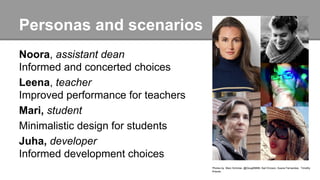
Noora, assistant dean
Informed and concerted choices
Leena, teacher
Improved performance for teachers
Mari, student
Minimalistic design for students
Juha, developer
Informed development choices
Photos by Marc Schmier, @Doug88888, Karl Ericson, Suene Fernandes, Timothy
Krause.
Design session and concept map
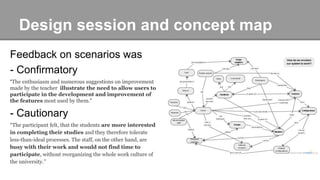
Feedback on scenarios was
- Confirmatory
“The enthusiasm and numerous suggestions on improvement
made by the teacher illustrate the need to allow users to
participate in the development and improvement of
the features most used by them.”
- Cautionary
“The participant felt, that the students are more interested
in completing their studies and they therefore tolerate
less-than-ideal processes. The staff, on the other hand, are
busy with their work and would not find time to
participate, without reorganizing the whole work culture of
the university.”
Testing tasks and user stories
Task 1 – Providing improvement feedback on modules
Story #1: Sending improvement idea to developer
Story #2: Voting on comments
Task 2 – Analyzing user feedback
Story #6: System owner is viewing improvement feedback
Story #7: System owner decides on an improvement idea
Task 3 – Adding modules
Story #11: Adding a module
Story #12: Removing a module
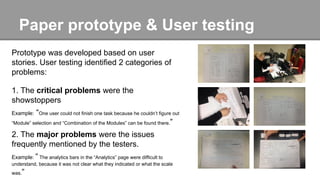
Paper prototype & User testing
Prototype was developed based on user
stories. User testing identified 2 categories of
problems:
1. The critical problems were the
showstoppers
Example: “One user could not finish one task because he couldn’t figure out
“Module” selection and “Combination of the Modules” can be found there.”
2. The major problems were the issues
frequently mentioned by the testers.
Example: “ The analytics bars in the “Analytics” page were difficult to
understand, because it was not clear what they indicated or what the scale
was.”
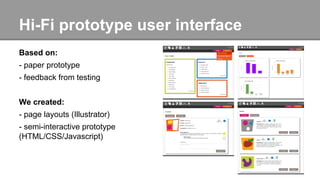
Hi-Fi prototype user interface
Based on:
- paper prototype
- feedback from testing
We created:
- page layouts (Illustrator)
- semi-interactive prototype
(HTML/CSS/Javascript)

Final presentation

  • 1.
    SustainIT Arman Arakelyan, TeaDickman, Ülleli Lember
  • 2.
    Idea and context Idea:Redesign existing school information system components into one sustainable and evolving system. Discussion highlights: - Minimal viable product - Unobtrusive design Context: Current Situation & Similar Solutions
  • 3.
    Personas and scenarios Noora,assistant dean Informed and concerted choices Leena, teacher Improved performance for teachers Mari, student Minimalistic design for students Juha, developer Informed development choices Photos by Marc Schmier, @Doug88888, Karl Ericson, Suene Fernandes, Timothy Krause.
  • 4.
    Design session andconcept map Feedback on scenarios was - Confirmatory “The enthusiasm and numerous suggestions on improvement made by the teacher illustrate the need to allow users to participate in the development and improvement of the features most used by them.” - Cautionary “The participant felt, that the students are more interested in completing their studies and they therefore tolerate less-than-ideal processes. The staff, on the other hand, are busy with their work and would not find time to participate, without reorganizing the whole work culture of the university.”
  • 5.
    Testing tasks anduser stories Task 1 – Providing improvement feedback on modules Story #1: Sending improvement idea to developer Story #2: Voting on comments Task 2 – Analyzing user feedback Story #6: System owner is viewing improvement feedback Story #7: System owner decides on an improvement idea Task 3 – Adding modules Story #11: Adding a module Story #12: Removing a module
  • 6.
    Paper prototype &User testing Prototype was developed based on user stories. User testing identified 2 categories of problems: 1. The critical problems were the showstoppers Example: “One user could not finish one task because he couldn’t figure out “Module” selection and “Combination of the Modules” can be found there.” 2. The major problems were the issues frequently mentioned by the testers. Example: “ The analytics bars in the “Analytics” page were difficult to understand, because it was not clear what they indicated or what the scale was.”
  • 7.
    Hi-Fi prototype userinterface Based on: - paper prototype - feedback from testing We created: - page layouts (Illustrator) - semi-interactive prototype (HTML/CSS/Javascript)