NALLA MALLA REDDY ENGINEERING COLLEGE
DEPARTMENT OF COMPUTER SCIENCE AND ENGINEERING
Presented By: Guided By:
Durga Prasad Reddy. P (14B61A0533) Y. Durga Bhargavi (M-Tech)
Sai Naveen. D (14B61A0530) Assistant Professor
Divya. G (14B61A0529)
Suchitra. CH (14B61A0525)
Augmented Reality
E-Learning, Animation
Development of Education Technology Tool Based
on Animation Concepts
Introduction
• Development of education technology tool based on animation concepts as the
name suggests it’s a tool which helps the students to learn the education related
concepts using the animation concepts.
• The idea is to provide a direct view of the real-world objects for efficient learning
and understanding the objects in a deeper way.
• The system provides the users a multidimensional access to the topics and also
provides animated models in an interactive manner to understand the topic in
deeper.
Literature survey
1. A research paper on virtual learning environment
Author: arvind mahajan(2016)
• The presence of a virtual learning environment can alter the dimensions of existing learning and the
teaching relationships in a drastic way.
• It will explore how institutes and their students can benefit from appropriate use of technology in ways to
help them learn.
2. A review of using augmented reality in Education from 2011 to 2016
Author: pengchen,xiaolinliu,weicheng,ronghuaihuang
• Augmented reality takes advantage of object of virtual information overlaying physical objects or
environments, resulting in a mixed reality.
3. Augmented reality
Author: Dieter Schmalstieg, Tobias Langlotz, and Mark Billinghurst(2008)
• Augmented Reality (AR) is an area of research that aims to enhance the real world by overlaying
computer-generated data on top of it.
Problem Definition
• The problem of referencing a stack of books or websites to learn something in
deep can be reduced by providing enhancement of learning experience.
• The idea is to provide a live direct or indirect view of a physical, real world
environment.
• Its more related to computer-mediated reality in which a view of reality can be
modified using a computer.
Existing System
• The Existing system only provide the 3D static view of any lesson.
• It fails to provide the reality environment of education.
• No possibility of dimensionality view of any working process.
Disadvantages
• Problem in learning the things theoretically.
• No proper explanation through the static view of any object.
• Does not provide a friendly environment to the students to learn.
Proposed System
• The proposed system including augmented reality into lessons to help the students
to involve directly in learning process.
• The system provides alternative way of integrating theory into reality.
• Helps the students in virtual visualization.
• Provides a way to use mobile as a Pocket-Tool.
• It provides a way to the educators to present the exact view to the learners.
• Interaction with virtual objects.
Advantages
• Eye catching presentation capacity.
• Interactive lessons for better understanding.
• Portable and less expensive.
Software and Hardware Requirements
Software Requirements
• Unity 2017.1
• Cinema 4d R19.024
• Vuforia plugin 6.2.10
• Android sdk 19 or above
Hardware Requirements
• Processor : AMD-A6
• Hard Disk : 500GB
• RAM : 8GB
• Camera : 5MP
Functional Requirements
The application should be able to
• Interact with the virtual world objects.
• Provide an interface for user to choose the topics.
• Allow the user to view the virtual objects in any dimension.
• Provides the user different modules like cse, mechanical, civil, ece, etc…..
• Provides various experiments to view.
Non-Functional Requirements
• Platform Compatibility
• Portability
• Camera pixel
• Low lighting
• Target image not clear
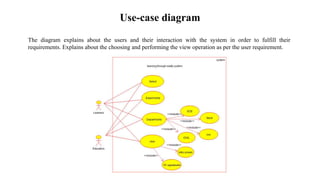
Use-case diagram
The diagram explains about the users and their interaction with the system in order to fulfill their
requirements. Explains about the choosing and performing the view operation as per the user requirement.
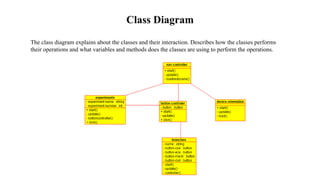
Class Diagram
The class diagram explains about the classes and their interaction. Describes how the classes performs
their operations and what variables and methods does the classes are using to perform the operations.
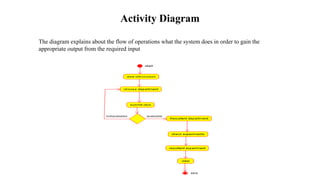
Activity Diagram
The diagram explains about the flow of operations what the system does in order to gain the
appropriate output from the required input
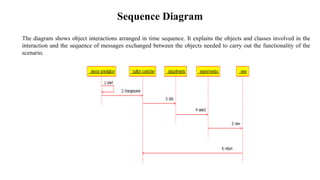
Sequence Diagram
The diagram shows object interactions arranged in time sequence. It explains the objects and classes involved in the
interaction and the sequence of messages exchanged between the objects needed to carry out the functionality of the
scenario.
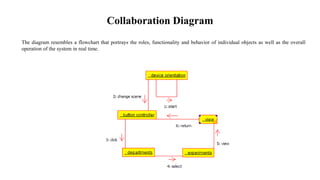
Collaboration Diagram
The diagram resembles a flowchart that portrays the roles, functionality and behavior of individual objects as well as the overall
operation of the system in real time.
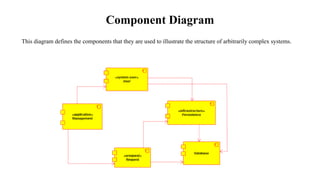
Component Diagram
This diagram defines the components that they are used to illustrate the structure of arbitrarily complex systems.
Screenshots
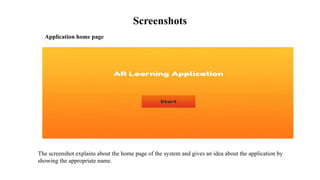
Application home page
The screenshot explains about the home page of the system and gives an idea about the application by
showing the appropriate name.
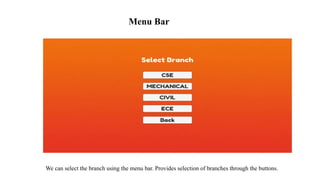
We can select the branch using the menu bar. Provides selection of branches through the buttons.
Menu Bar
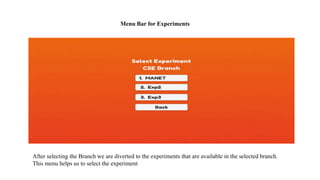
After selecting the Branch we are diverted to the experiments that are available in the selected branch.
This menu helps us to select the experiment
Menu Bar for Experiments
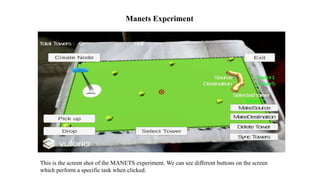
This is the screen shot of the MANETS experiment. We can see different buttons on the screen
which perform a specific task when clicked.
Manets Experiment
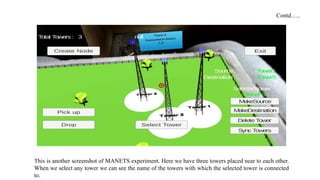
This is another screenshot of MANETS experiment. Here we have three towers placed near to each other.
When we select any tower we can see the name of the towers with which the selected tower is connected
to.
Contd…..
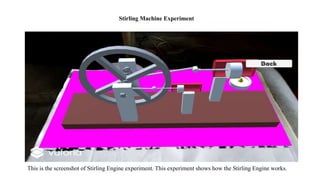
This is the screenshot of Stirling Engine experiment. This experiment shows how the Stirling Engine works.
Stirling Machine Experiment
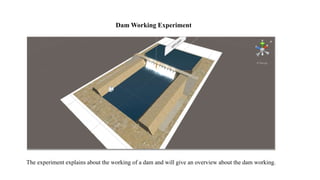
The experiment explains about the working of a dam and will give an overview about the dam working.
Dam Working Experiment
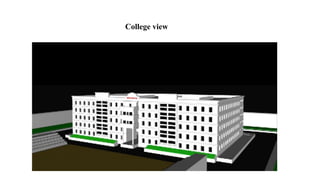
College view
Conclusion
• The Development of education technology tool based on animation concepts successfully
designed and it is tested for accuracy and quality.
• During this project we have accomplished all the objectives and this project meets the needs of the
organization.
• Optimum utilization of resources.
• Efficient management of records.
• Simplification of the operations.
• Less processing time and getting required information.
• User friendly. Portable and flexible for further enhancement.
Future Enhancements
It is not possible to develop a system that makes all the requirements of the user. User
requirements keep changing as the system is being used. Some of the future enhancements that
can be done to this system are:
• Can be implemented for all the theoretical parts of the subjects.
• No requirement of target images as they can be taken from the cloud.
• The view can be performed dynamically by recognizing the images directly from the books as
required for the users.
• As the technology emerges, it is possible to upgrade the system and can be adaptable to
desired environment.
• Because it is based on object-oriented design, any further changes can be easily adaptable.
• Based on the future security issues, security can be improved using emerging technologies.
References
• B. Teoh, T. Neo, "Interactive multimedia learning: Students' attitudes and learning impact
in an animation course", Turkish Online J. Educ. Technol., vol. 6, no. 4, pp. 28-37, 2007.
• D. Zhang, J. L. Zhao, L. Zhou, J. F. Nunamaker, "Can e-learning replace classroom
learning?", Communications of the ACM, vol. 47, no. 5, pp. 75-79, 2004.
• S. Martin, G. Diaz, E. Sancristobal, R. Gil, M. Castro, J. Peire, "New technology trends in
education: Seven years of forecasts and convergence", Comput. Educ., vol. 57, no. 3, pp.
1893-1906, 2011.
• State, Andrei, Gentaro Hirota, David T. Chen, Bill Garrett, and Mark Livingston.
Superior Augmented Reality Registration by Integrating Landmark Tracking and
Magnetic Tracking. Proceedings of SIGGRAPH ‘96 (New Orleans, LA, 4-9 August
1996), 429-438.
• Rekimoto, Jun. The Magnifying Glass Approach to Augmented Reality Systems.
Proceedings of ICAT '95 (Makuhari Messe, Chiba, Japan, 20-22 November 1995).
Thank You

Augmented Reality Learning App

  • 1.
    NALLA MALLA REDDYENGINEERING COLLEGE DEPARTMENT OF COMPUTER SCIENCE AND ENGINEERING Presented By: Guided By: Durga Prasad Reddy. P (14B61A0533) Y. Durga Bhargavi (M-Tech) Sai Naveen. D (14B61A0530) Assistant Professor Divya. G (14B61A0529) Suchitra. CH (14B61A0525)
  • 2.
    Augmented Reality E-Learning, Animation Developmentof Education Technology Tool Based on Animation Concepts
  • 3.
    Introduction • Development ofeducation technology tool based on animation concepts as the name suggests it’s a tool which helps the students to learn the education related concepts using the animation concepts. • The idea is to provide a direct view of the real-world objects for efficient learning and understanding the objects in a deeper way. • The system provides the users a multidimensional access to the topics and also provides animated models in an interactive manner to understand the topic in deeper.
  • 4.
    Literature survey 1. Aresearch paper on virtual learning environment Author: arvind mahajan(2016) • The presence of a virtual learning environment can alter the dimensions of existing learning and the teaching relationships in a drastic way. • It will explore how institutes and their students can benefit from appropriate use of technology in ways to help them learn. 2. A review of using augmented reality in Education from 2011 to 2016 Author: pengchen,xiaolinliu,weicheng,ronghuaihuang • Augmented reality takes advantage of object of virtual information overlaying physical objects or environments, resulting in a mixed reality. 3. Augmented reality Author: Dieter Schmalstieg, Tobias Langlotz, and Mark Billinghurst(2008) • Augmented Reality (AR) is an area of research that aims to enhance the real world by overlaying computer-generated data on top of it.
  • 5.
    Problem Definition • Theproblem of referencing a stack of books or websites to learn something in deep can be reduced by providing enhancement of learning experience. • The idea is to provide a live direct or indirect view of a physical, real world environment. • Its more related to computer-mediated reality in which a view of reality can be modified using a computer.
  • 6.
    Existing System • TheExisting system only provide the 3D static view of any lesson. • It fails to provide the reality environment of education. • No possibility of dimensionality view of any working process. Disadvantages • Problem in learning the things theoretically. • No proper explanation through the static view of any object. • Does not provide a friendly environment to the students to learn.
  • 7.
    Proposed System • Theproposed system including augmented reality into lessons to help the students to involve directly in learning process. • The system provides alternative way of integrating theory into reality. • Helps the students in virtual visualization. • Provides a way to use mobile as a Pocket-Tool. • It provides a way to the educators to present the exact view to the learners. • Interaction with virtual objects. Advantages • Eye catching presentation capacity. • Interactive lessons for better understanding. • Portable and less expensive.
  • 8.
    Software and HardwareRequirements Software Requirements • Unity 2017.1 • Cinema 4d R19.024 • Vuforia plugin 6.2.10 • Android sdk 19 or above Hardware Requirements • Processor : AMD-A6 • Hard Disk : 500GB • RAM : 8GB • Camera : 5MP
  • 9.
    Functional Requirements The applicationshould be able to • Interact with the virtual world objects. • Provide an interface for user to choose the topics. • Allow the user to view the virtual objects in any dimension. • Provides the user different modules like cse, mechanical, civil, ece, etc….. • Provides various experiments to view.
  • 10.
    Non-Functional Requirements • PlatformCompatibility • Portability • Camera pixel • Low lighting • Target image not clear
  • 11.
    Use-case diagram The diagramexplains about the users and their interaction with the system in order to fulfill their requirements. Explains about the choosing and performing the view operation as per the user requirement.
  • 12.
    Class Diagram The classdiagram explains about the classes and their interaction. Describes how the classes performs their operations and what variables and methods does the classes are using to perform the operations.
  • 13.
    Activity Diagram The diagramexplains about the flow of operations what the system does in order to gain the appropriate output from the required input
  • 14.
    Sequence Diagram The diagramshows object interactions arranged in time sequence. It explains the objects and classes involved in the interaction and the sequence of messages exchanged between the objects needed to carry out the functionality of the scenario.
  • 15.
    Collaboration Diagram The diagramresembles a flowchart that portrays the roles, functionality and behavior of individual objects as well as the overall operation of the system in real time.
  • 16.
    Component Diagram This diagramdefines the components that they are used to illustrate the structure of arbitrarily complex systems.
  • 17.
    Screenshots Application home page Thescreenshot explains about the home page of the system and gives an idea about the application by showing the appropriate name.
  • 18.
    We can selectthe branch using the menu bar. Provides selection of branches through the buttons. Menu Bar
  • 19.
    After selecting theBranch we are diverted to the experiments that are available in the selected branch. This menu helps us to select the experiment Menu Bar for Experiments
  • 20.
    This is thescreen shot of the MANETS experiment. We can see different buttons on the screen which perform a specific task when clicked. Manets Experiment
  • 21.
    This is anotherscreenshot of MANETS experiment. Here we have three towers placed near to each other. When we select any tower we can see the name of the towers with which the selected tower is connected to. Contd…..
  • 22.
    This is thescreenshot of Stirling Engine experiment. This experiment shows how the Stirling Engine works. Stirling Machine Experiment
  • 23.
    The experiment explainsabout the working of a dam and will give an overview about the dam working. Dam Working Experiment
  • 24.
  • 25.
    Conclusion • The Developmentof education technology tool based on animation concepts successfully designed and it is tested for accuracy and quality. • During this project we have accomplished all the objectives and this project meets the needs of the organization. • Optimum utilization of resources. • Efficient management of records. • Simplification of the operations. • Less processing time and getting required information. • User friendly. Portable and flexible for further enhancement.
  • 26.
    Future Enhancements It isnot possible to develop a system that makes all the requirements of the user. User requirements keep changing as the system is being used. Some of the future enhancements that can be done to this system are: • Can be implemented for all the theoretical parts of the subjects. • No requirement of target images as they can be taken from the cloud. • The view can be performed dynamically by recognizing the images directly from the books as required for the users. • As the technology emerges, it is possible to upgrade the system and can be adaptable to desired environment. • Because it is based on object-oriented design, any further changes can be easily adaptable. • Based on the future security issues, security can be improved using emerging technologies.
  • 27.
    References • B. Teoh,T. Neo, "Interactive multimedia learning: Students' attitudes and learning impact in an animation course", Turkish Online J. Educ. Technol., vol. 6, no. 4, pp. 28-37, 2007. • D. Zhang, J. L. Zhao, L. Zhou, J. F. Nunamaker, "Can e-learning replace classroom learning?", Communications of the ACM, vol. 47, no. 5, pp. 75-79, 2004. • S. Martin, G. Diaz, E. Sancristobal, R. Gil, M. Castro, J. Peire, "New technology trends in education: Seven years of forecasts and convergence", Comput. Educ., vol. 57, no. 3, pp. 1893-1906, 2011. • State, Andrei, Gentaro Hirota, David T. Chen, Bill Garrett, and Mark Livingston. Superior Augmented Reality Registration by Integrating Landmark Tracking and Magnetic Tracking. Proceedings of SIGGRAPH ‘96 (New Orleans, LA, 4-9 August 1996), 429-438. • Rekimoto, Jun. The Magnifying Glass Approach to Augmented Reality Systems. Proceedings of ICAT '95 (Makuhari Messe, Chiba, Japan, 20-22 November 1995).
  • 28.