eTest Solution: Software
  for Integrating Large- and
     Small-scale Assessment
                                                             18th July 2012 @ Lisbon


      Srdjan Verbić1, Srdjan Božović2, Saša Veličković2

1 Institute for Education Quality and Evaluation, Belgrade
2 MFC Mikrokomerc, Belgrade
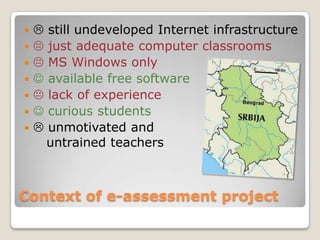
      still undeveloped Internet infrastructure
      just adequate computer classrooms
      MS Windows only
      available free software
      lack of experience
      curious students
      unmotivated and
        untrained teachers


Context of e-assessment project
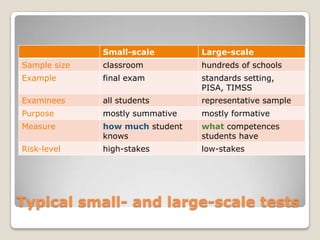
Small-scale        Large-scale
Sample size   classroom          hundreds of schools
Example       final exam         standards setting,
                                 PISA, TIMSS
Examinees     all students       representative sample
Purpose       mostly summative   mostly formative
Measure       how much student   what competences
              knows              students have
Risk-level    high-stakes        low-stakes


Typical small- and large-scale tests
Trial testing (or pilot-testing)

   the same conditions as for final test
   more-less the same questions
   smaller sample (usually volunteers)
   (very) low-stakes
   looking for items’ characteristics


Trial-testing
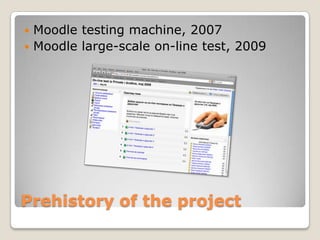
 Moodle testing machine, 2007
 Moodle large-scale on-line test, 2009


Prehistory of the project
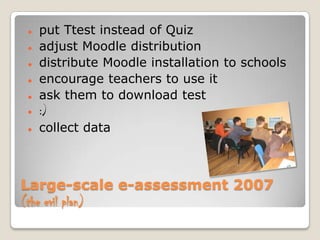
   put Ttest instead of Quiz
   adjust Moodle distribution
   distribute Moodle installation to schools
   encourage teachers to use it
   ask them to download test
   :)
   collect data


Large-scale e-assessment 2007
(the evil plan)
Moodle is not so good solution for on-line tests, after all.


   memory leaking, again
   unreliable Internet connections
   slow update of the awkward database
   …


Never-ending series of problems
   Microsoft technology

   XML based interoperability (like IMS QTI)

   Separate system components

   On- and off-line testing

   Efficient use of multimedia


New system 2011
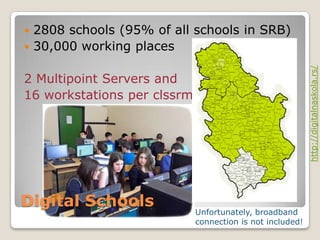
 2808 schools (95% of all schools in SRB)
 30,000 working places


                                                           http://digitalnaskola.rs/
2 Multipoint Servers and
16 workstations per clssrm


Digital Schools
                             Unfortunately, broadband
                             connection is not included!
 eTest   Player
 eTest   School Portal


                              http://mfc.rs/
 eTest   Management Portal
 eTest   Question Editor


eTest Solution
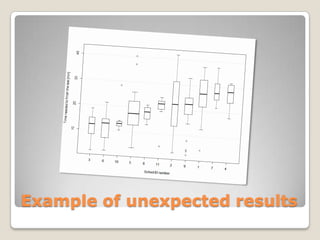
Example of unexpected results
   Students prefer e-testing mode…
   …and don’t have problem to communicate
    with computers.
   “collective behavior”
   Teachers agree that <30% of colleagues
    would be able to conduct e-testing.
   Main obstacle: untrained teachers
   Main challenge: to prepare enough high-
    quality tests ready for download


Questionnaires’ feedback
   Teachers’ training

   Installing software in
    all digital classrooms

   More training

   Providing high-quality
    tests


Further steps

eTest Solution

  • 1.
    eTest Solution: Software for Integrating Large- and Small-scale Assessment 18th July 2012 @ Lisbon Srdjan Verbić1, Srdjan Božović2, Saša Veličković2 1 Institute for Education Quality and Evaluation, Belgrade 2 MFC Mikrokomerc, Belgrade
  • 2.
     still undeveloped Internet infrastructure   just adequate computer classrooms   MS Windows only   available free software   lack of experience   curious students   unmotivated and untrained teachers Context of e-assessment project
  • 3.
    Small-scale Large-scale Sample size classroom hundreds of schools Example final exam standards setting, PISA, TIMSS Examinees all students representative sample Purpose mostly summative mostly formative Measure how much student what competences knows students have Risk-level high-stakes low-stakes Typical small- and large-scale tests
  • 4.
    Trial testing (orpilot-testing)  the same conditions as for final test  more-less the same questions  smaller sample (usually volunteers)  (very) low-stakes  looking for items’ characteristics Trial-testing
  • 5.
     Moodle testingmachine, 2007  Moodle large-scale on-line test, 2009 Prehistory of the project
  • 6.
    put Ttest instead of Quiz  adjust Moodle distribution  distribute Moodle installation to schools  encourage teachers to use it  ask them to download test  :)  collect data Large-scale e-assessment 2007 (the evil plan)
  • 7.
    Moodle is notso good solution for on-line tests, after all.  memory leaking, again  unreliable Internet connections  slow update of the awkward database  … Never-ending series of problems
  • 8.
    Microsoft technology  XML based interoperability (like IMS QTI)  Separate system components  On- and off-line testing  Efficient use of multimedia New system 2011
  • 9.
     2808 schools(95% of all schools in SRB)  30,000 working places http://digitalnaskola.rs/ 2 Multipoint Servers and 16 workstations per clssrm Digital Schools Unfortunately, broadband connection is not included!
  • 10.
     eTest Player  eTest School Portal http://mfc.rs/  eTest Management Portal  eTest Question Editor eTest Solution
  • 11.
  • 12.
    Students prefer e-testing mode…  …and don’t have problem to communicate with computers.  “collective behavior”  Teachers agree that <30% of colleagues would be able to conduct e-testing.  Main obstacle: untrained teachers  Main challenge: to prepare enough high- quality tests ready for download Questionnaires’ feedback
  • 13.
    Teachers’ training  Installing software in all digital classrooms  More training  Providing high-quality tests Further steps