Findings Report
Usability Test of
XXXXX.gov
<Your Name>
<Agency>
<Date>
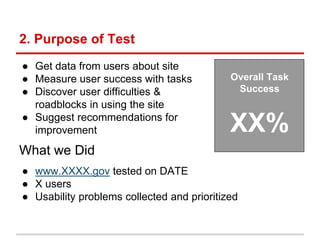
2. Purpose of Test
● Get data from users about site
● Measure user success with tasks
● Discover user difficulties &
roadblocks in using the site
● Suggest recommendations for
improvement
What we Did
Overall Task
Success
XX%
● www.XXXX.gov tested on DATE
● X users
● Usability problems collected and prioritized
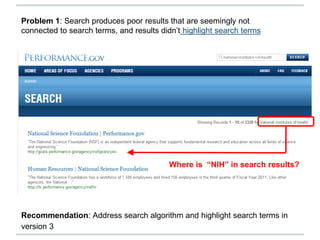
Recommendation: Address search algorithm and highlight search terms in
version 3
Problem 1: Search produces poor results that are seemingly not
connected to search terms, and results didn’t highlight search terms
Where is “NIH” in search results?
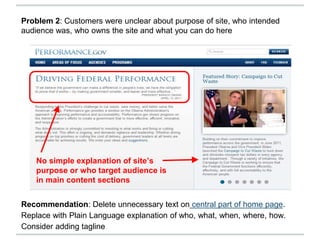
Recommendation: Delete unnecessary text on central part of home page.
Replace with Plain Language explanation of who, what, when, where, how.
Consider adding tagline
Problem 2: Customers were unclear about purpose of site, who intended
audience was, who owns the site and what you can do here
No simple explanation of site’s
purpose or who target audience is
in main content sections
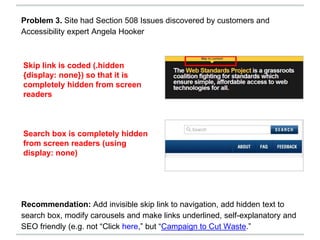
Recommendation: Add invisible skip link to navigation, add hidden text to
search box, modify carousels and make links underlined, self-explanatory and
SEO friendly (e.g. not “Click here,” but “Campaign to Cut Waste.”
Problem 3. Site had Section 508 Issues discovered by customers and
Accessibility expert Angela Hooker
Skip link is coded (.hidden
{display: none}) so that it is
completely hidden from screen
readers
Search box is completely hidden
from screen readers (using
display: none)
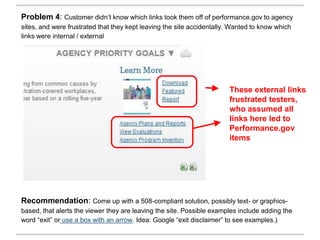
Recommendation: Come up with a 508-compliant solution, possibly text- or graphics-
based, that alerts the viewer they are leaving the site. Possible examples include adding the
word “exit” or use a box with an arrow. Idea: Google “exit disclaimer” to see examples.)
These external links
frustrated testers,
who assumed all
links here led to
Performance.gov
items
Problem 4: Customer didn’t know which links took them off of performance.gov to agency
sites, and were frustrated that they kept leaving the site accidentally. Wanted to know which
links were internal / external
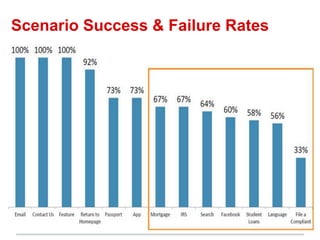
Scenario Success & Failure Rates
See our full report (if available)
See “XXXXX” for complete report.
● Scenarios
● Full list of problems

Usability Testing Report Template

  • 1.
    Findings Report Usability Testof XXXXX.gov <Your Name> <Agency> <Date>
  • 2.
    2. Purpose ofTest ● Get data from users about site ● Measure user success with tasks ● Discover user difficulties & roadblocks in using the site ● Suggest recommendations for improvement What we Did Overall Task Success XX% ● www.XXXX.gov tested on DATE ● X users ● Usability problems collected and prioritized
  • 3.
    Recommendation: Address searchalgorithm and highlight search terms in version 3 Problem 1: Search produces poor results that are seemingly not connected to search terms, and results didn’t highlight search terms Where is “NIH” in search results?
  • 4.
    Recommendation: Delete unnecessarytext on central part of home page. Replace with Plain Language explanation of who, what, when, where, how. Consider adding tagline Problem 2: Customers were unclear about purpose of site, who intended audience was, who owns the site and what you can do here No simple explanation of site’s purpose or who target audience is in main content sections
  • 5.
    Recommendation: Add invisibleskip link to navigation, add hidden text to search box, modify carousels and make links underlined, self-explanatory and SEO friendly (e.g. not “Click here,” but “Campaign to Cut Waste.” Problem 3. Site had Section 508 Issues discovered by customers and Accessibility expert Angela Hooker Skip link is coded (.hidden {display: none}) so that it is completely hidden from screen readers Search box is completely hidden from screen readers (using display: none)
  • 6.
    Recommendation: Come upwith a 508-compliant solution, possibly text- or graphics- based, that alerts the viewer they are leaving the site. Possible examples include adding the word “exit” or use a box with an arrow. Idea: Google “exit disclaimer” to see examples.) These external links frustrated testers, who assumed all links here led to Performance.gov items Problem 4: Customer didn’t know which links took them off of performance.gov to agency sites, and were frustrated that they kept leaving the site accidentally. Wanted to know which links were internal / external
  • 7.
    Scenario Success &Failure Rates
  • 8.
    See our fullreport (if available) See “XXXXX” for complete report. ● Scenarios ● Full list of problems