File Access in Novell Open
                   ®


Enterprise Server 2 SP2/SP3
Haripriya S
    Distinguished Engineer
    sharipriya@novell.com


    Praveen G
    Product Manager
    gpraveen@novell.com


    Girish KS
    Software Consultant
    ksgirish@novell.com

2   © Novell, Inc. All rights reserved.
Agenda

    •   Objectives

    •   File Access: the present and the future

    •   File Access Protocols: NCP , AFP, CIFS, Samba, FTP
                                          ™


    •   Making them all work together

    •   Troubleshooting

    •   Question and Answer


3   © Novell, Inc. All rights reserved.
Objectives

    •   To provide a view into the various file access methods
        available with Novell Open Enterprise Server 2 SP2
                                          ®


        and SP3

    •   To provide information on the various file access
        protocols – AFP, CIFS, NCP , FTP, Samba – and their
                                              ™


        capabilities

    •   To look at ways to deploy and troubleshoot the various
        protocols for high availability, multi-protocol access,
        auditing, high performance

4   © Novell, Inc. All rights reserved.
File Access Protocols
The Present and the Future
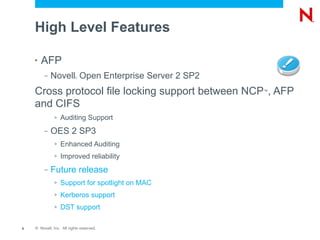
High Level Features

    •   AFP
         –   Novell Open Enterprise Server 2 SP2
                           ®


    Cross protocol file locking support between NCP , AFP
                                                   ™


    and CIFS
              >   Auditing Support
         –   OES 2 SP3
              >   Enhanced Auditing
              >   Improved reliability
         –   Future release
              >   Support for spotlight on MAC
              >   Kerberos support
              >   DST support

6   © Novell, Inc. All rights reserved.
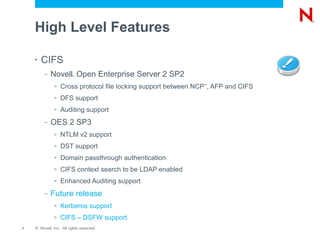
High Level Features

    •   CIFS
         –   Novell Open Enterprise Server 2 SP2
                         ®


              >   Cross protocol file locking support between NCP , AFP and CIFS
                                                                ™


              >   DFS support
              >   Auditing support
         –   OES 2 SP3
              >   NTLM v2 support
              >   DST support
              >   Domain passthrough authentication
              >   CIFS context search to be LDAP enabled
              >   Enhanced Auditing support
         –   Future release
              >   Kerberos support
              >   CIFS – DSFW support
7   © Novell, Inc. All rights reserved.
High Level Features

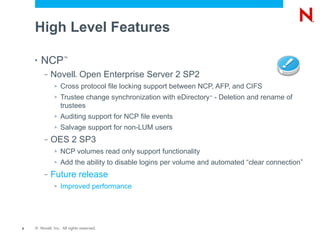
    •   NCP         ™


         –   Novell Open Enterprise Server 2 SP2
                           ®


              >   Cross protocol file locking support between NCP, AFP, and CIFS
              >   Trustee change synchronization with eDirectory - Deletion and rename of
                                                                 ™


                  trustees
              >   Auditing support for NCP file events
              >   Salvage support for non-LUM users
         –   OES 2 SP3
              >   NCP volumes read only support functionality
              >   Add the ability to disable logins per volume and automated “clear connection”
         –   Future release
              >   Improved performance


8   © Novell, Inc. All rights reserved.
High Level Features
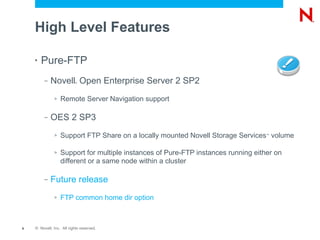
    •   Pure-FTP
         –   Novell Open Enterprise Server 2 SP2
                           ®


              >   Remote Server Navigation support

         –   OES 2 SP3
              >   Support FTP Share on a locally mounted Novell Storage Services volume
                                                                                   ™


              >   Support for multiple instances of Pure-FTP instances running either on
                  different or a same node within a cluster

         –   Future release
              >   FTP common home dir option


9   © Novell, Inc. All rights reserved.
When to Use Which Protocol?

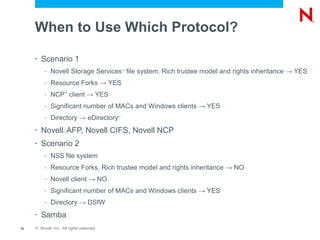
     •   Scenario 1
          –   Novell Storage Services file system, Rich trustee model and rights inheritance → YES
                                               ™


          –   Resource Forks → YES
          –   NCP client → YES
                     ™


          –   Significant number of MACs and Windows clients → YES
          –   Directory → eDirectory       ™


     •   Novell AFP, Novell CIFS, Novell NCP
                     ®


     •   Scenario 2
          –   NSS file system
          –   Resource Forks, Rich trustee model and rights inheritance → NO
          –   Novell client → NO
          –   Significant number of MACs and Windows clients → YES
          –   Directory → DSfW
     •   Samba
10   © Novell, Inc. All rights reserved.
When to Use Which Protocol?
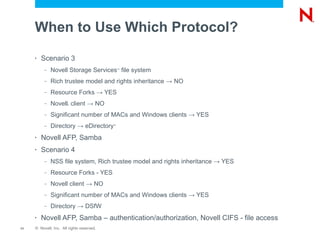
     •   Scenario 3
          –   Novell Storage Services file system
                                               ™


          –   Rich trustee model and rights inheritance → NO
          –   Resource Forks → YES
          –   Novell client → NO
                       ®


          –   Significant number of MACs and Windows clients → YES
          –   Directory → eDirectory       ™


     •   Novell AFP, Samba
     •   Scenario 4
          –   NSS file system, Rich trustee model and rights inheritance → YES
          –   Resource Forks - YES
          –   Novell client → NO
          –   Significant number of MACs and Windows clients → YES
          –   Directory → DSfW
     •   Novell AFP, Samba – authentication/authorization, Novell CIFS - file access
11   © Novell, Inc. All rights reserved.
File Access Protocols
Architecture, Capabilities
Novell Open Enterprise Server 2
                          ®


     File Systems
     Types and Access Protocols
     •   Multiple choices for File Systems
          –   Novell Storage Services      ™


          –   Posix File-Systems: Ext3, Reiser, XFS
     •   Multiple choices for File Access Protocols
          –   NCP - Novell NCP
                        ™


          –   CIFS/SMB – Novell CIFS, Samba
          –   AFP – Novell AFP
          –   HTTP – NetStorage, Apache
          –   FTP – PureFTP with Novell changes
          –   NFS – Linux NFS
13   © Novell, Inc. All rights reserved.
Novell NCP Server       ®
                                           ™


     •   Novell NCP Server for Linux enables support for
          –   Login scripts,
          –   Mapping drives, and...
          –   Other services commonly associated with Novell Client™


     •   Services included with NCP (NetWare Core Protocol)
                                                       ®


          –   File access and locking
          –   Tracking of resource allocation
          –   Event notification
          –   Connection and communication management
          –   Legacy print services and queue management, and...
          –   Network management

14   © Novell, Inc. All rights reserved.
Novell NCP Server (cont.)
                             ®
                                           ™


     •   NCP Server can run in front of POSIX Filesystems
          –   EXT3, Reiser
          –   Virtual File System (VFS) layer
          –   Lossy mapping from Novell rights to POSIX attributes
     •   NCP Server can run in front of Novell Storage
         Services filesystems    ™


          –   Complete mapping for Novell rights and trustees
     •   Moving users from NetWare to Linux     ®


          –   With Open Enterprise Server 2, you no longer need to
              Linux enable the user just to run a Linux server

15   © Novell, Inc. All rights reserved.
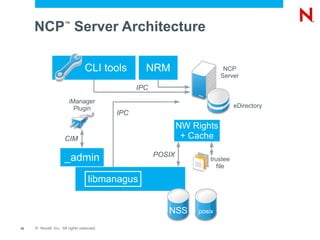
NCP Server Architecture
                     ™


                                 CLI tools         NRM                      NCP
                                                                           Server
                                                 IPC
                        iManager
                          Plugin                                                 eDirectory
                                           IPC
                                                               NW Rights
                      CIM                                       + Cache

                                                       POSIX
                     _admin                                            trustee
                                                                          file

                                   libmanagus


                                                          NSS      posix

16   © Novell, Inc. All rights reserved.
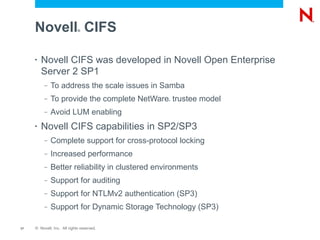
Novell CIFS             ®


     •   Novell CIFS was developed in Novell Open Enterprise
         Server 2 SP1
          –   To address the scale issues in Samba
          –   To provide the complete NetWare trustee model
                                                 ®


          –   Avoid LUM enabling
     •   Novell CIFS capabilities in SP2/SP3
          –   Complete support for cross-protocol locking
          –   Increased performance
          –   Better reliability in clustered environments
          –   Support for auditing
          –   Support for NTLMv2 authentication (SP3)
          –   Support for Dynamic Storage Technology (SP3)

17   © Novell, Inc. All rights reserved.
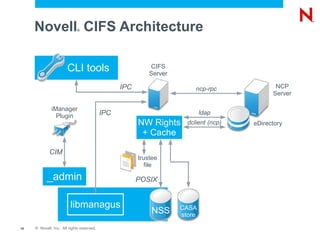
Novell CIFS Architecture®


                       CLI tools                            CIFS
                                                           Server

                                                 IPC                     ncp-rpc             NCP
                                                                                            Server

              iManager
                Plugin                     IPC                              ldap
                                                       NW Rights      dclient (ncp)   eDirectory
                                                        + Cache

             CIM
                                                       trustee
                                                         file

           _admin                                      POSIX


                         libmanagus                                 CASA
                                                           NSS      store

18   © Novell, Inc. All rights reserved.
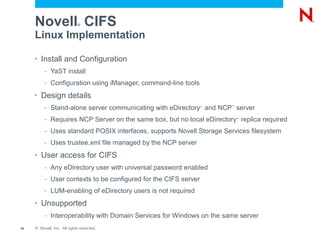
Novell CIFS             ®


     Linux Implementation

     •   Install and Configuration
          –   YaST install
          –   Configuration using iManager, command-line tools
     •   Design details
          –   Stand-alone server communicating with eDirectory and NCP server
                                                                   ™     ™


          –   Requires NCP Server on the same box, but no local eDirectory replica required
                                                                             ™


          –   Uses standard POSIX interfaces, supports Novell Storage Services filesystem
          –   Uses trustee.xml file managed by the NCP server
     •   User access for CIFS
          –   Any eDirectory user with universal password enabled
          –   User contexts to be configured for the CIFS server
          –   LUM-enabling of eDirectory users is not required
     •   Unsupported
          –   Interoperability with Domain Services for Windows on the same server
19   © Novell, Inc. All rights reserved.
Novell AFP              ®


     •   Novell AFP
          –   To support Mac clients

     •   Novell AFP capabilities in SP2/SP3
          –   Cross-protocol locking

          –   Better scalability and reliability

          –   Audit support


20   © Novell, Inc. All rights reserved.
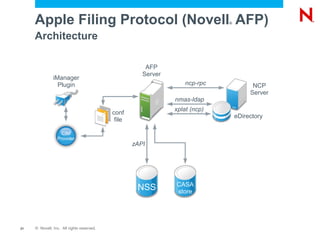
Apple Filing Protocol (Novell AFP)                                      ®


     Architecture

                                                       AFP
                                                      Server
               iManager
                 Plugin                                            ncp-rpc             NCP
                                                                                      Server
                                                               nmas-ldap
                                                               xplat (ncp)
                                           conf
                                                                                 eDirectory
                                            file

                   CIM
                 Provider
                                                   zAPI


                                                               CASA
                                                    NSS        store


21   © Novell, Inc. All rights reserved.
Apple Filing Protocol (Novell AFP)                                  ®


     Linux Implementation
     •   Install and Configuration
          –   YaST install
          –   Configuration using iManager, CIM providers for configuration and management
     •   Design details
          –   Stand-alone server communicating with eDirectory for authentication and
                                                                  ™


              authorization
          –   Novell Storage Services file-system, resource forks fully supported, uses zAPI
                                           ™


     •   User access for AFP
          –   Any eDirectory user with universal password enabled
          –   User contexts to be configured for the AFP server
          –   LUM-enabling of eDirectory users is not required
     •   Cross-protocol locking (CPL)
          –   Byte-range locks and Share modes
     •   CPL supported across AFP, NCP and Samba ™


22   © Novell, Inc. All rights reserved.
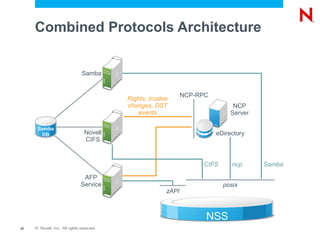
Combined Protocols Architecture


                               Samba


                                                                NCP-RPC
                                           Rights, trustee
                                           changes, DST                         NCP
                                              events                           Server

      Samba
       DB                        Novell                                   eDirectory
                                 CIFS


                                                                      CIFS      ncp     Samba

                                AFP
                               Service                                       posix
                                                         zAPI


                                                                      NSS
23   © Novell, Inc. All rights reserved.
Deploying Multiple Methods for
     File Access
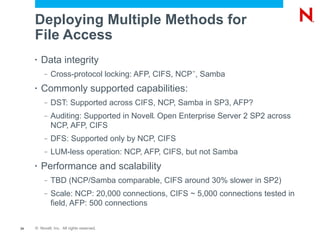
     •   Data integrity
          –   Cross-protocol locking: AFP, CIFS, NCP , Samba
                                                    ™


     •   Commonly supported capabilities:
          –   DST: Supported across CIFS, NCP, Samba in SP3, AFP?
          –   Auditing: Supported in Novell Open Enterprise Server 2 SP2 across
                                           ®


              NCP, AFP, CIFS
          –   DFS: Supported only by NCP, CIFS
          –   LUM-less operation: NCP, AFP, CIFS, but not Samba
     •   Performance and scalability
          –   TBD (NCP/Samba comparable, CIFS around 30% slower in SP2)
          –   Scale: NCP: 20,000 connections, CIFS ~ 5,000 connections tested in
              field, AFP: 500 connections


24   © Novell, Inc. All rights reserved.
Cross-Protocol Locking
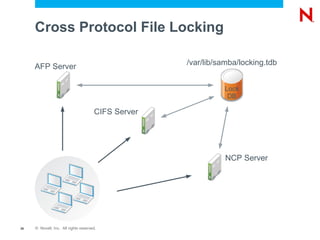
Cross Protocol File Locking

                                                    /var/lib/samba/locking.tdb
     AFP Server

                                                              Lock
                                                               DB

                                      CIFS Server


                                                               NCP Server


26   © Novell, Inc. All rights reserved.
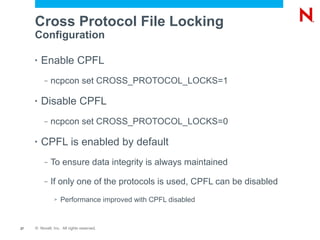
Cross Protocol File Locking
     Configuration

     •   Enable CPFL
          –   ncpcon set CROSS_PROTOCOL_LOCKS=1

     •   Disable CPFL
          –   ncpcon set CROSS_PROTOCOL_LOCKS=0

     •   CPFL is enabled by default
          –   To ensure data integrity is always maintained

          –   If only one of the protocols is used, CPFL can be disabled
               >   Performance improved with CPFL disabled


27   © Novell, Inc. All rights reserved.
High Availability
NCS Clustering
Clustering

     •   Why clustering?
          –   Increased availability of services and data

          –   Service and storage consolidation

          –   Lower cost of operation

          –   Software and Hardware maintenance and upgrades


29   © Novell, Inc. All rights reserved.
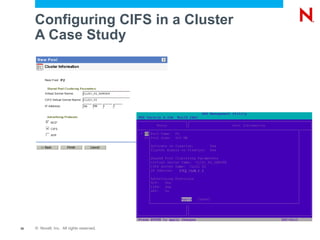
Configuring CIFS in a Cluster
     A Case Study


30   © Novell, Inc. All rights reserved.
Configuring CIFS in a Cluster

     •   Load script
             novcifs --add --vserver=virtualserverFDN –ip-
             addr=virtualserverip
     •   Unload script
             novcifs --remove --vserver=virtualserverFDN --ip-
             addr=virtualserverip
     •   CIFS attributes for the virtual server
             nfapCIFSServerName
             nfapCIFSAttach
             nfapCIFSComment
             nfapCIFSShares

31   © Novell, Inc. All rights reserved.
Using a Preexisting Cluster Pool
     for CIFS
     •   Select CIFS under advertising protocols

     •   Offline the pool server

     •   Download cifsPool.py script from http:

     •   Run the following command

             python cifsPool.py Resource_DN CIFS_Server_Name
             ldaps://ldapserver:636 Admin_DN Admin_password


32   © Novell, Inc. All rights reserved.
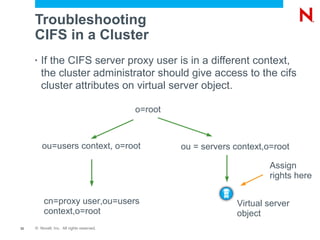
Troubleshooting
     CIFS in a Cluster
     •   If the CIFS server proxy user is in a different context,
         the cluster administrator should give access to the cifs
         cluster attributes on virtual server object.

                                           o=root


         ou=users context, o=root                   ou = servers context,o=root

                                                                          Assign
                                                                          rights here

         cn=proxy user,ou=users                                  Virtual server
         context,o=root                                          object
33   © Novell, Inc. All rights reserved.
Troubleshooting
     CIFS in a Cluster
     •   Restart CIFS service whenever eDirectory service is
                                                       ™


         restarted

     •   You have to offline and online resource whenever cifs
         service is restarted on the node that currently serves
         cluster resource

          –   CIFS service will bind to the cluster resource IP


34   © Novell, Inc. All rights reserved.
Clustering - AFP

     •   Volumes in a cluster
          –   When a client connects to the server ip, both local and cluster
              enabled shared volumes are exported

          –   When a client connects to the cluster ip, then only cluster
              enabled shared volumes associated with the IP are exported

     •   Volume representation
          –   Machine name and volume name (e.g. server.afp_vol)

     •   Volume name management in a cluster
          –   Edit /etc/opt/novell/afptcpd/afpvols.conf on each cluster node.
              Syntax, Servername.VolumeName VolumeName
35   © Novell, Inc. All rights reserved.
Support for
Distributed File Services
DFS Support for CIFS

     •   CIFS on Novell Open Enterprise Server 2 SP2
                                           ®


         supports DFS junction that points to
          –   Root of Novell Storage Services volume
                                               ™


          –   Subdirectories in NSS volume

     •   Trustee rights are set both on the junction and the
         target of the junction


37   © Novell, Inc. All rights reserved.
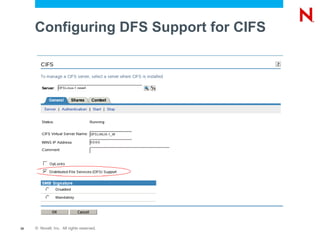
Configuring DFS Support for CIFS


38   © Novell, Inc. All rights reserved.
DFS Support for AFP

     •   AFP service on Novell Open Enterprise Server does
                                           ®


         not support DFS junctions


39   © Novell, Inc. All rights reserved.
Support for
Dynamic Storage Technology


41   © Novell, Inc. All rights reserved.
Benefits of Dynamic Storage
     Technology
     •   Transparent file access to end users

     •   Policy based migration

     •   Faster and smaller backups of important data

     •   Efficient use of expensive devices

     •   Migrating files from an existing secondary volume

     •   Access to the secondary storage area without the
         performance penalties seen in HSM solutions


42   © Novell, Inc. All rights reserved.
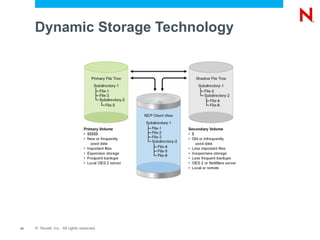
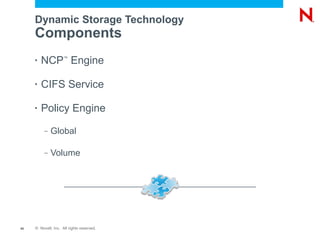
Dynamic Storage Technology
     Components
     •   NCP Engine  ™


     •   CIFS Service

     •   Policy Engine
          –   Global

          –   Volume


43   © Novell, Inc. All rights reserved.
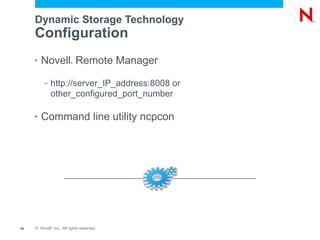
Dynamic Storage Technology
     Configuration
     •   Novell Remote Manager
                         ®


          –   http://server_IP_address:8008 or
              other_configured_port_number

     •   Command line utility ncpcon


44   © Novell, Inc. All rights reserved.
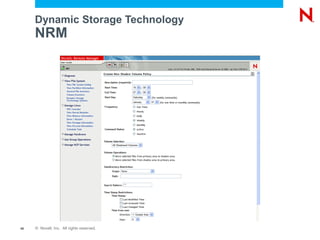
Dynamic Storage Technology
     NRM


45   © Novell, Inc. All rights reserved.
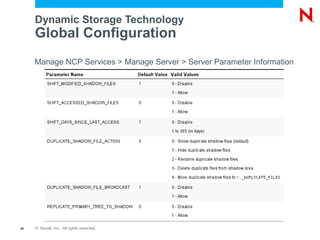
Dynamic Storage Technology
     Global Configuration
     Manage NCP Services > Manage Server > Server Parameter Information


46   © Novell, Inc. All rights reserved.
Dynamic Storage Technology

     •   Cross protocol file locking should be enabled when
         DST volume is exported as CIFS and NCP share
                                                  ™


47   © Novell, Inc. All rights reserved.
Authentication and Access Control
CIFS Authentication

     •   Default configuration on Windows workstations
          –   Up to Windows XP – NTLMv1

          –   Windows Vista and Windows 7 – NTLMv2

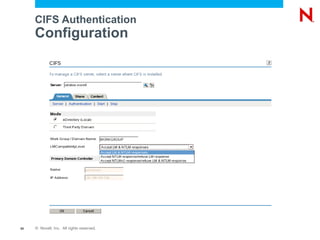
     •   Configuration
          –   CIFS iManager

          –   Command line utility - novcifs


49   © Novell, Inc. All rights reserved.
CIFS Authentication
     Configuration


50   © Novell, Inc. All rights reserved.
Miscellaneous
Auditing

     •   File events auditing supported across
          –   NCP , AFP, CIFS
                        ™


     •   Vigil interface
          –   Kernel modules for capturing file events
          –   Per-protocol kernel modules for mapping file events to protocol
              events and users (for ncp, cifs)
          –   vigil_dump: A sample tool to display audit messages
          –   Can work with multiple auditing tools and reporting applications
     •   Sentinel
          –   The client solution offered by Novell which is integrated with vigil
                                                   ®


          –   Separate product

52   © Novell, Inc. All rights reserved.
Unpublished Work of Novell, Inc. All Rights Reserved.
This work is an unpublished work and contains confidential, proprietary, and trade secret information of Novell, Inc.
Access to this work is restricted to Novell employees who have a need to know to perform tasks within the scope
of their assignments. No part of this work may be practiced, performed, copied, distributed, revised, modified,
translated, abridged, condensed, expanded, collected, or adapted without the prior written consent of Novell, Inc.
Any use or exploitation of this work without authorization could subject the perpetrator to criminal and civil liability.


General Disclaimer
This document is not to be construed as a promise by any participating company to develop, deliver, or market a
product. It is not a commitment to deliver any material, code, or functionality, and should not be relied upon in
making purchasing decisions. Novell, Inc. makes no representations or warranties with respect to the contents
of this document, and specifically disclaims any express or implied warranties of merchantability or fitness for any
particular purpose. The development, release, and timing of features or functionality described for Novell products
remains at the sole discretion of Novell. Further, Novell, Inc. reserves the right to revise this document and to
make changes to its content, at any time, without obligation to notify any person or entity of such revisions or
changes. All Novell marks referenced in this presentation are trademarks or registered trademarks of Novell, Inc.
in the United States and other countries. All third-party trademarks are the property of their respective owners.

File Access in Novell Open Enterprise Server 2 SP2

  • 1.
    File Access inNovell Open ® Enterprise Server 2 SP2/SP3
  • 2.
    Haripriya S Distinguished Engineer sharipriya@novell.com Praveen G Product Manager gpraveen@novell.com Girish KS Software Consultant ksgirish@novell.com 2 © Novell, Inc. All rights reserved.
  • 3.
    Agenda • Objectives • File Access: the present and the future • File Access Protocols: NCP , AFP, CIFS, Samba, FTP ™ • Making them all work together • Troubleshooting • Question and Answer 3 © Novell, Inc. All rights reserved.
  • 4.
    Objectives • To provide a view into the various file access methods available with Novell Open Enterprise Server 2 SP2 ® and SP3 • To provide information on the various file access protocols – AFP, CIFS, NCP , FTP, Samba – and their ™ capabilities • To look at ways to deploy and troubleshoot the various protocols for high availability, multi-protocol access, auditing, high performance 4 © Novell, Inc. All rights reserved.
  • 5.
    File Access Protocols ThePresent and the Future
  • 6.
    High Level Features • AFP – Novell Open Enterprise Server 2 SP2 ® Cross protocol file locking support between NCP , AFP ™ and CIFS > Auditing Support – OES 2 SP3 > Enhanced Auditing > Improved reliability – Future release > Support for spotlight on MAC > Kerberos support > DST support 6 © Novell, Inc. All rights reserved.
  • 7.
    High Level Features • CIFS – Novell Open Enterprise Server 2 SP2 ® > Cross protocol file locking support between NCP , AFP and CIFS ™ > DFS support > Auditing support – OES 2 SP3 > NTLM v2 support > DST support > Domain passthrough authentication > CIFS context search to be LDAP enabled > Enhanced Auditing support – Future release > Kerberos support > CIFS – DSFW support 7 © Novell, Inc. All rights reserved.
  • 8.
    High Level Features • NCP ™ – Novell Open Enterprise Server 2 SP2 ® > Cross protocol file locking support between NCP, AFP, and CIFS > Trustee change synchronization with eDirectory - Deletion and rename of ™ trustees > Auditing support for NCP file events > Salvage support for non-LUM users – OES 2 SP3 > NCP volumes read only support functionality > Add the ability to disable logins per volume and automated “clear connection” – Future release > Improved performance 8 © Novell, Inc. All rights reserved.
  • 9.
    High Level Features • Pure-FTP – Novell Open Enterprise Server 2 SP2 ® > Remote Server Navigation support – OES 2 SP3 > Support FTP Share on a locally mounted Novell Storage Services volume ™ > Support for multiple instances of Pure-FTP instances running either on different or a same node within a cluster – Future release > FTP common home dir option 9 © Novell, Inc. All rights reserved.
  • 10.
    When to UseWhich Protocol? • Scenario 1 – Novell Storage Services file system, Rich trustee model and rights inheritance → YES ™ – Resource Forks → YES – NCP client → YES ™ – Significant number of MACs and Windows clients → YES – Directory → eDirectory ™ • Novell AFP, Novell CIFS, Novell NCP ® • Scenario 2 – NSS file system – Resource Forks, Rich trustee model and rights inheritance → NO – Novell client → NO – Significant number of MACs and Windows clients → YES – Directory → DSfW • Samba 10 © Novell, Inc. All rights reserved.
  • 11.
    When to UseWhich Protocol? • Scenario 3 – Novell Storage Services file system ™ – Rich trustee model and rights inheritance → NO – Resource Forks → YES – Novell client → NO ® – Significant number of MACs and Windows clients → YES – Directory → eDirectory ™ • Novell AFP, Samba • Scenario 4 – NSS file system, Rich trustee model and rights inheritance → YES – Resource Forks - YES – Novell client → NO – Significant number of MACs and Windows clients → YES – Directory → DSfW • Novell AFP, Samba – authentication/authorization, Novell CIFS - file access 11 © Novell, Inc. All rights reserved.
  • 12.
  • 13.
    Novell Open EnterpriseServer 2 ® File Systems Types and Access Protocols • Multiple choices for File Systems – Novell Storage Services ™ – Posix File-Systems: Ext3, Reiser, XFS • Multiple choices for File Access Protocols – NCP - Novell NCP ™ – CIFS/SMB – Novell CIFS, Samba – AFP – Novell AFP – HTTP – NetStorage, Apache – FTP – PureFTP with Novell changes – NFS – Linux NFS 13 © Novell, Inc. All rights reserved.
  • 14.
    Novell NCP Server ® ™ • Novell NCP Server for Linux enables support for – Login scripts, – Mapping drives, and... – Other services commonly associated with Novell Client™ • Services included with NCP (NetWare Core Protocol) ® – File access and locking – Tracking of resource allocation – Event notification – Connection and communication management – Legacy print services and queue management, and... – Network management 14 © Novell, Inc. All rights reserved.
  • 15.
    Novell NCP Server(cont.) ® ™ • NCP Server can run in front of POSIX Filesystems – EXT3, Reiser – Virtual File System (VFS) layer – Lossy mapping from Novell rights to POSIX attributes • NCP Server can run in front of Novell Storage Services filesystems ™ – Complete mapping for Novell rights and trustees • Moving users from NetWare to Linux ® – With Open Enterprise Server 2, you no longer need to Linux enable the user just to run a Linux server 15 © Novell, Inc. All rights reserved.
  • 16.
    NCP Server Architecture ™ CLI tools NRM NCP Server IPC iManager Plugin eDirectory IPC NW Rights CIM + Cache POSIX _admin trustee file libmanagus NSS posix 16 © Novell, Inc. All rights reserved.
  • 17.
    Novell CIFS ® • Novell CIFS was developed in Novell Open Enterprise Server 2 SP1 – To address the scale issues in Samba – To provide the complete NetWare trustee model ® – Avoid LUM enabling • Novell CIFS capabilities in SP2/SP3 – Complete support for cross-protocol locking – Increased performance – Better reliability in clustered environments – Support for auditing – Support for NTLMv2 authentication (SP3) – Support for Dynamic Storage Technology (SP3) 17 © Novell, Inc. All rights reserved.
  • 18.
    Novell CIFS Architecture® CLI tools CIFS Server IPC ncp-rpc NCP Server iManager Plugin IPC ldap NW Rights dclient (ncp) eDirectory + Cache CIM trustee file _admin POSIX libmanagus CASA NSS store 18 © Novell, Inc. All rights reserved.
  • 19.
    Novell CIFS ® Linux Implementation • Install and Configuration – YaST install – Configuration using iManager, command-line tools • Design details – Stand-alone server communicating with eDirectory and NCP server ™ ™ – Requires NCP Server on the same box, but no local eDirectory replica required ™ – Uses standard POSIX interfaces, supports Novell Storage Services filesystem – Uses trustee.xml file managed by the NCP server • User access for CIFS – Any eDirectory user with universal password enabled – User contexts to be configured for the CIFS server – LUM-enabling of eDirectory users is not required • Unsupported – Interoperability with Domain Services for Windows on the same server 19 © Novell, Inc. All rights reserved.
  • 20.
    Novell AFP ® • Novell AFP – To support Mac clients • Novell AFP capabilities in SP2/SP3 – Cross-protocol locking – Better scalability and reliability – Audit support 20 © Novell, Inc. All rights reserved.
  • 21.
    Apple Filing Protocol(Novell AFP) ® Architecture AFP Server iManager Plugin ncp-rpc NCP Server nmas-ldap xplat (ncp) conf eDirectory file CIM Provider zAPI CASA NSS store 21 © Novell, Inc. All rights reserved.
  • 22.
    Apple Filing Protocol(Novell AFP) ® Linux Implementation • Install and Configuration – YaST install – Configuration using iManager, CIM providers for configuration and management • Design details – Stand-alone server communicating with eDirectory for authentication and ™ authorization – Novell Storage Services file-system, resource forks fully supported, uses zAPI ™ • User access for AFP – Any eDirectory user with universal password enabled – User contexts to be configured for the AFP server – LUM-enabling of eDirectory users is not required • Cross-protocol locking (CPL) – Byte-range locks and Share modes • CPL supported across AFP, NCP and Samba ™ 22 © Novell, Inc. All rights reserved.
  • 23.
    Combined Protocols Architecture Samba NCP-RPC Rights, trustee changes, DST NCP events Server Samba DB Novell eDirectory CIFS CIFS ncp Samba AFP Service posix zAPI NSS 23 © Novell, Inc. All rights reserved.
  • 24.
    Deploying Multiple Methodsfor File Access • Data integrity – Cross-protocol locking: AFP, CIFS, NCP , Samba ™ • Commonly supported capabilities: – DST: Supported across CIFS, NCP, Samba in SP3, AFP? – Auditing: Supported in Novell Open Enterprise Server 2 SP2 across ® NCP, AFP, CIFS – DFS: Supported only by NCP, CIFS – LUM-less operation: NCP, AFP, CIFS, but not Samba • Performance and scalability – TBD (NCP/Samba comparable, CIFS around 30% slower in SP2) – Scale: NCP: 20,000 connections, CIFS ~ 5,000 connections tested in field, AFP: 500 connections 24 © Novell, Inc. All rights reserved.
  • 25.
  • 26.
    Cross Protocol FileLocking /var/lib/samba/locking.tdb AFP Server Lock DB CIFS Server NCP Server 26 © Novell, Inc. All rights reserved.
  • 27.
    Cross Protocol FileLocking Configuration • Enable CPFL – ncpcon set CROSS_PROTOCOL_LOCKS=1 • Disable CPFL – ncpcon set CROSS_PROTOCOL_LOCKS=0 • CPFL is enabled by default – To ensure data integrity is always maintained – If only one of the protocols is used, CPFL can be disabled > Performance improved with CPFL disabled 27 © Novell, Inc. All rights reserved.
  • 28.
  • 29.
    Clustering • Why clustering? – Increased availability of services and data – Service and storage consolidation – Lower cost of operation – Software and Hardware maintenance and upgrades 29 © Novell, Inc. All rights reserved.
  • 30.
    Configuring CIFS ina Cluster A Case Study 30 © Novell, Inc. All rights reserved.
  • 31.
    Configuring CIFS ina Cluster • Load script novcifs --add --vserver=virtualserverFDN –ip- addr=virtualserverip • Unload script novcifs --remove --vserver=virtualserverFDN --ip- addr=virtualserverip • CIFS attributes for the virtual server nfapCIFSServerName nfapCIFSAttach nfapCIFSComment nfapCIFSShares 31 © Novell, Inc. All rights reserved.
  • 32.
    Using a PreexistingCluster Pool for CIFS • Select CIFS under advertising protocols • Offline the pool server • Download cifsPool.py script from http: • Run the following command python cifsPool.py Resource_DN CIFS_Server_Name ldaps://ldapserver:636 Admin_DN Admin_password 32 © Novell, Inc. All rights reserved.
  • 33.
    Troubleshooting CIFS in a Cluster • If the CIFS server proxy user is in a different context, the cluster administrator should give access to the cifs cluster attributes on virtual server object. o=root ou=users context, o=root ou = servers context,o=root Assign rights here cn=proxy user,ou=users Virtual server context,o=root object 33 © Novell, Inc. All rights reserved.
  • 34.
    Troubleshooting CIFS in a Cluster • Restart CIFS service whenever eDirectory service is ™ restarted • You have to offline and online resource whenever cifs service is restarted on the node that currently serves cluster resource – CIFS service will bind to the cluster resource IP 34 © Novell, Inc. All rights reserved.
  • 35.
    Clustering - AFP • Volumes in a cluster – When a client connects to the server ip, both local and cluster enabled shared volumes are exported – When a client connects to the cluster ip, then only cluster enabled shared volumes associated with the IP are exported • Volume representation – Machine name and volume name (e.g. server.afp_vol) • Volume name management in a cluster – Edit /etc/opt/novell/afptcpd/afpvols.conf on each cluster node. Syntax, Servername.VolumeName VolumeName 35 © Novell, Inc. All rights reserved.
  • 36.
  • 37.
    DFS Support forCIFS • CIFS on Novell Open Enterprise Server 2 SP2 ® supports DFS junction that points to – Root of Novell Storage Services volume ™ – Subdirectories in NSS volume • Trustee rights are set both on the junction and the target of the junction 37 © Novell, Inc. All rights reserved.
  • 38.
    Configuring DFS Supportfor CIFS 38 © Novell, Inc. All rights reserved.
  • 39.
    DFS Support forAFP • AFP service on Novell Open Enterprise Server does ® not support DFS junctions 39 © Novell, Inc. All rights reserved.
  • 40.
  • 41.
    Dynamic Storage Technology 41 © Novell, Inc. All rights reserved.
  • 42.
    Benefits of DynamicStorage Technology • Transparent file access to end users • Policy based migration • Faster and smaller backups of important data • Efficient use of expensive devices • Migrating files from an existing secondary volume • Access to the secondary storage area without the performance penalties seen in HSM solutions 42 © Novell, Inc. All rights reserved.
  • 43.
    Dynamic Storage Technology Components • NCP Engine ™ • CIFS Service • Policy Engine – Global – Volume 43 © Novell, Inc. All rights reserved.
  • 44.
    Dynamic Storage Technology Configuration • Novell Remote Manager ® – http://server_IP_address:8008 or other_configured_port_number • Command line utility ncpcon 44 © Novell, Inc. All rights reserved.
  • 45.
    Dynamic Storage Technology NRM 45 © Novell, Inc. All rights reserved.
  • 46.
    Dynamic Storage Technology Global Configuration Manage NCP Services > Manage Server > Server Parameter Information 46 © Novell, Inc. All rights reserved.
  • 47.
    Dynamic Storage Technology • Cross protocol file locking should be enabled when DST volume is exported as CIFS and NCP share ™ 47 © Novell, Inc. All rights reserved.
  • 48.
  • 49.
    CIFS Authentication • Default configuration on Windows workstations – Up to Windows XP – NTLMv1 – Windows Vista and Windows 7 – NTLMv2 • Configuration – CIFS iManager – Command line utility - novcifs 49 © Novell, Inc. All rights reserved.
  • 50.
    CIFS Authentication Configuration 50 © Novell, Inc. All rights reserved.
  • 51.
  • 52.
    Auditing • File events auditing supported across – NCP , AFP, CIFS ™ • Vigil interface – Kernel modules for capturing file events – Per-protocol kernel modules for mapping file events to protocol events and users (for ncp, cifs) – vigil_dump: A sample tool to display audit messages – Can work with multiple auditing tools and reporting applications • Sentinel – The client solution offered by Novell which is integrated with vigil ® – Separate product 52 © Novell, Inc. All rights reserved.
  • 54.
    Unpublished Work ofNovell, Inc. All Rights Reserved. This work is an unpublished work and contains confidential, proprietary, and trade secret information of Novell, Inc. Access to this work is restricted to Novell employees who have a need to know to perform tasks within the scope of their assignments. No part of this work may be practiced, performed, copied, distributed, revised, modified, translated, abridged, condensed, expanded, collected, or adapted without the prior written consent of Novell, Inc. Any use or exploitation of this work without authorization could subject the perpetrator to criminal and civil liability. General Disclaimer This document is not to be construed as a promise by any participating company to develop, deliver, or market a product. It is not a commitment to deliver any material, code, or functionality, and should not be relied upon in making purchasing decisions. Novell, Inc. makes no representations or warranties with respect to the contents of this document, and specifically disclaims any express or implied warranties of merchantability or fitness for any particular purpose. The development, release, and timing of features or functionality described for Novell products remains at the sole discretion of Novell. Further, Novell, Inc. reserves the right to revise this document and to make changes to its content, at any time, without obligation to notify any person or entity of such revisions or changes. All Novell marks referenced in this presentation are trademarks or registered trademarks of Novell, Inc. in the United States and other countries. All third-party trademarks are the property of their respective owners.