Fulfillment center -
Registration process
In this module, we will discuss :-
1. What is a Fulfillment center?
2. What are the documents required for FC registration?
3. What is the fee for availing an FC service?
4. How do you get registered for an FC from the Seller Panel?
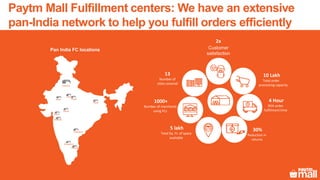
Pan India FC locations
13
Number of
cities covered
2x
Customer
satisfaction
1000+
Number of merchants
using FCs
4 Hour
95% order
fulfillment time
10 Lakh
Total order
processing capacity
30%
Reduction in
returns
5 lakh
Total Sq. Ft. of space
available
Delhi
Chennai
Bangalore
Jaipur
Mumbai
Surat
Patna
Indore
Noida
Telangana
Paytm Mall Fulfillment centers: We have an extensive
pan-India network to help you fulfill orders efficiently
Ludhiana
Scale
Skilled manpower, well-equipped
storage space to fulfill orders at
an optimized cost
Convenience Faster deliveries
You focus on selling more products
& we manage packaging, dealing
with multiple couriers, et al
Reach your consumer 2 times
faster. Achieve higher customer
satisfaction & faster payouts
Better product visibility Buy now preference
All FC products are tagged as
‘fulfilled by Paytm Mall Partner’,
inviting better customer attention
Our proprietary algorithm to choose a
seller for a product has a higher
weightage for FC products
This network gives multiple benefits to the seller in
e-commerce operations
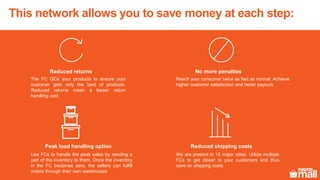
This network allows you to save money at each step:
Reduced shipping costs
We are present in 15 major cities. Utilize multiple
FCs to get closer to your customers and thus
save on shipping costs
Reduced returns
The FC QCs your products to ensure your
customer gets only the best of products.
Reduced returns mean a lesser return
handling cost
No more penalties
Reach your consumer twice as fast as normal. Achieve
higher customer satisfaction and faster payouts
Peak load handling option
Use FCs to handle the peak sales by sending a
part of the inventory to them. Once the inventory
in the FC becomes zero, the sellers can fulfill
orders through their own warehouses
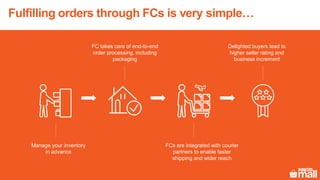
Manage your inventory
in advance
FC takes care of end-to-end
order processing, including
packaging
FCs are integrated with courier
partners to enable faster
shipping and wider reach
Delighted buyers lead to
higher seller rating and
business increment
Fulfilling orders through FCs is very simple…
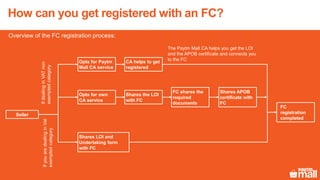
Overview of the FC registration process:
Seller
Opts for Paytm
Mall CA service
Opts for own
CA service
Shares LOI and
Undertaking form
with FC
Shares the LOI
with FC
FC shares the
required
documents
FC
registration
completed
CA helps to get
registered
Shares APOB
certificate with
FC
The Paytm Mall CA helps you get the LOI
and the APOB certificate and connects you
to the FC
IfdealinginVATnon
exemptedcategory
IfyouaredealinginVat
exemptedcategory
How can you get registered with an FC?
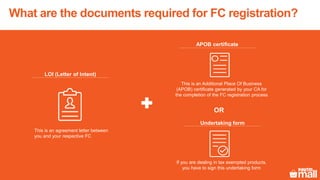
This is an agreement letter between
you and your respective FC
LOI (Letter of Intent)
This is an Additional Place Of Business
(APOB) certificate generated by your CA for
the completion of the FC registration process
APOB certificate
If you are dealing in tax exempted products,
you have to sign this undertaking form
Undertaking form
OR
What are the documents required for FC registration?
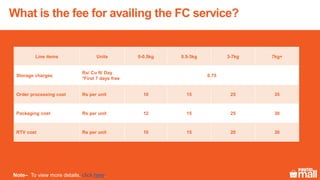
Line items Units 0-0.5kg 0.5-3kg 3-7kg 7kg+
Storage charges
Rs/ Cu ft/ Day
*First 7 days free
0.75
Order processing cost Rs per unit 10 15 25 35
Packaging cost Rs per unit 12 15 25 30
RTV cost Rs per unit 10 15 20 30
Note– To view more details, click here.
What is the fee for availing the FC service?
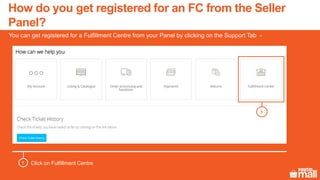
Click on Fulfillment Centre1
1
You can get registered for a Fulfillment Centre from your Panel by clicking on the Support Tab -
How do you get registered for an FC from the Seller
Panel?
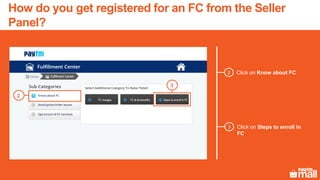
Click on Know about FC2
3
2
Click on Steps to enroll in
FC
3
How do you get registered for an FC from the Seller
Panel?
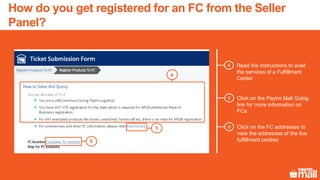
Read the instructions to avail
the services of a Fulfillment
Center
4
4
Click on the FC addresses to
view the addresses of the live
fulfillment centres
65
6
Click on the Paytm Mall Gobig
link for more information on
FCs
5
How do you get registered for an FC from the Seller
Panel?
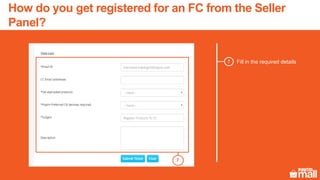
Fill in the required details7
7
How do you get registered for an FC from the Seller
Panel?
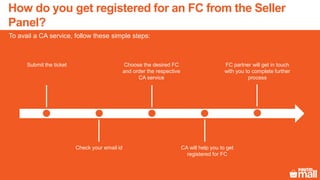
Submit the ticket
CA will help you to get
registered for FC
Choose the desired FC
and order the respective
CA service
Check your email id
FC partner will get in touch
with you to complete further
process
To avail a CA service, follow these simple steps:
How do you get registered for an FC from the Seller
Panel?
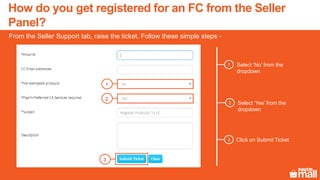
Select ‘No’ from the
dropdown
1
From the Seller Support tab, raise the ticket. Follow these simple steps -
Select ‘Yes’ from the
dropdown
2
Click on Submit Ticket3
1
2
3
How do you get registered for an FC from the Seller
Panel?
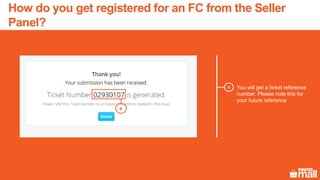
You will get a ticket reference
number. Please note this for
your future reference
4
4
How do you get registered for an FC from the Seller
Panel?
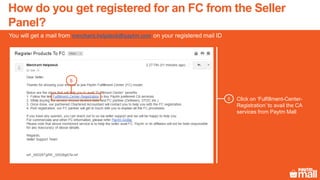
Click on ‘Fulfillment-Center-
Registration’ to avail the CA
services from Paytm Mall
5
You will get a mail from merchant.helpdesk@paytm.com on your registered mail ID
5
How do you get registered for an FC from the Seller
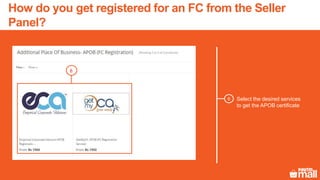
Panel?
Select the desired services
to get the APOB certificate
6
6
How do you get registered for an FC from the Seller
Panel?
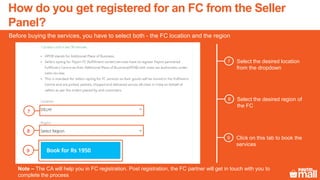
Select the desired location
from the dropdown
7
Before buying the services, you have to select both - the FC location and the region
Select the desired region of
the FC
8
Click on this tab to book the
services
9
Note – The CA will help you in FC registration. Post registration, the FC partner will get in touch with you to
complete the process
7
8
9
How do you get registered for an FC from the Seller
Panel?
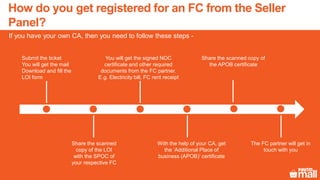
Submit the ticket
You will get the mail
Download and fill the
LOI form
With the help of your CA, get
the ‘Additional Place of
business (APOB)’ certificate
You will get the signed NOC
certificate and other required
documents from the FC partner.
E.g. Electricity bill, FC rent receipt
Share the scanned
copy of the LOI
with the SPOC of
your respective FC
Share the scanned copy of
the APOB certificate
If you have your own CA, then you need to follow these steps -
The FC partner will get in
touch with you
How do you get registered for an FC from the Seller
Panel?
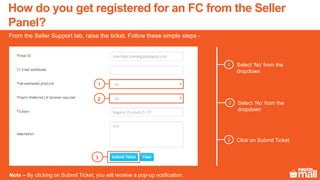
Select ‘No’ from the
dropdown
1
From the Seller Support tab, raise the ticket. Follow these simple steps -
Select ‘No’ from the
dropdown
2
Click on Submit Ticket3
1
2
3
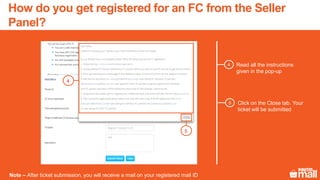
Note – By clicking on Submit Ticket, you will receive a pop-up notification.
How do you get registered for an FC from the Seller
Panel?
Read all the instructions
given in the pop-up
4
Click on the Close tab. Your
ticket will be submitted
5
4
Note – After ticket submission, you will receive a mail on your registered mail ID
5
How do you get registered for an FC from the Seller
Panel?
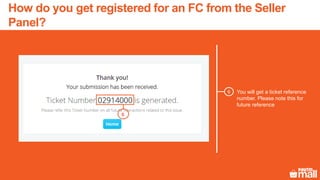
You will get a ticket reference
number. Please note this for
future reference
6
6
How do you get registered for an FC from the Seller
Panel?
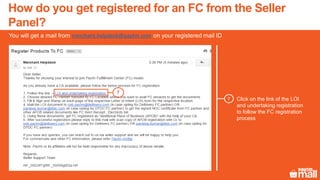
Click on the link of the LOI
and undertaking registration
to follow the FC registration
process
7
You will get a mail from merchant.helpdesk@paytm.com on your registered mail ID
7
How do you get registered for an FC from the Seller
Panel?
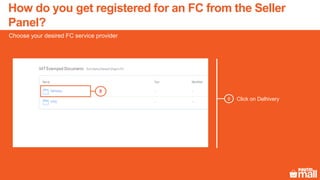
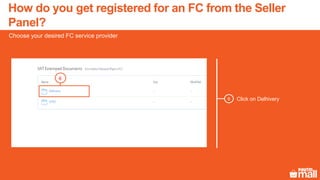
Click on Delhivery8
Choose your desired FC service provider
8
How do you get registered for an FC from the Seller
Panel?
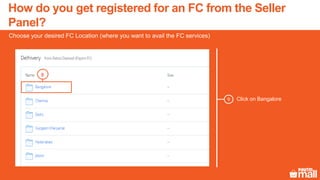
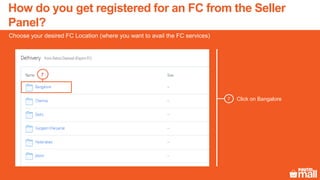
Click on Bangalore
Choose your desired FC Location (where you want to avail the FC services)
9
9
How do you get registered for an FC from the Seller
Panel?
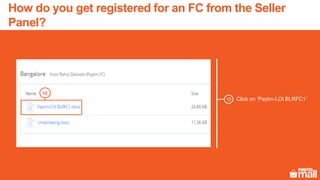
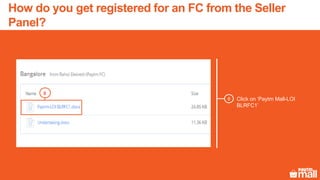
Click on ‘Paytm-LOI BLRFC1’
10
10
How do you get registered for an FC from the Seller
Panel?
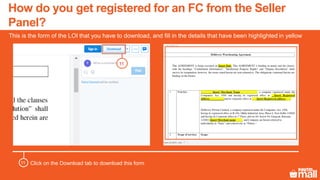
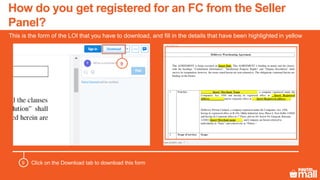
This is the form of the LOI that you have to download, and fill in the details that have been highlighted in yellow
11
Click on the Download tab to download this form11
How do you get registered for an FC from the Seller
Panel?
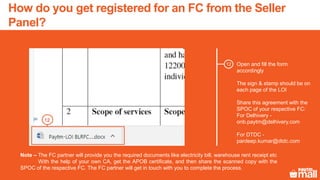
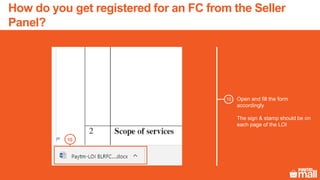
Open and fill the form
accordingly
The sign & stamp should be on
each page of the LOI
Share this agreement with the
SPOC of your respective FC:
For Delhivery -
onb.paytm@delhivery.com
For DTDC -
pardeep.kumar@dtdc.com
12
12
Note – The FC partner will provide you the required documents like electricity bill, warehouse rent receipt etc
With the help of your own CA, get the APOB certificate, and then share the scanned copy with the
SPOC of the respective FC. The FC partner will get in touch with you to complete the process.
How do you get registered for an FC from the Seller
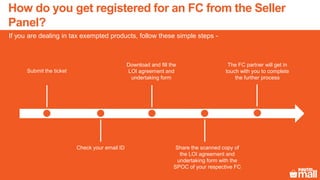
Panel?
Submit the ticket
Share the scanned copy of
the LOI agreement and
undertaking form with the
SPOC of your respective FC
Download and fill the
LOI agreement and
undertaking form
Check your email ID
The FC partner will get in
touch with you to complete
the further process
If you are dealing in tax exempted products, follow these simple steps -
How do you get registered for an FC from the Seller
Panel?
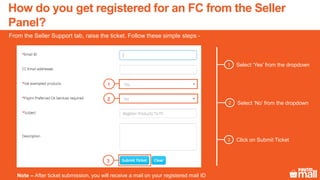
Select ‘Yes’ from the dropdown1
From the Seller Support tab, raise the ticket. Follow these simple steps -
Select ‘No’ from the dropdown2
Click on Submit Ticket3
1
2
3
Note – After ticket submission, you will receive a mail on your registered mail ID
How do you get registered for an FC from the Seller
Panel?
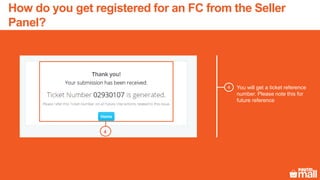
You will get a ticket reference
number. Please note this for
future reference
4
5
4
How do you get registered for an FC from the Seller
Panel?
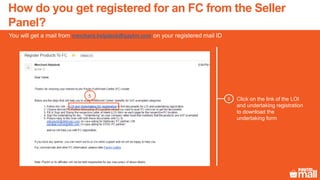
Click on the link of the LOI
and undertaking registration
to download the
undertaking form
5
You will get a mail from merchant.helpdesk@paytm.com on your registered mail ID
5
How do you get registered for an FC from the Seller
Panel?
Click on Delhivery6
Choose your desired FC service provider
6
How do you get registered for an FC from the Seller
Panel?
Click on Bangalore7
Choose your desired FC Location (where you want to avail the FC services)
7
How do you get registered for an FC from the Seller
Panel?
Click on ‘Paytm Mall-LOI
BLRFC1’
8
8
How do you get registered for an FC from the Seller
Panel?
This is the form of the LOI that you have to download, and fill in the details that have been highlighted in yellow
9
Click on the Download tab to download this form9
How do you get registered for an FC from the Seller
Panel?
Open and fill the form
accordingly
The sign & stamp should be on
each page of the LOI
10
10
How do you get registered for an FC from the Seller
Panel?
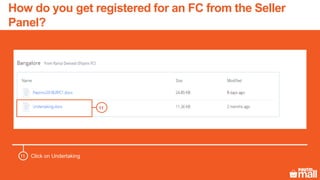
Click on Undertaking
11
11
How do you get registered for an FC from the Seller
Panel?
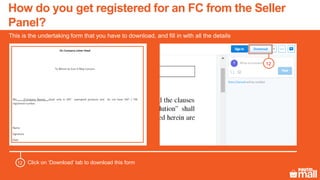
This is the undertaking form that you have to download, and fill in with all the details
12
Click on ‘Download’ tab to download this form12
How do you get registered for an FC from the Seller
Panel?
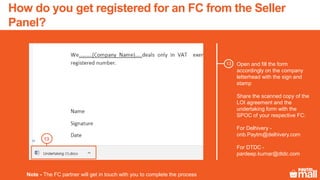
Open and fill the form
accordingly on the company
letterhead with the sign and
stamp
Share the scanned copy of the
LOI agreement and the
undertaking form with the
SPOC of your respective FC:
For Delhivery -
onb.Paytm@delhivery.com
For DTDC -
pardeep.kumar@dtdc.com
13
Note - The FC partner will get in touch with you to complete the process
13
How do you get registered for an FC from the Seller
Panel?
Thanks everyone!
For any query, please raise a ticket on Support

FC registration

  • 1.
    Fulfillment center - Registrationprocess In this module, we will discuss :- 1. What is a Fulfillment center? 2. What are the documents required for FC registration? 3. What is the fee for availing an FC service? 4. How do you get registered for an FC from the Seller Panel?
  • 2.
    Pan India FClocations 13 Number of cities covered 2x Customer satisfaction 1000+ Number of merchants using FCs 4 Hour 95% order fulfillment time 10 Lakh Total order processing capacity 30% Reduction in returns 5 lakh Total Sq. Ft. of space available Delhi Chennai Bangalore Jaipur Mumbai Surat Patna Indore Noida Telangana Paytm Mall Fulfillment centers: We have an extensive pan-India network to help you fulfill orders efficiently Ludhiana
  • 3.
    Scale Skilled manpower, well-equipped storagespace to fulfill orders at an optimized cost Convenience Faster deliveries You focus on selling more products & we manage packaging, dealing with multiple couriers, et al Reach your consumer 2 times faster. Achieve higher customer satisfaction & faster payouts Better product visibility Buy now preference All FC products are tagged as ‘fulfilled by Paytm Mall Partner’, inviting better customer attention Our proprietary algorithm to choose a seller for a product has a higher weightage for FC products This network gives multiple benefits to the seller in e-commerce operations
  • 4.
    This network allowsyou to save money at each step: Reduced shipping costs We are present in 15 major cities. Utilize multiple FCs to get closer to your customers and thus save on shipping costs Reduced returns The FC QCs your products to ensure your customer gets only the best of products. Reduced returns mean a lesser return handling cost No more penalties Reach your consumer twice as fast as normal. Achieve higher customer satisfaction and faster payouts Peak load handling option Use FCs to handle the peak sales by sending a part of the inventory to them. Once the inventory in the FC becomes zero, the sellers can fulfill orders through their own warehouses
  • 5.
    Manage your inventory inadvance FC takes care of end-to-end order processing, including packaging FCs are integrated with courier partners to enable faster shipping and wider reach Delighted buyers lead to higher seller rating and business increment Fulfilling orders through FCs is very simple…
  • 6.
    Overview of theFC registration process: Seller Opts for Paytm Mall CA service Opts for own CA service Shares LOI and Undertaking form with FC Shares the LOI with FC FC shares the required documents FC registration completed CA helps to get registered Shares APOB certificate with FC The Paytm Mall CA helps you get the LOI and the APOB certificate and connects you to the FC IfdealinginVATnon exemptedcategory IfyouaredealinginVat exemptedcategory How can you get registered with an FC?
  • 7.
    This is anagreement letter between you and your respective FC LOI (Letter of Intent) This is an Additional Place Of Business (APOB) certificate generated by your CA for the completion of the FC registration process APOB certificate If you are dealing in tax exempted products, you have to sign this undertaking form Undertaking form OR What are the documents required for FC registration?
  • 8.
    Line items Units0-0.5kg 0.5-3kg 3-7kg 7kg+ Storage charges Rs/ Cu ft/ Day *First 7 days free 0.75 Order processing cost Rs per unit 10 15 25 35 Packaging cost Rs per unit 12 15 25 30 RTV cost Rs per unit 10 15 20 30 Note– To view more details, click here. What is the fee for availing the FC service?
  • 9.
    Click on FulfillmentCentre1 1 You can get registered for a Fulfillment Centre from your Panel by clicking on the Support Tab - How do you get registered for an FC from the Seller Panel?
  • 10.
    Click on Knowabout FC2 3 2 Click on Steps to enroll in FC 3 How do you get registered for an FC from the Seller Panel?
  • 11.
    Read the instructionsto avail the services of a Fulfillment Center 4 4 Click on the FC addresses to view the addresses of the live fulfillment centres 65 6 Click on the Paytm Mall Gobig link for more information on FCs 5 How do you get registered for an FC from the Seller Panel?
  • 12.
    Fill in therequired details7 7 How do you get registered for an FC from the Seller Panel?
  • 13.
    Submit the ticket CAwill help you to get registered for FC Choose the desired FC and order the respective CA service Check your email id FC partner will get in touch with you to complete further process To avail a CA service, follow these simple steps: How do you get registered for an FC from the Seller Panel?
  • 14.
    Select ‘No’ fromthe dropdown 1 From the Seller Support tab, raise the ticket. Follow these simple steps - Select ‘Yes’ from the dropdown 2 Click on Submit Ticket3 1 2 3 How do you get registered for an FC from the Seller Panel?
  • 15.
    You will geta ticket reference number. Please note this for your future reference 4 4 How do you get registered for an FC from the Seller Panel?
  • 16.
    Click on ‘Fulfillment-Center- Registration’to avail the CA services from Paytm Mall 5 You will get a mail from merchant.helpdesk@paytm.com on your registered mail ID 5 How do you get registered for an FC from the Seller Panel?
  • 17.
    Select the desiredservices to get the APOB certificate 6 6 How do you get registered for an FC from the Seller Panel?
  • 18.
    Select the desiredlocation from the dropdown 7 Before buying the services, you have to select both - the FC location and the region Select the desired region of the FC 8 Click on this tab to book the services 9 Note – The CA will help you in FC registration. Post registration, the FC partner will get in touch with you to complete the process 7 8 9 How do you get registered for an FC from the Seller Panel?
  • 19.
    Submit the ticket Youwill get the mail Download and fill the LOI form With the help of your CA, get the ‘Additional Place of business (APOB)’ certificate You will get the signed NOC certificate and other required documents from the FC partner. E.g. Electricity bill, FC rent receipt Share the scanned copy of the LOI with the SPOC of your respective FC Share the scanned copy of the APOB certificate If you have your own CA, then you need to follow these steps - The FC partner will get in touch with you How do you get registered for an FC from the Seller Panel?
  • 20.
    Select ‘No’ fromthe dropdown 1 From the Seller Support tab, raise the ticket. Follow these simple steps - Select ‘No’ from the dropdown 2 Click on Submit Ticket3 1 2 3 Note – By clicking on Submit Ticket, you will receive a pop-up notification. How do you get registered for an FC from the Seller Panel?
  • 21.
    Read all theinstructions given in the pop-up 4 Click on the Close tab. Your ticket will be submitted 5 4 Note – After ticket submission, you will receive a mail on your registered mail ID 5 How do you get registered for an FC from the Seller Panel?
  • 22.
    You will geta ticket reference number. Please note this for future reference 6 6 How do you get registered for an FC from the Seller Panel?
  • 23.
    Click on thelink of the LOI and undertaking registration to follow the FC registration process 7 You will get a mail from merchant.helpdesk@paytm.com on your registered mail ID 7 How do you get registered for an FC from the Seller Panel?
  • 24.
    Click on Delhivery8 Chooseyour desired FC service provider 8 How do you get registered for an FC from the Seller Panel?
  • 25.
    Click on Bangalore Chooseyour desired FC Location (where you want to avail the FC services) 9 9 How do you get registered for an FC from the Seller Panel?
  • 26.
    Click on ‘Paytm-LOIBLRFC1’ 10 10 How do you get registered for an FC from the Seller Panel?
  • 27.
    This is theform of the LOI that you have to download, and fill in the details that have been highlighted in yellow 11 Click on the Download tab to download this form11 How do you get registered for an FC from the Seller Panel?
  • 28.
    Open and fillthe form accordingly The sign & stamp should be on each page of the LOI Share this agreement with the SPOC of your respective FC: For Delhivery - onb.paytm@delhivery.com For DTDC - pardeep.kumar@dtdc.com 12 12 Note – The FC partner will provide you the required documents like electricity bill, warehouse rent receipt etc With the help of your own CA, get the APOB certificate, and then share the scanned copy with the SPOC of the respective FC. The FC partner will get in touch with you to complete the process. How do you get registered for an FC from the Seller Panel?
  • 29.
    Submit the ticket Sharethe scanned copy of the LOI agreement and undertaking form with the SPOC of your respective FC Download and fill the LOI agreement and undertaking form Check your email ID The FC partner will get in touch with you to complete the further process If you are dealing in tax exempted products, follow these simple steps - How do you get registered for an FC from the Seller Panel?
  • 30.
    Select ‘Yes’ fromthe dropdown1 From the Seller Support tab, raise the ticket. Follow these simple steps - Select ‘No’ from the dropdown2 Click on Submit Ticket3 1 2 3 Note – After ticket submission, you will receive a mail on your registered mail ID How do you get registered for an FC from the Seller Panel?
  • 31.
    You will geta ticket reference number. Please note this for future reference 4 5 4 How do you get registered for an FC from the Seller Panel?
  • 32.
    Click on thelink of the LOI and undertaking registration to download the undertaking form 5 You will get a mail from merchant.helpdesk@paytm.com on your registered mail ID 5 How do you get registered for an FC from the Seller Panel?
  • 33.
    Click on Delhivery6 Chooseyour desired FC service provider 6 How do you get registered for an FC from the Seller Panel?
  • 34.
    Click on Bangalore7 Chooseyour desired FC Location (where you want to avail the FC services) 7 How do you get registered for an FC from the Seller Panel?
  • 35.
    Click on ‘PaytmMall-LOI BLRFC1’ 8 8 How do you get registered for an FC from the Seller Panel?
  • 36.
    This is theform of the LOI that you have to download, and fill in the details that have been highlighted in yellow 9 Click on the Download tab to download this form9 How do you get registered for an FC from the Seller Panel?
  • 37.
    Open and fillthe form accordingly The sign & stamp should be on each page of the LOI 10 10 How do you get registered for an FC from the Seller Panel?
  • 38.
    Click on Undertaking 11 11 Howdo you get registered for an FC from the Seller Panel?
  • 39.
    This is theundertaking form that you have to download, and fill in with all the details 12 Click on ‘Download’ tab to download this form12 How do you get registered for an FC from the Seller Panel?
  • 40.
    Open and fillthe form accordingly on the company letterhead with the sign and stamp Share the scanned copy of the LOI agreement and the undertaking form with the SPOC of your respective FC: For Delhivery - onb.Paytm@delhivery.com For DTDC - pardeep.kumar@dtdc.com 13 Note - The FC partner will get in touch with you to complete the process 13 How do you get registered for an FC from the Seller Panel?
  • 41.
    Thanks everyone! For anyquery, please raise a ticket on Support