Contents
1. Identify the Automation Boundaries
2. Review Manual Tasks
3. Complete the Process Model
4. Bring the Process Model to an Adequate
Granularity Level
5. Specify Execution Properties
6. The Last Mile
7. Recap
Chapter 10: Process Implementation with
Executable Models
Process
discovery
Process
identification
Process
analysis
Process
implementation
Process
monitoring
Process
redesign
Process architecture
As-is process
model
Insights on
weaknesses and
their impact
To-be process
model
Executable
process
model
Conformance and
performance
insights
Process Implementation in the BPM Lifecycle
Define Vision Develop Strategy Implement
Strategy
Manage Personnel Manage Assets
Management Processes
Core Processes
Support Processes
Manage Risk
Manage
Information
Procure
Materials
Procure
Products
Market
Products
Deliver
Products
Manage
Customer
Service
les for BPM lifecycle and process mining
C
1.5h
B
15h
D
E
2h
C D
A B E
A
3m
35h 30h
15m
10m
10min
5m
5m 10m
30m
 This chapter deals with turning conceptual models into executable models
 Executable models can be used by a process-aware information system to coordinate a
business process
 We propose a systematic method for carrying out this transformation, which consists of
five steps:
1. Identify the automation boundaries,
2. Review manual tasks,
3. Complete the process model,
4. Bring the process model to an adequate level of granularity, and
5. Specify execution properties.
 By following this method a conceptual model incrementally becomes less abstract and
more IT-oriented
 As part of this method, two standards complementary to BPMN are used:
 the Case Management Model and Notation (CMMN), and
 the Decision Model and Notation (DMN)
Chapter Overview
Contents
1. Identify the Automation Boundaries
2. Review Manual Tasks
3. Complete the Process Model
4. Bring the Process Model to an Adequate
Granularity Level
5. Specify Execution Properties
6. The Last Mile
7. Recap
Chapter 10: Process Implementation with
Executable Models
Setting the boundaries
 Guiding principle: not all processes can be automated.
 Based on this principle, establish which parts of a process can be coordinated by
the BPMS and which parts cannot
 Input: the conceptual model of the business process
 Three types of tasks are to be distinguished:
1. Automated: are performed by the BPMS itself or by an external service,
2. Manual: are performed by process participants without the aid of any software,
3. User: are performed by a participant with the assistance of the worklist handler of the
BPMS or an external task list manager
Notation
 The distinction between automated, manual, and user tasks is captured in BPMN
via specific markers on the top-left corner of the task box
 Manual tasks are marked with a hand,
 User tasks are marked with a user icon.
 Automated tasks are further classified into the following subtypes in BPMN:
 Script (script marker), if the task executes some code (the script) internally to the
BPMS
 Service (gears marker), if the task is executed by an external application, which
exposes its functionality via a service interface
 Business rule (table marker), if the task triggers a business rule to be executed by a
rules engine external to the BPMS
 Send (filled envelope marker), if the task sends a message to an external service,
 Receive (empty envelope marker), if the task waits for a message from an external
service
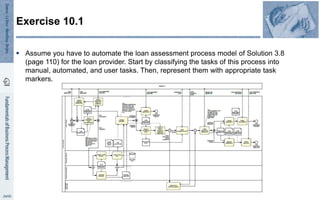
Exercise 10.1
 Assume you have to automate the loan assessment process model of Solution 3.8
(page 110) for the loan provider. Start by classifying the tasks of this process into
manual, automated, and user tasks. Then, represent them with appropriate task
markers.
Contents
1. Identify the Automation Boundaries
2. Review Manual Tasks
3. Complete the Process Model
4. Bring the Process Model to an Adequate
Granularity Level
5. Specify Execution Properties
6. The Last Mile
7. Recap
Chapter 10: Process Implementation with
Executable Models
 Goal: check whether the manual tasks can be linked with the BPMS
 Guiding principle: if the task cannot be seen by the BPMS, it does not exist
 Two ways of linking a manual task to a BPMS:
1. Implement as User Task
2. Implement as Automated Task
 Note: There are cases in which it is not convenient to link manual tasks to a
BPMS.
Review manual tasks
Contents
1. Identify the Automation Boundaries
2. Review Manual Tasks
3. Complete the Process Model
4. Bring the Process Model to an Adequate
Granularity Level
5. Specify Execution Properties
6. The Last Mile
7. Recap
Chapter 10: Process Implementation with
Executable Models
Complete the Process Model
 Main goal: Establish that the the process model is complete
 Two principles underlie this step:
 i) exceptions are the rule, and
 ii) no data implies no decisions and no task handoff
(so, better include how data is used and produced)
Exceptions
 Often, conceptual process models neglect certain information because modelers
deem it as irrelevant for the specific modeling purpose, they assume it is common
knowledge, or they are simply not aware of it.
 Depending on the application scenario, it may be fine to neglect this information in
a conceptual model; however, information that is not relevant in a conceptual
model may be highly relevant for a process model to be executed
In the majority of cases, a model must completed with the aspects concerning
exceptions to make it executable
Data objects
 Purpose: All electronic data objects that are required as input and output by the
tasks of our process need to be specified
Rationale:
 Data objects are often assumed to exist in a conceptual model.
 In an executable model, where a software engine has to run the model, they need
to made explicit.
Each data object needed by the BPMS engine to pass control between tasks and to
take decisions must be modeled.
Contents
1. Identify the Automation Boundaries
2. Review Manual Tasks
3. Complete the Process Model
4. Bring the Process Model to an Adequate
Granularity Level
5. Specify Execution Properties
6. The Last Mile
7. Recap
Chapter 10: Process Implementation with
Executable Models
 Tasks in a conceptual model may not be
at the right level of granularity for
implementation
 They may be either:
 too abstract, in which case we need to
decompose them, or
 too detailed, in which case they should
be aggregated
 Guiding principle: A BPMS adds value if
it coordinates handoffs of work between
resources
Granularity
Unordered tasks
 As a rule of thumb, a (sub-)process whose tasks are performed in an ad hoc
manner, without any predictable order, is not suitable for automation via a BPMN-
based BPMS. In this case, a case management system or an ad hoc workflow
system is more appropriate.
 If the BPMS supports the Case Management Model and Notation (CMMN)
language, this is not an issue
 Defines which tasks have to be
executed, although potentially restricted
by certain conditions
 Describes what has to be achieved in a
process instead of how to achieve it
 Can be used as a type of sub-process in
a BPMN model, but also vice versa:
tasks in a CMMN model can have BPMN
sub-processes.
CMMN
Contents
1. Identify the Automation Boundaries
2. Review Manual Tasks
3. Complete the Process Model
4. Bring the Process Model to an Adequate
Granularity Level
5. Specify Execution Properties
6. The Last Mile
7. Recap
Chapter 10: Process Implementation with
Executable Models
 To make the model fully executable, we need to specify in the last step how each
model element is effectively implemented by the BPMS of choice
 The relevant Execution Properties are:
 Variables, messages, signals, errors, and their data types,
 Data mappings,
 Service details for service, send and receive tasks, and for message and signal
events,
 Code snippets for script tasks,
 Participant assignment rules and user interface structure for user tasks,
 Task, event, and sequence flow expressions, and
 Other BPMS-specific properties.
Execution Properties
DMN
 Sometimes, the conditions that allow a process instance to be routed towards one
or another path in the model can be quite complex.
 OMG has developed the Decision Model and Notation (DMN) standard, which can
be used for specifying business rules
DMN provides three parts for the specification of business rules:
1. the Decision Requirements Graph (DRG), which describes how data is
propagated between different decisions,
2. the Simple Expression Language (S-FEEL) to define how values are extracted
from variables, and
3. Decision Tables (DMN tables)
DMN Tables
Contents
1. Identify the Automation Boundaries
2. Review Manual Tasks
3. Complete the Process Model
4. Bring the Process Model to an Adequate
Granularity Level
5. Specify Execution Properties
6. The Last Mile
7. Recap
Chapter 10: Process Implementation with
Executable Models
BPMSs and BPMN
Three categories of BPMSs with respect to their support for BPMN:
1. Pure BPMN: These systems have been designed from the ground up to support
BPMN natively. Examples are Activiti and Camunda.
2. Adapted BPMN: These tools use a BPMN skin but rely on an internal
representation to execute the process model. Examples are Bizagi and Bonita.
3. Non BPMN: There is, lastly, a general category of BPMSs that use their own
proprietary language and semantics. These systems do not support BPMN. An
example of such a system is YAWL.
 The book’s website provides tutorial notes showing how to perform the last step of
our method (the specification of execution properties) for various concrete BPMSs:
http://fundamentals-of-bpm.org
Contents
1. Identify the Automation Boundaries
2. Review Manual Tasks
3. Complete the Process Model
4. Bring the Process Model to an Adequate
Granularity Level
5. Specify Execution Properties
6. The Last Mile
7. Recap
Chapter 10: Process Implementation with
Executable Models
Recap
 A five-step method was presented for transforming conceptual process models into
executable ones:
1. Identify the automation boundaries,
2. Review manual tasks,
3. Complete the process model,
4. Bring the process model to an adequate level of granularity, and
5. Specify execution properties
 CMMN was discussed as a technique to deal with unordered tasks
 DMN was presented as a technique to specify business rules

FBPM2-Chapter10-ProcessImplementationExecutableModels.pptx

  • 1.
    Contents 1. Identify theAutomation Boundaries 2. Review Manual Tasks 3. Complete the Process Model 4. Bring the Process Model to an Adequate Granularity Level 5. Specify Execution Properties 6. The Last Mile 7. Recap Chapter 10: Process Implementation with Executable Models
  • 2.
    Process discovery Process identification Process analysis Process implementation Process monitoring Process redesign Process architecture As-is process model Insightson weaknesses and their impact To-be process model Executable process model Conformance and performance insights Process Implementation in the BPM Lifecycle Define Vision Develop Strategy Implement Strategy Manage Personnel Manage Assets Management Processes Core Processes Support Processes Manage Risk Manage Information Procure Materials Procure Products Market Products Deliver Products Manage Customer Service les for BPM lifecycle and process mining C 1.5h B 15h D E 2h C D A B E A 3m 35h 30h 15m 10m 10min 5m 5m 10m 30m
  • 3.
     This chapterdeals with turning conceptual models into executable models  Executable models can be used by a process-aware information system to coordinate a business process  We propose a systematic method for carrying out this transformation, which consists of five steps: 1. Identify the automation boundaries, 2. Review manual tasks, 3. Complete the process model, 4. Bring the process model to an adequate level of granularity, and 5. Specify execution properties.  By following this method a conceptual model incrementally becomes less abstract and more IT-oriented  As part of this method, two standards complementary to BPMN are used:  the Case Management Model and Notation (CMMN), and  the Decision Model and Notation (DMN) Chapter Overview
  • 4.
    Contents 1. Identify theAutomation Boundaries 2. Review Manual Tasks 3. Complete the Process Model 4. Bring the Process Model to an Adequate Granularity Level 5. Specify Execution Properties 6. The Last Mile 7. Recap Chapter 10: Process Implementation with Executable Models
  • 5.
    Setting the boundaries Guiding principle: not all processes can be automated.  Based on this principle, establish which parts of a process can be coordinated by the BPMS and which parts cannot  Input: the conceptual model of the business process  Three types of tasks are to be distinguished: 1. Automated: are performed by the BPMS itself or by an external service, 2. Manual: are performed by process participants without the aid of any software, 3. User: are performed by a participant with the assistance of the worklist handler of the BPMS or an external task list manager
  • 6.
    Notation  The distinctionbetween automated, manual, and user tasks is captured in BPMN via specific markers on the top-left corner of the task box  Manual tasks are marked with a hand,  User tasks are marked with a user icon.  Automated tasks are further classified into the following subtypes in BPMN:  Script (script marker), if the task executes some code (the script) internally to the BPMS  Service (gears marker), if the task is executed by an external application, which exposes its functionality via a service interface  Business rule (table marker), if the task triggers a business rule to be executed by a rules engine external to the BPMS  Send (filled envelope marker), if the task sends a message to an external service,  Receive (empty envelope marker), if the task waits for a message from an external service
  • 7.
    Exercise 10.1  Assumeyou have to automate the loan assessment process model of Solution 3.8 (page 110) for the loan provider. Start by classifying the tasks of this process into manual, automated, and user tasks. Then, represent them with appropriate task markers.
  • 8.
    Contents 1. Identify theAutomation Boundaries 2. Review Manual Tasks 3. Complete the Process Model 4. Bring the Process Model to an Adequate Granularity Level 5. Specify Execution Properties 6. The Last Mile 7. Recap Chapter 10: Process Implementation with Executable Models
  • 9.
     Goal: checkwhether the manual tasks can be linked with the BPMS  Guiding principle: if the task cannot be seen by the BPMS, it does not exist  Two ways of linking a manual task to a BPMS: 1. Implement as User Task 2. Implement as Automated Task  Note: There are cases in which it is not convenient to link manual tasks to a BPMS. Review manual tasks
  • 10.
    Contents 1. Identify theAutomation Boundaries 2. Review Manual Tasks 3. Complete the Process Model 4. Bring the Process Model to an Adequate Granularity Level 5. Specify Execution Properties 6. The Last Mile 7. Recap Chapter 10: Process Implementation with Executable Models
  • 11.
    Complete the ProcessModel  Main goal: Establish that the the process model is complete  Two principles underlie this step:  i) exceptions are the rule, and  ii) no data implies no decisions and no task handoff (so, better include how data is used and produced)
  • 12.
    Exceptions  Often, conceptualprocess models neglect certain information because modelers deem it as irrelevant for the specific modeling purpose, they assume it is common knowledge, or they are simply not aware of it.  Depending on the application scenario, it may be fine to neglect this information in a conceptual model; however, information that is not relevant in a conceptual model may be highly relevant for a process model to be executed In the majority of cases, a model must completed with the aspects concerning exceptions to make it executable
  • 13.
    Data objects  Purpose:All electronic data objects that are required as input and output by the tasks of our process need to be specified Rationale:  Data objects are often assumed to exist in a conceptual model.  In an executable model, where a software engine has to run the model, they need to made explicit. Each data object needed by the BPMS engine to pass control between tasks and to take decisions must be modeled.
  • 14.
    Contents 1. Identify theAutomation Boundaries 2. Review Manual Tasks 3. Complete the Process Model 4. Bring the Process Model to an Adequate Granularity Level 5. Specify Execution Properties 6. The Last Mile 7. Recap Chapter 10: Process Implementation with Executable Models
  • 15.
     Tasks ina conceptual model may not be at the right level of granularity for implementation  They may be either:  too abstract, in which case we need to decompose them, or  too detailed, in which case they should be aggregated  Guiding principle: A BPMS adds value if it coordinates handoffs of work between resources Granularity
  • 16.
    Unordered tasks  Asa rule of thumb, a (sub-)process whose tasks are performed in an ad hoc manner, without any predictable order, is not suitable for automation via a BPMN- based BPMS. In this case, a case management system or an ad hoc workflow system is more appropriate.  If the BPMS supports the Case Management Model and Notation (CMMN) language, this is not an issue
  • 17.
     Defines whichtasks have to be executed, although potentially restricted by certain conditions  Describes what has to be achieved in a process instead of how to achieve it  Can be used as a type of sub-process in a BPMN model, but also vice versa: tasks in a CMMN model can have BPMN sub-processes. CMMN
  • 18.
    Contents 1. Identify theAutomation Boundaries 2. Review Manual Tasks 3. Complete the Process Model 4. Bring the Process Model to an Adequate Granularity Level 5. Specify Execution Properties 6. The Last Mile 7. Recap Chapter 10: Process Implementation with Executable Models
  • 19.
     To makethe model fully executable, we need to specify in the last step how each model element is effectively implemented by the BPMS of choice  The relevant Execution Properties are:  Variables, messages, signals, errors, and their data types,  Data mappings,  Service details for service, send and receive tasks, and for message and signal events,  Code snippets for script tasks,  Participant assignment rules and user interface structure for user tasks,  Task, event, and sequence flow expressions, and  Other BPMS-specific properties. Execution Properties
  • 20.
    DMN  Sometimes, theconditions that allow a process instance to be routed towards one or another path in the model can be quite complex.  OMG has developed the Decision Model and Notation (DMN) standard, which can be used for specifying business rules DMN provides three parts for the specification of business rules: 1. the Decision Requirements Graph (DRG), which describes how data is propagated between different decisions, 2. the Simple Expression Language (S-FEEL) to define how values are extracted from variables, and 3. Decision Tables (DMN tables)
  • 21.
  • 22.
    Contents 1. Identify theAutomation Boundaries 2. Review Manual Tasks 3. Complete the Process Model 4. Bring the Process Model to an Adequate Granularity Level 5. Specify Execution Properties 6. The Last Mile 7. Recap Chapter 10: Process Implementation with Executable Models
  • 23.
    BPMSs and BPMN Threecategories of BPMSs with respect to their support for BPMN: 1. Pure BPMN: These systems have been designed from the ground up to support BPMN natively. Examples are Activiti and Camunda. 2. Adapted BPMN: These tools use a BPMN skin but rely on an internal representation to execute the process model. Examples are Bizagi and Bonita. 3. Non BPMN: There is, lastly, a general category of BPMSs that use their own proprietary language and semantics. These systems do not support BPMN. An example of such a system is YAWL.  The book’s website provides tutorial notes showing how to perform the last step of our method (the specification of execution properties) for various concrete BPMSs: http://fundamentals-of-bpm.org
  • 24.
    Contents 1. Identify theAutomation Boundaries 2. Review Manual Tasks 3. Complete the Process Model 4. Bring the Process Model to an Adequate Granularity Level 5. Specify Execution Properties 6. The Last Mile 7. Recap Chapter 10: Process Implementation with Executable Models
  • 25.
    Recap  A five-stepmethod was presented for transforming conceptual process models into executable ones: 1. Identify the automation boundaries, 2. Review manual tasks, 3. Complete the process model, 4. Bring the process model to an adequate level of granularity, and 5. Specify execution properties  CMMN was discussed as a technique to deal with unordered tasks  DMN was presented as a technique to specify business rules