}   Fake malware and virus scanners

}   What are their goals?

}   Malware statistics

}   How they look like?

}   Tricks by scammers to spread rogue malware

}   A case study

}   How to prevent them?


.
}   A fake anti-antivirus or anti-malware scanner will mislead web visitors on fake scan
    results

}   They will scare computer users by displaying files infection alerts

}   It does not offer any protection to computer

}   It uses false positives and fake alerts in order to trick user into obtaining a program

}   The problem is widespread
}   Abuse the name of genuine malware scanner programs

}   Force the user into buying for a fake anti-malware program


}   Steal financial and personal information

}   Compromise the target computer

}   Stay resident
}   The following statistics were compiled this year using data from computers running
    Kaspersky Lab products:
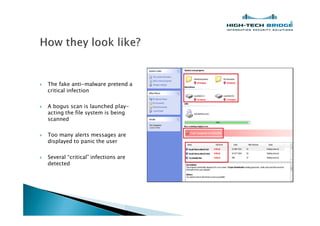
}   The fake anti-malware pretend a
    critical infection

}   A bogus scan is launched play-
    acting the file system is being
    scanned

}   Too many alerts messages are
    displayed to panic the user

}   Several critical infections are
    detected
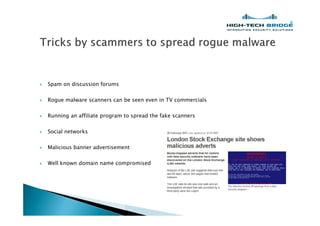
}   Spam on discussion forums

}   Rogue malware scanners can be seen even in TV commercials

}   Running an affiliate program to spread the fake scanners

}   Social networks

}   Malicious banner advertisement

}   Well known domain name compromised
}   Let s study how a common fake malware scanner works

}   We will study the one behind this URL:

    somrtype.com/scn/f7068a638392089bf9c6462f3c816e37/0540f0d2bb566d0ed0d80150e2b728ef/3656b9eddb95
    cfb9d7f013ed46b015a2
}   After pasting the URL into a web
    browser a fake message says the
    computer is under risk of
    malware and virus attacks.

}   A system requires an fast check

}   The System Security fake malware
    will perform a bogus scan
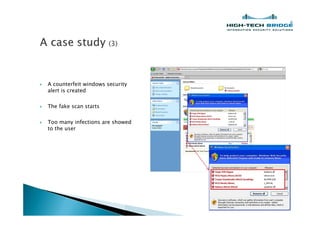
}   A counterfeit windows security
    alert is created

}   The fake scan starts

}   Too many infections are showed
    to the user
}   Let s see how this fake anti-
    malware operates

}   We get the web page using CLI
    commands.
}   The file is a kind of hash

}   It contains an encrypted webpage
}   Let s open it using more user-
    friendly software

}   We can understand more clearly
    what is happening in here

}   Some javaScript code waiting to
    be executed in x_xtea.js and
    base64.js files

}   The long variable is being
    decoded using simply base64
    algorithm. Then the result was
    passed to TEA algorithm using
    the password "test
}   When we change the
    document.write function by an
    alert one we get a screenshot of
    the deobfuscated code
}   Playing a while with the path
    /new_engine/landings/04/ let us
    know another interesting
    javaScript page scn3.js
}   After viewing the file
    contents I get another
    encoded webpage

}   This time I used
    Malzilla. This good
    piece of code is very
    useful to be used in
    exploring malicious
    webpages
}   Copying the code into the
    decoder option got me in
    seconds the deobfuscated
    webpage contents

}   We can clearly see the list of files
    being used for the fake antivirus,
    trying to convince the victim that
    the box is being scan to search
     malicious programs
}   Users should pause before clicking on a window or strange pop-ups

}   Users should make sure that they run up-to-date legitimate antimalware software

}   Updated Web browser with antiphishing features

}   Patched applications and Operating system

}   Auto-update features should be enabled
}   SecureList - http://www.securelist.com/en/analysis/204792170/Monthly_Malware_Statistics_March_2011

}   MalwareDomainList -         http://www.malwaredomainlist.com


}   Malzilla -   http://malzilla.sourceforge.net


}   The Inquirer -  http://www.theinquirer.net/inquirer/news/2029425/london-stock-exchange-website-
    hacked-malware-ads
Questions?


brian.mariani@htbridge.ch

Fake malware and virus scanners

  • 2.
    } Fake malware and virus scanners } What are their goals? } Malware statistics } How they look like? } Tricks by scammers to spread rogue malware } A case study } How to prevent them? .
  • 3.
    } A fake anti-antivirus or anti-malware scanner will mislead web visitors on fake scan results } They will scare computer users by displaying files infection alerts } It does not offer any protection to computer } It uses false positives and fake alerts in order to trick user into obtaining a program } The problem is widespread
  • 4.
    } Abuse the name of genuine malware scanner programs } Force the user into buying for a fake anti-malware program } Steal financial and personal information } Compromise the target computer } Stay resident
  • 5.
    } The following statistics were compiled this year using data from computers running Kaspersky Lab products:
  • 6.
    } The fake anti-malware pretend a critical infection } A bogus scan is launched play- acting the file system is being scanned } Too many alerts messages are displayed to panic the user } Several critical infections are detected
  • 7.
    } Spam on discussion forums } Rogue malware scanners can be seen even in TV commercials } Running an affiliate program to spread the fake scanners } Social networks } Malicious banner advertisement } Well known domain name compromised
  • 8.
    } Let s study how a common fake malware scanner works } We will study the one behind this URL: somrtype.com/scn/f7068a638392089bf9c6462f3c816e37/0540f0d2bb566d0ed0d80150e2b728ef/3656b9eddb95 cfb9d7f013ed46b015a2
  • 9.
    } After pasting the URL into a web browser a fake message says the computer is under risk of malware and virus attacks. } A system requires an fast check } The System Security fake malware will perform a bogus scan
  • 10.
    } A counterfeit windows security alert is created } The fake scan starts } Too many infections are showed to the user
  • 11.
    } Let s see how this fake anti- malware operates } We get the web page using CLI commands.
  • 12.
    } The file is a kind of hash } It contains an encrypted webpage
  • 13.
    } Let s open it using more user- friendly software } We can understand more clearly what is happening in here } Some javaScript code waiting to be executed in x_xtea.js and base64.js files } The long variable is being decoded using simply base64 algorithm. Then the result was passed to TEA algorithm using the password "test
  • 14.
    } When we change the document.write function by an alert one we get a screenshot of the deobfuscated code
  • 15.
    } Playing a while with the path /new_engine/landings/04/ let us know another interesting javaScript page scn3.js
  • 16.
    } After viewing the file contents I get another encoded webpage } This time I used Malzilla. This good piece of code is very useful to be used in exploring malicious webpages
  • 17.
    } Copying the code into the decoder option got me in seconds the deobfuscated webpage contents } We can clearly see the list of files being used for the fake antivirus, trying to convince the victim that the box is being scan to search malicious programs
  • 18.
    } Users should pause before clicking on a window or strange pop-ups } Users should make sure that they run up-to-date legitimate antimalware software } Updated Web browser with antiphishing features } Patched applications and Operating system } Auto-update features should be enabled
  • 19.
    } SecureList - http://www.securelist.com/en/analysis/204792170/Monthly_Malware_Statistics_March_2011 } MalwareDomainList - http://www.malwaredomainlist.com } Malzilla - http://malzilla.sourceforge.net } The Inquirer - http://www.theinquirer.net/inquirer/news/2029425/london-stock-exchange-website- hacked-malware-ads
  • 20.