Extracting Data from GE
Smallworld into Common
Information Model (CIM XML)
Based on a true story…
Digital Energy's 2014 Americas Software Summit
Feb 2014
 ,  
Mark Stoakes, Safe Software Inc.
Agenda
Introduction
Populating a DMS via FME & CIM XML
Q&A
What we do.
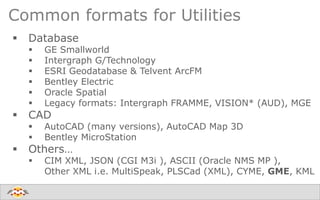
Common formats for Utilities
 Database
 GE Smallworld
 Intergraph G/Technology
 ESRI Geodatabase & Telvent ArcFM
 Bentley Electric
 Oracle Spatial
 Legacy formats: Intergraph FRAMME, VISION* (AUD), MGE
 CAD
 AutoCAD (many versions), AutoCAD Map 3D
 Bentley MicroStation
 Others…
 CIM XML, JSON (CGI M3i ), ASCII (Oracle NMS MP ),
Other XML i.e. MultiSpeak, PLSCad (XML), CYME, GME, KML
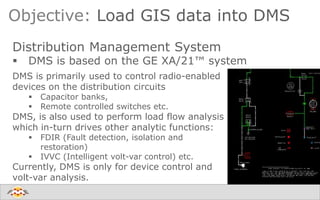
Objective: Load GIS data into DMS
Distribution Management System
 DMS is based on the GE XA/21™ system
DMS is primarily used to control radio-enabled
devices on the distribution circuits
 Capacitor banks,
 Remote controlled switches etc.
DMS, is also used to perform load flow analysis
which in-turn drives other analytic functions:
 FDIR (Fault detection, isolation and
restoration)
 IVVC (Intelligent volt-var control) etc.
Currently, DMS is only for device control and
volt-var analysis.
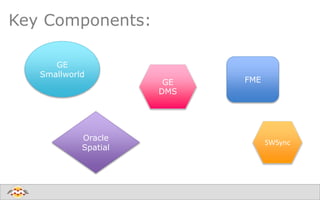
Key Components:
GE
Smallworld
FME
Oracle
Spatial
SWSync
GE
DMS
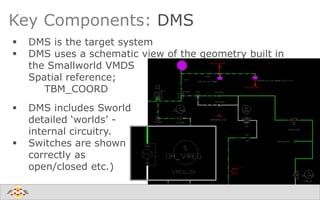
Key Components: DMS
 DMS is the target system
 DMS uses a schematic view of the geometry built in
the Smallworld VMDS
Spatial reference;
TBM_COORD
 DMS includes Sworld
detailed ‘worlds’ -
internal circuitry.
 Switches are shown
correctly as
open/closed etc.)
Key Components: Smallworld 4.2
Smallworld 4.2 VMDS
 Smallworld is the source system
 Physical Network
 Geometry:
 physical geometry (UTM83-11F)
 schematic geometry
 Source dataset for:
 Oracle 11g
 CGI M3i OMS
Key Components: Oracle 11g
Oracle 11g
 Mirror of Smallworld VMDS (UTM83-11F)
 DMS_TRACING table populated by a set of stored
procedures
 traces the network connectivity of each circuit.
 Multiple Spatial columns for physical and schematic
geometry, annotation location, etc.
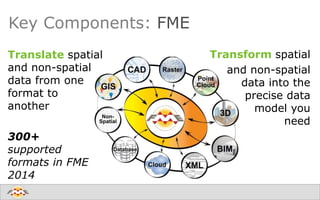
Key Components: FME
Translate spatial
and non-spatial
data from one
format to
another
300+
supported
formats in FME
2014
Transform spatial
and non-spatial
data into the
precise data
model you
need
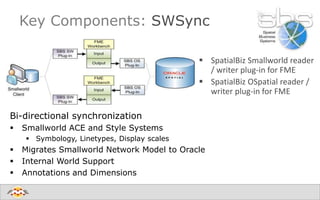
 SpatialBiz Smallworld reader
/ writer plug-in for FME
 SpatialBiz OSpatial reader /
writer plug-in for FME
Key Components: SWSync
Bi-directional synchronization
 Smallworld ACE and Style Systems
 Symbology, Linetypes, Display scales
 Migrates Smallworld Network Model to Oracle
 Internal World Support
 Annotations and Dimensions
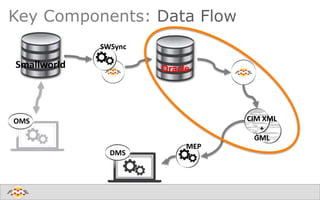
Key Components: Data Flow
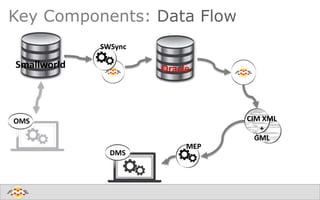
OMS
DMS
Smallworld Oracle
CIM XML
+
GML
SWSync
MEP
What is CIM?
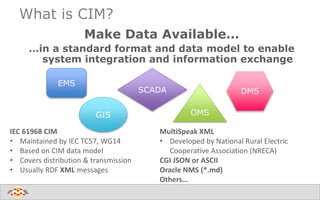
Make Data Available…
…in a standard format and data model to enable
system integration and information exchange
MultiSpeak XML
• Developed by National Rural Electric
Cooperative Association (NRECA)
CGI JSON or ASCII
Oracle NMS (*.md)
Others…
IEC 61968 CIM
• Maintained by IEC TC57, WG14
• Based on CIM data model
• Covers distribution & transmission
• Usually RDF XML messages
GIS
EMS
OMS
SCADA DMS
Data Conversion: Smallworld Oracle
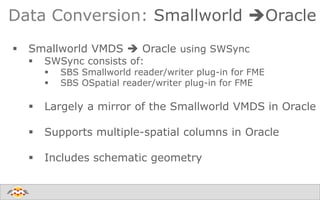
 Smallworld VMDS  Oracle using SWSync
 SWSync consists of:
 SBS Smallworld reader/writer plug-in for FME
 SBS OSpatial reader/writer plug-in for FME
 Largely a mirror of the Smallworld VMDS in Oracle
 Supports multiple-spatial columns in Oracle
 Includes schematic geometry
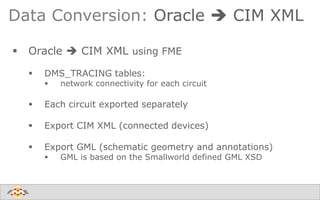
Data Conversion: Oracle  CIM XML
 Oracle  CIM XML using FME
 DMS_TRACING tables:
 network connectivity for each circuit
 Each circuit exported separately
 Export CIM XML (connected devices)
 Export GML (schematic geometry and annotations)
 GML is based on the Smallworld defined GML XSD
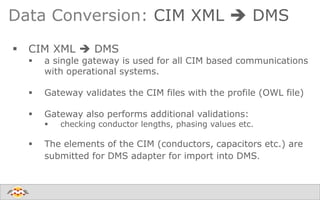
Data Conversion: CIM XML  DMS
 CIM XML  DMS
 a single gateway is used for all CIM based communications
with operational systems.
 Gateway validates the CIM files with the profile (OWL file)
 Gateway also performs additional validations:
 checking conductor lengths, phasing values etc.
 The elements of the CIM (conductors, capacitors etc.) are
submitted for DMS adapter for import into DMS.
Key Components: Data Flow
OMS
DMS
Smallworld Oracle
CIM XML
+
GML
SWSync
MEP
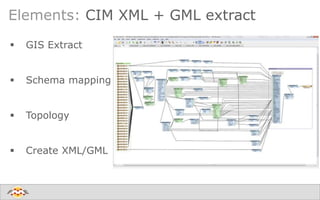
Elements: CIM XML + GML extract
 GIS Extract
 Schema mapping
 Topology
 Create XML/GML
Elements: CIM XML + GML extract
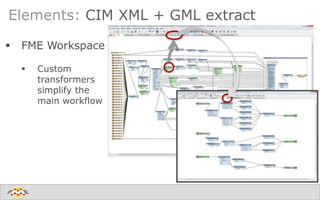
 FME Workspace
 Custom
transformers
simplify the
main workflow
Extract Elements: GIS extract
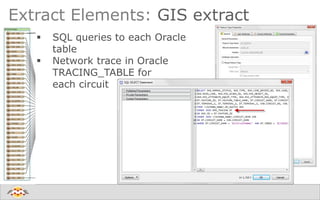
 SQL queries to each Oracle
table
 Network trace in Oracle
TRACING_TABLE for
each circuit
Extract Elements: Schema Mapping
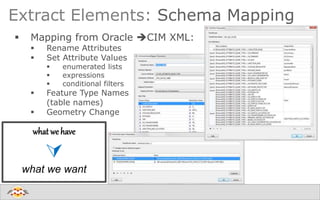
 Mapping from Oracle CIM XML:
 Rename Attributes
 Set Attribute Values
 enumerated lists
 expressions
 conditional filters
 Feature Type Names
(table names)
 Geometry Change
what we have

what we want
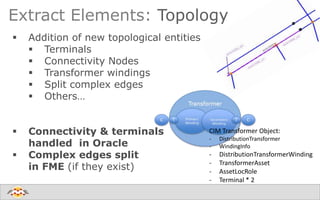
 Addition of new topological entities
 Terminals
 Connectivity Nodes
 Transformer windings
 Split complex edges
 Others…
 Connectivity & terminals
handled in Oracle
 Complex edges split
in FME (if they exist)
Extract Elements: Topology
CIM Transformer Object:
- DistributionTransformer
- WindingInfo
- DistributionTransformerWinding
- TransformerAsset
- AssetLocRole
- Terminal * 2
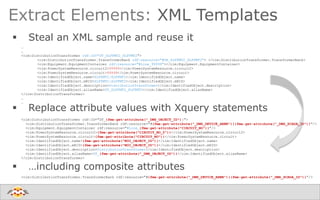
Extract Elements: XML Templates
 Steal an XML sample and reuse it
 Replace attribute values with Xquery statements
 …including composite attributes
…
…
<cim:DistributionTransformer rdf:ID="DT_SLFPMT2_SLFPMT2">
<cim:DistributionTransformer.TransformerBank rdf:resource="#TB_SLFPMT2_SLFPMT2"> </cim:DistributionTransformer.TransformerBank>
<cim:Equipment.EquipmentContainer rdf:resource="#Line_99999"></cim:Equipment.EquipmentContainer>
<cim:PowerSystemResource.circuit2>99999</cim:PowerSystemResource.circuit2>
<cim:PowerSystemResource.circuit>99999</cim:PowerSystemResource.circuit>
<cim:IdentifiedObject.name>SLFPMT2:SLFPMT2</cim:IdentifiedObject.name>
<cim:IdentifiedObject.mRID>SLFPMT2:SLFPMT2</cim:IdentifiedObject.mRID>
<cim:IdentifiedObject.description>DistributionTransformer</cim:IdentifiedObject.description>
<cim:IdentifiedObject.aliasName>DT_SLFPMT2_SLFPMT2</cim:IdentifiedObject.aliasName>
</cim:DistributionTransformer>
…
…
<cim:DistributionTransformer rdf:ID="DT_{fme:get-attribute("_DMS_OBJECT_ID")}">
<cim:DistributionTransformer.TransformerBank rdf:resource="#{fme:get-attribute("_DMS_DEVICE_ABBR")}{fme:get-attribute("_DMS_SCADA_ID")}"/>
<cim:Equipment.EquipmentContainer rdf:resource="#Line_{fme:get-attribute("CIRCUIT_NO")}"/>
<cim:PowerSystemResource.circuit2>{fme:get-attribute("CIRCUIT_NO_2")}</cim:PowerSystemResource.circuit2>
<cim:PowerSystemResource.circuit>{fme:get-attribute("CIRCUIT_NO")}</cim:PowerSystemResource.circuit>
<cim:IdentifiedObject.name>{fme:get-attribute("M3I_OBJECT_ID")}</cim:IdentifiedObject.name>
<cim:IdentifiedObject.mRID>{fme:get-attribute("M3I_OBJECT_ID")}</cim:IdentifiedObject.mRID>
<cim:IdentifiedObject.description>DistributionTransformer</cim:IdentifiedObject.description>
<cim:IdentifiedObject.aliasName>DT_{fme:get-attribute("_DMS_OBJECT_ID")}</cim:IdentifiedObject.aliasName>
</cim:DistributionTransformer>
<cim:DistributionTransformer.TransformerBank rdf:resource="#{fme:get-attribute("_DMS_DEVICE_ABBR")}{fme:get-attribute("_DMS_SCADA_ID")}"/>
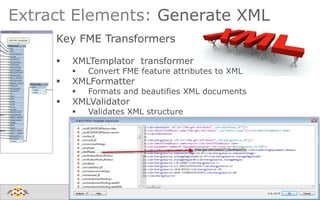
Key FME Transformers
 XMLTemplator transformer
 Convert FME feature attributes to XML
 XMLFormatter
 Formats and beautifies XML documents
 XMLValidator
 Validates XML structure
Extract Elements: Generate XML
Summary
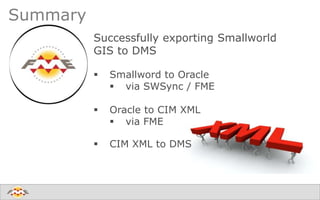
Successfully exporting Smallworld
GIS to DMS
 Smallword to Oracle
 via SWSync / FME
 Oracle to CIM XML
 via FME
 CIM XML to DMS
Summary
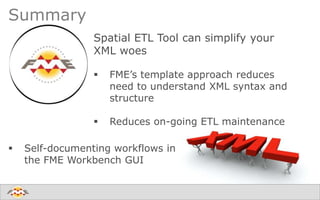
Spatial ETL Tool can simplify your
XML woes
 FME’s template approach reduces
need to understand XML syntax and
structure
 Reduces on-going ETL maintenance
 Self-documenting workflows in
the FME Workbench GUI
Create harmony between data and applications
Q&A
Thank you!
 Mark Stoakes
 mark@safe.com
 Free FME Training
 www.safe.com/training

Extracting Data from GE Smallworld into Common Information Model (CIM XML)

  • 1.
    Extracting Data fromGE Smallworld into Common Information Model (CIM XML) Based on a true story… Digital Energy's 2014 Americas Software Summit Feb 2014  ,   Mark Stoakes, Safe Software Inc.
  • 2.
  • 3.
  • 4.
    Common formats forUtilities  Database  GE Smallworld  Intergraph G/Technology  ESRI Geodatabase & Telvent ArcFM  Bentley Electric  Oracle Spatial  Legacy formats: Intergraph FRAMME, VISION* (AUD), MGE  CAD  AutoCAD (many versions), AutoCAD Map 3D  Bentley MicroStation  Others…  CIM XML, JSON (CGI M3i ), ASCII (Oracle NMS MP ), Other XML i.e. MultiSpeak, PLSCad (XML), CYME, GME, KML
  • 5.
    Objective: Load GISdata into DMS Distribution Management System  DMS is based on the GE XA/21™ system DMS is primarily used to control radio-enabled devices on the distribution circuits  Capacitor banks,  Remote controlled switches etc. DMS, is also used to perform load flow analysis which in-turn drives other analytic functions:  FDIR (Fault detection, isolation and restoration)  IVVC (Intelligent volt-var control) etc. Currently, DMS is only for device control and volt-var analysis.
  • 6.
  • 7.
    Key Components: DMS DMS is the target system  DMS uses a schematic view of the geometry built in the Smallworld VMDS Spatial reference; TBM_COORD  DMS includes Sworld detailed ‘worlds’ - internal circuitry.  Switches are shown correctly as open/closed etc.)
  • 8.
    Key Components: Smallworld4.2 Smallworld 4.2 VMDS  Smallworld is the source system  Physical Network  Geometry:  physical geometry (UTM83-11F)  schematic geometry  Source dataset for:  Oracle 11g  CGI M3i OMS
  • 9.
    Key Components: Oracle11g Oracle 11g  Mirror of Smallworld VMDS (UTM83-11F)  DMS_TRACING table populated by a set of stored procedures  traces the network connectivity of each circuit.  Multiple Spatial columns for physical and schematic geometry, annotation location, etc.
  • 10.
    Key Components: FME Translatespatial and non-spatial data from one format to another 300+ supported formats in FME 2014 Transform spatial and non-spatial data into the precise data model you need
  • 11.
     SpatialBiz Smallworldreader / writer plug-in for FME  SpatialBiz OSpatial reader / writer plug-in for FME Key Components: SWSync Bi-directional synchronization  Smallworld ACE and Style Systems  Symbology, Linetypes, Display scales  Migrates Smallworld Network Model to Oracle  Internal World Support  Annotations and Dimensions
  • 12.
    Key Components: DataFlow OMS DMS Smallworld Oracle CIM XML + GML SWSync MEP
  • 13.
    What is CIM? MakeData Available… …in a standard format and data model to enable system integration and information exchange MultiSpeak XML • Developed by National Rural Electric Cooperative Association (NRECA) CGI JSON or ASCII Oracle NMS (*.md) Others… IEC 61968 CIM • Maintained by IEC TC57, WG14 • Based on CIM data model • Covers distribution & transmission • Usually RDF XML messages GIS EMS OMS SCADA DMS
  • 14.
    Data Conversion: SmallworldOracle  Smallworld VMDS  Oracle using SWSync  SWSync consists of:  SBS Smallworld reader/writer plug-in for FME  SBS OSpatial reader/writer plug-in for FME  Largely a mirror of the Smallworld VMDS in Oracle  Supports multiple-spatial columns in Oracle  Includes schematic geometry
  • 15.
    Data Conversion: Oracle CIM XML  Oracle  CIM XML using FME  DMS_TRACING tables:  network connectivity for each circuit  Each circuit exported separately  Export CIM XML (connected devices)  Export GML (schematic geometry and annotations)  GML is based on the Smallworld defined GML XSD
  • 16.
    Data Conversion: CIMXML  DMS  CIM XML  DMS  a single gateway is used for all CIM based communications with operational systems.  Gateway validates the CIM files with the profile (OWL file)  Gateway also performs additional validations:  checking conductor lengths, phasing values etc.  The elements of the CIM (conductors, capacitors etc.) are submitted for DMS adapter for import into DMS.
  • 17.
    Key Components: DataFlow OMS DMS Smallworld Oracle CIM XML + GML SWSync MEP
  • 18.
    Elements: CIM XML+ GML extract  GIS Extract  Schema mapping  Topology  Create XML/GML
  • 19.
    Elements: CIM XML+ GML extract  FME Workspace  Custom transformers simplify the main workflow
  • 20.
    Extract Elements: GISextract  SQL queries to each Oracle table  Network trace in Oracle TRACING_TABLE for each circuit
  • 21.
    Extract Elements: SchemaMapping  Mapping from Oracle CIM XML:  Rename Attributes  Set Attribute Values  enumerated lists  expressions  conditional filters  Feature Type Names (table names)  Geometry Change what we have  what we want
  • 22.
     Addition ofnew topological entities  Terminals  Connectivity Nodes  Transformer windings  Split complex edges  Others…  Connectivity & terminals handled in Oracle  Complex edges split in FME (if they exist) Extract Elements: Topology CIM Transformer Object: - DistributionTransformer - WindingInfo - DistributionTransformerWinding - TransformerAsset - AssetLocRole - Terminal * 2
  • 23.
    Extract Elements: XMLTemplates  Steal an XML sample and reuse it  Replace attribute values with Xquery statements  …including composite attributes … … <cim:DistributionTransformer rdf:ID="DT_SLFPMT2_SLFPMT2"> <cim:DistributionTransformer.TransformerBank rdf:resource="#TB_SLFPMT2_SLFPMT2"> </cim:DistributionTransformer.TransformerBank> <cim:Equipment.EquipmentContainer rdf:resource="#Line_99999"></cim:Equipment.EquipmentContainer> <cim:PowerSystemResource.circuit2>99999</cim:PowerSystemResource.circuit2> <cim:PowerSystemResource.circuit>99999</cim:PowerSystemResource.circuit> <cim:IdentifiedObject.name>SLFPMT2:SLFPMT2</cim:IdentifiedObject.name> <cim:IdentifiedObject.mRID>SLFPMT2:SLFPMT2</cim:IdentifiedObject.mRID> <cim:IdentifiedObject.description>DistributionTransformer</cim:IdentifiedObject.description> <cim:IdentifiedObject.aliasName>DT_SLFPMT2_SLFPMT2</cim:IdentifiedObject.aliasName> </cim:DistributionTransformer> … … <cim:DistributionTransformer rdf:ID="DT_{fme:get-attribute("_DMS_OBJECT_ID")}"> <cim:DistributionTransformer.TransformerBank rdf:resource="#{fme:get-attribute("_DMS_DEVICE_ABBR")}{fme:get-attribute("_DMS_SCADA_ID")}"/> <cim:Equipment.EquipmentContainer rdf:resource="#Line_{fme:get-attribute("CIRCUIT_NO")}"/> <cim:PowerSystemResource.circuit2>{fme:get-attribute("CIRCUIT_NO_2")}</cim:PowerSystemResource.circuit2> <cim:PowerSystemResource.circuit>{fme:get-attribute("CIRCUIT_NO")}</cim:PowerSystemResource.circuit> <cim:IdentifiedObject.name>{fme:get-attribute("M3I_OBJECT_ID")}</cim:IdentifiedObject.name> <cim:IdentifiedObject.mRID>{fme:get-attribute("M3I_OBJECT_ID")}</cim:IdentifiedObject.mRID> <cim:IdentifiedObject.description>DistributionTransformer</cim:IdentifiedObject.description> <cim:IdentifiedObject.aliasName>DT_{fme:get-attribute("_DMS_OBJECT_ID")}</cim:IdentifiedObject.aliasName> </cim:DistributionTransformer> <cim:DistributionTransformer.TransformerBank rdf:resource="#{fme:get-attribute("_DMS_DEVICE_ABBR")}{fme:get-attribute("_DMS_SCADA_ID")}"/>
  • 24.
    Key FME Transformers XMLTemplator transformer  Convert FME feature attributes to XML  XMLFormatter  Formats and beautifies XML documents  XMLValidator  Validates XML structure Extract Elements: Generate XML
  • 25.
    Summary Successfully exporting Smallworld GISto DMS  Smallword to Oracle  via SWSync / FME  Oracle to CIM XML  via FME  CIM XML to DMS
  • 26.
    Summary Spatial ETL Toolcan simplify your XML woes  FME’s template approach reduces need to understand XML syntax and structure  Reduces on-going ETL maintenance  Self-documenting workflows in the FME Workbench GUI
  • 27.
    Create harmony betweendata and applications Q&A
  • 28.
    Thank you!  MarkStoakes  mark@safe.com  Free FME Training  www.safe.com/training

Editor's Notes

  • #4 Safe Software is the
  • #5 We support a wide range of utility oriented data formats. We’re going to be discussing CIM XML Oracle and smallworld.
  • #6 DMS is primarily used to control radio-enabled devices on the distribution circuits: Capacitor banks, Remote controlled switches etc. DMS, is also used to perform load flow analysis which in-turn drives other analytic functions: FDIR (Fault detection, isolation and restoration) IVVC (Intelligent volt-var control) etc. Currently, DMS is only for device control and volt-var analysis.
  • #7 TBM_COORD – Thomas Brothers – same as CGI M3i OMS
  • #8 TBM_COORD – Thomas Brothers – same as CGI M3i OMS
  • #22 Geometry Change – complex edges may need to be split