Introduction to The Spiceworks IT Desktop
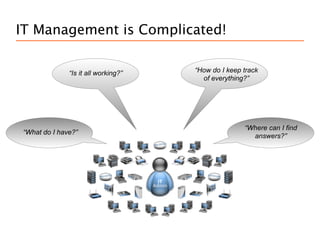
IT Management is Complicated!

              “Is it all working?”   “How do I keep track
                                       of everything?”


                                                    “Where can I find
“What do I have?”
                                                      answers?”
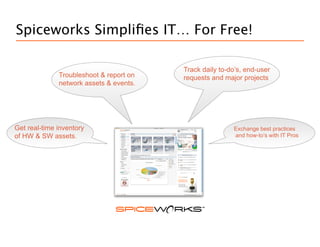
Spiceworks Simplifies IT… For Free!

                                         Track daily to-do’s, end-user
                                            “How do I keep track
              Troubleshootworking?”on
                   “Is it all & report   requests everything?”
                                               of and major projects
                  “Is it all working?”
              network assets & events.


Get real-time inventory                                     “Where can I find
                                                         Exchange best practices
   “What do I have?”
of HW & SW assets.                                              answers?”
                                                         and how-to’s with IT Pros
Spiceworks is for SMB IT Pros
     “Is Spiceworks for
            Me?”


                 Spiceworks is a 7mb download designed for…


                    IT Pros who have admin rights on their network

                    Organizations with less than 250 devices on their
                     network. It will work with more, it just won’t be as
                     fast.

                    Running on a PC. It discovers Windows, OS X,
                     Linux and Unix but you need to run it from a PC on
                     your network.
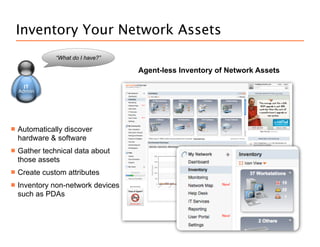
Inventory Your Network Assets
               “What do I have?”

                                    Agent-less Inventory of Network Assets


   Automatically discover
    hardware & software
   Gather technical data about
    those assets
   Create custom attributes
   Inventory non-network devices
    such as PDAs
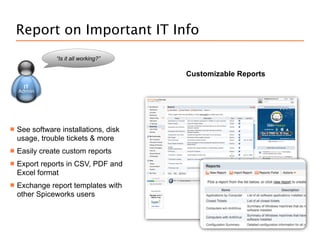
Report on Important IT Info
                “Is it all working?”

                                       Customizable Reports


   See software installations, disk
    usage, trouble tickets & more
   Easily create custom reports
   Export reports in CSV, PDF and
    Excel format
   Exchange report templates with
    other Spiceworks users
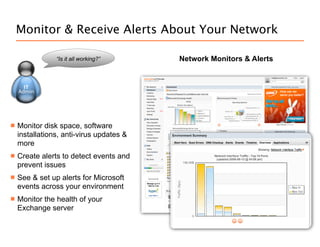
Monitor & Receive Alerts About Your Network

                “Is it all working?”      Network Monitors & Alerts


   Monitor disk space, software
    installations, anti-virus updates &
    more
   Create alerts to detect events and
    prevent issues
   See & set up alerts for Microsoft
    events across your environment
   Monitor the health of your
    Exchange server
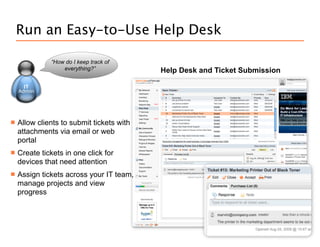
Run an Easy-to-Use Help Desk

              “How do I keep track of
                  everything?”             Help Desk and Ticket Submission


   Allow clients to submit tickets with
    attachments via email or web
    portal
   Create tickets in one click for
    devices that need attention
   Assign tickets across your IT team,
    manage projects and view
    progress
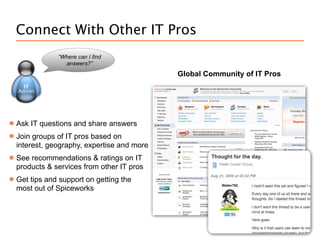
Connect With Other IT Pros
                “Where can I find
                  answers?”
                                              Global Community of IT Pros


   Ask IT questions and share answers
   Join groups of IT pros based on
    interest, geography, expertise and more
   See recommendations & ratings on IT
    products & services from other IT pros
   Get tips and support on getting the
    most out of Spiceworks
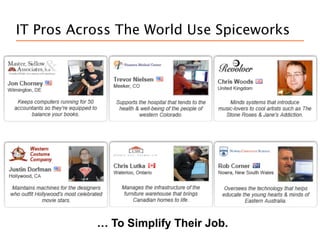
IT Pros Across The World Use Spiceworks


           … To Simplify Their Job.
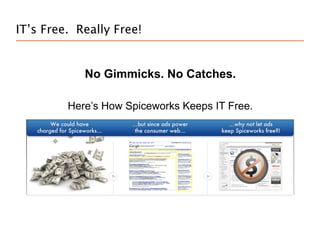
IT’s Free. Really Free!


            No Gimmicks. No Catches.

         Here’s How Spiceworks Keeps IT Free.
Can’t Have or Don’t Want Ads?

           Have Spiceworks Your Way


        Replace the Ads and add your logo for $20 a
              month with Spiceworks MyWay.
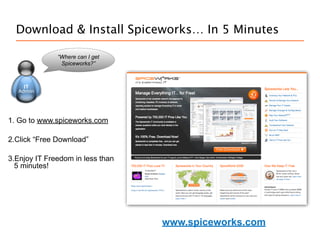
Download & Install Spiceworks… In 5 Minutes

              “Where can I get
               Spiceworks?”


1. Go to www.spiceworks.com

2.Click “Free Download”

3.Enjoy IT Freedom in less than
  5 minutes!


                                  www.spiceworks.com
Spiceworks System Requirements

     “What do I need for
       Spiceworks to
          work?”
                           System Requirements

                           Windows XP Pro SP2, Windows Vista (with
                           special settings), Windows 2003 Server (latest
                           service packs recommended)

                           700 MHz Pentium class processor

                           512 MB RAM

                           Browser Requirements

                           Firefox 1.5 - 2.0

                           Internet Explorer 6.0 - 7.0

Spiceworks Intro

  • 1.
    Introduction to TheSpiceworks IT Desktop
  • 2.
    IT Management isComplicated! “Is it all working?” “How do I keep track of everything?” “Where can I find “What do I have?” answers?”
  • 3.
    Spiceworks Simplifies IT…For Free! Track daily to-do’s, end-user “How do I keep track Troubleshootworking?”on “Is it all & report requests everything?” of and major projects “Is it all working?” network assets & events. Get real-time inventory “Where can I find Exchange best practices “What do I have?” of HW & SW assets. answers?” and how-to’s with IT Pros
  • 4.
    Spiceworks is forSMB IT Pros “Is Spiceworks for Me?” Spiceworks is a 7mb download designed for…  IT Pros who have admin rights on their network  Organizations with less than 250 devices on their network. It will work with more, it just won’t be as fast.  Running on a PC. It discovers Windows, OS X, Linux and Unix but you need to run it from a PC on your network.
  • 5.
    Inventory Your NetworkAssets “What do I have?” Agent-less Inventory of Network Assets  Automatically discover hardware & software  Gather technical data about those assets  Create custom attributes  Inventory non-network devices such as PDAs
  • 6.
    Report on ImportantIT Info “Is it all working?” Customizable Reports  See software installations, disk usage, trouble tickets & more  Easily create custom reports  Export reports in CSV, PDF and Excel format  Exchange report templates with other Spiceworks users
  • 7.
    Monitor & ReceiveAlerts About Your Network “Is it all working?” Network Monitors & Alerts  Monitor disk space, software installations, anti-virus updates & more  Create alerts to detect events and prevent issues  See & set up alerts for Microsoft events across your environment  Monitor the health of your Exchange server
  • 8.
    Run an Easy-to-UseHelp Desk “How do I keep track of everything?” Help Desk and Ticket Submission  Allow clients to submit tickets with attachments via email or web portal  Create tickets in one click for devices that need attention  Assign tickets across your IT team, manage projects and view progress
  • 9.
    Connect With OtherIT Pros “Where can I find answers?” Global Community of IT Pros  Ask IT questions and share answers  Join groups of IT pros based on interest, geography, expertise and more  See recommendations & ratings on IT products & services from other IT pros  Get tips and support on getting the most out of Spiceworks
  • 10.
    IT Pros AcrossThe World Use Spiceworks … To Simplify Their Job.
  • 11.
    IT’s Free. ReallyFree! No Gimmicks. No Catches. Here’s How Spiceworks Keeps IT Free.
  • 12.
    Can’t Have orDon’t Want Ads? Have Spiceworks Your Way Replace the Ads and add your logo for $20 a month with Spiceworks MyWay.
  • 13.
    Download & InstallSpiceworks… In 5 Minutes “Where can I get Spiceworks?” 1. Go to www.spiceworks.com 2.Click “Free Download” 3.Enjoy IT Freedom in less than 5 minutes! www.spiceworks.com
  • 14.
    Spiceworks System Requirements “What do I need for Spiceworks to work?” System Requirements Windows XP Pro SP2, Windows Vista (with special settings), Windows 2003 Server (latest service packs recommended) 700 MHz Pentium class processor 512 MB RAM Browser Requirements Firefox 1.5 - 2.0 Internet Explorer 6.0 - 7.0