



Converting Edmonton’s Electrical
Data from Smallworld to
Microstation Format
Janna Fung
GIS Systems Analyst, EPCOR Utilities Inc.
Overview
 Introduction
 Overview of the conversion process
 Application of the output data
 The FME workspace
 Workspace organization with custom transformers
 Questions
About Me – Janna Fung
 Holds a B.Sc. in Geomatics Engineering from the
University of Calgary
 GIS Systems Analyst at EPCOR
 Started working with FME about 2.5 years ago
About EPCOR
 We provide clean water and wastewater services
and safe, reliable electricity
 Distributing about 13.5% of Alberta's energy
consumption in Edmonton
 About 600,000 energy customers around Alberta
 Providing water and wastewater service to over 1 million
people in over 85 Western Canadian communities and
industrial sites
 Largest private regulated water utility in Arizona and
New Mexico — serving 22 communities and 7 counties
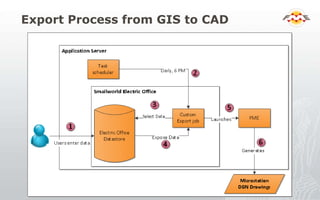
Export Process from GIS to CAD
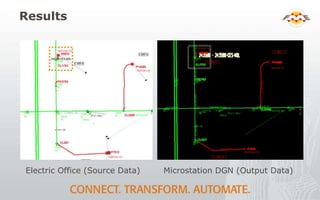
Results
Electric Office (Source Data) Microstation DGN (Output Data)
How the Output Files are Used
 Internally
 Distributed to locate contractors
 Additional versions with subsets of the data are
distributed to GeoEdmonton
 A partnership of companies and organizations for
sharing spatial data
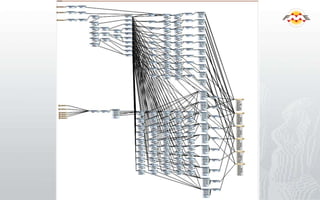
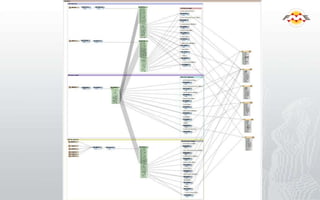
FME Workspace
Workspace file
Problem
 Dimensions are an unusual
object type
 No attribute data other than
ID
 Read into FME with
dissimilar parts (Text,
Leader Line, Right Arrow,
Left Arrow)
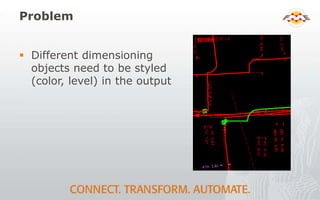
Problem
 Different dimensioning
objects need to be styled
(color, level) in the output
Solution in FME
 Filter the text string based on prefix or suffix (ex.
“P” from P 1.00)
 Match each filtered string against each of the
other dimensioning subtypes (Arrows, Leader
Line components) using common ID numbers
 Set the desired Microstation styling for each
filtered type
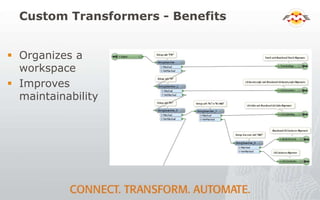
Custom Transformers - Benefits
 Organizes a
workspace
 Improves
maintainability
Custom Transformers - Benefits
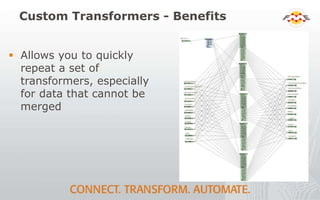
 Allows you to quickly
repeat a set of
transformers, especially
for data that cannot be
merged
Custom Transformers - Benefits
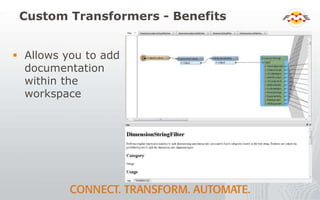
 Allows you to add
documentation
within the
workspace
Thank You!
 Questions?
 For more information:
 Janna Fung
 EPCOR Utilities Inc.
 Email: jnfung@epcor.com

Converting the City’s Electrical Data from Smallworld to Microstation Format

  • 1.
    Converting Edmonton’s Electrical Datafrom Smallworld to Microstation Format Janna Fung GIS Systems Analyst, EPCOR Utilities Inc.
  • 2.
    Overview  Introduction  Overviewof the conversion process  Application of the output data  The FME workspace  Workspace organization with custom transformers  Questions
  • 3.
    About Me –Janna Fung  Holds a B.Sc. in Geomatics Engineering from the University of Calgary  GIS Systems Analyst at EPCOR  Started working with FME about 2.5 years ago
  • 4.
    About EPCOR  Weprovide clean water and wastewater services and safe, reliable electricity  Distributing about 13.5% of Alberta's energy consumption in Edmonton  About 600,000 energy customers around Alberta  Providing water and wastewater service to over 1 million people in over 85 Western Canadian communities and industrial sites  Largest private regulated water utility in Arizona and New Mexico — serving 22 communities and 7 counties
  • 5.
  • 6.
    Results Electric Office (SourceData) Microstation DGN (Output Data)
  • 7.
    How the OutputFiles are Used  Internally  Distributed to locate contractors  Additional versions with subsets of the data are distributed to GeoEdmonton  A partnership of companies and organizations for sharing spatial data
  • 8.
  • 9.
    Problem  Dimensions arean unusual object type  No attribute data other than ID  Read into FME with dissimilar parts (Text, Leader Line, Right Arrow, Left Arrow)
  • 10.
    Problem  Different dimensioning objectsneed to be styled (color, level) in the output
  • 11.
    Solution in FME Filter the text string based on prefix or suffix (ex. “P” from P 1.00)  Match each filtered string against each of the other dimensioning subtypes (Arrows, Leader Line components) using common ID numbers  Set the desired Microstation styling for each filtered type
  • 14.
    Custom Transformers -Benefits  Organizes a workspace  Improves maintainability
  • 15.
    Custom Transformers -Benefits  Allows you to quickly repeat a set of transformers, especially for data that cannot be merged
  • 16.
    Custom Transformers -Benefits  Allows you to add documentation within the workspace
  • 17.
    Thank You!  Questions? For more information:  Janna Fung  EPCOR Utilities Inc.  Email: jnfung@epcor.com