© Globema2016. All rights reserved.
1
© Globema2016. All rights reserved.
2
ABOUT GLOBEMA
Leading provider and integrator
of geospatial and location-based
software solutions
that enable effective planning,
management and control
of networks, assets, resources and
works
in utilities, telecoms & other
enterprises
Mobile
Workforce
Management
Real-Time
Tracking of
Assets & Staff
Optimizing
Decisions
with Maps
& Data
Energy Management
in Smart Grid &
Renewables
Network
Inventory
& Service
Handling
Advanced
Distribution
Management
GLOBEMA
SOLUTIONS
& SERVICES
© Globema2016. All rights reserved.
3
120+ Geospatial Software Engineers at 5 R&D Labs
SELECTED TECHNOLOGIES & PLATFORMS WE USE
© Globema2016. All rights reserved.
4
OUR GE SMALLWORLD SERVICES
Application development
COTS Products on Smallworld
GIS Solution Delivery
& Implementation
Business Analysis
Technical Consulting
System Audits
Smallworld Trainings
GIS Data Migration
GIS Data consolidation
GIS Data Quality assurance
Helpdesk
Remote System Admin
Maintenance & Support
Project Management
© Globema2016. All rights reserved.
5
Why Smallworld 5?
© Globema2016. All rights reserved.
6
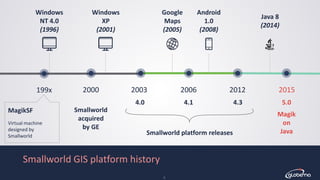
Smallworld GIS platform history
2000 2003 2006 2012 2015
MagikSF
Virtual machine
designed by
Smallworld
Magik
on
Java
Java 8
(2014)
Smallworld
acquired
by GE
4.0 4.1 4.3 5.0
199x
Smallworld platform releases
Windows
XP
(2001)
Google
Maps
(2005)
Windows
NT 4.0
(1996)
Android
1.0
(2008)
© Globema2016. All rights reserved.
7
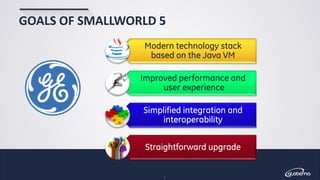
GOALS OF SMALLWORLD 5
Modern technology stack
based on the Java VM
Improved performance and
user experience
Simplified integration and
interoperability
Straightforward upgrade
© Globema2016. All rights reserved.
8
JAVA VM
Benefits of adopting Java VM
• Multithreading, 64-bit processing
• Optimized virtual machine
JIT (just-in-time) compilation
Advanced memory allocation algorithms
• Profiling tools available
• Broad availability of Java libraries
© Globema2016. All rights reserved.
9
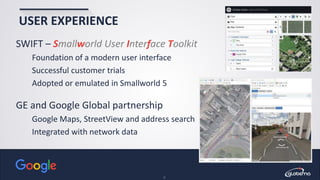
USER EXPERIENCE
SWIFT – Smallworld User Interface Toolkit
Foundation of a modern user interface
Successful customer trials
Adopted or emulated in Smallworld 5
GE and Google Global partnership
Google Maps, StreetView and address search
Integrated with network data
© Globema2016. All rights reserved.
10
INTEGRATION AND INTEROPERABILITY
Preserving your existing investment
• Applications can still be written in Magik
• Existing SWAF applications supported
• Extends GE’s open architecture policy
Reducing TCO
• Availability of libraries and tools
• Open standards
• Simplified integration – e.g. Java to Java
Leading technology for many years into the future
© Globema2016. All rights reserved.
EASE OF UPGRADE
• GE’s objective is to support smooth and successful upgrades
Working closely with Globema and other partners
• Limited changes between 4.3 and 5.0
Minimal data model or API changes
Minimal functional changes
• Smallworld 5 portfolio released in Q4 2015
Smallworld Core, PNI, LNI, EO, GSS, NV, NIG, …
11
© Globema2016. All rights reserved.
12
GLOBEMA INVOLVEMENT
• GE Smallworld Logical Network Inventory (LNI)
Developed for GE by Globema since 2008
Migration to version 5.0 started in November 2014
5.0 released in November 2015
• Other products
Telecommunication – PRM, ONA, CATV Design
Utilities – DH.GIS (district heating), EL.GIS (power grid)
• Customers’ applications
© Globema2016. All rights reserved.
13
GLOBEMA INVOLVEMENT
• GE Smallworld Logical Network Inventory (LNI)
Developed for GE by Globema since 2008
Migration to version 5.0 started in November 2014
5.0 released in November 2015
• Other products
Telecommunication – PRM, ONA, CATV Design
Utilities – DH.GIS (district heating), EL.GIS (power grid)
• Customers’ applications
© Globema2016. All rights reserved.
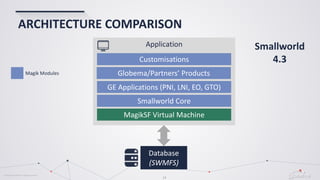
ARCHITECTURE COMPARISON
14
Database
(SWMFS)
Application
MagikSF Virtual Machine
Smallworld Core
GE Applications (PNI, LNI, EO, GTO)
Globema/Partners’ Products
Smallworld
4.3
Magik Modules
Customisations
© Globema2016. All rights reserved.
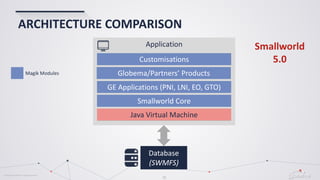
ARCHITECTURE COMPARISON
Magik Modules
Smallworld
5.0
Database
(SWMFS)
Application
MagikSF Virtual Machine
Smallworld Core
GE Applications (PNI, LNI, EO, GTO)
Globema/Partners’ Products
Customisations
Java Virtual Machine
15
© Globema2016. All rights reserved.
16
Our experiences
© Globema2016. All rights reserved.
17
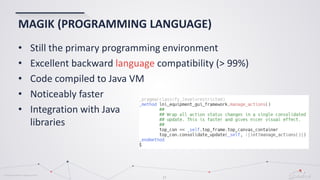
MAGIK (PROGRAMMING LANGUAGE)
• Still the primary programming environment
• Excellent backward language compatibility (> 99%)
• Code compiled to Java VM
• Noticeably faster
• Integration with Java
libraries
© Globema2016. All rights reserved.
18
DATABASE (VMDS)
• No functional changes
Practically 100% backward compatible
• Faster access
API read even 4x times faster in some scenarios
• Same communication protocol
Improvements planned after 5.0 release
• Concurrent access for 4.x and 5.0 clients
© Globema2016. All rights reserved.
19
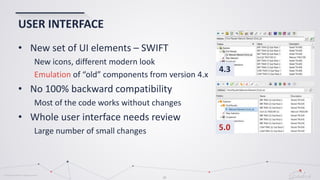
USER INTERFACE
• New set of UI elements – SWIFT
New icons, different modern look
Emulation of “old” components from version 4.x
• No 100% backward compatibility
Most of the code works without changes
• Whole user interface needs review
Large number of small changes 5.0
4.3
© Globema2016. All rights reserved.
20
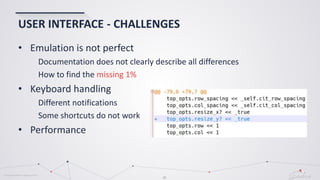
USER INTERFACE - CHALLENGES
• Emulation is not perfect
Documentation does not clearly describe all differences
How to find the missing 1%
• Keyboard handling
Different notifications
Some shortcuts do not work
• Performance
© Globema2016. All rights reserved.
21
THREADING
• Threads are different in Smallworld 5
Native Java threads
Pre-emptive thread switching
• Basic conversion well-documented
• Issues
UI synchronization
Some features are missing
In one case significant application re-design was needed
© Globema2016. All rights reserved.
22
TRIVIA
• Magik images are gone
closed image  compile code into jars
open image  use database contexts
• Conversion of icons .ico  .png
• Keep Smallworld 5.0 directory locally
Disable localisation products if possible (to be fixed in 5.1)
• perform()
Do not redefine perform() method in Magik
Even a single re-definition can seriously degrade DB write performance
© Globema2016. All rights reserved.
23
DEVELOPMENT ENVIRONMENT
• MDT – limited experience
Difficult to change developers’ habits
• Emacs
Not officially supported – but still works!
Including class browser
• Native Java diagnostic tools (performance, memory)
• Developer tools not available in 5.0
© Globema2016. All rights reserved.
24
OTHER CHANGES
• Documentation and context help
Based on HTML 5
Context help delivered with application
Documentation available on-line on GE servers
• Google Maps and StreetView
Built in the application
Address search
StreetView integrated with other tools (e.g. trail)
© Globema2016. All rights reserved.
25
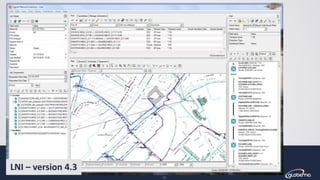
LNI – version 4.3
© Globema2016. All rights reserved.
26
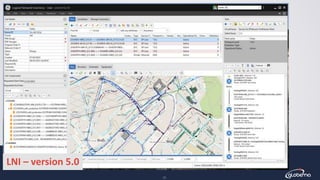
LNI – version 5.0
© Globema2016. All rights reserved.
27
LNI - RESULTS
• Product upgraded, tested and released
• Much more changes than initially anticipated
We have started early – platform was not stable at that time
UI changes and threading
Unexpectedly large number of small changes/corrections
A number of performance issues identified together with GE
Platform performance improved
© Globema2016. All rights reserved.
28
LNI - STATISTICS
• Total lines of code
LNI 4.3 192.500
LNI 5.0 191.200
• Changes: 16.600 lines [9%]
Added 6.100
Modified 800
Deleted 9.700
Modules with biggest changes 58%
cit_protection_diversity_editor 20%
cit_config_rule 13%
lni_gui_components 12%
cit_channel_editor 13%
58% of changes in just 4 modules
Migration of legacy code
Changes after adjustment:
~7.000 lines [4%]
© Globema2016. All rights reserved.
29
NETWORK VIEWER FOR DH.GIS
• NV to replace a legacy web application
• New features available in NV 5.0.1
Printing improvements
Large internals
• Partial upgrade of DH.GIS application
Data model and API level only
No changes in application-level Magik code between NV 4.3.2 and 5.0.1
Migration of some low-level modules needed
© Globema2016. All rights reserved.
30
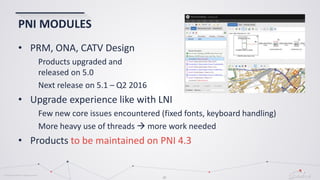
PNI MODULES
• PRM, ONA, CATV Design
Products upgraded and
released on 5.0
Next release on 5.1 – Q2 2016
• Upgrade experience like with LNI
Few new core issues encountered (fixed fonts, keyboard handling)
More heavy use of threads  more work needed
• Products to be maintained on PNI 4.3
© Globema2016. All rights reserved.
31
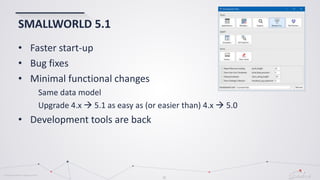
SMALLWORLD 5.1
• Faster start-up
• Bug fixes
• Minimal functional changes
Same data model
Upgrade 4.x  5.1 as easy as (or easier than) 4.x  5.0
• Development tools are back
© Globema2016. All rights reserved.
32
HOW TO START?
• Difficult to assess upgrade
costs
• Upgrade in stages
• Client application upgrade
© Globema2016. All rights reserved.
33
HOW TO START?
• Difficult to assess upgrade
costs
• Upgrade in stages
• Client application upgrade
Primary areas – UI and threading
© Globema2016. All rights reserved.
34
HOW TO START?
• Difficult to assess upgrade
costs
• Upgrade in stages
• Client application upgrade
Primary areas – UI and threading
Start with the low-hanging fruit
Database-level and API should be easy
NV/NIG/GSS may be a good candidate
Can run simultaneously with 4.x clients
© Globema2016. All rights reserved.
35
HOW TO START?
• Difficult to assess upgrade
costs
• Upgrade in stages
• Client application upgrade
Primary areas – UI and threading
Start with the low-hanging fruit
Database-level and API should be easy
NV/NIG/GSS may be a good candidate
Can run simultaneously with 4.x clients
Concentrate on UI
© Globema2016. All rights reserved.
36
SUMMARY
• Mature/proven platform (Java VM)
• Excellent Magik compatibility
• Minimal changes to the architecture
Ease of migration
• UI changes
Needs review and fixes
• Performance
Possible to achieve decent performance, but it needs work
© Globema2016. All rights reserved.
37
CONTACT US!
contact@globema.com
• How to conduct migration to Smallworld 5?
• How to get the most of your Smallworld 5 system?
www.globema.com
www.globema.com/solutions/smallworld-gis
© Globema2016. All rights reserved.
38
Thank you
All trademarks and registered trademarks are the property of their respective owners. All rights reserved.

Smallworld 5 Migration Experiences

  • 1.
    © Globema2016. Allrights reserved. 1
  • 2.
    © Globema2016. Allrights reserved. 2 ABOUT GLOBEMA Leading provider and integrator of geospatial and location-based software solutions that enable effective planning, management and control of networks, assets, resources and works in utilities, telecoms & other enterprises Mobile Workforce Management Real-Time Tracking of Assets & Staff Optimizing Decisions with Maps & Data Energy Management in Smart Grid & Renewables Network Inventory & Service Handling Advanced Distribution Management GLOBEMA SOLUTIONS & SERVICES
  • 3.
    © Globema2016. Allrights reserved. 3 120+ Geospatial Software Engineers at 5 R&D Labs SELECTED TECHNOLOGIES & PLATFORMS WE USE
  • 4.
    © Globema2016. Allrights reserved. 4 OUR GE SMALLWORLD SERVICES Application development COTS Products on Smallworld GIS Solution Delivery & Implementation Business Analysis Technical Consulting System Audits Smallworld Trainings GIS Data Migration GIS Data consolidation GIS Data Quality assurance Helpdesk Remote System Admin Maintenance & Support Project Management
  • 5.
    © Globema2016. Allrights reserved. 5 Why Smallworld 5?
  • 6.
    © Globema2016. Allrights reserved. 6 Smallworld GIS platform history 2000 2003 2006 2012 2015 MagikSF Virtual machine designed by Smallworld Magik on Java Java 8 (2014) Smallworld acquired by GE 4.0 4.1 4.3 5.0 199x Smallworld platform releases Windows XP (2001) Google Maps (2005) Windows NT 4.0 (1996) Android 1.0 (2008)
  • 7.
    © Globema2016. Allrights reserved. 7 GOALS OF SMALLWORLD 5 Modern technology stack based on the Java VM Improved performance and user experience Simplified integration and interoperability Straightforward upgrade
  • 8.
    © Globema2016. Allrights reserved. 8 JAVA VM Benefits of adopting Java VM • Multithreading, 64-bit processing • Optimized virtual machine JIT (just-in-time) compilation Advanced memory allocation algorithms • Profiling tools available • Broad availability of Java libraries
  • 9.
    © Globema2016. Allrights reserved. 9 USER EXPERIENCE SWIFT – Smallworld User Interface Toolkit Foundation of a modern user interface Successful customer trials Adopted or emulated in Smallworld 5 GE and Google Global partnership Google Maps, StreetView and address search Integrated with network data
  • 10.
    © Globema2016. Allrights reserved. 10 INTEGRATION AND INTEROPERABILITY Preserving your existing investment • Applications can still be written in Magik • Existing SWAF applications supported • Extends GE’s open architecture policy Reducing TCO • Availability of libraries and tools • Open standards • Simplified integration – e.g. Java to Java Leading technology for many years into the future
  • 11.
    © Globema2016. Allrights reserved. EASE OF UPGRADE • GE’s objective is to support smooth and successful upgrades Working closely with Globema and other partners • Limited changes between 4.3 and 5.0 Minimal data model or API changes Minimal functional changes • Smallworld 5 portfolio released in Q4 2015 Smallworld Core, PNI, LNI, EO, GSS, NV, NIG, … 11
  • 12.
    © Globema2016. Allrights reserved. 12 GLOBEMA INVOLVEMENT • GE Smallworld Logical Network Inventory (LNI) Developed for GE by Globema since 2008 Migration to version 5.0 started in November 2014 5.0 released in November 2015 • Other products Telecommunication – PRM, ONA, CATV Design Utilities – DH.GIS (district heating), EL.GIS (power grid) • Customers’ applications
  • 13.
    © Globema2016. Allrights reserved. 13 GLOBEMA INVOLVEMENT • GE Smallworld Logical Network Inventory (LNI) Developed for GE by Globema since 2008 Migration to version 5.0 started in November 2014 5.0 released in November 2015 • Other products Telecommunication – PRM, ONA, CATV Design Utilities – DH.GIS (district heating), EL.GIS (power grid) • Customers’ applications
  • 14.
    © Globema2016. Allrights reserved. ARCHITECTURE COMPARISON 14 Database (SWMFS) Application MagikSF Virtual Machine Smallworld Core GE Applications (PNI, LNI, EO, GTO) Globema/Partners’ Products Smallworld 4.3 Magik Modules Customisations
  • 15.
    © Globema2016. Allrights reserved. ARCHITECTURE COMPARISON Magik Modules Smallworld 5.0 Database (SWMFS) Application MagikSF Virtual Machine Smallworld Core GE Applications (PNI, LNI, EO, GTO) Globema/Partners’ Products Customisations Java Virtual Machine 15
  • 16.
    © Globema2016. Allrights reserved. 16 Our experiences
  • 17.
    © Globema2016. Allrights reserved. 17 MAGIK (PROGRAMMING LANGUAGE) • Still the primary programming environment • Excellent backward language compatibility (> 99%) • Code compiled to Java VM • Noticeably faster • Integration with Java libraries
  • 18.
    © Globema2016. Allrights reserved. 18 DATABASE (VMDS) • No functional changes Practically 100% backward compatible • Faster access API read even 4x times faster in some scenarios • Same communication protocol Improvements planned after 5.0 release • Concurrent access for 4.x and 5.0 clients
  • 19.
    © Globema2016. Allrights reserved. 19 USER INTERFACE • New set of UI elements – SWIFT New icons, different modern look Emulation of “old” components from version 4.x • No 100% backward compatibility Most of the code works without changes • Whole user interface needs review Large number of small changes 5.0 4.3
  • 20.
    © Globema2016. Allrights reserved. 20 USER INTERFACE - CHALLENGES • Emulation is not perfect Documentation does not clearly describe all differences How to find the missing 1% • Keyboard handling Different notifications Some shortcuts do not work • Performance
  • 21.
    © Globema2016. Allrights reserved. 21 THREADING • Threads are different in Smallworld 5 Native Java threads Pre-emptive thread switching • Basic conversion well-documented • Issues UI synchronization Some features are missing In one case significant application re-design was needed
  • 22.
    © Globema2016. Allrights reserved. 22 TRIVIA • Magik images are gone closed image  compile code into jars open image  use database contexts • Conversion of icons .ico  .png • Keep Smallworld 5.0 directory locally Disable localisation products if possible (to be fixed in 5.1) • perform() Do not redefine perform() method in Magik Even a single re-definition can seriously degrade DB write performance
  • 23.
    © Globema2016. Allrights reserved. 23 DEVELOPMENT ENVIRONMENT • MDT – limited experience Difficult to change developers’ habits • Emacs Not officially supported – but still works! Including class browser • Native Java diagnostic tools (performance, memory) • Developer tools not available in 5.0
  • 24.
    © Globema2016. Allrights reserved. 24 OTHER CHANGES • Documentation and context help Based on HTML 5 Context help delivered with application Documentation available on-line on GE servers • Google Maps and StreetView Built in the application Address search StreetView integrated with other tools (e.g. trail)
  • 25.
    © Globema2016. Allrights reserved. 25 LNI – version 4.3
  • 26.
    © Globema2016. Allrights reserved. 26 LNI – version 5.0
  • 27.
    © Globema2016. Allrights reserved. 27 LNI - RESULTS • Product upgraded, tested and released • Much more changes than initially anticipated We have started early – platform was not stable at that time UI changes and threading Unexpectedly large number of small changes/corrections A number of performance issues identified together with GE Platform performance improved
  • 28.
    © Globema2016. Allrights reserved. 28 LNI - STATISTICS • Total lines of code LNI 4.3 192.500 LNI 5.0 191.200 • Changes: 16.600 lines [9%] Added 6.100 Modified 800 Deleted 9.700 Modules with biggest changes 58% cit_protection_diversity_editor 20% cit_config_rule 13% lni_gui_components 12% cit_channel_editor 13% 58% of changes in just 4 modules Migration of legacy code Changes after adjustment: ~7.000 lines [4%]
  • 29.
    © Globema2016. Allrights reserved. 29 NETWORK VIEWER FOR DH.GIS • NV to replace a legacy web application • New features available in NV 5.0.1 Printing improvements Large internals • Partial upgrade of DH.GIS application Data model and API level only No changes in application-level Magik code between NV 4.3.2 and 5.0.1 Migration of some low-level modules needed
  • 30.
    © Globema2016. Allrights reserved. 30 PNI MODULES • PRM, ONA, CATV Design Products upgraded and released on 5.0 Next release on 5.1 – Q2 2016 • Upgrade experience like with LNI Few new core issues encountered (fixed fonts, keyboard handling) More heavy use of threads  more work needed • Products to be maintained on PNI 4.3
  • 31.
    © Globema2016. Allrights reserved. 31 SMALLWORLD 5.1 • Faster start-up • Bug fixes • Minimal functional changes Same data model Upgrade 4.x  5.1 as easy as (or easier than) 4.x  5.0 • Development tools are back
  • 32.
    © Globema2016. Allrights reserved. 32 HOW TO START? • Difficult to assess upgrade costs • Upgrade in stages • Client application upgrade
  • 33.
    © Globema2016. Allrights reserved. 33 HOW TO START? • Difficult to assess upgrade costs • Upgrade in stages • Client application upgrade Primary areas – UI and threading
  • 34.
    © Globema2016. Allrights reserved. 34 HOW TO START? • Difficult to assess upgrade costs • Upgrade in stages • Client application upgrade Primary areas – UI and threading Start with the low-hanging fruit Database-level and API should be easy NV/NIG/GSS may be a good candidate Can run simultaneously with 4.x clients
  • 35.
    © Globema2016. Allrights reserved. 35 HOW TO START? • Difficult to assess upgrade costs • Upgrade in stages • Client application upgrade Primary areas – UI and threading Start with the low-hanging fruit Database-level and API should be easy NV/NIG/GSS may be a good candidate Can run simultaneously with 4.x clients Concentrate on UI
  • 36.
    © Globema2016. Allrights reserved. 36 SUMMARY • Mature/proven platform (Java VM) • Excellent Magik compatibility • Minimal changes to the architecture Ease of migration • UI changes Needs review and fixes • Performance Possible to achieve decent performance, but it needs work
  • 37.
    © Globema2016. Allrights reserved. 37 CONTACT US! contact@globema.com • How to conduct migration to Smallworld 5? • How to get the most of your Smallworld 5 system? www.globema.com www.globema.com/solutions/smallworld-gis
  • 38.
    © Globema2016. Allrights reserved. 38 Thank you All trademarks and registered trademarks are the property of their respective owners. All rights reserved.