Microsoft Dynamics CRM
Een eerste kennismaking
Peter Meulman
Solution Architect, Microsoft
Ede, 27 maart 2014
Introductie
Demo Look and Feel
Demo Accounts
Demo Case Management
Samenvatting
De komende 45 minuten ...
Een eerste
kennismaking
met CRM
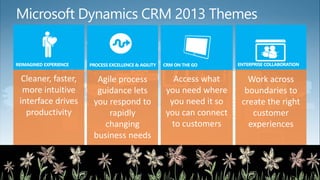
Microsoft Dynamics CRM 2013 Themes
Access what
you need where
you need it so
you can connect
to customers
Work across
boundaries to
create the right
customer
experiences
Cleaner, faster,
more intuitive
interface drives
productivity
Agile process
guidance lets
you respond to
rapidly
changing
business needs
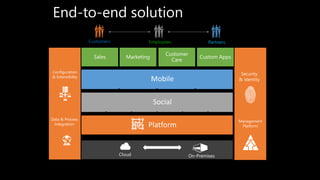
End-to-end solution
Security
& Identity
Management
Platform
Data & Process
Integration
Configuration
& Extensibility
Cloud On-Premises
Customers Employees Partners
in
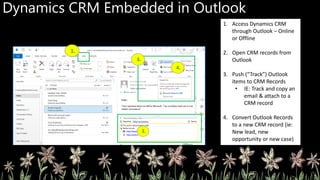
Dynamics CRM Embedded in Outlook
1. Access Dynamics CRM
through Outlook – Online
or Offline
2. Open CRM records from
Outlook
3. Push (“Track”) Outlook
items to CRM Records
• IE: Track and copy an
email & attach to a
CRM record
4. Convert Outlook Records
to a new CRM record (ie:
New lead, new
opportunity or new case)
Accounts View in Outlook
1. CRM Ribbon added to
Outlook
2. CRM Menu added to Left
Navigation
3. CRM Views of data
surfaced in Outlook
4. Lync & Skype integration
inside of CRM records
SharePoint Natively Embedded in CRM Record
1. Automatically embed
contextual SharePoint Site
in CRM Records:
• Allowing CRM users
to access relevant
SharePoint files
through CRM
• Allowing non-CRM
users to access
relevant SharePoint
files from SharePoint
2. Access SharePoint files
from CRM record
3. Perform SharePoint
actions against files
through CRM
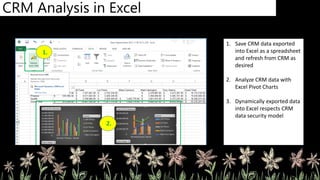
1. Save CRM data exported
into Excel as a spreadsheet
and refresh from CRM as
desired
2. Analyze CRM data with
Excel Pivot Charts
3. Dynamically exported data
into Excel respects CRM
data security model
Wat heeft u gezien ?
Look and Feel
Account Management
Case Management
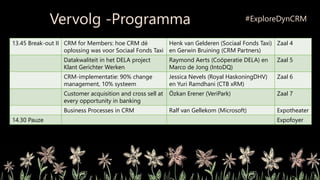
13.45 Break-out II CRM for Members: hoe CRM dé
oplossing was voor Sociaal Fonds Taxi
Henk van Gelderen (Sociaal Fonds Taxi)
en Gerwin Bruining (CRM Partners)
Zaal 4
Datakwaliteit in het DELA project
Klant Gerichter Werken
Raymond Aerts (Coöperatie DELA) en
Marco de Jong (IntoDQ)
Zaal 5
CRM-implementatie: 90% change
management, 10% systeem
Jessica Nevels (Royal HaskoningDHV)
en Yuri Ramdhani (CTB xRM)
Zaal 6
Customer acquisition and cross sell at
every opportunity in banking
Özkan Erener (VeriPark) Zaal 7
Business Processes in CRM Ralf van Gellekom (Microsoft) Expotheater
14.30 Pauze Expofoyer
Vervolg -Programma #ExploreDynCRM
Explore Dynamics CRM 2014 - Microsoft - CRM introductie

Explore Dynamics CRM 2014 - Microsoft - CRM introductie

  • 1.
    Microsoft Dynamics CRM Eeneerste kennismaking Peter Meulman Solution Architect, Microsoft Ede, 27 maart 2014
  • 2.
    Introductie Demo Look andFeel Demo Accounts Demo Case Management Samenvatting De komende 45 minuten ... Een eerste kennismaking met CRM
  • 3.
    Microsoft Dynamics CRM2013 Themes Access what you need where you need it so you can connect to customers Work across boundaries to create the right customer experiences Cleaner, faster, more intuitive interface drives productivity Agile process guidance lets you respond to rapidly changing business needs
  • 5.
    End-to-end solution Security & Identity Management Platform Data& Process Integration Configuration & Extensibility Cloud On-Premises Customers Employees Partners in
  • 8.
    Dynamics CRM Embeddedin Outlook 1. Access Dynamics CRM through Outlook – Online or Offline 2. Open CRM records from Outlook 3. Push (“Track”) Outlook items to CRM Records • IE: Track and copy an email & attach to a CRM record 4. Convert Outlook Records to a new CRM record (ie: New lead, new opportunity or new case)
  • 9.
    Accounts View inOutlook 1. CRM Ribbon added to Outlook 2. CRM Menu added to Left Navigation 3. CRM Views of data surfaced in Outlook 4. Lync & Skype integration inside of CRM records
  • 10.
    SharePoint Natively Embeddedin CRM Record 1. Automatically embed contextual SharePoint Site in CRM Records: • Allowing CRM users to access relevant SharePoint files through CRM • Allowing non-CRM users to access relevant SharePoint files from SharePoint 2. Access SharePoint files from CRM record 3. Perform SharePoint actions against files through CRM
  • 12.
    1. Save CRMdata exported into Excel as a spreadsheet and refresh from CRM as desired 2. Analyze CRM data with Excel Pivot Charts 3. Dynamically exported data into Excel respects CRM data security model
  • 14.
    Wat heeft ugezien ? Look and Feel Account Management Case Management
  • 15.
    13.45 Break-out IICRM for Members: hoe CRM dé oplossing was voor Sociaal Fonds Taxi Henk van Gelderen (Sociaal Fonds Taxi) en Gerwin Bruining (CRM Partners) Zaal 4 Datakwaliteit in het DELA project Klant Gerichter Werken Raymond Aerts (Coöperatie DELA) en Marco de Jong (IntoDQ) Zaal 5 CRM-implementatie: 90% change management, 10% systeem Jessica Nevels (Royal HaskoningDHV) en Yuri Ramdhani (CTB xRM) Zaal 6 Customer acquisition and cross sell at every opportunity in banking Özkan Erener (VeriPark) Zaal 7 Business Processes in CRM Ralf van Gellekom (Microsoft) Expotheater 14.30 Pauze Expofoyer Vervolg -Programma #ExploreDynCRM