


TUGA IT 2016
LISBON, PORTUGAL
THANK YOU TO OUR
TEAM
ANDRÉ BATISTA ANDRÉ MELANCIA ANDRÉ VALA ANTÓNIO LOURENÇO BRUNO LOPES CLÁUDIO SILVA
NIKO NEUGEBAUER
RUI REISRICARDO CABRAL
NUNO CANCELO PAULO MATOS PEDRO SIMÕES
SANDRA MORGADO SANDRO PEREIRARUI BASTOS
NUNO ÁRIAS SILVA
© 2016, Right IT Services. All rights reserved
20th, May 2016
Dynamics CRM with Office 365 and Azure
Pedro Azevedo
About me
4
12 years in Microsoft technologies
6 years in Web, Desktop e Mobile
6 working with CRMs
Technical Architect at Right IT Services
Microsoft Partner company focused on providing CRM solutions,
Sharepoint and custom applications.
Business Solutions MVP (Dynamics CRM)
Agenda
5Dynamics CRM with Office 365 and Azure
CRM Market
Dynamics CRM
Dynamics CRM + Office365
Dynamics CRM + Azure
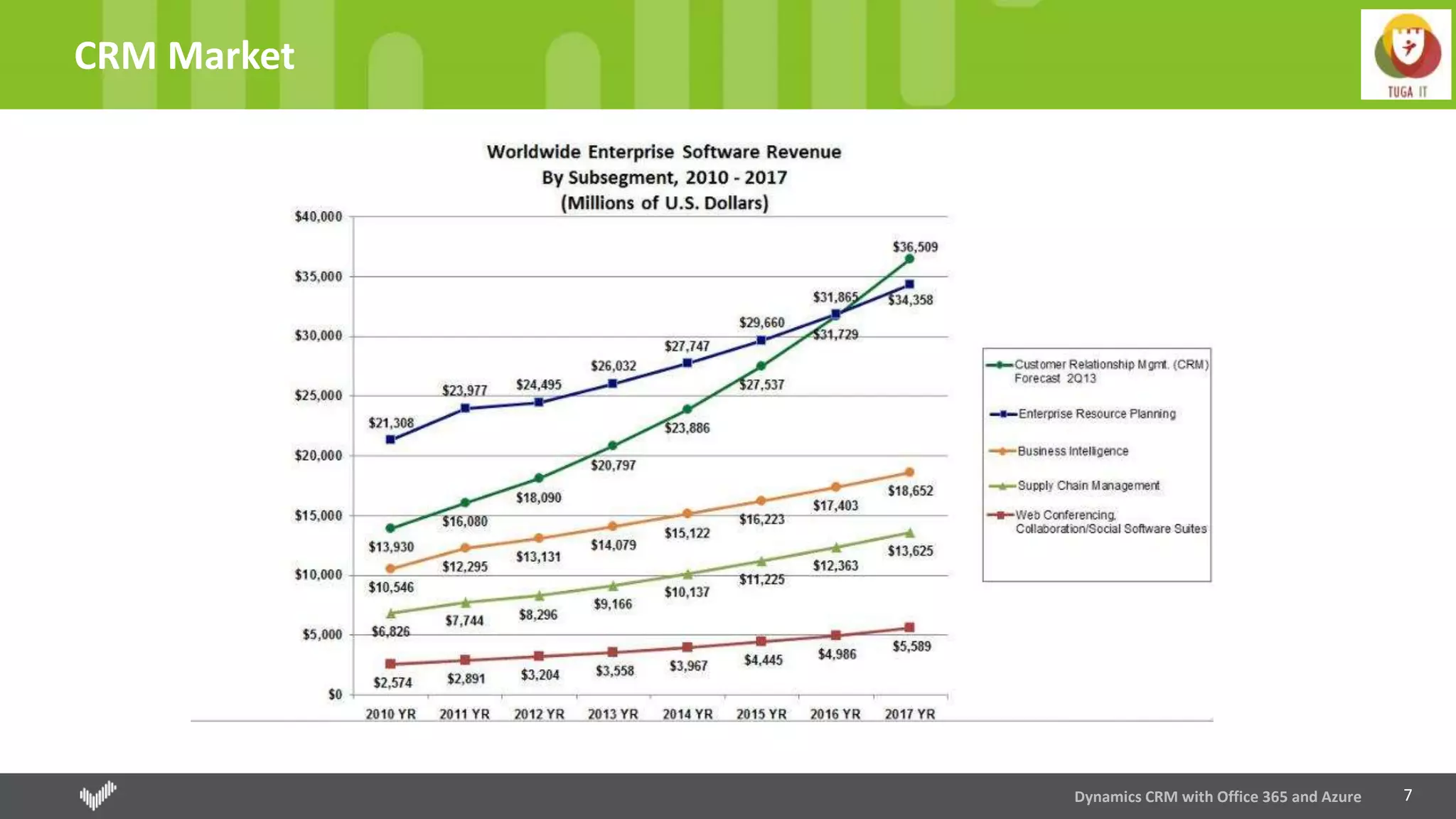
CRM Market
7
CRM Market
Dynamics CRM with Office 365 and Azure
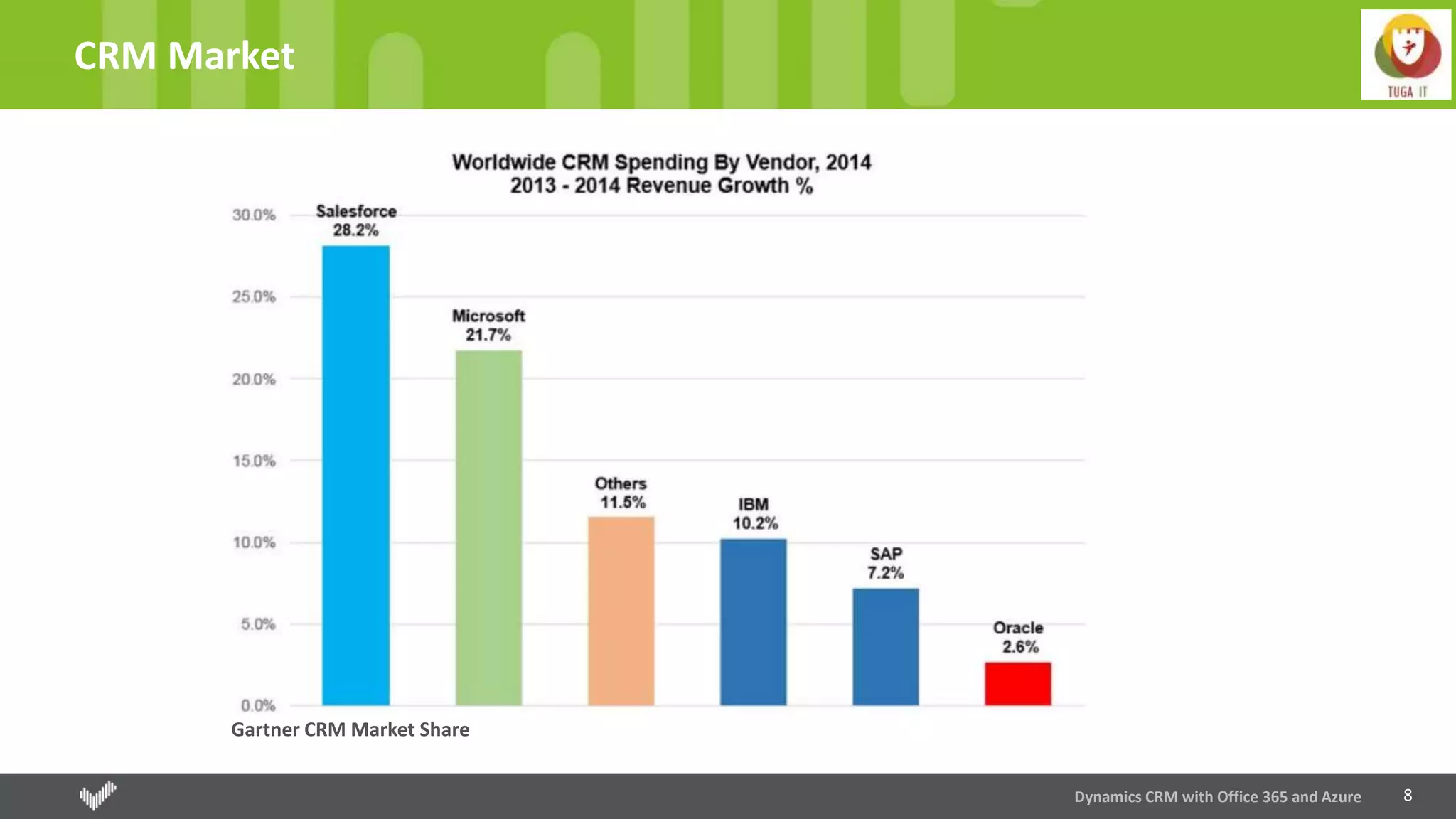
8
CRM Market
Dynamics CRM with Office 365 and Azure
Gartner CRM Market Share
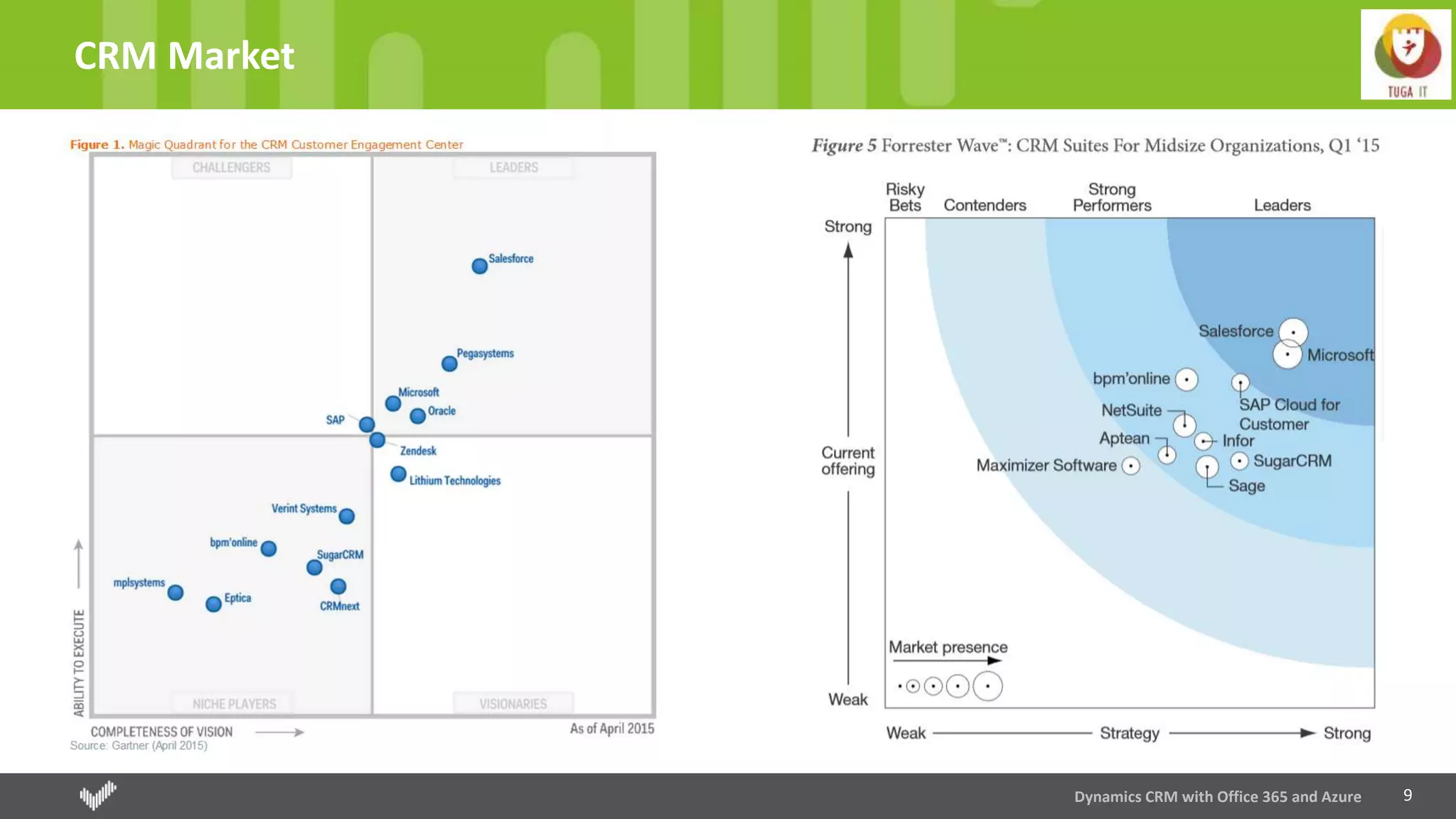
9
CRM Market
Dynamics CRM with Office 365 and Azure
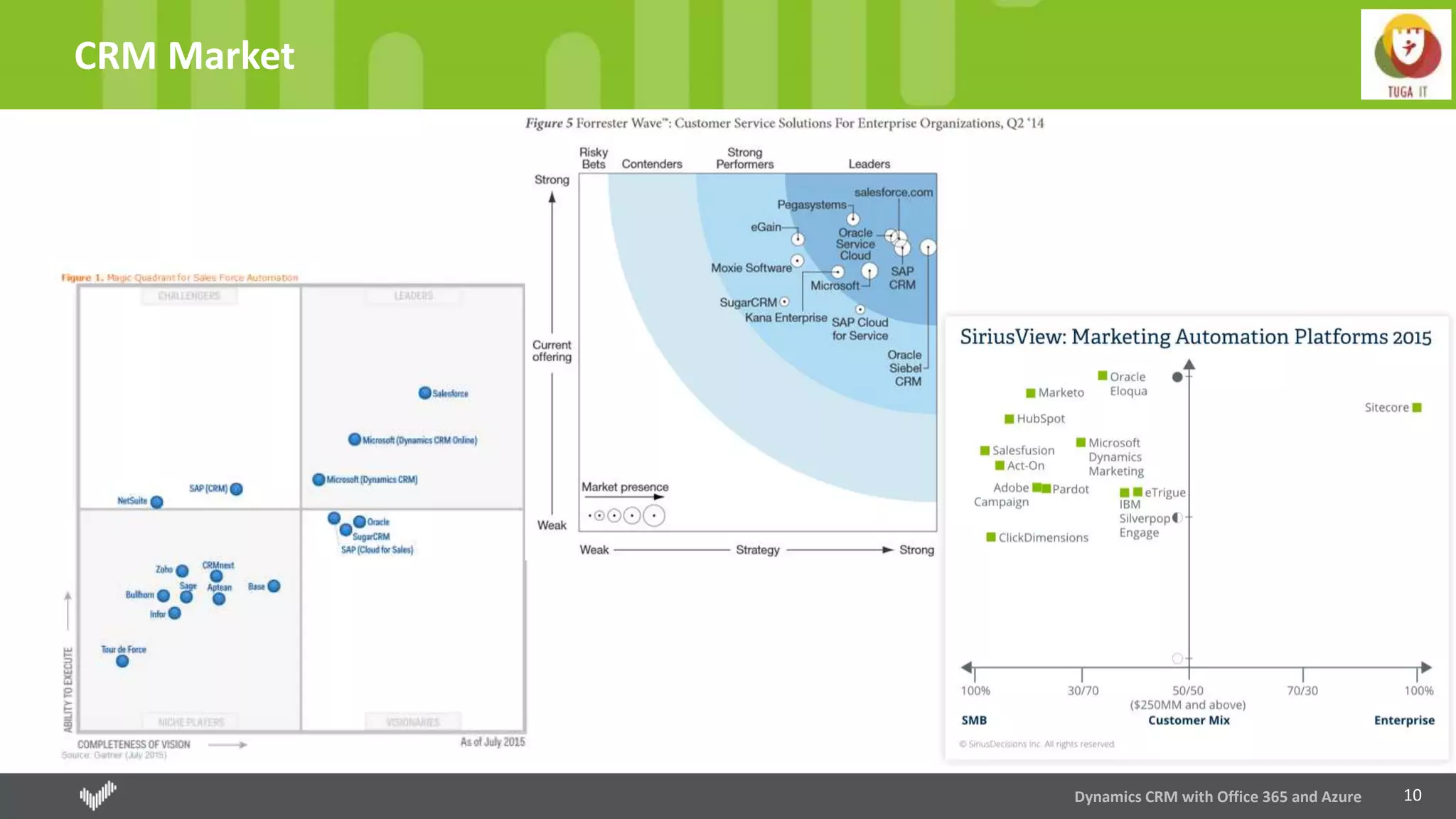
10
CRM Market
Dynamics CRM with Office 365 and Azure
11
Shop to Grow
Skype (2011)
Yammer (2012)
MarketingPilot (2012) – Microsoft Dynamics Marketing (MDM)
Netbreeze (2013) – Microsoft Social Engagement (MSE)
Parature (2014)
Mojo Surveys (2015)
FieldOne (2015)
FantasySalesTeam (2015)
Adxstudio (2015)
Dynamics CRM with Office 365 and Azure
12
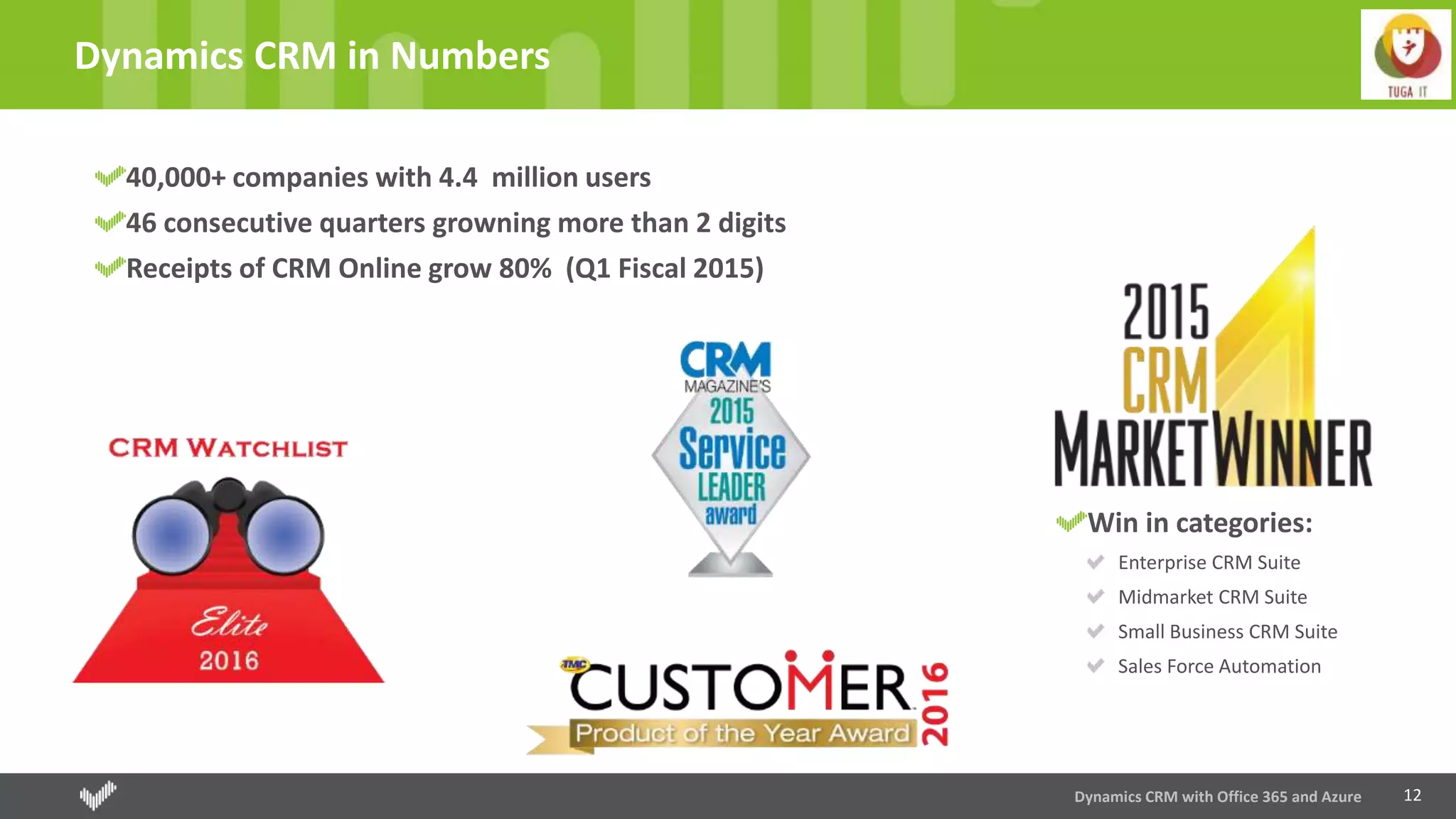
Dynamics CRM in Numbers
40,000+ companies with 4.4 million users
46 consecutive quarters growning more than 2 digits
Receipts of CRM Online grow 80% (Q1 Fiscal 2015)
Dynamics CRM with Office 365 and Azure
Win in categories:
Enterprise CRM Suite
Midmarket CRM Suite
Small Business CRM Suite
Sales Force Automation
13
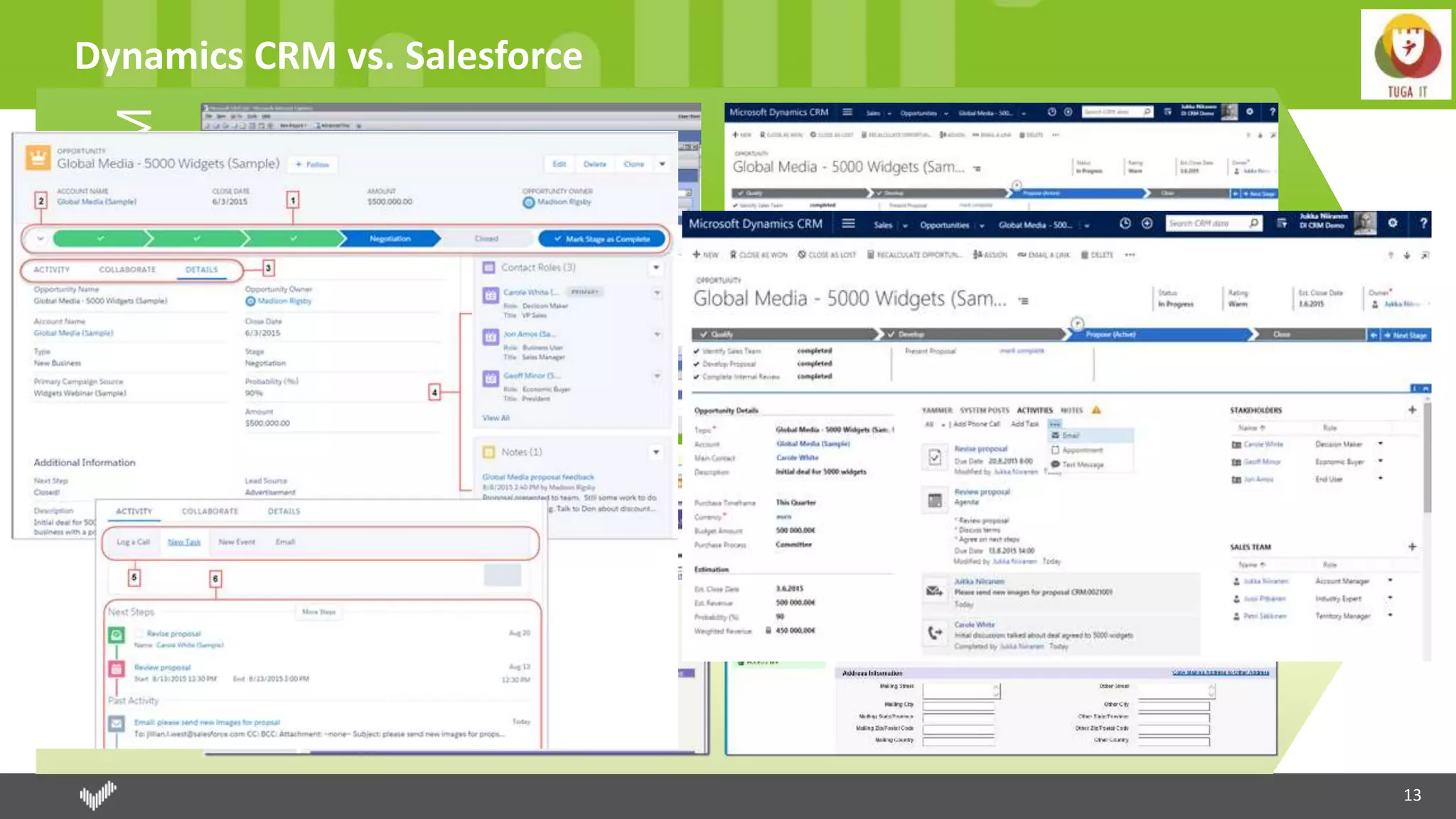
Dynamics CRM vs. Salesforce
Microsoft
DynamicsCRM
Salesforce
Dynamics CRM
15
Sales
Sales Analyse
Sales Analyse at real-time
Dashboards; Reports; Excel Export; PowerBI
Management of leads, accounts and opportunities
Mobility
Smartphones and tablets applications
Voice Commands
Offline Acess
Guided Process of Sales
Know what best process and know which state is the record and what is missing to accomplish
16
Service
Manage and Analyse Incidents
Different level of support based on contracts and SLAs.
Manage and Analyse Services
Scheduling of services
Knownledgment Managenagement
Resolution for incidentes already resolved
USD
All applications just in one window
17
Marketing
Marketing analysis
Planning and budget
Segmentation of data
Campaign management
Track of leads
18
xRM
Platform for rapid development
Flexible data model
Security through roles
Processes
Customization point-and-click and declarative design
Developing tools
© 2016, Right IT Services. All rights reserved
Microsoft Dynamics CRM
DEMO
20
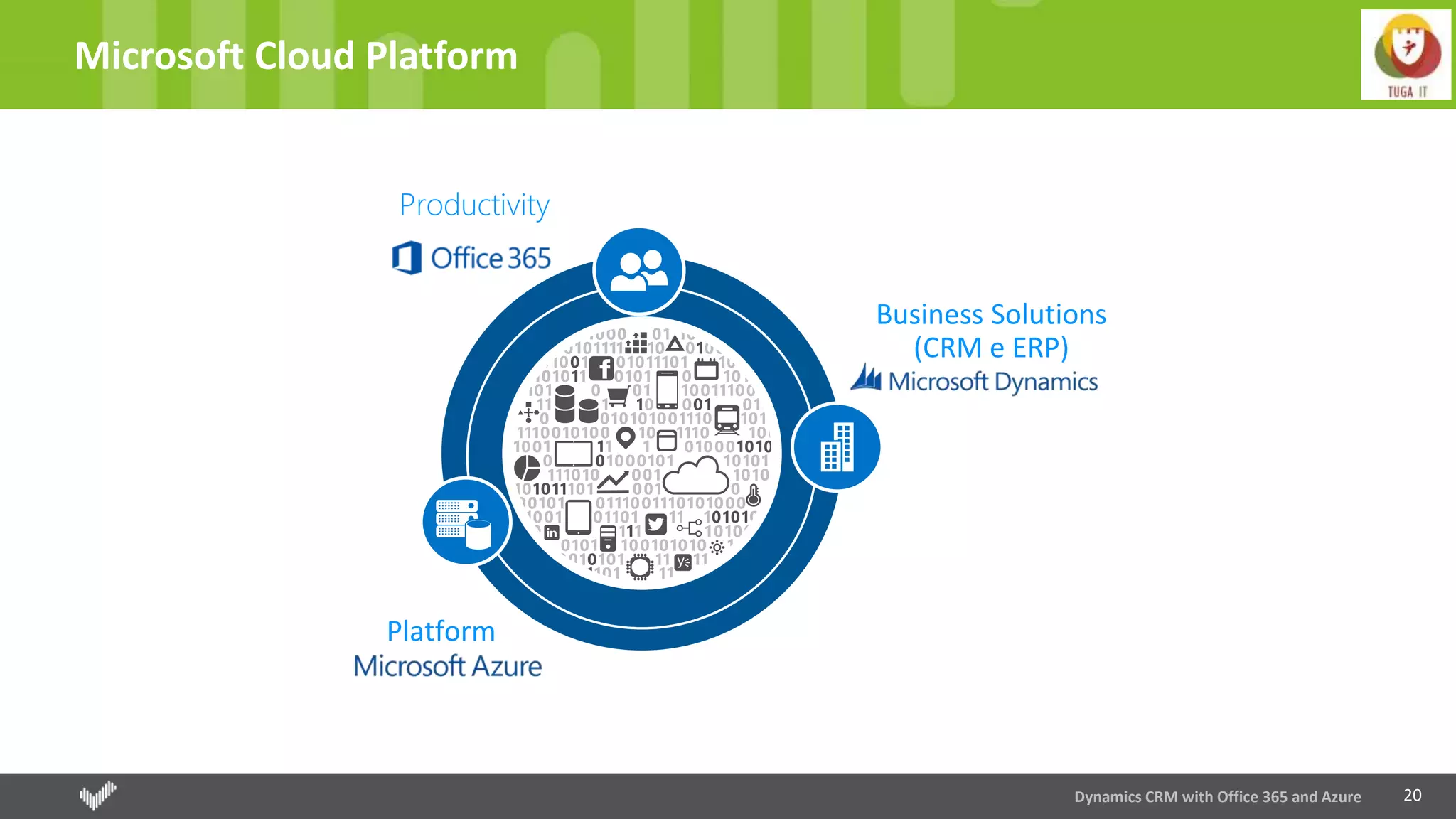
Microsoft Cloud Platform
Dynamics CRM with Office 365 and Azure
Platform
Business Solutions
(CRM e ERP)
Productivity
Dynamics CRM + Office 365
22
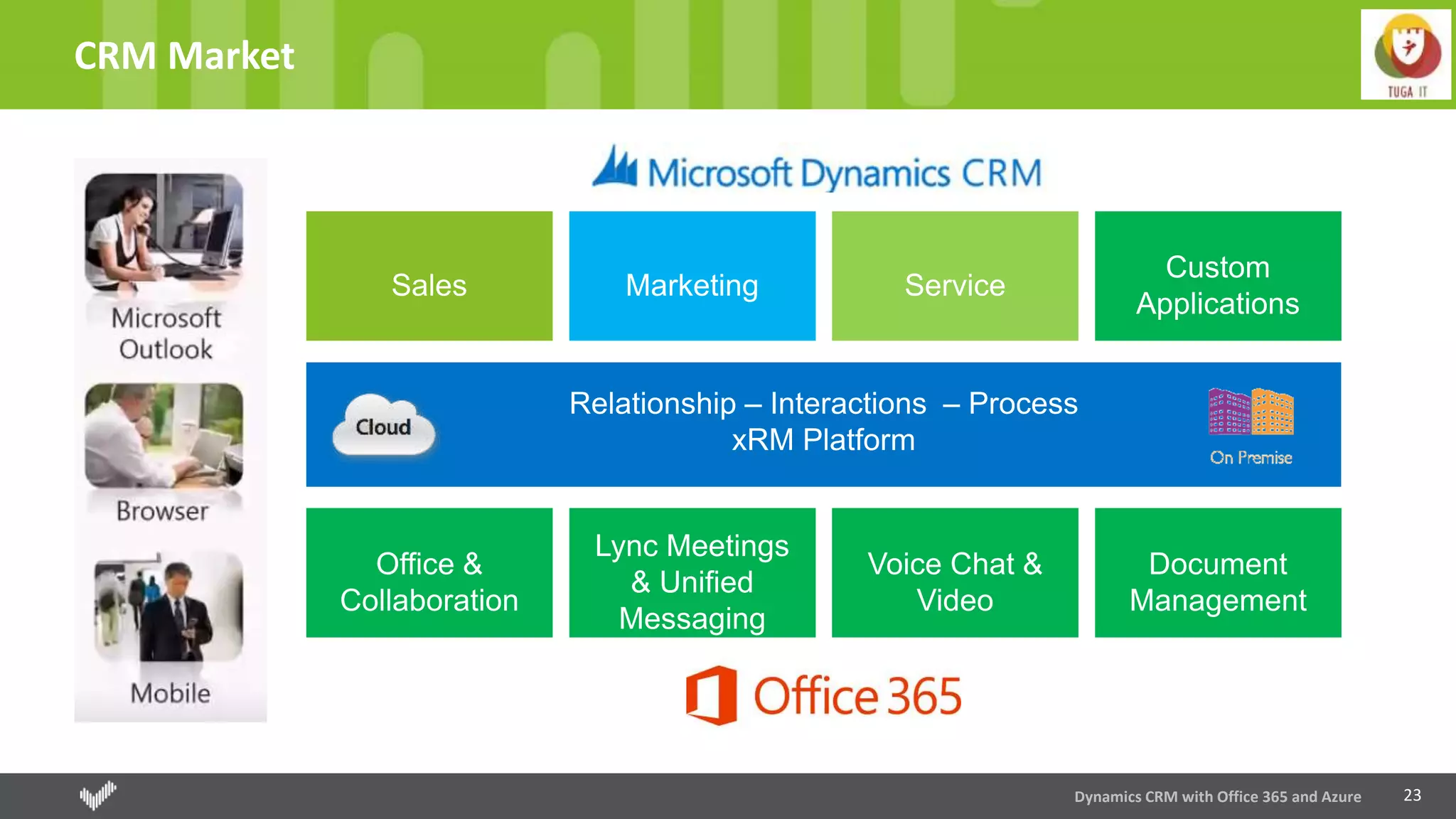
CRM Market
Dynamics CRM with Office 365 and Azure
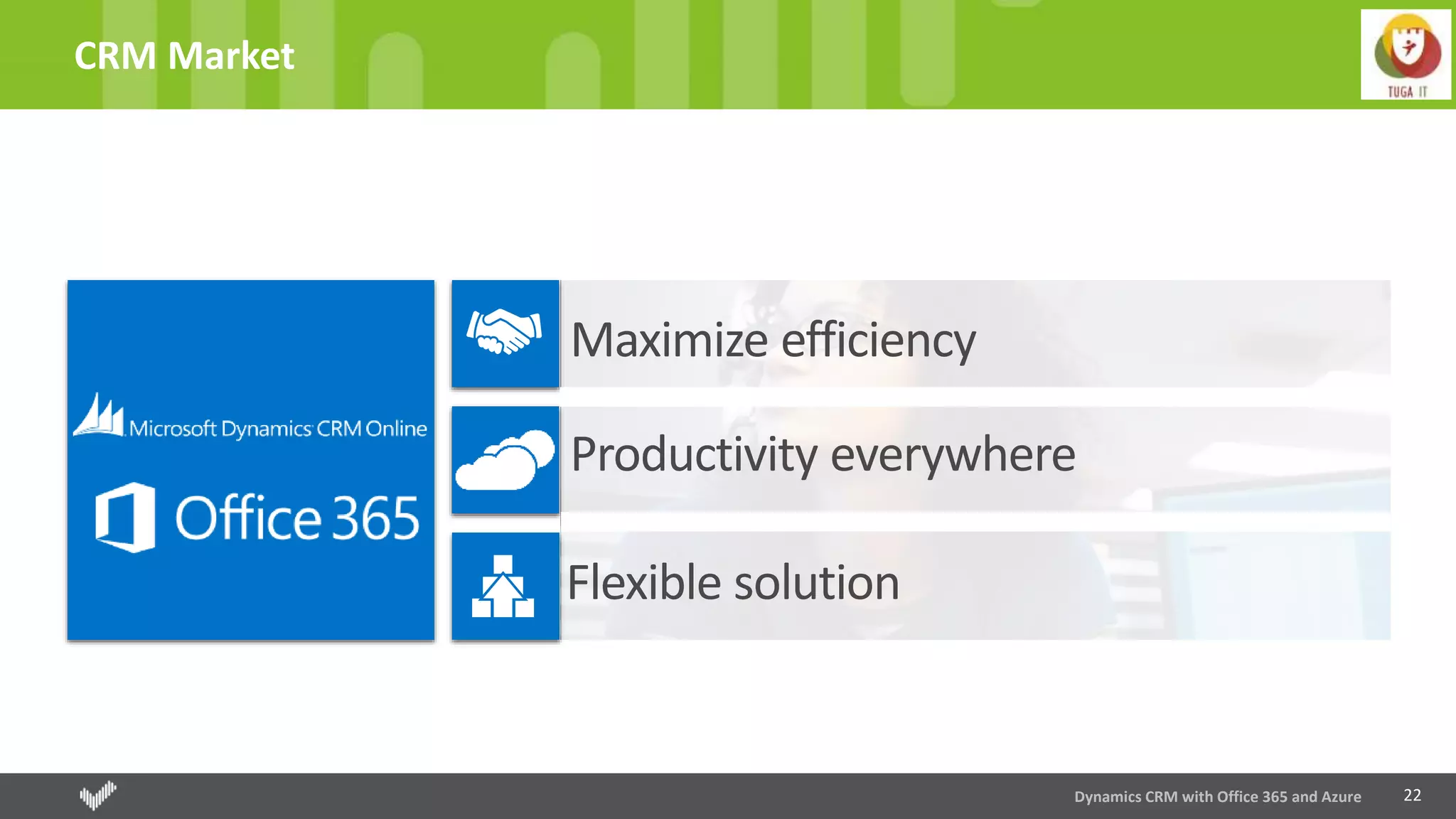
Maximize efficiency
Productivity everywhere
Flexible solution
23
CRM Market
Dynamics CRM with Office 365 and Azure
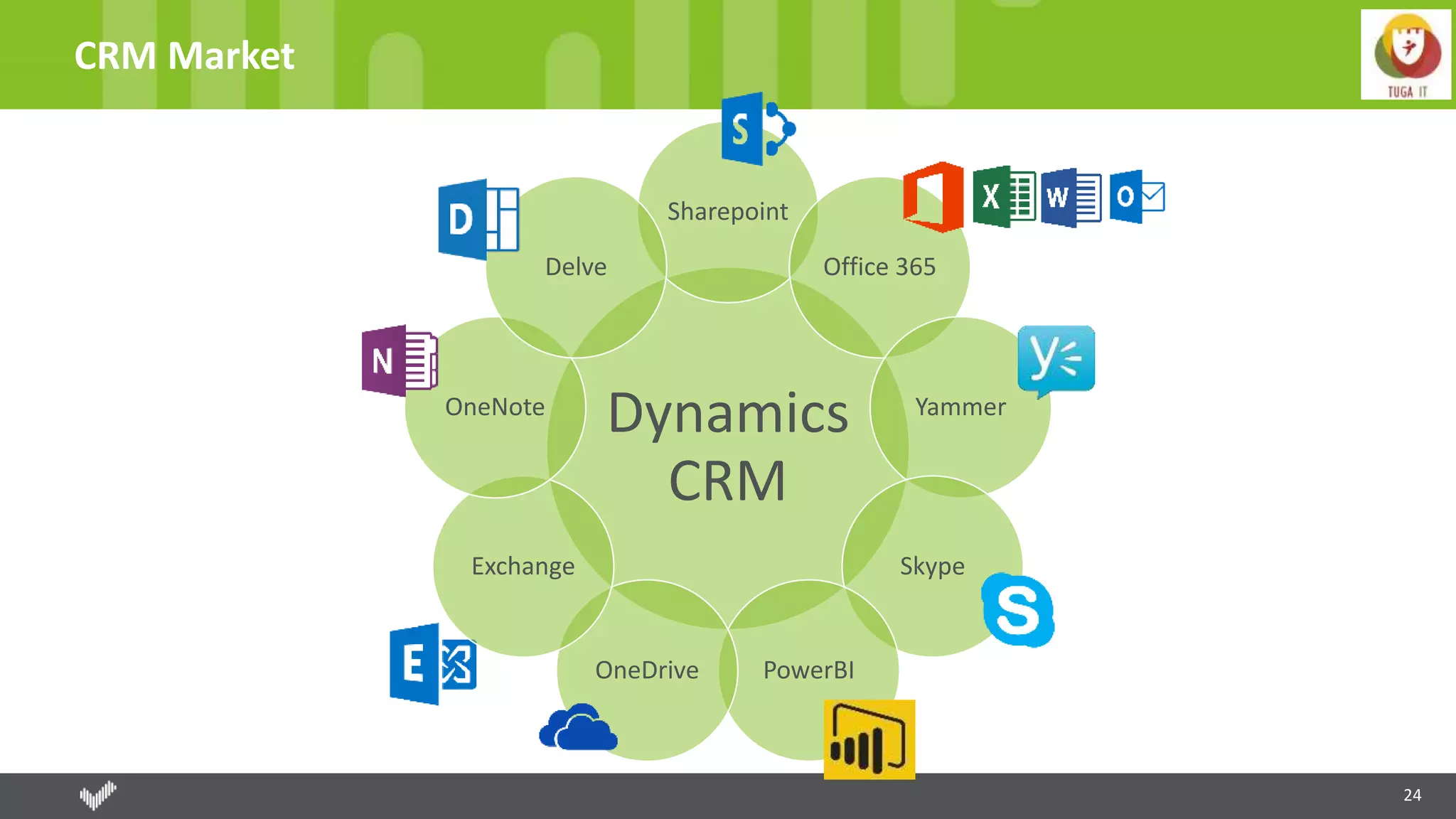
24
CRM Market
Dynamics
CRM
Sharepoint
Office 365
Yammer
Skype
PowerBIOneDrive
Exchange
OneNote
Delve
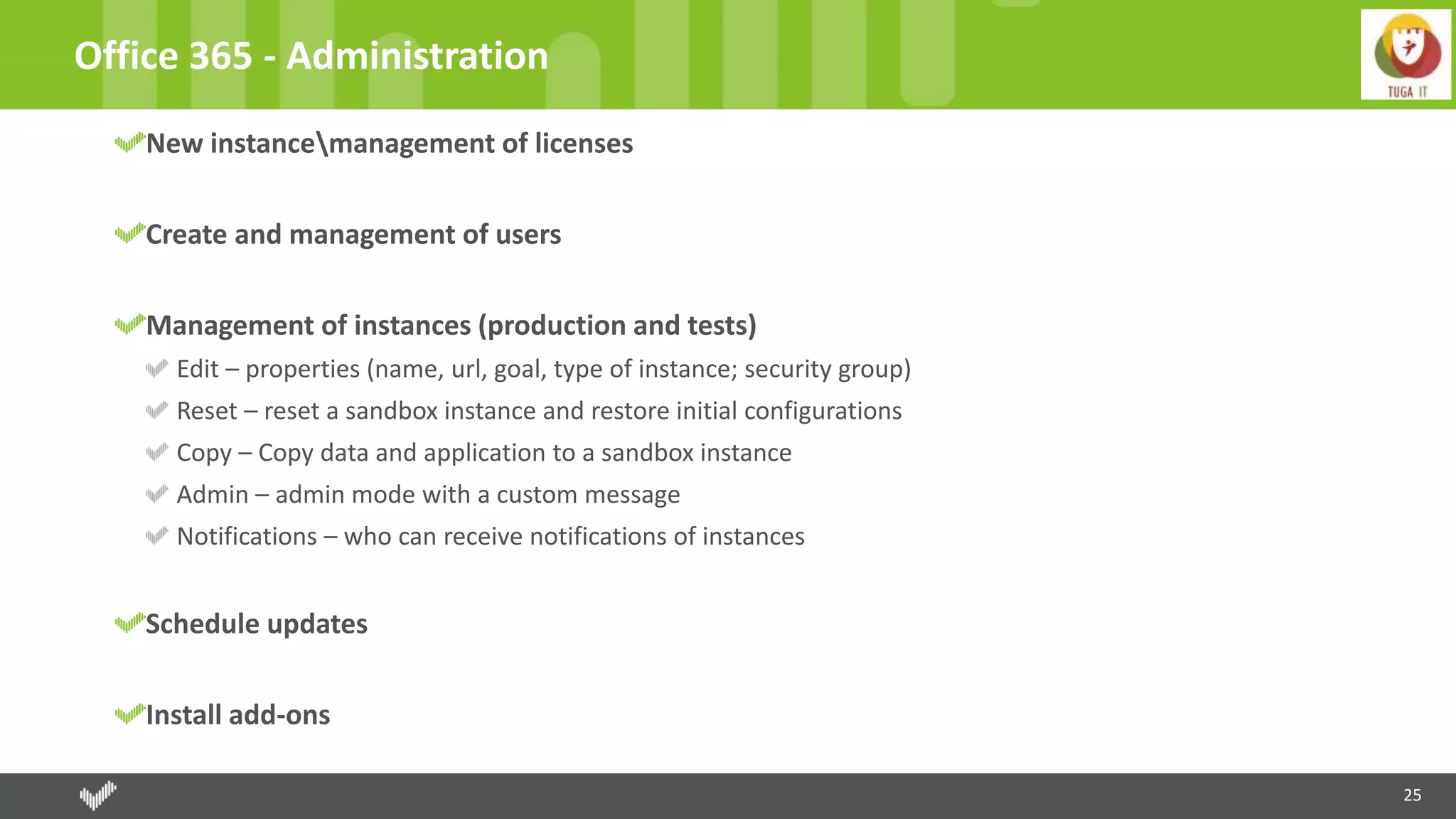
25
Office 365 - Administration
New instancemanagement of licenses
Create and management of users
Management of instances (production and tests)
Edit – properties (name, url, goal, type of instance; security group)
Reset – reset a sandbox instance and restore initial configurations
Copy – Copy data and application to a sandbox instance
Admin – admin mode with a custom message
Notifications – who can receive notifications of instances
Schedule updates
Install add-ons
© 2016, Right IT Services. All rights reserved
Office 365 - Administration
DEMO
27
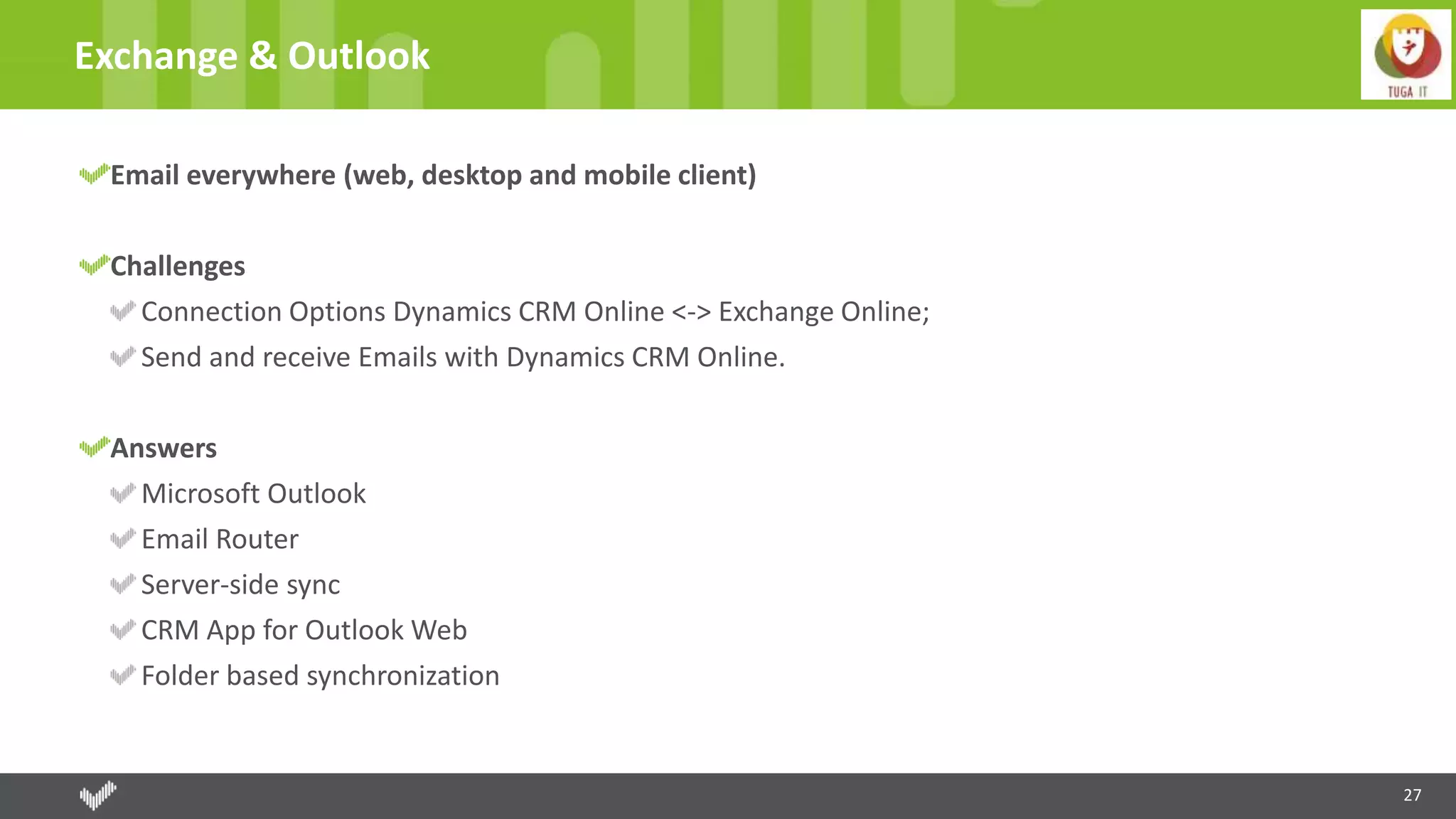
Exchange & Outlook
Email everywhere (web, desktop and mobile client)
Challenges
Connection Options Dynamics CRM Online <-> Exchange Online;
Send and receive Emails with Dynamics CRM Online.
Answers
Microsoft Outlook
Email Router
Server-side sync
CRM App for Outlook Web
Folder based synchronization
28
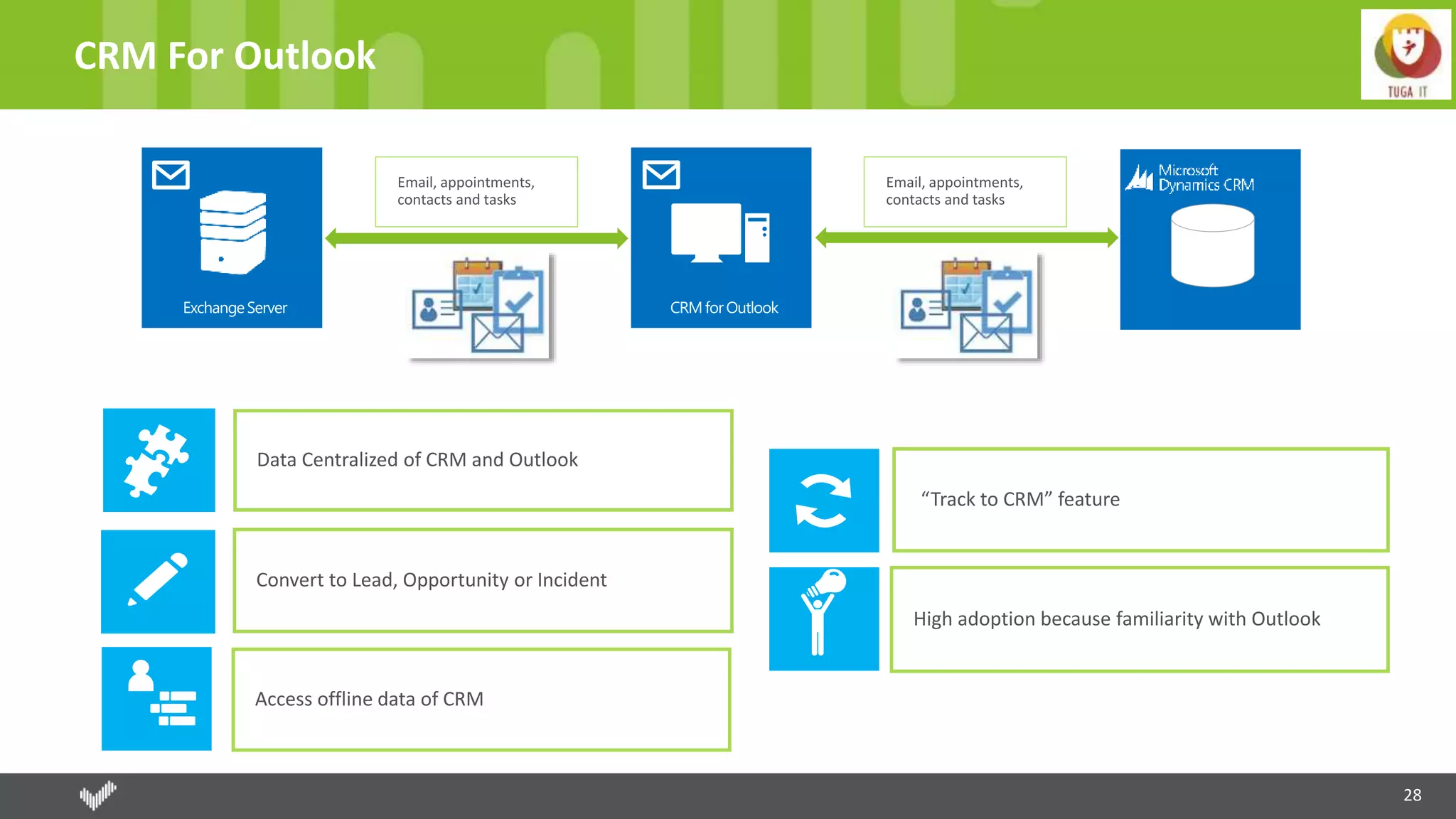
CRM For Outlook
“Track to CRM” feature
Data Centralized of CRM and Outlook
High adoption because familiarity with Outlook
Convert to Lead, Opportunity or Incident
Access offline data of CRM
29
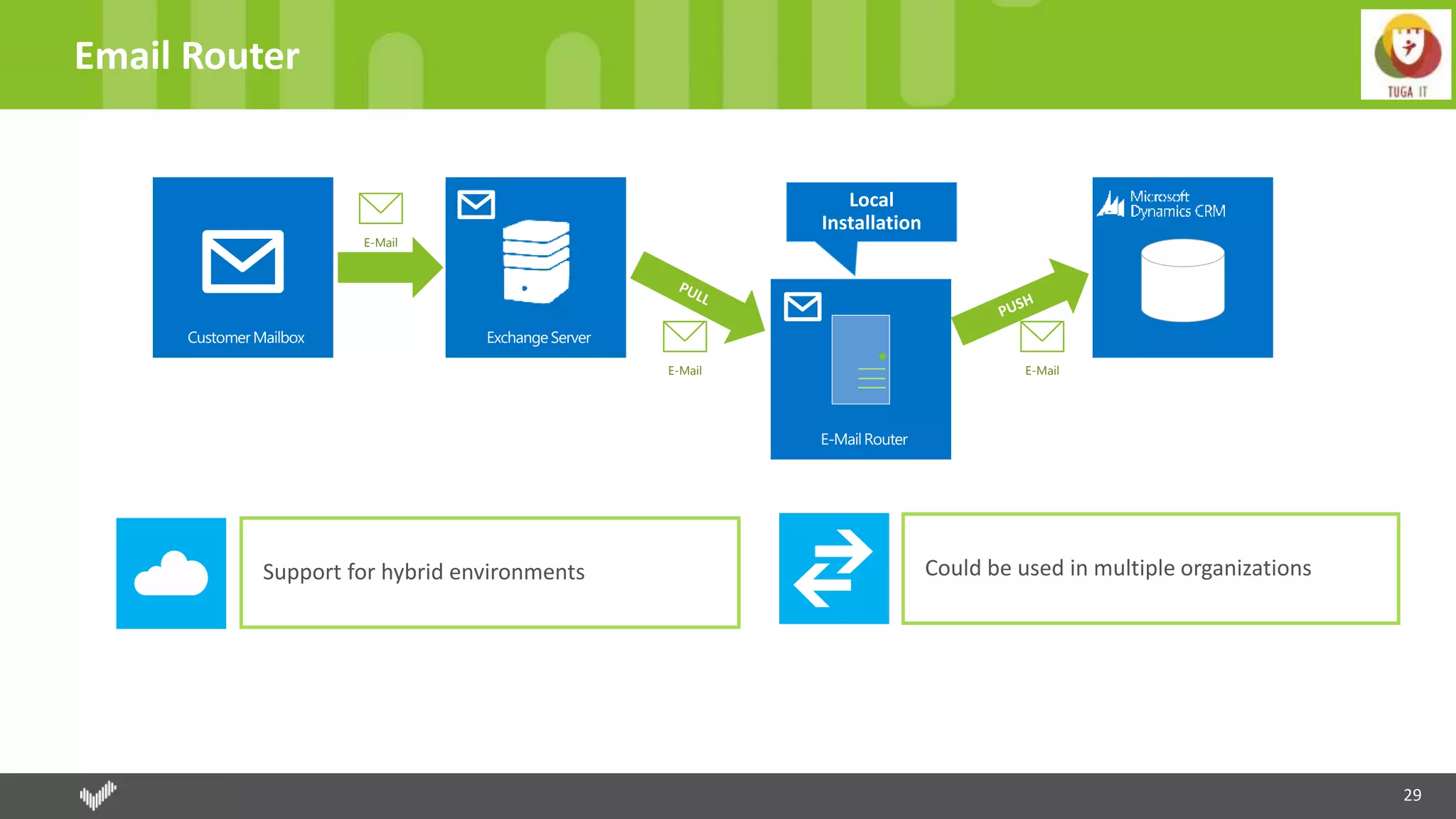
Email Router
E-Mail
E-Mail E-Mail
Support for hybrid environments Could be used in multiple organizations
30
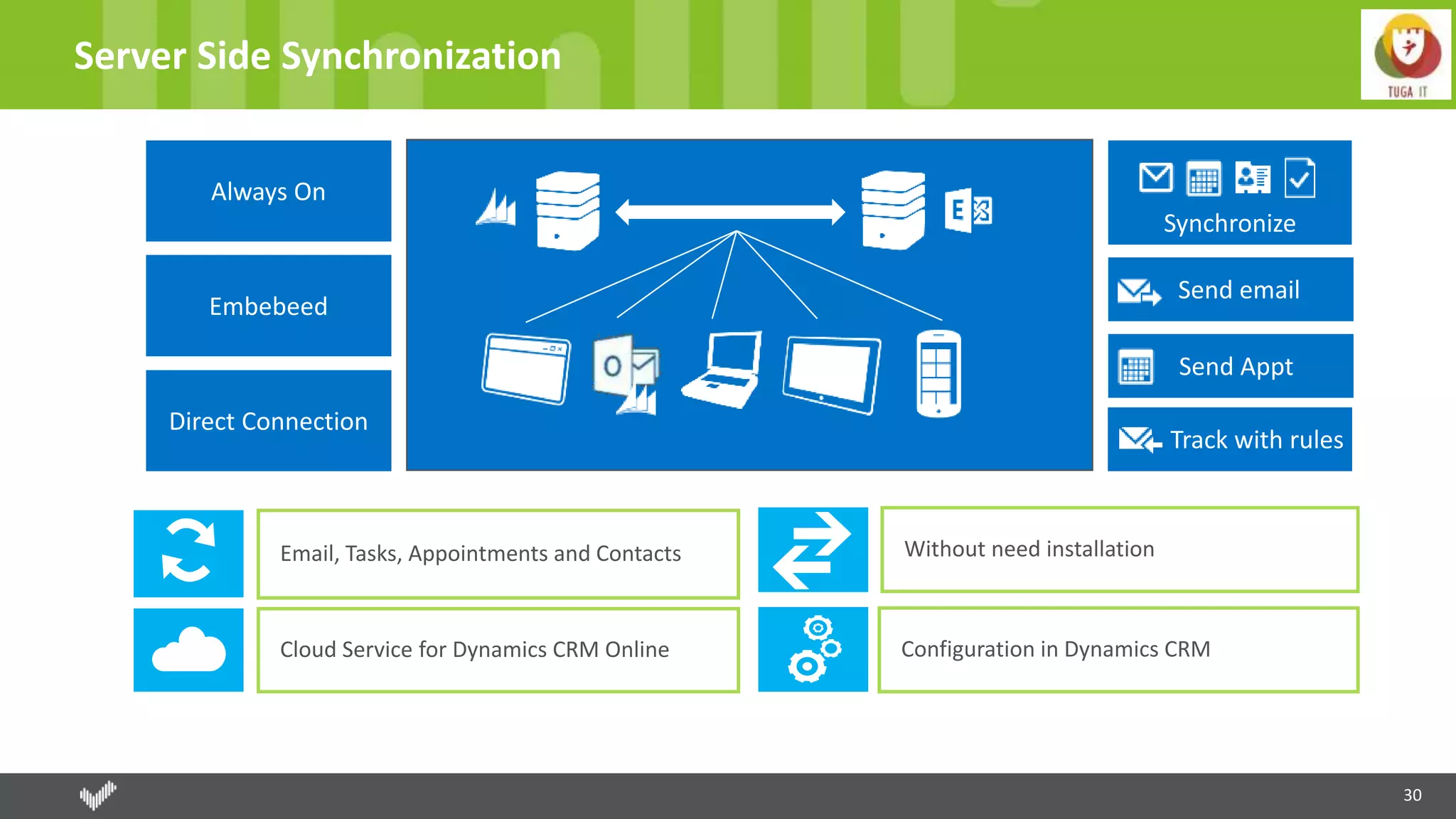
Server Side Synchronization
Email, Tasks, Appointments and Contacts
Cloud Service for Dynamics CRM Online
Without need installation
Configuration in Dynamics CRM
31
Other Ways
Dynamics CRM for Outlook Web
Contextual Dynamics CRM information about the people sending you email, sales activities, cases and
opportunities
Track the email and associate with CRM entity and convert in client, contact or a lead
Good support to mobile
Demands an installation and restricted to OWA version
Folder based synchronization
Email tracking is very important (keep everyone with last information)
Available with all device that supports Exchange
Allow automatic track and set the regarding entity
Works with Exchange rules (Without need intervation of system administrators, users can create the rules.)
© 2016, Right IT Services. All rights reserved
Outlook & Exchange
DEMO
33
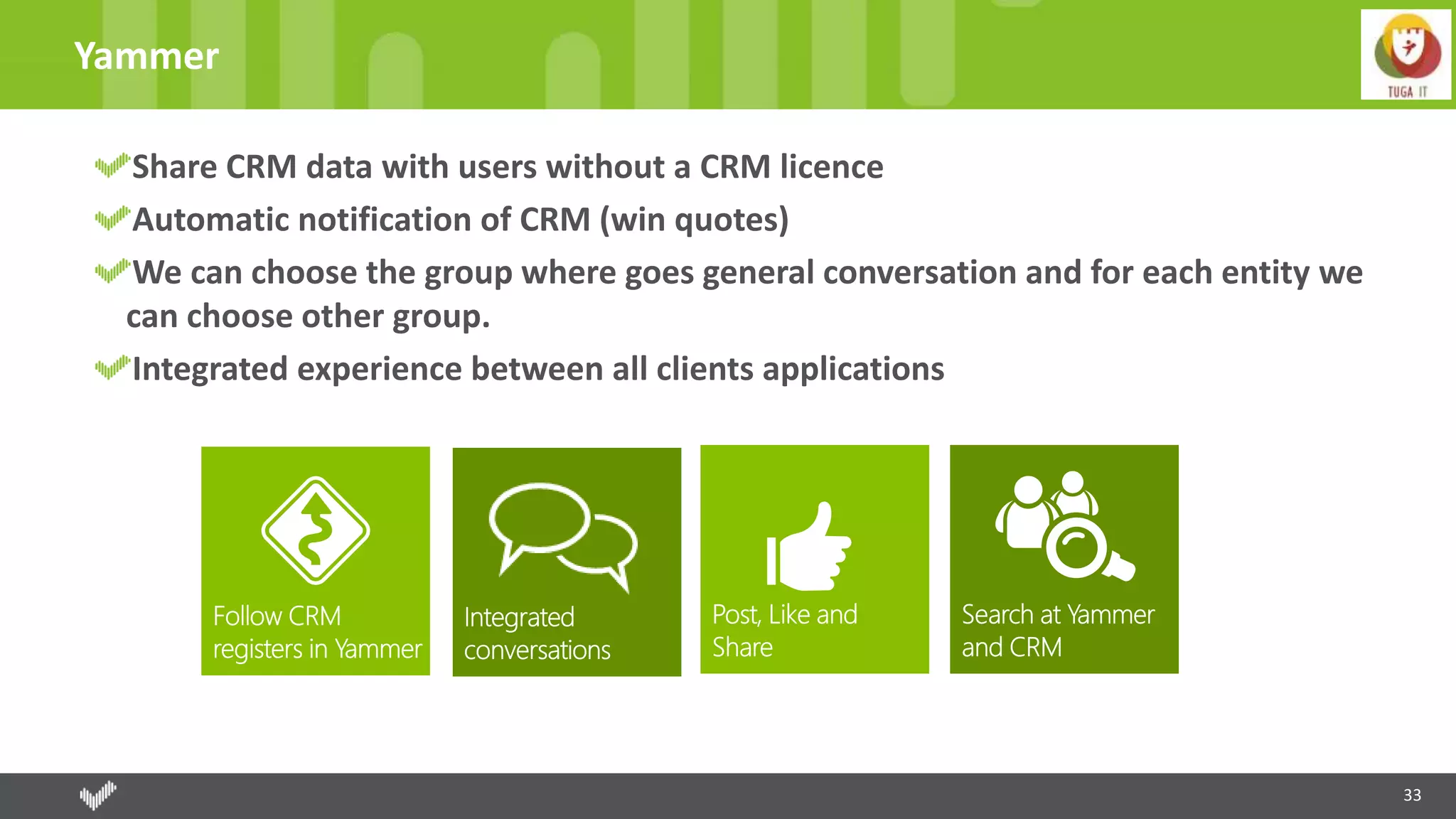
Yammer
Share CRM data with users without a CRM licence
Automatic notification of CRM (win quotes)
We can choose the group where goes general conversation and for each entity we
can choose other group.
Integrated experience between all clients applications
© 2016, Right IT Services. All rights reserved
Yammer
DEMO
35
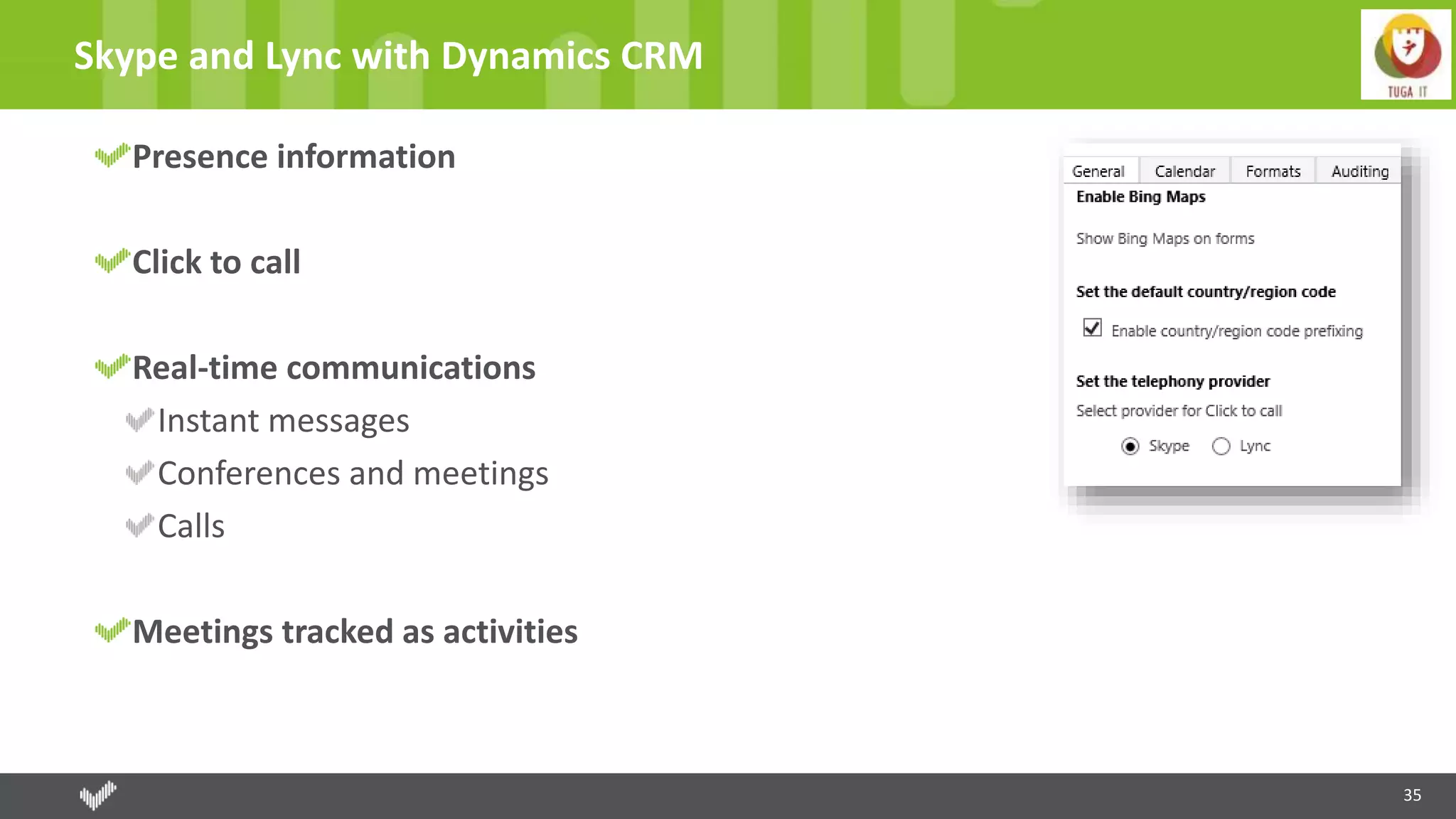
Skype and Lync with Dynamics CRM
Presence information
Click to call
Real-time communications
Instant messages
Conferences and meetings
Calls
Meetings tracked as activities
36
SharePoint
Configuration through Wizards
Select entities we want create at SharePoint. Automatically folder for each entity.
Native experience
Create; Upload; Visualization
Check-In; Check-Out; View history
Cheaper Cloud Storage for Documents
Contextual documents with the records
Interact without a CRM license, accessing directly with SharePoint
Can be the base for customize help – documents or sites
37
Office 365 - Groups
Distribution lists
Collaboration
Unified experience among Microsoft Dynamics CRM and non-Dynamics CRM users
Calendar, documents and conversations grouped in only place;
All interactions in a CRM record context
Groups available in Outlook, Office 365 and the Dynamics CRM record. Mobile access.
38
OneDrive for Business
Share documents - 1 TB of space
Create and manage private documents
Documents can be accessed within Dynamics CRM in the document grid
Storage is important in Dynamics CRM
© 2016, Right IT Services. All rights reserved
Sharepoint + Office 365 Groups + OneDrive
DEMO
40
Office - Excel
Excel embedded within CRM, without need to do alt+tab
Editions and analysis directly on CRM
Import at background
Export as static
Export dynamically
Update with new data
We can submit the changes
Templates – Document Generation
41
Office – Word e OneNote
Word
Mail-merge
Templates
OneNote
More rich notes (text, photos, voice, spreadsheets or handwritten notes)
Automatically create a notebook contextualized with the register of CRM.
Embedded inside Dynamics CRM
Office Delve
Powered by Office Graph
© 2016, Right IT Services. All rights reserved
Office
DEMO
43
PowerBI - Self-service analytics
Microsoft Dynamics CRM
Out-of-the-box connector and templates for Power BI
Analyze sales performance, drive pipeline goals and prepare
forecasts
Microsoft Dynamics Marketing
Content pack for Power BI
© 2016, Right IT Services. All rights reserved
PowerBI
DEMO
Azure
46
Deploy Dynamics CRM on Azure
Deployment on Microsoft Azure infrastructure as a service (IaaS)
DS-series of virtual machines
Preferred method for the deployment of Dynamics CRM onto Azure IaaS is using Microsoft Dynamics Lifecycle Services (LCS)
LCS, a cloud-based application life cycle management tool
LCS is Azure-based software as a service (SaaS) that’s free to Microsoft Dynamics customers
On-Premise
Azure Premium Storage
Locally redundant storage (LRS) and keeps three copies of the data in a single region
Premium Storage isn’t required for non-production environments
47
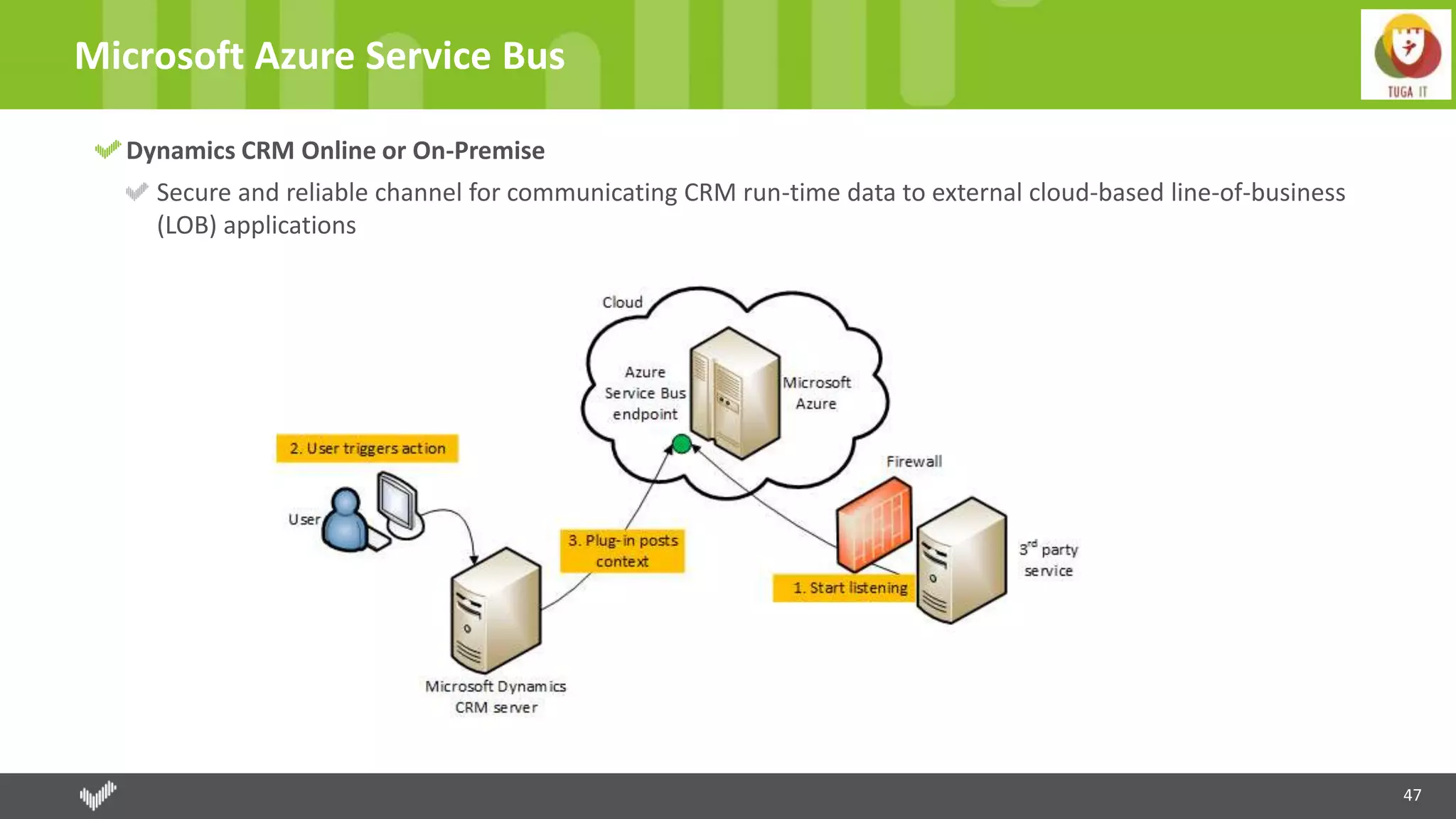
Microsoft Azure Service Bus
Dynamics CRM Online or On-Premise
Secure and reliable channel for communicating CRM run-time data to external cloud-based line-of-business
(LOB) applications
48
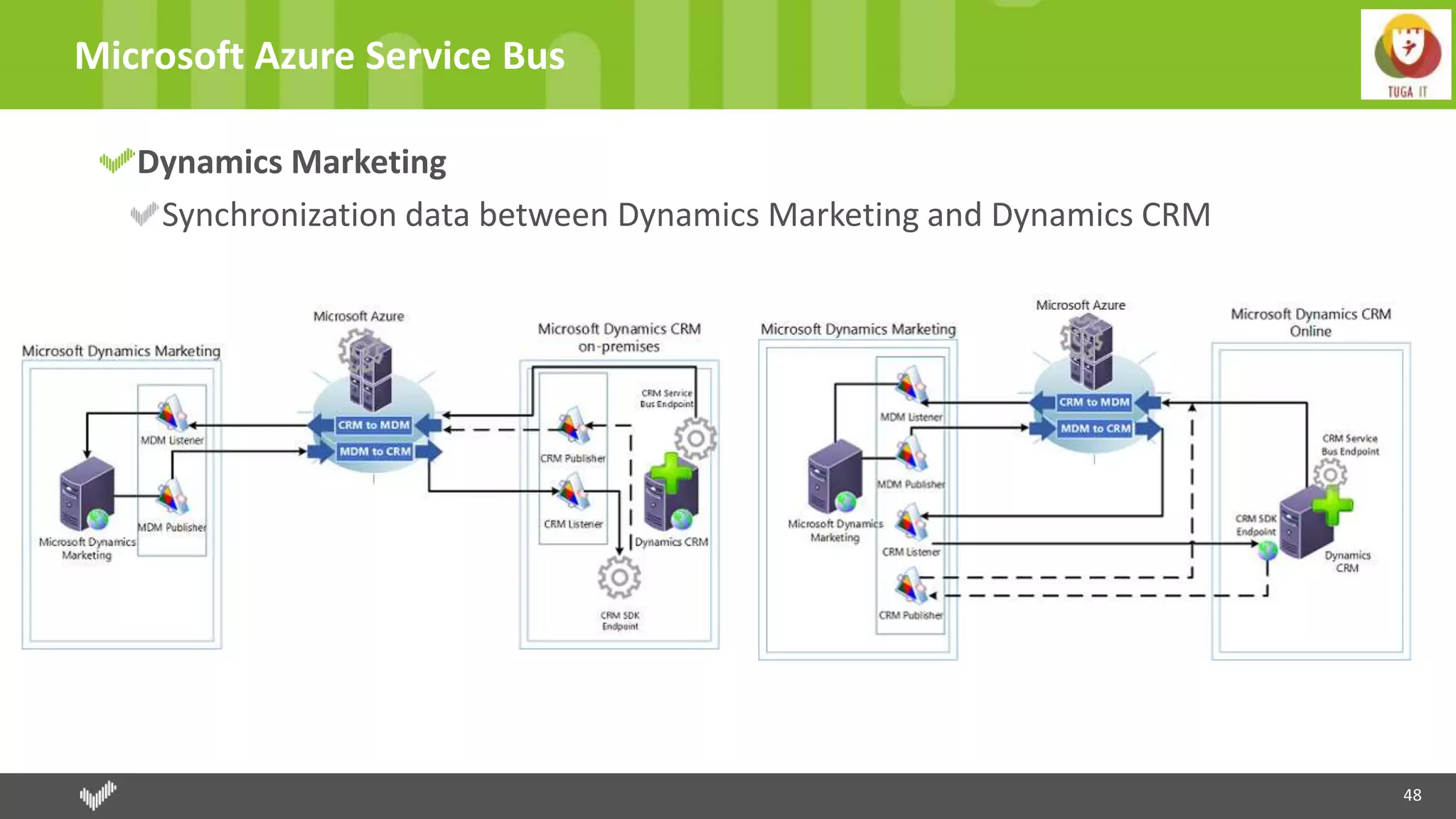
Microsoft Azure Service Bus
Dynamics Marketing
Synchronization data between Dynamics Marketing and Dynamics CRM
49
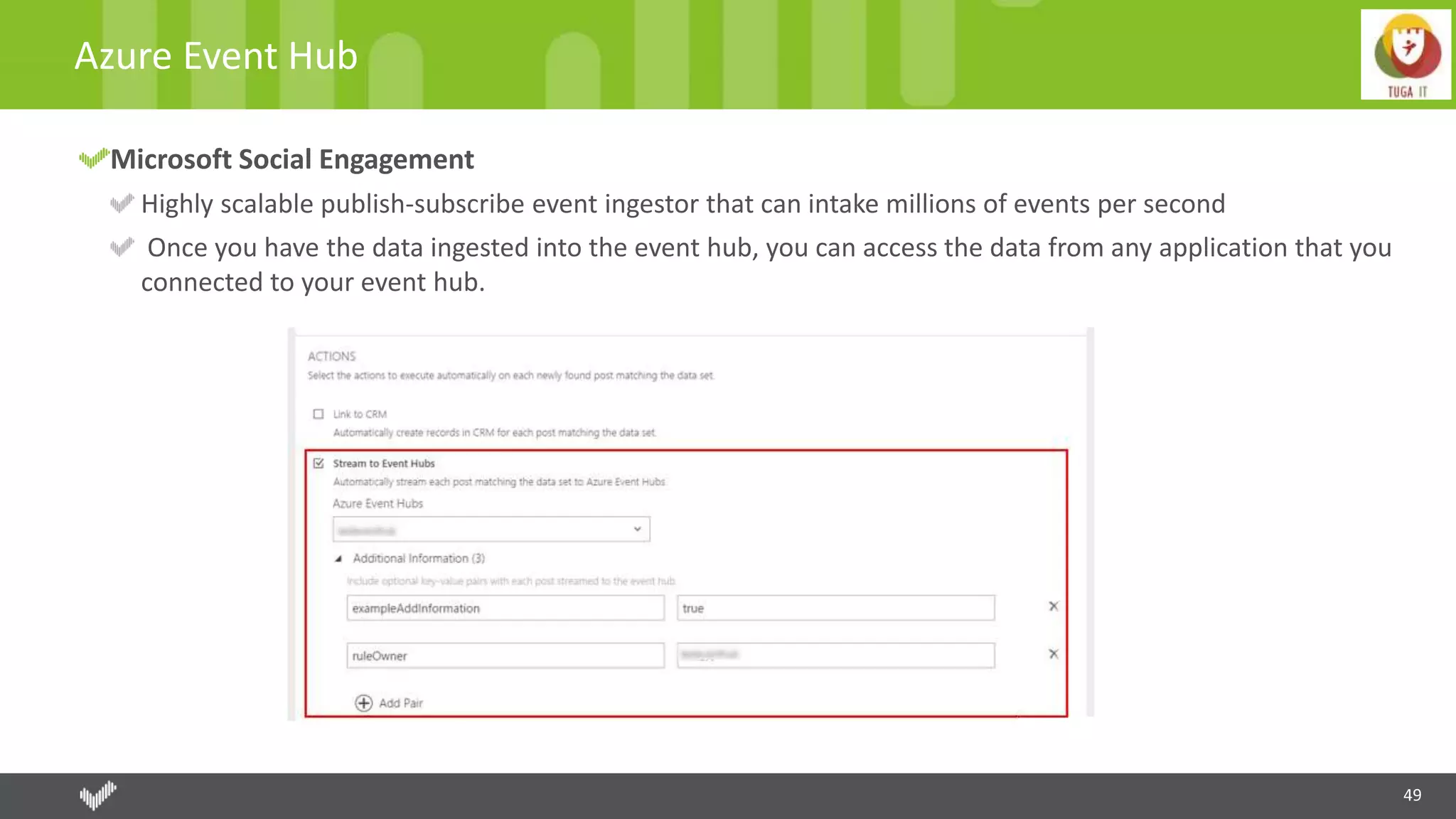
Azure Event Hub
Microsoft Social Engagement
Highly scalable publish-subscribe event ingestor that can intake millions of events per second
Once you have the data ingested into the event hub, you can access the data from any application that you
connected to your event hub.
50
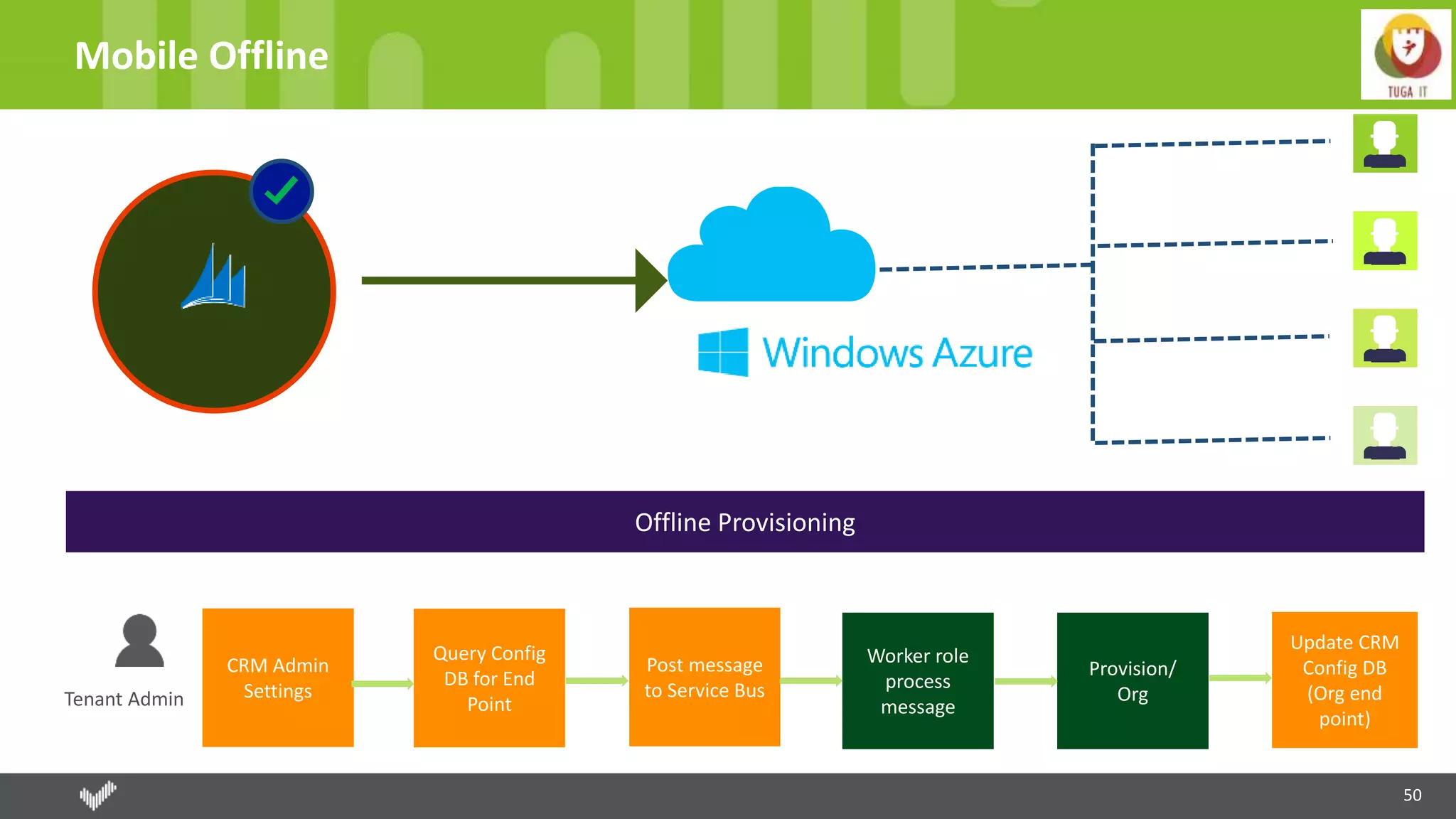
Mobile Offline
Tenant Admin
CRM Admin
Settings
Query Config
DB for End
Point
Post message
to Service Bus
Provision/
Org
Worker role
process
message
Update CRM
Config DB
(Org end
point)
Offline Provisioning
51
Azure offline mobility components
One Subscription per Geo
Separate deployments for prod and trial
Azure components deployed
Cloud Service
Queue – crm updates
Worker role – executes actions
SQL server DB
Two Storage accounts
Diagnostics
Sync Server Logs
52
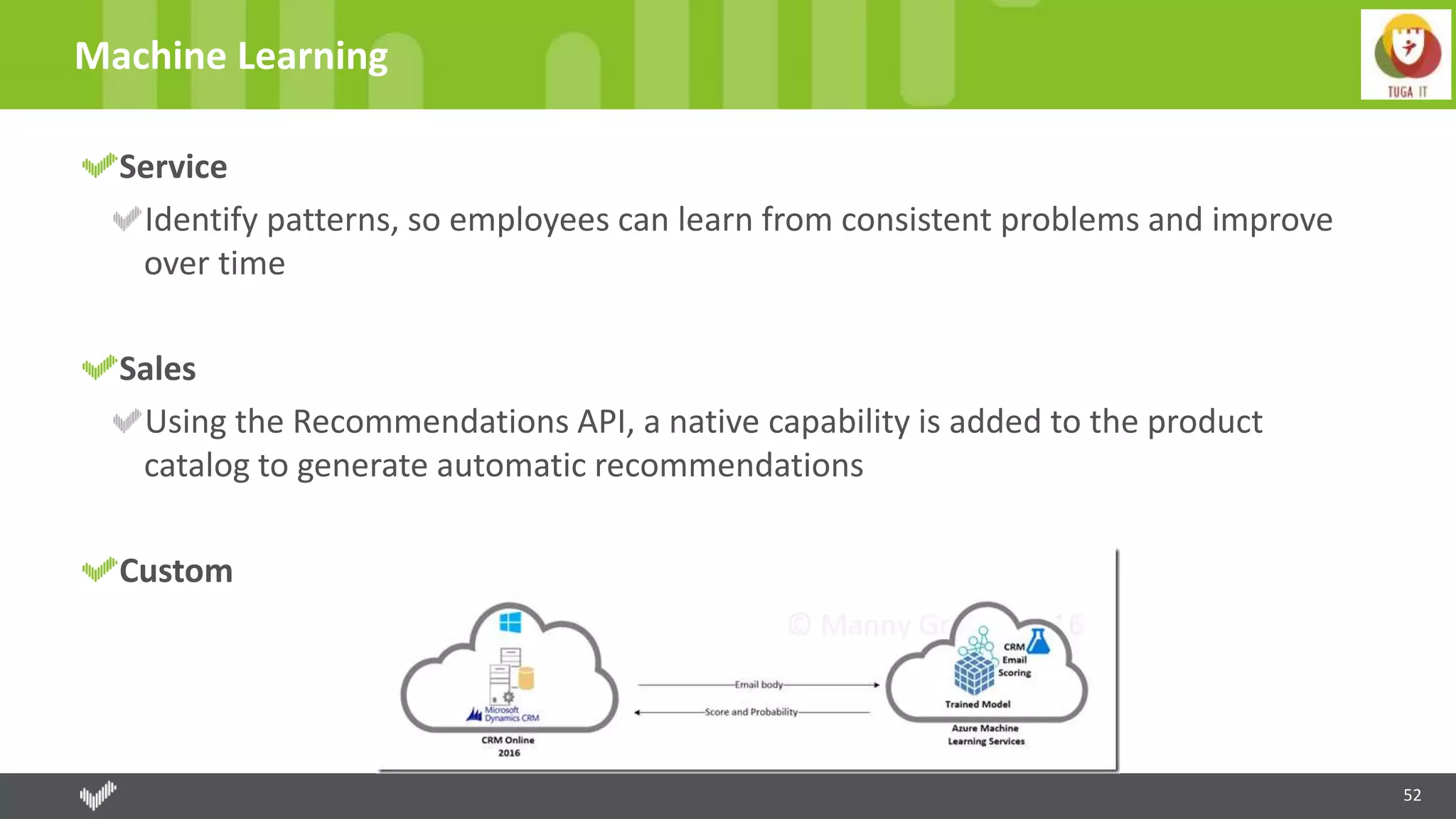
Machine Learning
Service
Identify patterns, so employees can learn from consistent problems and improve
over time
Sales
Using the Recommendations API, a native capability is added to the product
catalog to generate automatic recommendations
Custom
53
Voice of Customer
Cloud Services
Designer Service (Web Role)
Web Services for communication between a CRM organization and the multi-tenanted Voice of the Customer Azure
components.
Survey Runtime (Web Role)
Submitted survey responses are stored temporarily on an Azure Service Bus queue before being processed retrieved by CRM.
Response Processor (Worker Role)
Worker role is responsible for processing the raw completed surveys into valid survey responses that can be created in CRM.
Azure Key Vault
All cloud services store configuration data in Azure Key Vault. Organization, tenant data is stored in SQL Azure.
Azure SQL Database
Voice of the Customer uses SQL Azure to store: Piped data; Survey metadata; Organization (tenant) data
Azure Blob Storage
Survey definitions and partially completed (saved) responses are stored to Azure Blob storage.
54
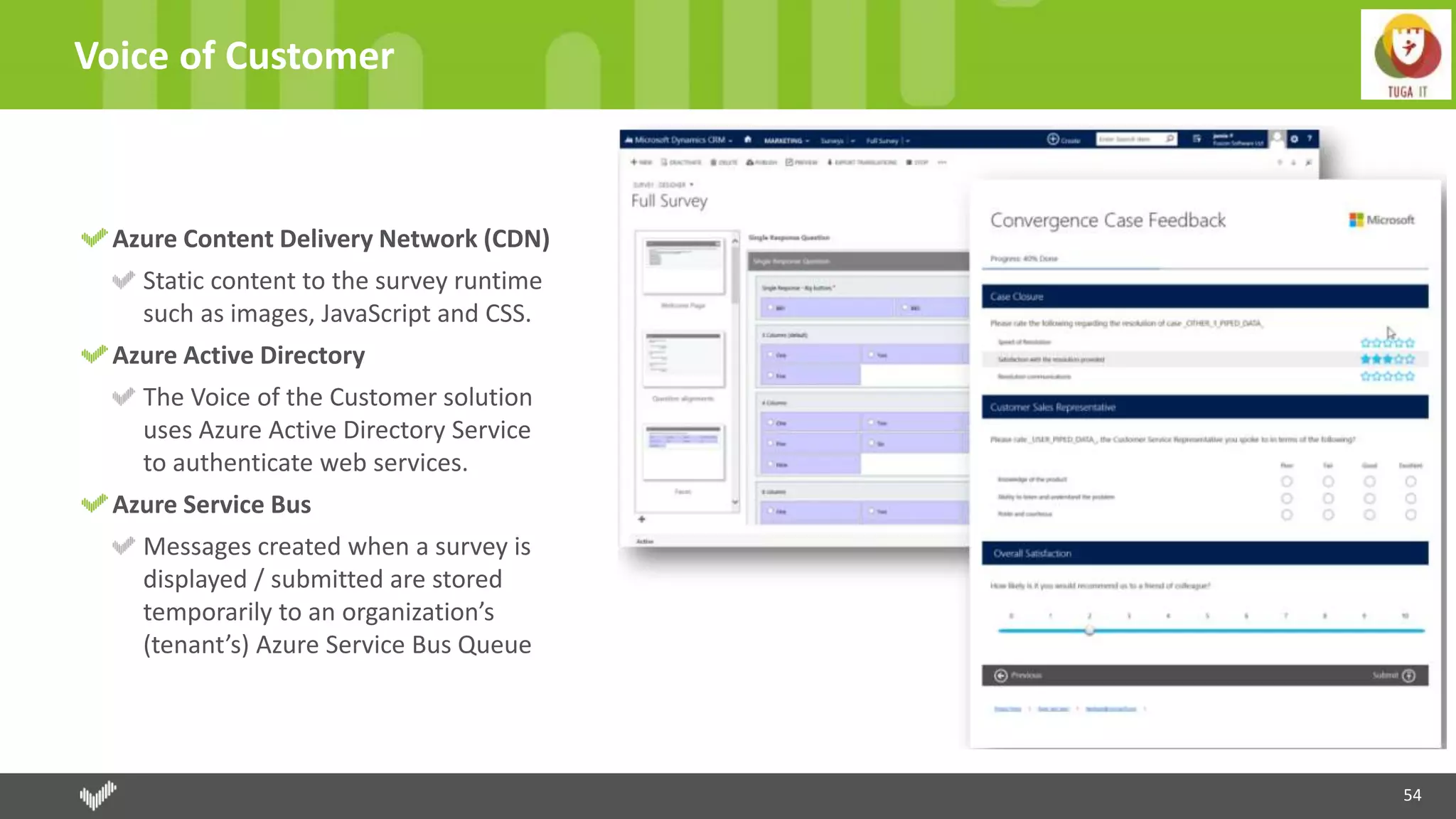
Voice of Customer
Azure Content Delivery Network (CDN)
Static content to the survey runtime
such as images, JavaScript and CSS.
Azure Active Directory
The Voice of the Customer solution
uses Azure Active Directory Service
to authenticate web services.
Azure Service Bus
Messages created when a survey is
displayed / submitted are stored
temporarily to an organization’s
(tenant’s) Azure Service Bus Queue
55
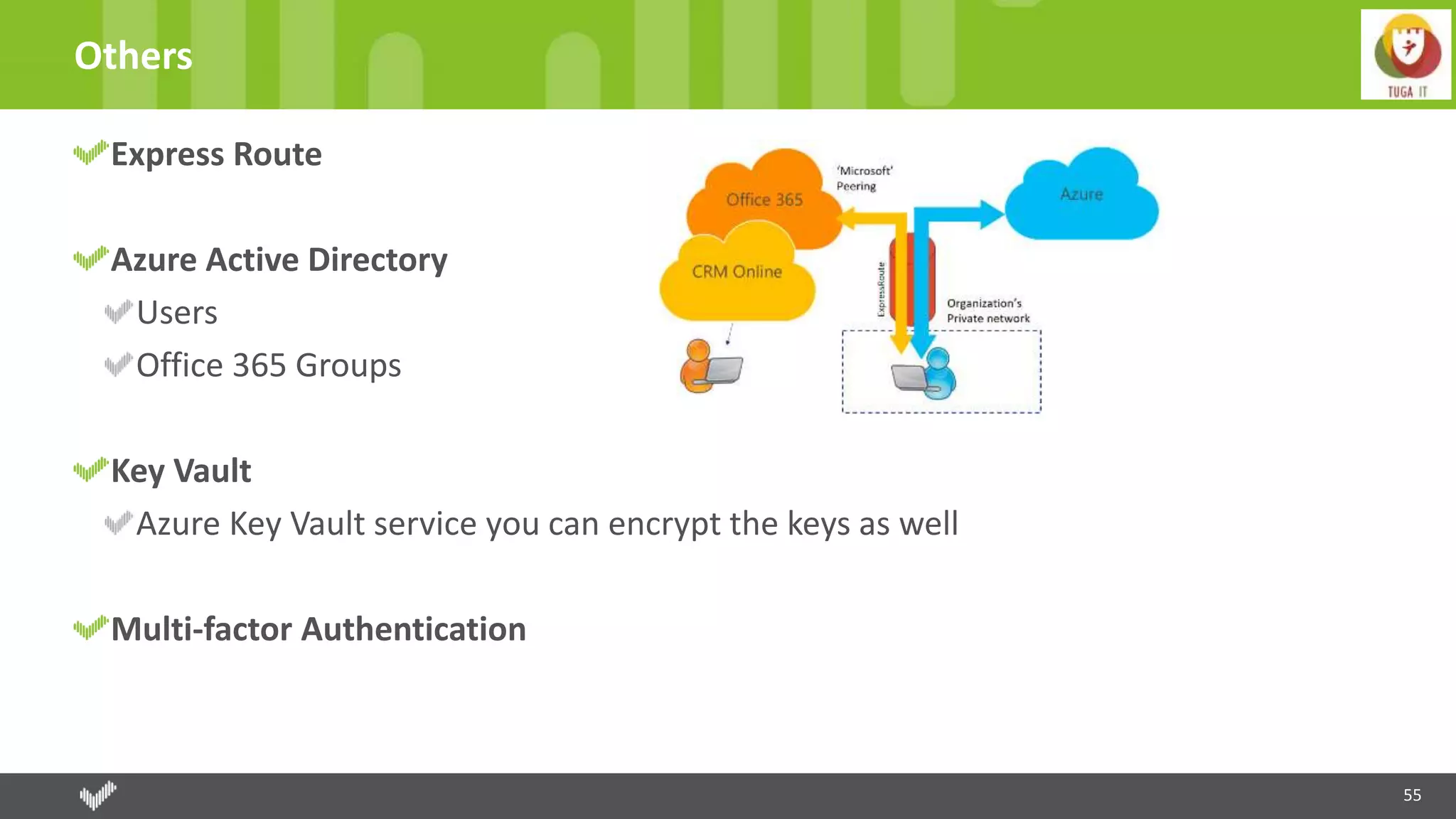
Others
Express Route
Azure Active Directory
Users
Office 365 Groups
Key Vault
Azure Key Vault service you can encrypt the keys as well
Multi-factor Authentication
THANK YOU TO OUR
SPONSORS
57
Contactos
pedro.Azevedo@rightitservices.com
http://www.psazevedo.com/
http://xptcrm.com/
@azevedo_pedro
58
Questões
THANKS!!

Tuga IT 2016 Dynamics CRM with Office 365 and Azure

  • 1.
  • 2.
    THANK YOU TOOUR TEAM ANDRÉ BATISTA ANDRÉ MELANCIA ANDRÉ VALA ANTÓNIO LOURENÇO BRUNO LOPES CLÁUDIO SILVA NIKO NEUGEBAUER RUI REISRICARDO CABRAL NUNO CANCELO PAULO MATOS PEDRO SIMÕES SANDRA MORGADO SANDRO PEREIRARUI BASTOS NUNO ÁRIAS SILVA
  • 3.
    © 2016, RightIT Services. All rights reserved 20th, May 2016 Dynamics CRM with Office 365 and Azure Pedro Azevedo
  • 4.
    About me 4 12 yearsin Microsoft technologies 6 years in Web, Desktop e Mobile 6 working with CRMs Technical Architect at Right IT Services Microsoft Partner company focused on providing CRM solutions, Sharepoint and custom applications. Business Solutions MVP (Dynamics CRM)
  • 5.
    Agenda 5Dynamics CRM withOffice 365 and Azure CRM Market Dynamics CRM Dynamics CRM + Office365 Dynamics CRM + Azure
  • 6.
  • 7.
    7 CRM Market Dynamics CRMwith Office 365 and Azure
  • 8.
    8 CRM Market Dynamics CRMwith Office 365 and Azure Gartner CRM Market Share
  • 9.
    9 CRM Market Dynamics CRMwith Office 365 and Azure
  • 10.
    10 CRM Market Dynamics CRMwith Office 365 and Azure
  • 11.
    11 Shop to Grow Skype(2011) Yammer (2012) MarketingPilot (2012) – Microsoft Dynamics Marketing (MDM) Netbreeze (2013) – Microsoft Social Engagement (MSE) Parature (2014) Mojo Surveys (2015) FieldOne (2015) FantasySalesTeam (2015) Adxstudio (2015) Dynamics CRM with Office 365 and Azure
  • 12.
    12 Dynamics CRM inNumbers 40,000+ companies with 4.4 million users 46 consecutive quarters growning more than 2 digits Receipts of CRM Online grow 80% (Q1 Fiscal 2015) Dynamics CRM with Office 365 and Azure Win in categories: Enterprise CRM Suite Midmarket CRM Suite Small Business CRM Suite Sales Force Automation
  • 13.
    13 Dynamics CRM vs.Salesforce Microsoft DynamicsCRM Salesforce
  • 14.
  • 15.
    15 Sales Sales Analyse Sales Analyseat real-time Dashboards; Reports; Excel Export; PowerBI Management of leads, accounts and opportunities Mobility Smartphones and tablets applications Voice Commands Offline Acess Guided Process of Sales Know what best process and know which state is the record and what is missing to accomplish
  • 16.
    16 Service Manage and AnalyseIncidents Different level of support based on contracts and SLAs. Manage and Analyse Services Scheduling of services Knownledgment Managenagement Resolution for incidentes already resolved USD All applications just in one window
  • 17.
    17 Marketing Marketing analysis Planning andbudget Segmentation of data Campaign management Track of leads
  • 18.
    18 xRM Platform for rapiddevelopment Flexible data model Security through roles Processes Customization point-and-click and declarative design Developing tools
  • 19.
    © 2016, RightIT Services. All rights reserved Microsoft Dynamics CRM DEMO
  • 20.
    20 Microsoft Cloud Platform DynamicsCRM with Office 365 and Azure Platform Business Solutions (CRM e ERP) Productivity
  • 21.
    Dynamics CRM +Office 365
  • 22.
    22 CRM Market Dynamics CRMwith Office 365 and Azure Maximize efficiency Productivity everywhere Flexible solution
  • 23.
    23 CRM Market Dynamics CRMwith Office 365 and Azure
  • 24.
  • 25.
    25 Office 365 -Administration New instancemanagement of licenses Create and management of users Management of instances (production and tests) Edit – properties (name, url, goal, type of instance; security group) Reset – reset a sandbox instance and restore initial configurations Copy – Copy data and application to a sandbox instance Admin – admin mode with a custom message Notifications – who can receive notifications of instances Schedule updates Install add-ons
  • 26.
    © 2016, RightIT Services. All rights reserved Office 365 - Administration DEMO
  • 27.
    27 Exchange & Outlook Emaileverywhere (web, desktop and mobile client) Challenges Connection Options Dynamics CRM Online <-> Exchange Online; Send and receive Emails with Dynamics CRM Online. Answers Microsoft Outlook Email Router Server-side sync CRM App for Outlook Web Folder based synchronization
  • 28.
    28 CRM For Outlook “Trackto CRM” feature Data Centralized of CRM and Outlook High adoption because familiarity with Outlook Convert to Lead, Opportunity or Incident Access offline data of CRM
  • 29.
    29 Email Router E-Mail E-Mail E-Mail Supportfor hybrid environments Could be used in multiple organizations
  • 30.
    30 Server Side Synchronization Email,Tasks, Appointments and Contacts Cloud Service for Dynamics CRM Online Without need installation Configuration in Dynamics CRM
  • 31.
    31 Other Ways Dynamics CRMfor Outlook Web Contextual Dynamics CRM information about the people sending you email, sales activities, cases and opportunities Track the email and associate with CRM entity and convert in client, contact or a lead Good support to mobile Demands an installation and restricted to OWA version Folder based synchronization Email tracking is very important (keep everyone with last information) Available with all device that supports Exchange Allow automatic track and set the regarding entity Works with Exchange rules (Without need intervation of system administrators, users can create the rules.)
  • 32.
    © 2016, RightIT Services. All rights reserved Outlook & Exchange DEMO
  • 33.
    33 Yammer Share CRM datawith users without a CRM licence Automatic notification of CRM (win quotes) We can choose the group where goes general conversation and for each entity we can choose other group. Integrated experience between all clients applications
  • 34.
    © 2016, RightIT Services. All rights reserved Yammer DEMO
  • 35.
    35 Skype and Lyncwith Dynamics CRM Presence information Click to call Real-time communications Instant messages Conferences and meetings Calls Meetings tracked as activities
  • 36.
    36 SharePoint Configuration through Wizards Selectentities we want create at SharePoint. Automatically folder for each entity. Native experience Create; Upload; Visualization Check-In; Check-Out; View history Cheaper Cloud Storage for Documents Contextual documents with the records Interact without a CRM license, accessing directly with SharePoint Can be the base for customize help – documents or sites
  • 37.
    37 Office 365 -Groups Distribution lists Collaboration Unified experience among Microsoft Dynamics CRM and non-Dynamics CRM users Calendar, documents and conversations grouped in only place; All interactions in a CRM record context Groups available in Outlook, Office 365 and the Dynamics CRM record. Mobile access.
  • 38.
    38 OneDrive for Business Sharedocuments - 1 TB of space Create and manage private documents Documents can be accessed within Dynamics CRM in the document grid Storage is important in Dynamics CRM
  • 39.
    © 2016, RightIT Services. All rights reserved Sharepoint + Office 365 Groups + OneDrive DEMO
  • 40.
    40 Office - Excel Excelembedded within CRM, without need to do alt+tab Editions and analysis directly on CRM Import at background Export as static Export dynamically Update with new data We can submit the changes Templates – Document Generation
  • 41.
    41 Office – Worde OneNote Word Mail-merge Templates OneNote More rich notes (text, photos, voice, spreadsheets or handwritten notes) Automatically create a notebook contextualized with the register of CRM. Embedded inside Dynamics CRM Office Delve Powered by Office Graph
  • 42.
    © 2016, RightIT Services. All rights reserved Office DEMO
  • 43.
    43 PowerBI - Self-serviceanalytics Microsoft Dynamics CRM Out-of-the-box connector and templates for Power BI Analyze sales performance, drive pipeline goals and prepare forecasts Microsoft Dynamics Marketing Content pack for Power BI
  • 44.
    © 2016, RightIT Services. All rights reserved PowerBI DEMO
  • 45.
  • 46.
    46 Deploy Dynamics CRMon Azure Deployment on Microsoft Azure infrastructure as a service (IaaS) DS-series of virtual machines Preferred method for the deployment of Dynamics CRM onto Azure IaaS is using Microsoft Dynamics Lifecycle Services (LCS) LCS, a cloud-based application life cycle management tool LCS is Azure-based software as a service (SaaS) that’s free to Microsoft Dynamics customers On-Premise Azure Premium Storage Locally redundant storage (LRS) and keeps three copies of the data in a single region Premium Storage isn’t required for non-production environments
  • 47.
    47 Microsoft Azure ServiceBus Dynamics CRM Online or On-Premise Secure and reliable channel for communicating CRM run-time data to external cloud-based line-of-business (LOB) applications
  • 48.
    48 Microsoft Azure ServiceBus Dynamics Marketing Synchronization data between Dynamics Marketing and Dynamics CRM
  • 49.
    49 Azure Event Hub MicrosoftSocial Engagement Highly scalable publish-subscribe event ingestor that can intake millions of events per second Once you have the data ingested into the event hub, you can access the data from any application that you connected to your event hub.
  • 50.
    50 Mobile Offline Tenant Admin CRMAdmin Settings Query Config DB for End Point Post message to Service Bus Provision/ Org Worker role process message Update CRM Config DB (Org end point) Offline Provisioning
  • 51.
    51 Azure offline mobilitycomponents One Subscription per Geo Separate deployments for prod and trial Azure components deployed Cloud Service Queue – crm updates Worker role – executes actions SQL server DB Two Storage accounts Diagnostics Sync Server Logs
  • 52.
    52 Machine Learning Service Identify patterns,so employees can learn from consistent problems and improve over time Sales Using the Recommendations API, a native capability is added to the product catalog to generate automatic recommendations Custom
  • 53.
    53 Voice of Customer CloudServices Designer Service (Web Role) Web Services for communication between a CRM organization and the multi-tenanted Voice of the Customer Azure components. Survey Runtime (Web Role) Submitted survey responses are stored temporarily on an Azure Service Bus queue before being processed retrieved by CRM. Response Processor (Worker Role) Worker role is responsible for processing the raw completed surveys into valid survey responses that can be created in CRM. Azure Key Vault All cloud services store configuration data in Azure Key Vault. Organization, tenant data is stored in SQL Azure. Azure SQL Database Voice of the Customer uses SQL Azure to store: Piped data; Survey metadata; Organization (tenant) data Azure Blob Storage Survey definitions and partially completed (saved) responses are stored to Azure Blob storage.
  • 54.
    54 Voice of Customer AzureContent Delivery Network (CDN) Static content to the survey runtime such as images, JavaScript and CSS. Azure Active Directory The Voice of the Customer solution uses Azure Active Directory Service to authenticate web services. Azure Service Bus Messages created when a survey is displayed / submitted are stored temporarily to an organization’s (tenant’s) Azure Service Bus Queue
  • 55.
    55 Others Express Route Azure ActiveDirectory Users Office 365 Groups Key Vault Azure Key Vault service you can encrypt the keys as well Multi-factor Authentication
  • 56.
    THANK YOU TOOUR SPONSORS
  • 57.
  • 58.
  • 59.

Editor's Notes

  • #14 Isto penso que mostra o quanto a Microsoft está apostar, com uma interface moderna e apelativa. Claro que a Salesforce defendia que a interface não mudava e assim os utilizadores não tinham que ser treinados uma vez mais Como vimos anteriormente a Microsoft foi imitando a Salesforce, basicamente a correr atrás Mas em Agosto deste ano a Microsoft demonstrou que já está a frente pois a Salesforce imitou a interface do Dynamics
  • #16 CRM Completo Online e Onpremise Processos (Workflow, Diálogos, Ações) Process-driven garante que um processo está a ser cumprido User interface moderna e adaptável. Optmização do número de clicks Gestão de produtos e preço Real-time dashboards Auditing Segurança ao nível do campo Offline é também no tablet e mobileVisibilidade do todo – sabermos interações passadas e futuras com o cliente entre as vendas, marketing e serviço
  • #20  - Real time dashboard, qualquer um pode criar um dashboard, basta para isso fazer gráficos. Drill-down e ver os dados que dão origem a esses dados. Desde que tenha permissões qualquer um pode criar gráficos. Mostrar demo. WebServices e Plugins para extender Falar do menu Posso fazer upload, adicionar um existente ou criar um novo e abrir o sharepoint. Se eu não tiver uma localização para aquele cliente ele cria uma passa para esse novo cliente. Process-driven existe muita informação neste formulário mas o que é mesmo importante é isto. Fazer isto com a Lead. Branch Process Export, todas as opções. Se fizer exportação dinâmica ele vai atualizar os dados nos dois sentidos. Se tivermos mais habituados com o excel podemos fazer isto. Reports O Dynamics CRM está cada vez mais idenpendete de programadores. Modern UI; Process-driven, simplicidade Menu vendas; serviço e marketing Dashboards Pesquisa global – fabricam Recently visited, pins Formulários Process-driven Conseguimos encaminhar as pessoas para finalizarem o processo Yammer; Onenote Três colunas – 1ª informação; 2ª para sabermos as interações; 3ª Registos relacionados Tablet e mobile apps (apple; android; windows) sem custo nenhum
  • #21 Um dos grande motivos também do crescimento foi a interligação feita com toda a cloud na Microsoft onde temos uma forte interligação tanto o Azure como com o Office 365. Isto é uma grande mais valia!! A solução de produtividade de negócios da Microsoft na nuvem oferece colaboração segura de qualquer lugar, a qualquer momento e praticamente em todos os dispositivos. Simples; Familiar; Imersivo; Powerful
  • #23 Maximizar a eficiência - Tecnologia que ajuda as pessoas a serem mais eficientes Funciona perfeitamente com toda a suite Office assim os utilizadores não terão de aprender novas ferramentas ou novas formações. Isto traz mais satisfação e produtividade em resumo uma melhor adopção e assim evitar o fracasso da implementação. Experiências consistentes entre PCs, dispositivos móveis e browser Colaboração é um termo chave desta integração. Integração com Yammer, Lync, Skype, Office Groups, etc. colaborar e finalizar rapidamente. Colaboração interna e externa da organização Ferramentas out-of-the-box para ajudar com o email, criar e partilhar documentos, gerir projetos e reuniões com clientes Track contactos, leads, oportunidades e interações Produtividade em qualquer lado Aceder a email, conteúdo, ferramentas de negócio para trabalhar nos dispositivos que usamos atualmente. Mesmo sem dispositivos poder aceder de uma forma segura Acesso a informação e aplicações tanto em online ou offline (por exemplo o OneDrive) Uma solução que cresce com o próprio negócio Cada euro conta e queremos a melhor tecnologia para suportar o crescimento do nosso negócio. Ter um baixo total cost of ownership (TCO) e um retorno alto na produtividade de um utilizador. Sabemos qual será o gasto mensal e a facilidade de ajustar recursos quando houver necessidade. Últimas versões do Office (Word, PowerPoint, Excel, que correm no PC ou portátil). Updates automáticos Todos os serviços têm um SLA de 99.9%.
  • #24 Módulos: Processo de vendas e pequenos módulos de faturação. Escalonamento de serviços; gestão de incidentes. Mobile: Hoje os utilizadores esperam que tudo funcione em qualquer dos seus dispositivos. Para isso existe suporte para telemóveis e tablets IOS, Android e Windows. Como também multibrowser IE, Chrome, FireFox, Safari no Mac. Aceder ao CRM através do Outlook, exportar com o Excel ou usar MailMerge no Word. Social: Comunicação intena com o Yammer para utilizadores CRM e não CRM. Com a integração do Lync e Skype podemos rapidamente IM ou Chat com outros utilizadores ou clientes. Sistema de track de emails no sistema ajudando a manter o histórico com o cliente. Possibilidade de usar o SharePoint para armazenar documentos e possibilitar que utilizadores CRM e não CRM aceder a documentos chave. Portais de cliente para expor dados de clientes e para registar eventos e incidentes. Plataforma: Temos dashboards e gráficos por defeito bem como criar novos pelos utilizadores. CRM tem workflows síncronos e assíncronos que ajuda a automatizar tarefas comuns. Poder estender a plataforma Escrever código customizado para plugins ou workflows quer permite aos programadores estenderem a plataforma.
  • #26 Em principio já não é possível usar o LiveID para entrar no Dynamics CRM. Apenas com utilizador Office 365. Trial – sem subscrição de licença Office 365. Subscrição do Dynamics CRM – diretamente é necessário um mínimo de 5 utilizadores Uma única visão, seja para Exchange, Sharepoint Admin - apenas para instâncias sandbox; apenas os customizadores\administraores conseguem entrar Reset – apaga e recria a instância Copy – temos a minimal e full (tem + dados que a minimal) Gestão de incidentes – pedidos de backup e restore
  • #27 Nova instância diferença entre CRM Online diretamente e através do Office 365 (serviços) Utilizadores Gerir Instância e mostrar – botões; soluções; updates
  • #28 Track dizendo a que registo aquele email está ligado, não é só enviar o email para o CRM Se carregar com o botão direito sobre um contacto posso criá-lo no crm Um dos objetivos do CRM é manter toda a interação com o cliente por isso era necessário passer os emails para o CRM, para isso surgiram alguns componentes https://www.youtube.com/watch?v=zaL0Nqq_Yms
  • #29 Usado como cliente de email (client-to-server synchronization) Necessário instalar plugin e haver configuração ao nível dos settings. Este plugin terá que ser instalado em cada utilizador, necessário ter licença CRM Track manual ou regras na inbox sincronizar email from Exchange ou Outlook to Microsoft Dynamics CRM. Funciona no CRM Online e Onpremise É possível sincronizar várias organizações mas apenas pode estar associado a uma mailbox (Exchange ou Pop3) Possibilidade de passer para Offline, usa o SQL Server Express. É possível criar, editar e apagar dados em modo offline sendo posteriormente os dados sincronizados. Templates de email
  • #30 Era necessário algo que envia-se os emails enviados pelo Dynamics CRM Apenas com o plugin para o Outlook, era necessário que o Outlook tivesse sempre ligado o que não é possível POP3/SMTP Apenas sincroniza mensagens de mail. Não sincroniza appointments, contacts, or tasks. Exchange Server, Exchange Online accounts, or POP3 servers, for incoming email For outgoing email, one or more SMTP servers, Exchange Web Services (EWS), or Exchange Online accounts are supported Para sincronizar appointments, contacts ou tarefas é necessário ter o cliente outlook ligado
  • #31 Era necessário ter um computador on-premise apenas para ter o email router Vem resolver outra questão quando usamos os clients tablet e mobile Possibilidade de usar no on-premise POP3 email server Sincronização de contactos, tarefas, apontamentos do Exchange Online através da autenticação Server to Server Reduz custos onde reduz o tempo de implementação e manutenção, sem necessidade de instalar outro componente Uma melhor integração com o Office 365
  • #32 Dynamics CRM 2015 http://www.comunidadcrm.com/gadesoft/2015/05/19/crm-2015-seguimiento-correo-libre-nueva-crm-app-for-outlook/ Office store Quando envio um email eu tenho as listas do CRM. Posso fazer track, posso usar templates e ele vai buscar os valores ao cliente por exemplo. Attach sales literature. Posso criar tarefas de follow up diretamente da lista de oportunidades, estas tarefas serão tarefas de sistema posso ter formatação condicional. (View->View Settings->Conditional Formating->Add->(conditional)) https://www.youtube.com/watch?v=XCxK-RQDYzE - Neste momento é possível mas dentro do outlook, e se eu receber o email dentro do meu iPhone? Então posso apenas deslocar esse email para a nova pasta (seja relativa a uma oportunidade ou cliente)
  • #34 Ver o que ele cria do lado do yammer, novo grupo por cada negócio? http://www.comunidadcrm.com/gadesoft/2015/01/16/yammer-como-social-crm-y-capa-social-en-office-365/ Notificações automáticas - Configurável. Message Rules. Administration->Yammer Estejamos a trabalhar numa oportunidade, executando uma campanha, ou resolvendo um incidente, dá acesso a pessoas e recursos que é necessário “Get Things Done”
  • #36 Lync (Skype for business) Temos a presença unificada em todas as aplicações Office e podemos fazer chat. Real-time communications with customers, colleagues, and team members without leaving Microsoft Dynamics CRM Track meetings as Activities in Microsoft Dynamics CRM. Get Presence information for members of the same email domain you are signed in with in Skype for Business or Lync.
  • #37 Old versions was needed install a component at sharepoint - http://www.comunidadcrm.com/pabloperalta/2015/07/21/paso-a-paso-como-instalar-el-asistente-para-creacion-de-proyectos-sure-step-en-sharepoint-online-y-crear-nuevos-proyectos/ - https://www.youtube.com/watch?v=TyBAFLnKiio - Podemos aceder offline aos documentos? Apenas através do documentos do Office 365 e está assente no sharepoint? E em que aplicação mobile isto está disponível? - Edição de ficheiros online, não sei se será importante? - Full-text search sharepoint documents ver se isto não é CRM 2016 Necessário adicionar utilizadores para trabalharem.
  • #38 Necessary enable Sharepoint Server Synchronization.
  • #39 Dynamics CRM 2016
  • #41 Dynamics CRM 2015 (imersivo) Farto de fazer export\import. http://www.comunidadcrm.com/demianrasko/2015/04/04/edicin-de-registros-en-excel-online-crm-2015-update-1/ Ele cria uma importação em background
  • #44 https://www.microsoft.com/en-us/learning/on-demand-online-courses.aspx?WT.mc_id=WWLeX_MOCOD_Ext_FB_Desktop Power Pivot in Microsoft Excel 2013 is an add-in you can use to perform powerful data analysis in Excel 2013 Microsoft Power Query for Excel is an Excel add-in that enhances the self-service Business Intelligence experience in Excel by simplifying data discovery, access and collaboration. Power View is an interactive data exploration, visualization, and presentation experience that encourages intuitive ad-hoc reporting. Microsoft Power Map for Excel is a three-dimensional (3-D) data visualization tool that lets you look at information in new ways. Power Query – easily discover and connect to data from public and corporate data sources Power Pivot – create a sophisticated Data Model directly in Excel Power View – create reports and analytical views with interactive data visualizations Power Map – explore and navigate geospatial data on a 3D map experience in Excel Speaker notes – Power BI is a business intelligence tool set that has, enabled Microsoft Office and Office 365 users to query and analyze data - both from their own local and network data sources and mined from external sources like the U.S. Census or data marts. Self-Service BI Features in Excel – these features extend the data-specific features and capabilities of Excel 2013 Power BI for Office 365 – these features amplify the self-service BI capabilities created in Excel by making them available in a collaborative online environment
  • #54 Designer Service (Web Role) For example, surveys are published and stored to Azure Blob Storage. Survey responses are retrieved from an Azure Service Bus queue and returned to be persisted in the CRM organization.  All requests are authenticated against Azure Active Directory.
  • #55 Designer Service (Web Role) For example, surveys are published and stored to Azure Blob Storage. Survey responses are retrieved from an Azure Service Bus queue and returned to be persisted in the CRM organization.  All requests are authenticated against Azure Active Directory.