MS Dynamics 365
First overview
Development perspective
Dynamics 365 structure
Dynamics 365 is the new designed product for Microsoft dynamics should include the
most common modules in from Dynamics AX and Dynamics CRM at one place
The user will have ability to choose the convenient apps for the business by [Appsources]
portal.
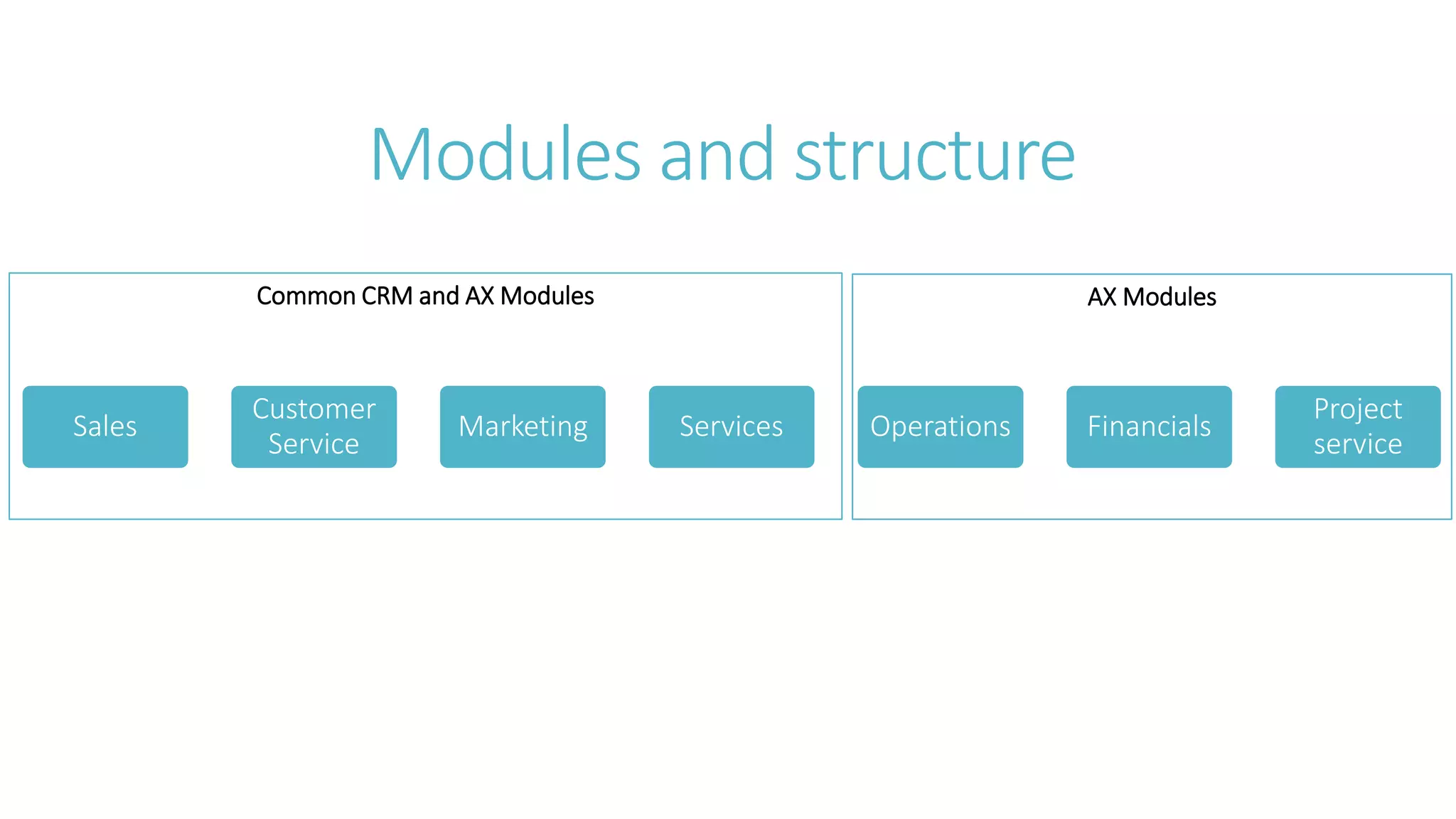
Dynamics 365 will be separated as below
1. Dynamics 356 Major Modules include CRM common modules and AX common
Modules
2. Dynamics AX Online
3. Dynamics AX for financials
Dynamics 365 overview
Modules and structure
AX ModulesCommon CRM and AX Modules
Modules and structure
Sales
Customer
Service
Marketing Services Operations Financials
Project
service
Dynamics 365 overview
a development prospective
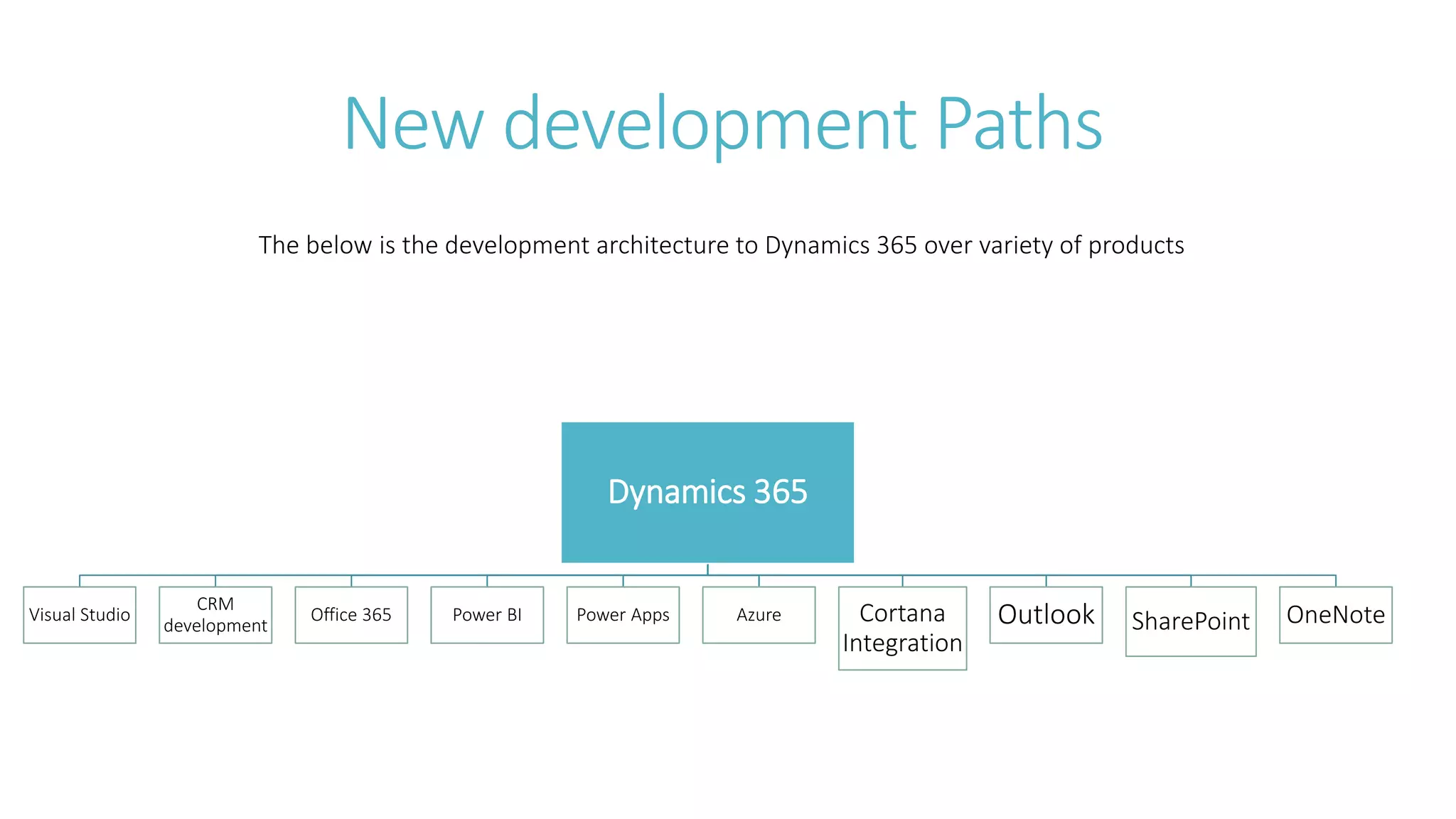
New development Paths
Dynamics 365
Visual Studio
CRM
development
Office 365 Power BI Power Apps Azure Cortana
Integration
Outlook SharePoint OneNote
The below is the development architecture to Dynamics 365 over variety of products
Dynamics 365 overview
a development prospective
Visual Studio
The developer will have ability to extend dynamics 365 by writing code snippets in
Visual Studio Directly and there is not need for AOT object to develop inside.
The developer will have ability to extend dynamics 365 by integrate with AX Project
Templates to cut time and development effort writing the code.
The developer will deply and publish directly from Visual studio, no need for CIL and
AOT object compile separately
AX Projects can be easily integrated with TFS[Team foundation server] to handle the
versioning of the project.
Dynamics 365 overview
a development prospective
CRM Development
for CRM development will be the same as CRM 2016 online development, the
developer will have ability to write and register custom code snippets to handle the
process of CRM entities
Include workflows, Dialogs , business process , client side code and server side code
like custom activity and plugins
Dynamics 365 overview
a development prospective
Office 365
The developer will have ability to extend dynamics 365 by integrating with office 365
through its apps like SharePoint and office tools [excel for data management and
Import/Export]
The developer will have ability to customize the office templates to match the
document management system through dynamics 365 sections and web forms.
Dynamics 365 overview
a development prospective
Power BI
The developer will have ability to invoke Analysis cubes in power BI and extract,
transform and load data into interactive view for business needs in dynamics 365
The developer will have an ability to embed the BI output in the web forms through
its outputs like charts, dashboards and interactive designs. Through power bi
embedded service.
The developer will have an ability to connect to sql server analysis service , Azure
analysis service to invoke the cubes and process the data into dynamics 365 web
forms.
Dynamics 365 overview
a development prospective
Power BI
The developer will have ability to Create stunning interactive reports and integrate
with dynamics 365
Building reusable modules over your data to provide consistency across reporting and
analysis in dynamics 356
Dynamics 365 overview
a development prospective
Power Apps
The developer will have ability to Create custom web apps and extend dynamics 365
platform and business.
Power apps can be written in visual studio on-premises on web and can be embedded
into the web forms.
Power apps is an extendibility to any platform- not dynamics 365 only – but also with
other apps and platforms like office 365, SharePoint , Microsoft Azure, SQL Server and
other custom API’s.
Power apps can host the developed solution to be available in the store as a
standalone app.
Dynamics 365 overview
a development prospective
Azure Machine Learning
The developer will have ability to Create custom web apps and extend dynamics 365
platform and business.
Power apps can be written in visual studio on-premises on web and can be embedded
into the web forms.
Power apps is an extendibility to any platform- not dynamics 365 only – but alos with
other apps and platforms like office 365, SharePoint , Microsoft Azure, SQL Server and
other custom API’s.
Dynamics 365 overview
a development prospective
Outlook
Microsoft Dynamics 365 for Outlook lets users interact with data while they’re offline and not
connected to a server. Microsoft Dynamics 365 includes features that let you extend your
solutions to offline scenarios by calling the web services offline from your custom code. In
addition,
The developer will have ability to provides programmatic support for basic Microsoft Outlook
actions such as synchronization, going offline or online, and Dynamics 365 for Outlook state
verification. Offline programming uses the Microsoft ASP.NET Development Server.
Microsoft Dynamics 365 includes features that allow administrators to customize and manage
filters for their users. Filter templates provide the starting point for entity synchronization on
Dynamics 365 for Outlook. Filters determine which entity collections are synchronized to
Outlook and to Microsoft SQL Server 2008 Express Edition for offline-enabled Microsoft
Dynamics 365 solutions.
Dynamics 365 overview
a development prospective
SharePoint
Microsoft SharePoint Server is a collaboration and content management application that simplifies how
people store, find, and share information. It helps people to collaborate effectively by having secure
access to documents and information that they require to make business decisions.
The SharePoint integration feature enables you to store and manage documents on SharePoint in the
context of a Microsoft Dynamics 365 record, and use the SharePoint document management abilities
in Microsoft Dynamics 365, such as checking the document in and out, viewing version history, and
changing document properties.
Microsoft Dynamics 365 supports two types of integration with SharePoint: client-to-server and server-
to-server (server-based).
Use the SharePointSite and SharePointDocumentLocation entities to store and manage the SharePoint
Server location records in Dynamics 365, and the UserMapping entity to define custom claim mappings
to use a value other than the default value used by Dynamics 365 (online) to authenticate and
authorize Dynamics 365 users in SharePoint.
Dynamics 365 overview
a development prospective
One note
Set up OneNote Integration in Microsoft Dynamics 365 (online) so that a dedicated OneNote notebook is
automatically created for the selected entity records in Dynamics 365. This feature provides you the ability
to easily take notes in the context of a Dynamics 365 record in various formats such as pictures, drawings,
formatted text (bullet points and tables), and voice recordings in a OneNote notebook. You can access the
OneNote notebook directly on the activity wall in the Dynamics 365 web client or from the record form in
the Dynamics 365 mobile apps.
Developers can enable or detect OneNote Integration for an entity in Dynamics 365 (online) using the
IsOneNoteintegrationEnabled attribute. OneNote integration can only be enabled for an entity when both
the following are true:
1. Server-based SharePoint integration is enabled between your Dynamics 365 (online) and SharePoint
Online instances. OneNote Integration is supported only for SharePoint Online. Document management
is enabled for the entity, By default, OneNote integration is enabled for the following
entities: Account, Lead, Opportunity, and Product.
2. You must also ensure that the activity feed wall is enabled for an entity to be able to see and use the
OneNote file for the entity record. For more information about configuring activity feeds wall.
thanks

Ms dynamics 365 First Overview

  • 1.
    MS Dynamics 365 Firstoverview Development perspective
  • 2.
    Dynamics 365 structure Dynamics365 is the new designed product for Microsoft dynamics should include the most common modules in from Dynamics AX and Dynamics CRM at one place The user will have ability to choose the convenient apps for the business by [Appsources] portal. Dynamics 365 will be separated as below 1. Dynamics 356 Major Modules include CRM common modules and AX common Modules 2. Dynamics AX Online 3. Dynamics AX for financials
  • 3.
  • 4.
    AX ModulesCommon CRMand AX Modules Modules and structure Sales Customer Service Marketing Services Operations Financials Project service
  • 5.
    Dynamics 365 overview adevelopment prospective
  • 6.
    New development Paths Dynamics365 Visual Studio CRM development Office 365 Power BI Power Apps Azure Cortana Integration Outlook SharePoint OneNote The below is the development architecture to Dynamics 365 over variety of products
  • 7.
    Dynamics 365 overview adevelopment prospective Visual Studio The developer will have ability to extend dynamics 365 by writing code snippets in Visual Studio Directly and there is not need for AOT object to develop inside. The developer will have ability to extend dynamics 365 by integrate with AX Project Templates to cut time and development effort writing the code. The developer will deply and publish directly from Visual studio, no need for CIL and AOT object compile separately AX Projects can be easily integrated with TFS[Team foundation server] to handle the versioning of the project.
  • 8.
    Dynamics 365 overview adevelopment prospective CRM Development for CRM development will be the same as CRM 2016 online development, the developer will have ability to write and register custom code snippets to handle the process of CRM entities Include workflows, Dialogs , business process , client side code and server side code like custom activity and plugins
  • 9.
    Dynamics 365 overview adevelopment prospective Office 365 The developer will have ability to extend dynamics 365 by integrating with office 365 through its apps like SharePoint and office tools [excel for data management and Import/Export] The developer will have ability to customize the office templates to match the document management system through dynamics 365 sections and web forms.
  • 10.
    Dynamics 365 overview adevelopment prospective Power BI The developer will have ability to invoke Analysis cubes in power BI and extract, transform and load data into interactive view for business needs in dynamics 365 The developer will have an ability to embed the BI output in the web forms through its outputs like charts, dashboards and interactive designs. Through power bi embedded service. The developer will have an ability to connect to sql server analysis service , Azure analysis service to invoke the cubes and process the data into dynamics 365 web forms.
  • 11.
    Dynamics 365 overview adevelopment prospective Power BI The developer will have ability to Create stunning interactive reports and integrate with dynamics 365 Building reusable modules over your data to provide consistency across reporting and analysis in dynamics 356
  • 12.
    Dynamics 365 overview adevelopment prospective Power Apps The developer will have ability to Create custom web apps and extend dynamics 365 platform and business. Power apps can be written in visual studio on-premises on web and can be embedded into the web forms. Power apps is an extendibility to any platform- not dynamics 365 only – but also with other apps and platforms like office 365, SharePoint , Microsoft Azure, SQL Server and other custom API’s. Power apps can host the developed solution to be available in the store as a standalone app.
  • 13.
    Dynamics 365 overview adevelopment prospective Azure Machine Learning The developer will have ability to Create custom web apps and extend dynamics 365 platform and business. Power apps can be written in visual studio on-premises on web and can be embedded into the web forms. Power apps is an extendibility to any platform- not dynamics 365 only – but alos with other apps and platforms like office 365, SharePoint , Microsoft Azure, SQL Server and other custom API’s.
  • 14.
    Dynamics 365 overview adevelopment prospective Outlook Microsoft Dynamics 365 for Outlook lets users interact with data while they’re offline and not connected to a server. Microsoft Dynamics 365 includes features that let you extend your solutions to offline scenarios by calling the web services offline from your custom code. In addition, The developer will have ability to provides programmatic support for basic Microsoft Outlook actions such as synchronization, going offline or online, and Dynamics 365 for Outlook state verification. Offline programming uses the Microsoft ASP.NET Development Server. Microsoft Dynamics 365 includes features that allow administrators to customize and manage filters for their users. Filter templates provide the starting point for entity synchronization on Dynamics 365 for Outlook. Filters determine which entity collections are synchronized to Outlook and to Microsoft SQL Server 2008 Express Edition for offline-enabled Microsoft Dynamics 365 solutions.
  • 15.
    Dynamics 365 overview adevelopment prospective SharePoint Microsoft SharePoint Server is a collaboration and content management application that simplifies how people store, find, and share information. It helps people to collaborate effectively by having secure access to documents and information that they require to make business decisions. The SharePoint integration feature enables you to store and manage documents on SharePoint in the context of a Microsoft Dynamics 365 record, and use the SharePoint document management abilities in Microsoft Dynamics 365, such as checking the document in and out, viewing version history, and changing document properties. Microsoft Dynamics 365 supports two types of integration with SharePoint: client-to-server and server- to-server (server-based). Use the SharePointSite and SharePointDocumentLocation entities to store and manage the SharePoint Server location records in Dynamics 365, and the UserMapping entity to define custom claim mappings to use a value other than the default value used by Dynamics 365 (online) to authenticate and authorize Dynamics 365 users in SharePoint.
  • 16.
    Dynamics 365 overview adevelopment prospective One note Set up OneNote Integration in Microsoft Dynamics 365 (online) so that a dedicated OneNote notebook is automatically created for the selected entity records in Dynamics 365. This feature provides you the ability to easily take notes in the context of a Dynamics 365 record in various formats such as pictures, drawings, formatted text (bullet points and tables), and voice recordings in a OneNote notebook. You can access the OneNote notebook directly on the activity wall in the Dynamics 365 web client or from the record form in the Dynamics 365 mobile apps. Developers can enable or detect OneNote Integration for an entity in Dynamics 365 (online) using the IsOneNoteintegrationEnabled attribute. OneNote integration can only be enabled for an entity when both the following are true: 1. Server-based SharePoint integration is enabled between your Dynamics 365 (online) and SharePoint Online instances. OneNote Integration is supported only for SharePoint Online. Document management is enabled for the entity, By default, OneNote integration is enabled for the following entities: Account, Lead, Opportunity, and Product. 2. You must also ensure that the activity feed wall is enabled for an entity to be able to see and use the OneNote file for the entity record. For more information about configuring activity feeds wall.
  • 17.