Introduction to Microsoft Dynamics CRM
2013
Nick Scott | Dynamics CRM Consultant with BKD Technologies
Click to edit
Master
subtitle style
01 | Course Introduction
Microsoft Dynamics CRM Overview
Nick Scott | Dynamics CRM Consultant with BKD Technologies
Module 1: Dynamics CRM Overview
• Microsoft Dynamics CRM Functionality
• Deployment Options
• Forms, Fields, Records & Entities
• Entity Relationship Model
• Navigation
Dynamics CRM Functionality
• Support Sales, Marketing & Service
• Customizable
• Marketplace
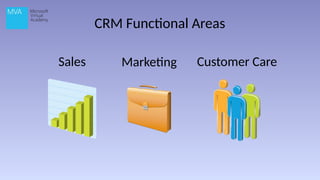
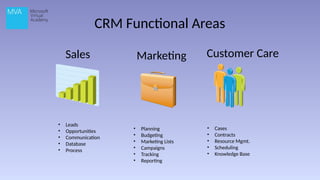
CRM Functional Areas
Sales Marketing Customer Care
Sales Functionality
• Leads
• Opportunities
• Communication tracking
• Product database
• Sales processes
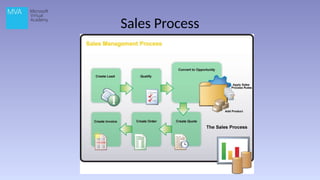
Sales Process
Client Care Functionality
• Case Recording
• Contract Management
• Services & Resources Management
• Appointment Scheduling
• Knowledge Base
Marketing Functionality
• Planning & Budgeting
• Marketing Lists
• Campaigns
• Tracking and Reporting
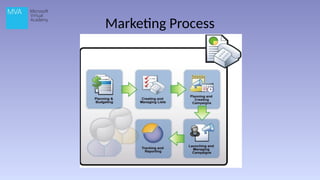
Marketing Process
CRM Functional Areas
Sales Marketing Customer Care
• Leads
• Opportunities
• Communication
• Database
• Process
• Planning
• Budgeting
• Marketing Lists
• Campaigns
• Tracking
• Reporting
• Cases
• Contracts
• Resource Mgmt.
• Scheduling
• Knowledge Base
Deployment Options and Clients
• Deployment Options
• Web Client
• Outlook Client
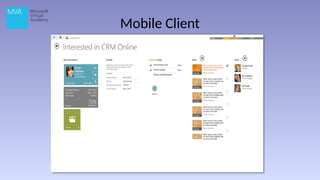
• Mobile & Tablet Client
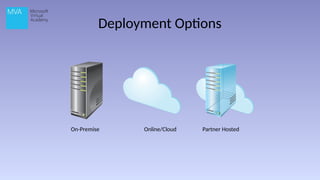
Deployment Options
On-Premise Online/Cloud Partner Hosted
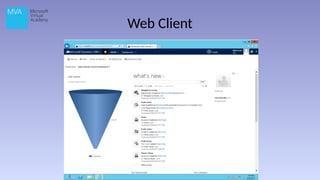
Web Client
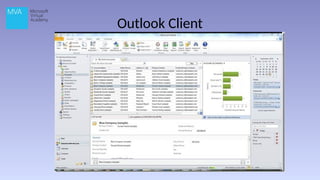
Outlook Client
Mobile Client
Deployment and Clients
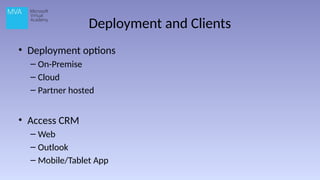
• Deployment options
– On-Premise
– Cloud
– Partner hosted
• Access CRM
– Web
– Outlook
– Mobile/Tablet App
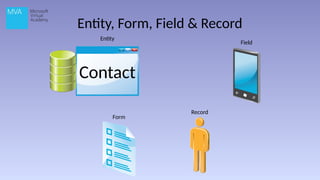
Entity, Form, Field & Record
Form
Field
Record
Contact
Entity
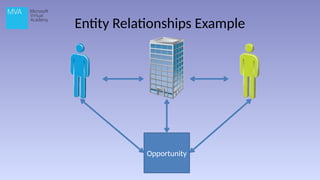
Entity Relationships Example
Opportunity
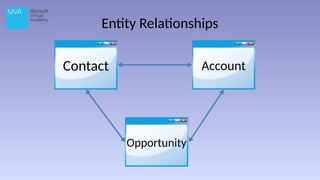
Entity Relationships
Contact Account
Opportunity
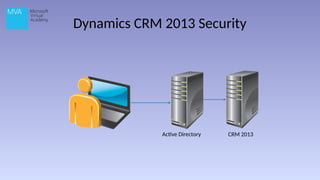
Dynamics CRM 2013 Security
Active Directory CRM 2013
Navigating Dynamics CRM
• Basic Navigation
• Working with Records
• Navigating within a Record
©2013 Microsoft Corporation. All rights reserved. Microsoft, Windows, Office, Azure, System Center, Dynamics and other product names are or may be registered trademarks and/or trademarks in the
U.S. and/or other countries. The information herein is for informational purposes only and represents the current view of Microsoft Corporation as of the date of this presentation. Because Microsoft
must respond to changing market conditions, it should not be interpreted to be a commitment on the part of Microsoft, and Microsoft cannot guarantee the accuracy of any information provided after
the date of this presentation. MICROSOFT MAKES NO WARRANTIES, EXPRESS, IMPLIED OR STATUTORY, AS TO THE INFORMATION IN THIS PRESENTATION.

47207AE_Module 01_Dynamics CRM Overview.pptx

Editor's Notes

  • #1 This course is designed to provide you with a general overview of the capabilities of Microsoft Dynamics CRM 2013. I will cover the following topics: An Overview of Dynamics CRM Working with Dynamics CRM Processes & Functional Scenarios And finally – Working with Data
  • #2 This is Module 1: A Dynamics CRM Overview In this module, I will provide a very high level overview of Microsoft Dynamics CRM and it’s capabilities.
  • #3 We will look at The basic functional areas The deployment options The difference between forms, fields, records and entities How the entity relationship model works And Navigating Dynamics CRM
  • #4  At it’s heart, Dynamics CRM 2013 is designed to support the sales, marketing and service functions of an organization. While it’s out-of-the-box state provides significant functionality for many different organizations, Dynamics CRM is highly customizable to fit the unique needs of all kinds of organizations. The ability to customize the software provides third-parties the ability to create Solutions To extend the capabilities of the software. These extensions are available in a centralized Marketplace.
  • #5 Lesson 1: Microsoft Dynamics CRM Functionality In this lesson, I will briefly touch on the purpose and functionality of Dynamics CRM 2013. Then, I will describe the specific functional areas. The three functional areas of Dynamics CRM are Sales Marketing Customer Care (Service)
  • #6 Prospecting and qualifying leads Managing opportunities and keeping track of the stages of deal closure Managing and tracking communications between salespeople and customers Maintaining a database of product information Using sales processes to guide sales representatives through the sales life-cycle using workflows, processes and dialog boxes.
  • #8 Recording Complaints, problems, questions or other queries (case records) Recording entitlement to service (Contracts) Defining services provided and resources needed for the services Scheduling appointments Building a store of intelligence using the Knowledge Base
  • #9 Planning and budgeting for campaigns Managing targeted marketing lists Running a marketing campaign Tracking and reporting efficacy
  • #11 Here are the functional areas and associated record types You should’ve learned about the general purpose and functionality of Dynamics CRM along with a general overview of the three functional areas: Sales, Service and Marketing. In the next lesson, we’ll cover the deployment option and clients
  • #12 We will look at Deployment options The web client The Outlook client And finally, the mobile/tablet client
  • #13 On-Premise Installed locally, hardware and software managed Online/Cloud Partner Hosted A hybrid of both options Highlight the Major differences between online and on-prem Online No physical servers purchased Pay only what you need Out of the network access On-premise Prefer to have data on your own servers Custom SSRS reports Large storage needs Internal staff Update at your own schedule
  • #14 Web Client Supported Browsers Internet Explorer Firefox Chrome Safari (on Apple OS)
  • #15 Outlook Client Integrated to Outlook No need to open a new window Emails, Tasks, appointments and Contacts created in Outlook can be synched with Dynamics CRM and vice versa Offline capability
  • #16 In this lesson we went over The three deployment options On-premise Cloud Partner hosted The options for accessing CRM Web Outlook Mobile/Tablet applications
  • #18 Entity: A Record type. Account, Contact, Order, etc. Field: A single data point relating to an entity. Name, Phone number, job title, etc. Additional fields can be added. Form: A collection of fields for one kind of entity presented so that data can be entered or modified. Record: A single instance of an entity and the related data the fields. John Johnson, ABC Company.
  • #19 Let’s walk through an example to show how these relationships might work in the real world. Meet Contact A Works at Account Learn of an Opportunity Learn about Contact B Relationships are bi-directional You can open any of these records and navigate to the others.
  • #20 That’s all for this Lesson. You should have learned the differences between an entity, form, field and record. Also, you should understand how the relationships between entities are modeled in Dynamics CRM. In the next lesson, we’ll go over security in CRM 2013.
  • #21 CRM authenticates Users. On-premise will use AD. Only one login required Security roles are created The Dynamics CRM security model can control access to Records Fields Forms
  • #22 Menu Bar Hover over Microsoft Dynamics CRM section to select different functional areas, settings and help. Once a functional area is selected, it is shown on the menu bar. Hover over the functional area for the different record types The down arrow gives quick links to recently viewed items Example of why you do a quick create Create button provides a quick process to create a new record of various types Open the accounts section Select an account – Options change Ellipsis for more options Create new account Red asterisks are required fields Pop-out Save Back to accounts View changes & pinning Sharing