DYNAMICS 365 APP FOR
OUTLOOK
Presented by Brian Begley – www.encloud9.com
ABOUT
ENCLOUD9
 Dynamics 365 Cloud Customer Relationship
Management – Silver 2014 - present
 12 years experience working with small to mid sized
businesses to modernize sales, marketing customer
service
 Work with companies throughout the US and
Canada
 Primary focus is on Cloud-based Dynamics 365
Customer Engagement Platform
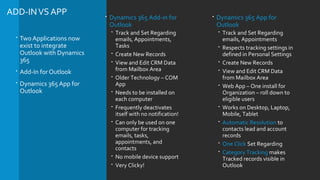
ADD-INVS APP
 Two Applications now
exist to integrate
Outlook with Dynamics
365
 Add-In for Outlook
 Dynamics 365 App for
Outlook
 Dynamics 365 Add-in for
Outlook
 Track and Set Regarding
emails, Appointments,
Tasks
 Create New Records
 View and Edit CRM Data
from Mailbox Area
 Older Technology – COM
App
 Needs to be installed on
each computer
 Frequently deactivates
itself with no notification!
 Can only be used on one
computer for tracking
emails, tasks,
appointments, and
contacts
 No mobile device support
 Very Clicky!
 Dynamics 365 App for
Outlook
 Track and Set Regarding
emails, Appointments
 Respects tracking settings in
defined in Personal Settings
 Create New Records
 View and Edit CRM Data
from Mailbox Area
 Web App – One install for
Organization – roll down to
eligible users
 Works on Desktop, Laptop,
Mobile, Tablet
 Automatic Resolution to
contacts lead and account
records
 One Click Set Regarding
 Category Tracking makes
Tracked records visible in
Outlook
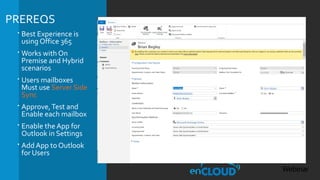
PREREQS
 Best Experience is
using Office 365
 Works with On
Premise and Hybrid
scenarios
 Users mailboxes
Must use Server Side
Sync
 Approve,Test and
Enable each mailbox
 Enable the App for
Outlook in Settings
 Add App to Outlook
for Users
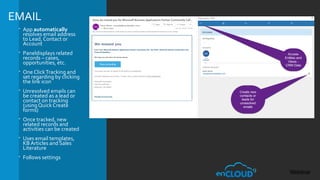
EMAIL
 App automatically
resolves email address
to Lead, Contact or
Account
 Paneldisplays related
records – cases,
opportunities, etc.
 One ClickTracking and
set regarding by clicking
the link icon
 Unresolved emails can
be created as a lead or
contact on tracking
(using Quick Create
forms)
 Once tracked, new
related records and
activities can be created
 Uses email templates,
KB Articles and Sales
Literature
 Follows settings
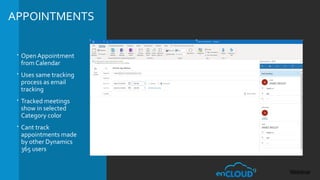
APPOINTMENTS
 Open Appointment
from Calendar
 Uses same tracking
process as email
tracking
 Tracked meetings
show in selected
Category color
 Cant track
appointments made
by other Dynamics
365 users
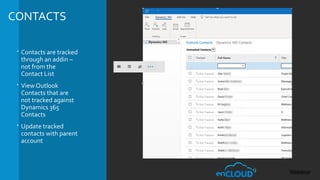
CONTACTS
 Contacts are tracked
through an addin –
not from the
Contact List
 View Outlook
Contacts that are
not tracked against
Dynamics 365
Contacts
 Update tracked
contacts with parent
account
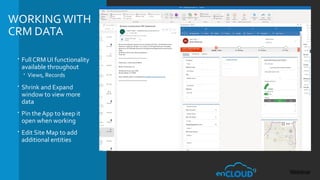
WORKINGWITH
CRM DATA
 Full CRM UI functionality
available throughout
 Views, Records
 Shrink and Expand
window to view more
data
 Pin the App to keep it
open when working
 Edit Site Map to add
additional entities
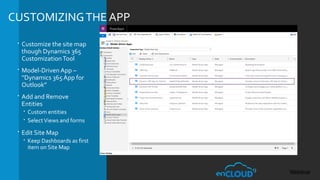
CUSTOMIZINGTHE APP
 Customize the site map
though Dynamics 365
CustomizationTool
 Model-Driven App –
“Dynamics 365 App for
Outlook”
 Add and Remove
Entities
 Custom entities
 SelectViews and forms
 Edit Site Map
 Keep Dashboards as first
item on Site Map
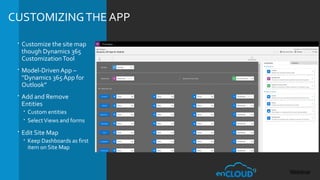
CUSTOMIZINGTHE APP
 Customize the site map
though Dynamics 365
CustomizationTool
 Model-Driven App –
“Dynamics 365 App for
Outlook”
 Add and Remove
Entities
 Custom entities
 SelectViews and forms
 Edit Site Map
 Keep Dashboards as first
item on Site Map
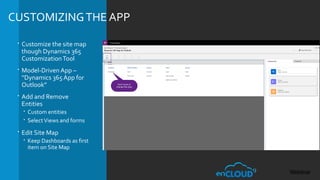
CUSTOMIZINGTHE APP
 Customize the site map
though Dynamics 365
CustomizationTool
 Model-Driven App –
“Dynamics 365 App for
Outlook”
 Add and Remove
Entities
 Custom entities
 SelectViews and forms
 Edit Site Map
 Keep Dashboards as first
item on Site Map
RESOURCES
 Questions? Contact us at support@encloud9.com
 enCloud9 events - encloud9.com/about-encloud9/events/
 12/19/18 – Building PowerApps and Hubs for Dynamics 365
 Aaron Richards 8 Part Series on Outlook App
https://blogs.msdn.microsoft.com/crminthefield/
 October 2018 Release Notes -
https://docs.microsoft.com/en-us/dynamics365/customer-engagement/o
 Category based tracking https://docs.microsoft.com/en-
us/dynamics365/customer-engagement/admin/use-outlook-
category-track-appointments-emails
 Microsoft Community Site - https://community.dynamics.com/
 Brian Begley – bbegley @ encloud9.com
 LinkedIn linkedin.com/in/brianbegleydynamicscrm

Dynamics 365 Outlook App presentation by enCloud9

  • 1.
    DYNAMICS 365 APPFOR OUTLOOK Presented by Brian Begley – www.encloud9.com
  • 2.
    ABOUT ENCLOUD9  Dynamics 365Cloud Customer Relationship Management – Silver 2014 - present  12 years experience working with small to mid sized businesses to modernize sales, marketing customer service  Work with companies throughout the US and Canada  Primary focus is on Cloud-based Dynamics 365 Customer Engagement Platform
  • 3.
    ADD-INVS APP  TwoApplications now exist to integrate Outlook with Dynamics 365  Add-In for Outlook  Dynamics 365 App for Outlook  Dynamics 365 Add-in for Outlook  Track and Set Regarding emails, Appointments, Tasks  Create New Records  View and Edit CRM Data from Mailbox Area  Older Technology – COM App  Needs to be installed on each computer  Frequently deactivates itself with no notification!  Can only be used on one computer for tracking emails, tasks, appointments, and contacts  No mobile device support  Very Clicky!  Dynamics 365 App for Outlook  Track and Set Regarding emails, Appointments  Respects tracking settings in defined in Personal Settings  Create New Records  View and Edit CRM Data from Mailbox Area  Web App – One install for Organization – roll down to eligible users  Works on Desktop, Laptop, Mobile, Tablet  Automatic Resolution to contacts lead and account records  One Click Set Regarding  Category Tracking makes Tracked records visible in Outlook
  • 4.
    PREREQS  Best Experienceis using Office 365  Works with On Premise and Hybrid scenarios  Users mailboxes Must use Server Side Sync  Approve,Test and Enable each mailbox  Enable the App for Outlook in Settings  Add App to Outlook for Users
  • 5.
    EMAIL  App automatically resolvesemail address to Lead, Contact or Account  Paneldisplays related records – cases, opportunities, etc.  One ClickTracking and set regarding by clicking the link icon  Unresolved emails can be created as a lead or contact on tracking (using Quick Create forms)  Once tracked, new related records and activities can be created  Uses email templates, KB Articles and Sales Literature  Follows settings
  • 6.
    APPOINTMENTS  Open Appointment fromCalendar  Uses same tracking process as email tracking  Tracked meetings show in selected Category color  Cant track appointments made by other Dynamics 365 users
  • 7.
    CONTACTS  Contacts aretracked through an addin – not from the Contact List  View Outlook Contacts that are not tracked against Dynamics 365 Contacts  Update tracked contacts with parent account
  • 8.
    WORKINGWITH CRM DATA  FullCRM UI functionality available throughout  Views, Records  Shrink and Expand window to view more data  Pin the App to keep it open when working  Edit Site Map to add additional entities
  • 9.
    CUSTOMIZINGTHE APP  Customizethe site map though Dynamics 365 CustomizationTool  Model-Driven App – “Dynamics 365 App for Outlook”  Add and Remove Entities  Custom entities  SelectViews and forms  Edit Site Map  Keep Dashboards as first item on Site Map
  • 10.
    CUSTOMIZINGTHE APP  Customizethe site map though Dynamics 365 CustomizationTool  Model-Driven App – “Dynamics 365 App for Outlook”  Add and Remove Entities  Custom entities  SelectViews and forms  Edit Site Map  Keep Dashboards as first item on Site Map
  • 11.
    CUSTOMIZINGTHE APP  Customizethe site map though Dynamics 365 CustomizationTool  Model-Driven App – “Dynamics 365 App for Outlook”  Add and Remove Entities  Custom entities  SelectViews and forms  Edit Site Map  Keep Dashboards as first item on Site Map
  • 12.
    RESOURCES  Questions? Contactus at support@encloud9.com  enCloud9 events - encloud9.com/about-encloud9/events/  12/19/18 – Building PowerApps and Hubs for Dynamics 365  Aaron Richards 8 Part Series on Outlook App https://blogs.msdn.microsoft.com/crminthefield/  October 2018 Release Notes - https://docs.microsoft.com/en-us/dynamics365/customer-engagement/o  Category based tracking https://docs.microsoft.com/en- us/dynamics365/customer-engagement/admin/use-outlook- category-track-appointments-emails  Microsoft Community Site - https://community.dynamics.com/  Brian Begley – bbegley @ encloud9.com  LinkedIn linkedin.com/in/brianbegleydynamicscrm