Zubair Farooq
Assistant Programmer
NEMIS, AEPAM
This Presentation cover the following skills:
 Using absolute cell referencing
 Applying conditional formatting
 Text /String Functions
 Using nested IF statements
 Forms and combo boxes
This formula Refers to Returns
=C2 Cell C2 The value in cell C2
=Sheet2!B2 Cell B2 on Sheet2 The value in cell B2 on
Sheet2
=$A$1 absolute column ‘A’ and absolute row ‘1’
=A$1 relative column ‘A’ and absolute row ‘1’
=$ A1 Absolute column ‘A’ and relative row ‘1’
 Use a conditional format to help us visually
explore and analyze data, detect critical issues,
and identify patterns and trends.
 it highlights interesting cells or ranges of cells
 It emphasizes unusual values, and visualize
data by using data bars, color scales, and icon
sets
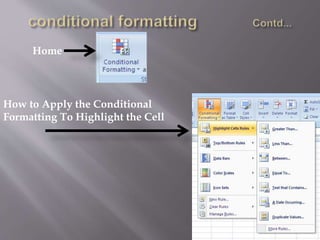
Home
How to Apply the Conditional
Formatting To Highlight the Cell
How to Apply the Conditional
Formatting Rules
How to Apply Data Bars and
Color Scales
Data Bar
Color Scheme
Example of Icon Set
 Upper(text) Converts text to uppercase
 Lower(text) Converts text to lowercase
 Exact (text1,text2)
Checks to see if two text values are identical
 TRIM(text)
Removes all spaces from text except for single
spaces between words
 CONCATENATE(text1,text2,…)
Joins several text items into one text item
IF is used to conduct conditional tests on values
and formulas.
Syntax
IF(logical_test,value_if_true,value_if_false)
e.g.
IF(A2<=100,"Within budget","Over budget")
IF(C3>D10, “TRUE”,”FALSE”)
IF(C10<20,1,0)
 Nested IF means check the multi conditions
We can also say IF within IF
e.g.
IF(A2>89,"A",IF(A2>79,"B", IF(A2>69,"C",IF(A2>59,"D","F"))))
Nested if used in our example:
IF(E8>$B$19,"Distinction",IF(E8>$B$20,"Merit",IF(E8>$B$21,"Pass","Fa
il")))
 to create a Combo box
select a region area whose details you want to bringup in the
page. For this, click on View and Forms
Assign the Value
Against the Combo
box
VLOOKUP:
You can use the VLOOKUP function to search the first column of a range of cells,
and then return a value from any cell on the same row of the range
Syntex:
VLOOKUP(lookup_value, table_array, col_index_num, [range_lookup])
Excel presentation
Excel presentation

Excel presentation

  • 1.
  • 2.
    This Presentation coverthe following skills:  Using absolute cell referencing  Applying conditional formatting  Text /String Functions  Using nested IF statements  Forms and combo boxes
  • 3.
    This formula Refersto Returns =C2 Cell C2 The value in cell C2 =Sheet2!B2 Cell B2 on Sheet2 The value in cell B2 on Sheet2 =$A$1 absolute column ‘A’ and absolute row ‘1’ =A$1 relative column ‘A’ and absolute row ‘1’ =$ A1 Absolute column ‘A’ and relative row ‘1’
  • 4.
     Use aconditional format to help us visually explore and analyze data, detect critical issues, and identify patterns and trends.  it highlights interesting cells or ranges of cells  It emphasizes unusual values, and visualize data by using data bars, color scales, and icon sets
  • 5.
    Home How to Applythe Conditional Formatting To Highlight the Cell
  • 7.
    How to Applythe Conditional Formatting Rules
  • 9.
    How to ApplyData Bars and Color Scales
  • 10.
  • 11.
  • 12.
     Upper(text) Convertstext to uppercase  Lower(text) Converts text to lowercase  Exact (text1,text2) Checks to see if two text values are identical  TRIM(text) Removes all spaces from text except for single spaces between words  CONCATENATE(text1,text2,…) Joins several text items into one text item
  • 13.
    IF is usedto conduct conditional tests on values and formulas. Syntax IF(logical_test,value_if_true,value_if_false) e.g. IF(A2<=100,"Within budget","Over budget") IF(C3>D10, “TRUE”,”FALSE”) IF(C10<20,1,0)
  • 14.
     Nested IFmeans check the multi conditions We can also say IF within IF e.g. IF(A2>89,"A",IF(A2>79,"B", IF(A2>69,"C",IF(A2>59,"D","F")))) Nested if used in our example: IF(E8>$B$19,"Distinction",IF(E8>$B$20,"Merit",IF(E8>$B$21,"Pass","Fa il")))
  • 15.
     to createa Combo box select a region area whose details you want to bringup in the page. For this, click on View and Forms
  • 17.
    Assign the Value Againstthe Combo box VLOOKUP: You can use the VLOOKUP function to search the first column of a range of cells, and then return a value from any cell on the same row of the range Syntex: VLOOKUP(lookup_value, table_array, col_index_num, [range_lookup])