Welcome to WORKPLACE REVIEW 2011“Building A Stronger Payroll”New Horizons Learning CentresExcel Master Class
Agenda For TodayExcel 2007 Interface Overview‘IF’ StatementsMacrosLinked SpreadsheetsQ & A
Excel 2007 Interface Overview
Why Did Microsoft Change the Layout?…Short Answer is PRODUCTIVITYLess time to access key featuresCustomisableMore visually appealing
Ribbon OverviewRibbon BreakdownTabGroupFull MenuQuick Access Toolbar
‘IF’ Statements
‘IF’ StatementsMicrosoft DefinitionChecks whether a condition is met, and returns on value if true, and another value if falseWhat does this mean?‘IF’ statements are a way for you to compare large amounts of data to specific criteria and identify if whether that criteria has been met or not.
Breaking ‘IF’ Statements Down3 PartsCriteria (logical_test)Value to display if true (value_if_true)Value to display if false (value_if_false)
Writing ‘IF’ StatementsWriting the Formula=IF( CriteriaValue if Criteria MetValue if Criteria Not Met
Example
ExampleFill Series Down
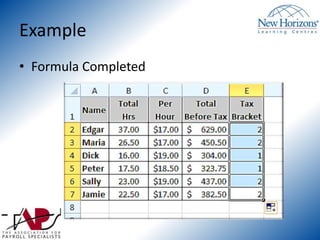
ExampleFormula Completed
Questions?
Using A Macro
What is a Macro?A Macro in Excel is a group of functions or commands assigned to a particular button in order to save time. You would use a macro when you are repeating the same group of commands on a regular basis.
Accessing Macro ToolsChoose Excel Options Under Office ButtonCHECK “Show Developer tab in the Ribbon”Developer Tab Now Shows
Recording A MacroAdjust ColumnsLeft Justify Text/NumbersBold NamesBold HeadingsBlue Heading BackgroundBorders
Recording A MacroClick ‘Record Macro”Give NameComplete FormattingClick ‘Stop Recording’
Assign to ButtonQuick Access ToolbarClick ‘More Commands’Choose ‘Macros’ on Drop DownFind your macro and click ‘Add’ and then ‘Ok’Your Macro is Added
Questions?
Linked Spreadsheets
Types of LinksOther SheetsOther WorkbooksWeb PagesApplications
Common IssuesWorkbook name has been changedLocation of either file is changedColumns/Rows are inserted and Absolute References are being usedCell with calculation formula is referring to an empty cell
Common FixesLimit Access to files with source dataIf people only need to VIEW information you may wish to save as single file web pageClick “Connections” under “Connections” group                          on the “Data” tab to see all links outside of 		the workbookUse “Ctrl + ~” to see formula viewUnder the “Formula Auditing” group in the “Formulas” tab“Trace Precedents” “Trace Dependants”“Error Checking” “Evaluate Formula”
Questions?
THANK YOU FOR ATTENDING Remember to Stop By the TAPS Booth and Leave your Business Card To Win Further Training

Excel Master Class