CHAPTER 4
VARIABLES AND DATA
TYPES
PROG0101
FUNDAMENTALS OF
PROGRAMMING
CHAPTER 3
ALGORITHMS
PROG0101
FUNDAMENTALS OF PROGRAMMING
C H A P T E R 1
O V E R V I E W O F C O M P U T E R S A N D L O G I C
PROG0101
FUNDAMENTALS OF
PROGRAMMING
PROG0101
FUNDAMENTALS OF PROGRAMMING
CHAPTER 4
VARIABLES
2
Introduction to Variables
 A symbol or name that stands for a value.
 A variable is a value that can change.
 Variables provide temporary storage for
information that will be needed during the lifespan
of the computer program (or application).
3
Introduction to Variables
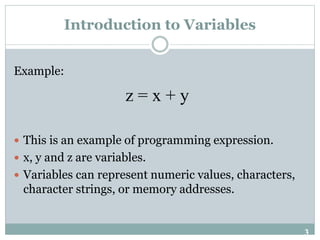
Example:
 This is an example of programming expression.
 x, y and z are variables.
 Variables can represent numeric values, characters,
character strings, or memory addresses.
z = x + y
4
Introduction to Variables
 Variables store everything in your program.
 The purpose of any useful program is to modify
variables.
 In a program every, variable has:
 Name (Identifier)
 Data Type
 Size
 Value
5
Types of Variables
 There are two types of variables:
 Local variable
 Global variable
6
Types of Variables
 Local variables are those that are in scope within a
specific part of the program (function, procedure,
method, or subroutine, depending on the
programming language employed).
 Global variables are those that are in scope for the
duration of the programs execution. They can be
accessed by any part of the program, and are read-
write for all statements that access them.
7
Types of Variables
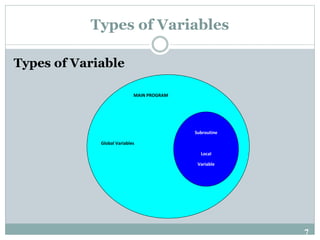
Types of Variable
MAIN PROGRAM
Global Variables
Subroutine
Local
Variable
8
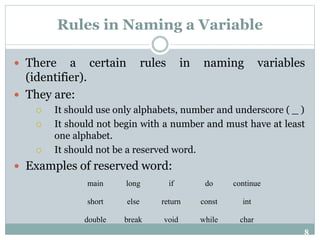
Rules in Naming a Variable
 There a certain rules in naming variables
(identifier).
 They are:
 It should use only alphabets, number and underscore ( _ )
 It should not begin with a number and must have at least
one alphabet.
 It should not be a reserved word.
 Examples of reserved word:
main long if do continue
short else return const int
double break void while char
9
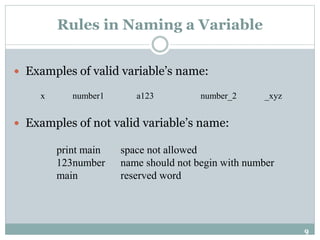
Rules in Naming a Variable
 Examples of valid variable’s name:
 Examples of not valid variable’s name:
x number1 a123 number_2 _xyz
print main space not allowed
123number name should not begin with number
main reserved word
10
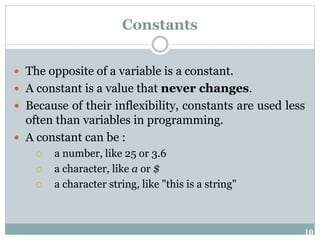
Constants
 The opposite of a variable is a constant.
 A constant is a value that never changes.
 Because of their inflexibility, constants are used less
often than variables in programming.
 A constant can be :
 a number, like 25 or 3.6
 a character, like a or $
 a character string, like "this is a string"
11
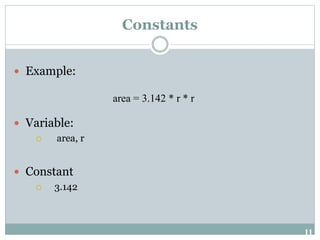
Constants
 Example:
 Variable:
 area, r
 Constant
 3.142
area = 3.142 * r * r
12
Data Types
 Data type is classification of a particular type of
information.
 Data types are essential to any computer
programming language.
 Without them, it becomes very difficult to maintain
information within a computer program.
 Different data types have different sizes in memory
depending on the machine and compilers.
13
Data Types
Examples of Data Types
 Integer
 Floating-point
 Character
 String
 Boolean
14
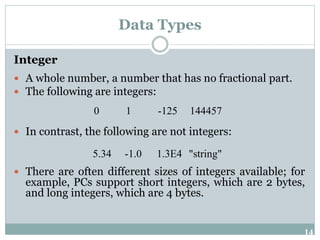
Data Types
Integer
 A whole number, a number that has no fractional part.
 The following are integers:
 In contrast, the following are not integers:
 There are often different sizes of integers available; for
example, PCs support short integers, which are 2 bytes,
and long integers, which are 4 bytes.
0 1 -125 144457
5.34 -1.0 1.3E4 "string"
15
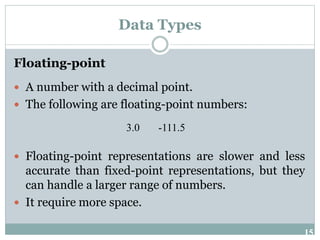
Data Types
Floating-point
 A number with a decimal point.
 The following are floating-point numbers:
 Floating-point representations are slower and less
accurate than fixed-point representations, but they
can handle a larger range of numbers.
 It require more space.
3.0 -111.5
16
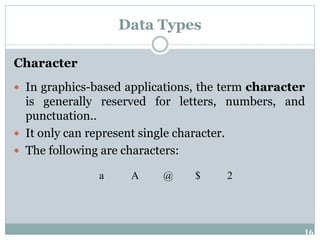
Data Types
Character
 In graphics-based applications, the term character
is generally reserved for letters, numbers, and
punctuation..
 It only can represent single character.
 The following are characters:
a A @ $ 2
17
Data Types
String
 String is a sequence of character.
 Example:
 Kuala Lumpur
 John White
 Computer
 Student011
18
Data Types
Boolean
 This data type only have two possible values:
 True
 False
 Use this data type for simple flags that track
true/false conditions.
19
Declaration of Variable
 In programming languages all the variables that a
program is going to use must be declared prior to
use.
 Declaration of a variable serves two purposes:
 It associates a type and an identifier (or name) with
the variable. The type allows the compiler to
interpret statements correctly.
 It allows the compiler to decide how much storage
space to allocate for storage of the value associated
with the identifier and to assign an address for each
variable which can be used in code generation.
20
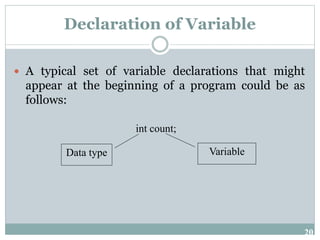
Declaration of Variable
 A typical set of variable declarations that might
appear at the beginning of a program could be as
follows:
int count;
Data type Variable
21
Declaration of Variable
 Often in programming numerical constants are
used, e.g. the value of  (pi = 3.14).
 It is well worthwhile to associate meaningful names
with constants.
 These names can be associated with the appropriate
numerical value in a constant declaration.
 The names given to constants must conform to the
rules for the formation of identifiers as defined
above.
22
Declaration of Variable
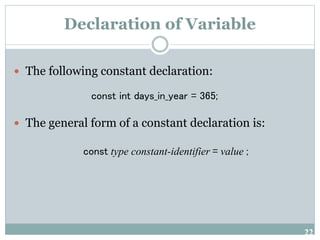
 The following constant declaration:
 The general form of a constant declaration is:
const int days_in_year = 365;
const type constant-identifier = value ;

Fundamentals of Programming Chapter 4

  • 1.
    CHAPTER 4 VARIABLES ANDDATA TYPES PROG0101 FUNDAMENTALS OF PROGRAMMING CHAPTER 3 ALGORITHMS PROG0101 FUNDAMENTALS OF PROGRAMMING C H A P T E R 1 O V E R V I E W O F C O M P U T E R S A N D L O G I C PROG0101 FUNDAMENTALS OF PROGRAMMING PROG0101 FUNDAMENTALS OF PROGRAMMING CHAPTER 4 VARIABLES
  • 2.
    2 Introduction to Variables A symbol or name that stands for a value.  A variable is a value that can change.  Variables provide temporary storage for information that will be needed during the lifespan of the computer program (or application).
  • 3.
    3 Introduction to Variables Example: This is an example of programming expression.  x, y and z are variables.  Variables can represent numeric values, characters, character strings, or memory addresses. z = x + y
  • 4.
    4 Introduction to Variables Variables store everything in your program.  The purpose of any useful program is to modify variables.  In a program every, variable has:  Name (Identifier)  Data Type  Size  Value
  • 5.
    5 Types of Variables There are two types of variables:  Local variable  Global variable
  • 6.
    6 Types of Variables Local variables are those that are in scope within a specific part of the program (function, procedure, method, or subroutine, depending on the programming language employed).  Global variables are those that are in scope for the duration of the programs execution. They can be accessed by any part of the program, and are read- write for all statements that access them.
  • 7.
    7 Types of Variables Typesof Variable MAIN PROGRAM Global Variables Subroutine Local Variable
  • 8.
    8 Rules in Naminga Variable  There a certain rules in naming variables (identifier).  They are:  It should use only alphabets, number and underscore ( _ )  It should not begin with a number and must have at least one alphabet.  It should not be a reserved word.  Examples of reserved word: main long if do continue short else return const int double break void while char
  • 9.
    9 Rules in Naminga Variable  Examples of valid variable’s name:  Examples of not valid variable’s name: x number1 a123 number_2 _xyz print main space not allowed 123number name should not begin with number main reserved word
  • 10.
    10 Constants  The oppositeof a variable is a constant.  A constant is a value that never changes.  Because of their inflexibility, constants are used less often than variables in programming.  A constant can be :  a number, like 25 or 3.6  a character, like a or $  a character string, like "this is a string"
  • 11.
    11 Constants  Example:  Variable: area, r  Constant  3.142 area = 3.142 * r * r
  • 12.
    12 Data Types  Datatype is classification of a particular type of information.  Data types are essential to any computer programming language.  Without them, it becomes very difficult to maintain information within a computer program.  Different data types have different sizes in memory depending on the machine and compilers.
  • 13.
    13 Data Types Examples ofData Types  Integer  Floating-point  Character  String  Boolean
  • 14.
    14 Data Types Integer  Awhole number, a number that has no fractional part.  The following are integers:  In contrast, the following are not integers:  There are often different sizes of integers available; for example, PCs support short integers, which are 2 bytes, and long integers, which are 4 bytes. 0 1 -125 144457 5.34 -1.0 1.3E4 "string"
  • 15.
    15 Data Types Floating-point  Anumber with a decimal point.  The following are floating-point numbers:  Floating-point representations are slower and less accurate than fixed-point representations, but they can handle a larger range of numbers.  It require more space. 3.0 -111.5
  • 16.
    16 Data Types Character  Ingraphics-based applications, the term character is generally reserved for letters, numbers, and punctuation..  It only can represent single character.  The following are characters: a A @ $ 2
  • 17.
    17 Data Types String  Stringis a sequence of character.  Example:  Kuala Lumpur  John White  Computer  Student011
  • 18.
    18 Data Types Boolean  Thisdata type only have two possible values:  True  False  Use this data type for simple flags that track true/false conditions.
  • 19.
    19 Declaration of Variable In programming languages all the variables that a program is going to use must be declared prior to use.  Declaration of a variable serves two purposes:  It associates a type and an identifier (or name) with the variable. The type allows the compiler to interpret statements correctly.  It allows the compiler to decide how much storage space to allocate for storage of the value associated with the identifier and to assign an address for each variable which can be used in code generation.
  • 20.
    20 Declaration of Variable A typical set of variable declarations that might appear at the beginning of a program could be as follows: int count; Data type Variable
  • 21.
    21 Declaration of Variable Often in programming numerical constants are used, e.g. the value of  (pi = 3.14).  It is well worthwhile to associate meaningful names with constants.  These names can be associated with the appropriate numerical value in a constant declaration.  The names given to constants must conform to the rules for the formation of identifiers as defined above.
  • 22.
    22 Declaration of Variable The following constant declaration:  The general form of a constant declaration is: const int days_in_year = 365; const type constant-identifier = value ;