HOW DIDYOU USE MEDIA
TECHNOLOGIES INTHE CONSTRUCTION
AND RESEARCH, PLANNING AND
EVALUATION STAGES?
EvaluationQuestion Four – By Harriet Bibby.
RESEARCHAND PLANNING
CONSTRUCTION
EVALUATIONS.
RESEARCH AND
PLANNING
Computers, Cameras and Mics.
How did you use them? What did you find easy?What problems did you face? Did
you learn anything new?
BLOGGERAND PREZI – KEEPING
THINGS IN ORDER.
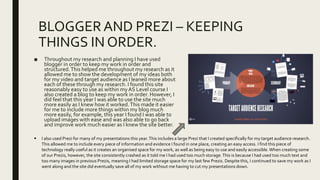
■ Throughout my research and planning I have used
blogger in order to keep my work in order and
structured.This helped me throughout my research as it
allowed me to show the development of my ideas both
for my video and target audience as I leaned more about
each of these through my research. I found this site
reasonably easy to use as within myAS Level course I
also created a blog to keep my work in order. However, I
did feel that this year I was able to use the site much
more easily as I knew how it worked.This made it easier
for me to include more things within my blog much
more easily, for example, this year I found I was able to
upload images with ease and was also able to go back
and improve work much easier as I knew the site better.
 I also used Prezi for many of my presentations this year.This includes a large Prezi that I created specifically for my target audience research.
This allowed me to include every piece of information and evidence I found in one place, creating an easy access. I find this piece of
technology really useful as it creates an organised space for my work, as well as being easy to use and easily accessible. When creating some
of our Prezis, however, the site consistently crashed as it told me I had used too much storage.This is because I had used too much text and
too many images in previous Prezis, meaning I had limited storage space for my last few Prezis. Despite this, I continued to save my work as I
went along and the site did eventually save all of my work without me having to cut my presentations down.
YOUTUBE –TA INTERVIEWS, REAL
TEXTSAND STUDENTWORK.
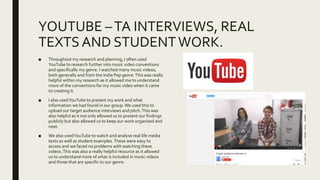
■ Throughout my research and planning, I often used
YouTube to research further into music video conventions
and specifically my genre. I watched many music videos,
both generally and from the Indie Pop genre.This was really
helpful within my research as it allowed me to understand
more of the conventions for my music video when it came
to creating it.
■ I also usedYouTube to present my work and what
information we had found in our group.We used this to
upload our target audience interviews and pitch.This was
also helpful as it not only allowed us to present our findings
publicly but also allowed us to keep our work organised and
neat.
■ We also usedYouTube to watch and analyse real life media
texts as well as student examples.These were easy to
access and we faced no problems with watching these
videos.This was also a really helpful resource as it allowed
us to understand more of what is included in music videos
and those that are specific to our genre.
INTERNETANDWEBSITES – INDIE POP
WEBSITESAND ACCESSINGWORK.
■ I used the internet a lot during our research and
planning.
■ When researching into our genre, Chloe and I found
some Indie Pop websites which were extremely
helpful when finding conventions for our genre.
These included Under the Radar and UKTribes (this
also gave us information about the psychographics
and demographics of our audience which helped with
ourTA research). (http://www.undertheradarmag.com/)
(http://www.uktribes.com/)
■ We also used the internet during our target audience
research to find out more about our potential
audience members.This included the BBC’s Social
ClassTest website – which we got some of our target
audience members to use to determine what kind of
class we were going to target when making our
video. (http://www.bbc.co.uk/news/magazine-22000973)
■ The internet was also helpful when accessing our
work, for example using Blogger, Prezi and other
websites for our research.Overall, the internet has
been very helpful as almost every piece of work we
have covered, we have had to use the internet for.
MOVIE STUDIO PLATINUM –TA
INTERVIEWS, FOCUS GROUPS AND PITCH.
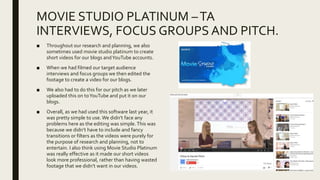
■ Throughout our research and planning, we also
sometimes used movie studio platinum to create
short videos for our blogs andYouTube accounts.
■ When we had filmed our target audience
interviews and focus groups we then edited the
footage to create a video for our blogs.
■ We also had to do this for our pitch as we later
uploaded this on toYouTube and put it on our
blogs.
■ Overall, as we had used this software last year, it
was pretty simple to use. We didn’t face any
problems here as the editing was simple.This was
because we didn’t have to include and fancy
transitions or filters as the videos were purely for
the purpose of research and planning, not to
entertain. I also think using Movie Studio Platinum
was really effective as it made our short videos
look more professional, rather than having wasted
footage that we didn’t want in our videos.
CAMERAS AND MICS –TA INTERVIEWS,
FOCUS GROUPS, PITCHES AND
AUDITIONS.■ When creating our target audience interviews, we had to use a HD Panasonic camera
to capture the footage. In my opinion, these take a fair bit of time to set up as we had
to use a tripod to make the camera steady. We also faced the problem of having low
battery on the camera, however, we were able to plug the camera in whilst still
filming so this wasn’t too big a problem. Despite this, the actual filming was easy and
simple to do and we didn’t have to use a voice recorder as the camera picks up sound
too, making the filming much easier. Because we had used these cameras in our
filmmaking last year, they seemed easier to use and we knew what we were doing.
We had also visited the University of Lincoln prior to this filming and had been
involved in a workshop where they taught us how to use cameras more efficiently
which was also really helpful when filming for our research and planning.
■ We created focus groups with our classmates after every few weeks to gain feedback
on the work we were producing. After drafting ideas for our initial storyboards we
created a focus group to feedback on our work. During this, we used a still camera to
capture the shot of our discussion ready to upload onto our blogs. This was easy to
use as we didn’t have to set up any tripods, etc. we simply used a camera to capture
the image in one shot.
■ During our pitch, we again used a HD Panasonic camera and had to set up a tripod to
film. I think that within the final video, some of the sound was fairly quiet, so we
ultimately could have benefitted from using a voice recorder during this presentation.
However, despite this I think that using this camera was fairly simple as we had used
them last year and had also gained more practice through filming our target audience
interviews etc. This time we made sure the battery was fully charged before we
started filming as we had learned from last time that it was more difficult to have to
plug the camera into a power source.
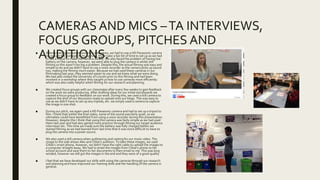
■ We also used a still camera when auditioning and casting for our music video. The
image to the side shows Alex and Chloe’s audition. To take these images, we used
Chloe’s smart phone, however, we didn’t have the right cable to upload the images to
a computer straight away. We had to email the images from Chloe’s phone to her
school account and save them to her documents to then email to me. This was long
winded, however we still got the images in the end and they were of a good quality.
■ I feel that we have developed our skills with using the cameras through our research
and planning and have improved our framing skills and the handling of the camera in
general.
RESEARCHAND PLANNING –
CONCLUSION.
■ Through our research and planning stage, I feel that I have improved my knowledge
and practice with using different technologies such as computers and websites and
software that we can produce work (including Prezi and Blogger), using online
websites to learn more about our target audience and produce research that is helpful
to us, but most of all I feel that using the cameras has helped me the most and I have
developed my skills effectively which ultimately helped us when filming our final music
video.
CONSTRUCTION
WHATWENTWELL? WHAT DIDN’T GOWELL?WHAT DIDYOU LEARN
THROUGHOUT CONSTRUCTION?
MICROPHONES – BOOM? PISTOL?
MPS? SOUNDTRACK.
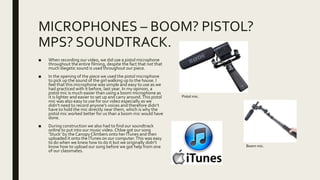
■ When recording our video, we did use a pistol microphone
throughout the entire filming, despite the fact that not that
much diegetic sound is used throughout our piece.
■ In the opening of the piece we used the pistol microphone
to pick up the sound of the girl walking up to the house. I
feel that this microphone was simple and easy to use as we
had practiced with it before, last year. In my opinion, a
pistol mic is much easier than using a boom microphone as
it is lighter and easier to set up and carry around.This pistol
mic was also easy to use for our video especially as we
didn’t need to record anyone’s voices and therefore didn’t
have to hold the mic directly near them, which is why the
pistol mic worked better for us than a boom mic would have
done.
■ During construction we also had to find our soundtrack
online to put into our music video. Chloe got our song
‘Stuck’ by the Canopy Climbers onto her ITunes and then
uploaded it onto the ITunes on our computer.This was easy
to do when we knew how to do it but we originally didn’t
know how to upload our song before we got help from one
of our classmates.
Pistol mic.
Boom mic.
CAMERAAND LIGHTING– OPERATING,
HANDLING.■ When filming, we used a HD Panasonic camera – the same that we had used when filming videos
within our research and planning. The fact that we had used This camera previously really did help
as it meant that we knew how to set it up and work it really quickly and we didn’t have to spend
half our filming time figuring out how to operate it. Within the first half of our video we generally
used a tripod in order to get steady shots within the house, however within the remainder of our
video we had generally used handheld shots which I felt made the video look much more visually
interesting. In my opinion, handling the camera was much easier and faster when we were filming
hand held shots as it meant that we didn’t have to set the tripod up and make sure it was level
(which takes a while!). On the other hand, I think that sometimes the handheld shots can look
messy and the tripod does help to steady the shots and make them look neater. Overall, I think the
HD Panasonic was a really good camera to use as it wasn’t over-complicated and generally
produced a high quality image. However, I don’t think the camera would have been as easy to use
if we hadn’t have practiced with it previously.
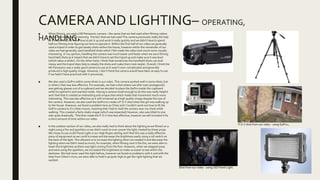
■ We also used a GoPro within some shots in our video. This camera worked well in some shots, but
in others I feel was less effective. For example, we had a shot where Leo (the main protagonist)
was getting glasses out of a cupboard and we decided to place the GoPro inside the cupboard
while he opened it and reached inside. Having a camera small enough to do this was really helpful
and I feel that it created an interesting and unique shot which made that movement much more
interesting. This was also effective as it still remained as a high quality image despite the size of
the camera. However, we also used the GoPro to create a P.O.V shot when the girl was walking up
to the house. However, we faced a problem here as Chloe and I Couldn’t work out how to fit the
GoPro camera to it’s chest mount, meaning that I had to hold the camera near my chest while
walking. This created a fairly shaky image (which was expected) however, also was tilted to one
side quite drastically. This then made the P.O.V shot less effective, however we still included it for
a short amount of time within our video.
■ In the outdoor section of our video, we also really had to think about the lighting as we filmed on a
night using a fire and sparklers so we didn’t want to over-power the light created by these props.
We chose to use a LED Panel Light in our High Ropes setting and I feel this was a really effective
piece of equipment as we could increase and decrease the brightness easily using a roll switch on
the back of the light. This allowed us to increase the lighting when we needed it and decrease the
lighting when we didn’t need as much, for example, when filming next ti the fire, we were able to
lower the brightness as there was light coming from the fore. However, when we stepped away
and were using the sparklers, we increased the brightness to make us easier to see within the
darkness. We had never used this light before, however we faced no problems with it and with the
help from Chloe’s mum, we were able to hold it up quite high to get the right lighting that we
wanted.
P.O.V shot from our video - using GoPro.
Shot from our video - using LED Panel Light.
COMPUTERS – MOVIE STUDIO PLAT.
■ After we had finished filming our video, we began editing using the software
Movie Studio Platinum on our computers. We had used this software last year
when creating our film openings so we vaguely knew how to edit our shots
together. I found using this software to edit reasonably difficult as I hadn’t
edited a lot and last year, my partner was more in control of the editing.
However, Chloe and I both edited our piece together and eventually began to
find it easy to use and got quicker at piecing the clips together. The only
problem that we faced which confused me and Chloe was when we were
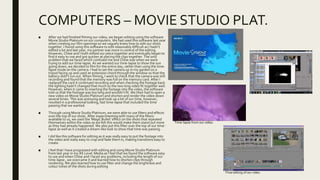
trying to add our time-lapse. As we wanted our time-lapse to show the sun
going down, we decided to film for the entire day, rather than using the time-
lapse mode on the camera. I had to set the camera up in my garden on a
tripod facing up and used an extension chord through the window so that the
battery didn’t run out. When filming, I went to check that the camera was still
recording and found that the memory was full on the memory card. After I
replaced the card it continued recording and when checking the footage back
the lighting hadn’t changed that much so the two long video fit together well.
However, when it came to inserting the footage into the video, the software
told us that the footage was too long and wouldn’t fit. We then had to open a
new video on Movie Studio Platinum and shorten and render the video down
several times. This was annoying and took up a lot of our time, however,
resulted in a professional looking, fast time-lapse that included the time
passing that we wanted.
■ Through using Movie Studio Platinum, we were able to use filters and effects
over the top of our shots. After experimenting with many of the filters
available to us, we used the ‘Magic Bullet’ effect on the shots that repeated
themselves within the video as we felt this would make them stand out more
as they had already happened. We also put this filter over the top of our time-
lapse as well as it created a dream-like look to show that time was passing.
■ I did like this software for editing as it was really easy to put the footage into
the video and really easy to crop and fade them in, making transitions easy to
create.
■ I feel that I have progressed with editing and using Movie Studio Platinum
from last year in my AS Level Media as I feel that we found the software easy
to use and when Chloe and I faced any problems, including the length of our
time-lapse , we overcame it and learned how to shorten clips through
rendering. We also learned how to use filter and change the brightness and
colour tones of the shots during editing.
Time-lapse from our video.
Final editing of our video.
COMPUTERS – PHOTOSHOP (DIGIPAKAND ADVERT).
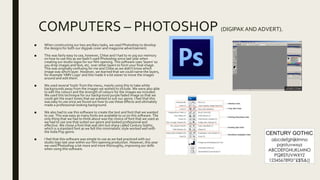
■ When constructing our two ancillary tasks, we used Photoshop to develop
the designs for both our digipak cover and magazine advertisement.
■ This was fairly easy to use, however, Chloe and I had to re-jog our memory
on how to use this as we hadn’t used Photoshop since last year when
creating our studio logos for our film opening. This software uses ‘layers’ so
you drop images and text, etc. over other layers to form your final image.
This was originally confusing for me and Chloe as we didn’t know which
image was which layer. However, we learned that we could name the layers,
for example ‘HMV Logo’ and this made it a lot easier to move the images
around and edit them.
■ We used several ‘tools’ from the menu, mainly using this to take white
backgrounds away from the images we wished to include. We were also able
to edit the colours and the strength of colours for the images we included.
We used this technique for our background purple faded image so that we
could get the exact tones that we wanted to suit our genre. I feel that this
was easy to use once we found out how to use these effects and ultimately
made a professional-looking background.
■ We also had to use this software to create the text and font that we wanted
to use. This was easy as many fonts are available to us on this software. The
only thing that we had to think about was the choice of font that we used as
we had to use one that suited our genre and looked professional and
effective. We chose a font that was slim but sharp called Century Gothic,
which is a standard font as we felt this minimalistic style worked well with
the Indie Pop genre.
■ I feel that this software was simple to use as we had practiced with our
studio logo last year within our film opening production. However, this year
we used Photoshop a lot more and more thoroughly, improving our skills
when using this software.
EVALUATIONS
HOW DIDTHESE HELPYOU?WHAT PLATFORMS DIDYOU USE? WHAT
DIDYOU LEARN?
EVALUATION Q1 – INWHAT WAYS DOESYOUR PRODUCT USE,
DEVELOPOR CHALLENGE FORMS AND CONVENTIONS OF REAL MEDIA PRODUCTS?
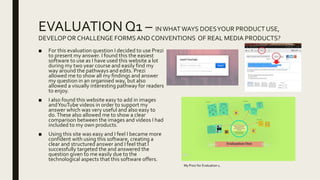
■ For this evaluation question I decided to use Prezi
to present my answer. I found this the easiest
software to use as I have used this website a lot
during my two year course and easily find my
way around the pathways and edits. Prezi
allowed me to show all my findings and answer
my question in an organised way, but also
allowed a visually interesting pathway for readers
to enjoy.
■ I also found this website easy to add in images
andYouTube videos in order to support my
answer which was very useful and also easy to
do.These also allowed me to show a clear
comparison between the images and videos I had
included to my own products.
■ Using this site was easy and I feel I became more
confident with using this software, creating a
clear and structured answer and I feel that I
successfully targeted the and answered the
question given to me easily due to the
technological aspects that this software offers.
My Prezi for Evaluation 1.
EVALUATION Q2 – HOW EFFECTIVE ISTHE COMBINATION OF
YOUR MAIN PRODUCTANDANCILLARYTASKS?
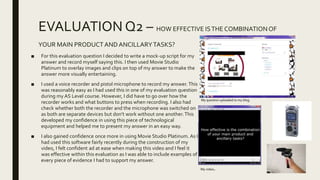
■ For this evaluation question I decided to write a mock-up script for my
answer and record myself saying this. I then used Movie Studio
Platinum to overlay images and clips on top of my answer to make the
answer more visually entertaining.
■ I used a voice recorder and pistol microphone to record my answer.This
was reasonably easy as I had used this in one of my evaluation question
during my AS Level course. However, I did have to go over how the
recorder works and what buttons to press when recording. I also had
check whether both the recorder and the microphone was switched on
as both are separate devices but don’t work without one another.This
developed my confidence in using this piece of technological
equipment and helped me to present my answer in an easy way.
■ I also gained confidence once more in using Movie Studio Platinum. As I
had used this software fairly recently during the construction of my
video, I felt confident ad at ease when making this video and I feel it
was effective within this evaluation as I was able to include examples of
every piece of evidence I had to support my answer.
My video.
My question uploaded to my blog.
EVALUATION Q3 – WHAT HAVEYOU LEARNED FROMYOUR
AUDIENCE FEEDBACK?
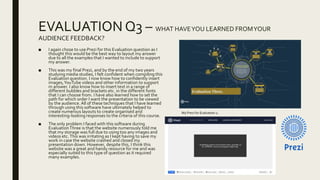
■ I again chose to use Prezi for this Evaluation question as I
thought this would be the best way to layout my answer
due to all the examples that I wanted to include to support
my answer.
■ This was my final Prezi, and by the end of my two years
studying media studies, I felt confident when compiling this
Evaluation question. I now know how to confidently insert
images,YouTube videos and other information to support
m answer. I also know how to insert text in a range of
different bubbles and brackets etc. in the different fonts
that I can choose from. I have also learned how to set the
path for which order I want the presentation to be viewed
by the audience. All of these techniques that I have learned
through using this software have ultimately helped to
create numerous layouts to create organised and
interesting-looking responses to the criteria of this course.
■ The only problem I faced with this software during
EvaluationThree is that the website numerously told me
that my storage was full due to using too any images and
videos etc.This was irritating as I kept having to save my
work in case the website crashed and closed my
presentation down. However, despite this, I think this
website was a great and handy resource for me and was
especially suited to this type of question as it required
many examples.
My Prezi for Evaluation 2.
EVALUATION Q4 – HOW DIDYOU USE MEDIATECHNOLOGIES
INTHE CONSTRUCTIONAND RESEACH, PLANNINGAND EVALUATION STAGES?
■ I chose to useWindows PowerPoint Presentation
to complete this Evaluation question.
■ In my opinion, this is a really reliable software that
I am confident and comfortable with using as I
have had a lot of practice using PowerPoint. I also
think this is effective in presenting information in a
clear and organised way which is again interesting
and stimulating.This is an easy software and I can
upload images easily to support my answer and
chose fonts that suit my overall theme.
■ I faced no problems when using PowerPoint and
found it the most easy piece of technology
throughout the Evaluation section of my
coursework.
CONCLUSION
HOW DIDYOU USETECHNOLOGIES?WHAT DIDYOU LEARN?
TO CONCLUDE…
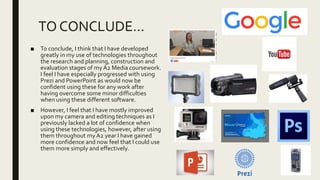
■ To conclude, I think that I have developed
greatly in my use of technologies throughout
the research and planning, construction and
evaluation stages of my A2 Media coursework.
I feel I have especially progressed with using
Prezi and PowerPoint as would now be
confident using these for any work after
having overcome some minor difficulties
when using these different software.
■ However, I feel that I have mostly improved
upon my camera and editing techniques as I
previously lacked a lot of confidence when
using these technologies, however, after using
them throughout my A2 year I have gained
more confidence and now feel that I could use
them more simply and effectively.

Evaluation 4

  • 1.
    HOW DIDYOU USEMEDIA TECHNOLOGIES INTHE CONSTRUCTION AND RESEARCH, PLANNING AND EVALUATION STAGES? EvaluationQuestion Four – By Harriet Bibby. RESEARCHAND PLANNING CONSTRUCTION EVALUATIONS.
  • 2.
    RESEARCH AND PLANNING Computers, Camerasand Mics. How did you use them? What did you find easy?What problems did you face? Did you learn anything new?
  • 3.
    BLOGGERAND PREZI –KEEPING THINGS IN ORDER. ■ Throughout my research and planning I have used blogger in order to keep my work in order and structured.This helped me throughout my research as it allowed me to show the development of my ideas both for my video and target audience as I leaned more about each of these through my research. I found this site reasonably easy to use as within myAS Level course I also created a blog to keep my work in order. However, I did feel that this year I was able to use the site much more easily as I knew how it worked.This made it easier for me to include more things within my blog much more easily, for example, this year I found I was able to upload images with ease and was also able to go back and improve work much easier as I knew the site better.  I also used Prezi for many of my presentations this year.This includes a large Prezi that I created specifically for my target audience research. This allowed me to include every piece of information and evidence I found in one place, creating an easy access. I find this piece of technology really useful as it creates an organised space for my work, as well as being easy to use and easily accessible. When creating some of our Prezis, however, the site consistently crashed as it told me I had used too much storage.This is because I had used too much text and too many images in previous Prezis, meaning I had limited storage space for my last few Prezis. Despite this, I continued to save my work as I went along and the site did eventually save all of my work without me having to cut my presentations down.
  • 4.
    YOUTUBE –TA INTERVIEWS,REAL TEXTSAND STUDENTWORK. ■ Throughout my research and planning, I often used YouTube to research further into music video conventions and specifically my genre. I watched many music videos, both generally and from the Indie Pop genre.This was really helpful within my research as it allowed me to understand more of the conventions for my music video when it came to creating it. ■ I also usedYouTube to present my work and what information we had found in our group.We used this to upload our target audience interviews and pitch.This was also helpful as it not only allowed us to present our findings publicly but also allowed us to keep our work organised and neat. ■ We also usedYouTube to watch and analyse real life media texts as well as student examples.These were easy to access and we faced no problems with watching these videos.This was also a really helpful resource as it allowed us to understand more of what is included in music videos and those that are specific to our genre.
  • 5.
    INTERNETANDWEBSITES – INDIEPOP WEBSITESAND ACCESSINGWORK. ■ I used the internet a lot during our research and planning. ■ When researching into our genre, Chloe and I found some Indie Pop websites which were extremely helpful when finding conventions for our genre. These included Under the Radar and UKTribes (this also gave us information about the psychographics and demographics of our audience which helped with ourTA research). (http://www.undertheradarmag.com/) (http://www.uktribes.com/) ■ We also used the internet during our target audience research to find out more about our potential audience members.This included the BBC’s Social ClassTest website – which we got some of our target audience members to use to determine what kind of class we were going to target when making our video. (http://www.bbc.co.uk/news/magazine-22000973) ■ The internet was also helpful when accessing our work, for example using Blogger, Prezi and other websites for our research.Overall, the internet has been very helpful as almost every piece of work we have covered, we have had to use the internet for.
  • 6.
    MOVIE STUDIO PLATINUM–TA INTERVIEWS, FOCUS GROUPS AND PITCH. ■ Throughout our research and planning, we also sometimes used movie studio platinum to create short videos for our blogs andYouTube accounts. ■ When we had filmed our target audience interviews and focus groups we then edited the footage to create a video for our blogs. ■ We also had to do this for our pitch as we later uploaded this on toYouTube and put it on our blogs. ■ Overall, as we had used this software last year, it was pretty simple to use. We didn’t face any problems here as the editing was simple.This was because we didn’t have to include and fancy transitions or filters as the videos were purely for the purpose of research and planning, not to entertain. I also think using Movie Studio Platinum was really effective as it made our short videos look more professional, rather than having wasted footage that we didn’t want in our videos.
  • 7.
    CAMERAS AND MICS–TA INTERVIEWS, FOCUS GROUPS, PITCHES AND AUDITIONS.■ When creating our target audience interviews, we had to use a HD Panasonic camera to capture the footage. In my opinion, these take a fair bit of time to set up as we had to use a tripod to make the camera steady. We also faced the problem of having low battery on the camera, however, we were able to plug the camera in whilst still filming so this wasn’t too big a problem. Despite this, the actual filming was easy and simple to do and we didn’t have to use a voice recorder as the camera picks up sound too, making the filming much easier. Because we had used these cameras in our filmmaking last year, they seemed easier to use and we knew what we were doing. We had also visited the University of Lincoln prior to this filming and had been involved in a workshop where they taught us how to use cameras more efficiently which was also really helpful when filming for our research and planning. ■ We created focus groups with our classmates after every few weeks to gain feedback on the work we were producing. After drafting ideas for our initial storyboards we created a focus group to feedback on our work. During this, we used a still camera to capture the shot of our discussion ready to upload onto our blogs. This was easy to use as we didn’t have to set up any tripods, etc. we simply used a camera to capture the image in one shot. ■ During our pitch, we again used a HD Panasonic camera and had to set up a tripod to film. I think that within the final video, some of the sound was fairly quiet, so we ultimately could have benefitted from using a voice recorder during this presentation. However, despite this I think that using this camera was fairly simple as we had used them last year and had also gained more practice through filming our target audience interviews etc. This time we made sure the battery was fully charged before we started filming as we had learned from last time that it was more difficult to have to plug the camera into a power source. ■ We also used a still camera when auditioning and casting for our music video. The image to the side shows Alex and Chloe’s audition. To take these images, we used Chloe’s smart phone, however, we didn’t have the right cable to upload the images to a computer straight away. We had to email the images from Chloe’s phone to her school account and save them to her documents to then email to me. This was long winded, however we still got the images in the end and they were of a good quality. ■ I feel that we have developed our skills with using the cameras through our research and planning and have improved our framing skills and the handling of the camera in general.
  • 8.
    RESEARCHAND PLANNING – CONCLUSION. ■Through our research and planning stage, I feel that I have improved my knowledge and practice with using different technologies such as computers and websites and software that we can produce work (including Prezi and Blogger), using online websites to learn more about our target audience and produce research that is helpful to us, but most of all I feel that using the cameras has helped me the most and I have developed my skills effectively which ultimately helped us when filming our final music video.
  • 9.
    CONSTRUCTION WHATWENTWELL? WHAT DIDN’TGOWELL?WHAT DIDYOU LEARN THROUGHOUT CONSTRUCTION?
  • 10.
    MICROPHONES – BOOM?PISTOL? MPS? SOUNDTRACK. ■ When recording our video, we did use a pistol microphone throughout the entire filming, despite the fact that not that much diegetic sound is used throughout our piece. ■ In the opening of the piece we used the pistol microphone to pick up the sound of the girl walking up to the house. I feel that this microphone was simple and easy to use as we had practiced with it before, last year. In my opinion, a pistol mic is much easier than using a boom microphone as it is lighter and easier to set up and carry around.This pistol mic was also easy to use for our video especially as we didn’t need to record anyone’s voices and therefore didn’t have to hold the mic directly near them, which is why the pistol mic worked better for us than a boom mic would have done. ■ During construction we also had to find our soundtrack online to put into our music video. Chloe got our song ‘Stuck’ by the Canopy Climbers onto her ITunes and then uploaded it onto the ITunes on our computer.This was easy to do when we knew how to do it but we originally didn’t know how to upload our song before we got help from one of our classmates. Pistol mic. Boom mic.
  • 11.
    CAMERAAND LIGHTING– OPERATING, HANDLING.■When filming, we used a HD Panasonic camera – the same that we had used when filming videos within our research and planning. The fact that we had used This camera previously really did help as it meant that we knew how to set it up and work it really quickly and we didn’t have to spend half our filming time figuring out how to operate it. Within the first half of our video we generally used a tripod in order to get steady shots within the house, however within the remainder of our video we had generally used handheld shots which I felt made the video look much more visually interesting. In my opinion, handling the camera was much easier and faster when we were filming hand held shots as it meant that we didn’t have to set the tripod up and make sure it was level (which takes a while!). On the other hand, I think that sometimes the handheld shots can look messy and the tripod does help to steady the shots and make them look neater. Overall, I think the HD Panasonic was a really good camera to use as it wasn’t over-complicated and generally produced a high quality image. However, I don’t think the camera would have been as easy to use if we hadn’t have practiced with it previously. ■ We also used a GoPro within some shots in our video. This camera worked well in some shots, but in others I feel was less effective. For example, we had a shot where Leo (the main protagonist) was getting glasses out of a cupboard and we decided to place the GoPro inside the cupboard while he opened it and reached inside. Having a camera small enough to do this was really helpful and I feel that it created an interesting and unique shot which made that movement much more interesting. This was also effective as it still remained as a high quality image despite the size of the camera. However, we also used the GoPro to create a P.O.V shot when the girl was walking up to the house. However, we faced a problem here as Chloe and I Couldn’t work out how to fit the GoPro camera to it’s chest mount, meaning that I had to hold the camera near my chest while walking. This created a fairly shaky image (which was expected) however, also was tilted to one side quite drastically. This then made the P.O.V shot less effective, however we still included it for a short amount of time within our video. ■ In the outdoor section of our video, we also really had to think about the lighting as we filmed on a night using a fire and sparklers so we didn’t want to over-power the light created by these props. We chose to use a LED Panel Light in our High Ropes setting and I feel this was a really effective piece of equipment as we could increase and decrease the brightness easily using a roll switch on the back of the light. This allowed us to increase the lighting when we needed it and decrease the lighting when we didn’t need as much, for example, when filming next ti the fire, we were able to lower the brightness as there was light coming from the fore. However, when we stepped away and were using the sparklers, we increased the brightness to make us easier to see within the darkness. We had never used this light before, however we faced no problems with it and with the help from Chloe’s mum, we were able to hold it up quite high to get the right lighting that we wanted. P.O.V shot from our video - using GoPro. Shot from our video - using LED Panel Light.
  • 12.
    COMPUTERS – MOVIESTUDIO PLAT. ■ After we had finished filming our video, we began editing using the software Movie Studio Platinum on our computers. We had used this software last year when creating our film openings so we vaguely knew how to edit our shots together. I found using this software to edit reasonably difficult as I hadn’t edited a lot and last year, my partner was more in control of the editing. However, Chloe and I both edited our piece together and eventually began to find it easy to use and got quicker at piecing the clips together. The only problem that we faced which confused me and Chloe was when we were trying to add our time-lapse. As we wanted our time-lapse to show the sun going down, we decided to film for the entire day, rather than using the time- lapse mode on the camera. I had to set the camera up in my garden on a tripod facing up and used an extension chord through the window so that the battery didn’t run out. When filming, I went to check that the camera was still recording and found that the memory was full on the memory card. After I replaced the card it continued recording and when checking the footage back the lighting hadn’t changed that much so the two long video fit together well. However, when it came to inserting the footage into the video, the software told us that the footage was too long and wouldn’t fit. We then had to open a new video on Movie Studio Platinum and shorten and render the video down several times. This was annoying and took up a lot of our time, however, resulted in a professional looking, fast time-lapse that included the time passing that we wanted. ■ Through using Movie Studio Platinum, we were able to use filters and effects over the top of our shots. After experimenting with many of the filters available to us, we used the ‘Magic Bullet’ effect on the shots that repeated themselves within the video as we felt this would make them stand out more as they had already happened. We also put this filter over the top of our time- lapse as well as it created a dream-like look to show that time was passing. ■ I did like this software for editing as it was really easy to put the footage into the video and really easy to crop and fade them in, making transitions easy to create. ■ I feel that I have progressed with editing and using Movie Studio Platinum from last year in my AS Level Media as I feel that we found the software easy to use and when Chloe and I faced any problems, including the length of our time-lapse , we overcame it and learned how to shorten clips through rendering. We also learned how to use filter and change the brightness and colour tones of the shots during editing. Time-lapse from our video. Final editing of our video.
  • 13.
    COMPUTERS – PHOTOSHOP(DIGIPAKAND ADVERT). ■ When constructing our two ancillary tasks, we used Photoshop to develop the designs for both our digipak cover and magazine advertisement. ■ This was fairly easy to use, however, Chloe and I had to re-jog our memory on how to use this as we hadn’t used Photoshop since last year when creating our studio logos for our film opening. This software uses ‘layers’ so you drop images and text, etc. over other layers to form your final image. This was originally confusing for me and Chloe as we didn’t know which image was which layer. However, we learned that we could name the layers, for example ‘HMV Logo’ and this made it a lot easier to move the images around and edit them. ■ We used several ‘tools’ from the menu, mainly using this to take white backgrounds away from the images we wished to include. We were also able to edit the colours and the strength of colours for the images we included. We used this technique for our background purple faded image so that we could get the exact tones that we wanted to suit our genre. I feel that this was easy to use once we found out how to use these effects and ultimately made a professional-looking background. ■ We also had to use this software to create the text and font that we wanted to use. This was easy as many fonts are available to us on this software. The only thing that we had to think about was the choice of font that we used as we had to use one that suited our genre and looked professional and effective. We chose a font that was slim but sharp called Century Gothic, which is a standard font as we felt this minimalistic style worked well with the Indie Pop genre. ■ I feel that this software was simple to use as we had practiced with our studio logo last year within our film opening production. However, this year we used Photoshop a lot more and more thoroughly, improving our skills when using this software.
  • 14.
    EVALUATIONS HOW DIDTHESE HELPYOU?WHATPLATFORMS DIDYOU USE? WHAT DIDYOU LEARN?
  • 15.
    EVALUATION Q1 –INWHAT WAYS DOESYOUR PRODUCT USE, DEVELOPOR CHALLENGE FORMS AND CONVENTIONS OF REAL MEDIA PRODUCTS? ■ For this evaluation question I decided to use Prezi to present my answer. I found this the easiest software to use as I have used this website a lot during my two year course and easily find my way around the pathways and edits. Prezi allowed me to show all my findings and answer my question in an organised way, but also allowed a visually interesting pathway for readers to enjoy. ■ I also found this website easy to add in images andYouTube videos in order to support my answer which was very useful and also easy to do.These also allowed me to show a clear comparison between the images and videos I had included to my own products. ■ Using this site was easy and I feel I became more confident with using this software, creating a clear and structured answer and I feel that I successfully targeted the and answered the question given to me easily due to the technological aspects that this software offers. My Prezi for Evaluation 1.
  • 16.
    EVALUATION Q2 –HOW EFFECTIVE ISTHE COMBINATION OF YOUR MAIN PRODUCTANDANCILLARYTASKS? ■ For this evaluation question I decided to write a mock-up script for my answer and record myself saying this. I then used Movie Studio Platinum to overlay images and clips on top of my answer to make the answer more visually entertaining. ■ I used a voice recorder and pistol microphone to record my answer.This was reasonably easy as I had used this in one of my evaluation question during my AS Level course. However, I did have to go over how the recorder works and what buttons to press when recording. I also had check whether both the recorder and the microphone was switched on as both are separate devices but don’t work without one another.This developed my confidence in using this piece of technological equipment and helped me to present my answer in an easy way. ■ I also gained confidence once more in using Movie Studio Platinum. As I had used this software fairly recently during the construction of my video, I felt confident ad at ease when making this video and I feel it was effective within this evaluation as I was able to include examples of every piece of evidence I had to support my answer. My video. My question uploaded to my blog.
  • 17.
    EVALUATION Q3 –WHAT HAVEYOU LEARNED FROMYOUR AUDIENCE FEEDBACK? ■ I again chose to use Prezi for this Evaluation question as I thought this would be the best way to layout my answer due to all the examples that I wanted to include to support my answer. ■ This was my final Prezi, and by the end of my two years studying media studies, I felt confident when compiling this Evaluation question. I now know how to confidently insert images,YouTube videos and other information to support m answer. I also know how to insert text in a range of different bubbles and brackets etc. in the different fonts that I can choose from. I have also learned how to set the path for which order I want the presentation to be viewed by the audience. All of these techniques that I have learned through using this software have ultimately helped to create numerous layouts to create organised and interesting-looking responses to the criteria of this course. ■ The only problem I faced with this software during EvaluationThree is that the website numerously told me that my storage was full due to using too any images and videos etc.This was irritating as I kept having to save my work in case the website crashed and closed my presentation down. However, despite this, I think this website was a great and handy resource for me and was especially suited to this type of question as it required many examples. My Prezi for Evaluation 2.
  • 18.
    EVALUATION Q4 –HOW DIDYOU USE MEDIATECHNOLOGIES INTHE CONSTRUCTIONAND RESEACH, PLANNINGAND EVALUATION STAGES? ■ I chose to useWindows PowerPoint Presentation to complete this Evaluation question. ■ In my opinion, this is a really reliable software that I am confident and comfortable with using as I have had a lot of practice using PowerPoint. I also think this is effective in presenting information in a clear and organised way which is again interesting and stimulating.This is an easy software and I can upload images easily to support my answer and chose fonts that suit my overall theme. ■ I faced no problems when using PowerPoint and found it the most easy piece of technology throughout the Evaluation section of my coursework.
  • 19.
  • 20.
    TO CONCLUDE… ■ Toconclude, I think that I have developed greatly in my use of technologies throughout the research and planning, construction and evaluation stages of my A2 Media coursework. I feel I have especially progressed with using Prezi and PowerPoint as would now be confident using these for any work after having overcome some minor difficulties when using these different software. ■ However, I feel that I have mostly improved upon my camera and editing techniques as I previously lacked a lot of confidence when using these technologies, however, after using them throughout my A2 year I have gained more confidence and now feel that I could use them more simply and effectively.