Navigating the ICC Library WebpageCreated by Michelle Nielsen Ott, Illinois Central College, Summer 2010
How to navigate the ICC library websiteAbout the different sections of the websiteWhom to contact for more helpWhat you will learn…
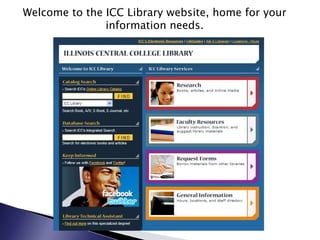
Welcome to the ICC Library website, home for your information needs.
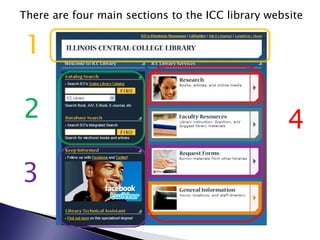
There are four main sections to the ICC library website1243
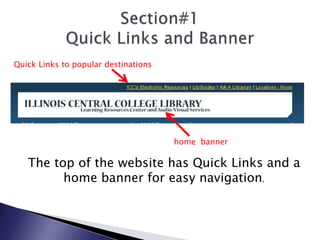
Section#1Quick Links and BannerQuick Links to popular destinationshome  bannerThe top of the website has Quick Links and a home banner for easy navigation.
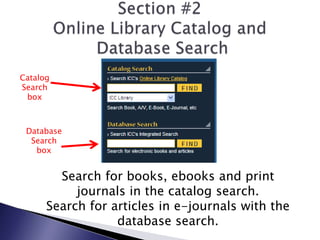
Section #2Online Library Catalog and Database SearchCatalogSearch boxDatabase Search boxSearch for books, ebooks and print journals in the catalog search.Search for articles in e-journals with the database search.
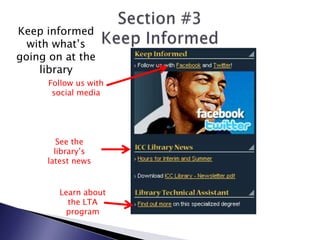
Section #3Keep InformedKeep informed with what’s going on at the libraryFollow us with social mediaSee the library’s latest news Learn about the LTA program
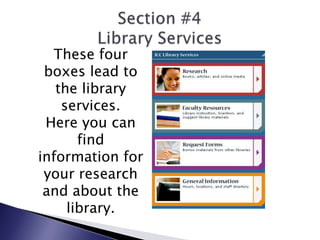
Section #4Library ServicesThese four boxes lead to the library services.  Here you can find information for your research and about the library.
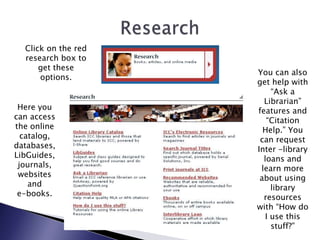
ResearchClick on the red research box to get these options.You can also get help with “Ask a Librarian” features and “Citation Help.” You can request Inter -library loans and learn more about using library resources with “How do I use this stuff?”Here you can access the online catalog, databases, LibGuides, journals, websites and e-books.
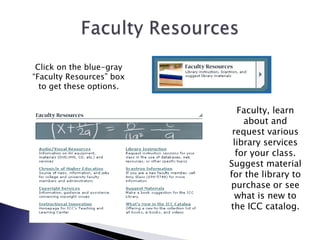
Faculty ResourcesClick on the blue-gray“Faculty Resources” box to get these options.Faculty, learn about and request various library services for your class.  Suggest material for the library to purchase or see what is new to the ICC catalog.
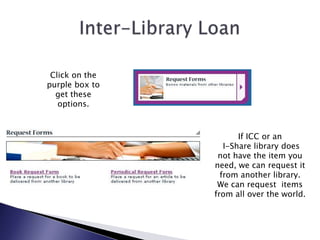
Inter-Library LoanClick on the purple box to get these options.If ICC or an  I-Share library does not have the item you need, we can request it from another library.  We can request  items from all over the world.
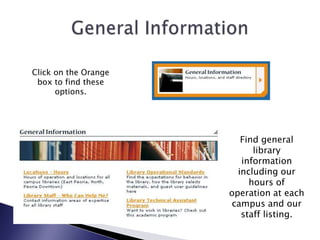
General InformationClick on the Orange box to find these options.Find general library information including our hours of operation at each campus and our staff listing.
Thanks for Visiting the ICC Library Website!  If you need assistance, please visit us at the library.www.icc.edu/libraryEast Peoria Campus: L312  Ph: 309-694-5355Downtown Campus : 103 HS  Ph:309-999-4610 North Campus: 59 Cedar   Ph:309-690-6837

Navigating the ICC Library Webpage

  • 1.
    Navigating the ICCLibrary WebpageCreated by Michelle Nielsen Ott, Illinois Central College, Summer 2010
  • 2.
    How to navigatethe ICC library websiteAbout the different sections of the websiteWhom to contact for more helpWhat you will learn…
  • 3.
    Welcome to theICC Library website, home for your information needs.
  • 4.
    There are fourmain sections to the ICC library website1243
  • 5.
    Section#1Quick Links andBannerQuick Links to popular destinationshome bannerThe top of the website has Quick Links and a home banner for easy navigation.
  • 6.
    Section #2Online LibraryCatalog and Database SearchCatalogSearch boxDatabase Search boxSearch for books, ebooks and print journals in the catalog search.Search for articles in e-journals with the database search.
  • 7.
    Section #3Keep InformedKeepinformed with what’s going on at the libraryFollow us with social mediaSee the library’s latest news Learn about the LTA program
  • 8.
    Section #4Library ServicesThesefour boxes lead to the library services. Here you can find information for your research and about the library.
  • 9.
    ResearchClick on thered research box to get these options.You can also get help with “Ask a Librarian” features and “Citation Help.” You can request Inter -library loans and learn more about using library resources with “How do I use this stuff?”Here you can access the online catalog, databases, LibGuides, journals, websites and e-books.
  • 10.
    Faculty ResourcesClick onthe blue-gray“Faculty Resources” box to get these options.Faculty, learn about and request various library services for your class. Suggest material for the library to purchase or see what is new to the ICC catalog.
  • 11.
    Inter-Library LoanClick onthe purple box to get these options.If ICC or an I-Share library does not have the item you need, we can request it from another library. We can request items from all over the world.
  • 12.
    General InformationClick onthe Orange box to find these options.Find general library information including our hours of operation at each campus and our staff listing.
  • 13.
    Thanks for Visitingthe ICC Library Website! If you need assistance, please visit us at the library.www.icc.edu/libraryEast Peoria Campus: L312 Ph: 309-694-5355Downtown Campus : 103 HS Ph:309-999-4610 North Campus: 59 Cedar Ph:309-690-6837