Guide to Erasmus+ website
The Erasmus+ website has been developed
based upon feedback from our users. You can
navigate, (or find your way through), the site by:
• Sector
• Before you apply
• Apply for funding
• After you apply
• Information for participants.
Welcome
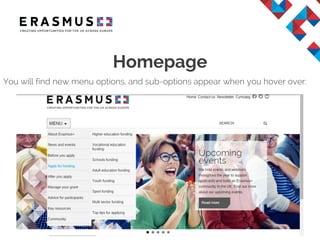
Homepage
You will find new menu options, and sub-options appear when you hover over:
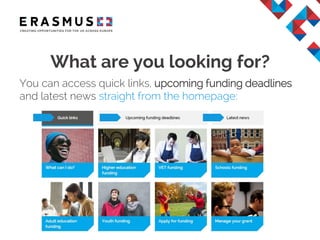
What are you looking for?
You can access quick links, upcoming funding deadlines
and latest news straight from the homepage:
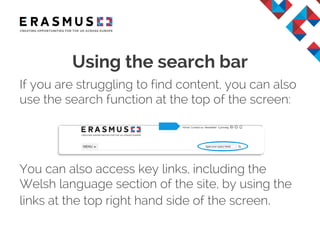
If you are struggling to find content, you can also
use the search function at the top of the screen:
You can also access key links, including the
Welsh language section of the site, by using the
links at the top right hand side of the screen.
Using the search bar
About Erasmus+
• Here you can find information about the
programme as a whole:
– Particularly useful for new applicants
– How the programme is managed by the UK
National Agency
– Explanations of the Key Actions
– FAQs.
What’s under each menu item?
News and events
• Promotional activities in addition to:
– Funding results and statistics.
Before you apply
• Details for applicants:
– Funding deadlines
– How to register on ECAS and obtain a PIC
– Sector charters and accreditation (such as the
ECHE)
– Project planning.
What’s under each menu item?
Apply for funding
• Details of all the funding opportunities
available:
– By sector
– Application eForms and guidance.
After you apply
• Key dates for applicants including:
– Selection process
– Information on the appeals process.
What’s under each menu item?
Manage your grant
• Information for managing Erasmus+ or legacy
grants (Lifelong Learning & YiA programmes):
– Reporting and guidance details by sector
– Dissemination and promotion.
Advice for participants:
– Passport and Visa information
– Travel and accommodation information
– Additional requirements advice
– Advice for parents.
What’s under each menu item?
Key resources
Print and online resources.
Community
For the wider Erasmus+ community:
– Find out about other EU initiatives
– Follow-up from community events such as the
annual conference, Learning Networks initiative
and TCA activities intended for funded projects.
What’s under each menu item?

Erasmus+ website user guide

  • 1.
  • 2.
    The Erasmus+ websitehas been developed based upon feedback from our users. You can navigate, (or find your way through), the site by: • Sector • Before you apply • Apply for funding • After you apply • Information for participants. Welcome
  • 3.
    Homepage You will findnew menu options, and sub-options appear when you hover over:
  • 4.
    What are youlooking for? You can access quick links, upcoming funding deadlines and latest news straight from the homepage:
  • 5.
    If you arestruggling to find content, you can also use the search function at the top of the screen: You can also access key links, including the Welsh language section of the site, by using the links at the top right hand side of the screen. Using the search bar
  • 6.
    About Erasmus+ • Hereyou can find information about the programme as a whole: – Particularly useful for new applicants – How the programme is managed by the UK National Agency – Explanations of the Key Actions – FAQs. What’s under each menu item?
  • 7.
    News and events •Promotional activities in addition to: – Funding results and statistics. Before you apply • Details for applicants: – Funding deadlines – How to register on ECAS and obtain a PIC – Sector charters and accreditation (such as the ECHE) – Project planning. What’s under each menu item?
  • 8.
    Apply for funding •Details of all the funding opportunities available: – By sector – Application eForms and guidance. After you apply • Key dates for applicants including: – Selection process – Information on the appeals process. What’s under each menu item?
  • 9.
    Manage your grant •Information for managing Erasmus+ or legacy grants (Lifelong Learning & YiA programmes): – Reporting and guidance details by sector – Dissemination and promotion. Advice for participants: – Passport and Visa information – Travel and accommodation information – Additional requirements advice – Advice for parents. What’s under each menu item?
  • 10.
    Key resources Print andonline resources. Community For the wider Erasmus+ community: – Find out about other EU initiatives – Follow-up from community events such as the annual conference, Learning Networks initiative and TCA activities intended for funded projects. What’s under each menu item?