Dianne Pappafotopoulos
K-12 Instructional Technology Specialist Teacher
Dover Sherborn Public Schools





Things to consider
Apps selected
Purpose of portfolio
Description of ePortfolio process using apps
•

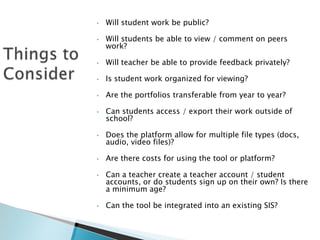
Will student work be public?

•

Will students be able to view / comment on peers
work?

•

Will teacher be able to provide feedback privately?

•

Is student work organized for viewing?

•

Are the portfolios transferable from year to year?

•

Can students access / export their work outside of
school?

•

Does the platform allow for multiple file types (docs,
audio, video files)?

•

Are there costs for using the tool or platform?

•

•

Can a teacher create a teacher account / student
accounts, or do students sign up on their own? Is there
a minimum age?

Can the tool be integrated into an existing SIS?


Google Apps (Drive, Blogger, Sites)



Evernote



VoiceThread


Showcase student work



Evaluate student work



Track student growth
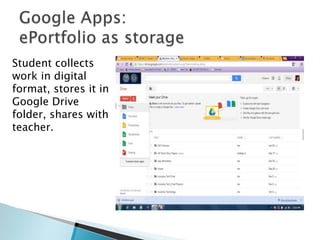
Student collects
work in digital
format, stores it in
Google Drive
folder, shares with
teacher.
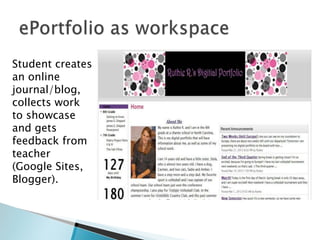
Student creates
an online
journal/blog,
collects work
to showcase
and gets
feedback from
teacher
(Google Sites,
Blogger).
Student should ask….
 What am I most proud to highlight about
my work?


What does this work show about my
learning ?



What more can I learn?



Student self-assesses and teacher provides
feedback
TEACHER:
•
•
•
•
•
•
•

Identify the PURPOSE of portfolio.
Indicate goals, outcomes and standards
Create template in Google Site for students to collect / display work
Check student work and provide feedback for assessment.
Allow students to update their work based on your comments.
Use a rubric to evaluate student work.
Allow students to present highlights of their portfolios.

STUDENT:
Create a Google Site with the following elements:
•
•
•
•

Introduction (who are you?)
Journal/Blog (describe the purpose)
Collection of work to display in this portfolio
Reflection: how do items in portfolio show achievement and meet goals?
Create a Folder for work on Google Drive (store
video, docs, presentations)
•
•

•

Create a folder in Google Drive
Upload files
Share from an app to the Google Drive


Evernote lets you take notes, sync files across



Create folder for each student or 1 for class



Access from anywhere



devices, save webpages, capture media, and
share your ideas.

Find info fast! Search by tag, keyword or text
within your note




Voicethread allows conversations in the
cloud. Students/teachers/parents can
comment on an image or idea.

Students create a VT of their work to use as a
portfolio.

ePortfolios

  • 1.
    Dianne Pappafotopoulos K-12 InstructionalTechnology Specialist Teacher Dover Sherborn Public Schools
  • 2.
        Things to consider Appsselected Purpose of portfolio Description of ePortfolio process using apps
  • 3.
    • Will student workbe public? • Will students be able to view / comment on peers work? • Will teacher be able to provide feedback privately? • Is student work organized for viewing? • Are the portfolios transferable from year to year? • Can students access / export their work outside of school? • Does the platform allow for multiple file types (docs, audio, video files)? • Are there costs for using the tool or platform? • • Can a teacher create a teacher account / student accounts, or do students sign up on their own? Is there a minimum age? Can the tool be integrated into an existing SIS?
  • 4.
     Google Apps (Drive,Blogger, Sites)  Evernote  VoiceThread
  • 5.
     Showcase student work  Evaluatestudent work  Track student growth
  • 6.
    Student collects work indigital format, stores it in Google Drive folder, shares with teacher.
  • 7.
    Student creates an online journal/blog, collectswork to showcase and gets feedback from teacher (Google Sites, Blogger).
  • 8.
    Student should ask…. What am I most proud to highlight about my work?  What does this work show about my learning ?  What more can I learn?  Student self-assesses and teacher provides feedback
  • 9.
    TEACHER: • • • • • • • Identify the PURPOSEof portfolio. Indicate goals, outcomes and standards Create template in Google Site for students to collect / display work Check student work and provide feedback for assessment. Allow students to update their work based on your comments. Use a rubric to evaluate student work. Allow students to present highlights of their portfolios. STUDENT: Create a Google Site with the following elements: • • • • Introduction (who are you?) Journal/Blog (describe the purpose) Collection of work to display in this portfolio Reflection: how do items in portfolio show achievement and meet goals?
  • 10.
    Create a Folderfor work on Google Drive (store video, docs, presentations) • • • Create a folder in Google Drive Upload files Share from an app to the Google Drive
  • 11.
     Evernote lets youtake notes, sync files across  Create folder for each student or 1 for class  Access from anywhere  devices, save webpages, capture media, and share your ideas. Find info fast! Search by tag, keyword or text within your note
  • 12.
      Voicethread allows conversationsin the cloud. Students/teachers/parents can comment on an image or idea. Students create a VT of their work to use as a portfolio.