

What is Cookie?
Cookie is small information stored in text file on user’s hard drive by
web server. This information is later used by web browser to retrieve
information from that machine. Generally cookie contains personalized
user data or information that is used to communicate between different
web pages.
Cookie Working..?
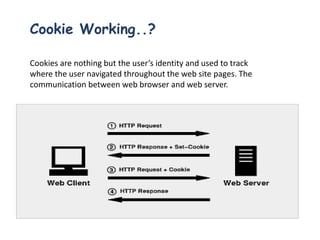
Cookies are nothing but the user’s identity and used to track
where the user navigated throughout the web site pages. The
communication between web browser and web server.
There are two types of HTTP protocol.
• Stateless Protocol
Stateless HTTP protocol does not keep any record of previously
accessed web page history
• Stateful Protocol
Stateful HTTP protocol do keep some history of previous web browser
and web server interactions and this protocol is used by cookies to
maintain the user interactions.
HTTP Protocol
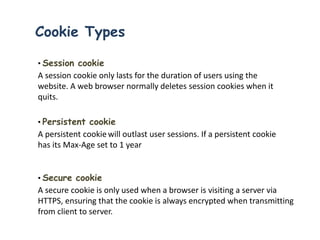
Cookie Types
• Session cookie
A session cookie only lasts for the duration of users using the
website. A web browser normally deletes session cookies when it
quits.
• Persistent cookie
A persistent cookiewill outlast user sessions. If a persistent cookie
has its Max-Age set to 1 year
• Secure cookie
A secure cookie is only used when a browser is visiting a server via
HTTPS, ensuring that the cookie is always encrypted when transmitting
from client to server.
Cookie Types
• Http Only cookie
The Http Only cookie is supported by most modern browsers. On a
supported browser, an Http Only session cookie will be used only when
transmitting HTTP
• Zombie cookie
A zombie cookie is any cookie that is automatically recreated after a
user has deleted
• Third-party cookie
Third-party cookies are cookies being set with different domains than
the one shown on the address bar
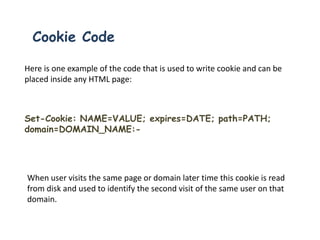
Cookie Code
Here is one example of the code that is used to write cookie and can be
placed inside any HTML page:
Set-Cookie: NAME=VALUE; expires=DATE; path=PATH;
domain=DOMAIN_NAME:-
When user visits the same page or domain later time this cookie is read
from disk and used to identify the second visit of the same user on that
domain.
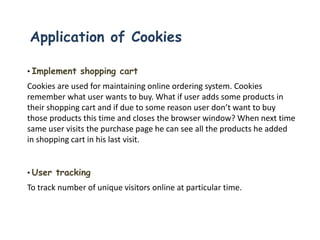
Application of Cookies
• Implement shopping cart
Cookies are used for maintaining online ordering system. Cookies
remember what user wants to buy. What if user adds some products in
their shopping cart and if due to some reason user don’t want to buy
those products this time and closes the browser window? When next time
same user visits the purchase page he can see all the products he added
in shopping cart in his last visit.
• User tracking
To track number of unique visitors online at particular time.
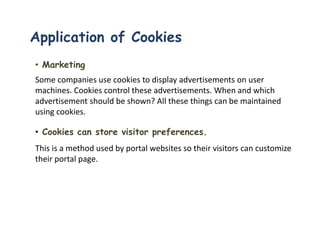
• Marketing
Some companies use cookies to display advertisements on user
machines. Cookies control these advertisements. When and which
advertisement should be shown? All these things can be maintained
using cookies.
• Cookies can store visitor preferences.
This is a method used by portal websites so their visitors can customize
their portal page.
Application of Cookies
• If you have more than one site, Cookies can track visitors
going from site to site.
The Page is retrieved from one Page dispensing domain (even when loading a page
on a different site),cookies maintain a record of visitors visited on multiple sites
• Personalized sites:
When user visits certain pages they are asked which pages they don’t want to visit or
display. User options are get stored in cookie and till the user is online, those pages
are not shown to him.
Drawback of Cookies
• Inaccurate identification
If more than one browser is used on a computer, each usually has a
separate storage area for cookies. Hence cookies do not identify a
person
• Disabled
if user has disabled the cookies completely then site containing
cookie will be completely disabled and can not perform any operation
resulting in loss of site traffic.
• Security issues
Some times users personal information is stored in cookies and if
someone hack the cookie then hacker can get access to your personal
information.
Test Case For Cookie Testing
 Stored in encrypted format.
 No overuse of cookies on your site under test.
 Disable the cookies.
 Accepts/Reject some cookies
 Delete cookie
 Cookie Testing on Multiple browsers
 Cookies to maintain the logging state of any user
Cookie testing

Cookie testing

  • 2.
    What is Cookie? Cookieis small information stored in text file on user’s hard drive by web server. This information is later used by web browser to retrieve information from that machine. Generally cookie contains personalized user data or information that is used to communicate between different web pages.
  • 3.
    Cookie Working..? Cookies arenothing but the user’s identity and used to track where the user navigated throughout the web site pages. The communication between web browser and web server.
  • 4.
    There are twotypes of HTTP protocol. • Stateless Protocol Stateless HTTP protocol does not keep any record of previously accessed web page history • Stateful Protocol Stateful HTTP protocol do keep some history of previous web browser and web server interactions and this protocol is used by cookies to maintain the user interactions. HTTP Protocol
  • 5.
    Cookie Types • Sessioncookie A session cookie only lasts for the duration of users using the website. A web browser normally deletes session cookies when it quits. • Persistent cookie A persistent cookiewill outlast user sessions. If a persistent cookie has its Max-Age set to 1 year • Secure cookie A secure cookie is only used when a browser is visiting a server via HTTPS, ensuring that the cookie is always encrypted when transmitting from client to server.
  • 6.
    Cookie Types • HttpOnly cookie The Http Only cookie is supported by most modern browsers. On a supported browser, an Http Only session cookie will be used only when transmitting HTTP • Zombie cookie A zombie cookie is any cookie that is automatically recreated after a user has deleted • Third-party cookie Third-party cookies are cookies being set with different domains than the one shown on the address bar
  • 7.
    Cookie Code Here isone example of the code that is used to write cookie and can be placed inside any HTML page: Set-Cookie: NAME=VALUE; expires=DATE; path=PATH; domain=DOMAIN_NAME:- When user visits the same page or domain later time this cookie is read from disk and used to identify the second visit of the same user on that domain.
  • 8.
    Application of Cookies •Implement shopping cart Cookies are used for maintaining online ordering system. Cookies remember what user wants to buy. What if user adds some products in their shopping cart and if due to some reason user don’t want to buy those products this time and closes the browser window? When next time same user visits the purchase page he can see all the products he added in shopping cart in his last visit. • User tracking To track number of unique visitors online at particular time.
  • 9.
    • Marketing Some companiesuse cookies to display advertisements on user machines. Cookies control these advertisements. When and which advertisement should be shown? All these things can be maintained using cookies. • Cookies can store visitor preferences. This is a method used by portal websites so their visitors can customize their portal page. Application of Cookies
  • 10.
    Application of Cookies •If you have more than one site, Cookies can track visitors going from site to site. The Page is retrieved from one Page dispensing domain (even when loading a page on a different site),cookies maintain a record of visitors visited on multiple sites • Personalized sites: When user visits certain pages they are asked which pages they don’t want to visit or display. User options are get stored in cookie and till the user is online, those pages are not shown to him.
  • 11.
    Drawback of Cookies •Inaccurate identification If more than one browser is used on a computer, each usually has a separate storage area for cookies. Hence cookies do not identify a person • Disabled if user has disabled the cookies completely then site containing cookie will be completely disabled and can not perform any operation resulting in loss of site traffic. • Security issues Some times users personal information is stored in cookies and if someone hack the cookie then hacker can get access to your personal information.
  • 12.
    Test Case ForCookie Testing  Stored in encrypted format.  No overuse of cookies on your site under test.  Disable the cookies.  Accepts/Reject some cookies  Delete cookie  Cookie Testing on Multiple browsers  Cookies to maintain the logging state of any user