Module – 5
Managing State
Developed by
Mr.V.Sivakumar
Cookies
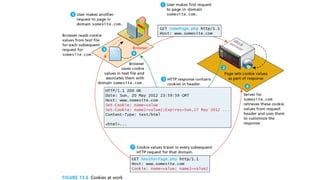
• Cookies are a client-side approach for persisting state
information.
• They are name=value pairs that are saved within one or more
text files that are managed by the browser.
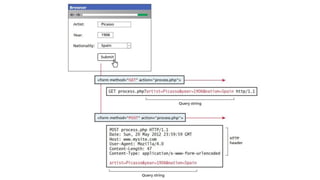
• These pairs accompany both server requests and responses
within the HTTP header.
• Cookies were intended to be a long-term state mechanism.
• They provide website authors with a mechanism for persisting
user-related information that can be stored on the user’s
computer and be managed by the user’s browser.
Cookies
• A session cookie has no expiry stated and thus will be
deleted at the end of the user browsing session.
• Persistent cookies have an expiry date specified, they will
persist in the browser’s cookie file until the expiry date
occurs, after which they are deleted.
Writing a cookie
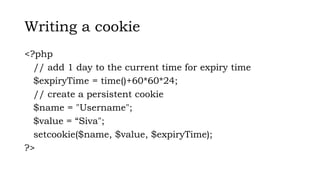
<?php
// add 1 day to the current time for expiry time
$expiryTime = time()+60*60*24;
// create a persistent cookie
$name = "Username";
$value = “Siva";
setcookie($name, $value, $expiryTime);
?>
Serialization
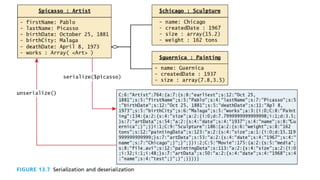
• Serialization is the process of taking a complicated object
and reducing it down to zeros and ones for either storage
or transmission.
• In PHP objects can easily be reduced down to a binary
string using the serialize() function. The resulting string is
a binary representation of the object and therefore may
contain unprintable characters.
• The string can be reconstituted back into an object using
the unserialize() method.
• While arrays, strings, and other primitive types will be
serializable by default, classes
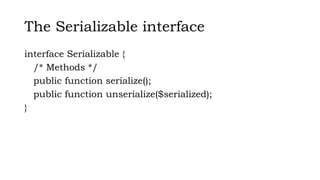
The Serializable interface
interface Serializable {
/* Methods */
public function serialize();
public function unserialize($serialized);
}
Session state
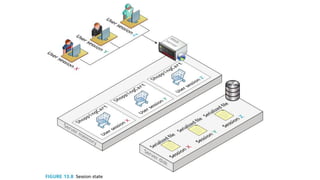
• Session state is a server-based state mechanism that lets
web applications store and retrieve objects of any type for
each unique user session.
• That is, each browser session has its own session state
stored as a serialized file on the server, which is
deserialized and loaded into memory as needed for each
request.
• Session state is used for storing information that needs to
be preserved across multiple requests by the same user.
Since each user session has its own session state
collection
Accessing session state
<?php
session_start();
if ( isset($_SESSION['user']) ) {
// User is logged in
}
else {
// No one is logged in (guest)
}
?>
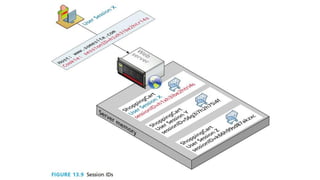
• Session state relies on session IDs that are
transmitted via cookies or via embedding in the URL
path.
HTML5 Web storage
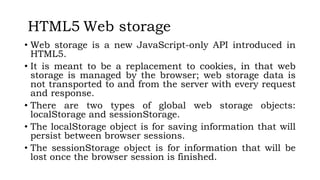
• Web storage is a new JavaScript-only API introduced in
HTML5.
• It is meant to be a replacement to cookies, in that web
storage is managed by the browser; web storage data is
not transported to and from the server with every request
and response.
• There are two types of global web storage objects:
localStorage and sessionStorage.
• The localStorage object is for saving information that will
persist between browser sessions.
• The sessionStorage object is for information that will be
lost once the browser session is finished.
Accessing session state
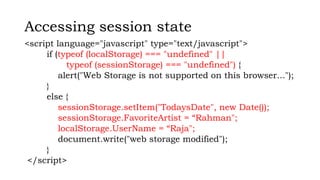
<script language="javascript" type="text/javascript">
if (typeof (localStorage) === "undefined" ||
typeof (sessionStorage) === "undefined") {
alert("Web Storage is not supported on this browser...");
}
else {
sessionStorage.setItem("TodaysDate", new Date());
sessionStorage.FavoriteArtist = “Rahman";
localStorage.UserName = “Raja";
document.write("web storage modified");
}
</script>
Caching
• Caching is a vital way to improve the performance of web
applications.
• Your browser uses caching to speed up the user
experience by using locally stored versions of images and
other files rather than re-requesting the files from the
server.
Thank you
Source Reference: Randy Connolly, Ricardo Hoar, Fundamentals of Web Development, Pearson

Module-5_WTA_Managing State & jQuery

  • 1.
    Module – 5 ManagingState Developed by Mr.V.Sivakumar
  • 5.
    Cookies • Cookies area client-side approach for persisting state information. • They are name=value pairs that are saved within one or more text files that are managed by the browser. • These pairs accompany both server requests and responses within the HTTP header. • Cookies were intended to be a long-term state mechanism. • They provide website authors with a mechanism for persisting user-related information that can be stored on the user’s computer and be managed by the user’s browser.
  • 6.
    Cookies • A sessioncookie has no expiry stated and thus will be deleted at the end of the user browsing session. • Persistent cookies have an expiry date specified, they will persist in the browser’s cookie file until the expiry date occurs, after which they are deleted.
  • 8.
    Writing a cookie <?php //add 1 day to the current time for expiry time $expiryTime = time()+60*60*24; // create a persistent cookie $name = "Username"; $value = “Siva"; setcookie($name, $value, $expiryTime); ?>
  • 9.
    Serialization • Serialization isthe process of taking a complicated object and reducing it down to zeros and ones for either storage or transmission. • In PHP objects can easily be reduced down to a binary string using the serialize() function. The resulting string is a binary representation of the object and therefore may contain unprintable characters. • The string can be reconstituted back into an object using the unserialize() method. • While arrays, strings, and other primitive types will be serializable by default, classes
  • 10.
    The Serializable interface interfaceSerializable { /* Methods */ public function serialize(); public function unserialize($serialized); }
  • 12.
    Session state • Sessionstate is a server-based state mechanism that lets web applications store and retrieve objects of any type for each unique user session. • That is, each browser session has its own session state stored as a serialized file on the server, which is deserialized and loaded into memory as needed for each request. • Session state is used for storing information that needs to be preserved across multiple requests by the same user. Since each user session has its own session state collection
  • 15.
    Accessing session state <?php session_start(); if( isset($_SESSION['user']) ) { // User is logged in } else { // No one is logged in (guest) } ?> • Session state relies on session IDs that are transmitted via cookies or via embedding in the URL path.
  • 16.
    HTML5 Web storage •Web storage is a new JavaScript-only API introduced in HTML5. • It is meant to be a replacement to cookies, in that web storage is managed by the browser; web storage data is not transported to and from the server with every request and response. • There are two types of global web storage objects: localStorage and sessionStorage. • The localStorage object is for saving information that will persist between browser sessions. • The sessionStorage object is for information that will be lost once the browser session is finished.
  • 17.
    Accessing session state <scriptlanguage="javascript" type="text/javascript"> if (typeof (localStorage) === "undefined" || typeof (sessionStorage) === "undefined") { alert("Web Storage is not supported on this browser..."); } else { sessionStorage.setItem("TodaysDate", new Date()); sessionStorage.FavoriteArtist = “Rahman"; localStorage.UserName = “Raja"; document.write("web storage modified"); } </script>
  • 18.
    Caching • Caching isa vital way to improve the performance of web applications. • Your browser uses caching to speed up the user experience by using locally stored versions of images and other files rather than re-requesting the files from the server.
  • 19.
    Thank you Source Reference:Randy Connolly, Ricardo Hoar, Fundamentals of Web Development, Pearson