Enterprise Java
Unit-3
Chapter-1
• Introduction to JSP
• Advantages of JSP
• JSP Vs Servlet
• Life Cycle of JSP
By
Prof. Sandeep Vishwakarma
Introduction to Java Server Pages
JSP technology is used to create dynamic web
applications. It provides some additional features
such as Expression Language, Custom Tags, etc.
JSP enables us to write HTML pages containing
tags, inside which we can include powerful Java
programs. Using JSP, one can easily separate
Presentation and Business logic . A web designer
can design and update JSP pages by creating the
presentation layer and java developer can write
server side complex computational code without
concerning the web design. And both the layers
can easily interact over HTTP requests.
Why use Java Server Pages
Java Server Pages often serve the same purpose as programs
implemented using the Common Gateway Interface (CGI). But
JSP offers several advantages in comparison with the CGI.
• Performance is significantly better because JSP allows
embedding Dynamic Elements in HTML Pages itself instead of
having separate CGI files.
• JSP are always compiled before they are processed by the
server unlike CGI/Perl which requires the server to load an
interpreter and the target script each time the page is
requested.
• Java Server Pages are built on top of the Java Servlets API, so
like Servlets, JSP also has access to all the powerful Enterprise
Java APIs, including JDBC, JNDI, EJB, JAXP, etc.
• JSP pages can be used in combination with servlets that handle
the business logic, the model supported by Java servlet
template engines.
Advantages of Java Server Pages
• Portability
Since it is based on Java, JSP technology is platform independent.
To run .jsp files, we need a JSP engine . This engine can be built
for different type of web-servers to make them execute jsp files.
• Reuse of Components & Tag Libraries
JSP technology emphasizes the use of reusable component such
as Java Bean Components, Enterprise Java Bean Components etc.
It supports different type of markup languages such as
HTML/DHTML/XML. JSP supports user-defined tags
• Separation of static & Dynamic Content
JSP allows you to include dynamic content into the static
contents separating the two from each other. The static contents
are provided using HTML tags and dynamic contents are
generated using scriptlets, user-defined tags etc
Continue..
• Suitable for N-Tier Architecture
Because of features such as, platform-independence,
support for different types of servers(web servers,
database servers etc), markup languages, reuse of objects
in the form of components etc. it is best suited for N-Tier
architecture.
• Performance
JSP pages are automatically compiled before execution.
So it frees the job of programmer to explicitly compile the
program. After compilation, the page is kept in memory
for certain duration to serve for next requests. Thus the
compilation activity is not done for every request(unless
there are modifications in the page).
Why JSP is preffered over servlets?
• It is very much convenient to modify the HTML.
• We can write the servlet code into the JSP.
• It is only intended for simple inclusions which can
use form data and make connections.
• The performance and scalability of JSP are good
because JSP allows embedding of dynamic
elements in HTML pages.
• It enables to separate presentation layer with the
business logic layer in the web application.
• It is easy for developers to show as well as process
the information.
Disadvantages of JSP
• It is hard to trace JSP pages error because JSP
pages are translated to servlet.
• As JSP output is HTML, it is not rich in features.
• It is very hard to debug or trace errors because JSP
pages are first translated into servlets before the
compilation process.
• Database connectivity is not easy.
• JSP pages require more disk space and time to hold
JSP pages as they are compiled on the server.
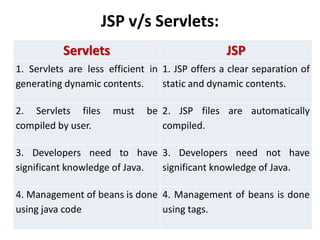
JSP v/s Servlets:
Servlets JSP
1. Servlets are less efficient in
generating dynamic contents.
1. JSP offers a clear separation of
static and dynamic contents.
2. Servlets files must be
compiled by user.
2. JSP files are automatically
compiled.
3. Developers need to have
significant knowledge of Java.
3. Developers need not have
significant knowledge of Java.
4. Management of beans is done
using java code
4. Management of beans is done
using tags.
Life Cycle of a JSP Page:
A JSP page is converted into Servlet in order
to service requests. The translation of a JSP
page to a Servlet is called Lifecycle of JSP.
JSP Lifecycle is exactly same as the Servlet
Lifecycle, with one additional first step,
which is, translation of JSP code to Servlet
code.
Life Cycle of a JSP Page:
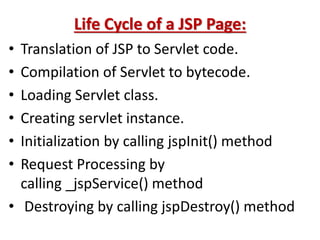
• Translation of JSP to Servlet code.
• Compilation of Servlet to bytecode.
• Loading Servlet class.
• Creating servlet instance.
• Initialization by calling jspInit() method
• Request Processing by
calling _jspService() method
• Destroying by calling jspDestroy() method
Life Cycle of a JSP Page:
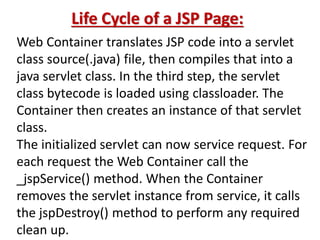
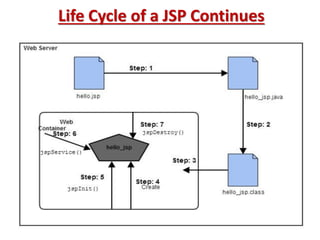
Web Container translates JSP code into a servlet
class source(.java) file, then compiles that into a
java servlet class. In the third step, the servlet
class bytecode is loaded using classloader. The
Container then creates an instance of that servlet
class.
The initialized servlet can now service request. For
each request the Web Container call the
_jspService() method. When the Container
removes the servlet instance from service, it calls
the jspDestroy() method to perform any required
clean up.
Life Cycle of a JSP Continues
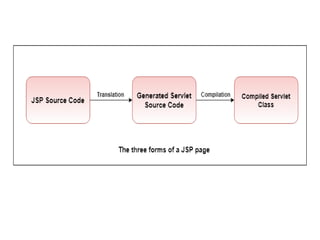
How JSP Works
A JSP page exists in three forms:
• JSP source code - This is the form the developer actually
writes. It exists in a text file with an extension of .jsp,
and consists of a mix of HTML template code, Java
language statements, and JSP directives and actions that
describe how to generate a Web page to service a
particular request.
• Java source code - The JSP container translates the JSP
source code into the source code for an equivalent Java
servlet as needed.
• Compiled Java class - Like any other Java class, the
generated servlet code is compiled into bytecodes in
a .class file, ready to be loaded and executed.
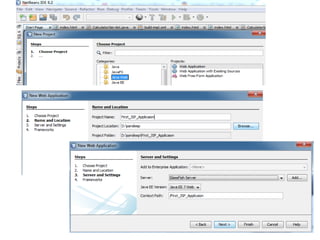
How to Create JSP Application
To create a JSP web page in the Netbeans IDE we must
do the following three main steps:
• Start by creating a "Java web" -> "web application
project".
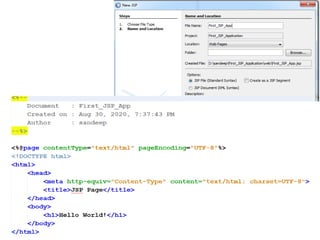
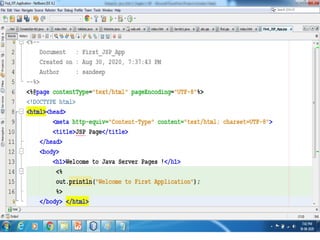
• Create a JSP web file.
• Last and finally, start the Glassfish Server and deploy
the project.
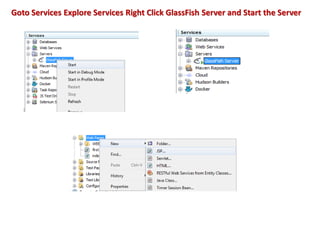
Goto Services Explore Services Right Click GlassFish Server and Start the Server
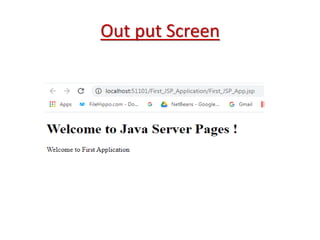
Out put Screen
Thank You

Enterprise java unit-3_chapter-1-jsp

  • 1.
    Enterprise Java Unit-3 Chapter-1 • Introductionto JSP • Advantages of JSP • JSP Vs Servlet • Life Cycle of JSP By Prof. Sandeep Vishwakarma
  • 2.
    Introduction to JavaServer Pages JSP technology is used to create dynamic web applications. It provides some additional features such as Expression Language, Custom Tags, etc. JSP enables us to write HTML pages containing tags, inside which we can include powerful Java programs. Using JSP, one can easily separate Presentation and Business logic . A web designer can design and update JSP pages by creating the presentation layer and java developer can write server side complex computational code without concerning the web design. And both the layers can easily interact over HTTP requests.
  • 3.
    Why use JavaServer Pages Java Server Pages often serve the same purpose as programs implemented using the Common Gateway Interface (CGI). But JSP offers several advantages in comparison with the CGI. • Performance is significantly better because JSP allows embedding Dynamic Elements in HTML Pages itself instead of having separate CGI files. • JSP are always compiled before they are processed by the server unlike CGI/Perl which requires the server to load an interpreter and the target script each time the page is requested. • Java Server Pages are built on top of the Java Servlets API, so like Servlets, JSP also has access to all the powerful Enterprise Java APIs, including JDBC, JNDI, EJB, JAXP, etc. • JSP pages can be used in combination with servlets that handle the business logic, the model supported by Java servlet template engines.
  • 4.
    Advantages of JavaServer Pages • Portability Since it is based on Java, JSP technology is platform independent. To run .jsp files, we need a JSP engine . This engine can be built for different type of web-servers to make them execute jsp files. • Reuse of Components & Tag Libraries JSP technology emphasizes the use of reusable component such as Java Bean Components, Enterprise Java Bean Components etc. It supports different type of markup languages such as HTML/DHTML/XML. JSP supports user-defined tags • Separation of static & Dynamic Content JSP allows you to include dynamic content into the static contents separating the two from each other. The static contents are provided using HTML tags and dynamic contents are generated using scriptlets, user-defined tags etc
  • 5.
    Continue.. • Suitable forN-Tier Architecture Because of features such as, platform-independence, support for different types of servers(web servers, database servers etc), markup languages, reuse of objects in the form of components etc. it is best suited for N-Tier architecture. • Performance JSP pages are automatically compiled before execution. So it frees the job of programmer to explicitly compile the program. After compilation, the page is kept in memory for certain duration to serve for next requests. Thus the compilation activity is not done for every request(unless there are modifications in the page).
  • 6.
    Why JSP ispreffered over servlets? • It is very much convenient to modify the HTML. • We can write the servlet code into the JSP. • It is only intended for simple inclusions which can use form data and make connections. • The performance and scalability of JSP are good because JSP allows embedding of dynamic elements in HTML pages. • It enables to separate presentation layer with the business logic layer in the web application. • It is easy for developers to show as well as process the information.
  • 7.
    Disadvantages of JSP •It is hard to trace JSP pages error because JSP pages are translated to servlet. • As JSP output is HTML, it is not rich in features. • It is very hard to debug or trace errors because JSP pages are first translated into servlets before the compilation process. • Database connectivity is not easy. • JSP pages require more disk space and time to hold JSP pages as they are compiled on the server.
  • 8.
    JSP v/s Servlets: ServletsJSP 1. Servlets are less efficient in generating dynamic contents. 1. JSP offers a clear separation of static and dynamic contents. 2. Servlets files must be compiled by user. 2. JSP files are automatically compiled. 3. Developers need to have significant knowledge of Java. 3. Developers need not have significant knowledge of Java. 4. Management of beans is done using java code 4. Management of beans is done using tags.
  • 9.
    Life Cycle ofa JSP Page: A JSP page is converted into Servlet in order to service requests. The translation of a JSP page to a Servlet is called Lifecycle of JSP. JSP Lifecycle is exactly same as the Servlet Lifecycle, with one additional first step, which is, translation of JSP code to Servlet code.
  • 10.
    Life Cycle ofa JSP Page: • Translation of JSP to Servlet code. • Compilation of Servlet to bytecode. • Loading Servlet class. • Creating servlet instance. • Initialization by calling jspInit() method • Request Processing by calling _jspService() method • Destroying by calling jspDestroy() method
  • 11.
    Life Cycle ofa JSP Page: Web Container translates JSP code into a servlet class source(.java) file, then compiles that into a java servlet class. In the third step, the servlet class bytecode is loaded using classloader. The Container then creates an instance of that servlet class. The initialized servlet can now service request. For each request the Web Container call the _jspService() method. When the Container removes the servlet instance from service, it calls the jspDestroy() method to perform any required clean up.
  • 12.
    Life Cycle ofa JSP Continues
  • 13.
    How JSP Works AJSP page exists in three forms: • JSP source code - This is the form the developer actually writes. It exists in a text file with an extension of .jsp, and consists of a mix of HTML template code, Java language statements, and JSP directives and actions that describe how to generate a Web page to service a particular request. • Java source code - The JSP container translates the JSP source code into the source code for an equivalent Java servlet as needed. • Compiled Java class - Like any other Java class, the generated servlet code is compiled into bytecodes in a .class file, ready to be loaded and executed.
  • 15.
    How to CreateJSP Application To create a JSP web page in the Netbeans IDE we must do the following three main steps: • Start by creating a "Java web" -> "web application project". • Create a JSP web file. • Last and finally, start the Glassfish Server and deploy the project.
  • 17.
    Goto Services ExploreServices Right Click GlassFish Server and Start the Server
  • 20.
  • 21.