Cross Platform Mobile
                              Application Architecture for
                                                Enterprise


Venkat Alagarsamy
venkat.alagarsamy@gmail.com


                                                https://www.linkedin.com/in/VenkatAlagarsamy
                                                    https://www.scribd.com/VenkatAlagarsamy
                                     https://www.facebook.com/Venkatachalapathi.Alagarsamy
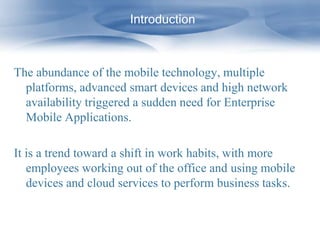
Introduction


The abundance of the mobile technology, multiple
  platforms, advanced smart devices and high network
  availability triggered a sudden need for Enterprise
  Mobile Applications.

It is a trend toward a shift in work habits, with more
   employees working out of the office and using mobile
   devices and cloud services to perform business tasks.
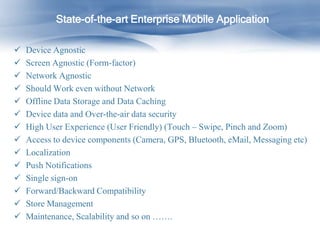
State-of-the-art Enterprise Mobile Application

   Device Agnostic
   Screen Agnostic (Form-factor)
   Network Agnostic
   Should Work even without Network
   Offline Data Storage and Data Caching
   Device data and Over-the-air data security
   High User Experience (User Friendly) (Touch – Swipe, Pinch and Zoom)
   Access to device components (Camera, GPS, Bluetooth, eMail, Messaging etc)
   Localization
   Push Notifications
   Single sign-on
   Forward/Backward Compatibility
   Store Management
   Maintenance, Scalability and so on …….
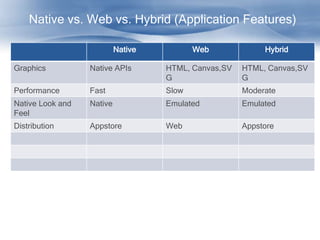
Native vs. Web vs. Hybrid (Application Features)

                           Native          Web             Hybrid

Graphics          Native APIs       HTML, Canvas,SV   HTML, Canvas,SV
                                    G                 G
Performance       Fast              Slow              Moderate
Native Look and   Native            Emulated          Emulated
Feel
Distribution      Appstore          Web               Appstore
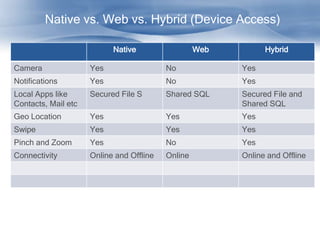
Native vs. Web vs. Hybrid (Device Access)

                           Native                  Web         Hybrid

Camera               Yes                  No             Yes
Notifications        Yes                  No             Yes
Local Apps like      Secured File S       Shared SQL     Secured File and
Contacts, Mail etc                                       Shared SQL
Geo Location         Yes                  Yes            Yes
Swipe                Yes                  Yes            Yes
Pinch and Zoom       Yes                  No             Yes
Connectivity         Online and Offline   Online         Online and Offline
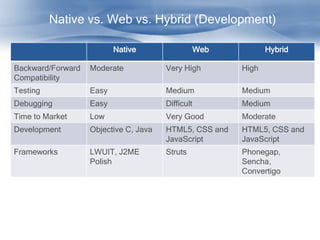
Native vs. Web vs. Hybrid (Development)

                          Native                   Web          Hybrid

Backward/Forward   Moderate            Very High         High
Compatibility
Testing            Easy                Medium            Medium
Debugging          Easy                Difficult         Medium
Time to Market     Low                 Very Good         Moderate
Development        Objective C, Java   HTML5, CSS and    HTML5, CSS and
                                       JavaScript        JavaScript
Frameworks         LWUIT, J2ME         Struts            Phonegap,
                   Polish                                Sencha,
                                                         Convertigo
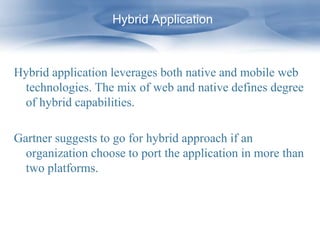
Hybrid Application


Hybrid application leverages both native and mobile web
 technologies. The mix of web and native defines degree
 of hybrid capabilities.

Gartner suggests to go for hybrid approach if an
  organization choose to port the application in more than
  two platforms.
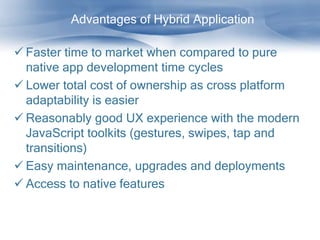
Advantages of Hybrid Application

 Faster time to market when compared to pure
  native app development time cycles
 Lower total cost of ownership as cross platform
  adaptability is easier
 Reasonably good UX experience with the modern
  JavaScript toolkits (gestures, swipes, tap and
  transitions)
 Easy maintenance, upgrades and deployments
 Access to native features
Disadvantages Hybrid Application


 Slightly lower performance due to rendering of web
  pages and accessing data through multiple layers
 Limited UX experience compared to native UI
 Security concerns
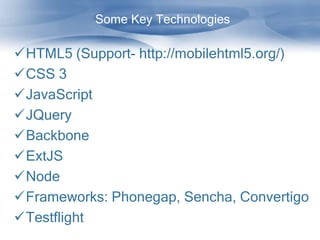
Some Key Technologies

HTML5 (Support- http://mobilehtml5.org/)
CSS 3
JavaScript
JQuery
Backbone
ExtJS
Node
Frameworks: Phonegap, Sencha, Convertigo
Testflight
Hybrid – Offline Storage


Offline DB: SQLite, UltraLite, GoogleGears
Offline Encrypted DB: SQL Cipher
Offline DB are Relational DB
Can perform SQL queries on this DB
Can store HTML code as part of a DB for
 high performance
Hybrid – Security Risks

Cross site scripting (Prevention of malicious
 scripts)
Cross site Request Forgery (Cookie thefts)
SQL injections
Secured local storage (encryption)
Data encryption: additional encryption may
 be required for data transfers between web
 and native contents or data storages on the
 device database.
Hybrid – Performance

Service code (HTML and JavaScript) from
  Server – This could be avoided by storing the
  code either as a part of a footprint or in offline
  data.
Loading of larger images – Store the data
  locally then optimize and render according to
  device factors.
Over-air-data transfer
Encryption and Decryption time
.
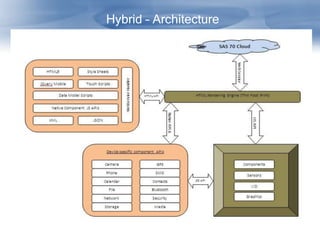
Hybrid – Architecture
Hybrid – Architectural Approach
   (Custom Web Container – Component Access)

By leveraging WebKit engine, the custom
 web container can provide access to devices
 by messaging. The
WebKit engines are very native to each
 platform
JavaScript or framework libraries can access
 the WebKit engine APIs.
Hybrid – Architectural Approach
   (Custom Web Container – Device Rendering)


Using WebView control (iOS UIWebView or
 Andriod WebView), the hybrid apps renders
 HTML5.

WebView uses the native browser rendering
 engine and not the browser.
Hybrid – Build and Deployment

Once the application is developed, multiple
 foot print for very device should be created.
There are tools available to do that (like
 adobe for Phonegap)
The built application can be distributed using
 app stores (Commercial or Enterprise)
If performance has to be improved, the web
 content can be embedded on the device as
 part of the local footprint.
Conclusion

If the application has to support more than
 two platforms.
If time to market is low
Total cost of the ownership is significant
Uniform user experience across multiple
 devices
Developers availability

Invest less, address wide and grow rapidly…

Cross platform mobile application architecture for enterprise

  • 1.
    Cross Platform Mobile Application Architecture for Enterprise Venkat Alagarsamy venkat.alagarsamy@gmail.com https://www.linkedin.com/in/VenkatAlagarsamy https://www.scribd.com/VenkatAlagarsamy https://www.facebook.com/Venkatachalapathi.Alagarsamy
  • 2.
    Introduction The abundance ofthe mobile technology, multiple platforms, advanced smart devices and high network availability triggered a sudden need for Enterprise Mobile Applications. It is a trend toward a shift in work habits, with more employees working out of the office and using mobile devices and cloud services to perform business tasks.
  • 3.
    State-of-the-art Enterprise MobileApplication  Device Agnostic  Screen Agnostic (Form-factor)  Network Agnostic  Should Work even without Network  Offline Data Storage and Data Caching  Device data and Over-the-air data security  High User Experience (User Friendly) (Touch – Swipe, Pinch and Zoom)  Access to device components (Camera, GPS, Bluetooth, eMail, Messaging etc)  Localization  Push Notifications  Single sign-on  Forward/Backward Compatibility  Store Management  Maintenance, Scalability and so on …….
  • 4.
    Native vs. Webvs. Hybrid (Application Features) Native Web Hybrid Graphics Native APIs HTML, Canvas,SV HTML, Canvas,SV G G Performance Fast Slow Moderate Native Look and Native Emulated Emulated Feel Distribution Appstore Web Appstore
  • 5.
    Native vs. Webvs. Hybrid (Device Access) Native Web Hybrid Camera Yes No Yes Notifications Yes No Yes Local Apps like Secured File S Shared SQL Secured File and Contacts, Mail etc Shared SQL Geo Location Yes Yes Yes Swipe Yes Yes Yes Pinch and Zoom Yes No Yes Connectivity Online and Offline Online Online and Offline
  • 6.
    Native vs. Webvs. Hybrid (Development) Native Web Hybrid Backward/Forward Moderate Very High High Compatibility Testing Easy Medium Medium Debugging Easy Difficult Medium Time to Market Low Very Good Moderate Development Objective C, Java HTML5, CSS and HTML5, CSS and JavaScript JavaScript Frameworks LWUIT, J2ME Struts Phonegap, Polish Sencha, Convertigo
  • 7.
    Hybrid Application Hybrid applicationleverages both native and mobile web technologies. The mix of web and native defines degree of hybrid capabilities. Gartner suggests to go for hybrid approach if an organization choose to port the application in more than two platforms.
  • 8.
    Advantages of HybridApplication  Faster time to market when compared to pure native app development time cycles  Lower total cost of ownership as cross platform adaptability is easier  Reasonably good UX experience with the modern JavaScript toolkits (gestures, swipes, tap and transitions)  Easy maintenance, upgrades and deployments  Access to native features
  • 9.
    Disadvantages Hybrid Application Slightly lower performance due to rendering of web pages and accessing data through multiple layers  Limited UX experience compared to native UI  Security concerns
  • 10.
    Some Key Technologies HTML5(Support- http://mobilehtml5.org/) CSS 3 JavaScript JQuery Backbone ExtJS Node Frameworks: Phonegap, Sencha, Convertigo Testflight
  • 11.
    Hybrid – OfflineStorage Offline DB: SQLite, UltraLite, GoogleGears Offline Encrypted DB: SQL Cipher Offline DB are Relational DB Can perform SQL queries on this DB Can store HTML code as part of a DB for high performance
  • 12.
    Hybrid – SecurityRisks Cross site scripting (Prevention of malicious scripts) Cross site Request Forgery (Cookie thefts) SQL injections Secured local storage (encryption) Data encryption: additional encryption may be required for data transfers between web and native contents or data storages on the device database.
  • 13.
    Hybrid – Performance Servicecode (HTML and JavaScript) from Server – This could be avoided by storing the code either as a part of a footprint or in offline data. Loading of larger images – Store the data locally then optimize and render according to device factors. Over-air-data transfer Encryption and Decryption time .
  • 14.
  • 15.
    Hybrid – ArchitecturalApproach (Custom Web Container – Component Access) By leveraging WebKit engine, the custom web container can provide access to devices by messaging. The WebKit engines are very native to each platform JavaScript or framework libraries can access the WebKit engine APIs.
  • 16.
    Hybrid – ArchitecturalApproach (Custom Web Container – Device Rendering) Using WebView control (iOS UIWebView or Andriod WebView), the hybrid apps renders HTML5. WebView uses the native browser rendering engine and not the browser.
  • 17.
    Hybrid – Buildand Deployment Once the application is developed, multiple foot print for very device should be created. There are tools available to do that (like adobe for Phonegap) The built application can be distributed using app stores (Commercial or Enterprise) If performance has to be improved, the web content can be embedded on the device as part of the local footprint.
  • 18.
    Conclusion If the applicationhas to support more than two platforms. If time to market is low Total cost of the ownership is significant Uniform user experience across multiple devices Developers availability Invest less, address wide and grow rapidly…