Encryption Presented By: Aaina katyal
Contents Introduction to Encryption  Why is encryption necessary?  Benefits of Data Encryption  How to encrypt a file in  Windows XP  Types of Encryption  Common terms
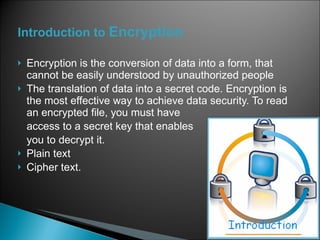
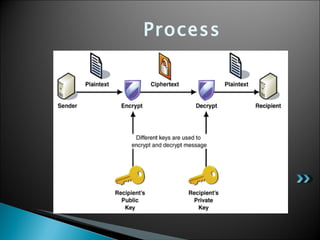
Introduction to  Encryption Encryption is the conversion of data into a form, that cannot be easily understood by unauthorized people The translation of data into a secret code. Encryption is the most effective way to achieve data security. To read an encrypted file, you must have  access to a secret key that enables you to decrypt it. Plain text  Cipher text.
Why is encryption necessary? Encryption is taking straight text and scrambling it for security purposes. It's like a Locker system. You put any valuables and lock it using a code. The necessity of encryption is mainly to  protect your documents
Benefits of Data Encryption   Flexibility Transparency
Process
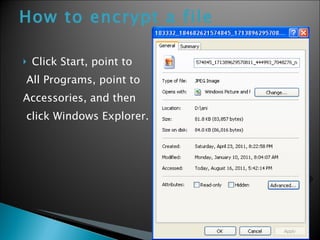
How to encrypt a file   Click Start, point to All Programs, point to Accessories, and then click Windows Explorer.
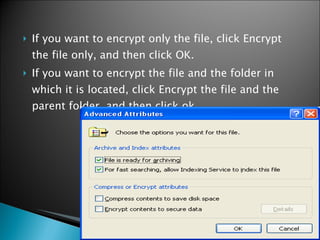
If you want to encrypt only the file, click Encrypt the file only, and then click OK.  If you want to encrypt the file and the folder in which it is located, click Encrypt the file and the parent folder, and then click ok.
Symmetric -  same secret, password or key is used to encrypt and to decrypt. Asymmetric -  It uses two different keys - a public key and a  private key .
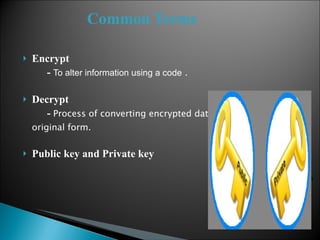
Common Terms   Encrypt -  To alter information using a code  . Decrypt -  Process of converting encrypted data back into its original form. Public key and Private key
 

Encryption_ppt

  • 1.
  • 2.
    Contents Introduction toEncryption Why is encryption necessary? Benefits of Data Encryption How to encrypt a file in Windows XP Types of Encryption Common terms
  • 3.
    Introduction to Encryption Encryption is the conversion of data into a form, that cannot be easily understood by unauthorized people The translation of data into a secret code. Encryption is the most effective way to achieve data security. To read an encrypted file, you must have access to a secret key that enables you to decrypt it. Plain text Cipher text.
  • 4.
    Why is encryptionnecessary? Encryption is taking straight text and scrambling it for security purposes. It's like a Locker system. You put any valuables and lock it using a code. The necessity of encryption is mainly to protect your documents
  • 5.
    Benefits of DataEncryption Flexibility Transparency
  • 6.
  • 7.
    How to encrypta file Click Start, point to All Programs, point to Accessories, and then click Windows Explorer.
  • 8.
    If you wantto encrypt only the file, click Encrypt the file only, and then click OK. If you want to encrypt the file and the folder in which it is located, click Encrypt the file and the parent folder, and then click ok.
  • 9.
    Symmetric - same secret, password or key is used to encrypt and to decrypt. Asymmetric - It uses two different keys - a public key and a  private key .
  • 10.
    Common Terms Encrypt - To alter information using a code . Decrypt - Process of converting encrypted data back into its original form. Public key and Private key
  • 11.